It is safe to Update my Bios ??

maccik

New member
Power User
VIP
Local time
9:58 PM
Messages
371
Location
Wales Deeside
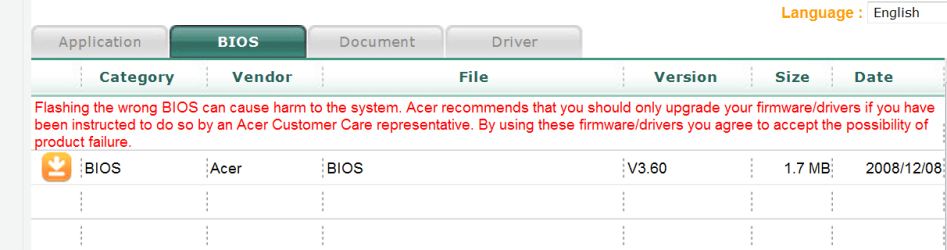
I want to Update my Bios i need your advice and help..


I have an Acer laptop ....and founded this on the Acer site..


after downloaded have this Instructions

Install SOP¡G
01) Unzip <BIOS_v3.60.zip>nder WindowsXP or Vista.
02) Click "Flash32" application in the unziped folder.
03) System will automatically update bios.
Now it s only one step ...waiting for your advice and recommandation ...
 

Attachments

  • bios.PNG
    bios.PNG
    18.4 KB · Views: 169
Last edited by a moderator:

My Computer My Computer

OS
Windows 7
Make sure u have the correct bios and that the power doesn't go out while your flashing:D

I've flashed the wrong bios to a board about 4 years ago, that sux.
 

My Computer My Computer

OS
Windows 7 Ultimate x64 Retail RTM, Ubuntu 9.10
oh thx ...what is Sopig ?? Install SOP¡G
 

My Computer My Computer

OS
Windows 7
BIOS upgrades are generally a hairy affair and should only be done when absolutely necessary. If it fails, it may very well turn your motherboard into an expensive paper-weight.

- Make sure you have a backup of your existing BIOS.
- Make CERTAIN it's successful before rebooting.
- If it fails, keep trying until it succeeds.
 

My Computer My Computer

Computer type
PC/Desktop
Computer Manufacturer/Model Number
Custom Build/Mod
OS
Windows 7 Home Premium x64
CPU
Intel QX9650 Extreme 4.0 GHz
Motherboard
ASUS Rampage Extreme Rev2
Memory
8GB (4x2) Corsair Dominator DDR3
Graphics Card(s)
2x Radeon R390X [8GB]
Sound Card
SupremeFX X-Fi
Monitor(s) Displays
Dell 2408WFP 26" Panel
Screen Resolution
1920x1200
Hard Drives
4x WD 2TB (8TB+ Total)
2x Crucial SSD 128GB (RAID-0)
1x LG Blu-ray read/write
1x Phillips LightScribe DVD read/write
PSU
Corsair HX1000
Case
CoolerMaster - Cosmos S
Cooling
Custom Liquid - 320mm rad w/ 3x 80mm fans, CPU/NB/SB Blocks
Keyboard
Logitech Illuminater Pro
Mouse
Logitech
Internet Speed
Fractional T1 - 125Mbps
Antivirus
ESET Security Suite / Microsoft Security Essentials
Browser
Cyberfox Intel x64
Other Info
OC'd to 5.0GHz @ 44c under full load
why do you want to update your BIOS..??, is there a specific reason..??


:)SK
 

My Computer My Computer

Computer Manufacturer/Model Number
myself
OS
SEVEN x64
CPU
Q9450 @ 3.6GHZ 1.34v
Motherboard
ASUS P5K PREMIUM P35
Memory
8GB 1066 buffalo firestix @ 1152mhz CL5
Graphics Card(s)
Sapphire HD 5970 + GTX260 (physX)
Sound Card
Creative X-FI Xtreme Gamer
Monitor(s) Displays
SAMSUNG 20'' & SAMSUNG 23'' (dual screens)
Screen Resolution
2048x1152 & 1680x1050
Hard Drives
1x seagate 160gb IDE & 1x seagate 160gb SATA
PSU
XCILIO 850w (78A)
Case
CM590 1x 120x38mm & 2x92x38mm / 4x 120x25mm
Cooling
AC7 PRO @ 92x38mm blower, Lamptron military bus bay controll
Keyboard
LOGITECH E110
Mouse
logitech NX5
Internet Speed
2MB
Other Info
its a continual ''work in progress''....
BIOS upgrades are generally a hairy affair and should only be done when absolutely necessary. If it fails, it may very well turn your motherboard into an expensive paper-weight.

- Make sure you have a backup of your existing BIOS.
- Make CERTAIN it's successful before rebooting.
- If it fails, keep trying until it succeeds.


thx your advice .


why do you want to update your BIOS..??, is there a specific reason..??


:)SK


I wanted to be Updateed ..nothing special...


So i don 't do anything ..Right ??
 

My Computer My Computer

OS
Windows 7
"SOPiG" - WTF it is?! I tried to google it but found nothing.
I did bios upgrade 3 times and 2 of it went wrong! So I suggest to you if you don't have to do it, don't do it! :) But I know you will do it at least for the adrenalin :)
I've found something for you:
How to...
 

My Computer My Computer

Computer Manufacturer/Model Number
home made
OS
Windows 7 RTM x64
CPU
AMD X2 5000+
Motherboard
Asrock
Memory
4GB
Graphics Card(s)
Nvidia 9400GT
Sound Card
onboard 6Ch
Monitor(s) Displays
Medion 22" + HannSpree 22"
Screen Resolution
1680X1050 + 1920X1080
Hard Drives
Intel SSD 80GB
WD 1.5 TB
WD 1 TB
Samsung 1TB X 3
PSU
noname
Case
noname
Cooling
Zalman
Keyboard
DeLUX multimedia keyboard
Mouse
Microsoft
Internet Speed
25MB/s
"SOPiG" - WTF it is?! I tried to google it but found nothing.
I did bios upgrade 3 times and 2 of it went wrong! So I suggest to you if you don't have to do it, don't do it! :) But I know you will do it at least for the adrenalin :)
I've found something for you:
How to...


Thx Robert the good info..;) and advice ..
 

My Computer My Computer

OS
Windows 7
You are welcome!
Let us know if you did it!
 

My Computer My Computer

Computer Manufacturer/Model Number
home made
OS
Windows 7 RTM x64
CPU
AMD X2 5000+
Motherboard
Asrock
Memory
4GB
Graphics Card(s)
Nvidia 9400GT
Sound Card
onboard 6Ch
Monitor(s) Displays
Medion 22" + HannSpree 22"
Screen Resolution
1680X1050 + 1920X1080
Hard Drives
Intel SSD 80GB
WD 1.5 TB
WD 1 TB
Samsung 1TB X 3
PSU
noname
Case
noname
Cooling
Zalman
Keyboard
DeLUX multimedia keyboard
Mouse
Microsoft
Internet Speed
25MB/s
make sure your laptop has a backup bios : )
 

My Computer My Computer

OS
Windows 7 32bit RTM
oh thx ...what is Sopig ?? Install SOP¡G


It is probably Sales order product Items Genie.

It comes sometimes with Acer updates. I am not sure if you would really need it to update the Bios. The genie leads you to a sales page where you register for the item you are about to use. It is irrelevant, as you have wisely chosen not to update the bios.
 

My Computer My Computer

Computer Manufacturer/Model Number
Three desktops and one laptop with good specs..
OS
Vista and now 7 in 32 and 64 bit.
You are welcome!
Let us know if you did it!


Now i m done..

I did it successfully with the link what you gave.

But as you said it isn't good to play with it because it's dangerous.


Thanx for the replys to everyone ...
 

My Computer My Computer

OS
Windows 7
It also depends on how easy your mobo makes the process. My EP45-UD3P Gigabyte has like 3 different ways to do it. I did it for the 1st time using a flash drive and it was SO easy I will never be afraid to do it again. I will probably never buy another brand of board either. This thing is GREAT!
 

My Computer My Computer

Computer Manufacturer/Model Number
Keeps changing - (Custom)
OS
Windows 7 Professional x64
CPU
Intel Core i7 860
Motherboard
Gigabyte GA-P55-UD4P
Memory
4GB DDR3 Mushkin 1600Mhz @ 7-8-7-20
Graphics Card(s)
MSI GTS250 1GB DDR3 Twin Frozr
Sound Card
Onboard realtek
Monitor(s) Displays
Samsung SyncMaster 24" P2450 + Samsung 20" 2033
Screen Resolution
1920 X 1080 and 1600 X 900 (#2 system 1440 X 900)
Hard Drives
Patriot Inferno 120GB SSD + 3 WD Blue 640GB drives
PSU
Corsair 750 HX Modular
Case
Lancool PC-K62
Cooling
Cooler Master TX3 CPU cooler and 4-140mm and 1-120mm case
Keyboard
Gigabyte USB keyboard
Mouse
Microsoft wireless laser mouse 5000
Internet Speed
7 Mb down 1.5 up
Other Info
System #2: AMD Phenom II X6 1055T (Freezer 7 Pro cooler) - Gigabyte 880GMA-UD2H - WD 500GB Black - 9500GT (1GB) 500W OCZ modular PSU - Antec 200 case. System #3 (LapTop) Core 2 Duo T6670 - 320GB 7200RPM HD - 4GB DDR3 RAM.
You need to go to the forum for your motherboard and find a 'sticky' on how to update your bios. The two motherboard manufacturer's I have had (Asus/DFI) generally updated the bios in a similar way. I would try to use a USB stick and update directly from your bios and avoid updating from within your operating system. DO NOT TURN OFF YOUR COMPUTER while the update is in progress!!
 

My Computer My Computer

OS
Windows 7 x64
CPU
Intel Q9400 @ 3.4GHz
Motherboard
Asus P5Q Deluxe (Bios P5QD1406)
Memory
2x2GB Mushkin Redline PC2-8000
Graphics Card(s)
MSI RX3650 512MB CF
Sound Card
Sound Blaster Audigy SE
Monitor(s) Displays
Dell 3007WFP & Dell 2001FP
Screen Resolution
2560 x 1600 & 1600 x 1200
Hard Drives
Intel X25-M 80GB SSD
PSU
Zalman ZM-850 HP
Case
Antec P182
Keyboard
Logitech MX 3200 Cordless
Mouse
Logitech Laser
Bios update

the one thing I noticed no one mentioned. Maybe its a given but before you do anything substantial BACKUP and make sure the backup is valid. Better safe than sorry

Ken
 

My Computer My Computer

Computer Manufacturer/Model Number
HP Pavillion dv-7 1005 Tx
OS
Win 8 Release candidate 8400
CPU
[email protected]
Memory
4 gigs
Graphics Card(s)
Nvidia 9600M
Sound Card
HD built-in
Monitor(s) Displays
17" Wxga
Screen Resolution
1440x900
Cooling
none
Internet Speed
45Mb down 5Mb up
Back
Top