My default gateway is 0.0.0.0 how do i change my default gateway

sal123

New member
Local time
3:18 AM
Messages
21
to forward a port i typed my default gateway in the browser then i got this pageIP Address Lookup - Home page at the top right corner there was a login field wherei tried to login without having an account i tried .I tried five times and each time i failed.after five times the webpage banned me for fifteen minutes from then my default gateway is 0.0.0.0.
this is my ip config


Code:
Windows IP Configuration

   Host Name . . . . . . . . . . . . : sam
   Primary Dns Suffix  . . . . . . . :
   Node Type . . . . . . . . . . . . : Hybrid
   IP Routing Enabled. . . . . . . . : No
   WINS Proxy Enabled. . . . . . . . : No

PPP adapter BSNL-East Internet:

   Connection-specific DNS Suffix  . :
   Description . . . . . . . . . . . : BSNL-East Internet
   Physical Address. . . . . . . . . :
   DHCP Enabled. . . . . . . . . . . : No
   Autoconfiguration Enabled . . . . : Yes
   IPv4 Address. . . . . . . . . . . : 117.226.251.52(Preferred)
   Subnet Mask . . . . . . . . . . . : 255.255.255.255
   Default Gateway . . . . . . . . . : 0.0.0.0
   DNS Servers . . . . . . . . . . . : 8.8.8.8
                                       8.8.4.4
   Primary WINS Server . . . . . . . : 10.11.12.13
   Secondary WINS Server . . . . . . : 10.11.12.14
   NetBIOS over Tcpip. . . . . . . . : Disabled

Tunnel adapter Local Area Connection* 14:

   Media State . . . . . . . . . . . : Media disconnected
   Connection-specific DNS Suffix  . :
   Description . . . . . . . . . . . : Microsoft 6to4 Adapter #7
   Physical Address. . . . . . . . . : 00-00-00-00-00-00-00-E0
   DHCP Enabled. . . . . . . . . . . : No
   Autoconfiguration Enabled . . . . : Yes

Tunnel adapter 6TO4 Adapter:

   Media State . . . . . . . . . . . : Media disconnected
   Connection-specific DNS Suffix  . :
   Description . . . . . . . . . . . : Microsoft 6to4 Adapter
   Physical Address. . . . . . . . . : 00-00-00-00-00-00-00-E0
   DHCP Enabled. . . . . . . . . . . : No
   Autoconfiguration Enabled . . . . : Yes

Tunnel adapter Teredo Tunneling Pseudo-Interface:

   Connection-specific DNS Suffix  . :
   Description . . . . . . . . . . . : Teredo Tunneling Pseudo-Interface
   Physical Address. . . . . . . . . : 00-00-00-00-00-00-00-E0
   DHCP Enabled. . . . . . . . . . . : No
   Autoconfiguration Enabled . . . . : Yes
   IPv6 Address. . . . . . . . . . . : 2001:0:4137:9e76:9f:31e7:8a1d:4cb(Preferr
ed)
   Link-local IPv6 Address . . . . . : fe80::9f:31e7:8a1d:4cb%13(Preferred)
   Default Gateway . . . . . . . . . :
   NetBIOS over Tcpip. . . . . . . . : Disabled

Tunnel adapter Local Area Connection* 11:

   Media State . . . . . . . . . . . : Media disconnected
   Connection-specific DNS Suffix  . :
   Description . . . . . . . . . . . : Microsoft 6to4 Adapter #4
   Physical Address. . . . . . . . . : 00-00-00-00-00-00-00-E0
   DHCP Enabled. . . . . . . . . . . : No
   Autoconfiguration Enabled . . . . : Yes

Tunnel adapter Local Area Connection* 13:

   Media State . . . . . . . . . . . : Media disconnected
   Connection-specific DNS Suffix  . :
   Description . . . . . . . . . . . : Microsoft 6to4 Adapter #6
   Physical Address. . . . . . . . . : 00-00-00-00-00-00-00-E0
   DHCP Enabled. . . . . . . . . . . : No
   Autoconfiguration Enabled . . . . : Yes

Tunnel adapter Local Area Connection* 12:

   Media State . . . . . . . . . . . : Media disconnected
   Connection-specific DNS Suffix  . :
   Description . . . . . . . . . . . : Microsoft 6to4 Adapter #5
   Physical Address. . . . . . . . . : 00-00-00-00-00-00-00-E0
   DHCP Enabled. . . . . . . . . . . : No
   Autoconfiguration Enabled . . . . : Yes

Tunnel adapter isatap.{ADA0FDA7-D33F-47DE-82D5-B0B8DCC275E2}:

   Media State . . . . . . . . . . . : Media disconnected
   Connection-specific DNS Suffix  . :
   Description . . . . . . . . . . . : Microsoft ISATAP Adapter
   Physical Address. . . . . . . . . : 00-00-00-00-00-00-00-E0
   DHCP Enabled. . . . . . . . . . . : No
   Autoconfiguration Enabled . . . . : Yes

Tunnel adapter Local Area Connection* 15:

   Media State . . . . . . . . . . . : Media disconnected
   Connection-specific DNS Suffix  . :
   Description . . . . . . . . . . . : Microsoft 6to4 Adapter #8
   Physical Address. . . . . . . . . : 00-00-00-00-00-00-00-E0
   DHCP Enabled. . . . . . . . . . . : No
   Autoconfiguration Enabled . . . . : Yes

Tunnel adapter Local Area Connection* 16:

   Media State . . . . . . . . . . . : Media disconnected
   Connection-specific DNS Suffix  . :
   Description . . . . . . . . . . . : Microsoft 6to4 Adapter #9
   Physical Address. . . . . . . . . : 00-00-00-00-00-00-00-E0
   DHCP Enabled. . . . . . . . . . . : No
   Autoconfiguration Enabled . . . . : Yes

Tunnel adapter Local Area Connection* 17:

   Connection-specific DNS Suffix  . :
   Description . . . . . . . . . . . : Microsoft 6to4 Adapter #10
   Physical Address. . . . . . . . . : 00-00-00-00-00-00-00-E0
   DHCP Enabled. . . . . . . . . . . : No
   Autoconfiguration Enabled . . . . : Yes
   IPv6 Address. . . . . . . . . . . : 2002:75e2:fb34::75e2:fb34(Preferred)
   Default Gateway . . . . . . . . . : 2002:c058:6301::c058:6301
   DNS Servers . . . . . . . . . . . : 8.8.8.8
                                       8.8.4.4
   NetBIOS over Tcpip. . . . . . . . : Disabled


AND my IP INFORMATION

IP Information - 117.226.251.52

Country:    India 
Country Code:    IN
Region:    Delhi
City:    New Delhi
Latitude:    28.6
Longitude:    77.2
Whois* Information

NetRange: 117.0.0.0 - 117.255.255.255
CIDR: 117.0.0.0/8
OriginAS: 
NetName: APNIC-117
NetHandle: NET-117-0-0-0-1
Parent: 
NetType: Allocated to APNIC
Comment: This IP address range is not registered in the ARIN database.
Comment: For details, refer to the APNIC Whois Database via
Comment: WHOIS.APNIC.NET or [URL="http://wq.apnic.net/apnic-bin/whois.pl"]APNIC - Query the APNIC Whois Database[/URL]
Comment: ** IMPORTANT NOTE: APNIC is the Regional Internet Registry
Comment: for the Asia Pacific region. APNIC does not operate networks
Comment: using this IP address range and is not able to investigate
Comment: spam or abuse reports relating to these addresses. For more
Comment: help, refer to [URL="http://www.apnic.net/apnic-info/whois_search2/abuse-and-spamming"]APNIC - About network abuse and spamming[/URL]
RegDate: 2007-01-17
Updated: 2010-07-30
Ref: [URL]http://whois.arin.net/rest/net/NET-117-0-0-0-1[/URL]

OrgName: Asia Pacific Network Information Centre
OrgId: APNIC
Address: PO Box 2131
City: Milton
StateProv: QLD
PostalCode: 4064
Country: AU
RegDate: 
Updated: 2004-03-01
Ref: [URL]http://whois.arin.net/rest/org/APNIC[/URL]

ReferralServer: whois://whois.apnic.net

OrgTechHandle: AWC12-ARIN
OrgTechName: APNIC Whois Contact
OrgTechPhone: +61 7 3858 3188 
OrgTechEmail: [EMAIL="[email protected]"][email protected][/EMAIL]
OrgTechRef: [URL]http://whois.arin.net/rest/poc/AWC12-ARIN[/URL]


PLEASE HELP ME:huh::(:cry:
 

My Computer My Computer

At a glance

windows 7 home premium 32bit
OS
windows 7 home premium 32bit
Hello Sal, welcome!

Please post some more info on your PC and LAN setup. If your gateway was truely only zeroes... you probably would not be able to access internet or this forum either... :confused:

Mark
 

My Computer My Computer

At a glance

Windows 7 64b UltimateI7-2600 3.40GHz - testing various OC levels..2x 4Gb DDR3/1333GTX570 - testing OC levels
Computer Manufacturer/Model Number
custom build
OS
Windows 7 64b Ultimate
CPU
I7-2600 3.40GHz - testing various OC levels..
Motherboard
ASUS Sabretooth
Memory
2x 4Gb DDR3/1333
Graphics Card(s)
GTX570 - testing OC levels
Sound Card
motherboard 7.1 DIG.
Monitor(s) Displays
2x Ilyama 24" E2409HDS-B1 2ms/DVI
Screen Resolution
1920 x 1080
Hard Drives
120 GB Intel Elmcrest SSD
1 TB SATAII 7200RPM/32MB
External 2TB USB3
PSU
Corsair Pro HX850W
Cooling
Coolermaster Hyper V8
Keyboard
Logitech G110
Mouse
Logitech G700
Internet Speed
25Mb
Other Info
CPU: 7,7 RAM: 7,7 GTX: 7,9 GTX 3D : 7,9 SSD 7,6
Overall 7,6 ...... now to speed up the SSD... ;)

Also use a Dell XPS M1710 on Vista 32b
Asus LT on Vista 32
3 older machines still doing fine on Linux/ubuntu but not used much anymore...
my operating system is windows 7 32 bit and i,m using mmx 310g 3g usb manager
previous my gateway was 27.112.112.3
 

My Computer My Computer

At a glance

windows 7 home premium 32bit
OS
windows 7 home premium 32bit
my os is win7 32 bit and i use mmx 310g 3g usb manager.previously my gateway was 27.112.112.3 and after doing the following above my ip config looked like as it displayed in the code above
 

My Computer My Computer

At a glance

windows 7 home premium 32bit
OS
windows 7 home premium 32bit
my os is win7 32 bit and i use mmx 310g 3g usb manager.previously my gateway was 27.112.112.3 and after doing the following above my ip config looked like as it displayed in the code above

Sal, that does not tell me enough as yet. Can you upload a snip (jpg) of your network properties by going to your network configuration, LAN-connection and upload the screen under 'Details'?

Open the Control Panel (all items view), and click on the Network and Sharing Center icon. click on LAN-Connection , Details. The screen that follows is what I'd like to check.
 

My Computer My Computer

At a glance

Windows 7 64b UltimateI7-2600 3.40GHz - testing various OC levels..2x 4Gb DDR3/1333GTX570 - testing OC levels
Computer Manufacturer/Model Number
custom build
OS
Windows 7 64b Ultimate
CPU
I7-2600 3.40GHz - testing various OC levels..
Motherboard
ASUS Sabretooth
Memory
2x 4Gb DDR3/1333
Graphics Card(s)
GTX570 - testing OC levels
Sound Card
motherboard 7.1 DIG.
Monitor(s) Displays
2x Ilyama 24" E2409HDS-B1 2ms/DVI
Screen Resolution
1920 x 1080
Hard Drives
120 GB Intel Elmcrest SSD
1 TB SATAII 7200RPM/32MB
External 2TB USB3
PSU
Corsair Pro HX850W
Cooling
Coolermaster Hyper V8
Keyboard
Logitech G110
Mouse
Logitech G700
Internet Speed
25Mb
Other Info
CPU: 7,7 RAM: 7,7 GTX: 7,9 GTX 3D : 7,9 SSD 7,6
Overall 7,6 ...... now to speed up the SSD... ;)

Also use a Dell XPS M1710 on Vista 32b
Asus LT on Vista 32
3 older machines still doing fine on Linux/ubuntu but not used much anymore...
i could not upload but i found this
Intel(R) PRO/100 VE Network Connection

property
device description

value
Intel(R) PRO/100 VE Network Connection
this is all
 

My Computer My Computer

At a glance

windows 7 home premium 32bit
OS
windows 7 home premium 32bit
i could not upload but i found this
Intel(R) PRO/100 VE Network Connection

property
device description

value
Intel(R) PRO/100 VE Network Connection
this is all

mmmm that won't do. Please go to this tutorial and look at the second option there. http://www.sevenforums.com/tutorial...ublic-network.html?highlight=network+settings

In that second option, the secon screenprint shows the screen I referred to. Left mouse click on local area connection (or network) in blue... choose "details" and post or write down everyting on that screen.

If you're not up to that, choose Problem solving (lower right button in the previous screen).
 

My Computer My Computer

At a glance

Windows 7 64b UltimateI7-2600 3.40GHz - testing various OC levels..2x 4Gb DDR3/1333GTX570 - testing OC levels
Computer Manufacturer/Model Number
custom build
OS
Windows 7 64b Ultimate
CPU
I7-2600 3.40GHz - testing various OC levels..
Motherboard
ASUS Sabretooth
Memory
2x 4Gb DDR3/1333
Graphics Card(s)
GTX570 - testing OC levels
Sound Card
motherboard 7.1 DIG.
Monitor(s) Displays
2x Ilyama 24" E2409HDS-B1 2ms/DVI
Screen Resolution
1920 x 1080
Hard Drives
120 GB Intel Elmcrest SSD
1 TB SATAII 7200RPM/32MB
External 2TB USB3
PSU
Corsair Pro HX850W
Cooling
Coolermaster Hyper V8
Keyboard
Logitech G110
Mouse
Logitech G700
Internet Speed
25Mb
Other Info
CPU: 7,7 RAM: 7,7 GTX: 7,9 GTX 3D : 7,9 SSD 7,6
Overall 7,6 ...... now to speed up the SSD... ;)

Also use a Dell XPS M1710 on Vista 32b
Asus LT on Vista 32
3 older machines still doing fine on Linux/ubuntu but not used much anymore...
images

this screen was displayed upon clicking on local area network or network in blue . my network is home type i clicked on it
images
(i clicked on this option at the right) but there was no detail option as you said but there was some information the network location is home now

network name: BSNL-East Internet
type: home
there were two links below
1 view or change setting in network and sharing center
2 view or change homegroup setting
 
Last edited:

My Computer My Computer

At a glance

windows 7 home premium 32bit
OS
windows 7 home premium 32bit
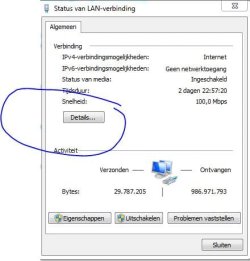
OK, sorry, I must've been unclear. Please follow the following steps:
click on the middle icon that has a computer screen on it...

1.JPG

in the screen that you then get (not shown here) left click on "open network center"or something like that in English.

2.JPG

Then left-click on LAN-connection

3.JPG

Then left-click on "Details" and post the content of the screen that you get.
 

My Computer My Computer

At a glance

Windows 7 64b UltimateI7-2600 3.40GHz - testing various OC levels..2x 4Gb DDR3/1333GTX570 - testing OC levels
Computer Manufacturer/Model Number
custom build
OS
Windows 7 64b Ultimate
CPU
I7-2600 3.40GHz - testing various OC levels..
Motherboard
ASUS Sabretooth
Memory
2x 4Gb DDR3/1333
Graphics Card(s)
GTX570 - testing OC levels
Sound Card
motherboard 7.1 DIG.
Monitor(s) Displays
2x Ilyama 24" E2409HDS-B1 2ms/DVI
Screen Resolution
1920 x 1080
Hard Drives
120 GB Intel Elmcrest SSD
1 TB SATAII 7200RPM/32MB
External 2TB USB3
PSU
Corsair Pro HX850W
Cooling
Coolermaster Hyper V8
Keyboard
Logitech G110
Mouse
Logitech G700
Internet Speed
25Mb
Other Info
CPU: 7,7 RAM: 7,7 GTX: 7,9 GTX 3D : 7,9 SSD 7,6
Overall 7,6 ...... now to speed up the SSD... ;)

Also use a Dell XPS M1710 on Vista 32b
Asus LT on Vista 32
3 older machines still doing fine on Linux/ubuntu but not used much anymore...
network connection details

property - value
connection-specific DN.. -
description - BSNL-East Internet
physical address -
DHCP Enabled - no
IPv4 address - 117.226.128.112
IPv4 subnet mask - 255.255.255.255
IPv4 default gateway -
IPv4 DNS address - 8.8.8.8
8.8.4.4
IPv4 wins address - 10.11.12.13
10.11.12.14
Net BIOS over TCPIP Enabled - no

the blank feild above appear blank in the details and i replaced my DNS server with GOOGLE public DNS
 
Last edited:

My Computer My Computer

At a glance

windows 7 home premium 32bit
OS
windows 7 home premium 32bit
What is your PC's Network cable connected too? 117.226.128.112 I believe is a public IP address? It sounds like you are connected directly to your ISP's DSL or cable modem. If you are stop what you are doing.
 

My Computer My Computer

At a glance

Windows 10 Education 64 bitAMD Phenom II X4 980 Black Edition Deneb 3.7GHz8GB 4GBx2 Kingston PC10600 DDR3 1333 MemoryZotac NVIDIA Geforce GT640 2 Gig DDR3 PCIe
Computer type
PC/Desktop
Computer Manufacturer/Model Number
Home Built
OS
Windows 10 Education 64 bit
CPU
AMD Phenom II X4 980 Black Edition Deneb 3.7GHz
Motherboard
Asus M4N68T-M V2 µATX Motherboard
Memory
8GB 4GBx2 Kingston PC10600 DDR3 1333 Memory
Graphics Card(s)
Zotac NVIDIA Geforce GT640 2 Gig DDR3 PCIe
Sound Card
VIA VT1708s High Definition Audio 8-channel Onboard
Monitor(s) Displays
22" LG E2242 1080p and 2 19" I-INC AG191D
Screen Resolution
1280x1024 - 1920x1080 - 1280x1024
Hard Drives
Crucial M100 256 GB SSD and 500 GB WD Blue SATA
PSU
Thermaltake TR 620
Case
Power Up Black ATX Mid-Tower Case
Cooling
Stock heatsink and fan
Keyboard
Logitech Wireless K350 Wave
Mouse
Logitech Wireless M570 Trackman Wheel
Internet Speed
80 Mbps Down 30 Mbps Up
Antivirus
Windows Defender
Browser
Internet Explorer 11
Other Info
HP DVD1040e Lightscribe - External USB2
I fully agree with Alphanumeric. Something is very wrong here.

I would immediately remove/delete your current active network connection on that PC.

Then, if you're sure it's gone, it might be best to reboot and see waht happens. If the network connection was really deleted, upon reboot, your PC would 'find' a network and proceed to let you choose if it's Home, Public etc. If it does that then it should find the correct default ip's using DHCP in your router... I'm assuming that works still as your other pc is still ok?
 

My Computer My Computer

At a glance

Windows 7 64b UltimateI7-2600 3.40GHz - testing various OC levels..2x 4Gb DDR3/1333GTX570 - testing OC levels
Computer Manufacturer/Model Number
custom build
OS
Windows 7 64b Ultimate
CPU
I7-2600 3.40GHz - testing various OC levels..
Motherboard
ASUS Sabretooth
Memory
2x 4Gb DDR3/1333
Graphics Card(s)
GTX570 - testing OC levels
Sound Card
motherboard 7.1 DIG.
Monitor(s) Displays
2x Ilyama 24" E2409HDS-B1 2ms/DVI
Screen Resolution
1920 x 1080
Hard Drives
120 GB Intel Elmcrest SSD
1 TB SATAII 7200RPM/32MB
External 2TB USB3
PSU
Corsair Pro HX850W
Cooling
Coolermaster Hyper V8
Keyboard
Logitech G110
Mouse
Logitech G700
Internet Speed
25Mb
Other Info
CPU: 7,7 RAM: 7,7 GTX: 7,9 GTX 3D : 7,9 SSD 7,6
Overall 7,6 ...... now to speed up the SSD... ;)

Also use a Dell XPS M1710 on Vista 32b
Asus LT on Vista 32
3 older machines still doing fine on Linux/ubuntu but not used much anymore...
i did what you said but just my DNS server changed default gateway is still blank
 

My Computer My Computer

At a glance

windows 7 home premium 32bit
OS
windows 7 home premium 32bit
I believe the 0.0.0.0 default gateway can be caused by the infamous bonjour services, and also sometimes by ipv6. Do you have a dial up connection?
 

My Computer My Computer

At a glance

Windows 7 x64 pro/ Windows 7 x86 Pro/ XP SP3 x86
Computer Manufacturer/Model Number
Too many to describe...
OS
Windows 7 x64 pro/ Windows 7 x86 Pro/ XP SP3 x86
What is your computers network cable connected too? If you don't have your own router you can't port forward. If your PC is connected to your ISP's cable or DSL modem and you try to log into the IP address listed as default gateway, you are trying to log into equipment owned by your ISP. They frown on that type or thing and may lock you out for trying. You could end up getting your service canceled and have to find a new ISP.
 

My Computer My Computer

At a glance

Windows 10 Education 64 bitAMD Phenom II X4 980 Black Edition Deneb 3.7GHz8GB 4GBx2 Kingston PC10600 DDR3 1333 MemoryZotac NVIDIA Geforce GT640 2 Gig DDR3 PCIe
Computer type
PC/Desktop
Computer Manufacturer/Model Number
Home Built
OS
Windows 10 Education 64 bit
CPU
AMD Phenom II X4 980 Black Edition Deneb 3.7GHz
Motherboard
Asus M4N68T-M V2 µATX Motherboard
Memory
8GB 4GBx2 Kingston PC10600 DDR3 1333 Memory
Graphics Card(s)
Zotac NVIDIA Geforce GT640 2 Gig DDR3 PCIe
Sound Card
VIA VT1708s High Definition Audio 8-channel Onboard
Monitor(s) Displays
22" LG E2242 1080p and 2 19" I-INC AG191D
Screen Resolution
1280x1024 - 1920x1080 - 1280x1024
Hard Drives
Crucial M100 256 GB SSD and 500 GB WD Blue SATA
PSU
Thermaltake TR 620
Case
Power Up Black ATX Mid-Tower Case
Cooling
Stock heatsink and fan
Keyboard
Logitech Wireless K350 Wave
Mouse
Logitech Wireless M570 Trackman Wheel
Internet Speed
80 Mbps Down 30 Mbps Up
Antivirus
Windows Defender
Browser
Internet Explorer 11
Other Info
HP DVD1040e Lightscribe - External USB2
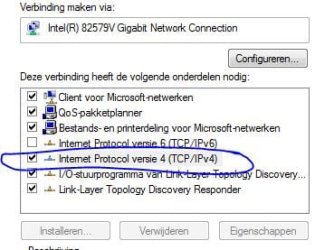
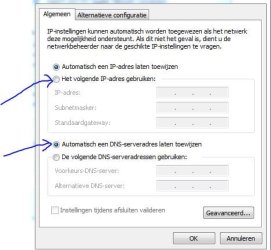
If you're up to it... as a test you can try to overrule DHCP and set up things yourself:

Go to your network settings and chooses your current connection.

In the screen that follows, choose "properties"
Turn off the IP6 option and choose ip4 and the choose properties again
netw1.JPG

You should get the below screen. Choose the buttons I pointed to and then hard code (enter in) all the right IP numbers.
netw2.JPG

Fill in your current IP for your computer in IP adress. All other values should be the same as in this screeen in your other computer.

Click a couple of "OK's" to get out, it will reconfigure and tell us the result.

PS. sorry, in the lower picture the arrow should have been to the lower button....
 

My Computer My Computer

At a glance

Windows 7 64b UltimateI7-2600 3.40GHz - testing various OC levels..2x 4Gb DDR3/1333GTX570 - testing OC levels
Computer Manufacturer/Model Number
custom build
OS
Windows 7 64b Ultimate
CPU
I7-2600 3.40GHz - testing various OC levels..
Motherboard
ASUS Sabretooth
Memory
2x 4Gb DDR3/1333
Graphics Card(s)
GTX570 - testing OC levels
Sound Card
motherboard 7.1 DIG.
Monitor(s) Displays
2x Ilyama 24" E2409HDS-B1 2ms/DVI
Screen Resolution
1920 x 1080
Hard Drives
120 GB Intel Elmcrest SSD
1 TB SATAII 7200RPM/32MB
External 2TB USB3
PSU
Corsair Pro HX850W
Cooling
Coolermaster Hyper V8
Keyboard
Logitech G110
Mouse
Logitech G700
Internet Speed
25Mb
Other Info
CPU: 7,7 RAM: 7,7 GTX: 7,9 GTX 3D : 7,9 SSD 7,6
Overall 7,6 ...... now to speed up the SSD... ;)

Also use a Dell XPS M1710 on Vista 32b
Asus LT on Vista 32
3 older machines still doing fine on Linux/ubuntu but not used much anymore...
I notice that netbios over TCP is not enabled. Is this related to his issues? When is it OK for Netbios over TCP be disabled?
 

My Computer My Computer

At a glance

Win7U 64 RTMQ95508GB GskillASUS|EAH4850/HTDI/1GD3/A
OS
Win7U 64 RTM
CPU
Q9550
Motherboard
GA-EP45-UD3R
Memory
8GB Gskill
Graphics Card(s)
ASUS|EAH4850/HTDI/1GD3/A
Sound Card
xfi Plat
Monitor(s) Displays
Dell 2405fpw
Screen Resolution
1920x1200
Hard Drives
Seagate & WD sata Drives
PSU
Antec
Case
Antec
Keyboard
MS Natural Ergonomic 4000
Mouse
Logitech MX610 USB Cordless
I believe the 0.0.0.0 default gateway can be caused by the infamous bonjour services, and also sometimes by ipv6. Do you have a dial up connection?

yes i do have a dial up connection
 

My Computer My Computer

At a glance

windows 7 home premium 32bit
OS
windows 7 home premium 32bit
If you're up to it... as a test you can try to overrule DHCP and set up things yourself:

Go to your network settings and chooses your current connection.

In the screen that follows, choose "properties"
Turn off the IP6 option and choose ip4 and the choose properties again
View attachment 162488

You should get the below screen. Choose the buttons I pointed to and then hard code (enter in) all the right IP numbers.
View attachment 162489

Fill in your current IP for your computer in IP adress. All other values should be the same as in this screeen in your other computer.

Click a couple of "OK's" to get out, it will reconfigure and tell us the result.

PS. sorry, in the lower picture the arrow should have been to the lower button....


when i type everything along with my previous gateway it displays that it doesn't match with ip and subnet mask .AND WHEN i type everything except the gateway it approves
 

My Computer My Computer

At a glance

windows 7 home premium 32bit
OS
windows 7 home premium 32bit
James has a good point! You need netbios or something like it for your Session Layer.

If your up to it, there's a great, but somewhat technical tutorial here: http://www.sevenforums.com/tutorials/55419-internetwork-troubleshooting-guide.html

If that's too much: check this:
HTML:
To enable NetBIOS over TCP/IP:
Click Start, and then click Network. (Or you can click Start, type ncpa.cpl into the search box, and press ENTER).
Click on the Network and Sharing Center, and then click Manage Network Connections.
Right click on the Local Area Connection or the connection you are using.
Select the Internet Protocol version 4 (TCP/IPv4)
Click the Advanced button under the General tab.
Click the WINS tab.

You should see a similar screen as below. Make sure the buttun the arrow points to is on.... That says that your DHCP server gives you the netbios settings. That is how it should be. If in doubt, post your version of this screen.

netbios.JPG

Good luck!
 

My Computer My Computer

At a glance

Windows 7 64b UltimateI7-2600 3.40GHz - testing various OC levels..2x 4Gb DDR3/1333GTX570 - testing OC levels
Computer Manufacturer/Model Number
custom build
OS
Windows 7 64b Ultimate
CPU
I7-2600 3.40GHz - testing various OC levels..
Motherboard
ASUS Sabretooth
Memory
2x 4Gb DDR3/1333
Graphics Card(s)
GTX570 - testing OC levels
Sound Card
motherboard 7.1 DIG.
Monitor(s) Displays
2x Ilyama 24" E2409HDS-B1 2ms/DVI
Screen Resolution
1920 x 1080
Hard Drives
120 GB Intel Elmcrest SSD
1 TB SATAII 7200RPM/32MB
External 2TB USB3
PSU
Corsair Pro HX850W
Cooling
Coolermaster Hyper V8
Keyboard
Logitech G110
Mouse
Logitech G700
Internet Speed
25Mb
Other Info
CPU: 7,7 RAM: 7,7 GTX: 7,9 GTX 3D : 7,9 SSD 7,6
Overall 7,6 ...... now to speed up the SSD... ;)

Also use a Dell XPS M1710 on Vista 32b
Asus LT on Vista 32
3 older machines still doing fine on Linux/ubuntu but not used much anymore...
Back
Top