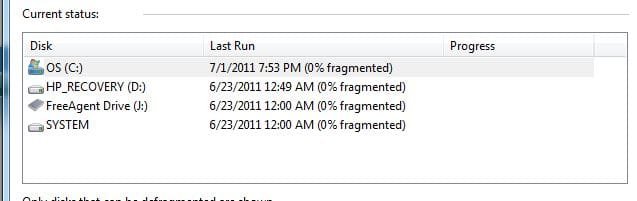
0% fragmented, for seven months

bru

New member
Pro User
Local time
6:05 PM
Messages
417
Location
A suburb of Chicago
Never thought too much about it until reading some threads here. My Disk Defrag was set to once a week which I think is default. AFAICT my disks have always been 0% fragmented.

I don't think it is defragging them to get them to 0, they are not fragmented to any degree, according to Windows.

I decided to change the schedule to once a month based on some comments that defragging too often can be bad. So after eight days I analyzed C: and it still says 0%.

The computer is 7 months old, has 70GB of data and has had a lot of things moved in and out. Shouldn't there be some fragmentation at this point?

I previoulsy used Auslogics on a different computer and understand Windows may not find as many fragments as Auslogics or others.

I just wonder if it's really possible to be 0% fragmented for so long?
 

Attachments
  • defrag.JPG
    defrag.JPG
    22.7 KB · Views: 126

My Computer My Computer

At a glance

Win 7 Home Premium x64Intel Core i3-540 3.07 GHz4 GB (2 X 2) Dual-Channel PC-10600 DDR3 @ 665...Integrated Intel H57
Computer Manufacturer/Model Number
HP p6608f
OS
Win 7 Home Premium x64
CPU
Intel Core i3-540 3.07 GHz
Motherboard
MS-7613 (Iona-GL8E)
Memory
4 GB (2 X 2) Dual-Channel PC-10600 DDR3 @ 665MHz (9-9-9-24)
Graphics Card(s)
Integrated Intel H57
Sound Card
Integrated Realtek ALC888S Audio
Monitor(s) Displays
17" SDM-HS73 (a vestige from my old computer)
Screen Resolution
1280 X 1024
Hard Drives
750GB SATA 7200 RPM
PSU
250W
Keyboard
HP USB keyboard
Mouse
HP USB optical mouse
Internet Speed
15Mbps/1Mbps
Did you run Analyze Disk?
You have to run Analyze Disk to get the new fragmentation after each defragmentation.
 

My Computer My Computer

At a glance

Windows 7 Home Premium 64 bitIntel Core i7-4790G.SKILL 8GB (2 x 4GB) DDR3 F3-10666CL9D-8GBNTAMD Radeon R7 250
Computer type
PC/Desktop
Computer Manufacturer/Model Number
Custom Build
OS
Windows 7 Home Premium 64 bit
CPU
Intel Core i7-4790
Motherboard
GA-Z87X-D3H
Memory
G.SKILL 8GB (2 x 4GB) DDR3 F3-10666CL9D-8GBNT
Graphics Card(s)
AMD Radeon R7 250
Sound Card
Realtek ALC892
Monitor(s) Displays
Samsung UN32EH5000, Dell 1703FPT
Screen Resolution
1920 x 1080, 1280 x 1024
Hard Drives
WD5003AZEX
WD10EZEX
Samsung HD103SJ
Samsung 128 GB 840 PRO
PSU
SeaSonic M12II SS-500GM
Case
Fractal Design Define R4
Cooling
Zalman CNPS9900ALED
Keyboard
Logitech K800
Mouse
Logitech M705
Internet Speed
16 Mbps
Antivirus
Avast
Browser
Firefox
Other Info
Bose Companion 2 Multimedia Speakers
You need to push the ANALYZE button to get the actual fragmentation %.

I'm not sure if you did that. If you did disregard.
 

My Computer My Computer

At a glance

Windows7 Pro 64bit SP-1; Windows XP Pro 32bitIntel Core i7-870 Lynnfield 2.93GHz LGA 1156 ...8GB@1400MHz Crucial Ballistix DDR3-1600 4x2GBASUS ENGTX460 DirectCU/2DI/1GD5 1GB 256-bit G...
Computer Manufacturer/Model Number
Hopalong/ Godzilla
OS
Windows7 Pro 64bit SP-1; Windows XP Pro 32bit
CPU
Intel Core i7-870 Lynnfield 2.93GHz LGA 1156 95W Quad-Core
Motherboard
ASUS P7P55D-E PRO
Memory
8GB@1400MHz Crucial Ballistix DDR3-1600 4x2GB
Graphics Card(s)
ASUS ENGTX460 DirectCU/2DI/1GD5 1GB 256-bit GDDR5
Sound Card
VIA Onboard
Monitor(s) Displays
Asus VS248H-P 24"; Samsung SyncMaster 941BW 19"ws
Screen Resolution
1920x1080; 1440x900
Hard Drives
Samsung 830 120GB SSD
Intel 320 120GB SSD
Western Digital Caviar Black WD7501AALS 750GB 7200 RPM SATA 3.0Gb/s
Western Digital Caviar Black WD6401AALS 640GB 7200 RPM SATA 3.0Gb/s
PSU
COOLER MASTER Silent Pro RS850-AMBAJ3-US 850W Modular
Case
COOLER MASTER HAF 932 RC-932-KKN5-GP Black
Cooling
Scythe "Mugen-2 Rev.B" (2 ScytheKaze-Jyuni PWM fans)
Keyboard
Logitech K-320
Mouse
Kensington
Antivirus
Avast Inernet Suite
Browser
IE 9 ; Chrome
I don't think it is defragging them to get them to 0, they are not fragmented to any degree, according to Windows.

The only way I could possibly see defragging often being bad, is if you have a SSD. The amount of disk usage used by defragging is unlikely to wear out your drive any more than normal usage.

Windows defrags in the background anyway, even when not scheduled when disk usage is idle, so that could account for some of it, maybe you are checking at the wrong times?

Also, in my opinion 3rd party defraggers do more harm than good. The Windows defragger is Prefetch and Superfetch aware, so it orders the files the way they are needed. 3rd party defraggers dont always do that, and can actually defeat the object of superfetch, as the drive spends more time fetching.

For example: When you launch an application, lets say it reads the first 10KB of notepad, then the last 5KB of Media player. (yes I know... an unlikely scenario, this is just an example) Windows defragger will put the files in that order, so they can be read quicker. A 3rd party defragger is much more likely to put all of notepad together, and all of Media Player together. This actually results in longer seek times because it has to go and find the other bits, and then go back again, even though technically the programs aren't fragmented any more.
 

My Computer My Computer

At a glance

Windows 10 Pro x64Intel Core i5 7400 @ 3.00GHz8GB 2133Mhz DDR4 (OEM supplied)Gygabyte Windforce GTX 1050Ti (Factory Overcl...
Computer type
PC/Desktop
Computer Manufacturer/Model Number
Medion Erazer (note to self: insert model number) - with custom additions
OS
Windows 10 Pro x64
CPU
Intel Core i5 7400 @ 3.00GHz
Motherboard
OEM supllied with PC
Memory
8GB 2133Mhz DDR4 (OEM supplied)
Graphics Card(s)
Gygabyte Windforce GTX 1050Ti (Factory Overclocked)
Sound Card
Realtek
Monitor(s) Displays
Acer Al1980 + HKC
Screen Resolution
1360*768(HKC) / 1280*1024(Acer)
Hard Drives
1TB Toshiba
1TB WD Caviar Green
120GB Samsung Evo 840
PSU
OEM supplied (no power rating on case)
Case
OEM Supplied
Cooling
Stock
Keyboard
Logitech Wireless
Mouse
Logitect Wireless
Internet Speed
40Mb/s Down 10Mb/s Up
Antivirus
Defender
Browser
Firefox
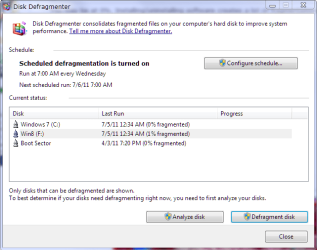
The screen shot you see shows C: after being analyzed. And it says 0% fragmented. It had been eight days since defrag had automatically run so I decided to analyze C:.

I am pretty sure Disk Defragmenter has never done any defragging because the disks have always been 0% fragmented. So that leads to my question. Is it possible to have 0% fragmentation after seven months?
 

My Computer My Computer

At a glance

Win 7 Home Premium x64Intel Core i3-540 3.07 GHz4 GB (2 X 2) Dual-Channel PC-10600 DDR3 @ 665...Integrated Intel H57
Computer Manufacturer/Model Number
HP p6608f
OS
Win 7 Home Premium x64
CPU
Intel Core i3-540 3.07 GHz
Motherboard
MS-7613 (Iona-GL8E)
Memory
4 GB (2 X 2) Dual-Channel PC-10600 DDR3 @ 665MHz (9-9-9-24)
Graphics Card(s)
Integrated Intel H57
Sound Card
Integrated Realtek ALC888S Audio
Monitor(s) Displays
17" SDM-HS73 (a vestige from my old computer)
Screen Resolution
1280 X 1024
Hard Drives
750GB SATA 7200 RPM
PSU
250W
Keyboard
HP USB keyboard
Mouse
HP USB optical mouse
Internet Speed
15Mbps/1Mbps
I am pretty sure Disk Defragmenter has never done any defragging because the disks have always been 0% fragmented. So that leads to my question. Is it possible to have 0% fragmentation after seven months?

Yes, is the short answer.

As I said, it will defrag in the background anyway when the drive isn't busy. The schedule is basically there to clean up anything it misses. Most people's machines probably never even hit a scheduled defrag, as their machine's aren't on at 3am on a wednesday.

It's unlikely for it to always be 0% when you happen to check, but certainly not impossible.

It's not unusual to see fragmentation remain low, NTFS is quite intelligent when it comes to fragmentation resistance anyway, and combined with the background defragging, it is very rare for me to see a drive get anywhere beyond 3% fragmentation, with 0% being the norm. So I would say that what you are seeing is quite normal.

How often do you check how fragmented the drive is? If the answer is not often, then I wouldn't worry. If the answer is say, every day, then I would be a little more concerned.
 

My Computer My Computer

At a glance

Windows 10 Pro x64Intel Core i5 7400 @ 3.00GHz8GB 2133Mhz DDR4 (OEM supplied)Gygabyte Windforce GTX 1050Ti (Factory Overcl...
Computer type
PC/Desktop
Computer Manufacturer/Model Number
Medion Erazer (note to self: insert model number) - with custom additions
OS
Windows 10 Pro x64
CPU
Intel Core i5 7400 @ 3.00GHz
Motherboard
OEM supllied with PC
Memory
8GB 2133Mhz DDR4 (OEM supplied)
Graphics Card(s)
Gygabyte Windforce GTX 1050Ti (Factory Overclocked)
Sound Card
Realtek
Monitor(s) Displays
Acer Al1980 + HKC
Screen Resolution
1360*768(HKC) / 1280*1024(Acer)
Hard Drives
1TB Toshiba
1TB WD Caviar Green
120GB Samsung Evo 840
PSU
OEM supplied (no power rating on case)
Case
OEM Supplied
Cooling
Stock
Keyboard
Logitech Wireless
Mouse
Logitect Wireless
Internet Speed
40Mb/s Down 10Mb/s Up
Antivirus
Defender
Browser
Firefox
Not a chance. Even after a clean install there will be some fragmentation. Check it from Safe Mode, see if you get the same results.
 

My Computer My Computer

At a glance

Windows 10 Pro X64Intel Quad Core i7-4770 @ 3.4Ghz16.0GB PC3-12800 DDR3 SDRAM 1600 MHzIntel Integrated HD Graphics
Computer type
PC/Desktop
Computer Manufacturer/Model Number
Lenovo IdeaCenter 450
OS
Windows 10 Pro X64
CPU
Intel Quad Core i7-4770 @ 3.4Ghz
Memory
16.0GB PC3-12800 DDR3 SDRAM 1600 MHz
Graphics Card(s)
Intel Integrated HD Graphics
Sound Card
Realtek HD Audio
Monitor(s) Displays
HP 22" LCD
Screen Resolution
1680 x 1050
Hard Drives
250GB Samsung EVO SATA-3 SSD
2TB Seagate ST2000DM001 SATA-2
1.5TB Seagate ST3150041AS SATA
Keyboard
Dell USB
Mouse
Lenovo USB
Internet Speed
Cable via Road Runner 3MB Upload, 30MB Download
Antivirus
Windows Defender, MBAM Pro, MBAE
Browser
Seamonkey
Other Info
UEFI/GPT
PLDS DVD-RW DH16AERSH
Two different opinions, one saying normal, the other saying a problem :confused: .

My Disk Defragmenter schedule was set to every Wednesday when the computer was on (it's now set for once a month). I didn't check it more than once or twice a week but it always said 0% fragmented, even after analyzing the disk up to eight days after it's scheduled run.

I guess I could always run Auslogics and see what it says.

edit: Could not get Disk Defragmenter to run in Safe Mode. Tried Open and also Run As Administrator. Nothing. Doing a search tells me it is apparently disabled in Safe Mode although the thread is a bit confusing.

Why is Disk Defragmenter disabled by default in Safe mode in Windows 7?
 
Last edited:

My Computer My Computer

At a glance

Win 7 Home Premium x64Intel Core i3-540 3.07 GHz4 GB (2 X 2) Dual-Channel PC-10600 DDR3 @ 665...Integrated Intel H57
Computer Manufacturer/Model Number
HP p6608f
OS
Win 7 Home Premium x64
CPU
Intel Core i3-540 3.07 GHz
Motherboard
MS-7613 (Iona-GL8E)
Memory
4 GB (2 X 2) Dual-Channel PC-10600 DDR3 @ 665MHz (9-9-9-24)
Graphics Card(s)
Integrated Intel H57
Sound Card
Integrated Realtek ALC888S Audio
Monitor(s) Displays
17" SDM-HS73 (a vestige from my old computer)
Screen Resolution
1280 X 1024
Hard Drives
750GB SATA 7200 RPM
PSU
250W
Keyboard
HP USB keyboard
Mouse
HP USB optical mouse
Internet Speed
15Mbps/1Mbps
I honestly don't remember the last time I defragged a machine.
 

My Computer My Computer

At a glance

Windows 7 Ultimate x64Intel Q9550 2.83Ghz OC'd to 3.40Ghz8GB G.Skill PI DDR2-800, 4-4-4-12 timingsEVGA 1280MB Nvidia GeForce GTX570
Computer Manufacturer/Model Number
Self-Built in July 2009
OS
Windows 7 Ultimate x64
CPU
Intel Q9550 2.83Ghz OC'd to 3.40Ghz
Motherboard
Gigabyte GA-EP45-UD3R rev. 1.1, F12 BIOS
Memory
8GB G.Skill PI DDR2-800, 4-4-4-12 timings
Graphics Card(s)
EVGA 1280MB Nvidia GeForce GTX570
Sound Card
Realtek ALC899A 8 channel onboard audio
Monitor(s) Displays
23" Acer x233H
Screen Resolution
1920x1080
Hard Drives
Intel X25-M 80GB Gen 2 SSD
Western Digital 1TB Caviar Black, 32MB cache. WD1001FALS
PSU
Corsair 620HX modular
Case
Antec P182
Cooling
stock
Keyboard
ABS M1 Mechanical
Mouse
Logitech G9 Laser Mouse
Internet Speed
15/2 cable modem
Other Info
Windows and Linux enthusiast. Logitech G35 Headset.
Try defraggler if you are worried about it.
 

My Computer My Computer

At a glance

W7 Professional x64AMD Athlon II X3 445 Rana 3.10 GHzPNY XLR DDR3 1600 4x2GBNVIDIA GeForce GTS 450 (fermi) 1GB GDDR5
Computer Manufacturer/Model Number
Pugh Technologies
OS
W7 Professional x64
CPU
AMD Athlon II X3 445 Rana 3.10 GHz
Motherboard
MSI 870A-G54
Memory
PNY XLR DDR3 1600 4x2GB
Graphics Card(s)
NVIDIA GeForce GTS 450 (fermi) 1GB GDDR5
Sound Card
Realtek ALC892 onboard
Monitor(s) Displays
ASUS VE205t, Viewsonic VX2035WM
Screen Resolution
1600x900, 1600x1050
Hard Drives
977GB Hitachi Hitachi HDS721010CLA332
244GB Western Digital WDC WD2500AAJS-65B4A0
488GB Western Digital WDC WD5000AAJS-00A8B0
488GB Western Digital WDC WD5000AAKS-00UU3A0
PSU
Antec EarthWatts EA650 650W
Case
ThermalTake Armor A90 Mid Tower
Cooling
3x 120mm in, 1x 120mm & 200mm out, self built hydro-cooler
Keyboard
Logitec 55
Mouse
Razer Deathadder
Internet Speed
20 Mbps D/L, 9 Mbps U/L
Win 7 Pro has been installed since September 09 and i have never done a manual defrag. From what I remember reading, Win 7 does scheduled defrags but I suspect they have never run since I don't leave my computer on overnight.

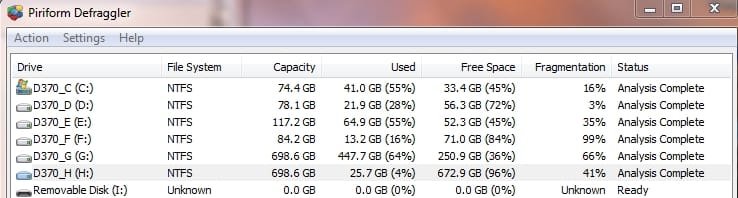
This is what Defraggler says about my drives/partitions:

DefragStats.jpg

As you can see, my F: drive is 99% fragmented, but the only files/folders there are System Volume Information (Shodow Copy, System Restore stuff) and two .vdi files (Virtual Disk Images) for Oracle VirtualBox (Ubuntu and XP Pro). I don't know what defragging that drive would do to Oracle VB so I've not tried it yet.

The G: drive (66%) has my Acronis True Image Home 2010 image backups so again, I'm leary of defragging that drive. Has anyone defragged a drive containing ATI image backups and if so, what were the results.

The H: drive (41%) I can probably defrag but have not tried it yet as it also has another of the OracleVB .vdi files and pagefile.sys.

E: (35%) I will defrag, nothing special there.
 

My Computer My Computer

At a glance

Windows 10 Pro X64Intel Quad Core i7-4770 @ 3.4Ghz16.0GB PC3-12800 DDR3 SDRAM 1600 MHzIntel Integrated HD Graphics
Computer type
PC/Desktop
Computer Manufacturer/Model Number
Lenovo IdeaCenter 450
OS
Windows 10 Pro X64
CPU
Intel Quad Core i7-4770 @ 3.4Ghz
Memory
16.0GB PC3-12800 DDR3 SDRAM 1600 MHz
Graphics Card(s)
Intel Integrated HD Graphics
Sound Card
Realtek HD Audio
Monitor(s) Displays
HP 22" LCD
Screen Resolution
1680 x 1050
Hard Drives
250GB Samsung EVO SATA-3 SSD
2TB Seagate ST2000DM001 SATA-2
1.5TB Seagate ST3150041AS SATA
Keyboard
Dell USB
Mouse
Lenovo USB
Internet Speed
Cable via Road Runner 3MB Upload, 30MB Download
Antivirus
Windows Defender, MBAM Pro, MBAE
Browser
Seamonkey
Other Info
UEFI/GPT
PLDS DVD-RW DH16AERSH

My Computer My Computer

At a glance

Windows 10 Pro (x64)Intel Core i7-3930K (3.2GHz - 4.5GHz)4x Samsung 4GB PC3-12800 DDR3 (16GB 1600MHz)Nvidia Geforce GTX 690
Computer type
PC/Desktop
Computer Manufacturer/Model Number
Alienware Aurora ALX R4
OS
Windows 10 Pro (x64)
CPU
Intel Core i7-3930K (3.2GHz - 4.5GHz)
Motherboard
Alienware Aurora-R4 x79
Memory
4x Samsung 4GB PC3-12800 DDR3 (16GB 1600MHz)
Graphics Card(s)
Nvidia Geforce GTX 690
Sound Card
SteelSeries Siberia Elite
Monitor(s) Displays
Dell UltraSharp U3011
Screen Resolution
2560x1600
Hard Drives
Samsung 850 Pro 256 GB, Seagate 1TB Desktop Hybrid HDD, 2x Western Digital 4TB Green HDD
PSU
875W Some Dell PSU <.<
Case
Alienware Aurora ALX
Cooling
Custom Liquid Cooling (EK CPU & GPU blocks) dual EK 480RAD
Keyboard
Logitech G710+ Mechanical
Mouse
Logitech G700s
Internet Speed
Verizon Fios (50 mbps average)
Other Info
Server: Intel NUC D54250WYK: i5-4250U, 16GB, 256 GB mSATA, Windows Server 2012 R2
You can manually analyze the disks and see if the Disk Defragmenter gives you similar results to Defraggler. Then you can decide what to do. Or you can change it's schedule to run when the computer is on and I'm thinking it will defrag everything.
 

My Computer My Computer

At a glance

Win 7 Home Premium x64Intel Core i3-540 3.07 GHz4 GB (2 X 2) Dual-Channel PC-10600 DDR3 @ 665...Integrated Intel H57
Computer Manufacturer/Model Number
HP p6608f
OS
Win 7 Home Premium x64
CPU
Intel Core i3-540 3.07 GHz
Motherboard
MS-7613 (Iona-GL8E)
Memory
4 GB (2 X 2) Dual-Channel PC-10600 DDR3 @ 665MHz (9-9-9-24)
Graphics Card(s)
Integrated Intel H57
Sound Card
Integrated Realtek ALC888S Audio
Monitor(s) Displays
17" SDM-HS73 (a vestige from my old computer)
Screen Resolution
1280 X 1024
Hard Drives
750GB SATA 7200 RPM
PSU
250W
Keyboard
HP USB keyboard
Mouse
HP USB optical mouse
Internet Speed
15Mbps/1Mbps
Logicearth, thanks for a very informative article. I bookmarked it.

Bru, agree, I'll play with it and see what happens.
 

My Computer My Computer

At a glance

Windows 10 Pro X64Intel Quad Core i7-4770 @ 3.4Ghz16.0GB PC3-12800 DDR3 SDRAM 1600 MHzIntel Integrated HD Graphics
Computer type
PC/Desktop
Computer Manufacturer/Model Number
Lenovo IdeaCenter 450
OS
Windows 10 Pro X64
CPU
Intel Quad Core i7-4770 @ 3.4Ghz
Memory
16.0GB PC3-12800 DDR3 SDRAM 1600 MHz
Graphics Card(s)
Intel Integrated HD Graphics
Sound Card
Realtek HD Audio
Monitor(s) Displays
HP 22" LCD
Screen Resolution
1680 x 1050
Hard Drives
250GB Samsung EVO SATA-3 SSD
2TB Seagate ST2000DM001 SATA-2
1.5TB Seagate ST3150041AS SATA
Keyboard
Dell USB
Mouse
Lenovo USB
Internet Speed
Cable via Road Runner 3MB Upload, 30MB Download
Antivirus
Windows Defender, MBAM Pro, MBAE
Browser
Seamonkey
Other Info
UEFI/GPT
PLDS DVD-RW DH16AERSH
Given the fact that Windows built-in defrag ignores fragments larger than 64MB (consolidating larger fragments does not seem to improve performance) and shows fragmentation in integer % (so, e.g. 0.49% fragmented will be shown as 0%), seeing 0% fragmentation is quite normal.
 

My Computer My Computer

At a glance

Windows 7 Home Premium x64 SP1Intel Core i3 M330 @ 2.13GHz4 GBNVidia GeForce 310M
Computer Manufacturer/Model Number
Toshiba Satellite U500
OS
Windows 7 Home Premium x64 SP1
CPU
Intel Core i3 M330 @ 2.13GHz
Memory
4 GB
Graphics Card(s)
NVidia GeForce 310M
Screen Resolution
1280x800
I have nothing but bad luck with this computer.

Now that I changed the schedule the Disk Defragmenter doesn't run. I set it for 5:00 pm and nothing happened. Opened it up and it shows the next scheduled run but it's clear it didn't run as scheduled since the last scan was on 6/23. So I kept changing the schedule and the time would come and go with the program not running. I manually ran it so I know it does work. It's the schedule that is messed up.

Right now I have it scheduled for 10:00 PM everyday and it says Next scheduled run: 7/4/2011 10:00 PM. 10:00 PM will come and go and it will say Next scheduled run: 7/5/2011 10:00 PM but it will not have run at 10:00 PM on 7/4. Clock and date is correct.
 

My Computer My Computer

At a glance

Win 7 Home Premium x64Intel Core i3-540 3.07 GHz4 GB (2 X 2) Dual-Channel PC-10600 DDR3 @ 665...Integrated Intel H57
Computer Manufacturer/Model Number
HP p6608f
OS
Win 7 Home Premium x64
CPU
Intel Core i3-540 3.07 GHz
Motherboard
MS-7613 (Iona-GL8E)
Memory
4 GB (2 X 2) Dual-Channel PC-10600 DDR3 @ 665MHz (9-9-9-24)
Graphics Card(s)
Integrated Intel H57
Sound Card
Integrated Realtek ALC888S Audio
Monitor(s) Displays
17" SDM-HS73 (a vestige from my old computer)
Screen Resolution
1280 X 1024
Hard Drives
750GB SATA 7200 RPM
PSU
250W
Keyboard
HP USB keyboard
Mouse
HP USB optical mouse
Internet Speed
15Mbps/1Mbps
I honestly don't remember the last time I defragged a machine.

Ditto.

My home pc(s) are usually left on overnight until power management kicks in, so theres a fair chunk of idle time.
Win7 defrags in the background during idle time.

It does though sound unusual to always be 0% if you use it every day.

Just checked my work machine while writing this, and it's only %1 fragged on a 70GB partition.
2nd partition (same size) is at 0%, and I've just done a lot of file transfers.

:huh:

So maybe you're right, and its reporting accurately, as surprising as it is.
 

My Computer My Computer

At a glance

Windows 7 EnterpriseIntel Pentium Dual E2200 @2.2GHz4GBPalit GForce 9500GT 1GB
OS
Windows 7 Enterprise
CPU
Intel Pentium Dual E2200 @2.2GHz
Motherboard
Gigabyte II-G31
Memory
4GB
Graphics Card(s)
Palit GForce 9500GT 1GB
Sound Card
onBoard
Hard Drives
WesternDigital: 250GB + 1TB + 1TB + 2TB
PSU
450W
Case
CoolerMaster CM690
Cooling
Corsair H50
Mouse
Logitech MX518
You may be at 0%. Installing/uninstalling software creates a lot of fragmentation. I have found using Winzip or Winrar does too.

Here's mine, one partition is 1%. The most used is 0%, freshly analyzed. I rarely turn mine off.

Defragger.PNG
 

My Computer My Computer

At a glance

Windows 7 Ultimate X64 SP1Intel i5-2550K, Differing ~4.4-4.8GHz No buil...16GB G.Skill Sniper 1866MHz @ 2133MHz 2x8GBASUS GTX650TIB-DC2OC-2GD5, (650TI Boost)
Computer type
PC/Desktop
Computer Manufacturer/Model Number
Home Built Desktop By DataTech
OS
Windows 7 Ultimate X64 SP1
CPU
Intel i5-2550K, Differing ~4.4-4.8GHz No built in GPU
Motherboard
ASUS P8Z68-V PRO/GEN3
Memory
16GB G.Skill Sniper 1866MHz @ 2133MHz 2x8GB
Graphics Card(s)
ASUS GTX650TIB-DC2OC-2GD5, (650TI Boost)
Sound Card
Onboard Realtek 5-1
Monitor(s) Displays
Samsung P2570HD
Screen Resolution
1920x1080
Hard Drives
Samsung 840 Pro 256GB SSD for OS, 500GB Seagate Constellation (Enterprise drive) for Data
PSU
Corsair HX650W
Case
Inwin Dragon Rider
Cooling
Hyper 212 EVO w/two Noctua fans, push-pull, @1300 RPM
Keyboard
E-Z Eyes, bright yellow keys with large characters
Mouse
steelseries SENSEI Laser Pro Gaming
Internet Speed
48-51Mbs Mbs down, 11 Mbs up Xfinity Cable
Antivirus
Norton Internet Security 2013
Browser
IE 10, Opera, Pale Moon if needed
Other Info
4 case fans, LG BluRay-RE, ASUS DVD-RW, Mr. Fusion power supply, 1.21 gigawatts.
I have nothing but bad luck with this computer.

Now that I changed the schedule the Disk Defragmenter doesn't run. I set it for 5:00 pm and nothing happened. Opened it up and it shows the next scheduled run but it's clear it didn't run as scheduled since the last scan was on 6/23. So I kept changing the schedule and the time would come and go with the program not running. I manually ran it so I know it does work. It's the schedule that is messed up.

Right now I have it scheduled for 10:00 PM everyday and it says Next scheduled run: 7/4/2011 10:00 PM. 10:00 PM will come and go and it will say Next scheduled run: 7/5/2011 10:00 PM but it will not have run at 10:00 PM on 7/4. Clock and date is correct.

It only runs when the computer is idle, mouse movement is the opposite of idle. It also runs in such a way that it takes very little resources.
 

My Computer My Computer

At a glance

Windows 10 Pro (x64)Intel Core i7-3930K (3.2GHz - 4.5GHz)4x Samsung 4GB PC3-12800 DDR3 (16GB 1600MHz)Nvidia Geforce GTX 690
Computer type
PC/Desktop
Computer Manufacturer/Model Number
Alienware Aurora ALX R4
OS
Windows 10 Pro (x64)
CPU
Intel Core i7-3930K (3.2GHz - 4.5GHz)
Motherboard
Alienware Aurora-R4 x79
Memory
4x Samsung 4GB PC3-12800 DDR3 (16GB 1600MHz)
Graphics Card(s)
Nvidia Geforce GTX 690
Sound Card
SteelSeries Siberia Elite
Monitor(s) Displays
Dell UltraSharp U3011
Screen Resolution
2560x1600
Hard Drives
Samsung 850 Pro 256 GB, Seagate 1TB Desktop Hybrid HDD, 2x Western Digital 4TB Green HDD
PSU
875W Some Dell PSU <.<
Case
Alienware Aurora ALX
Cooling
Custom Liquid Cooling (EK CPU & GPU blocks) dual EK 480RAD
Keyboard
Logitech G710+ Mechanical
Mouse
Logitech G700s
Internet Speed
Verizon Fios (50 mbps average)
Other Info
Server: Intel NUC D54250WYK: i5-4250U, 16GB, 256 GB mSATA, Windows Server 2012 R2
I don't think it is defragging them to get them to 0, they are not fragmented to any degree, according to Windows.

The only way I could possibly see defragging often being bad, is if you have a SSD. The amount of disk usage used by defragging is unlikely to wear out your drive any more than normal usage.

Windows defrags in the background anyway, even when not scheduled when disk usage is idle, so that could account for some of it, maybe you are checking at the wrong times?

Also, in my opinion 3rd party defraggers do more harm than good. The Windows defragger is Prefetch and Superfetch aware, so it orders the files the way they are needed. 3rd party defraggers dont always do that, and can actually defeat the object of superfetch, as the drive spends more time fetching.

For example: When you launch an application, lets say it reads the first 10KB of notepad, then the last 5KB of Media player. (yes I know... an unlikely scenario, this is just an example) Windows defragger will put the files in that order, so they can be read quicker. A 3rd party defragger is much more likely to put all of notepad together, and all of Media Player together. This actually results in longer seek times because it has to go and find the other bits, and then go back again, even though technically the programs aren't fragmented any more.

Not true of all third party defraggers. O&O, plus some other defraggers has the option to use the layout.ini, which will preserve Windows layout of files such as you mentioned. Though it is an option, it is enabled by default in O&O.
 

My Computer My Computer

At a glance

W7x64 Pro, SuSe 12.1/** W7 x64 Pro, XP MCEPhenom II 1090T w/Noctua NH-D14 /**4400+ X2 w...2 x 2GB Patriot PGS34g1600LLKA/**4x1GB Corsai...EVGA GTX460 SC/**EVGA 8800GTS
Computer Manufacturer/Model Number
DIY
OS
W7x64 Pro, SuSe 12.1/** W7 x64 Pro, XP MCE
CPU
Phenom II 1090T w/Noctua NH-D14 /**4400+ X2 w/CM Hyper TX 3
Motherboard
ASRock 890FX Deluxe 4/**A8N-SLI
Memory
2 x 2GB Patriot PGS34g1600LLKA/**4x1GB Corsair VS
Graphics Card(s)
EVGA GTX460 SC/**EVGA 8800GTS
Sound Card
Asus Xonar D2X/**Xonar D1
Monitor(s) Displays
Acer X233H, Dell E152FPc /**LG M237-WD
Screen Resolution
1920x1080 & 1024x768/**1980x1080
Hard Drives
WDC 2TB, 1.5TB, 1TB, 500GB,Seagate 500GB , Maxtor 80GB /**500GB Seagate & WDC 1TB Black
PSU
CM RS600 w/ APC BX1000G/**Antec 500 TP w/ APC BX1000
Case
HAF922/**Antec 1040IIB
Cooling
3x200mm, 1x140 and 1x120mm/**5x80mm fans
Keyboard
Logitech Media USB/**Saitek Eclipse
Mouse
Cordless Trackman Wheel/**Ditto
Internet Speed
3.3Mbps
Other Info
SB 560 5.1 w/ Sennheiser RS140/**Creative T20 speakers, Dvico FusionHDTV7 Gold RT, Cisco E3000, HP 5510V AIO, Linksys E3000, Belkin F5U237 hub and **F5D8055 adapter
(** = 2nd rig)
Back
Top