Zoo Tycoon 2 Ultimate Collection Compatibility

chibiotakurae

New member
Local time
4:50 PM
Messages
2
Yes I purchased a new zoo tycoon 2 ultimate collection, having been told by friends that it worked in windows 7. But for some reason it won't install on my computer.

Every time I try I get

Error 1606. Could not access network location. %APPDATA%\.


I looked through the list of game that played and it said it worked on 32bit version only,
my computer is a 64bit version.

My question is should I just go ahead and try to return the game or is there anything I can do to get it to work on my computer?

I'm sorry if this isn't exactly the right place to put this, I just don't want to keep the game if it isn't going to work.
 

My Computer My Computer

OS
Windows 7 Home Premium 64bit
Hi,

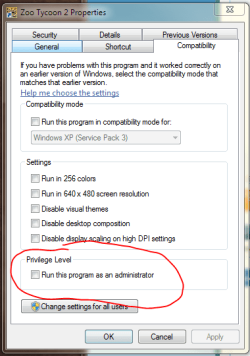
Odd I installed it on my x64 system and it works fine. Try and run the game with some compatibility settings - see image.

Regards,
Golden
 

Attachments

  • Capture.PNG
    Capture.PNG
    17.8 KB · Views: 297

My Computer My Computer

Computer type
PC/Desktop
Computer Manufacturer/Model Number
Golden Mk. I.4
OS
Windows 10 Pro x64 ; Xubuntu x64
CPU
Intel i7 860 @ 2.80 GHz O/C'ed to 4.0GHz
Motherboard
Gigabyte P55A-UD3R Rev.1. Award BIOS F13
Memory
16GB Corsair Vengance DDR3 @ 661 MHz Dual Channel (9-9-9-24)
Graphics Card(s)
EVGA NVidia GTX 560 1024MB
Sound Card
Realtek Integrated
Monitor(s) Displays
Dual Samsung SyncMaster 2494HS
Screen Resolution
1920*1080 and 1920*1080
Hard Drives
1*Samsung 840 EVO 120GB SSD;
1*OCZ Vertex 2 60GB SSD;
2*Samsung F3 SpinPoint 1TB in RAID0;
1*Samsung F1 SpinPoint 1TB;
2*Western Digital 1TB External USB 3.0
1*Western Digital 500GB External USB 3.0
1*Seagate 500GB External USB 2.0
PSU
Thermaltake ToughPower QFan 750W
Case
Thermaltake Element S VK60001W2Z
Cooling
Corsair H60 Water Cooling, 2*230mm and 2*80mm case fans
Keyboard
Logitech G110
Mouse
Logitech MX518
Hi,

Odd I installed it on my x64 system and it works fine. Try and run the game with some compatibility settings - see image.

Regards,
Golden

Thanks for the advice :)

I tried to find it but I think my game might be defective or something because when I click on properties all I get is

This Screenshot
 

My Computer My Computer

OS
Windows 7 Home Premium 64bit
Hi,

Sorry, I wasn't being clear. Right-click on thew shortcut icon on your desktop to access Properties - not the DVD drive as you did in your case.

Let us know.

Regards,
Golden
 

My Computer My Computer

Computer type
PC/Desktop
Computer Manufacturer/Model Number
Golden Mk. I.4
OS
Windows 10 Pro x64 ; Xubuntu x64
CPU
Intel i7 860 @ 2.80 GHz O/C'ed to 4.0GHz
Motherboard
Gigabyte P55A-UD3R Rev.1. Award BIOS F13
Memory
16GB Corsair Vengance DDR3 @ 661 MHz Dual Channel (9-9-9-24)
Graphics Card(s)
EVGA NVidia GTX 560 1024MB
Sound Card
Realtek Integrated
Monitor(s) Displays
Dual Samsung SyncMaster 2494HS
Screen Resolution
1920*1080 and 1920*1080
Hard Drives
1*Samsung 840 EVO 120GB SSD;
1*OCZ Vertex 2 60GB SSD;
2*Samsung F3 SpinPoint 1TB in RAID0;
1*Samsung F1 SpinPoint 1TB;
2*Western Digital 1TB External USB 3.0
1*Western Digital 500GB External USB 3.0
1*Seagate 500GB External USB 2.0
PSU
Thermaltake ToughPower QFan 750W
Case
Thermaltake Element S VK60001W2Z
Cooling
Corsair H60 Water Cooling, 2*230mm and 2*80mm case fans
Keyboard
Logitech G110
Mouse
Logitech MX518
it was fine at me too no problem on W7 64bit
 

My Computer My Computer

OS
Windows 7 Ultimate 64 bit
CPU
Intel E7500 2.93Ghz
Motherboard
P5KPL-AM/SE
Memory
4GB of RAM
Graphics Card(s)
Geforce 9500GT/512MB..my Poor geforce 9800GT is dead? @_@'
Sound Card
Realtik Chipset
Monitor(s) Displays
BenQ 18'
Screen Resolution
1280x1024
Hard Drives
Seagate barracuda 2x1 Terrabyte
PSU
600 Watts
Case
I don't know
Cooling
Stock
Keyboard
Ordenary Keyboard
Mouse
Ordenary Optical Mouse
Internet Speed
6MB broadband
Other Info
my 2nd junk backup computer spec

OS:XP Pro
CPU: Pentium 4 HT
RAM: 1GB 2x DDR1 512MB
GPU: Geforce FX5500
PSU: 500watts
I've been having the same problems with my game. It used to work fine until recently. I've attempted this with the compatibility mode but the problem is I don't have a desktop icon since I've un- and reinstalled it a couple times
 

My Computer My Computer

Computer type
PC/Desktop
OS
Windows 7 Unknown Bit
Back
Top