Solved Windows wont let me enable wifi adaptor

tallon

New member
Local time
9:42 PM
Messages
6
I've just installed a wireless PCI adaptor (Tenda W322P 11N) in my desktop PC but I can't 'enable' it - every time I double click it starts to enable then stops and leaves it disabled with no warning or error messages.

The system is definitely seeing it as it's listed in Device Manager, and if I bring up Network Connections (using ncpa.cpl) it's listed and shown as disabled. Why would windows stop it from being enabled??

I've tried downloading new drivers from the manufacturers site in case the drivers on the disk were old - no difference. I uninstalled it and removed the drivers and then re-booted so windows would use it's own drivers - no difference.

It seems the system has a problem with it, but surely ONE of the drivers would work if it was a driver problem?
 

My Computer My Computer

At a glance

Windows 7 home premium
OS
Windows 7 home premium

My Computer My Computer

At a glance

Windows 7 x64Intel i7 2600kG.skill Ripjaw 16gigs @ 1866Nvidia gtx580 (evga)
Computer Manufacturer/Model Number
Insane hobo technologies. ;-)
OS
Windows 7 x64
CPU
Intel i7 2600k
Motherboard
Asrock z68 extreme 4 gen 3
Memory
G.skill Ripjaw 16gigs @ 1866
Graphics Card(s)
Nvidia gtx580 (evga)
Sound Card
Integrated HD audio + hdmi
Monitor(s) Displays
24" ASUS widescreen + 42" insignia
Screen Resolution
1080p (1920x1080)
Hard Drives
128 Samsung 830
256 Samsung 840
3 x 1tb storage drive (various)
1 western digital 1tb (eSATA)
1 Seagate 1tb (eSATA)
PSU
1 kilowatt SLI/Crossfire rated Silverstone modular
Case
NZXT Phantom + additional 220 fan
Cooling
Zalmann
Keyboard
Microsoft wireless 3000 (v2)
Mouse
MS - wireless 5000 (bluetrack)
Internet Speed
depends on if you ask me or my provider.
Other Info
The above information is provided as is, and the author assumes no responsibility for issues it may cause with your sanity or fanboyism.
Thanks, good thought, but I tried that driver and it made no difference.
 

My Computer My Computer

At a glance

Windows 7 home premium
OS
Windows 7 home premium
Are you attempting to use the provided software or are you using the windows zero configuration tool?
Because frankly I've had a lot more luck disabling proprietary software on wifi devices and allowing windows to control the connection.
 

My Computer My Computer

At a glance

Windows 7 x64Intel i7 2600kG.skill Ripjaw 16gigs @ 1866Nvidia gtx580 (evga)
Computer Manufacturer/Model Number
Insane hobo technologies. ;-)
OS
Windows 7 x64
CPU
Intel i7 2600k
Motherboard
Asrock z68 extreme 4 gen 3
Memory
G.skill Ripjaw 16gigs @ 1866
Graphics Card(s)
Nvidia gtx580 (evga)
Sound Card
Integrated HD audio + hdmi
Monitor(s) Displays
24" ASUS widescreen + 42" insignia
Screen Resolution
1080p (1920x1080)
Hard Drives
128 Samsung 830
256 Samsung 840
3 x 1tb storage drive (various)
1 western digital 1tb (eSATA)
1 Seagate 1tb (eSATA)
PSU
1 kilowatt SLI/Crossfire rated Silverstone modular
Case
NZXT Phantom + additional 220 fan
Cooling
Zalmann
Keyboard
Microsoft wireless 3000 (v2)
Mouse
MS - wireless 5000 (bluetrack)
Internet Speed
depends on if you ask me or my provider.
Other Info
The above information is provided as is, and the author assumes no responsibility for issues it may cause with your sanity or fanboyism.
Not sure what you mean by 'windows zero configuration tool'.

After I installed the device, when I switched on, windows automatically installed a driver.

I then tried to use the Tenda 'Wizard' assuming it would install a better driver but it wouldn't run (presumably because it could see the device was disabled) so I then just installed the driver from the supplied disk. This wouldn't work either so I went to Tenda's website downloaded the latest driver (ver 4 I think) installed it but made no difference. Then uninstalled it, and the driver, and let Windows find it and re-install it when I re-booted.

Despite all this Windows wont allow it to be enabled.
 

My Computer My Computer

At a glance

Windows 7 home premium
OS
Windows 7 home premium
what does the device look like in the device manager?
Is there a red dot/exclamation mark in front of it?
 

My Computer My Computer

At a glance

Windows 7 x64Intel i7 2600kG.skill Ripjaw 16gigs @ 1866Nvidia gtx580 (evga)
Computer Manufacturer/Model Number
Insane hobo technologies. ;-)
OS
Windows 7 x64
CPU
Intel i7 2600k
Motherboard
Asrock z68 extreme 4 gen 3
Memory
G.skill Ripjaw 16gigs @ 1866
Graphics Card(s)
Nvidia gtx580 (evga)
Sound Card
Integrated HD audio + hdmi
Monitor(s) Displays
24" ASUS widescreen + 42" insignia
Screen Resolution
1080p (1920x1080)
Hard Drives
128 Samsung 830
256 Samsung 840
3 x 1tb storage drive (various)
1 western digital 1tb (eSATA)
1 Seagate 1tb (eSATA)
PSU
1 kilowatt SLI/Crossfire rated Silverstone modular
Case
NZXT Phantom + additional 220 fan
Cooling
Zalmann
Keyboard
Microsoft wireless 3000 (v2)
Mouse
MS - wireless 5000 (bluetrack)
Internet Speed
depends on if you ask me or my provider.
Other Info
The above information is provided as is, and the author assumes no responsibility for issues it may cause with your sanity or fanboyism.
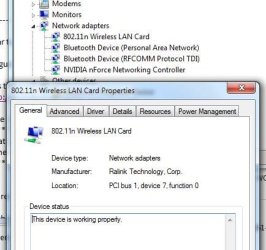
No red or yellow mark, device manager shows it operating normally: screen grab attached
 

Attachments

  • W322P in device manager.JPG
    W322P in device manager.JPG
    35.6 KB · Views: 28

My Computer My Computer

At a glance

Windows 7 home premium
OS
Windows 7 home premium
UPDATE:

I read elsewhere that anti-virus progs can interfere with driver installation, so tried this:

- Disabled AVG 2011, then uninstalled the wifi card
- rebooted into 'safe' mode (with networking), installed the wifi card and let windows supply the driver
- it works!
- rebooted into 'normal' mode and it still works - BUT THE PC HAS SLOWED TO A CRAWL
- by that I mean it takes between 40-80- seconds to execute every key press or mouse click

Re-did all the above twice using the latest drivers from Tenda's website and Ralinks website - same problem with each.

So, this leaves me thinking it's nothing to do with the Tenda card or it's drivers (these are very common cards and most people on the net post good things about them) but is a Windows 7 problem (well, no suprise there.....) compounded by AVG not allowing driver installation.

I'm baffled - any thoughts?
 

My Computer My Computer

At a glance

Windows 7 home premium
OS
Windows 7 home premium
AVG can become problematic on some systems with windows 7. This is a known, while it doesn't affect everyone it is common enough a problem to recognize.

There are AVG removal tools because of this, you should be able to just google one, and make sure you got it all out of there. (sometimes uninstallers just don't finish the job)
 

My Computer My Computer

At a glance

Windows 7 x64Intel i7 2600kG.skill Ripjaw 16gigs @ 1866Nvidia gtx580 (evga)
Computer Manufacturer/Model Number
Insane hobo technologies. ;-)
OS
Windows 7 x64
CPU
Intel i7 2600k
Motherboard
Asrock z68 extreme 4 gen 3
Memory
G.skill Ripjaw 16gigs @ 1866
Graphics Card(s)
Nvidia gtx580 (evga)
Sound Card
Integrated HD audio + hdmi
Monitor(s) Displays
24" ASUS widescreen + 42" insignia
Screen Resolution
1080p (1920x1080)
Hard Drives
128 Samsung 830
256 Samsung 840
3 x 1tb storage drive (various)
1 western digital 1tb (eSATA)
1 Seagate 1tb (eSATA)
PSU
1 kilowatt SLI/Crossfire rated Silverstone modular
Case
NZXT Phantom + additional 220 fan
Cooling
Zalmann
Keyboard
Microsoft wireless 3000 (v2)
Mouse
MS - wireless 5000 (bluetrack)
Internet Speed
depends on if you ask me or my provider.
Other Info
The above information is provided as is, and the author assumes no responsibility for issues it may cause with your sanity or fanboyism.
I have been having hotspot wifi connections problems ever since I got my new smart phone with hot spot. My Windows 7 laptop would connect and disconnect. Sometimes the network could not even be discovered. I got 2 usb wifi dongles and the same thing. Connect, disconnect and no network. I was struggling with this for weeks. Nobody had answers, one close, interference. Low and behold I turned off my security camera system and bang, bang bang I had three stable hotspot connections. I was ready to return the phone because it was useless, how I'm happy except.....What to do with my security cameras?
 

My Computer My Computer

At a glance

Windows 7 home premiumAthlon X24gigNvidia
Computer Manufacturer/Model Number
Compaq HP/ Presario CQ50
OS
Windows 7 home premium
CPU
Athlon X2
Motherboard
Nvidia
Memory
4gig
Graphics Card(s)
Nvidia
Sound Card
Built in
Monitor(s) Displays
TFT
Hard Drives
500gig Samsung
You have multiple devices operating on the same frequency it would appear.
Sorry but I don't have a solution for that :(
 

My Computer My Computer

At a glance

Windows 7 x64Intel i7 2600kG.skill Ripjaw 16gigs @ 1866Nvidia gtx580 (evga)
Computer Manufacturer/Model Number
Insane hobo technologies. ;-)
OS
Windows 7 x64
CPU
Intel i7 2600k
Motherboard
Asrock z68 extreme 4 gen 3
Memory
G.skill Ripjaw 16gigs @ 1866
Graphics Card(s)
Nvidia gtx580 (evga)
Sound Card
Integrated HD audio + hdmi
Monitor(s) Displays
24" ASUS widescreen + 42" insignia
Screen Resolution
1080p (1920x1080)
Hard Drives
128 Samsung 830
256 Samsung 840
3 x 1tb storage drive (various)
1 western digital 1tb (eSATA)
1 Seagate 1tb (eSATA)
PSU
1 kilowatt SLI/Crossfire rated Silverstone modular
Case
NZXT Phantom + additional 220 fan
Cooling
Zalmann
Keyboard
Microsoft wireless 3000 (v2)
Mouse
MS - wireless 5000 (bluetrack)
Internet Speed
depends on if you ask me or my provider.
Other Info
The above information is provided as is, and the author assumes no responsibility for issues it may cause with your sanity or fanboyism.
SOLVED IT.

I uninstalled AVG, then ran avgremover to strip out all the cr#p it left behind. (Then I found remnants of Kaspersky anti-virus installation from 2 years ago so used kavremover to get rid of that too.) Thanks for that, Maguscreed.

Then uninstalled wifi card and it's drivers, and rebooted into safe mode. Installed latest card drivers and it worked fine.

Re-booted into normal mode - still working fine - and then installed Avira Free version, which doesn't seem to have any problems with it as it's all working.

So, it looks like it was down to AVG having issues with driver installation, or at least THESE drivers as I've not experienced this before.
 

My Computer My Computer

At a glance

Windows 7 home premium
OS
Windows 7 home premium
yeah, people argue about which av is best to use. I just keep saying MSE it's not the best protection but it is far less likely to cause system problems like that.
 

My Computer My Computer

At a glance

Windows 7 x64Intel i7 2600kG.skill Ripjaw 16gigs @ 1866Nvidia gtx580 (evga)
Computer Manufacturer/Model Number
Insane hobo technologies. ;-)
OS
Windows 7 x64
CPU
Intel i7 2600k
Motherboard
Asrock z68 extreme 4 gen 3
Memory
G.skill Ripjaw 16gigs @ 1866
Graphics Card(s)
Nvidia gtx580 (evga)
Sound Card
Integrated HD audio + hdmi
Monitor(s) Displays
24" ASUS widescreen + 42" insignia
Screen Resolution
1080p (1920x1080)
Hard Drives
128 Samsung 830
256 Samsung 840
3 x 1tb storage drive (various)
1 western digital 1tb (eSATA)
1 Seagate 1tb (eSATA)
PSU
1 kilowatt SLI/Crossfire rated Silverstone modular
Case
NZXT Phantom + additional 220 fan
Cooling
Zalmann
Keyboard
Microsoft wireless 3000 (v2)
Mouse
MS - wireless 5000 (bluetrack)
Internet Speed
depends on if you ask me or my provider.
Other Info
The above information is provided as is, and the author assumes no responsibility for issues it may cause with your sanity or fanboyism.
yeah, people argue about which av is best to use. I just keep saying MSE it's not the best protection but it is far less likely to cause system problems like that.


I have the tenda W322P as well with exactly same problem i.e. says it's enabling when it isn't, remains defiantly disabled. In device manager it says it's working fine with no resource conflicts. It doesn't make any difference which driver I install (inc. windows default). I reinstalled windows 7 a couple of days ago so it is still very 'clean'. I avoided AVG, Avast etc etc and went with your advice of MSE. All was fine for about 48 hours whilst browsing a web page and then without warning: "you have no network connections" (or words to that effect). It's been like that ever since? This happens every time I re-install windows 7! I've run SFC utility but no problems found with the system integrity. I've repeatedly installed and uninstalled the device driver (with reboot) which makes no difference at all. Any suggestions please?

Back on LAN temporarily!

I can't see it being the hardware as it always works fine initially after a windows reinstallation, but isn't long before it breaks down yet again!!

Tried windows diagnostic/repair utility which reports that my network adapter has a problem; but as the device manager simultaneously reports that it is 'working fine' [contradictory or what?], I now suspect a windows 7 problem rather than anything to do with the Tenda hardware/software?

Booting into safety without the firewall enabled makes no difference as does with removing the wireless drivers prior to entering safety. System restore makes no difference either!
 
Last edited:

My Computer My Computer

At a glance

windows 8 Pro x64Intel Pentium 4 Prescott 90nm3.00GB Single-Channel DDR @ 199MHz (3-3-3-8)512MB ATI Radeon HD 3450 (AMD Computer Inc)
Computer type
PC/Desktop
Computer Manufacturer/Model Number
custom build
OS
windows 8 Pro x64
CPU
Intel Pentium 4 Prescott 90nm
Motherboard
ASUSTeK Computer Inc. P4C800-E (CPU 1)
Memory
3.00GB Single-Channel DDR @ 199MHz (3-3-3-8)
Graphics Card(s)
512MB ATI Radeon HD 3450 (AMD Computer Inc)
Sound Card
SoundMAX Integrated Digital Audio
Monitor(s) Displays
IPS235 (1440x900@59Hz)
Screen Resolution
1440x900@59Hz
Hard Drives
75GB Maxtor 6V080E0 ATA Device (SATA)
466GB Hitachi HDP725050GLA360 ATA Device (SATA)
Check the BIOS

I was having an issue where The wireless card was disabled when pressing fn +f5. Device manager indicated the wireless was active and enabled.
Checking the BIOS indicated that the wireless adapter was set to off. Turning it on fixed the issue.
 

My Computer My Computer

At a glance

Windows 7 Professional x64
Computer type
PC/Desktop
OS
Windows 7 Professional x64
Back
Top