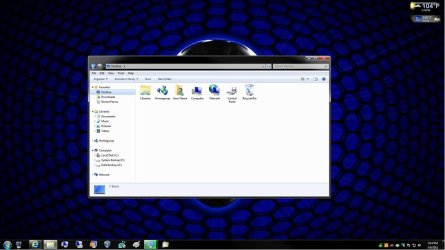
Icons on desktop which shouldn't be there

lukair

New member
Local time
4:38 PM
Messages
12
I looked for this on the web, but still can't get this fixed.

I have a desktop which has only recycle bin and my computer as system icons. Then I created(as I always do in all windows systems) a desktop shortcut which is a simple folder shortcut. The problem is that in this folder, there are icons that shouldn't be there, as they ain't on the desktop. Namely, my profile folder and control panel shortcut.

Here is a screenshot
beztytuubpg.png


When I save a file from the internet, the situation is similar, although there is just 1 unwanted icon. I did try to fix something in register by removing keys in the
HKEY_LOCAL_MACHINE\SOFTWARE\Microsoft\Windows\CurrentVersion\Explorer\Desktop\NameSpace
as I found in the internet, but it still seems like it works in random. Even if I delete all the keys there, some icons remain.

Anybody knows how to get rid of those icons? It drives me nuts.
 
Last edited by a moderator:

My Computer My Computer

At a glance

7 32bit
OS
7 32bit
I dunno how to get rid of them, but I think they're suppose to be there. I have them in my desktop folder, too, even though they're not on the desktop itself.
 

My Computer My Computer

At a glance

Windows 7 Ultimate x64
OS
Windows 7 Ultimate x64
Welcome to Seven forums Lukair.
Your example appears normal. My desktop folder had items which do not appear either. I advise you not to try to delete them, they are harmless and needed by Windows to operate.
If you don't want to see them, right click the offenders|properties and apply the Hidden attribute.
 

My Computer My Computer

At a glance

Windows 7 Ultimate X64 SP1Intel i5-2550K, Differing ~4.4-4.8GHz No buil...16GB G.Skill Sniper 1866MHz @ 2133MHz 2x8GBASUS GTX650TIB-DC2OC-2GD5, (650TI Boost)
Computer type
PC/Desktop
Computer Manufacturer/Model Number
Home Built Desktop By DataTech
OS
Windows 7 Ultimate X64 SP1
CPU
Intel i5-2550K, Differing ~4.4-4.8GHz No built in GPU
Motherboard
ASUS P8Z68-V PRO/GEN3
Memory
16GB G.Skill Sniper 1866MHz @ 2133MHz 2x8GB
Graphics Card(s)
ASUS GTX650TIB-DC2OC-2GD5, (650TI Boost)
Sound Card
Onboard Realtek 5-1
Monitor(s) Displays
Samsung P2570HD
Screen Resolution
1920x1080
Hard Drives
Samsung 840 Pro 256GB SSD for OS, 500GB Seagate Constellation (Enterprise drive) for Data
PSU
Corsair HX650W
Case
Inwin Dragon Rider
Cooling
Hyper 212 EVO w/two Noctua fans, push-pull, @1300 RPM
Keyboard
E-Z Eyes, bright yellow keys with large characters
Mouse
steelseries SENSEI Laser Pro Gaming
Internet Speed
48-51Mbs Mbs down, 11 Mbs up Xfinity Cable
Antivirus
Norton Internet Security 2013
Browser
IE 10, Opera, Pale Moon if needed
Other Info
4 case fans, LG BluRay-RE, ASUS DVD-RW, Mr. Fusion power supply, 1.21 gigawatts.
I dont have any icons showing on my desktop and the users\desktop folder is always empty, however the desktop link in the navigation bar always opens with 6 items (recycle bin/user folder/computer/libraries/control panel/network)I think (hope) this is just the default behaviour of the link\desktop folder.Although occasionally ive noticed shortcuts in the links\desktop folder that arnt in the users\desktop folder.Not sure why.

Danny
 

My Computer My Computer

At a glance

Windows 7 Home Premium x64 SP1intel(R)core(TM)2 duo CPU T6600 @ 2.20GHz3 gb ddr3ati radeon hd4570/512mb
Computer Manufacturer/Model Number
acer aspire 5935g
OS
Windows 7 Home Premium x64 SP1
CPU
intel(R)core(TM)2 duo CPU T6600 @ 2.20GHz
Motherboard
intel gm45/gm47 revision 07
Memory
3 gb ddr3
Graphics Card(s)
ati radeon hd4570/512mb
Monitor(s) Displays
lop156wh2-tle1 15.3 flat
Screen Resolution
1366x768
Hard Drives
OCZ-Agility3 60gig ssd
320gig external hdd
500gig external hdd
Mouse
Optical
Internet Speed
30Mbps Down/30Mbps Up
Thanks guys for replies. I appriciate that you take time to respond.

Now I don't want to sound ungratefull, and don't take it the wrong way, but often on the web it can be seen, that whenever somebody doesn't know how to fix some problem, questions arise like "why do you want this", "what's wrong with it that you want to change" and so on ;)

Again, don't take it the wrong way, but if I did post this message I DO want to change it :P, I didn't create a thread to debate about it ;)

Going back to the issue at hand...


Welcome to Seven forums Lukair.
If you don't want to see them, right click the offenders|properties and apply the Hidden attribute.
I can't do that, because those icons seem untypical. I don't have a "properties" option on them, when I click RMB.

If I could make them "dissapear" it would be fine as well. I just don't want them there as I never, ever use it.

ps. Thanks Britton for a warm welcome.

I dont have any icons showing on my desktop and the users\desktop folder is always empty, however the desktop link in the navigation bar always opens with 6 items (recycle bin/user folder/computer/libraries/control panel/network)I think (hope) this is just the default behaviour of the link\desktop folder.Although occasionally ive noticed shortcuts in the links\desktop folder that arnt in the users\desktop folder.Not sure why.

Danny
Yep, same here. If I go to my folder on C:\, and then to desktop, those icons are not there. What's better, the "My computer" and "Bin" icons are gone too, which is just perfect. However, when I do a shortcut to the same folder, no matter where I put it(it can be even on C:\), somehow the icons I shouldn't see, are shown there.
 

My Computer My Computer

At a glance

7 32bit
OS
7 32bit
Hi Lukair

Just right click c\username\desktop folder and send a shortcut of your desktop folder to your desktop.If that makes any sense at all lol.That way the only folder that should be in your shortcut will be desktop shortcut obviously but this folder can then be hidden which will give you the empty folder I think your trying to achieve.

Danny
 

My Computer My Computer

At a glance

Windows 7 Home Premium x64 SP1intel(R)core(TM)2 duo CPU T6600 @ 2.20GHz3 gb ddr3ati radeon hd4570/512mb
Computer Manufacturer/Model Number
acer aspire 5935g
OS
Windows 7 Home Premium x64 SP1
CPU
intel(R)core(TM)2 duo CPU T6600 @ 2.20GHz
Motherboard
intel gm45/gm47 revision 07
Memory
3 gb ddr3
Graphics Card(s)
ati radeon hd4570/512mb
Monitor(s) Displays
lop156wh2-tle1 15.3 flat
Screen Resolution
1366x768
Hard Drives
OCZ-Agility3 60gig ssd
320gig external hdd
500gig external hdd
Mouse
Optical
Internet Speed
30Mbps Down/30Mbps Up
Thanks for your reply danny.

Hi Lukair

Just right click c\username\desktop folder and send a shortcut of your desktop folder to your desktop.If that makes any sense at all lol.That way the only folder that should be in your shortcut will be desktop shotcut[...]
Why it should be the only shortcut there?

Sorry danny, but I'm finding it hard to follow :/
 

My Computer My Computer

At a glance

7 32bit
OS
7 32bit
No worries its awkward to explain to but ill try.
If you create a shortcut to your desktop on your desktop when you open your shortcut you will have a desktop shortcut in there as the shortcut is on your desktop.Its easier to understand if you do it yourself.Just create the shortcut on your desktop and open it you will see what I mean.

Danny
 

My Computer My Computer

At a glance

Windows 7 Home Premium x64 SP1intel(R)core(TM)2 duo CPU T6600 @ 2.20GHz3 gb ddr3ati radeon hd4570/512mb
Computer Manufacturer/Model Number
acer aspire 5935g
OS
Windows 7 Home Premium x64 SP1
CPU
intel(R)core(TM)2 duo CPU T6600 @ 2.20GHz
Motherboard
intel gm45/gm47 revision 07
Memory
3 gb ddr3
Graphics Card(s)
ati radeon hd4570/512mb
Monitor(s) Displays
lop156wh2-tle1 15.3 flat
Screen Resolution
1366x768
Hard Drives
OCZ-Agility3 60gig ssd
320gig external hdd
500gig external hdd
Mouse
Optical
Internet Speed
30Mbps Down/30Mbps Up
Hello Lukair, and welcome to Seven Forums.

Double check using the tutorial below to make sure that the boxes for these icons are unchecked in the Desktop Icon Settings window, or use the REG files in OPTION TWO to try and remove the desktop icons that you do not want.

http://www.sevenforums.com/tutorials/919-desktop-icons-add-remove.html

1514d1229144700-desktop-icons-add-remove-add_or_remove.jpg


Hope this helps,
Shawn
 

My Computer My Computer

At a glance

64-bit Windows 11 Pro for WorkstationsIntel i7-8700K OC'd to 5 GHz64 GB (4x16GB) G.SKILL TridentZ RGB DDR4 3600...ASUS ROG-STRIX-GTX1080TI-O11G-GAMING
Computer type
PC/Desktop
Computer Manufacturer/Model Number
Self built custom
OS
64-bit Windows 11 Pro for Workstations
CPU
Intel i7-8700K OC'd to 5 GHz
Motherboard
ASUS ROG Maximus XI Formula Z390
Memory
64 GB (4x16GB) G.SKILL TridentZ RGB DDR4 3600 MHz
Graphics Card(s)
ASUS ROG-STRIX-GTX1080TI-O11G-GAMING
Sound Card
Integrated
Monitor(s) Displays
2 x Samsung Odyssey G7 27"
Screen Resolution
2560x1440
Hard Drives
1TB Samsung 990 PRO M.2,
4TB Samsung 990 PRO PRO M.2,
TerraMaster F8 SSD Plus NAS
PSU
Seasonic Prime Titanium 850W
Case
Thermaltake Core P3
Cooling
Corsair Hydro H115i
Keyboard
Logitech wireless K800
Mouse
Logitech MX Master 4
Internet Speed
2 Gb/s Download and 100 Mb/s Upload
Antivirus
Malwarebyte Anti-Malware Premium
Browser
Google Chrome
Other Info
Logitech Z625 speaker system,
Logitech BRIO 4K Pro webcam,
HP Color LaserJet Pro MFP M477fdn,
APC SMART-UPS RT 1000 XL - SURT1000XLI,
Galaxy S23 Plus phone
No worries its awkward to explain to but ill try.
If you create a shortcut to your desktop on your desktop when you open your shortcut you will have a desktop shortcut in there as the shortcut is on your desktop.Its easier to understand if you do it yourself.Just create the shortcut on your desktop and open it you will see what I mean.

Danny
Let me try to follow you. You want me to create a shortcut to C:\...\profile\desktop and then put this very shortcut on the windows desktop?

If so, how this will fix the issue? If I do that, my screenshot will look the same as in the first post, just with the addition of a desktop shortcut ;)


Hello Lukair, and welcome to Seven Forums.

Double check using the tutorial below to make sure that the boxes for these icons are unchecked in the Desktop Icon Settings window, or use the REG files in OPTION TWO to try and remove the desktop icons that you do not want.

http://www.sevenforums.com/tutorials/919-desktop-icons-add-remove.html

1514d1229144700-desktop-icons-add-remove-add_or_remove.jpg


Hope this helps,
Shawn
That's the first thing I checked Brink. I also tried to check all the icons, and then remove them afterwards.

The thing is... it does work, but when we talk about the windows desktop. Whichever icons there are set in personalized menu, then I will have those icons on the windows desktop. But still, those settings seems that have no bearing, if I do a shortcut to the desktop FOLDER.
 

My Computer My Computer

At a glance

7 32bit
OS
7 32bit
Lukair,

I believe that I know what location that you mean now. If so, then this is normal and they cannot be removed here. Notice my desktop does not have any icons on it, but if you click on Desktop in Favorites it shows them.

What target location did you use to create your Desktop shortcut?

If you do not want to see them, then you could use the target location below instead for the Desktop shortcut.

C:\Users\user-name\Desktop

Desktop.jpg
 
Last edited:

My Computer My Computer

At a glance

64-bit Windows 11 Pro for WorkstationsIntel i7-8700K OC'd to 5 GHz64 GB (4x16GB) G.SKILL TridentZ RGB DDR4 3600...ASUS ROG-STRIX-GTX1080TI-O11G-GAMING
Computer type
PC/Desktop
Computer Manufacturer/Model Number
Self built custom
OS
64-bit Windows 11 Pro for Workstations
CPU
Intel i7-8700K OC'd to 5 GHz
Motherboard
ASUS ROG Maximus XI Formula Z390
Memory
64 GB (4x16GB) G.SKILL TridentZ RGB DDR4 3600 MHz
Graphics Card(s)
ASUS ROG-STRIX-GTX1080TI-O11G-GAMING
Sound Card
Integrated
Monitor(s) Displays
2 x Samsung Odyssey G7 27"
Screen Resolution
2560x1440
Hard Drives
1TB Samsung 990 PRO M.2,
4TB Samsung 990 PRO PRO M.2,
TerraMaster F8 SSD Plus NAS
PSU
Seasonic Prime Titanium 850W
Case
Thermaltake Core P3
Cooling
Corsair Hydro H115i
Keyboard
Logitech wireless K800
Mouse
Logitech MX Master 4
Internet Speed
2 Gb/s Download and 100 Mb/s Upload
Antivirus
Malwarebyte Anti-Malware Premium
Browser
Google Chrome
Other Info
Logitech Z625 speaker system,
Logitech BRIO 4K Pro webcam,
HP Color LaserJet Pro MFP M477fdn,
APC SMART-UPS RT 1000 XL - SURT1000XLI,
Galaxy S23 Plus phone
Lukair,

I believe that I know what location that you mean now. If so, then this is normal and they cannot be removed here.
What a shame...

I'm not one of those who bit** about microsoft and still use their software 24/7, but I must tell that they really try sometimes to force their ideas as much as they possibly can :P

Notice my desktop does not have any icons on it, but if you click on Desktop in Favorites it shows them.

What target location did you use to create your Desktop shortcut?
Just went to C:\...\Desktop and create shortcut to that folder.

If you do not want to see them, then you could use the target location below instead for the Desktop shortcut.

%UserProfile%\Desktop
Doesn't work.

Anyways... I believe that's simply a bug of win7. Any shortcut to the folder you will make, it has only the files/folders it has inside. But my theory is that when you create a desktop shortcut the settings you have in the personalization menu are not taken into account, that's why all those icons are there.

Because what would be the reason to put those icons there if you make a shortcut, but when you go directly to C:\...\Desktop there are just files/folders you have on your windows desktop? ;)
 

My Computer My Computer

At a glance

7 32bit
OS
7 32bit
I would guess that those icons show in the Desktop folder to allow them to display on the Desktop is so selected, as in Brinks post.
 

My Computer My Computer

At a glance

Windows 7 Ultimate X64 SP1Intel i5-2550K, Differing ~4.4-4.8GHz No buil...16GB G.Skill Sniper 1866MHz @ 2133MHz 2x8GBASUS GTX650TIB-DC2OC-2GD5, (650TI Boost)
Computer type
PC/Desktop
Computer Manufacturer/Model Number
Home Built Desktop By DataTech
OS
Windows 7 Ultimate X64 SP1
CPU
Intel i5-2550K, Differing ~4.4-4.8GHz No built in GPU
Motherboard
ASUS P8Z68-V PRO/GEN3
Memory
16GB G.Skill Sniper 1866MHz @ 2133MHz 2x8GB
Graphics Card(s)
ASUS GTX650TIB-DC2OC-2GD5, (650TI Boost)
Sound Card
Onboard Realtek 5-1
Monitor(s) Displays
Samsung P2570HD
Screen Resolution
1920x1080
Hard Drives
Samsung 840 Pro 256GB SSD for OS, 500GB Seagate Constellation (Enterprise drive) for Data
PSU
Corsair HX650W
Case
Inwin Dragon Rider
Cooling
Hyper 212 EVO w/two Noctua fans, push-pull, @1300 RPM
Keyboard
E-Z Eyes, bright yellow keys with large characters
Mouse
steelseries SENSEI Laser Pro Gaming
Internet Speed
48-51Mbs Mbs down, 11 Mbs up Xfinity Cable
Antivirus
Norton Internet Security 2013
Browser
IE 10, Opera, Pale Moon if needed
Other Info
4 case fans, LG BluRay-RE, ASUS DVD-RW, Mr. Fusion power supply, 1.21 gigawatts.
If you do not want to see them, then you could use the target location below instead for the Desktop shortcut.

%UserProfile%\Desktop
Doesn't work.

Anyways... I believe that's simply a bug of win7. Any shortcut to the folder you will make, it has only the files/folders it has inside. But my theory is that when you create a desktop shortcut the settings you have in the personalization menu are not taken into account, that's why all those icons are there.

Because what would be the reason to put those icons there if you make a shortcut, but when you go directly to C:\...\Desktop there are just files/folders you have on your windows desktop? ;)

Sorry, it should have been this location below instead.

C:\Users\user-name\Desktop
 

My Computer My Computer

At a glance

64-bit Windows 11 Pro for WorkstationsIntel i7-8700K OC'd to 5 GHz64 GB (4x16GB) G.SKILL TridentZ RGB DDR4 3600...ASUS ROG-STRIX-GTX1080TI-O11G-GAMING
Computer type
PC/Desktop
Computer Manufacturer/Model Number
Self built custom
OS
64-bit Windows 11 Pro for Workstations
CPU
Intel i7-8700K OC'd to 5 GHz
Motherboard
ASUS ROG Maximus XI Formula Z390
Memory
64 GB (4x16GB) G.SKILL TridentZ RGB DDR4 3600 MHz
Graphics Card(s)
ASUS ROG-STRIX-GTX1080TI-O11G-GAMING
Sound Card
Integrated
Monitor(s) Displays
2 x Samsung Odyssey G7 27"
Screen Resolution
2560x1440
Hard Drives
1TB Samsung 990 PRO M.2,
4TB Samsung 990 PRO PRO M.2,
TerraMaster F8 SSD Plus NAS
PSU
Seasonic Prime Titanium 850W
Case
Thermaltake Core P3
Cooling
Corsair Hydro H115i
Keyboard
Logitech wireless K800
Mouse
Logitech MX Master 4
Internet Speed
2 Gb/s Download and 100 Mb/s Upload
Antivirus
Malwarebyte Anti-Malware Premium
Browser
Google Chrome
Other Info
Logitech Z625 speaker system,
Logitech BRIO 4K Pro webcam,
HP Color LaserJet Pro MFP M477fdn,
APC SMART-UPS RT 1000 XL - SURT1000XLI,
Galaxy S23 Plus phone
Sorry, it should have been this location below instead.

C:\Users\user-name\Desktop
Oh!

You mean like I should literaly create a shortcut to "C:\Users\user-name\Desktop"??

If so, it doesn't work. And if you meant, to create a shortcut to a Desktop folder in my(lets say it's Tom) user folder, and by this token if you mean C:\Users\Tom\Desktop, then that's what I meant all the time. This is how I created a shortcut to begin with ;)
 

My Computer My Computer

At a glance

7 32bit
OS
7 32bit
LOL, yep to the user folder itself. :)

The variable %userprofile% one will give you the icons in it.
 

My Computer My Computer

At a glance

64-bit Windows 11 Pro for WorkstationsIntel i7-8700K OC'd to 5 GHz64 GB (4x16GB) G.SKILL TridentZ RGB DDR4 3600...ASUS ROG-STRIX-GTX1080TI-O11G-GAMING
Computer type
PC/Desktop
Computer Manufacturer/Model Number
Self built custom
OS
64-bit Windows 11 Pro for Workstations
CPU
Intel i7-8700K OC'd to 5 GHz
Motherboard
ASUS ROG Maximus XI Formula Z390
Memory
64 GB (4x16GB) G.SKILL TridentZ RGB DDR4 3600 MHz
Graphics Card(s)
ASUS ROG-STRIX-GTX1080TI-O11G-GAMING
Sound Card
Integrated
Monitor(s) Displays
2 x Samsung Odyssey G7 27"
Screen Resolution
2560x1440
Hard Drives
1TB Samsung 990 PRO M.2,
4TB Samsung 990 PRO PRO M.2,
TerraMaster F8 SSD Plus NAS
PSU
Seasonic Prime Titanium 850W
Case
Thermaltake Core P3
Cooling
Corsair Hydro H115i
Keyboard
Logitech wireless K800
Mouse
Logitech MX Master 4
Internet Speed
2 Gb/s Download and 100 Mb/s Upload
Antivirus
Malwarebyte Anti-Malware Premium
Browser
Google Chrome
Other Info
Logitech Z625 speaker system,
Logitech BRIO 4K Pro webcam,
HP Color LaserJet Pro MFP M477fdn,
APC SMART-UPS RT 1000 XL - SURT1000XLI,
Galaxy S23 Plus phone
Back
Top