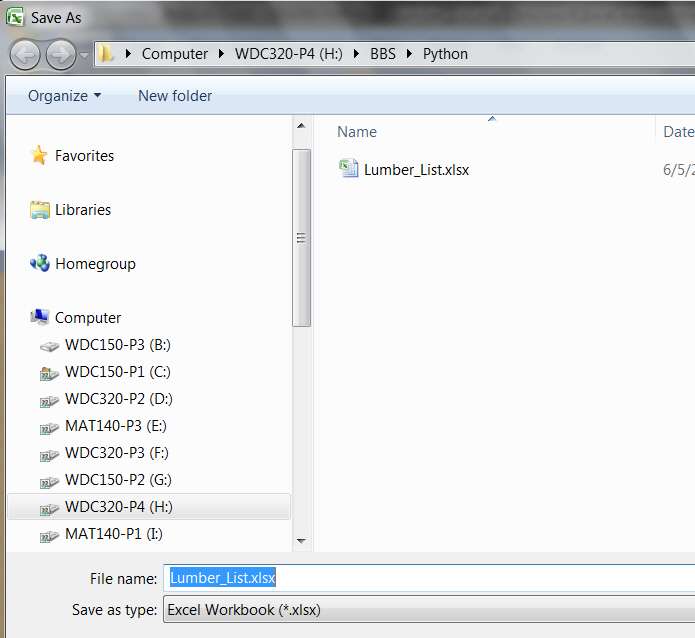
Can Save to Desktop But Can't see it

Many people use Fences without any conflicts or problems concerning saving items to the Desktop. Perhaps you just got a corrupted download of Fences. Why don't you try uninstalling it (and be sure you get all of the little remnants that are sometimes left behind!), and then reinstalling it? If you get a clean, uncorrupted installation, you might still be able to use the app without any problem with saving items to the Desktop. If you like Fences so much, it might be worth a try. If it still causes problems you can always delete it again.
Uninstalling Fences did NOT work. Problem of Desktop not auto refreshing persists.

Does anyone have a fix for this ? Its driving me nuts ! :cry:
 

My Computer My Computer

At a glance

Windows 7 32 bit and 64 bit ProfessionalIntel Pentium 4 ; AMD SEMPRON 3600+2.5GB ; 4GBNVIDIA GS8400
Computer Manufacturer/Model Number
IBM 8291-E2U ; 9120-CTO ; 4061-BL2
OS
Windows 7 32 bit and 64 bit Professional
CPU
Intel Pentium 4 ; AMD SEMPRON 3600+
Memory
2.5GB ; 4GB
Graphics Card(s)
NVIDIA GS8400
Monitor(s) Displays
HP W2207
Can you save to one of the Fences you've created?
 

My Computer My Computer

At a glance

Windows 7 Ultimate X64 SP1Intel i5-2550K, Differing ~4.4-4.8GHz No buil...16GB G.Skill Sniper 1866MHz @ 2133MHz 2x8GBASUS GTX650TIB-DC2OC-2GD5, (650TI Boost)
Computer type
PC/Desktop
Computer Manufacturer/Model Number
Home Built Desktop By DataTech
OS
Windows 7 Ultimate X64 SP1
CPU
Intel i5-2550K, Differing ~4.4-4.8GHz No built in GPU
Motherboard
ASUS P8Z68-V PRO/GEN3
Memory
16GB G.Skill Sniper 1866MHz @ 2133MHz 2x8GB
Graphics Card(s)
ASUS GTX650TIB-DC2OC-2GD5, (650TI Boost)
Sound Card
Onboard Realtek 5-1
Monitor(s) Displays
Samsung P2570HD
Screen Resolution
1920x1080
Hard Drives
Samsung 840 Pro 256GB SSD for OS, 500GB Seagate Constellation (Enterprise drive) for Data
PSU
Corsair HX650W
Case
Inwin Dragon Rider
Cooling
Hyper 212 EVO w/two Noctua fans, push-pull, @1300 RPM
Keyboard
E-Z Eyes, bright yellow keys with large characters
Mouse
steelseries SENSEI Laser Pro Gaming
Internet Speed
48-51Mbs Mbs down, 11 Mbs up Xfinity Cable
Antivirus
Norton Internet Security 2013
Browser
IE 10, Opera, Pale Moon if needed
Other Info
4 case fans, LG BluRay-RE, ASUS DVD-RW, Mr. Fusion power supply, 1.21 gigawatts.
This thread is a little hard to follow/work with.... It was started by "raceman3" with a Pdf not showing on desktop but now looks like we are dealing with a issue for "porkr" ?? Is it the same issue? pdf? desktop auto-refresh? Some of the ideas in this thread may not help/have to do with each problem at the same time.
 

My Computer My Computer

At a glance

Windows 7 Ultimate 64bitIntel Core i7-2600K Sandy Bridge 3.4GHz (@4.5...G.SKILL Ripjaws X Series 16GB 1600Mhz (4 x 4G...x2 EVGA GeForce GTX 760's w/ACXCoolers in SLI...
Computer type
PC/Desktop
Computer Manufacturer/Model Number
Jeepmann/Custom Built
OS
Windows 7 Ultimate 64bit
CPU
Intel Core i7-2600K Sandy Bridge 3.4GHz (@[email protected])
Motherboard
Asus Maximus IV Extreme LGA 1155 Intel P67
Memory
G.SKILL Ripjaws X Series 16GB 1600Mhz (4 x 4GB) (Stock)
Graphics Card(s)
x2 EVGA GeForce GTX 760's w/ACXCoolers in SLI Surround
Sound Card
On-Board
Monitor(s) Displays
3x Acer 24" HDMI Widescreen LCD Monitor
Screen Resolution
3@ 1920x1080 (5760x1080 In Surround)
Hard Drives
Samsung 830 128gb ssd
Western Digital Caviar Black 640GB 7200 RPM
Western Digital Caviar Black 500GB 7200 RPM
Seagate 2tb 7200 RPM
PSU
COOLER MASTER Silent Pro 1000W
Case
COOLER MASTER HAF X Black
Cooling
CORSAIR Hydro H70
Keyboard
Logitech G510
Mouse
Zalman M300
Internet Speed
100mbps-ish Down & 5mbps-ish Up
Other Info
I installed the stock 140mm case fan outside of case then installed the H70+ 1 of its 120mm fans inside case. Used the 2nd 120mm from the H70 to go in the Gpu tunnel.
230mm Front,200mm side,200mm top,120mm Gpu tunnel,120mm&140mm on H70.
Yup, noobies see a topic and post their issues in someone else's thread. but we try to give some help. Also raceman3's last post was a week ago.
 

My Computer My Computer

At a glance

Windows 7 Ultimate X64 SP1Intel i5-2550K, Differing ~4.4-4.8GHz No buil...16GB G.Skill Sniper 1866MHz @ 2133MHz 2x8GBASUS GTX650TIB-DC2OC-2GD5, (650TI Boost)
Computer type
PC/Desktop
Computer Manufacturer/Model Number
Home Built Desktop By DataTech
OS
Windows 7 Ultimate X64 SP1
CPU
Intel i5-2550K, Differing ~4.4-4.8GHz No built in GPU
Motherboard
ASUS P8Z68-V PRO/GEN3
Memory
16GB G.Skill Sniper 1866MHz @ 2133MHz 2x8GB
Graphics Card(s)
ASUS GTX650TIB-DC2OC-2GD5, (650TI Boost)
Sound Card
Onboard Realtek 5-1
Monitor(s) Displays
Samsung P2570HD
Screen Resolution
1920x1080
Hard Drives
Samsung 840 Pro 256GB SSD for OS, 500GB Seagate Constellation (Enterprise drive) for Data
PSU
Corsair HX650W
Case
Inwin Dragon Rider
Cooling
Hyper 212 EVO w/two Noctua fans, push-pull, @1300 RPM
Keyboard
E-Z Eyes, bright yellow keys with large characters
Mouse
steelseries SENSEI Laser Pro Gaming
Internet Speed
48-51Mbs Mbs down, 11 Mbs up Xfinity Cable
Antivirus
Norton Internet Security 2013
Browser
IE 10, Opera, Pale Moon if needed
Other Info
4 case fans, LG BluRay-RE, ASUS DVD-RW, Mr. Fusion power supply, 1.21 gigawatts.
This thread is a little hard to follow/work with.... It was started by "raceman3" with a Pdf not showing on desktop but now looks like we are dealing with a issue for "porkr" ?? Is it the same issue? pdf? desktop auto-refresh? Some of the ideas in this thread may not help/have to do with each problem at the same time.

Yes --- its ANY file tyep saved to the desktop -- PDF, XLS, DOC, etal.

p.s. I did not mean to hijack raceman3's thread --- but his problem sounded like mine and I believe they are the same. If nescessary, I will start a new thread ...
 

My Computer My Computer

At a glance

Windows 7 32 bit and 64 bit ProfessionalIntel Pentium 4 ; AMD SEMPRON 3600+2.5GB ; 4GBNVIDIA GS8400
Computer Manufacturer/Model Number
IBM 8291-E2U ; 9120-CTO ; 4061-BL2
OS
Windows 7 32 bit and 64 bit Professional
CPU
Intel Pentium 4 ; AMD SEMPRON 3600+
Memory
2.5GB ; 4GB
Graphics Card(s)
NVIDIA GS8400
Monitor(s) Displays
HP W2207
I'm a bit puzzled.

Any "save as..." dialog will show you the complete fully-qualified path up in the Address Bar area, identifying WHERE you are putting it (i.e. into what folder).

Furthermore, any "save as..." dialog which can be navigated to move to a different location can be fully expanded (in what I assume are the two Explorer View panes, on left and right) so that you can control that target save location in that way as well... which is simultaneously confirmed up in the Address Bar.

So, isn't it 100% explicitly known in advance WHERE the saved file is going? If it's one of the assorted "desktop" targets, what is the fully qualified path down to the \Desktop?? That should tell you in advance WHERE you're putting it?

And since you should know 100% that it is going to that precise location folder, why shouldn't the "reverse" mechanism (i.e. using Windows Explorer to examine that location) also show that exact location and its contents? And if you've done that and the file you just saved there is NOT visible, well I guess that's the real mystery. Is that the real mystery???


Initially I'd read this thread as a question about base MS Win7 functionality, but then there was a 3rd-party desktop enhancer product injected into the story.

Is this an issue with Win7? Or is this an issue with the 3rd-party product.
 

My Computer My Computer

At a glance

Windows 7 Pro x64 (1), Win7 Pro X64 (2)i5-3350p 3.1Ghz/6MB-cache (1); E8400 3.0Ghz/6...8GB PC3-12800 DDR3 (1); 4GB PC3-10600 DDR3 (2)ATI HD7750 (1), (see TV cards); ATI R7 250 (2)
Computer type
PC/Desktop
Computer Manufacturer/Model Number
Home-built, two systems (1) and (2)
OS
Windows 7 Pro x64 (1), Win7 Pro X64 (2)
CPU
i5-3350p 3.1Ghz/6MB-cache (1); E8400 3.0Ghz/6MB-cache (2)
Motherboard
ASUS P8Z77-V Pro (1); ASUS P5Q3 (2)
Memory
8GB PC3-12800 DDR3 (1); 4GB PC3-10600 DDR3 (2)
Graphics Card(s)
ATI HD7750 (1), (see TV cards); ATI R7 250 (2)
Sound Card
Realtek ALC892 HD Audio (1); Realtek ALC1200 HD Audio (2)
Monitor(s) Displays
Eizo HD2441W LCD, Eizo S2433W (1); Eizo 24" S2433W (2)
Screen Resolution
1920x1200, 1920x1200 (1); 1920x1200 (2)
Hard Drives
(1) 1TB SATA-II (7200RPM), 2x2TB SATA-III (7200RPM), 250GB SATA-III (10000RPM) for OS; 2x2TB external USB 3.0

(2) 320GB SATA-II (7200RPM), 750GB SATA-II (7200RPM), 150GB SATA-II (10000RPM) for OS; 2TB external USB 3.0
PSU
Nesteq ECS-6001 600W (1); Nesteq ECS-5001 500W (2)
Case
Acousti-Case 360 (1) and (2)
Cooling
Noctua NH-U12P SE2 for CPU, 2x120mm case fans (1) and (2)
Keyboard
IBM PS/2 (1) and (2)
Mouse
Logitech MX Revolution wireless (1); Microsoft wired (2)
Internet Speed
100mbps down / 10mbps up
Antivirus
Microsoft Security Essentials; Malwarebyte Anti-Malware Pro
Browser
Firefox
Other Info
Ceton InfiniTV 4-tuner cablecard-enabled TV card as well as Hauppauge HVR-2250 OTA/ATSC 2-tuner TV card in (1), running under Win7 WMC
@ porkr... No biggie, though it's best to always start your own thread for YOUR issue.

But since we are already here,...Give this a go.
Open any folder and go to "Organize>Folder and Search Options. On the "View" tab Under "Advanced setting>Hidden files and Folders. Mark the box next to "Show hidden files,folders, and drives. Also UN-check the box next to "Hide protected operating system files". Now go back to your "Desktop" their should now be One or more "Desktop.ini" files. Delete them all. Now Reboot your system.

Please do not forget to go and change the above settings back to "Hide and Hidden"
 

My Computer My Computer

At a glance

Windows 7 Ultimate 64bitIntel Core i7-2600K Sandy Bridge 3.4GHz (@4.5...G.SKILL Ripjaws X Series 16GB 1600Mhz (4 x 4G...x2 EVGA GeForce GTX 760's w/ACXCoolers in SLI...
Computer type
PC/Desktop
Computer Manufacturer/Model Number
Jeepmann/Custom Built
OS
Windows 7 Ultimate 64bit
CPU
Intel Core i7-2600K Sandy Bridge 3.4GHz (@[email protected])
Motherboard
Asus Maximus IV Extreme LGA 1155 Intel P67
Memory
G.SKILL Ripjaws X Series 16GB 1600Mhz (4 x 4GB) (Stock)
Graphics Card(s)
x2 EVGA GeForce GTX 760's w/ACXCoolers in SLI Surround
Sound Card
On-Board
Monitor(s) Displays
3x Acer 24" HDMI Widescreen LCD Monitor
Screen Resolution
3@ 1920x1080 (5760x1080 In Surround)
Hard Drives
Samsung 830 128gb ssd
Western Digital Caviar Black 640GB 7200 RPM
Western Digital Caviar Black 500GB 7200 RPM
Seagate 2tb 7200 RPM
PSU
COOLER MASTER Silent Pro 1000W
Case
COOLER MASTER HAF X Black
Cooling
CORSAIR Hydro H70
Keyboard
Logitech G510
Mouse
Zalman M300
Internet Speed
100mbps-ish Down & 5mbps-ish Up
Other Info
I installed the stock 140mm case fan outside of case then installed the H70+ 1 of its 120mm fans inside case. Used the 2nd 120mm from the H70 to go in the Gpu tunnel.
230mm Front,200mm side,200mm top,120mm Gpu tunnel,120mm&140mm on H70.
surely a way to have searched for the file would have been to check the downloads history on your browser ,in firefox i click downloads and a window opens and shows me all the recent downloads then i can right click a download and get the option to open containing folder ,this will open the location of the file
 

My Computer My Computer

At a glance

Microsoft Windows 7 Home Premium 64-bit 7600IIx4 amd athelon 635 processor2x2gbati radeon HD 5450
Computer Manufacturer/Model Number
Hewlett packard/p6512uk
OS
Microsoft Windows 7 Home Premium 64-bit 7600
CPU
IIx4 amd athelon 635 processor
Motherboard
FOXCONN 2AA9
Memory
2x2gb
Graphics Card(s)
ati radeon HD 5450
Sound Card
(1) Realtek High Definition Audio (2) AMD High Definition
Monitor(s) Displays
samsung lcd tv 32"
Screen Resolution
1360x 768
Hard Drives
(1) WDC WD10 01FAES-60Z2A0 SATA Disk Device (2) Maxtor OneTouch USB Device (3) ST310003 33AS USB Device (4) WD My Book 1111 USB Device
PSU
?
Cooling
air!
Keyboard
wireless hp
Mouse
wireless Hp,optical
Internet Speed
1.10mb/s
Antivirus
MSE
Browser
Firefox
@ porkr... No biggie, though it's best to always start your own thread for YOUR issue.

But since we are already here,...Give this a go.
Open any folder and go to "Organize>Folder and Search Options. On the "View" tab Under "Advanced setting>Hidden files and Folders. Mark the box next to "Show hidden files,folders, and drives. Also UN-check the box next to "Hide protected operating system files". Now go back to your "Desktop" their should now be One or more "Desktop.ini" files. Delete them all. Now Reboot your system.

Please do not forget to go and change the above settings back to "Hide and Hidden"
f1.JPG

I did as advised and the problem persists
 

My Computer My Computer

At a glance

Windows 7 32 bit and 64 bit ProfessionalIntel Pentium 4 ; AMD SEMPRON 3600+2.5GB ; 4GBNVIDIA GS8400
Computer Manufacturer/Model Number
IBM 8291-E2U ; 9120-CTO ; 4061-BL2
OS
Windows 7 32 bit and 64 bit Professional
CPU
Intel Pentium 4 ; AMD SEMPRON 3600+
Memory
2.5GB ; 4GB
Graphics Card(s)
NVIDIA GS8400
Monitor(s) Displays
HP W2207
What about my request for a screenshot taken at the very end of the "Save as..." dialog, just before you're about to push SAVE or OK or whatever?

This is that moment when the complete path to the target folder (presumably one of the "desktop" folders) would be shown at the top in the Address Bar, so you can see EXACTLY where it is going?

Presumably, that is also where you should then be able to find it. And if not (as you say), well at least we'll know EXACTLY where it SHOULD have been stored.
 

My Computer My Computer

At a glance

Windows 7 Pro x64 (1), Win7 Pro X64 (2)i5-3350p 3.1Ghz/6MB-cache (1); E8400 3.0Ghz/6...8GB PC3-12800 DDR3 (1); 4GB PC3-10600 DDR3 (2)ATI HD7750 (1), (see TV cards); ATI R7 250 (2)
Computer type
PC/Desktop
Computer Manufacturer/Model Number
Home-built, two systems (1) and (2)
OS
Windows 7 Pro x64 (1), Win7 Pro X64 (2)
CPU
i5-3350p 3.1Ghz/6MB-cache (1); E8400 3.0Ghz/6MB-cache (2)
Motherboard
ASUS P8Z77-V Pro (1); ASUS P5Q3 (2)
Memory
8GB PC3-12800 DDR3 (1); 4GB PC3-10600 DDR3 (2)
Graphics Card(s)
ATI HD7750 (1), (see TV cards); ATI R7 250 (2)
Sound Card
Realtek ALC892 HD Audio (1); Realtek ALC1200 HD Audio (2)
Monitor(s) Displays
Eizo HD2441W LCD, Eizo S2433W (1); Eizo 24" S2433W (2)
Screen Resolution
1920x1200, 1920x1200 (1); 1920x1200 (2)
Hard Drives
(1) 1TB SATA-II (7200RPM), 2x2TB SATA-III (7200RPM), 250GB SATA-III (10000RPM) for OS; 2x2TB external USB 3.0

(2) 320GB SATA-II (7200RPM), 750GB SATA-II (7200RPM), 150GB SATA-II (10000RPM) for OS; 2TB external USB 3.0
PSU
Nesteq ECS-6001 600W (1); Nesteq ECS-5001 500W (2)
Case
Acousti-Case 360 (1) and (2)
Cooling
Noctua NH-U12P SE2 for CPU, 2x120mm case fans (1) and (2)
Keyboard
IBM PS/2 (1) and (2)
Mouse
Logitech MX Revolution wireless (1); Microsoft wired (2)
Internet Speed
100mbps down / 10mbps up
Antivirus
Microsoft Security Essentials; Malwarebyte Anti-Malware Pro
Browser
Firefox
Other Info
Ceton InfiniTV 4-tuner cablecard-enabled TV card as well as Hauppauge HVR-2250 OTA/ATSC 2-tuner TV card in (1), running under Win7 WMC
what about my request for a screenshot taken at the very end of the "save as..." dialog, just before you're about to push save or ok or whatever?

This is that moment when the complete path to the target folder (presumably one of the "desktop" folders) would be shown at the top in the address bar, so you can see exactly where it is going?

Presumably, that is also where you should then be able to find it. And if not (as you say), well at least we'll know exactly where it should have been stored.
Save to Desktop.JPG
 

My Computer My Computer

At a glance

Windows 7 32 bit and 64 bit ProfessionalIntel Pentium 4 ; AMD SEMPRON 3600+2.5GB ; 4GBNVIDIA GS8400
Computer Manufacturer/Model Number
IBM 8291-E2U ; 9120-CTO ; 4061-BL2
OS
Windows 7 32 bit and 64 bit Professional
CPU
Intel Pentium 4 ; AMD SEMPRON 3600+
Memory
2.5GB ; 4GB
Graphics Card(s)
NVIDIA GS8400
Monitor(s) Displays
HP W2207
What state are you in when you do this SAVE? What program? Not a browser?

You say "I downloaded a PDF and saved it to my desktop", so I assumed you were using a browser like Firefox or IE, to do either (a) "save link as..." before actually downloading it, or (b) "save page as..." after downloading it. But your screenshot suggests you are in some program other than a browser.

The top of this "save in" dialog shown in your screenshot suggests you are in some program, but I don't know what. Are you somehow in Acrobat Reader directly? I'm puzzled.

In particular, your screenshot doesn't show the Win7 address bar with the full expanded path to the target location I was expecting to see... again, suggesting some other situation from some other program when you started the "save" dialog. Instead, there are the major category buttons on the left side, again suggesting a dialog from some program other than a browser.

What program or state are you in when you start your "save" dialog??

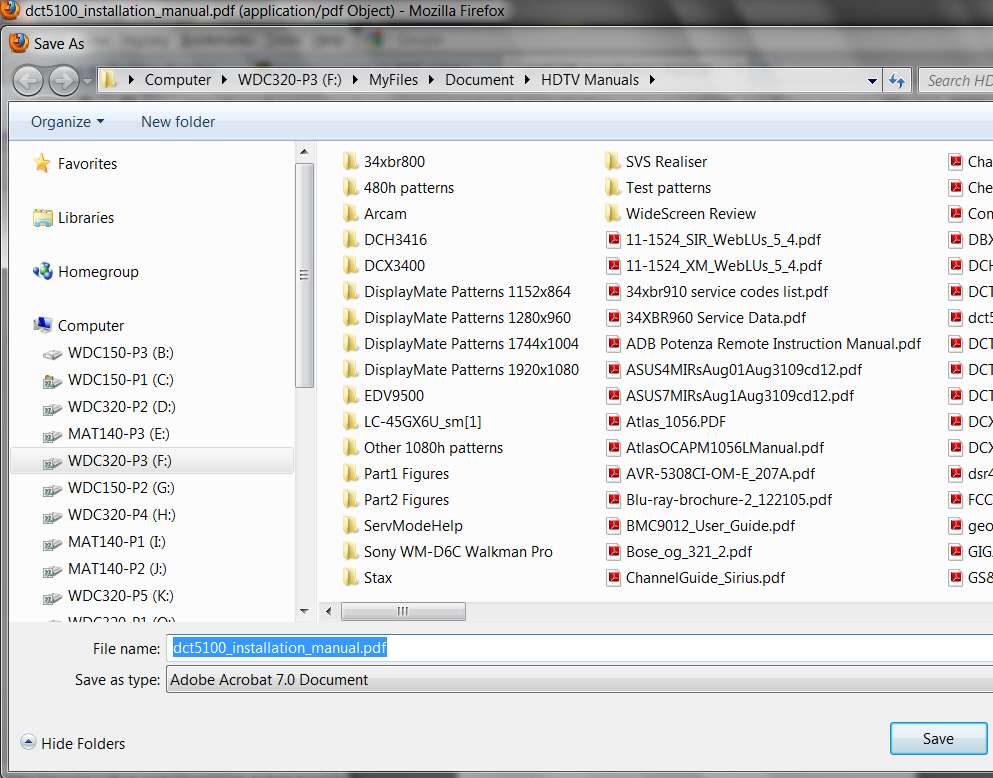
For example, here is what it looks like for me when I do a "save page as..." from a tab in which a PDF has been downloaded/opened within Firefox:

savepageas.jpg


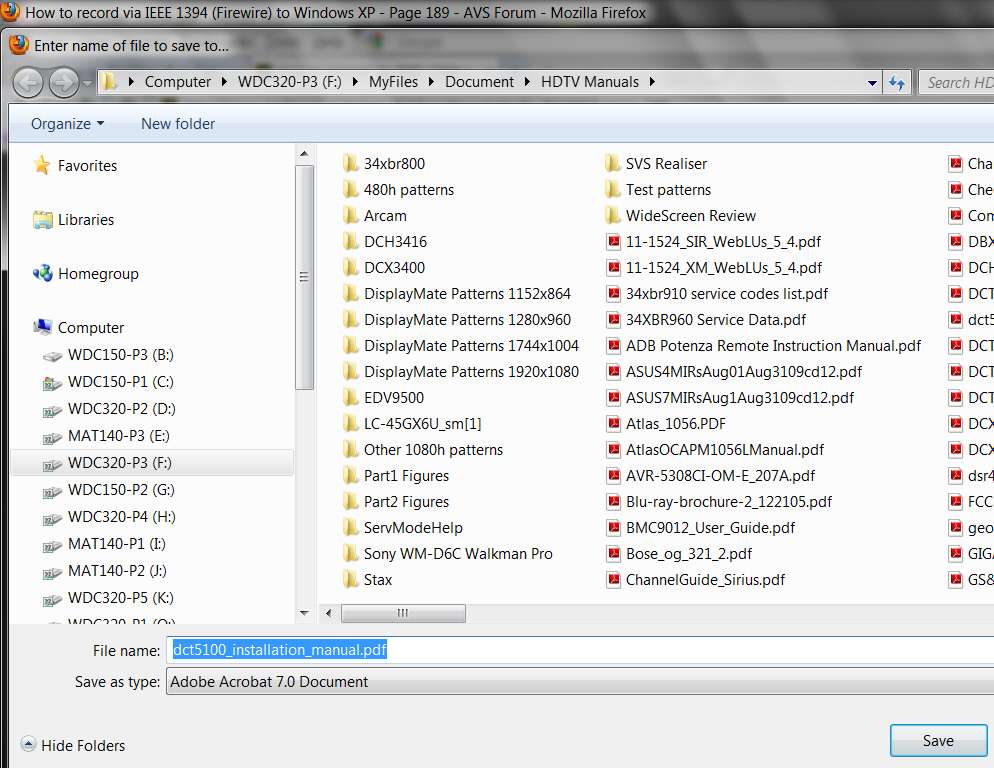
Alternatively, if I right-click on the PDF link in the original web page while in Firefox and then choose "save link as...", I get a slightly different but obviously similar "save" dialog:

savelinkas.jpg
 

My Computer My Computer

At a glance

Windows 7 Pro x64 (1), Win7 Pro X64 (2)i5-3350p 3.1Ghz/6MB-cache (1); E8400 3.0Ghz/6...8GB PC3-12800 DDR3 (1); 4GB PC3-10600 DDR3 (2)ATI HD7750 (1), (see TV cards); ATI R7 250 (2)
Computer type
PC/Desktop
Computer Manufacturer/Model Number
Home-built, two systems (1) and (2)
OS
Windows 7 Pro x64 (1), Win7 Pro X64 (2)
CPU
i5-3350p 3.1Ghz/6MB-cache (1); E8400 3.0Ghz/6MB-cache (2)
Motherboard
ASUS P8Z77-V Pro (1); ASUS P5Q3 (2)
Memory
8GB PC3-12800 DDR3 (1); 4GB PC3-10600 DDR3 (2)
Graphics Card(s)
ATI HD7750 (1), (see TV cards); ATI R7 250 (2)
Sound Card
Realtek ALC892 HD Audio (1); Realtek ALC1200 HD Audio (2)
Monitor(s) Displays
Eizo HD2441W LCD, Eizo S2433W (1); Eizo 24" S2433W (2)
Screen Resolution
1920x1200, 1920x1200 (1); 1920x1200 (2)
Hard Drives
(1) 1TB SATA-II (7200RPM), 2x2TB SATA-III (7200RPM), 250GB SATA-III (10000RPM) for OS; 2x2TB external USB 3.0

(2) 320GB SATA-II (7200RPM), 750GB SATA-II (7200RPM), 150GB SATA-II (10000RPM) for OS; 2TB external USB 3.0
PSU
Nesteq ECS-6001 600W (1); Nesteq ECS-5001 500W (2)
Case
Acousti-Case 360 (1) and (2)
Cooling
Noctua NH-U12P SE2 for CPU, 2x120mm case fans (1) and (2)
Keyboard
IBM PS/2 (1) and (2)
Mouse
Logitech MX Revolution wireless (1); Microsoft wired (2)
Internet Speed
100mbps down / 10mbps up
Antivirus
Microsoft Security Essentials; Malwarebyte Anti-Malware Pro
Browser
Firefox
Other Info
Ceton InfiniTV 4-tuner cablecard-enabled TV card as well as Hauppauge HVR-2250 OTA/ATSC 2-tuner TV card in (1), running under Win7 WMC
What state are you in when you do this SAVE? What program? Not a browser?

You say "I downloaded a PDF and saved it to my desktop", so I assumed you were using a browser like Firefox or IE, to do either (a) "save link as..." before actually downloading it, or (b) "save page as..." after downloading it. But your screenshot suggests you are in some program other than a browser.

The top of this "save in" dialog shown in your screenshot suggests you are in some program, but I don't know what. Are you somehow in Acrobat Reader directly? I'm puzzled.

In particular, your screenshot doesn't show the Win7 address bar with the full expanded path to the target location I was expecting to see... again, suggesting some other situation from some other program when you started the "save" dialog. Instead, there are the major category buttons on the left side, again suggesting a dialog from some program other than a browser.

What program or state are you in when you start your "save" dialog??

For example, here is what it looks like for me when I do a "save page as..." from a tab in which a PDF has been downloaded/opened within Firefox:

savepageas.jpg


Alternatively, if I right-click on the PDF link in the original web page while in Firefox and then choose "save link as...", I get a slightly different but obviously similar "save" dialog:

savelinkas.jpg
I was using Microsoft Xcel to do a "save as" to the desktop ( in this case ).
 

My Computer My Computer

At a glance

Windows 7 32 bit and 64 bit ProfessionalIntel Pentium 4 ; AMD SEMPRON 3600+2.5GB ; 4GBNVIDIA GS8400
Computer Manufacturer/Model Number
IBM 8291-E2U ; 9120-CTO ; 4061-BL2
OS
Windows 7 32 bit and 64 bit Professional
CPU
Intel Pentium 4 ; AMD SEMPRON 3600+
Memory
2.5GB ; 4GB
Graphics Card(s)
NVIDIA GS8400
Monitor(s) Displays
HP W2207
"I downloaded a PDF and saved it to my desktop"

I was using Microsoft Excel to do a "save as" to the desktop ( in this case ).
How do you use Excel for a PDF??

What version of Excel are you using? Is it old?

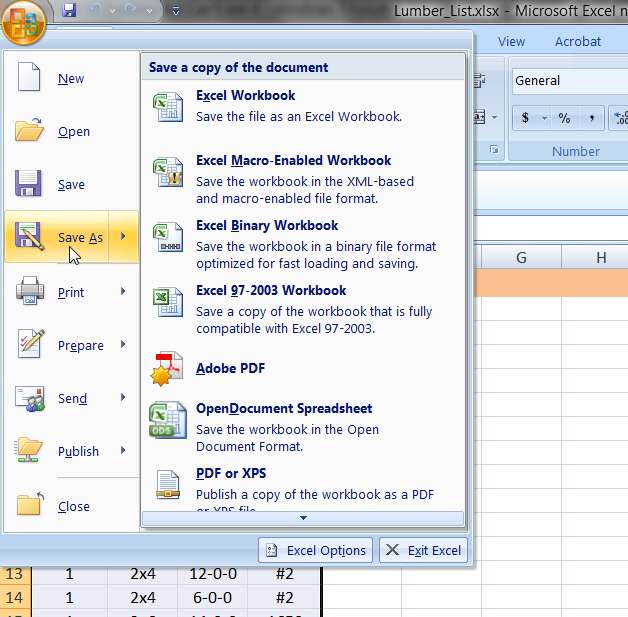
In my own Win7 and Excel 2007 situation, I again show the standard full "Save as..." dialog when I enter the Save process from Excel,

excelsave.jpg


which again provides the normal Win7 address bar at the top showing the full path to the target folder location as I've navigated to it.

Granted, I'm not normally using the "desktop" as my target

excelsaveas.jpg


However even If I change things and save "to the desktop", the Win7 address bar at the top of the "Save As..." dialog window still shows the path to the desktop.

excelsaveasdesktop.jpg
 

My Computer My Computer

At a glance

Windows 7 Pro x64 (1), Win7 Pro X64 (2)i5-3350p 3.1Ghz/6MB-cache (1); E8400 3.0Ghz/6...8GB PC3-12800 DDR3 (1); 4GB PC3-10600 DDR3 (2)ATI HD7750 (1), (see TV cards); ATI R7 250 (2)
Computer type
PC/Desktop
Computer Manufacturer/Model Number
Home-built, two systems (1) and (2)
OS
Windows 7 Pro x64 (1), Win7 Pro X64 (2)
CPU
i5-3350p 3.1Ghz/6MB-cache (1); E8400 3.0Ghz/6MB-cache (2)
Motherboard
ASUS P8Z77-V Pro (1); ASUS P5Q3 (2)
Memory
8GB PC3-12800 DDR3 (1); 4GB PC3-10600 DDR3 (2)
Graphics Card(s)
ATI HD7750 (1), (see TV cards); ATI R7 250 (2)
Sound Card
Realtek ALC892 HD Audio (1); Realtek ALC1200 HD Audio (2)
Monitor(s) Displays
Eizo HD2441W LCD, Eizo S2433W (1); Eizo 24" S2433W (2)
Screen Resolution
1920x1200, 1920x1200 (1); 1920x1200 (2)
Hard Drives
(1) 1TB SATA-II (7200RPM), 2x2TB SATA-III (7200RPM), 250GB SATA-III (10000RPM) for OS; 2x2TB external USB 3.0

(2) 320GB SATA-II (7200RPM), 750GB SATA-II (7200RPM), 150GB SATA-II (10000RPM) for OS; 2TB external USB 3.0
PSU
Nesteq ECS-6001 600W (1); Nesteq ECS-5001 500W (2)
Case
Acousti-Case 360 (1) and (2)
Cooling
Noctua NH-U12P SE2 for CPU, 2x120mm case fans (1) and (2)
Keyboard
IBM PS/2 (1) and (2)
Mouse
Logitech MX Revolution wireless (1); Microsoft wired (2)
Internet Speed
100mbps down / 10mbps up
Antivirus
Microsoft Security Essentials; Malwarebyte Anti-Malware Pro
Browser
Firefox
Other Info
Ceton InfiniTV 4-tuner cablecard-enabled TV card as well as Hauppauge HVR-2250 OTA/ATSC 2-tuner TV card in (1), running under Win7 WMC
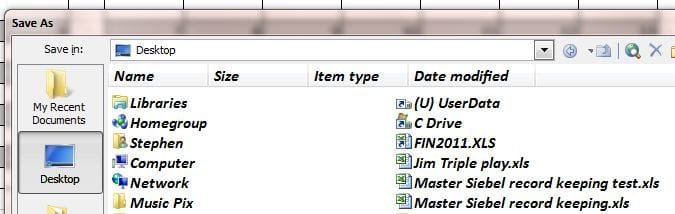
When I do a "Save As' from any program -- XLS, Adobe, Word, Powerpoint my target for the save is the Desktop :
save1.JPG

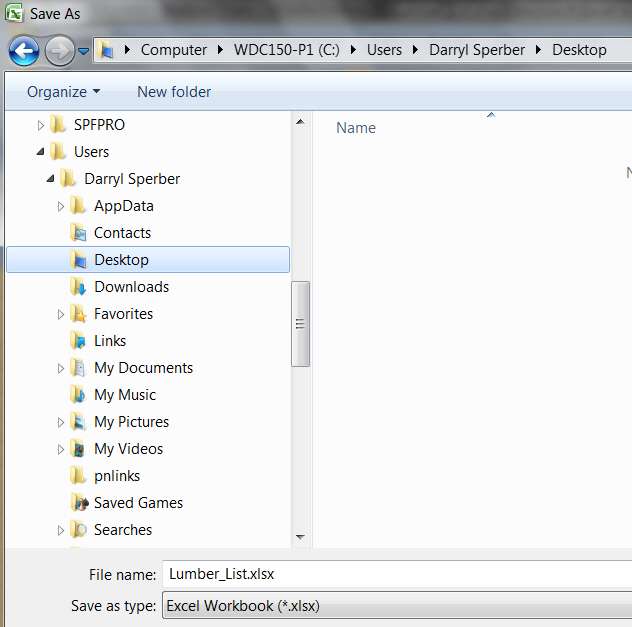
In your screen shots it appears you're going to the desktop using the fully qualified path ===> My Computer ==> C Drive ===> Users ===> Username ===> Desktop ...

Anyway, no matter which file type ( or program ) I do a "Save As" with, the desktop will not show the file until I go to the desktop, right click and do a refresh --- which is annoying me to no end.

Since my last entry, I reran the Windows Experience Index procedure and reset my folder settings to the defaults. The desktop is working as designed ( so far ) -- we'll see how long it lasts......
 

My Computer My Computer

At a glance

Windows 7 32 bit and 64 bit ProfessionalIntel Pentium 4 ; AMD SEMPRON 3600+2.5GB ; 4GBNVIDIA GS8400
Computer Manufacturer/Model Number
IBM 8291-E2U ; 9120-CTO ; 4061-BL2
OS
Windows 7 32 bit and 64 bit Professional
CPU
Intel Pentium 4 ; AMD SEMPRON 3600+
Memory
2.5GB ; 4GB
Graphics Card(s)
NVIDIA GS8400
Monitor(s) Displays
HP W2207
When I do a "Save As' from any program -- XLS, Adobe, Word, Powerpoint my target for the save is the Desktop :
View attachment 165806
Your screenshot now shows saving a DOC, which is from Word. Your previous screenshot was supposed to be from Excel.

But both of these show a totally different "Save as..." dialog than my screenshots, which are from Office 2007 and present what I would describe as a standard Win7 save dialog.

Your screenshot shows what I believe is from a much older version of Office. That whole left pane in your version of "Save as" is not present in mine. Can you please state what edition of Office you are using?


In your screen shots it appears you're going to the desktop using the fully qualified path ===> My Computer ==> C Drive ===> Users ===> Username ===> Desktop ...
Well yes... that's exactly what I'm asking you to duplicate when you save something to "the desktop".

Using "desktop" on that left pane, from a very old edition of Office... well, I'm just suspicious of what that is really doing. Unless you see the standard Win7 address bar at the top which shows the fully qualified path, how can you possibly know what "desktop" in that left pane actually corresponds to?

That's why I'm exploring this whole subject of your version of Office. It just looks very old.


Anyway, no matter which file type ( or program ) I do a "Save As" with, the desktop will not show the file until I go to the desktop, right click and do a refresh --- which is annoying me to no end.
Which is exactly why I'm pursuing this whole subject of KNOWING IN ADVANCE WHERE "DESKTOP" REALLY IS GOING. If you look at my screenshot, the address bar shows EXACTLY where it is going... whether I pick a data folder somewhere, or "desktop", the address bar shows precisely and exactly where it is going!!

I want you to get to that same point, so that you will know where it is going BEFORE YOU PUSH OK TO SAVE IT!


Since my last entry, I reran the Windows Experience Index procedure and reset my folder settings to the defaults. The desktop is working as designed ( so far ) -- we'll see how long it lasts......
Seems totally irrelevant to me. I can't imagine this is the answer.

Your "Save as" dialog is nothing like the standard Win7 dialog. It looks like from a very old Office. This is more suspect to me, and you really don't know what "desktop" means if this is an old WinXP-compliant Office.

Instead of simply clicking on "desktop" button in your left pane, why don't you use the "My computer" button, and then navigate to \Users etc. just like my screenshot shows? That way you would know EXACTLY where you are putting it!!

 

My Computer My Computer

At a glance

Windows 7 Pro x64 (1), Win7 Pro X64 (2)i5-3350p 3.1Ghz/6MB-cache (1); E8400 3.0Ghz/6...8GB PC3-12800 DDR3 (1); 4GB PC3-10600 DDR3 (2)ATI HD7750 (1), (see TV cards); ATI R7 250 (2)
Computer type
PC/Desktop
Computer Manufacturer/Model Number
Home-built, two systems (1) and (2)
OS
Windows 7 Pro x64 (1), Win7 Pro X64 (2)
CPU
i5-3350p 3.1Ghz/6MB-cache (1); E8400 3.0Ghz/6MB-cache (2)
Motherboard
ASUS P8Z77-V Pro (1); ASUS P5Q3 (2)
Memory
8GB PC3-12800 DDR3 (1); 4GB PC3-10600 DDR3 (2)
Graphics Card(s)
ATI HD7750 (1), (see TV cards); ATI R7 250 (2)
Sound Card
Realtek ALC892 HD Audio (1); Realtek ALC1200 HD Audio (2)
Monitor(s) Displays
Eizo HD2441W LCD, Eizo S2433W (1); Eizo 24" S2433W (2)
Screen Resolution
1920x1200, 1920x1200 (1); 1920x1200 (2)
Hard Drives
(1) 1TB SATA-II (7200RPM), 2x2TB SATA-III (7200RPM), 250GB SATA-III (10000RPM) for OS; 2x2TB external USB 3.0

(2) 320GB SATA-II (7200RPM), 750GB SATA-II (7200RPM), 150GB SATA-II (10000RPM) for OS; 2TB external USB 3.0
PSU
Nesteq ECS-6001 600W (1); Nesteq ECS-5001 500W (2)
Case
Acousti-Case 360 (1) and (2)
Cooling
Noctua NH-U12P SE2 for CPU, 2x120mm case fans (1) and (2)
Keyboard
IBM PS/2 (1) and (2)
Mouse
Logitech MX Revolution wireless (1); Microsoft wired (2)
Internet Speed
100mbps down / 10mbps up
Antivirus
Microsoft Security Essentials; Malwarebyte Anti-Malware Pro
Browser
Firefox
Other Info
Ceton InfiniTV 4-tuner cablecard-enabled TV card as well as Hauppauge HVR-2250 OTA/ATSC 2-tuner TV card in (1), running under Win7 WMC
Looks like Office XP?
 

My Computer My Computer

At a glance

Windows 7 Ultimate X64 SP1Intel i5-2550K, Differing ~4.4-4.8GHz No buil...16GB G.Skill Sniper 1866MHz @ 2133MHz 2x8GBASUS GTX650TIB-DC2OC-2GD5, (650TI Boost)
Computer type
PC/Desktop
Computer Manufacturer/Model Number
Home Built Desktop By DataTech
OS
Windows 7 Ultimate X64 SP1
CPU
Intel i5-2550K, Differing ~4.4-4.8GHz No built in GPU
Motherboard
ASUS P8Z68-V PRO/GEN3
Memory
16GB G.Skill Sniper 1866MHz @ 2133MHz 2x8GB
Graphics Card(s)
ASUS GTX650TIB-DC2OC-2GD5, (650TI Boost)
Sound Card
Onboard Realtek 5-1
Monitor(s) Displays
Samsung P2570HD
Screen Resolution
1920x1080
Hard Drives
Samsung 840 Pro 256GB SSD for OS, 500GB Seagate Constellation (Enterprise drive) for Data
PSU
Corsair HX650W
Case
Inwin Dragon Rider
Cooling
Hyper 212 EVO w/two Noctua fans, push-pull, @1300 RPM
Keyboard
E-Z Eyes, bright yellow keys with large characters
Mouse
steelseries SENSEI Laser Pro Gaming
Internet Speed
48-51Mbs Mbs down, 11 Mbs up Xfinity Cable
Antivirus
Norton Internet Security 2013
Browser
IE 10, Opera, Pale Moon if needed
Other Info
4 case fans, LG BluRay-RE, ASUS DVD-RW, Mr. Fusion power supply, 1.21 gigawatts.
Looks like Office XP?
Exactly.

And in XP there was \Documents and Settings\<username>\Desktop, which of course is not the Win7 \Users\<username>\Desktop.

I would have expected even an old Office XP and Win7 to "convert" that old reference to "Desktop" (in the left pane) to \Users\<username>\Desktop when Office XP is running in a Win7 environment, but I don't know for sure. That's one reason I upgraded to Office 2007.

Anyway, unless the standard Win7 "save as" dialog is seen, with the address bar across the top showing exactly where "desktop" corresponds to, I don't know what we can speculate about "desktop" in that left pane of an Office XP "save as" dialog.
 

My Computer My Computer

At a glance

Windows 7 Pro x64 (1), Win7 Pro X64 (2)i5-3350p 3.1Ghz/6MB-cache (1); E8400 3.0Ghz/6...8GB PC3-12800 DDR3 (1); 4GB PC3-10600 DDR3 (2)ATI HD7750 (1), (see TV cards); ATI R7 250 (2)
Computer type
PC/Desktop
Computer Manufacturer/Model Number
Home-built, two systems (1) and (2)
OS
Windows 7 Pro x64 (1), Win7 Pro X64 (2)
CPU
i5-3350p 3.1Ghz/6MB-cache (1); E8400 3.0Ghz/6MB-cache (2)
Motherboard
ASUS P8Z77-V Pro (1); ASUS P5Q3 (2)
Memory
8GB PC3-12800 DDR3 (1); 4GB PC3-10600 DDR3 (2)
Graphics Card(s)
ATI HD7750 (1), (see TV cards); ATI R7 250 (2)
Sound Card
Realtek ALC892 HD Audio (1); Realtek ALC1200 HD Audio (2)
Monitor(s) Displays
Eizo HD2441W LCD, Eizo S2433W (1); Eizo 24" S2433W (2)
Screen Resolution
1920x1200, 1920x1200 (1); 1920x1200 (2)
Hard Drives
(1) 1TB SATA-II (7200RPM), 2x2TB SATA-III (7200RPM), 250GB SATA-III (10000RPM) for OS; 2x2TB external USB 3.0

(2) 320GB SATA-II (7200RPM), 750GB SATA-II (7200RPM), 150GB SATA-II (10000RPM) for OS; 2TB external USB 3.0
PSU
Nesteq ECS-6001 600W (1); Nesteq ECS-5001 500W (2)
Case
Acousti-Case 360 (1) and (2)
Cooling
Noctua NH-U12P SE2 for CPU, 2x120mm case fans (1) and (2)
Keyboard
IBM PS/2 (1) and (2)
Mouse
Logitech MX Revolution wireless (1); Microsoft wired (2)
Internet Speed
100mbps down / 10mbps up
Antivirus
Microsoft Security Essentials; Malwarebyte Anti-Malware Pro
Browser
Firefox
Other Info
Ceton InfiniTV 4-tuner cablecard-enabled TV card as well as Hauppauge HVR-2250 OTA/ATSC 2-tuner TV card in (1), running under Win7 WMC
When I do a "Save As' from any program -- XLS, Adobe, Word, Powerpoint my target for the save is the Desktop :
View attachment 165806
Your screenshot now shows saving a DOC, which is from Word. Your previous screenshot was supposed to be from Excel.

But both of these show a totally different "Save as..." dialog than my screenshots, which are from Office 2007 and present what I would describe as a standard Win7 save dialog.

Your screenshot shows what I believe is from a much older version of Office. That whole left pane in your version of "Save as" is not present in mine. Can you please state what edition of Office you are using?

Office 2003


In your screen shots it appears you're going to the desktop using the fully qualified path ===> My Computer ==> C Drive ===> Users ===> Username ===> Desktop ...
Well yes... that's exactly what I'm asking you to duplicate when you save something to "the desktop".

I tried the fully qualified way with same results ( i.e. the file did not show on the desktop )

Using "desktop" on that left pane, from a very old edition of Office... well, I'm just suspicious of what that is really doing. Unless you see the standard Win7 address bar at the top which shows the fully qualified path, how can you possibly know what "desktop" in that left pane actually corresponds to?

That's why I'm exploring this whole subject of your version of Office. It just looks very old.


Anyway, no matter which file type ( or program ) I do a "Save As" with, the desktop will not show the file until I go to the desktop, right click and do a refresh --- which is annoying me to no end.
Which is exactly why I'm pursuing this whole subject of KNOWING IN ADVANCE WHERE "DESKTOP" REALLY IS GOING. If you look at my screenshot, the address bar shows EXACTLY where it is going... whether I pick a data folder somewhere, or "desktop", the address bar shows precisely and exactly where it is going!!

I want you to get to that same point, so that you will know where it is going BEFORE YOU PUSH OK TO SAVE IT!


Since my last entry, I reran the Windows Experience Index procedure and reset my folder settings to the defaults. The desktop is working as designed ( so far ) -- we'll see how long it lasts......
Seems totally irrelevant to me. I can't imagine this is the answer.

Desperation makes men do crazy things --- btw, this did not work.

Your "Save as" dialog is nothing like the standard Win7 dialog. It looks like from a very old Office. This is more suspect to me, and you really don't know what "desktop" means if this is an old WinXP-compliant Office.

Instead of simply clicking on "desktop" button in your left pane, why don't you use the "My computer" button, and then navigate to \Users etc. just like my screenshot shows? That way you would know EXACTLY where you are putting it!!

See entry above -- I tried the explicit qualified path w/o results.

Not to muddy the waters but I would like to mention I have a laptop running W7 64 bit Professional with same software stack and NO issues.

Additional information : When I do "Save As" to the desktop using Adobe PDF
the file does not show up either and I believe this is the standard W7 window :
pdf capture.JPG

So I do not think this is Office 2003 specific problem.

I also noticed that when I save screenshots ( using "save as" jpg ), the desktop displays the file immediately on the desktop as desired.

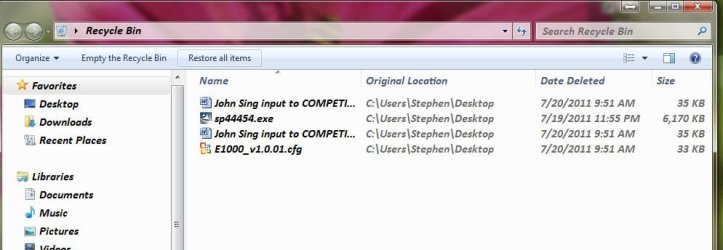
Additionally, when I look in the Recycle bin after deleting the files I am testing with, restoring the file immediately shows up on the desktop as desired. Note the "Original Location" field designates the explicit directory path to my desktop :

Recycle bin.JPG

By the way, I want to say thank you for taking the time to try and "shoot" this annoying problem. :)
 

My Computer My Computer

At a glance

Windows 7 32 bit and 64 bit ProfessionalIntel Pentium 4 ; AMD SEMPRON 3600+2.5GB ; 4GBNVIDIA GS8400
Computer Manufacturer/Model Number
IBM 8291-E2U ; 9120-CTO ; 4061-BL2
OS
Windows 7 32 bit and 64 bit Professional
CPU
Intel Pentium 4 ; AMD SEMPRON 3600+
Memory
2.5GB ; 4GB
Graphics Card(s)
NVIDIA GS8400
Monitor(s) Displays
HP W2207

My Computer My Computer

At a glance

Windows 7 32 bit and 64 bit ProfessionalIntel Pentium 4 ; AMD SEMPRON 3600+2.5GB ; 4GBNVIDIA GS8400
Computer Manufacturer/Model Number
IBM 8291-E2U ; 9120-CTO ; 4061-BL2
OS
Windows 7 32 bit and 64 bit Professional
CPU
Intel Pentium 4 ; AMD SEMPRON 3600+
Memory
2.5GB ; 4GB
Graphics Card(s)
NVIDIA GS8400
Monitor(s) Displays
HP W2207
Back
Top