Old IDE WD HDD on Win7 32-bit

DarthAdon

New member
Local time
4:27 PM
Messages
3
Hello everyone,
I recently opened my old DVD player and took out the HDD which was included in it.
It's the old WD1600BB-55GUC0 160gb HDD with IDE connector.
I hooked it up into my computer in the second connector of IDE cable in my computer (the cable is also connected into the DVD burner, I also tried setting the disc to slave using jumper). Problem is that Win7 seems to detect it but can't use because of missing driver. When I start the computer the HDD is detected perfectly in BIOS, and when I boot into Debian I can actually use it like any other drive. I searched the Internet and couldn't find any driver :confused: and I'd like to use the disc on all my OSes.
All my specifications should be in my profile.
Thanks in advance for any help :)
 

My Computer My Computer

At a glance

Windows 7 32-bit, Debian Testing 64-bit, Fedo...Intel Core 2 Quad CPU Q66004 GB, on WIN7 32-bit 3,25 GB usableGeforce 8800 GT
OS
Windows 7 32-bit, Debian Testing 64-bit, Fedora 14 64-bit
CPU
Intel Core 2 Quad CPU Q6600
Motherboard
Asus P5K-E
Memory
4 GB, on WIN7 32-bit 3,25 GB usable
Graphics Card(s)
Geforce 8800 GT
Sound Card
SoundMAX Integrated Digital HD Audio
Monitor(s) Displays
LG Flatron W2241S 1680x1050 native
Hard Drives
WDC WD 3200AAJS-04B1A0 on SATA 320gb
WDC WD6400AAKS-00A7B0 on SATA 640gb
one external HDD 120gb
old WDC WD1600BB-55GUC0 on IDE
Is there any data on the drive? What file system is used by the drive? :)
 

My Computer My Computer

At a glance

Main - Windows 7 Pro SP1 64-Bit; 2nd - Window...Main - Core i7 2600K; 2nd - Core i7 920Main - 16GB Corsair Vengeance; 2nd - 12GB Cor...Main - XFX Radeon 6870 1GB; 2nd - XFX Radeon ...
Computer Manufacturer/Model Number
Self
OS
Main - Windows 7 Pro SP1 64-Bit; 2nd - Windows Server 2008 R2
CPU
Main - Core i7 2600K; 2nd - Core i7 920
Motherboard
Main - Asus P8Z68-V Pro/Gen3; 2nd - Gigabyte GA-EX58-UDR3
Memory
Main - 16GB Corsair Vengeance; 2nd - 12GB Corsair Vengeance
Graphics Card(s)
Main - XFX Radeon 6870 1GB; 2nd - XFX Radeon 4870 1GB
Sound Card
Both: Onboard Realtek Azalia
Monitor(s) Displays
Main - Hann 25" + I-INC 25" + Acer 23"; 2nd - Upgrading Soon
Screen Resolution
Main - 1920x1080 (All Three Monitors); 2nd - Upgrading Soon
Hard Drives
Main - (1) Crucial M4 128GB (Boot)
Main - (1) Seagate 2TB 64MB Cache (Data)
Main - (1) Seagate 2TB 64MB Cache (Data Backup)
2nd - (1) Intel X25-M SSD 80GB (Boot)
2nd - (3) Seagate 1TB 32MB Cache (Data Backup)
2nd - (1) Seagate 320GB (Because)
PSU
Main - OCZ 600W Modular; 2nd - OCZ 600W
Case
Main - Thermaltake Element G; 2nd - NZXT something or other
Cooling
Main - Corsair H80; 2nd - Prolimatech Megahalems
Keyboard
Main - Razer Reclusa; 2nd - Old MS Keyboard
Mouse
Main - Logitech MX Revolution; 2nd - Old MS Mouse
Internet Speed
20Mbps Time-Warner Cable
Hello everyone,
I recently opened my old DVD player and took out the HDD which was included in it.
It's the old WD1600BB-55GUC0 160gb HDD with IDE connector.
I hooked it up into my computer in the second connector of IDE cable in my computer (the cable is also connected into the DVD burner, I also tried setting the disc to slave using jumper). Problem is that Win7 seems to detect it but can't use because of missing driver. When I start the computer the HDD is detected perfectly in BIOS, and when I boot into Debian I can actually use it like any other drive. I searched the Internet and couldn't find any driver :confused: and I'd like to use the disc on all my OSes.
All my specifications should be in my profile.
Thanks in advance for any help :)
Hi DarthAdon, Welcome to the forums , Try connecting the HDD to the primary IDE connector ( the cable the original HDD is on ) still keep the new drive as slave ;)
 

My Computer My Computer

At a glance

win 7 ultimate32bit, Win8.1pro wmc 32bitamd phenom x4 9600corsair twinxs 2x2gb2x nvidia 1gb 8500gt
Computer type
PC/Desktop
Computer Manufacturer/Model Number
self build
OS
win 7 ultimate32bit, Win8.1pro wmc 32bit
CPU
amd phenom x4 9600
Motherboard
asus m2n32-sli deluxe
Memory
corsair twinxs 2x2gb
Graphics Card(s)
2x nvidia 1gb 8500gt
Sound Card
onboard
Monitor(s) Displays
23" PB Viseo 233d
Screen Resolution
1920x1080
Hard Drives
maxtor sata 500gb
maxtor sata 320gb
fujitsu sata200gb
PSU
oryxx tornado 750w
Case
thermaltake xaser lll
Cooling
artic freezer64 pro + 7 case fans
Is there any data on the drive? What file system is used by the drive? :)
No, i formated it using Gparted live cd to NTFS.
 

My Computer My Computer

At a glance

Windows 7 32-bit, Debian Testing 64-bit, Fedo...Intel Core 2 Quad CPU Q66004 GB, on WIN7 32-bit 3,25 GB usableGeforce 8800 GT
OS
Windows 7 32-bit, Debian Testing 64-bit, Fedora 14 64-bit
CPU
Intel Core 2 Quad CPU Q6600
Motherboard
Asus P5K-E
Memory
4 GB, on WIN7 32-bit 3,25 GB usable
Graphics Card(s)
Geforce 8800 GT
Sound Card
SoundMAX Integrated Digital HD Audio
Monitor(s) Displays
LG Flatron W2241S 1680x1050 native
Hard Drives
WDC WD 3200AAJS-04B1A0 on SATA 320gb
WDC WD6400AAKS-00A7B0 on SATA 640gb
one external HDD 120gb
old WDC WD1600BB-55GUC0 on IDE
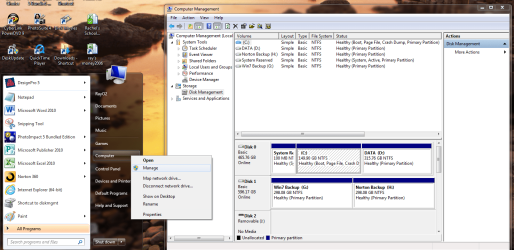
Reformat in Disk management.
 

My Computer My Computer

At a glance

ME/XP/Vista/Win7
OS
ME/XP/Vista/Win7
Reformat in Disk management.
I forgot to tell that Windows can't see the HDD at all except the device manager, where it's located in other devices and says that the driver is not installed.
 

My Computer My Computer

At a glance

Windows 7 32-bit, Debian Testing 64-bit, Fedo...Intel Core 2 Quad CPU Q66004 GB, on WIN7 32-bit 3,25 GB usableGeforce 8800 GT
OS
Windows 7 32-bit, Debian Testing 64-bit, Fedora 14 64-bit
CPU
Intel Core 2 Quad CPU Q6600
Motherboard
Asus P5K-E
Memory
4 GB, on WIN7 32-bit 3,25 GB usable
Graphics Card(s)
Geforce 8800 GT
Sound Card
SoundMAX Integrated Digital HD Audio
Monitor(s) Displays
LG Flatron W2241S 1680x1050 native
Hard Drives
WDC WD 3200AAJS-04B1A0 on SATA 320gb
WDC WD6400AAKS-00A7B0 on SATA 640gb
one external HDD 120gb
old WDC WD1600BB-55GUC0 on IDE
Disk Man.png
 

My Computer My Computer

At a glance

ME/XP/Vista/Win7
OS
ME/XP/Vista/Win7
Back
Top