Corsair Vengeance 2x 4GB sticks and Asus Motherboard

TheKGC02

New member
Local time
6:22 AM
Messages
11
Hell all!

I just finished building my new CPU and am running into some issues... this one is regarding my evident trouble with Corsair Vengeance 8gb (2x 4gb) RAM and my Asus M4A89GTD PRO MOBO.

Upon system startup if I let it go itself it freezes very wuickly, before Windows can even load. Each time i start up I have to hit my MemOK! function on the MOBO and it will load without issue, thus why I am here now. :p

So obviously the RAM works and works well with the CPU build but I am trying to find a way to get it to load correctly without having to leave my case open to hit the MemOK! function. Ideas?

Thanks in advance!
-TheKGC02


My Computer My Computer

At a glance

64 bit Win 7AMD Phenom II X6 1100T Black EditionCORSAIR Vengeance 4GB (2 x 2GB) 240-Pin DDR3 ...XFX HD-695X-ZNDC Radeon HD 6950
OS
64 bit Win 7
CPU
AMD Phenom II X6 1100T Black Edition
Motherboard
ASUS M4A89GTD PRO
Memory
CORSAIR Vengeance 4GB (2 x 2GB) 240-Pin DDR3 SDRAM
Graphics Card(s)
XFX HD-695X-ZNDC Radeon HD 6950
Hard Drives
Seagate Barracuda ST31000524AS
Note: The issue was occurring before the OS (win 7 64bit) was even installed.
 

My Computer My Computer

At a glance

64 bit Win 7AMD Phenom II X6 1100T Black EditionCORSAIR Vengeance 4GB (2 x 2GB) 240-Pin DDR3 ...XFX HD-695X-ZNDC Radeon HD 6950
OS
64 bit Win 7
CPU
AMD Phenom II X6 1100T Black Edition
Motherboard
ASUS M4A89GTD PRO
Memory
CORSAIR Vengeance 4GB (2 x 2GB) 240-Pin DDR3 SDRAM
Graphics Card(s)
XFX HD-695X-ZNDC Radeon HD 6950
Hard Drives
Seagate Barracuda ST31000524AS
Have you gone into the bios and checked the memory speed, timings and voltage are set correctly for your memory?

If not then you will need to set them to what they should be (it will tell you what they should be on a small sticker on the side of each stick of memory), then save and exit the bios.
 

My Computer My Computer

At a glance

Windows 7 Professional 64 bit
OS
Windows 7 Professional 64 bit
Will try and report back!
 

My Computer My Computer

At a glance

64 bit Win 7AMD Phenom II X6 1100T Black EditionCORSAIR Vengeance 4GB (2 x 2GB) 240-Pin DDR3 ...XFX HD-695X-ZNDC Radeon HD 6950
OS
64 bit Win 7
CPU
AMD Phenom II X6 1100T Black Edition
Motherboard
ASUS M4A89GTD PRO
Memory
CORSAIR Vengeance 4GB (2 x 2GB) 240-Pin DDR3 SDRAM
Graphics Card(s)
XFX HD-695X-ZNDC Radeon HD 6950
Hard Drives
Seagate Barracuda ST31000524AS
The BIOS are set for 9-9-9-24 as per the RAM.... however I am now noticing that my BIOS are not saving for some reason? The RAM seems to be set at 1233 ghz or somesuch and it is 1600 ghz ram. but if my bios arent saving.....
 

My Computer My Computer

At a glance

64 bit Win 7AMD Phenom II X6 1100T Black EditionCORSAIR Vengeance 4GB (2 x 2GB) 240-Pin DDR3 ...XFX HD-695X-ZNDC Radeon HD 6950
OS
64 bit Win 7
CPU
AMD Phenom II X6 1100T Black Edition
Motherboard
ASUS M4A89GTD PRO
Memory
CORSAIR Vengeance 4GB (2 x 2GB) 240-Pin DDR3 SDRAM
Graphics Card(s)
XFX HD-695X-ZNDC Radeon HD 6950
Hard Drives
Seagate Barracuda ST31000524AS
If this is the system in your specs, it is an AMD system. All AMD systems will automatically set the ram at 1333 9-9-9-24. Your 1600 ram should run at those specs. The only way to run the ram at 1600 is to overclock the system. Make sure the dram voltage is set correctly. The system should run at default settings unless the ram is incompatable with the system or you have bad stick(s). To test your ram, use this tutorial on memtest86.
 

My Computers My Computers

  • At a glance

    Windows 11 ProRyzen 9 5900X32GB G Skill DDR4-3600EVGA RTX 3080 FTW 3 Ultra
    Computer type
    PC/Desktop
    Computer Manufacturer/Model Number
    ALWAYS UNDER CONSTRUCTION
    OS
    Windows 11 Pro
    CPU
    Ryzen 9 5900X
    Motherboard
    Asus X570 Crosshair Viii Hero
    Memory
    32GB G Skill DDR4-3600
    Graphics Card(s)
    EVGA RTX 3080 FTW 3 Ultra
    Sound Card
    On Board/Sennheiser PC37X Headset
    Monitor(s) Displays
    3 X Asus 27"
    Screen Resolution
    2560x1440
    Hard Drives
    2 X 1 TB NVME drives
    PSU
    EVGA 850
    Case
    Phanteks Eclipse P400A
    Cooling
    EVGA 280 AIO
    Keyboard
    Logitech G510s/ Logitech G13
    Mouse
    Logitech G502
    Internet Speed
    24/1
    Antivirus
    ESET/MBAM Pro/SAS Pro
    Browser
    Chrome/ Firefox/ Edge
  • At a glance

    Windows 11 ProIntel Ultra 9 288V32 GB LPDDR5X 8533
    Computer type
    Laptop
    System Manufacturer/Model Number
    Dell 16 Plus
    OS
    Windows 11 Pro
    CPU
    Intel Ultra 9 288V
    Memory
    32 GB LPDDR5X 8533
    Monitor(s) Displays
    16" Mini-LED HDR600 Touch 90 Hz
    Screen Resolution
    2560X1600
    Hard Drives
    1 TB NVME
Yes, you will need to bump your DRAM volts a bit or set to what your RAM specifies, raise your NB frequency, leave the timings as is. The NB will overclock the CPU so you should lower its multiplier when raising the NB freq.
Check with Corsair for settings specific to your PC. See my system specs, I have my RAM at 1656MHz with careful BIOs adjustments.

Do these settings in small increments and check for stability each time.
 

My Computer My Computer

At a glance

Windows 7 Ultimate X64 SP1Intel i5-2550K, Differing ~4.4-4.8GHz No buil...16GB G.Skill Sniper 1866MHz @ 2133MHz 2x8GBASUS GTX650TIB-DC2OC-2GD5, (650TI Boost)
Computer type
PC/Desktop
Computer Manufacturer/Model Number
Home Built Desktop By DataTech
OS
Windows 7 Ultimate X64 SP1
CPU
Intel i5-2550K, Differing ~4.4-4.8GHz No built in GPU
Motherboard
ASUS P8Z68-V PRO/GEN3
Memory
16GB G.Skill Sniper 1866MHz @ 2133MHz 2x8GB
Graphics Card(s)
ASUS GTX650TIB-DC2OC-2GD5, (650TI Boost)
Sound Card
Onboard Realtek 5-1
Monitor(s) Displays
Samsung P2570HD
Screen Resolution
1920x1080
Hard Drives
Samsung 840 Pro 256GB SSD for OS, 500GB Seagate Constellation (Enterprise drive) for Data
PSU
Corsair HX650W
Case
Inwin Dragon Rider
Cooling
Hyper 212 EVO w/two Noctua fans, push-pull, @1300 RPM
Keyboard
E-Z Eyes, bright yellow keys with large characters
Mouse
steelseries SENSEI Laser Pro Gaming
Internet Speed
48-51Mbs Mbs down, 11 Mbs up Xfinity Cable
Antivirus
Norton Internet Security 2013
Browser
IE 10, Opera, Pale Moon if needed
Other Info
4 case fans, LG BluRay-RE, ASUS DVD-RW, Mr. Fusion power supply, 1.21 gigawatts.
Thank you for the replies! As above stated though I am also having an issue where my BIOS are not saving new settings... :(
 

My Computer My Computer

At a glance

64 bit Win 7AMD Phenom II X6 1100T Black EditionCORSAIR Vengeance 4GB (2 x 2GB) 240-Pin DDR3 ...XFX HD-695X-ZNDC Radeon HD 6950
OS
64 bit Win 7
CPU
AMD Phenom II X6 1100T Black Edition
Motherboard
ASUS M4A89GTD PRO
Memory
CORSAIR Vengeance 4GB (2 x 2GB) 240-Pin DDR3 SDRAM
Graphics Card(s)
XFX HD-695X-ZNDC Radeon HD 6950
Hard Drives
Seagate Barracuda ST31000524AS
Thank you for the replies! As above stated though I am also having an issue where my BIOS are not saving new settings... :(

It seems a setting might be wrong in the bios and is causing some issues?

May not work , but have you tried pressing F5 in the bios and loading the fail safe settings then saving and exiting?

Worth a try anyway.
 

My Computer My Computer

At a glance

Windows 7 Professional 64 bit
OS
Windows 7 Professional 64 bit
Will try that though the unsaved bios settings were only my idiocy. Using the MemOK! function automatically resets the BIOS to a working condition. What I dont understand is that when I save those *working BIOS* it still freezes unless i run MemOK! again....
 

My Computer My Computer

At a glance

64 bit Win 7AMD Phenom II X6 1100T Black EditionCORSAIR Vengeance 4GB (2 x 2GB) 240-Pin DDR3 ...XFX HD-695X-ZNDC Radeon HD 6950
OS
64 bit Win 7
CPU
AMD Phenom II X6 1100T Black Edition
Motherboard
ASUS M4A89GTD PRO
Memory
CORSAIR Vengeance 4GB (2 x 2GB) 240-Pin DDR3 SDRAM
Graphics Card(s)
XFX HD-695X-ZNDC Radeon HD 6950
Hard Drives
Seagate Barracuda ST31000524AS
Ok.... tried with the RAM suggested settings again (properly saved this time 9-9-9-24 at 1.5 volts, 1333 ghz). I tried a reccomended overclock 1.65v 1600 mhz, 9-10-9-27. I additionally tooled around with it a bit myself and tried several various settings. None of them fixed the issue.

I also tried the F5 during BIOS setup saved and restarted, did not fix issue.
 

My Computer My Computer

At a glance

64 bit Win 7AMD Phenom II X6 1100T Black EditionCORSAIR Vengeance 4GB (2 x 2GB) 240-Pin DDR3 ...XFX HD-695X-ZNDC Radeon HD 6950
OS
64 bit Win 7
CPU
AMD Phenom II X6 1100T Black Edition
Motherboard
ASUS M4A89GTD PRO
Memory
CORSAIR Vengeance 4GB (2 x 2GB) 240-Pin DDR3 SDRAM
Graphics Card(s)
XFX HD-695X-ZNDC Radeon HD 6950
Hard Drives
Seagate Barracuda ST31000524AS
If this is the system in your specs, it is an AMD system. All AMD systems will automatically set the ram at 1333 9-9-9-24. Your 1600 ram should run at those specs. The only way to run the ram at 1600 is to overclock the system. Make sure the dram voltage is set correctly. The system should run at default settings unless the ram is incompatable with the system or you have bad stick(s). To test your ram, use this tutorial on memtest86.


I am doing testing now with a USB boot. 50% through 0 errors thus far, will update at end. (and no im not doing something silly that isnt what you suggested while using the cpu.... im on my laptop!) :)
 

My Computer My Computer

At a glance

64 bit Win 7AMD Phenom II X6 1100T Black EditionCORSAIR Vengeance 4GB (2 x 2GB) 240-Pin DDR3 ...XFX HD-695X-ZNDC Radeon HD 6950
OS
64 bit Win 7
CPU
AMD Phenom II X6 1100T Black Edition
Motherboard
ASUS M4A89GTD PRO
Memory
CORSAIR Vengeance 4GB (2 x 2GB) 240-Pin DDR3 SDRAM
Graphics Card(s)
XFX HD-695X-ZNDC Radeon HD 6950
Hard Drives
Seagate Barracuda ST31000524AS
Testing finished, no errors.... RAM is fine. Waiting for more ideas if there are any, if not I think its time to call it match win- CPU and get a different MOBO.
 

My Computer My Computer

At a glance

64 bit Win 7AMD Phenom II X6 1100T Black EditionCORSAIR Vengeance 4GB (2 x 2GB) 240-Pin DDR3 ...XFX HD-695X-ZNDC Radeon HD 6950
OS
64 bit Win 7
CPU
AMD Phenom II X6 1100T Black Edition
Motherboard
ASUS M4A89GTD PRO
Memory
CORSAIR Vengeance 4GB (2 x 2GB) 240-Pin DDR3 SDRAM
Graphics Card(s)
XFX HD-695X-ZNDC Radeon HD 6950
Hard Drives
Seagate Barracuda ST31000524AS
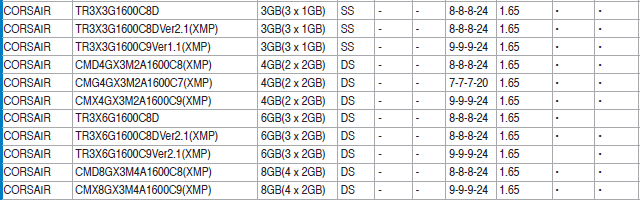
Here is the qualified venders list for your mobo for Corsair 1600 ram. the list can be found here.
It dosen't mean that these are the only modules that will work, only the only models they tested. But, it is a guide to go by. I don't know the exact model you have.
QVL.PNG
 

My Computers My Computers

  • At a glance

    Windows 11 ProRyzen 9 5900X32GB G Skill DDR4-3600EVGA RTX 3080 FTW 3 Ultra
    Computer type
    PC/Desktop
    Computer Manufacturer/Model Number
    ALWAYS UNDER CONSTRUCTION
    OS
    Windows 11 Pro
    CPU
    Ryzen 9 5900X
    Motherboard
    Asus X570 Crosshair Viii Hero
    Memory
    32GB G Skill DDR4-3600
    Graphics Card(s)
    EVGA RTX 3080 FTW 3 Ultra
    Sound Card
    On Board/Sennheiser PC37X Headset
    Monitor(s) Displays
    3 X Asus 27"
    Screen Resolution
    2560x1440
    Hard Drives
    2 X 1 TB NVME drives
    PSU
    EVGA 850
    Case
    Phanteks Eclipse P400A
    Cooling
    EVGA 280 AIO
    Keyboard
    Logitech G510s/ Logitech G13
    Mouse
    Logitech G502
    Internet Speed
    24/1
    Antivirus
    ESET/MBAM Pro/SAS Pro
    Browser
    Chrome/ Firefox/ Edge
  • At a glance

    Windows 11 ProIntel Ultra 9 288V32 GB LPDDR5X 8533
    Computer type
    Laptop
    System Manufacturer/Model Number
    Dell 16 Plus
    OS
    Windows 11 Pro
    CPU
    Intel Ultra 9 288V
    Memory
    32 GB LPDDR5X 8533
    Monitor(s) Displays
    16" Mini-LED HDR600 Touch 90 Hz
    Screen Resolution
    2560X1600
    Hard Drives
    1 TB NVME
I must admit , I am a little stumped as to why the bios is not saving.

When I do a bit of extreme overclocking, if I save the settings and it fails to boot due to me be a bit over the top with the settings then the bios will not save the settings and just boot with the default values.

Its almost as if the default values for yours are wrong so it just fails to boot into windows every time.

Really don't know what to suggest.
 

My Computer My Computer

At a glance

Windows 7 Professional 64 bit
OS
Windows 7 Professional 64 bit
If this is the system in your specs, it is an AMD system. All AMD systems will automatically set the ram at 1333 9-9-9-24. Your 1600 ram should run at those specs. The only way to run the ram at 1600 is to overclock the system. Make sure the dram voltage is set correctly. The system should run at default settings unless the ram is incompatable with the system or you have bad stick(s). To test your ram, use this tutorial on memtest86.


Tottaly right in order to use 1600mhz you have to up the cpu and do a few changes mind you i did some research before i oc'ed my rig
 

My Computer My Computer

At a glance

Windows 10 Home Premium 64bit sp1Intel I7-6700K @ 4.6 Ghz 1.344 volts everyday OC32GB G-Skill TridentZ 3200mhz 16-18-18-38 DDR4Sli Gigabyte Windforce GTX 980 G1
Computer type
PC/Desktop
Computer Manufacturer/Model Number
CoreI7-6700K MrFingerIII Special Builds
OS
Windows 10 Home Premium 64bit sp1
CPU
Intel I7-6700K @ 4.6 Ghz 1.344 volts everyday OC
Motherboard
Asrock Fatality K6 Z170 Socket 1151
Memory
32GB G-Skill TridentZ 3200mhz 16-18-18-38 DDR4
Graphics Card(s)
Sli Gigabyte Windforce GTX 980 G1
Sound Card
AC97 Creative Rage Tactic 3D Headphones Bluetooth
Monitor(s) Displays
27" Asus ROG Swift PG278Q G-Sync 48" Vizio Smart HD TV
Screen Resolution
2560x1440p 27"- 48" Currently Gaming at 2560x1440p Res 2K
Hard Drives
250GB Samsung Evo840SSD Seagate baracuda 500 GB WD Mybook 500Gb 1TB Seagate Barracuda
PSU
HX1050w Corsair Silver 80plus certified crosfire/sli
Case
Enthod Pro Full Tower
Cooling
Corsair H110i GT 280 mm High Performance WaterBlock
Keyboard
Logitech wireless keyboard
Mouse
Logitech wireless mouse
Internet Speed
Cox Cable 100+ mb
Antivirus
WebRoot Spysweeper with Antivirus
Browser
IE-10, Chrome, Opera
Other Info
My Other Rig is a AMD FX8320E @4.6Ghz 16GB Ballistic Sport Ram
Mobo Asrock Fatality 990FX 120GB OCZ SSD 1TB Seagate Barracuda Corsair H75 Cooling PSU Corsair CX750
GPU GTX Gigabyte 970G1
Back
Top