Flash, video playing, sound and generally high CPU Usag

phishie

New member
Local time
3:07 PM
Messages
12
I've done a fair amount of reading and searching on CPU Usage in Windows 7 (both Beta & RC 1) and haven't had any luck with this issue yet.

The machine I'm using contains:
Asus P4P800 motherboard
Intel P4 2.8 GHz dual core
2.5 GB of ram
GeForce 7800 GS 256MB
Clean install of Windows 7 RC1 (had same problem in Beta previously)

The issue I'm having is my CPU Usage spikes up to 80-100% very often and performance of any other task during this period is frustratingly laggy. These spikes happen from even the simplest action ranging from opening the start menu, to scrolling through text on a webpage and worst of all playing video (Youtube is my benchmark tool, 80% usage guaranteed during video play). Using any web browser with 3+ tabs open is guaranteed to spike CPU usage over 50%. Multitasking in general begets a sluggish OS performance.

Some of the solutions I've read and tried:
Installing NVIDIA's Windows 7 video drivers, no improvement.
Disabling the HD Audio in device manager seems to help a lot of people, I don't have this in my device manager.
Sound drivers/devices also seem to be a leading source of CPU over-usage in a lot of cases. I've tried disabling/removing my sound card, drivers, and audio services to no avail. I initially had a sound card and on-board sound (AC97) running and disabling one of the two had a minor improvement in performance but nothing spectacular. Even with both disabled the CPU usage still spikes to 90-100% during video play, not to mention the video stutters and stops often.
I also had on-board LAN in addition to a wireless card installed so I've switched between the two, disabling one or the other with no marked improvement.
Setting the page file to manual control with a 4+ GB size setting, no difference.
Disabling AERO, using a Windows 7 classic theme, no dice.

I like to think that my hardware is strong enough to handle video streaming/playing without maxing out the CPU but if you think I'm mistaken then feel free to let me know. My WIN7 performance score was somewhere around 3.4. I've also watched the Process Explorer extensively and I can't find any service that sticks out terribly.

Any ideas? Any diagnostic tools you guys would recommend?
 

My Computer My Computer

At a glance

Windows 7 RC 1Intel Pentium 4 2.80 GHz2.5 GBBFG GeForce 7800 GS 256 MB
OS
Windows 7 RC 1
CPU
Intel Pentium 4 2.80 GHz
Motherboard
Asus P4P800
Memory
2.5 GB
Graphics Card(s)
BFG GeForce 7800 GS 256 MB
Sound Card
Onboard SoundMAX
Monitor(s) Displays
Dell 21'' 207WFP
Hard Drives
Western Digital Caviar SE16 600 GB (SATA) - Windows Drive
Hitachi Deskstar 250 GB (SATA)
PSU
Seasonic SS-330HB (330 Watt)
Cooling
Standard stuff
Keyboard
Microsoft Natural Ergonomic 4000 (wired)
Mouse
Logitech Wireless MX Revolution
Internet Speed
FiOS
OK so a bit more succinct way to describe the problem.

Whenever I play youtube videos, regardless of browser, the video stutters and loads very very slow. Even after a video is fully loaded it will stutter during playback.

Two laptops in the same house, one with XP one with 7 RC1 have no problem loading youtube videos quickly with smooth playback. So the issue clearly stems from this PC's hardware.

I don't have any problem playing video files from the hard drive.

That's the most specific instance I can use to describe the problem. Otherwise the system just seems a little sluggish, e.g. when loading web pages they load in chunks, rather than filling in quickly. Also, when moving a window quickly around the desktop the border of the window is laggy.

It really seems like a video issue that's causing this (despite the high cpu usage indicator).

Any other ideas besides installing NVIDIA W7 drivers?
 

My Computer My Computer

At a glance

Windows 7 RC 1Intel Pentium 4 2.80 GHz2.5 GBBFG GeForce 7800 GS 256 MB
OS
Windows 7 RC 1
CPU
Intel Pentium 4 2.80 GHz
Motherboard
Asus P4P800
Memory
2.5 GB
Graphics Card(s)
BFG GeForce 7800 GS 256 MB
Sound Card
Onboard SoundMAX
Monitor(s) Displays
Dell 21'' 207WFP
Hard Drives
Western Digital Caviar SE16 600 GB (SATA) - Windows Drive
Hitachi Deskstar 250 GB (SATA)
PSU
Seasonic SS-330HB (330 Watt)
Cooling
Standard stuff
Keyboard
Microsoft Natural Ergonomic 4000 (wired)
Mouse
Logitech Wireless MX Revolution
Internet Speed
FiOS
welcome phishie.
Have some questions for before i could help you.

Which build are you using?
Have you ran windows update after installing the windows?
And what softwares have you installed in you system.


And please fill up the system specs by going to this link: http://www.sevenforums.com/profile.php?do=extra
 

My Computer My Computer

At a glance

Window 7 build 7600, Xp pro(VM)Amd Athlon 2000 xp+kingstone(1gb+256MB)Nvdia 6200(256 mb+255mb(shared))
Computer Manufacturer/Model Number
Custom made
OS
Window 7 build 7600, Xp pro(VM)
CPU
Amd Athlon 2000 xp+
Motherboard
Asus x series
Memory
kingstone(1gb+256MB)
Graphics Card(s)
Nvdia 6200(256 mb+255mb(shared))
Sound Card
soundmax
Monitor(s) Displays
Lg Flatron w1943
Screen Resolution
1360x768
Hard Drives
segate 80GB
Case
i-ball
Keyboard
i-ball
Mouse
i-ball
Internet Speed
256kbps up and 256 kbps down
Build 7100.

I ran Windows Update.

I've had all these problem since the get-go, even before I installed a program. Since then I've updated the video drivers with NVIDIA's drivers, Chrome, Firefox, iTunes, and Windows 7 Codecs.

Also my Windows Experience Index scores:
Processor: 3.3
Memory: 3.4
Graphics: 5.9
Gaming Graphics: 4.9
Primary hard disk: 5.9
 

My Computer My Computer

At a glance

Windows 7 RC 1Intel Pentium 4 2.80 GHz2.5 GBBFG GeForce 7800 GS 256 MB
OS
Windows 7 RC 1
CPU
Intel Pentium 4 2.80 GHz
Motherboard
Asus P4P800
Memory
2.5 GB
Graphics Card(s)
BFG GeForce 7800 GS 256 MB
Sound Card
Onboard SoundMAX
Monitor(s) Displays
Dell 21'' 207WFP
Hard Drives
Western Digital Caviar SE16 600 GB (SATA) - Windows Drive
Hitachi Deskstar 250 GB (SATA)
PSU
Seasonic SS-330HB (330 Watt)
Cooling
Standard stuff
Keyboard
Microsoft Natural Ergonomic 4000 (wired)
Mouse
Logitech Wireless MX Revolution
Internet Speed
FiOS
your computers config is a nice and enough for 32 bit os....
As you mentioned it happens when you are streaming from youtube this may be the problem.
sometimes the activx plugins from you tube or other media streaming sites is responsible for slowing down you pc. It is a common problem.


You could upgrade to newer faster and more stable builds like 7201, 7229, 7260(according to me this are stable builds and faster than 7100).
 

My Computer My Computer

At a glance

Window 7 build 7600, Xp pro(VM)Amd Athlon 2000 xp+kingstone(1gb+256MB)Nvdia 6200(256 mb+255mb(shared))
Computer Manufacturer/Model Number
Custom made
OS
Window 7 build 7600, Xp pro(VM)
CPU
Amd Athlon 2000 xp+
Motherboard
Asus x series
Memory
kingstone(1gb+256MB)
Graphics Card(s)
Nvdia 6200(256 mb+255mb(shared))
Sound Card
soundmax
Monitor(s) Displays
Lg Flatron w1943
Screen Resolution
1360x768
Hard Drives
segate 80GB
Case
i-ball
Keyboard
i-ball
Mouse
i-ball
Internet Speed
256kbps up and 256 kbps down
How would I update/fix my activx? How can I update my Windows 7 RC1 build?
 

My Computer My Computer

At a glance

Windows 7 RC 1Intel Pentium 4 2.80 GHz2.5 GBBFG GeForce 7800 GS 256 MB
OS
Windows 7 RC 1
CPU
Intel Pentium 4 2.80 GHz
Motherboard
Asus P4P800
Memory
2.5 GB
Graphics Card(s)
BFG GeForce 7800 GS 256 MB
Sound Card
Onboard SoundMAX
Monitor(s) Displays
Dell 21'' 207WFP
Hard Drives
Western Digital Caviar SE16 600 GB (SATA) - Windows Drive
Hitachi Deskstar 250 GB (SATA)
PSU
Seasonic SS-330HB (330 Watt)
Cooling
Standard stuff
Keyboard
Microsoft Natural Ergonomic 4000 (wired)
Mouse
Logitech Wireless MX Revolution
Internet Speed
FiOS
A P4 and high CPU usage on flash seems about norm to me, did you not notice that in the previous OS ?.
 

My Computer My Computer

At a glance

Win 7
OS
Win 7
It is due to activx script send from the website. And microsoft send activx update through windows update. Forget activx you cant do nothing about it.

How can I update my Windows 7 RC1 build?/QUOTE]

Download a new build and install..
If you need download link Pm me i will send you the links.
Don`t forget to mention which build and version, i mean 32 bit or 64 bit although according to you system specs you computer supports 32 bit.
 

My Computer My Computer

At a glance

Window 7 build 7600, Xp pro(VM)Amd Athlon 2000 xp+kingstone(1gb+256MB)Nvdia 6200(256 mb+255mb(shared))
Computer Manufacturer/Model Number
Custom made
OS
Window 7 build 7600, Xp pro(VM)
CPU
Amd Athlon 2000 xp+
Motherboard
Asus x series
Memory
kingstone(1gb+256MB)
Graphics Card(s)
Nvdia 6200(256 mb+255mb(shared))
Sound Card
soundmax
Monitor(s) Displays
Lg Flatron w1943
Screen Resolution
1360x768
Hard Drives
segate 80GB
Case
i-ball
Keyboard
i-ball
Mouse
i-ball
Internet Speed
256kbps up and 256 kbps down
I didn't have any youtube video/buffering lag issues when I was running XP. Although I suppose the general sluggishness of the new UI could be due to it being a bit more CPU intensive than XP was.
 

My Computer My Computer

At a glance

Windows 7 RC 1Intel Pentium 4 2.80 GHz2.5 GBBFG GeForce 7800 GS 256 MB
OS
Windows 7 RC 1
CPU
Intel Pentium 4 2.80 GHz
Motherboard
Asus P4P800
Memory
2.5 GB
Graphics Card(s)
BFG GeForce 7800 GS 256 MB
Sound Card
Onboard SoundMAX
Monitor(s) Displays
Dell 21'' 207WFP
Hard Drives
Western Digital Caviar SE16 600 GB (SATA) - Windows Drive
Hitachi Deskstar 250 GB (SATA)
PSU
Seasonic SS-330HB (330 Watt)
Cooling
Standard stuff
Keyboard
Microsoft Natural Ergonomic 4000 (wired)
Mouse
Logitech Wireless MX Revolution
Internet Speed
FiOS
Dude I have the same experience as yours while streaming from youtube(While i was using RC1 build).
I really think that your performance lag is due to the activx issues.
 

My Computer My Computer

At a glance

Window 7 build 7600, Xp pro(VM)Amd Athlon 2000 xp+kingstone(1gb+256MB)Nvdia 6200(256 mb+255mb(shared))
Computer Manufacturer/Model Number
Custom made
OS
Window 7 build 7600, Xp pro(VM)
CPU
Amd Athlon 2000 xp+
Motherboard
Asus x series
Memory
kingstone(1gb+256MB)
Graphics Card(s)
Nvdia 6200(256 mb+255mb(shared))
Sound Card
soundmax
Monitor(s) Displays
Lg Flatron w1943
Screen Resolution
1360x768
Hard Drives
segate 80GB
Case
i-ball
Keyboard
i-ball
Mouse
i-ball
Internet Speed
256kbps up and 256 kbps down
It is due to activx script send from the website. And microsoft send activx update through windows update. Forget activx you cant do nothing about it.
Especially since the other browsers are not using ActiveX.


I didn't have any youtube video/buffering lag issues when I was running XP. Although I suppose the general sluggishness of the new UI could be due to it being a bit more CPU intensive than XP was.
Could be, did you say your using WDDM 1.1 drivers.?
 

My Computer My Computer

At a glance

Win 7
OS
Win 7
For video I'm using the Nvidia drivers for Windows 7 from 6/10/2009.

This issue is across all browsers so I'm not sure if that rules out the Activex idea.
 

My Computer My Computer

At a glance

Windows 7 RC 1Intel Pentium 4 2.80 GHz2.5 GBBFG GeForce 7800 GS 256 MB
OS
Windows 7 RC 1
CPU
Intel Pentium 4 2.80 GHz
Motherboard
Asus P4P800
Memory
2.5 GB
Graphics Card(s)
BFG GeForce 7800 GS 256 MB
Sound Card
Onboard SoundMAX
Monitor(s) Displays
Dell 21'' 207WFP
Hard Drives
Western Digital Caviar SE16 600 GB (SATA) - Windows Drive
Hitachi Deskstar 250 GB (SATA)
PSU
Seasonic SS-330HB (330 Watt)
Cooling
Standard stuff
Keyboard
Microsoft Natural Ergonomic 4000 (wired)
Mouse
Logitech Wireless MX Revolution
Internet Speed
FiOS
Additionally, multitasking in general seems to really bog down the system. In XP I could rip a DVD, copy files from HD to HD, have bittorrent running and not have the system slow to a crawl. In Windows 7 if I have a browser open with 3 windows and I'm copying files from HD to HD performance takes a big hit.
 

My Computer My Computer

At a glance

Windows 7 RC 1Intel Pentium 4 2.80 GHz2.5 GBBFG GeForce 7800 GS 256 MB
OS
Windows 7 RC 1
CPU
Intel Pentium 4 2.80 GHz
Motherboard
Asus P4P800
Memory
2.5 GB
Graphics Card(s)
BFG GeForce 7800 GS 256 MB
Sound Card
Onboard SoundMAX
Monitor(s) Displays
Dell 21'' 207WFP
Hard Drives
Western Digital Caviar SE16 600 GB (SATA) - Windows Drive
Hitachi Deskstar 250 GB (SATA)
PSU
Seasonic SS-330HB (330 Watt)
Cooling
Standard stuff
Keyboard
Microsoft Natural Ergonomic 4000 (wired)
Mouse
Logitech Wireless MX Revolution
Internet Speed
FiOS
Something else that makes me think it's a video issue is how images are rendered in web browsers. They render in chunks, not smoothly, reminds me of how video would be on my system in XP if I was running basic VGA drivers prior to installing the proprietary drivers. Don't get me wrong though, I have the resolution and color depth of good drivers.
 

My Computer My Computer

At a glance

Windows 7 RC 1Intel Pentium 4 2.80 GHz2.5 GBBFG GeForce 7800 GS 256 MB
OS
Windows 7 RC 1
CPU
Intel Pentium 4 2.80 GHz
Motherboard
Asus P4P800
Memory
2.5 GB
Graphics Card(s)
BFG GeForce 7800 GS 256 MB
Sound Card
Onboard SoundMAX
Monitor(s) Displays
Dell 21'' 207WFP
Hard Drives
Western Digital Caviar SE16 600 GB (SATA) - Windows Drive
Hitachi Deskstar 250 GB (SATA)
PSU
Seasonic SS-330HB (330 Watt)
Cooling
Standard stuff
Keyboard
Microsoft Natural Ergonomic 4000 (wired)
Mouse
Logitech Wireless MX Revolution
Internet Speed
FiOS
For video I'm using the Nvidia drivers for Windows 7 from 6/10/2009.

This issue is across all browsers so I'm not sure if that rules out the Activex idea.

Not all browser use ActiveX so i would say that could safely be ruled out. And if i remember correctly only Nvidia 8 series and up use WDDM 1.1, but there are newer drivers than 6/10/2009 if you wish to try them out.
 

My Computer My Computer

At a glance

Win 7
OS
Win 7
The drivers I used are here: GeForce/ION Driver Release 186

The site has the release date as 6/18/09 even though in device manager it says 6/10/09.

One other thing, I installed the drivers without uninstalling whatever Windows Video driver was being used at that time.. a possible issue?
 

My Computer My Computer

At a glance

Windows 7 RC 1Intel Pentium 4 2.80 GHz2.5 GBBFG GeForce 7800 GS 256 MB
OS
Windows 7 RC 1
CPU
Intel Pentium 4 2.80 GHz
Motherboard
Asus P4P800
Memory
2.5 GB
Graphics Card(s)
BFG GeForce 7800 GS 256 MB
Sound Card
Onboard SoundMAX
Monitor(s) Displays
Dell 21'' 207WFP
Hard Drives
Western Digital Caviar SE16 600 GB (SATA) - Windows Drive
Hitachi Deskstar 250 GB (SATA)
PSU
Seasonic SS-330HB (330 Watt)
Cooling
Standard stuff
Keyboard
Microsoft Natural Ergonomic 4000 (wired)
Mouse
Logitech Wireless MX Revolution
Internet Speed
FiOS
The drivers I used are here: GeForce/ION Driver Release 186

The site has the release date as 6/18/09 even though in device manager it says 6/10/09.

One other thing, I installed the drivers without uninstalling whatever Windows Video driver was being used at that time.. a possible issue?

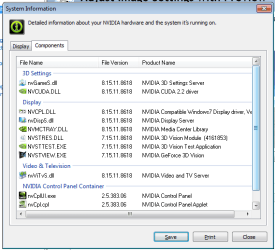
Hmmm that does seem odd, does the system properties in the Nvidia control panel show the same driver numbers in the component tab (other than the control panel files and PhysX) ?.
 

My Computer My Computer

At a glance

Win 7
OS
Win 7
The Nvidia control panel shows 186.18 for the version and the device manager has the version listed as 8.15.11.8618
 

My Computer My Computer

At a glance

Windows 7 RC 1Intel Pentium 4 2.80 GHz2.5 GBBFG GeForce 7800 GS 256 MB
OS
Windows 7 RC 1
CPU
Intel Pentium 4 2.80 GHz
Motherboard
Asus P4P800
Memory
2.5 GB
Graphics Card(s)
BFG GeForce 7800 GS 256 MB
Sound Card
Onboard SoundMAX
Monitor(s) Displays
Dell 21'' 207WFP
Hard Drives
Western Digital Caviar SE16 600 GB (SATA) - Windows Drive
Hitachi Deskstar 250 GB (SATA)
PSU
Seasonic SS-330HB (330 Watt)
Cooling
Standard stuff
Keyboard
Microsoft Natural Ergonomic 4000 (wired)
Mouse
Logitech Wireless MX Revolution
Internet Speed
FiOS
The Nvidia control panel shows 186.18 for the version and the device manager has the version listed as 8.15.11.8618

Yes but under the components tab are they all the same except PhysX and control panel files, See pic for example.
nvidia.png
 

My Computer My Computer

At a glance

Win 7
OS
Win 7
Ahhh, nope! I've got some mismatches here.
 

Attachments

  • nvidiacomponents.png
    nvidiacomponents.png
    13.9 KB · Views: 23

My Computer My Computer

At a glance

Windows 7 RC 1Intel Pentium 4 2.80 GHz2.5 GBBFG GeForce 7800 GS 256 MB
OS
Windows 7 RC 1
CPU
Intel Pentium 4 2.80 GHz
Motherboard
Asus P4P800
Memory
2.5 GB
Graphics Card(s)
BFG GeForce 7800 GS 256 MB
Sound Card
Onboard SoundMAX
Monitor(s) Displays
Dell 21'' 207WFP
Hard Drives
Western Digital Caviar SE16 600 GB (SATA) - Windows Drive
Hitachi Deskstar 250 GB (SATA)
PSU
Seasonic SS-330HB (330 Watt)
Cooling
Standard stuff
Keyboard
Microsoft Natural Ergonomic 4000 (wired)
Mouse
Logitech Wireless MX Revolution
Internet Speed
FiOS
Back
Top