Random CPU spikes and performance lag

Chani

New member
Local time
5:44 PM
Messages
6
Hi everyone. Ok so after relentless searching online for this problem, and the solution that might be out there :confused:, I've finally decided to just post here about it.

Problem:
-My computer is getting random performance lags that last 3-5 seconds.
-The cpu usage will jump when it happens; anywhere from 50-100%
-It's completely random and is very hard to catch but it happens when I'm:
a. browsing the internet with only firefox open; engaging in miniscule internet activities.
b. watching a youtube video at any pixel size.
c. playing a software intensive game.

symptoms:
-Computer slows but doesn't freeze
-the really bad spikes are up to 100% cpu usage; usually though they are 70-80%.
-Video sound gets distorted and choppy; like if you have an injured CD that still plays right through the scratches but gets all choppy sounding.
-often times the mouse pointer will, all of the sudden, be trailing during the strange slow motion performance lag.

fixes I've tried:
-Cleaned out entire case fans, vents, cpu heatsink.
-disabled home network
-increased gpu fan speed
-monitored cpu temps
-made sure all drivers were up to date for everything in my computer
-ran spybot and also my av of course (who wouldn't right? lol.)

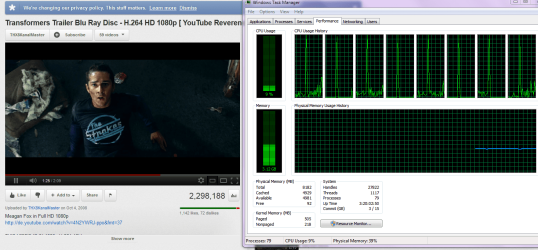
I have all my system specs in my profile. I tried and tried to catch the problem today with a screenshot while watching an hd trailer on youtube; I finally did! but I wasn't able to catch it again while I had the process list up :cry:; it just wouldn't happen again.

Thanks for the help in advance!! Here's the screenshot I caught.
P.S. funny shot I got. Ironically an evil machine is hunting the guy from transformers- coincidence? I'm having nightmares! :sick:
 

Attachments

  • CPU spike.PNG
    CPU spike.PNG
    521 KB · Views: 711

My Computer

Computer Manufacturer/Model Number
dell studio xps 435T/9000
OS
windows 7 home premium x64
CPU
i7 920 @2.67ghz
Motherboard
generic dell mobo (I know) x58 ATX intel chipset (I think)
Memory
8gb
Graphics Card(s)
nvidia GTX 570
Sound Card
creative sound blaster x-fi xtreme gamer
Monitor(s) Displays
1 dell 1920x1080p
Hard Drives
1 TB samsung HD103UJ
PSU
corsair 700 watt
Case
factory case
Cooling
factory dell cooling for this model
Other Info
I run McAfee for my av.

I keep all my drivers constantly updated.
For how long have you had that computer?
Have you tried uninstall your AV, What other programs do you have running in the background.
Have you tried to open the OS in "Safe Mode" and see if the problem still accures?
 

My Computer

Computer type
PC/Desktop
OS
Windows 7 Professional (64x)
CPU
Intel Core i7 5930K @ 3.5GHz 15MB
Motherboard
MSI X99S Gaming 7
Memory
Kingston 16GB (4x4GB) DDR4 2133MHz CL13 XMP
Graphics Card(s)
EVGA Titan X SuperClocked 12GB
Sound Card
Intergrated
Monitor(s) Displays
Samsung SyncMaster SA300 Surround (3 monitors)
Screen Resolution
5760x1080
Hard Drives
120GB (OS SSD), 250GB (SSD Game Drive), 2TB (HDD Game Drive)
PSU
Fractual Design 1000W 80+ Certified
Case
Fractal Design Define XL R2 Black
Cooling
NZXT Kraken X61 (Top Mounted), 4x120mm (3xFront&1Bottom)
Keyboard
Razer Blackwidow Ultimate Stealth Edition
Mouse
Razer Mamba & Razer Vespula MouseMat
Internet Speed
ComHem 100/50
Browser
Mozilla Firefox, Google Chrome
Lets start simple. McAffe does cause many problems. For testing remove it and install MSE.
Next go to msconfig/start up and let us know what all is checked.
While you are in msconfig go to services. Check Hide all Microsoft's services and let us know what you have checked there.
What we are doing is checking what is running in the background that doesn't need to run.
More simple things that might help.

Install and update MalwareBytes Anti Malware then run a full scan and let us know what it finds. So far no change to Windows 7 has been done, we need to see what is going on first.
This is a good little thing to do that can't hurt but can help. Cmd. Prompt/admin type in sfc /scannow. Run it 3 times restarting between each one.
Have you changed anything, (adding programs or the such)?
Have you used any Tune-Up, Registry Cleaners programs, if so which ones?
You state you monitored temps, what were they?
It seem like a long list but it won't take long.
 

My Computer

Computer type
PC/Desktop
Computer Manufacturer/Model Number
Home made Desktop
OS
Windows 10 Pro. 64/ version 1709 Windows 7 Pro/64
CPU
Intel i7-6800K @ 4.3
Motherboard
ASUS X-99 Deluxe II
Memory
Corsair Platinum 16 gig @2400
Graphics Card(s)
EVGA GTX 1070 OC
Monitor(s) Displays
Asus 27" LED LCD/VE278Q
Screen Resolution
1920-1080 or 1280-720 HDMI
Hard Drives
INTEL SSD 730-240 Gb Sata 3.0/
PSU
EVGA Platium 1200W
Case
Phanteks Luxe Tempered Glass 8 fans/ one radiator
Cooling
XSPC/ Water Cooled CPU
Keyboard
Das 4 Professional
Mouse
Logitech M705/MX Anywhere 2-S
Internet Speed
100 mbits
Antivirus
Microsoft Security Essentials/ Malwarebytes Premium 3.0/ SAS
Browser
I.E. 11 default/Firefox/ ISP Time Warner Cable/Spectrum
Other Info
LG BluRay Burner/
Sound system-KLipsch-THX/
Icy Dock ssd Hot Swap bays.
1. Lets start simple. McAffe does cause many problems. For testing remove it and install MSE.
-Removed McAfee/ installed MSE

2. Next go to msconfig/start up and let us know what all is checked.

-Snipped two pictures of all checked services for start up

3. While you are in msconfig go to services. Check Hide all Microsoft's services and let us know what you have checked there.

-Snipped 3 pictures of all services checked/ hid all Microsoft services.

More simple things that might help.


1. Install and update MalwareBytes Anti Malware then run a full scan and let us know what it finds.
-Installed and updated MBAM and ran it. Snipped the results and uploaded them.

2. Cmd. Prompt/admin type in sfc /scannow. Run it 3 times restarting between each one.
-Ran sfc / scannow and followed instructions on repairing files from the
windows 7 installation disk. Results found no errors except for some printer error which I've always had on this pc and can never successfully repair. Printer works though.


3. Have you changed anything, (adding programs or the such)?
-I haven't changed any settings but I did install the game battlefield 3.

4. Have you used any Tune-Up, Registry Cleaners programs, if so which ones?
-Once. Uniblue registry cleaner; that was about 1 1/2 years ago and I uninstalled it after I had used it. This problem I've been having is not that old so I think that would be an unlikely culprit.

5. You state you monitored temps, what were they?
-I monitored my cpu core temps but don't remember exactly what they were. I don't think they were anything out of safe ranges but I'll monitor them again this week and post back.

*Note: Fuluftge in the system services start up list has been removed by MBAM.
 

Attachments

  • Services Results.PNG
    Services Results.PNG
    87.2 KB · Views: 346
  • Start up services.PNG
    Start up services.PNG
    83 KB · Views: 349
  • Malwarebytes Results.PNG
    Malwarebytes Results.PNG
    13.1 KB · Views: 194

My Computer

Computer Manufacturer/Model Number
dell studio xps 435T/9000
OS
windows 7 home premium x64
CPU
i7 920 @2.67ghz
Motherboard
generic dell mobo (I know) x58 ATX intel chipset (I think)
Memory
8gb
Graphics Card(s)
nvidia GTX 570
Sound Card
creative sound blaster x-fi xtreme gamer
Monitor(s) Displays
1 dell 1920x1080p
Hard Drives
1 TB samsung HD103UJ
PSU
corsair 700 watt
Case
factory case
Cooling
factory dell cooling for this model
Other Info
I run McAfee for my av.

I keep all my drivers constantly updated.
First off you are doing a grate job. Your StartUp and Services are killing your computer. In my services non Microsoft is MAM that's it. In start up I have MSE, MAM and my keyboard and mouse. My keyboard and mouse will act crazy if I don't let them start up, Bluetooth. IMHO you have way to much starting up and services. This will drive your computer crazy. Now so you know where I'm coming from, you have done nothing wrong. Every time you update or download and install programs they put them self's in start up and services. You must check these things often to see what is going on. I don't see your upload from MAM, but I hope is says your clean. I will look again, I don't want to loose all I have typed.
Take care of your Services, (non M/S) leave M/S services alone or you will get in trouble. Take care of the Start Up and reboot and see how things are working for you. Your computer specs look very good. If we can get the B/S out of the system things should work well. Note; I'm not saying your non M/S services are bad they should only work when you tell them to not when they fell like it. At the present time lets just see how things have improved. Also remember that a Shut Down or a Reboot does wonderful things after changes have been made. Unplug your printer for now, you can plug it in later and we will deal with it. Unplug everything you don't need. Things for a camera, external hard drives ect. We can also deal with them later. If you have any question just ask. We are here to help. I just ate a dozen chocolate donettes with two cups of coffee so I'm a bit wired. Forgive me.
 

My Computer

Computer type
PC/Desktop
Computer Manufacturer/Model Number
Home made Desktop
OS
Windows 10 Pro. 64/ version 1709 Windows 7 Pro/64
CPU
Intel i7-6800K @ 4.3
Motherboard
ASUS X-99 Deluxe II
Memory
Corsair Platinum 16 gig @2400
Graphics Card(s)
EVGA GTX 1070 OC
Monitor(s) Displays
Asus 27" LED LCD/VE278Q
Screen Resolution
1920-1080 or 1280-720 HDMI
Hard Drives
INTEL SSD 730-240 Gb Sata 3.0/
PSU
EVGA Platium 1200W
Case
Phanteks Luxe Tempered Glass 8 fans/ one radiator
Cooling
XSPC/ Water Cooled CPU
Keyboard
Das 4 Professional
Mouse
Logitech M705/MX Anywhere 2-S
Internet Speed
100 mbits
Antivirus
Microsoft Security Essentials/ Malwarebytes Premium 3.0/ SAS
Browser
I.E. 11 default/Firefox/ ISP Time Warner Cable/Spectrum
Other Info
LG BluRay Burner/
Sound system-KLipsch-THX/
Icy Dock ssd Hot Swap bays.
I am having a very similar problem to Chani. It only started happening about 2 weeks ago. I have done malware scans, disk defrags, and a bit more... I wouldn't stand the short lag spikes so I reinstalled a clean copy of windows over my old version, and I deleted the windows.old folder using disk cleanup. STILL, man, STILL I get this damn problem (forgive me for I am frustrated to the max). Why in God's name do I have to get pooped on all the time with everything that I do!? I have been trying to solve this issue for the last few weeks, and have been unsuccessful in all of my attempts. I'll just note that everytime I get a lag spike, I can hear a usb device connecting to my computer. I started a new thread about this a week ago in the "crashes and debugging" section, but I wasnt able to get much help there. Please, any help is appreciated!
 

My Computer

OS
Windows 7 Ultimate x64
CPU
AMD Phenom 9850 @ 2.5Ghz
Memory
OCZ Platinum Series RAM @ 4GB Dual-Channel
Graphics Card(s)
ATI Radeon HD4870 @ 512MB GDDR5
Hard Drives
Seagate Barracuda 500GB HDD @ 7200rpm
PSU
Thermaltake 750W
Following along and doing recommendations that you read could help you but lets do one computer at a time. I recommend going back to your original post with your problem. State your problem as precise as you can. We really try not to miss any post but sometimes it takes a little longer.
 

My Computer

Computer type
PC/Desktop
Computer Manufacturer/Model Number
Home made Desktop
OS
Windows 10 Pro. 64/ version 1709 Windows 7 Pro/64
CPU
Intel i7-6800K @ 4.3
Motherboard
ASUS X-99 Deluxe II
Memory
Corsair Platinum 16 gig @2400
Graphics Card(s)
EVGA GTX 1070 OC
Monitor(s) Displays
Asus 27" LED LCD/VE278Q
Screen Resolution
1920-1080 or 1280-720 HDMI
Hard Drives
INTEL SSD 730-240 Gb Sata 3.0/
PSU
EVGA Platium 1200W
Case
Phanteks Luxe Tempered Glass 8 fans/ one radiator
Cooling
XSPC/ Water Cooled CPU
Keyboard
Das 4 Professional
Mouse
Logitech M705/MX Anywhere 2-S
Internet Speed
100 mbits
Antivirus
Microsoft Security Essentials/ Malwarebytes Premium 3.0/ SAS
Browser
I.E. 11 default/Firefox/ ISP Time Warner Cable/Spectrum
Other Info
LG BluRay Burner/
Sound system-KLipsch-THX/
Icy Dock ssd Hot Swap bays.
Thanks Bear!! Sorry it's been a busy week for me and family is visiting for the weekend :confused: haha.. it's nice really though. Ok so I did upload a few different things including the MBAM results. The MBAM results were all the at the bottom in the group of uploaded pictures. I will upload them again right now to be sure :) Anyways I haven't noticed the problem since and I think that it was possibly taken care of from the scan. Note: Fuluftge in the system services start up list has been removed by MBAM. Strangely that has been there for a while and I'm not sure where it came from but have looked it up to see what it was. I'm not sure if that had actually been causing the problem or if it was a program conflict from my services or what. I do have a creative soundblaster card in one of my pci slots and it is located directly under my gtx570. I have heard and read that this sb xfi card is not genuinely recognized by windows 7 so I don't know if that helps to create problems for me. It is extremely close to the gpu as well and I feel like I remember this problem beginning when I installed the graphics card. Also the gtx570 is a very new card and I think that many people are experiencing issues with them. I do have all my drivers up to date with the cards. It's a lot to try and deal with for me and it's sooo frustrating! I feel like I don't have the understanding that I want to have with the machine and that it's still in a slightly performance hindered state. I am extremely OCD btw so maybe I just worry way too much about it. For now I think I will see how it runs for a while and see if the problem has truly been solved. The sound can sometimes still be a little distorted but nothing really noticeable. Also the cpu temps were never higher than 90º actually only in the very high 80's. Layback Bear thanks so much for your patient help!! I will post back if this problem reoccurs. I will thankfully except any and all insights and knowledge that you provide!! Eat more chocolate and drink more coffee!! haha lol... on my 3rd cup o coffee here! No chocolate though :cry:
~Thank You!!
 

Attachments

  • Malwarebytes Results.PNG
    Malwarebytes Results.PNG
    13.1 KB · Views: 307

My Computer

Computer Manufacturer/Model Number
dell studio xps 435T/9000
OS
windows 7 home premium x64
CPU
i7 920 @2.67ghz
Motherboard
generic dell mobo (I know) x58 ATX intel chipset (I think)
Memory
8gb
Graphics Card(s)
nvidia GTX 570
Sound Card
creative sound blaster x-fi xtreme gamer
Monitor(s) Displays
1 dell 1920x1080p
Hard Drives
1 TB samsung HD103UJ
PSU
corsair 700 watt
Case
factory case
Cooling
factory dell cooling for this model
Other Info
I run McAfee for my av.

I keep all my drivers constantly updated.
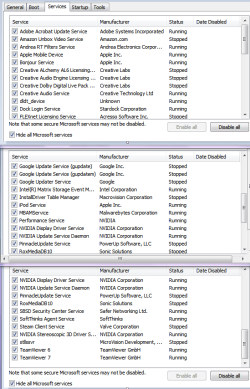
P.S. Fuluftge: I had tried to look it up and never found ANYTHING about it. That was months ago.
 

My Computer

Computer Manufacturer/Model Number
dell studio xps 435T/9000
OS
windows 7 home premium x64
CPU
i7 920 @2.67ghz
Motherboard
generic dell mobo (I know) x58 ATX intel chipset (I think)
Memory
8gb
Graphics Card(s)
nvidia GTX 570
Sound Card
creative sound blaster x-fi xtreme gamer
Monitor(s) Displays
1 dell 1920x1080p
Hard Drives
1 TB samsung HD103UJ
PSU
corsair 700 watt
Case
factory case
Cooling
factory dell cooling for this model
Other Info
I run McAfee for my av.

I keep all my drivers constantly updated.
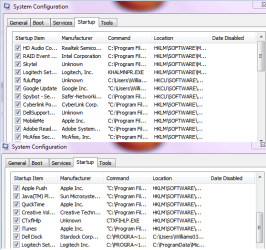
Chani you have way to many things checked and they are causing your spikes. If it was my computer Start Up would have my security programs, keyboard, and mouse. In Service (non Microsoft) only my security programs would be checked. I would also run Super Anti Spyware if you haven't already.

Keep in mind that having all those things un-checked doesn't mean you can't use them. It only means they aren't running until you tell them to. Kind of like a desktop icon for a program. It just sits there doing nothing until you tick on it.

I'm glad things are getting better. You every now and then should check msconfig/startup/services. Reason being that when you add a program it will plant itself there and sometimes when you update a program once again it does the same thing.
Example would be Adobe.

My computers have MSE, MAM, and SAS for security. MSE and MAM are active and work well together.
Get back and let us know how things are working. We all here to learn and help.

Note: If MAM removed Fuluftge you don't want it. I trust MAM.
 
Last edited:

My Computer

Computer type
PC/Desktop
Computer Manufacturer/Model Number
Home made Desktop
OS
Windows 10 Pro. 64/ version 1709 Windows 7 Pro/64
CPU
Intel i7-6800K @ 4.3
Motherboard
ASUS X-99 Deluxe II
Memory
Corsair Platinum 16 gig @2400
Graphics Card(s)
EVGA GTX 1070 OC
Monitor(s) Displays
Asus 27" LED LCD/VE278Q
Screen Resolution
1920-1080 or 1280-720 HDMI
Hard Drives
INTEL SSD 730-240 Gb Sata 3.0/
PSU
EVGA Platium 1200W
Case
Phanteks Luxe Tempered Glass 8 fans/ one radiator
Cooling
XSPC/ Water Cooled CPU
Keyboard
Das 4 Professional
Mouse
Logitech M705/MX Anywhere 2-S
Internet Speed
100 mbits
Antivirus
Microsoft Security Essentials/ Malwarebytes Premium 3.0/ SAS
Browser
I.E. 11 default/Firefox/ ISP Time Warner Cable/Spectrum
Other Info
LG BluRay Burner/
Sound system-KLipsch-THX/
Icy Dock ssd Hot Swap bays.
Hi, know this topic has not been active in a few months, but I thought I would add some extra notes for people who stumble across it just like I did while researching the same symptoms on my computer.

If you have McAfee Anti-virus then continue reading... hopefully this solves your problems as much as it did mine. I was monitoring my system resources and doing all sorts of things to create the freeze/spike and noticed McSvHost.exe hogging up the entire CPU whenever this spikes occurred. This obviously lead to a more specific search on google that revealed several people having this issue. Try the simple steps below from a different forum...it worked for me :)

To disable Net Guard:
1) Open McAfee Security Center
2) Click on "Web and Email Protection"
3) Click on "Firewall"
4) Click "Net Guard"
5) Uncheck the box beside "Turn on Net Guard"
 

My Computer

OS
Windows 7 Ultimate x64
If you have two monitors, check that the refresh rates are the same. I saw a similar issue elsewhere where they said that fixed one guy's issue. I have the same issue unfortunately that you do, but I noticed that my lag shows up only when the background changes. I like having my background cycle, but if this is going to cause my programs (both games and my browser) to lag/freeze up then I may just shut off the desktop background auto changer thing and pick one picture...
 

My Computer

Computer type
PC/Desktop
Computer Manufacturer/Model Number
Custom Build
OS
Windows 7 Ultimate x64
CPU
AMD Phenom II X4 965 Black Edition Deneb
Motherboard
ASUS Crosshair III Formula
Memory
4x 2GB G.SKILL Ripjaws Series
Graphics Card(s)
GTX 470
Hard Drives
2TB Barracuda XT
Antivirus
MSE
Browser
Firefox
Back
Top