Where is the windows photo viewer default location?

digitaltomj

New member
Local time
5:32 PM
Messages
2
Where is windows photo viewer (the application .exe file) located by default on windows 7 64 bit?

I am trying to set it as the default program to open certain picture files because an essential program I run needs those specific file associations to be made or it will not work. But every time I try to set windows photo viewer as the default program, windows asks me to browse for the application, and it is nowhere to be found on the computer (although I know it is installed and runs perfectly fine). I have tried preforming searches within the computer and just cant find the .exe file I need, someone please point me in the right direction.
 

My Computer My Computer

At a glance

Windows 7 Home Premium x64
OS
Windows 7 Home Premium x64
I use windows live photo gallery so i was unable to find it for you, i found wp gallery by typing windows photo viewer exe in the start search when i got a result i right clicked it and selected open file location,
another way to get the photoviewer as default viewer is to right click a photo and select open with then select choose default program, then select photo viewer from the list ,be sure to check the always use this prog for files of this type checkbox
 
Last edited:

My Computer My Computer

At a glance

Microsoft Windows 7 Home Premium 64-bit 7600IIx4 amd athelon 635 processor2x2gbati radeon HD 5450
Computer Manufacturer/Model Number
Hewlett packard/p6512uk
OS
Microsoft Windows 7 Home Premium 64-bit 7600
CPU
IIx4 amd athelon 635 processor
Motherboard
FOXCONN 2AA9
Memory
2x2gb
Graphics Card(s)
ati radeon HD 5450
Sound Card
(1) Realtek High Definition Audio (2) AMD High Definition
Monitor(s) Displays
samsung lcd tv 32"
Screen Resolution
1360x 768
Hard Drives
(1) WDC WD10 01FAES-60Z2A0 SATA Disk Device (2) Maxtor OneTouch USB Device (3) ST310003 33AS USB Device (4) WD My Book 1111 USB Device
PSU
?
Cooling
air!
Keyboard
wireless hp
Mouse
wireless Hp,optical
Internet Speed
1.10mb/s
Antivirus
MSE
Browser
Firefox
Windows Photo Viewer is run by dllhost.exe COM Surrogate. Basically, it does not have it's own exe file, only dll.

To start Windows Photo Viewer from command line you would have to use
Code:
%SystemRoot%\System32\rundll32.exe "%ProgramFiles%\Windows Photo Viewer\PhotoViewer.dll", ImageView_Fullscreen %1
where %1 is a full path to a file.

I am not sure how this is going to work for you.
 

My Computer My Computer

At a glance

Windows 8.1 ; Windows 7 x86 (Dec2008-Jan2013)
Computer type
PC/Desktop
OS
Windows 8.1 ; Windows 7 x86 (Dec2008-Jan2013)
Other Info
"The scale icon at the top right of a post or tutorial is how you can give rep to the member."
Hi There, I actually have a different need from the same issue of finding the exe file. My need is that I want to get this windows photo viewer.exe file so that I can install it on my windows xp PC as I am unable to find that through internet. So can anyone of you help me in finding out the exe file so that i may install it on my windows XP PC.
 

My Computer My Computer

At a glance

Windows 7 ultimate 32bit
Computer type
PC/Desktop
OS
Windows 7 ultimate 32bit
As mentioned in the previous post there is no viewer.exe file. I very much doubt that the viewer is compatible with XP.
 

My Computer My Computer

At a glance

Windows 7 Pro 64 bitXeon W35208 GBNvidia Geforce 210
Computer type
PC/Desktop
Computer Manufacturer/Model Number
HP
OS
Windows 7 Pro 64 bit
CPU
Xeon W3520
Memory
8 GB
Graphics Card(s)
Nvidia Geforce 210
Windows Photo Viewer CommandLine

Hi
How do I control Windows Photo Viewer from the command line (or via a URL)?

I am scripting the command line to test if an image exists in a folder.
At the moment I am using an Open URL command to do this (in Filemakerpro) (Dont worry about that)
If the file is missing I get an error number(good). But if it is there it gets opened in Windows photoviewer.

Ideally I would like a command just to see it the file is there.
But for now I want to kill Photoviewer.dll using "TASKKILL" or closing it in the command line.
It is a .dll and not an .exe file, so
How do I control it from the command line?
 

My Computer My Computer

At a glance

Windows 7 Professional 64 bit16gb
Computer type
PC/Desktop
Computer Manufacturer/Model Number
custom build
OS
Windows 7 Professional 64 bit
Motherboard
Asus
Memory
16gb
Screen Resolution
2560 x 1440
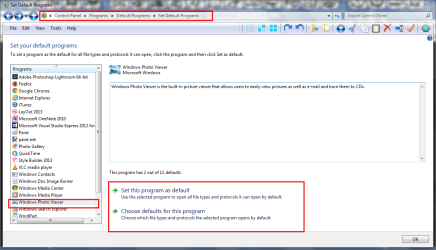
You should be able to set the association in the control panel.

screenshot307_2014-03-19.png
 

My Computer My Computer

At a glance

Microsoft Windows 7 Home Premium 64-bit Servi...Intel(R) Core(TM) i3 CPU M 330 @ 2.13GHz8 GB DDR3Intel(R) HD Graphics
Computer type
Laptop
Computer Manufacturer/Model Number
Hewlett-Packard/G62-107SA Notebook
OS
Microsoft Windows 7 Home Premium 64-bit Service Pack 1
CPU
Intel(R) Core(TM) i3 CPU M 330 @ 2.13GHz
Motherboard
Hewlett-Packard 1425
Memory
8 GB DDR3
Graphics Card(s)
Intel(R) HD Graphics
Sound Card
Realtek High Definition Audio
Monitor(s) Displays
Builtin
Screen Resolution
1366 x 768 x 32 bits (4294967296 colors) @ 60 Hz
Hard Drives
250 GB SATA Hard Disk Drive 7200 rpm
2TB Seagate GoFlex USB 2 Drive
1TB Iomega Prestige USB 2 Drive
1.5TB Iomega Prestige USB 2 Drive (Samsung)
2TB WD MyBook Live NAS.
Mouse
Logitech Anywhere MX
Internet Speed
152 Mbs download 10 Mbs upload
Antivirus
Norton 360
Browser
Chrome
Hi, I'm trying this solution but it's not working. I'm trying to change the default program for .gif files from the current default of Internet Explorer to Windows Photo Viewer. In Control Panel > Default Programs > Set Your Default Programs, I highlight Windows Photo Viewer on the left, and it says "This program has 8 out of 11 defaults" at the bottom. I click "Choose defaults for this program", and it won't let me uncheck .gif files, so I have to check "Select All" (and then uncheck the two choices I don't want associated with WPV), click Save, again highlight WPV on the left, and now it says "This program has 9 out of 11 defaults" so I thought the change worked, but it's still using IE to open .gif's. What's even weirder is that I managed to temporarily change it from IE to Paint with a right-click Open With... > Choose Default Program, choosing Paint, and leaving "Always use the selected program..." checked... but after trying the Control Panel method again, it reverts back to IE!
 

My Computer My Computer

At a glance

Windows 7 Professional SP1 64-bit
Computer type
PC/Desktop
OS
Windows 7 Professional SP1 64-bit
Suggestion

Forget Control Panel .

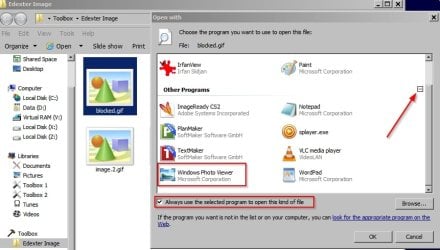
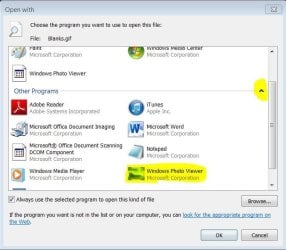
Find a .gif file and right click on it. In the menu choose "open with" > "choose default program"

Then in the window that opens up expand "other programs" and see if Windows Photo Viewer is in the list!

Screenshot:

WPV.jpg
 

My Computer My Computer

At a glance

Microsoft Windows 7 Home Premium 64-bit 7601 ...AMD C-60 APU with Radeon(tm) HD Graphics4.00 GBAMD Radeon HD 6290 Graphics
Computer type
Laptop
Computer Manufacturer/Model Number
ASUS
OS
Microsoft Windows 7 Home Premium 64-bit 7601 Multiprocessor Free Service Pack 1
CPU
AMD C-60 APU with Radeon(tm) HD Graphics
Motherboard
ASUSTeK COMPUTER INC. X501U
Memory
4.00 GB
Graphics Card(s)
AMD Radeon HD 6290 Graphics
Sound Card
(1) AMD High Definition Audio Device (2) Realtek High Defi
Screen Resolution
1366 x 768 x 32 bits (4294967296 colors) @ 60 Hz
Hard Drives
Hitachi HTS545050A7E380 SATA Disk Device
Antivirus
Comodo CIS & FW, SecureAplus App Whitelisting, Threatfire
Browser
Cyberfox 64bit, Opera 64bit, Airfox
Other Info
Spy-The-Spy, HitmanPro.Alert, Norton Connect Safe, MJRegWatcher, BitDefender TrafficLight, Voodoo Shield, Zemana AntiMalware
THANK YOU -- at first I was going to say it's not listed under Other Programs, in fact there's nothing under Other Programs... but I just went in again and happened to notice the tiny carrot you arrowed to in your illustration, to reveal a host of programs to choose! Thank you again!
Capture.JPG
 
Last edited:

My Computer My Computer

At a glance

Windows 7 Professional SP1 64-bit
Computer type
PC/Desktop
OS
Windows 7 Professional SP1 64-bit
To clarify, using Control Panel will work too saving the hassle of hunting down some specific file type if you have this issue again. ;)
 

My Computer My Computer

At a glance

Windows 7 Ultimate X64 SP1Intel i5-2550K, Differing ~4.4-4.8GHz No buil...16GB G.Skill Sniper 1866MHz @ 2133MHz 2x8GBASUS GTX650TIB-DC2OC-2GD5, (650TI Boost)
Computer type
PC/Desktop
Computer Manufacturer/Model Number
Home Built Desktop By DataTech
OS
Windows 7 Ultimate X64 SP1
CPU
Intel i5-2550K, Differing ~4.4-4.8GHz No built in GPU
Motherboard
ASUS P8Z68-V PRO/GEN3
Memory
16GB G.Skill Sniper 1866MHz @ 2133MHz 2x8GB
Graphics Card(s)
ASUS GTX650TIB-DC2OC-2GD5, (650TI Boost)
Sound Card
Onboard Realtek 5-1
Monitor(s) Displays
Samsung P2570HD
Screen Resolution
1920x1080
Hard Drives
Samsung 840 Pro 256GB SSD for OS, 500GB Seagate Constellation (Enterprise drive) for Data
PSU
Corsair HX650W
Case
Inwin Dragon Rider
Cooling
Hyper 212 EVO w/two Noctua fans, push-pull, @1300 RPM
Keyboard
E-Z Eyes, bright yellow keys with large characters
Mouse
steelseries SENSEI Laser Pro Gaming
Internet Speed
48-51Mbs Mbs down, 11 Mbs up Xfinity Cable
Antivirus
Norton Internet Security 2013
Browser
IE 10, Opera, Pale Moon if needed
Other Info
4 case fans, LG BluRay-RE, ASUS DVD-RW, Mr. Fusion power supply, 1.21 gigawatts.
Thanks from me too!

I had the same problem with CR2 files. I never noticed that little carret your big red arrow pointed to. Your solution worked for me too & I just wanted to say THANKS!
 

My Computer My Computer

At a glance

Windows 7 Home Premium 64 bit SP1 Build 7601Intel core i5-2500, 3.3GHzKingston HyperX DDR3 2x4GBRadeon HD 6850
Computer type
PC/Desktop
Computer Manufacturer/Model Number
custom build
OS
Windows 7 Home Premium 64 bit SP1 Build 7601
CPU
Intel core i5-2500, 3.3GHz
Motherboard
AzRock P67 Extreme 4
Memory
Kingston HyperX DDR3 2x4GB
Graphics Card(s)
Radeon HD 6850
Monitor(s) Displays
NEC MultiSync PA241W
Screen Resolution
1920x1200
Hard Drives
Corsair Force SSD 120 GB
Crucial M4 SSD 250GB
Hitachi 3TB
HD Black 2TB
HD Black 500GB
PSU
Antec CP-850
Case
Antec P183 Ve
Cooling
stock
Keyboard
Logitech wireless
Mouse
Logitech wireless
Internet Speed
28 Mbps download, 4 Mbps upload
Antivirus
Norton 360
Browser
IE11
Windows Photo Viewer is run by dllhost.exe COM Surrogate. Basically, it does not have it's own exe file, only dll.

To start Windows Photo Viewer from command line you would have to use
Code:
%SystemRoot%\System32\rundll32.exe "%ProgramFiles%\Windows Photo Viewer\PhotoViewer.dll", ImageView_Fullscreen %1
where %1 is a full path to a file.

I am not sure how this is going to work for you.

Is there any other way to adjust the window size using command line?
This ImageView_Fullscreen isn't working for me, it opens in the last size Windows Photo Viewer was run in.
 

My Computer My Computer

At a glance

Windows 7 Professional x64Quad Intel i5 3330 3.2 Turbo (OC's to 3.6 usi...8 GB 16001 GB Geforce GT 630
Computer type
PC/Desktop
Computer Manufacturer/Model Number
Custom Build
OS
Windows 7 Professional x64
CPU
Quad Intel i5 3330 3.2 Turbo (OC's to 3.6 using ASRock MB)
Motherboard
ASRock Z77 Pro3
Memory
8 GB 1600
Graphics Card(s)
1 GB Geforce GT 630
Sound Card
OnBoard
Monitor(s) Displays
ASUS 21.6" 1080p DVI + 42" Toshiba HDTV HDMI
Hard Drives
1 - 250 GB Samsung EVO 840 SSD Sata 6GB/s ;
1 - 1 TB Toshiba HDD Sata 6GB/s ;
2 - 3 TB Seagate Barracuda HDD Sata 3GB/s
PSU
500w Silent Enlight
Case
Logisys Exotic Red-removed plastic side to install 300mm fan
Cooling
2 Copper Heat Pipes Single Fan
Keyboard
Basic US Layout
Mouse
Basic Logitech
Internet Speed
True 512kb/s
Antivirus
Avast!
Browser
Mozilla Firefox
Other Info
Removed all plates on back of case, installed a second 80mm fan

My Computer My Computer

At a glance

Windows 10 Home x64INTEL Core i5-750 Quad-Core 3.37GHzHyperX Fury Black Series 8GB (2 x 4GB) 1866MhzEVGA GeForce GTX 750 Superclocked 1GB 128-Bit...
Computer type
PC/Desktop
OS
Windows 10 Home x64
CPU
INTEL Core i5-750 Quad-Core 3.37GHz
Motherboard
ASUS P7P55D
Memory
HyperX Fury Black Series 8GB (2 x 4GB) 1866Mhz
Graphics Card(s)
EVGA GeForce GTX 750 Superclocked 1GB 128-Bit GDDR5
Monitor(s) Displays
LG 32MA68HY 32" IPS
Screen Resolution
1920 x 1080
Hard Drives
Samsung 840 Evo 120GB, SEAGATE 500GB Barracuda® 7200.12, SATA 3 Gb/s, 7200 RPM, 16MB cache
PSU
ANTEC TruePower New TP-550, 80 PLUS, 550W
Case
ANTEC Three Hundred Illusion
Cooling
COOLER MASTER Hyper 212 Plus, 4 x 120mm 1 x 140mm Noctua's
Internet Speed
85 + Mbps
Antivirus
Avast
Browser
Vivaldi
I always had it without quotes. It does work to bring up the picture, just the ImageView_Fullscreen isn't working.

Here is my code:
rundll32.exe "c:\Program Files\Windows Photo Viewer\PhotoViewer.dll", ImageView_Fullscreen c:\pic.jpg

I've tried everything I could possibly imagine, adding %SystemRoot%\System32\ before rundll32.exe, adding and removing quotes.

I think I'm stuck with it opening in a small window lol.
Oh well. Thanks for trying.
 

My Computer My Computer

At a glance

Windows 7 Professional x64Quad Intel i5 3330 3.2 Turbo (OC's to 3.6 usi...8 GB 16001 GB Geforce GT 630
Computer type
PC/Desktop
Computer Manufacturer/Model Number
Custom Build
OS
Windows 7 Professional x64
CPU
Quad Intel i5 3330 3.2 Turbo (OC's to 3.6 using ASRock MB)
Motherboard
ASRock Z77 Pro3
Memory
8 GB 1600
Graphics Card(s)
1 GB Geforce GT 630
Sound Card
OnBoard
Monitor(s) Displays
ASUS 21.6" 1080p DVI + 42" Toshiba HDTV HDMI
Hard Drives
1 - 250 GB Samsung EVO 840 SSD Sata 6GB/s ;
1 - 1 TB Toshiba HDD Sata 6GB/s ;
2 - 3 TB Seagate Barracuda HDD Sata 3GB/s
PSU
500w Silent Enlight
Case
Logisys Exotic Red-removed plastic side to install 300mm fan
Cooling
2 Copper Heat Pipes Single Fan
Keyboard
Basic US Layout
Mouse
Basic Logitech
Internet Speed
True 512kb/s
Antivirus
Avast!
Browser
Mozilla Firefox
Other Info
Removed all plates on back of case, installed a second 80mm fan
Yeah, you have it right. I use Irfanview myself ;)

A Guy
 

My Computer My Computer

At a glance

Windows 10 Home x64INTEL Core i5-750 Quad-Core 3.37GHzHyperX Fury Black Series 8GB (2 x 4GB) 1866MhzEVGA GeForce GTX 750 Superclocked 1GB 128-Bit...
Computer type
PC/Desktop
OS
Windows 10 Home x64
CPU
INTEL Core i5-750 Quad-Core 3.37GHz
Motherboard
ASUS P7P55D
Memory
HyperX Fury Black Series 8GB (2 x 4GB) 1866Mhz
Graphics Card(s)
EVGA GeForce GTX 750 Superclocked 1GB 128-Bit GDDR5
Monitor(s) Displays
LG 32MA68HY 32" IPS
Screen Resolution
1920 x 1080
Hard Drives
Samsung 840 Evo 120GB, SEAGATE 500GB Barracuda® 7200.12, SATA 3 Gb/s, 7200 RPM, 16MB cache
PSU
ANTEC TruePower New TP-550, 80 PLUS, 550W
Case
ANTEC Three Hundred Illusion
Cooling
COOLER MASTER Hyper 212 Plus, 4 x 120mm 1 x 140mm Noctua's
Internet Speed
85 + Mbps
Antivirus
Avast
Browser
Vivaldi
I can see why u use an external pic viewer, but personally I don't like all the buttons on that one lol and I guess I'm fine with what I have, fullscreen is what I wanted but I can live without. Thanks again :)
 

My Computer My Computer

At a glance

Windows 7 Professional x64Quad Intel i5 3330 3.2 Turbo (OC's to 3.6 usi...8 GB 16001 GB Geforce GT 630
Computer type
PC/Desktop
Computer Manufacturer/Model Number
Custom Build
OS
Windows 7 Professional x64
CPU
Quad Intel i5 3330 3.2 Turbo (OC's to 3.6 using ASRock MB)
Motherboard
ASRock Z77 Pro3
Memory
8 GB 1600
Graphics Card(s)
1 GB Geforce GT 630
Sound Card
OnBoard
Monitor(s) Displays
ASUS 21.6" 1080p DVI + 42" Toshiba HDTV HDMI
Hard Drives
1 - 250 GB Samsung EVO 840 SSD Sata 6GB/s ;
1 - 1 TB Toshiba HDD Sata 6GB/s ;
2 - 3 TB Seagate Barracuda HDD Sata 3GB/s
PSU
500w Silent Enlight
Case
Logisys Exotic Red-removed plastic side to install 300mm fan
Cooling
2 Copper Heat Pipes Single Fan
Keyboard
Basic US Layout
Mouse
Basic Logitech
Internet Speed
True 512kb/s
Antivirus
Avast!
Browser
Mozilla Firefox
Other Info
Removed all plates on back of case, installed a second 80mm fan

My Computer My Computer

At a glance

Windows 10 Home x64INTEL Core i5-750 Quad-Core 3.37GHzHyperX Fury Black Series 8GB (2 x 4GB) 1866MhzEVGA GeForce GTX 750 Superclocked 1GB 128-Bit...
Computer type
PC/Desktop
OS
Windows 10 Home x64
CPU
INTEL Core i5-750 Quad-Core 3.37GHz
Motherboard
ASUS P7P55D
Memory
HyperX Fury Black Series 8GB (2 x 4GB) 1866Mhz
Graphics Card(s)
EVGA GeForce GTX 750 Superclocked 1GB 128-Bit GDDR5
Monitor(s) Displays
LG 32MA68HY 32" IPS
Screen Resolution
1920 x 1080
Hard Drives
Samsung 840 Evo 120GB, SEAGATE 500GB Barracuda® 7200.12, SATA 3 Gb/s, 7200 RPM, 16MB cache
PSU
ANTEC TruePower New TP-550, 80 PLUS, 550W
Case
ANTEC Three Hundred Illusion
Cooling
COOLER MASTER Hyper 212 Plus, 4 x 120mm 1 x 140mm Noctua's
Internet Speed
85 + Mbps
Antivirus
Avast
Browser
Vivaldi
To view all images in windows photo viewer instead of it opening in in

To view all images in windows photo viewer instead of it opening in internet explorer

just right click picture then select "open with" then browse and in the browse field enter

%ProgramFiles%\Windows Photo Viewer\PhotoViewer.dll then select Picture viewer from the list and Voila

To run picture viewer on its own %SystemRoot%\System32\rundll32.exe "%ProgramFiles%\Windows Photo Viewer\PhotoViewer.dll", ImageView_Fullscreen %1
 

My Computer My Computer

At a glance

windows 7 64bit ultimatequad core
Computer type
PC/Desktop
OS
windows 7 64bit ultimate
CPU
quad core
 ⁠ 
Windows Photo Viewer is run by dllhost.exe COM Surrogate.
Basically, it does not have its own .exe file, only .dll.

Use᎓
%SystemRoot%\System32\rundll32.exe "%ProgramFiles%\Windows Photo Viewer\PhotoViewer.dll", %1
… where %1 is a full path to a file.

 ^^ This! … thx, I needed that :cool:
 

My Computer My Computer

At a glance

Windows® 7 (64-bit)intel® Core™ i5-4690 @ 3.50 GHz8 GB DDR3
OS
Windows® 7 (64-bit)
CPU
intel® Core™ i5-4690 @ 3.50 GHz
Motherboard
GIGABYTE™ H97-D3H
Memory
8 GB DDR3
Back
Top