Gathering a Startup, Shutdown, Sleep, Hibernate, or Reboot Trace

Microsoft has created a toolset called the Windows Performance Toolkit, or WPT, to help developers and users visualize and troubleshoot performance issues. One of the tools in this toolset is specifically designed to assist with capturing traces of boot, shutdown, or reboot cycles, and can provide insight into drivers, services, winlogon, explorer, disk and CPU utilization, and even help with seeing things like disk fragmentation and driver load order.


Installing the tools

Before gathering any data, you will first need to download the installation packages necessary to install the Windows Performance Toolkit on your Windows 7 machine. The Windows Performance Toolkit is a part of the Windows 7 SDK, but you won’t need to install the entire SDK to get the WPT installation files if you follow this guide. First, you need to download the Windows 7 SDK, which is a 500K web installer (click the “Install Now” link). Once you start the installation, you only need to check the “Windows Performance Toolkit” checkbox under the “Redistributable Packages” section – uncheck EVERYTHING else:
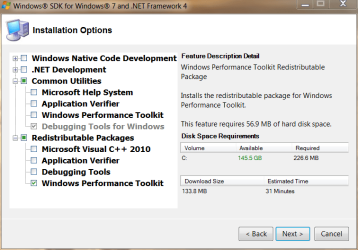
SDK_PerfToolkit.png

After you click next, it will download (only) the installation .MSI packages needed to actually install the WPT. Once the download of the files is complete and you exit the SDK installer, you will need to actually install the version of the WPT that matches the architecture of your OS (the x86 MSI on a 32bit Windows 7 machine, the x64 MSI on a 64bit Windows 7 machine). The downloaded .MSI files will be located (by default) in C:\Program Files\Microsoft SDKs\Windows\v7.1\Redist\Windows Performance Toolkit:
SDK_PerfToolkit_Redist.png

Install the correct installation file that matches the architecture (32bit or 64bit) of your Windows 7 install, taking all the default options and performing a “Complete” installation.


Disable the Paging of the Kernel Executive on x64 Windows

If you have a 64bit installation of Windows, you will need to modify the registry to enable full tracing to work properly. To do this, you will need to open an ELEVATED CMD PROMPT, then type "regedit.exe" from within that command prompt (minus the quotes of course). Once regedit is open, browse to HKEY_LOCAL_MACHINE\System\CurrentControlSet\Control\Session Manager\Memory Management, double-click the "DisablePagingExecutive" value, and change it from "0" to "1". Click "OK" to save the value:
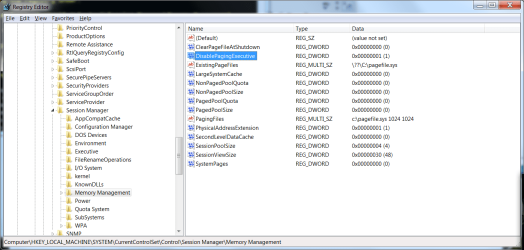
DisablePagingExecutive.png
At this point, you *must* reboot for this change to take effect before you start ANY tracing.

Once you've done the above steps, but before you continue, you will need to open an ELEVATED CMD PROMPT to execute any of the trace options described in this guide. Once you've decided which type of trace to take (or which you've been asked to take by a member of this forum), choose the correct trace section below and follow that section only:


Creating a BOOT trace:

First, you will need have that elevated CMD prompt open. Second, to generate a boot trace, you will need to type the following command into the CMD prompt, and press the ENTER key to execute it – note that this command is ALL ONE LINE:
Code:
xbootmgr –trace boot -traceFlags LATENCY+DISPATCHER+DISK_IO_INIT+NETWORKTRACE+MEMINFO+POWER+PERF_COUNTER+PRIORITY+REGISTRY+FILE_IO+FILE_IO_INIT -postBootDelay 300 -stackWalk Profile+ProcessCreate+CSwitch+ReadyThread+Mark+ThreadCreate+DiskReadInit+DiskWriteInit+DiskFlushInit+RegSetValue+RegCreateKey+RegSetInformation -resultPath C:\Boot_Trace
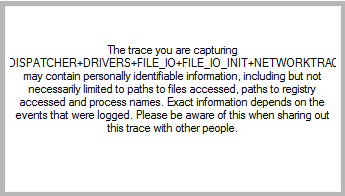
This command will cause your machine to shut down and reboot automatically. Once the system restarts, please log back in (as necessary) as soon as possible to minimize the size of the resulting trace file. Once logged in, the system will present a dialog box letting you know that it is waiting 120 seconds (it will count down) before finishing the trace. DO NOT use your computer to do anything during this time – let the countdown finish and trace files generate:
boot.png
capture_finish.png

Once the trace is complete, you will find a large .ETL file and a log file in C:\Boot_Trace. This .ETL file can then be compressed (using 7zip, winrar, winzip, etc.) and uploaded for analysis - however, due to its size, you will need to upload it to a third-party site such as MediaFire, MegaUpload or RapidShare.


Creating a Shutdown trace:

First, you will need have that elevated CMD prompt open. Second, to generate a boot trace, you will need to type the following command into the CMD prompt, and press the ENTER key to execute it – note that this command is ALL ONE LINE:
Code:
xbootmgr –trace shutdown -traceFlags BASE+LATENCY+DISK_IO_INIT+DISPATCHER+DRIVERS+FILE_IO+FILE_IO_INIT+NETWORKTRACE+PERF_COUNTER+POWER+PRIORITY+REGISTRY -resultPath C:\Shutdown_Trace
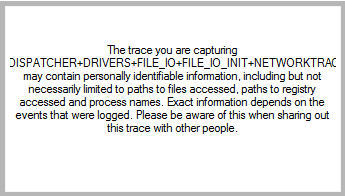
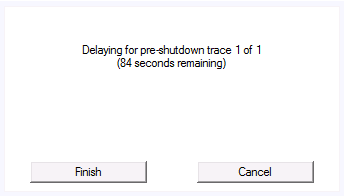
This command will cause your machine to shut down and reboot automatically. Once the system restarts, please log back in (as necessary) as soon as possible. Once logged in, the system will present a dialog box letting you know that it is waiting 120 seconds (it will count down) before rebooting your machine A SECOND TIME. DO NOT click the countdown dialog, or in any other way utilize your computer to do anything during this time – let the countdown finish and the system restart:
shutdown.png

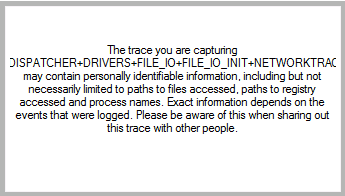
Again, once the system restarts a second time, please log back in (as necessary) as soon as possible. This time, the trace will finalize:
capture_finish.png

Once the trace is complete, you will find a large .ETL file and a log file in C:\Shutdown_Trace. This .ETL file can then be compressed (using 7zip, winrar, winzip, etc.) and uploaded for analysis - however, due to its size, you will need to upload it to a third-party site such as MediaFire, MegaUpload or RapidShare.


Creating a REBOOT trace:

First, you will need have that elevated CMD prompt open. Second, to generate a boot trace, you will need to type the following command into the CMD prompt, and press the ENTER key to execute it – note that this command is ALL ONE LINE:
Code:
xbootmgr –trace rebootCycle -traceFlags BASE+LATENCY+DISK_IO_INIT+DISPATCHER+DRIVERS+FILE_IO+FILE_IO_INIT+NETWORKTRACE+PERF_COUNTER+POWER+PRIORITY+REGISTRY -resultPath C:\Reboot_Trace
This command will cause your machine to shut down and reboot automatically. Once the system restarts, please log back in (as necessary) as soon as possible. Once logged in, the system will present a dialog box letting you know that it is waiting 120 seconds (it will count down) before rebooting your machine A SECOND TIME. DO NOT click the countdown dialog, or in any other way utilize your computer to do anything during this time – let the countdown finish and the system restart:
reboot.png

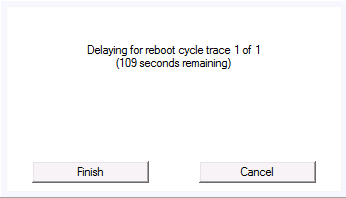
Again, once the system restarts a second time, please log back in (as necessary) as soon as possible. This will start another 120 second countdown, and reboot your machine A THIRD TIME. As before, DO NOT utilize your computer during this time – let the countdown finish (again) and the system restart (again):
reboot_2.png


Once the system restarts a third time, please log back in (as necessary) as soon as possible. This time, the trace will finalize:
capture_finish.png

Once the trace is complete, you will find a large .ETL file and a log file in C:\Reboot_Trace. This .ETL file can then be compressed (using 7zip, winrar, winzip, etc.) and uploaded for analysis - however, due to its size, you will need to upload it to a third-party site such as MediaFire, MegaUpload or RapidShare.
 

Attachments

  • capture_finish (1).png
    capture_finish (1).png
    3.8 KB · Views: 1
  • capture_finish (2).png
    capture_finish (2).png
    3.8 KB · Views: 1
  • reboot_2.png
    reboot_2.png
    1.5 KB · Views: 1
Last edited by a moderator:
Good stuff I was hoping you'd make a tutorial
 

My Computer My Computer

At a glance

Windows 7x64 Home Premium SP1Intel i7 2600kG.Skill Ripjaws (DDR3-1600) 2x4GBNvidia GeForce GTS 450; Intel HD Graphics 300...
Computer type
PC/Desktop
Computer Manufacturer/Model Number
Own build
OS
Windows 7x64 Home Premium SP1
CPU
Intel i7 2600k
Motherboard
ASUS P8Z68 Deluxe
Memory
G.Skill Ripjaws (DDR3-1600) 2x4GB
Graphics Card(s)
Nvidia GeForce GTS 450; Intel HD Graphics 3000(GT2+)
Monitor(s) Displays
Dell Ultrasharp IPS panel U2311H, Samsung SyncMaster P2350
Screen Resolution
1920x1080
Hard Drives
Samsung 850 Pro SSD 256GB, Samsung SSD 840 120GB, Seagates 1TB Barracuda ST31000528AS x2
PSU
Seasonic M12II 520W
Case
Lian Li Lancool PC-K60
Cooling
Case: 1x120mm, 3x140mm CPU: Hyper 212+
Keyboard
Logitech MK520 (wireless)
Mouse
Logitech MK520
Internet Speed
6-7 Mbps
Antivirus
Norton Security Premium, Malwarebytes on 2 (MSE on 3rd PC)
Browser
FireFox
Other Info
Audio: Logitech Z523 2.1
Glad to see a tutorial on this.

I've been reluctant to recommend xperf because of lack of tutorial and also because for the non-serious user I have feared that there would be more problems and situations created than solved.

I do feel like the tool is good for the knowledgeable user.

Thanks again for the tutorial.
 

My Computer My Computer

At a glance

MS Windows 7 Ultimate SP1 64-bitAMD A10-4600M6.00 GB Dual-Channel DDR3 @ 798MHz (11-11-12-28)AMD Radeon HD 7660G
Computer Manufacturer/Model Number
Toshiba Satellite S875D-S7239 laptop
OS
MS Windows 7 Ultimate SP1 64-bit
CPU
AMD A10-4600M
Motherboard
AMD Pumori (Socket FT1)
Memory
6.00 GB Dual-Channel DDR3 @ 798MHz (11-11-12-28)
Graphics Card(s)
AMD Radeon HD 7660G
Sound Card
High Definition Audio Device
Monitor(s) Displays
Generic PnP Monitor (1600x900@60Hz)
Screen Resolution
1600x900@60Hz
Hard Drives
SSD 119GB Corsair CSSD-V128GB2 ATA Device
Keyboard
Standard PS/2 Keyboard
Mouse
HP Wireless Optical Mobile Mouse Model FHA-3410
Internet Speed
What the local pub, local coffee shop offers.
Other Info
Optical Drive:MATSHITA BD-CMB UJ160B ATA Device


Also have an Asus ha1002xp netbook with Win 7 Ultimate installed.
Nice tutorial, thanks for taking the time to write this.
 

My Computer My Computer

At a glance

Windows 7 Ult x64 - SP1/ Windows 8 Pro x64Intel Core i5-3570K 4.6GHz8GB (2X4GB) DDR3 1600 Corsair Vengeance CL8 1.5vSapphire HD 7770 Vapor-X OC 1GB DDR5
Computer type
PC/Desktop
Computer Manufacturer/Model Number
76~2.0
OS
Windows 7 Ult x64 - SP1/ Windows 8 Pro x64
CPU
Intel Core i5-3570K 4.6GHz
Motherboard
Gigabyte GA-Z77X UD3H, f18
Memory
8GB (2X4GB) DDR3 1600 Corsair Vengeance CL8 1.5v
Graphics Card(s)
Sapphire HD 7770 Vapor-X OC 1GB DDR5
Sound Card
Onboard VIA VT2021
Monitor(s) Displays
22" LCD Dell
Screen Resolution
1680x1050
Hard Drives
Samsung 840Pro 128GB SSD,
Seagate Barracuda 500GB SATA2 7200rpm 32MB cache, Seagate Barracuda 1TB SATA2 7200rpm 32MB cache,
PSU
Corsair HX650W
Case
Cooler Master Storm Scout
Cooling
Corsair H80 2x12cm Noctua NF P12 , 2x14cm case fans
Keyboard
Logitech Wave
Mouse
CM Sentinel
Internet Speed
Dismal
Antivirus
Avast
Browser
Opera Next
Other Info
Haswell laptop: HP Envy 17t-j, i7-4700MQ, GeForce 740M 2GB DDR3, 17.3" Full HD 1920x1080, 16GB RAM, Samsung 840 Pro 128GB, 1TB Hitachi 7200 HDD,
Desktop: eSATA ports,
External eSATA Seagate 500GB SATA2 7200rpm,
External WD USB 500GB
Good job ! ;)
 

My Computer My Computer

At a glance

Windows 10 Pro x64Intel Core i5 4440 @Stock4 x 4GB HyperX Fury DDR3Gigabyte GTX 1050Ti O4G
Computer type
PC/Desktop
Computer Manufacturer/Model Number
Custom Build
OS
Windows 10 Pro x64
CPU
Intel Core i5 4440 @Stock
Motherboard
Gigabyte Z97 D3H
Memory
4 x 4GB HyperX Fury DDR3
Graphics Card(s)
Gigabyte GTX 1050Ti O4G
Sound Card
Integrated
Monitor(s) Displays
Dell P2417H
Screen Resolution
1920 x 1080
Hard Drives
Samsung EVO 850 120GB / Toshiba DT01ACA050 1TB 7200prm 32MB
PSU
Riotoro Onyx 750W
Case
NZXT H500 Black-Red
Cooling
Stock CPU + NZXT 120mm + 2x120mm red fans
Keyboard
Modecom Volcano Lanparty
Mouse
Asus ROG Gladius / DeepCool E-Pad Plus
Internet Speed
DOCSIS 50/3 Mbit
Browser
Google Chrome
Other Info
Asus K55VJ(i5 3210M, GT635M / 2GB, 8GB DDR3, 500GB HDD)
Fantastic! I didn't know you'd put it into a SF format, having seen just the one on your blog.

You are the top expert I've found on this and we are very lucky to have you here. :geek:
 
If I need to find out why my PC is taking 187 seconds instead of the former ~66, do I need all three traces? Which forum do you want them in?
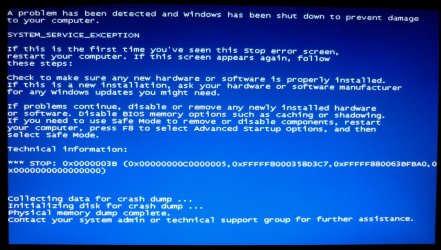
Installed the Windows Performance Toolkit per the tutorial and when booting up the first time I was presented with this BSOD right after the Windows boot animation finished.
BSOD with SDKs.jpg
I got another at the second boot up about USB_BUGCHECK I believe was the error message. The third time no error message in the BSOD.
 
Last edited:

My Computer My Computer

At a glance

Windows 7 Ultimate X64 SP1Intel i5-2550K, Differing ~4.4-4.8GHz No buil...16GB G.Skill Sniper 1866MHz @ 2133MHz 2x8GBASUS GTX650TIB-DC2OC-2GD5, (650TI Boost)
Computer type
PC/Desktop
Computer Manufacturer/Model Number
Home Built Desktop By DataTech
OS
Windows 7 Ultimate X64 SP1
CPU
Intel i5-2550K, Differing ~4.4-4.8GHz No built in GPU
Motherboard
ASUS P8Z68-V PRO/GEN3
Memory
16GB G.Skill Sniper 1866MHz @ 2133MHz 2x8GB
Graphics Card(s)
ASUS GTX650TIB-DC2OC-2GD5, (650TI Boost)
Sound Card
Onboard Realtek 5-1
Monitor(s) Displays
Samsung P2570HD
Screen Resolution
1920x1080
Hard Drives
Samsung 840 Pro 256GB SSD for OS, 500GB Seagate Constellation (Enterprise drive) for Data
PSU
Corsair HX650W
Case
Inwin Dragon Rider
Cooling
Hyper 212 EVO w/two Noctua fans, push-pull, @1300 RPM
Keyboard
E-Z Eyes, bright yellow keys with large characters
Mouse
steelseries SENSEI Laser Pro Gaming
Internet Speed
48-51Mbs Mbs down, 11 Mbs up Xfinity Cable
Antivirus
Norton Internet Security 2013
Browser
IE 10, Opera, Pale Moon if needed
Other Info
4 case fans, LG BluRay-RE, ASUS DVD-RW, Mr. Fusion power supply, 1.21 gigawatts.
Hi. I am doing a clean install with Gregrockers guidance and help. I was going through the event logs and found boot delay, standby degradation, delays caused by usb stick, sleep and hibernation errors. It all seems to point to bios yet Greg refered me to you first. I have a Mutt Mobo from Hp which does not support Win7 drivers for my system. So it does make me nervous to flash bios with a Universal driver for Amd that I found.

I installed tool and ran all three traces. Boot trace delays 300 seconds (did it twice) 216Mb. Reboot trace ask for elevated permission before each 120 sec delay (did it three times... one time it quit trace due to an error) 241Mb.
Shutdown trace 28Mb.

However I did not leave in USB stick when doing trace.....which was causing part of the delay errors.

I will greatly appreciate any help. Yet, do help Britton first..... he is definitely priority. Just let me know if I need to redo traces w/stick plugged in.
Thanks.
 

My Computer My Computer

At a glance

7 professionalYour Processor type and speed - AMD ATHLON(tm...2.5gbNVIDIA GeForce 7150/nForce 64MB
Computer Manufacturer/Model Number
Hp presario v6620us 6500notebook series.
OS
7 professional
CPU
Your Processor type and speed - AMD ATHLON(tm) 64X2 DUAL-COR
Motherboard
Quanta 30CF
Memory
2.5gb
Graphics Card(s)
NVIDIA GeForce 7150/nForce 64MB
Sound Card
conextant smartaudio hd2
Hard Drives
FUJITSU PLATA 160GB IDE
PSU
Wth? is this
Case
The judge threw it out. Not enough evidence.
Cooling
sometimes.
Keyboard
Yep
Mouse
Nope
Internet Speed
fast
If I need to find out why my PC is taking 187 seconds instead of the former ~66, do I need all three traces? Which forum do you want them in?
You would want just a boot trace. As to the BSOD, sometimes the +DRIVERS portion of the command line can cause it. If you get frequent BSODs when attempting to trace, remove "+DRIVERS" from the command line for a trace and that should avoid a BSOD when taking a trace.

I installed tool and ran all three traces. Boot trace delays 300 seconds (did it twice) 216Mb. Reboot trace ask for elevated permission before each 120 sec delay (did it three times... one time it quit trace due to an error) 241Mb.
Shutdown trace 28Mb.

However I did not leave in USB stick when doing trace.....which was causing part of the delay errors.

I will greatly appreciate any help. Yet, do help Britton first..... he is definitely priority. Just let me know if I need to redo traces w/stick plugged in.
Thanks.
You only need a boot trace, unless you want to get info on the others. I would recommend, if a USB key causes additional delays, that you take a boot trace with a USB key in.


If you need help with traces, create a thread in the performance section and point me to it.
 

My Computer My Computer

At a glance

Windows 10 Pro x64Intel Core i7 4790K @ 4.5GHz32GB DDR3Nvidia GeForce GTX970
Computer type
PC/Desktop
Computer Manufacturer/Model Number
Custom
OS
Windows 10 Pro x64
CPU
Intel Core i7 4790K @ 4.5GHz
Motherboard
Asus Maximus Hero VII
Memory
32GB DDR3
Graphics Card(s)
Nvidia GeForce GTX970
Sound Card
Realtek HD Audio
Screen Resolution
1920x1200
Hard Drives
1x Samsung 250GB SSD
4x WD RE 2TB (RAIDZ)
PSU
Corsair AX760i
Case
Fractal Design Define R4
Cooling
Noctua NH-D15
Ok thanks Cluberti, will do and let you know. :)
BTW, I did mean to say reboot in relation to those times.
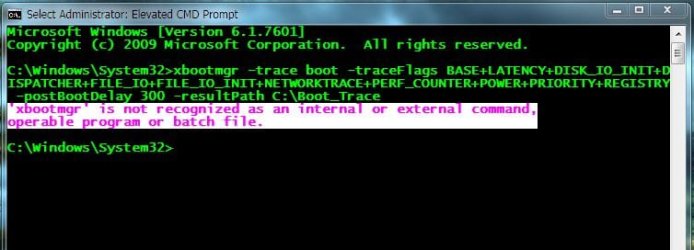
Now I can't start the trace
CMD Trace.JPG
 

My Computer My Computer

At a glance

Windows 7 Ultimate X64 SP1Intel i5-2550K, Differing ~4.4-4.8GHz No buil...16GB G.Skill Sniper 1866MHz @ 2133MHz 2x8GBASUS GTX650TIB-DC2OC-2GD5, (650TI Boost)
Computer type
PC/Desktop
Computer Manufacturer/Model Number
Home Built Desktop By DataTech
OS
Windows 7 Ultimate X64 SP1
CPU
Intel i5-2550K, Differing ~4.4-4.8GHz No built in GPU
Motherboard
ASUS P8Z68-V PRO/GEN3
Memory
16GB G.Skill Sniper 1866MHz @ 2133MHz 2x8GB
Graphics Card(s)
ASUS GTX650TIB-DC2OC-2GD5, (650TI Boost)
Sound Card
Onboard Realtek 5-1
Monitor(s) Displays
Samsung P2570HD
Screen Resolution
1920x1080
Hard Drives
Samsung 840 Pro 256GB SSD for OS, 500GB Seagate Constellation (Enterprise drive) for Data
PSU
Corsair HX650W
Case
Inwin Dragon Rider
Cooling
Hyper 212 EVO w/two Noctua fans, push-pull, @1300 RPM
Keyboard
E-Z Eyes, bright yellow keys with large characters
Mouse
steelseries SENSEI Laser Pro Gaming
Internet Speed
48-51Mbs Mbs down, 11 Mbs up Xfinity Cable
Antivirus
Norton Internet Security 2013
Browser
IE 10, Opera, Pale Moon if needed
Other Info
4 case fans, LG BluRay-RE, ASUS DVD-RW, Mr. Fusion power supply, 1.21 gigawatts.
Looks like you may have to reinstall, or at least do a repair installation to get it to run the command successfully.
 

My Computer My Computer

At a glance

Windows 10 Pro x64Intel Core i7 4790K @ 4.5GHz32GB DDR3Nvidia GeForce GTX970
Computer type
PC/Desktop
Computer Manufacturer/Model Number
Custom
OS
Windows 10 Pro x64
CPU
Intel Core i7 4790K @ 4.5GHz
Motherboard
Asus Maximus Hero VII
Memory
32GB DDR3
Graphics Card(s)
Nvidia GeForce GTX970
Sound Card
Realtek HD Audio
Screen Resolution
1920x1200
Hard Drives
1x Samsung 250GB SSD
4x WD RE 2TB (RAIDZ)
PSU
Corsair AX760i
Case
Fractal Design Define R4
Cooling
Noctua NH-D15

My Computer My Computer

At a glance

Windows 7 Ultimate X64 SP1Intel i5-2550K, Differing ~4.4-4.8GHz No buil...16GB G.Skill Sniper 1866MHz @ 2133MHz 2x8GBASUS GTX650TIB-DC2OC-2GD5, (650TI Boost)
Computer type
PC/Desktop
Computer Manufacturer/Model Number
Home Built Desktop By DataTech
OS
Windows 7 Ultimate X64 SP1
CPU
Intel i5-2550K, Differing ~4.4-4.8GHz No built in GPU
Motherboard
ASUS P8Z68-V PRO/GEN3
Memory
16GB G.Skill Sniper 1866MHz @ 2133MHz 2x8GB
Graphics Card(s)
ASUS GTX650TIB-DC2OC-2GD5, (650TI Boost)
Sound Card
Onboard Realtek 5-1
Monitor(s) Displays
Samsung P2570HD
Screen Resolution
1920x1080
Hard Drives
Samsung 840 Pro 256GB SSD for OS, 500GB Seagate Constellation (Enterprise drive) for Data
PSU
Corsair HX650W
Case
Inwin Dragon Rider
Cooling
Hyper 212 EVO w/two Noctua fans, push-pull, @1300 RPM
Keyboard
E-Z Eyes, bright yellow keys with large characters
Mouse
steelseries SENSEI Laser Pro Gaming
Internet Speed
48-51Mbs Mbs down, 11 Mbs up Xfinity Cable
Antivirus
Norton Internet Security 2013
Browser
IE 10, Opera, Pale Moon if needed
Other Info
4 case fans, LG BluRay-RE, ASUS DVD-RW, Mr. Fusion power supply, 1.21 gigawatts.
Well, if you get adventurous, get a trace and start a thread ;).
 

My Computer My Computer

At a glance

Windows 10 Pro x64Intel Core i7 4790K @ 4.5GHz32GB DDR3Nvidia GeForce GTX970
Computer type
PC/Desktop
Computer Manufacturer/Model Number
Custom
OS
Windows 10 Pro x64
CPU
Intel Core i7 4790K @ 4.5GHz
Motherboard
Asus Maximus Hero VII
Memory
32GB DDR3
Graphics Card(s)
Nvidia GeForce GTX970
Sound Card
Realtek HD Audio
Screen Resolution
1920x1200
Hard Drives
1x Samsung 250GB SSD
4x WD RE 2TB (RAIDZ)
PSU
Corsair AX760i
Case
Fractal Design Define R4
Cooling
Noctua NH-D15
LOL, adventurous is what gets me in trouble.:o
 

My Computer My Computer

At a glance

Windows 7 Ultimate X64 SP1Intel i5-2550K, Differing ~4.4-4.8GHz No buil...16GB G.Skill Sniper 1866MHz @ 2133MHz 2x8GBASUS GTX650TIB-DC2OC-2GD5, (650TI Boost)
Computer type
PC/Desktop
Computer Manufacturer/Model Number
Home Built Desktop By DataTech
OS
Windows 7 Ultimate X64 SP1
CPU
Intel i5-2550K, Differing ~4.4-4.8GHz No built in GPU
Motherboard
ASUS P8Z68-V PRO/GEN3
Memory
16GB G.Skill Sniper 1866MHz @ 2133MHz 2x8GB
Graphics Card(s)
ASUS GTX650TIB-DC2OC-2GD5, (650TI Boost)
Sound Card
Onboard Realtek 5-1
Monitor(s) Displays
Samsung P2570HD
Screen Resolution
1920x1080
Hard Drives
Samsung 840 Pro 256GB SSD for OS, 500GB Seagate Constellation (Enterprise drive) for Data
PSU
Corsair HX650W
Case
Inwin Dragon Rider
Cooling
Hyper 212 EVO w/two Noctua fans, push-pull, @1300 RPM
Keyboard
E-Z Eyes, bright yellow keys with large characters
Mouse
steelseries SENSEI Laser Pro Gaming
Internet Speed
48-51Mbs Mbs down, 11 Mbs up Xfinity Cable
Antivirus
Norton Internet Security 2013
Browser
IE 10, Opera, Pale Moon if needed
Other Info
4 case fans, LG BluRay-RE, ASUS DVD-RW, Mr. Fusion power supply, 1.21 gigawatts.
Britton, this is one adventure not to be missed.

Have Carl explain the charts' and you see an almost 3D picture of Win7 booting. It is endlessly fascinating to me, and exceedingly generous of Carl's valuable time as the author of these programs.
 
Thanks Greg, I am planning on doing it, still messing things up experimenting.
 

My Computer My Computer

At a glance

Windows 7 Ultimate X64 SP1Intel i5-2550K, Differing ~4.4-4.8GHz No buil...16GB G.Skill Sniper 1866MHz @ 2133MHz 2x8GBASUS GTX650TIB-DC2OC-2GD5, (650TI Boost)
Computer type
PC/Desktop
Computer Manufacturer/Model Number
Home Built Desktop By DataTech
OS
Windows 7 Ultimate X64 SP1
CPU
Intel i5-2550K, Differing ~4.4-4.8GHz No built in GPU
Motherboard
ASUS P8Z68-V PRO/GEN3
Memory
16GB G.Skill Sniper 1866MHz @ 2133MHz 2x8GB
Graphics Card(s)
ASUS GTX650TIB-DC2OC-2GD5, (650TI Boost)
Sound Card
Onboard Realtek 5-1
Monitor(s) Displays
Samsung P2570HD
Screen Resolution
1920x1080
Hard Drives
Samsung 840 Pro 256GB SSD for OS, 500GB Seagate Constellation (Enterprise drive) for Data
PSU
Corsair HX650W
Case
Inwin Dragon Rider
Cooling
Hyper 212 EVO w/two Noctua fans, push-pull, @1300 RPM
Keyboard
E-Z Eyes, bright yellow keys with large characters
Mouse
steelseries SENSEI Laser Pro Gaming
Internet Speed
48-51Mbs Mbs down, 11 Mbs up Xfinity Cable
Antivirus
Norton Internet Security 2013
Browser
IE 10, Opera, Pale Moon if needed
Other Info
4 case fans, LG BluRay-RE, ASUS DVD-RW, Mr. Fusion power supply, 1.21 gigawatts.
Cluberti, thanks for this great tutorial. It's very much appreciated.
 

My Computer My Computer

At a glance

Windows 7 Ultimate SP1 64-BitIntel Core i7 870 @ 2.93GHz8Gb Dual-Channel DDR3 @ 664MHznVidia GeForce GTX 460 1024MB dedicated RAM
Computer Manufacturer/Model Number
HP Pavilion Elite 495UK
OS
Windows 7 Ultimate SP1 64-Bit
CPU
Intel Core i7 870 @ 2.93GHz
Motherboard
MSI 2A9C (CPU1)
Memory
8Gb Dual-Channel DDR3 @ 664MHz
Graphics Card(s)
nVidia GeForce GTX 460 1024MB dedicated RAM
Sound Card
Realtek HD Audio
Monitor(s) Displays
HP2310i
Screen Resolution
1920 x 1080
Hard Drives
1x1954GB Hitachi HDS22020ALA 330 (RAID), 1x1954GB Hitachi External for backup and storage
PSU
460W
Case
HP Elite
Cooling
Air cooled
Keyboard
Logitech K750 solar-powered keyboard
Mouse
Logitech Wireless M180 mouse
Internet Speed
2Mb
Other Info
Pure Avanti Flow Internet Radio with iPod Dock, 64Gb iPod, HP USB Speakers, Sony MDR-V500 Headphones, Sony Vaio F-Series Laptop
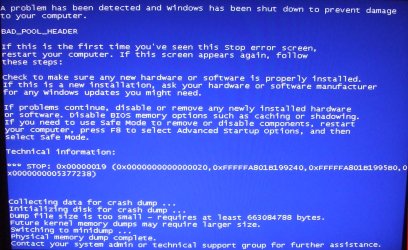
I too get a BSOD. Have followed the instructions here to the letter (for Win7 x64). Is it the registry change that could cause this? Any ideas? Thanks.

Martin
 

Attachments

  • BSOD.JPG
    BSOD.JPG
    193.1 KB · Views: 509

My Computer My Computer

At a glance

Windows 7 Home Premium SP1 64-bitIntel Core i7-4790K CPU @ 4.5GHz16GB KINGSTON HYPER-X FURY DUAL-DDR3 1600MHz8GB NVIDIA GEFORCE GTX 1070
Computer type
PC/Desktop
Computer Manufacturer/Model Number
Custom Build
OS
Windows 7 Home Premium SP1 64-bit
CPU
Intel Core i7-4790K CPU @ 4.5GHz
Motherboard
Asus H97I-PLUS
Memory
16GB KINGSTON HYPER-X FURY DUAL-DDR3 1600MHz
Graphics Card(s)
8GB NVIDIA GEFORCE GTX 1070
Monitor(s) Displays
HannsG 28" & Dell 24"
Screen Resolution
1920x1200
Hard Drives
1 x 2TB Samsung Evo 860 SSD
2 x 500GB Samsung Evo 850 SSD
PSU
CORSAIR 650W CS SERIES
Case
Thermaltake Core V1 Mini ITX Cube
Cooling
NOCTUA NH-L12
Browser
Firefox
Other Info
Custom PC used for X-Plane 11
cluberti,
I've been having some hibernation problems and wanted to pull a trace on it. I didn't see a command on here for hibernation so I pulled the parameters from the reboot command and set it to hibernate so my command looked like this:
xbootmgr –trace hibernate -traceFlags BASE+LATENCY+DISK_IO_INIT+DISPATCHER+DRIVERS+FILE_IO+FILE_IO_INIT+NETWORKTRACE+PERF_COUNTER+POWER+PRIORITY+REGISTRY -resultPath C:\hibernate_Trace
I was wondering if I did this right and if so, could I please get some help in decifering the results? Thank you in advance for your help.
 

My Computer My Computer

At a glance

Windows 7 Pro 32bitCore 2 Duo E6550 2.33 GHz4GB PC2 6400 (2X2GB)NVIDIA GeForce 8600 GT
OS
Windows 7 Pro 32bit
CPU
Core 2 Duo E6550 2.33 GHz
Motherboard
ASUS P5GC-MX/1333
Memory
4GB PC2 6400 (2X2GB)
Graphics Card(s)
NVIDIA GeForce 8600 GT
Sound Card
Onboard
Monitor(s) Displays
Single Display - DVI
Screen Resolution
1920 X 1080
Hard Drives
2 Seagate Barracuda 7200.12 Hard Drives.
1 Set for OS and Programs - 250 GB
1 Set for Data - 1TB
PSU
520W
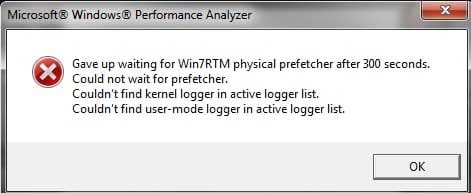
Hi. Yes, thanks, excluding the +Drivers stopped the BSODs. But after the first reboot I get a screen saying 'Waiting for Prefetcher' and then the window below.

By the way, my O/S is on an SSD - I don't want any defragging to occur. Does the string I am entering into the cmd window cause any defragmenting of the drive?

xbootmgr –trace boot -traceFlags LATENCY+DISPATCHER+DISK_IO_INIT+NETWORKTRACE+MEMINFO+POWER+PERF_COUNTER+PRIORITY+REGISTRY+FILE_IO+FILE_IO_INIT -postBootDelay 300 -stackWalk Profile+ProcessCreate+CSwitch+ReadyThread+Mark+ThreadCreate+DiskReadInit+DiskWriteInit+DiskFlushInit+RegSetValue+RegCreateKey+RegSetInformation -resultPath C:\Boot_Trace

Thanks again,

Martin
 

Attachments

  • Trace.jpg
    Trace.jpg
    16.1 KB · Views: 2,132

My Computer My Computer

At a glance

Windows 7 Home Premium SP1 64-bitIntel Core i7-4790K CPU @ 4.5GHz16GB KINGSTON HYPER-X FURY DUAL-DDR3 1600MHz8GB NVIDIA GEFORCE GTX 1070
Computer type
PC/Desktop
Computer Manufacturer/Model Number
Custom Build
OS
Windows 7 Home Premium SP1 64-bit
CPU
Intel Core i7-4790K CPU @ 4.5GHz
Motherboard
Asus H97I-PLUS
Memory
16GB KINGSTON HYPER-X FURY DUAL-DDR3 1600MHz
Graphics Card(s)
8GB NVIDIA GEFORCE GTX 1070
Monitor(s) Displays
HannsG 28" & Dell 24"
Screen Resolution
1920x1200
Hard Drives
1 x 2TB Samsung Evo 860 SSD
2 x 500GB Samsung Evo 850 SSD
PSU
CORSAIR 650W CS SERIES
Case
Thermaltake Core V1 Mini ITX Cube
Cooling
NOCTUA NH-L12
Browser
Firefox
Other Info
Custom PC used for X-Plane 11
Back
Top