
DNS Addressing - How to Change in Windows 7

Introduction

   Information
This tutorial is to guide you, the user, in changing your DNS address to (hopefully) a better alternative. OpenDNS, one of said alternatives, will be used as our main example but there are many others out there. Now while OpenDNS is great, it isn't for everyone: The best way to find the best one for you is to consult the link in the tutorial for a list of alternatives and choose the best (testing one yourself first hand here is key).

OpenDNS is a free, powerful, and easy to use DNS alternative best suited for people in the US and London areas.

Here is a direct quote from their site:
OpenDNS is the leading provider of free security and infrastructure services that make the Internet safer through integrated Web content filtering, anti-phishing and DNS. OpenDNS services enable consumers and network administrators to secure their networks from online threats, reduce costs and enforce Internet-use policies. OpenDNS is used today by millions of users and organizations around the world.
Now the question that you may ask is how this may benefit you? Well the default DNS server provided by ISPs tend to be slower than OpenDNS because of promotional offers included in said servers or the ISP doesn't have a good quality server to begin with (would Verizon please stand up?). This means that by using OpenDNS not only will your surfing be generally faster but any promotional offers that said ISP might try to spam you with or any phishing attacks will be blocked. To summarize, OpenDNS provides an all around better web experience PLUS its free so why not give it a try?;) Now with all good stories there are two sides. With the advantages that I have described, there are disadvantages. Now while I could myself describe what these are, I felt that a fellow member by the name of Charles Kane did it better than I could have with his scenario given. Please read this quote given and all credit goes to him for this part:

1. Anyone can use OpenDNS safely.
2. Free optional registration with OpenDNS enables the control panel which allows you to use preset content filtering, whitelisting and blacklisting of websites.
3. OpenDNS claims surfing speed and stability improvements. Speed may be enhanced with the centralized caching of internet addresses. The benefits of this claim should be weighed against your location (OpenDNS has 8 servers in the US and one in London with one planned for Hong Kong), the quality of your own ISPs caching, and particularly whether your ISP is using any particular servers to provide improved speeds in the seving of content.

As an example, for an Australian, the OpenDNS resolvers are at least 12 hops away (roughly 200ms) and the local server a maximum 4 hops (about 40ms) so the benefits may be reduced. Speed improvements for sites cached by your ISPs servers, especially common sites, are likely to be insignificant as network latency dominates DNS resolution time. The Pacific Ocean is the problem.

High quality ISPs (such as many of those in Australia), especially those that provide additional benefits such as Akamai delivered content delivered from servers within the local network will also be a major consideration. Akamai delivered content may be particularly important with streaming video and audio and big downloads (including Microsoft Download and Microsoft Update).

OpenDNS may give the greatest benefits if you are with a crappy ISP, relatively close to OpenDNS servers, if you want the benefits of their user control panel (filtering), or mainly access addresses unlikely to be cached by your ISP. OpenDNS server provision in North America makes OpenDNS particularly attractive for North American users.
Now to setup OpenDNS (or your other alternative) is rather easy and can be accomplished in less than a couple of minutes...

   Tip
You may also elect to sign up for an account at their website. It is also free and you will able to customize web site filtering and ad management....quite a handy control panel for your internet browsing experience (especially businesses that need content control).

   Tip
If you feel that OpenDNS is not for you than please consult this comprehensive list PortForward.com - Free Help Setting up Your Router or Firewall to find one near you! Just replace the numbers given here with the numbers given for your DNS server of choice from that page or anywhere else; these steps still apply.


Here's How: 1. Open the Control Panel.

2. Open up Network and Internet and go to the Network and Sharing Center. pic1.png
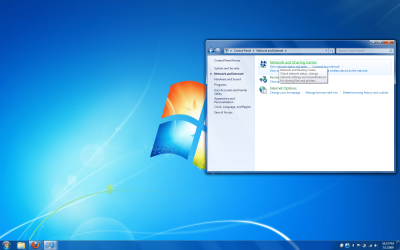
3. Click on Change adapter settings on the left hand panel. pic2.png
4. This will bring up a list of adapters present on your computer. Most people will have a Local Area Connection while laptop users will add a Wireless Network Connection and possibly a Bluetooth Network Connection...go ahead and right click on Local Area Connection and click on Properties.
NOTE: These steps do not change if you are modifying the Wireless Network Connection instead pic3.png
5. If prompted by UAC, click on Yes.

6. Highlight Internet Protocol Version 4 (TCP/IPv4) and click on properties. pic4.png
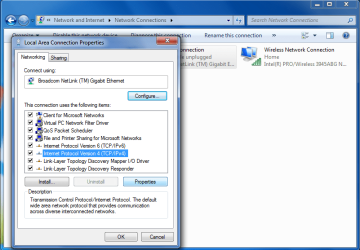
7. In the properties window you will see a few radio boxes with both of them saying Obtain an IP/DNS Address Automatically....we will leave the IP address alone and will change the Obtain DNS....to use the following: In the Preferred DNS server boxes enter this sequence: 208.67.222.222

In the Alternate DNS server boxes enter this sequence: 208.67.220.220
pic5.png
8. Check the validate settings upon exit (Optional) check box, click OK, and then Close to finish. (See screenshot above)

9. Windows will check your settings (if you checked the option above) and you will be finished! Now start surfing to feel the effects of a quicker and more secure browsing experience!
   Tip
For more info on OpenDNS don't hesitate to ask here or visit their website at OpenDNS | Providing A Safer And Faster Internet

   Tip
If you happen to be managing a network under a router, this tip will save you some time. If you change the router's DNS settings instead of each computer on the network than as long as each computer is set to Obtain a DNS Address Automatically, your choice of a DNS server will be applied to all the computers. Please consult the manual of your router or their respective website to do this.


Hope it helps,
Chris
 
Last edited by a moderator:
Nice tutorial mate, well done :D
 

My Computer My Computer

At a glance

Windows 7 Ultimate x64AMD Sempron Dual Core3GBNVIDIA GeForce 6150SE nForce 430
Computer Manufacturer/Model Number
Compaq Desktop
OS
Windows 7 Ultimate x64
CPU
AMD Sempron Dual Core
Memory
3GB
Graphics Card(s)
NVIDIA GeForce 6150SE nForce 430
Screen Resolution
1024x768
Hard Drives
150GB Sata
Nice tutorial. I use DNS Advantage after finding OpenDNS had issues with some pages that I regularly visit.
 

My Computer My Computer

At a glance

Windows 7 Professional 64-bitIntel E8400 3GHzKingston PC3-10700H 4GbXFX Radeon HD 5850 BlackEd.
Computer Manufacturer/Model Number
self built
OS
Windows 7 Professional 64-bit
CPU
Intel E8400 3GHz
Motherboard
Intel DX48BT2
Memory
Kingston PC3-10700H 4Gb
Graphics Card(s)
XFX Radeon HD 5850 BlackEd.
Sound Card
Asus Xonar DG
Monitor(s) Displays
2x Samsung SM-T220HD 22"
Screen Resolution
1680x1050 on two monitors
Hard Drives
OCZ Vertex 2 120gb 3.5" (OS)
Seagate Momentus XT 500gb
Samsung F3 1Tb (games)
2x Samsung F1 1Tb
PSU
Thermaltake ToughPower 850w
Case
Thermaltake Armor
Cooling
Scythe Mugen II
Keyboard
Microsoft Comfort Curve USB
Mouse
Razer Diamondback 3G
Internet Speed
8128/443
Nice tutorial. I use DNS Advantage after finding OpenDNS had issues with some pages that I regularly visit.
Thanks for the comments guys....a lot of credit also goes to Brink because I had all the info and screenshots collected but his formatting is what makes it shine....as for having issues with loading pages I haven't had any issues personally....due you care to give an example of a page it has difficulty with? I am curious about this
 

My Computer My Computer

At a glance

Windows 7 Home Premium x64 - Mac OS X 10.6.4 x64Intel Core 2 Duo T9300 2.5 GHz4GB Kingston DDR2-800NVIDIA Geforce 8600M GT (512MB Model)
Computer Manufacturer/Model Number
Compal JFT02 (Custom Build Laptop)
OS
Windows 7 Home Premium x64 - Mac OS X 10.6.4 x64
CPU
Intel Core 2 Duo T9300 2.5 GHz
Motherboard
JFT02
Memory
4GB Kingston DDR2-800
Graphics Card(s)
NVIDIA Geforce 8600M GT (512MB Model)
Sound Card
Realtek HD Audio
Monitor(s) Displays
WUXGA Standard Laptop Display
Screen Resolution
1680*1050
Hard Drives
Toshiba 320GB 5400RPM Laptop HD
PSU
Standard Laptop Power Supply
Case
Standard Laptop Case
Cooling
Standard Laptop Cooling
Keyboard
Standard Laptop 105 Key-Keyboard
Mouse
Synaptics Touchpad
Internet Speed
Verizion Online DSL 3360/864 kbs (dl/up)
I cant remember the exact page it was now. But Ive also noticed it seems to go slow sometimes.

(btw im not trying to belittle your tutorial here)
 

My Computer My Computer

At a glance

Windows 7 Professional 64-bitIntel E8400 3GHzKingston PC3-10700H 4GbXFX Radeon HD 5850 BlackEd.
Computer Manufacturer/Model Number
self built
OS
Windows 7 Professional 64-bit
CPU
Intel E8400 3GHz
Motherboard
Intel DX48BT2
Memory
Kingston PC3-10700H 4Gb
Graphics Card(s)
XFX Radeon HD 5850 BlackEd.
Sound Card
Asus Xonar DG
Monitor(s) Displays
2x Samsung SM-T220HD 22"
Screen Resolution
1680x1050 on two monitors
Hard Drives
OCZ Vertex 2 120gb 3.5" (OS)
Seagate Momentus XT 500gb
Samsung F3 1Tb (games)
2x Samsung F1 1Tb
PSU
Thermaltake ToughPower 850w
Case
Thermaltake Armor
Cooling
Scythe Mugen II
Keyboard
Microsoft Comfort Curve USB
Mouse
Razer Diamondback 3G
Internet Speed
8128/443
I cant remember the exact page it was now. But Ive also noticed it seems to go slow sometimes.

(btw im not trying to belittle your tutorial here)
Oh no I don't think that at all....I just wondered so that I could be better prepared if someone were to ask why said website isn't working....I also think it might be where your coming from. I come from a basic Verizon DSL service that saw a marginal increase in speed with OpenDNS but others might find the speed to be minimal or none at all....it just comes down to trying and seeing what the results are because OpenDNS' servers are great but they aren't the best

EDIT:I included DNS Advantage in the walkthrough (to let people that they have choices they could make). Thanks for the info swarfega!
 

My Computer My Computer

At a glance

Windows 7 Home Premium x64 - Mac OS X 10.6.4 x64Intel Core 2 Duo T9300 2.5 GHz4GB Kingston DDR2-800NVIDIA Geforce 8600M GT (512MB Model)
Computer Manufacturer/Model Number
Compal JFT02 (Custom Build Laptop)
OS
Windows 7 Home Premium x64 - Mac OS X 10.6.4 x64
CPU
Intel Core 2 Duo T9300 2.5 GHz
Motherboard
JFT02
Memory
4GB Kingston DDR2-800
Graphics Card(s)
NVIDIA Geforce 8600M GT (512MB Model)
Sound Card
Realtek HD Audio
Monitor(s) Displays
WUXGA Standard Laptop Display
Screen Resolution
1680*1050
Hard Drives
Toshiba 320GB 5400RPM Laptop HD
PSU
Standard Laptop Power Supply
Case
Standard Laptop Case
Cooling
Standard Laptop Cooling
Keyboard
Standard Laptop 105 Key-Keyboard
Mouse
Synaptics Touchpad
Internet Speed
Verizion Online DSL 3360/864 kbs (dl/up)
Nice regarding the inclusion.

But it could also be my location since Im from UK and doubtless the OpenDNS servsers are based in the US. As are the DNS Avantage ones. I need to find a UK based one.
 

My Computer My Computer

At a glance

Windows 7 Professional 64-bitIntel E8400 3GHzKingston PC3-10700H 4GbXFX Radeon HD 5850 BlackEd.
Computer Manufacturer/Model Number
self built
OS
Windows 7 Professional 64-bit
CPU
Intel E8400 3GHz
Motherboard
Intel DX48BT2
Memory
Kingston PC3-10700H 4Gb
Graphics Card(s)
XFX Radeon HD 5850 BlackEd.
Sound Card
Asus Xonar DG
Monitor(s) Displays
2x Samsung SM-T220HD 22"
Screen Resolution
1680x1050 on two monitors
Hard Drives
OCZ Vertex 2 120gb 3.5" (OS)
Seagate Momentus XT 500gb
Samsung F3 1Tb (games)
2x Samsung F1 1Tb
PSU
Thermaltake ToughPower 850w
Case
Thermaltake Armor
Cooling
Scythe Mugen II
Keyboard
Microsoft Comfort Curve USB
Mouse
Razer Diamondback 3G
Internet Speed
8128/443
Which one is better of the two?

I've been using OpenDNS for the past week or so, and didn't know about DNS Advantage.

Which one would be recommended?
 

My Computer My Computer

At a glance

Windows 7AMD Phenom 9950 Quad Core4gbATI Radeon HD 3200
OS
Windows 7
CPU
AMD Phenom 9950 Quad Core
Motherboard
Gigabyte GA-MA78GM-US2H
Memory
4gb
Graphics Card(s)
ATI Radeon HD 3200
Sound Card
Realtek HD Audio
Hard Drives
Seagate 500GB 32MB cache 7200 RPM 3.5" Barracuda
PSU
Stealth X Stream 500W
Case
Xion Solaris
Cooling
G-Power Lite Cooler (GH-PDU22-SC)
Internet Speed
20/5
Yep DNS Advantage is news to me too.

Thanks for the head's up Swarf.

I have been using OpenDns a long while - never had a problem with it - good to know of alternatives.
 

My Computers My Computers

  • At a glance

    7 X64i5 84002x8gb 3200mhz
    Computer type
    PC/Desktop
    OS
    7 X64
    CPU
    i5 8400
    Motherboard
    gigabyte b365m ds3h
    Memory
    2x8gb 3200mhz
    Hard Drives
    various
    PSU
    pure power 11 400w cm
    Case
    Coolermaster
    Cooling
    cryorig m9i
  • At a glance

    7x64g54008gb ddr4 2400
    Computer type
    PC/Desktop
    OS
    7x64
    CPU
    g5400
    Motherboard
    ga b365m ds3h
    Memory
    8gb ddr4 2400
    PSU
    xfx pro 450w
One additional option for anyone using a shared router for several machines is to leave the individual machine's network settings as default and to change the Preferred and Alternate DNS settings in the actual router.

Most, if not, all routers will allow you to do this but of course you would have to check the manual for the actual router as to the possibility and method used to change.

As for the location of the OpenDNS servers - although there are only two addresses there are servers actually located in London, as well as the US


network_map.gif


Source
 

My Computers My Computers

  • At a glance

    Windows 11 Pro x64 [Latest Release and Releas...Ryzen 9 5950X, 3.8 - 5.2 MHz64GB [2 x 32GB] DDR4 3200MHz4GB NVIDIA GEFORCE GTX 1650 Ti
    Computer type
    PC/Desktop
    Computer Manufacturer/Model Number
    ChillBlast - Custom to my design
    OS
    Windows 11 Pro x64 [Latest Release and Release Preview]
    CPU
    Ryzen 9 5950X, 3.8 - 5.2 MHz
    Motherboard
    Asus Prime X570-Pro
    Memory
    64GB [2 x 32GB] DDR4 3200MHz
    Graphics Card(s)
    4GB NVIDIA GEFORCE GTX 1650 Ti
    Sound Card
    On-board SPDIF to 5.1 System + HDMI [5.1 system]
    Monitor(s) Displays
    32" UHD 32 Bit HDR Monitor + 43" UHD 4K 32Bit HDR TV
    Screen Resolution
    2 x 3840 x 2160 @60Hz
    Hard Drives
    1TB M2 SSD OS, 500GB Fast Access SSD, 2 x 8TB Data + Various Externals from 1TB to 4TB, 10TB NAS
    PSU
    NZXT C750 80 PLUS Gold 750W Modular PSU
    Case
    Workstation Case [Matt Black]
    Cooling
    NZXT Kraken X63 280mm CPU Cooler +2x Quiet Case fans
    Keyboard
    Logitech Wireless MX Keys & K400 + others
    Mouse
    Logitech Wireless MX Master 3S
    Internet Speed
    920 MB Down 50 MB Up
    Antivirus
    BitDefender Total Security Pro
    Browser
    Chrome (always run latest Non-Beta)
    Other Info
    Also run ...
    Laptop - Quad 8GB - Windows 10 Pro x64
    Nexus 7 Android tablet x2
    Samsung 10.2" tablet
    Blackview TAB 8 4G Android Tablet c/w Keyboard
    Wacom Intuos Pro Medium Pen Pad
    Wacom Intuos Pro Small Pen Pad
    Wacom Expresskeys Remote
    Loopdeck+ Graphics Controller
    Shuttle Pro v2 Control
  • At a glance

    Windows 11 Pro x64 Latest RPIntel I7 10750H 5.0GHz32GB [2x16GB] DDR4 2933 MHznVidia GTX1650Ti 4 GB GDDR6
    Computer type
    Laptop
    System Manufacturer/Model Number
    Dell XPS 17 10750H
    OS
    Windows 11 Pro x64 Latest RP
    CPU
    Intel I7 10750H 5.0GHz
    Motherboard
    Dell XPS
    Memory
    32GB [2x16GB] DDR4 2933 MHz
    Graphics Card(s)
    nVidia GTX1650Ti 4 GB GDDR6
    Sound Card
    Stock [Realtek] 4 Speaker
    Monitor(s) Displays
    17" IPS UHD+ Infinity Edge Touchscreen
    Screen Resolution
    3840 x 2400
    Hard Drives
    2TB M2 NVMe, 4TB External + various 500GB & 1TB External NVMe (also have access to spinner HDD from
    PSU
    Stock
    Case
    Stock XPS Aluminium & Carbon Fibre
    Cooling
    Stock - Active Fan Control
    Keyboard
    Backlit + Various Logitech
    Mouse
    Stock Track Pad + Logitech MX Trackball
    Internet Speed
    72 MB Down 18MB Up
    Browser
    Chrome
    Other Info
    Also run ...
    Laptop - Quad 8GB - Windows 10 Pro x64
    Nexus 7 Android tablet x2
    10.2" tablet
    Sony Z3 Android Smartphone
    Wacom Intuos Pro Medium Pen Pad
    Wacom Intuos Pro Small Pen Pad
    Wacom Expresskeys Remote
    Loopdeck+ Graphics Controller
    Shuttle Pro v2 Control Pad
    10TB NAS
It's worth noting that if you sign up for an opendns account you are able to customize the filtering etc, I found the very handy at small companies to give them an effective web filters.
 

My Computer My Computer

At a glance

Windows 11
Computer type
PC/Desktop
OS
Windows 11
awesome guys thanks for the responses! I will include the bit about OpenDNS account memberships and expend a little on setting up for a router based DNS setup (can't go into all routers just because of complexity):)
 

My Computer My Computer

At a glance

Windows 7 Home Premium x64 - Mac OS X 10.6.4 x64Intel Core 2 Duo T9300 2.5 GHz4GB Kingston DDR2-800NVIDIA Geforce 8600M GT (512MB Model)
Computer Manufacturer/Model Number
Compal JFT02 (Custom Build Laptop)
OS
Windows 7 Home Premium x64 - Mac OS X 10.6.4 x64
CPU
Intel Core 2 Duo T9300 2.5 GHz
Motherboard
JFT02
Memory
4GB Kingston DDR2-800
Graphics Card(s)
NVIDIA Geforce 8600M GT (512MB Model)
Sound Card
Realtek HD Audio
Monitor(s) Displays
WUXGA Standard Laptop Display
Screen Resolution
1680*1050
Hard Drives
Toshiba 320GB 5400RPM Laptop HD
PSU
Standard Laptop Power Supply
Case
Standard Laptop Case
Cooling
Standard Laptop Cooling
Keyboard
Standard Laptop 105 Key-Keyboard
Mouse
Synaptics Touchpad
Internet Speed
Verizion Online DSL 3360/864 kbs (dl/up)
Nice tutorial. I use DNS Advantage after finding OpenDNS had issues with some pages that I regularly visit.

i like this DNS Advantage...

I've always used Open DNS... no problems but now i'll do some tests with this one..
 

My Computer My Computer

At a glance

Windows7 Enterprise SP1 x64 (Technet)
OS
Windows7 Enterprise SP1 x64 (Technet)
gonna try out DNS Advantage...wish they had a dashboard like OpenDNS
 

My Computer My Computer

At a glance

Windows 7AMD Phenom 9950 Quad Core4gbATI Radeon HD 3200
OS
Windows 7
CPU
AMD Phenom 9950 Quad Core
Motherboard
Gigabyte GA-MA78GM-US2H
Memory
4gb
Graphics Card(s)
ATI Radeon HD 3200
Sound Card
Realtek HD Audio
Hard Drives
Seagate 500GB 32MB cache 7200 RPM 3.5" Barracuda
PSU
Stealth X Stream 500W
Case
Xion Solaris
Cooling
G-Power Lite Cooler (GH-PDU22-SC)
Internet Speed
20/5
Just out of interest if anyone wants to try an alternate DNS server this site has a good list of the listed servers for various ISPs world wide ....

PortForward.com - Free Help Setting up Your Router or Firewall

Also useful for those who want to manually enter the address for their own ISP as this information is not always readily available
 

My Computers My Computers

  • At a glance

    Windows 11 Pro x64 [Latest Release and Releas...Ryzen 9 5950X, 3.8 - 5.2 MHz64GB [2 x 32GB] DDR4 3200MHz4GB NVIDIA GEFORCE GTX 1650 Ti
    Computer type
    PC/Desktop
    Computer Manufacturer/Model Number
    ChillBlast - Custom to my design
    OS
    Windows 11 Pro x64 [Latest Release and Release Preview]
    CPU
    Ryzen 9 5950X, 3.8 - 5.2 MHz
    Motherboard
    Asus Prime X570-Pro
    Memory
    64GB [2 x 32GB] DDR4 3200MHz
    Graphics Card(s)
    4GB NVIDIA GEFORCE GTX 1650 Ti
    Sound Card
    On-board SPDIF to 5.1 System + HDMI [5.1 system]
    Monitor(s) Displays
    32" UHD 32 Bit HDR Monitor + 43" UHD 4K 32Bit HDR TV
    Screen Resolution
    2 x 3840 x 2160 @60Hz
    Hard Drives
    1TB M2 SSD OS, 500GB Fast Access SSD, 2 x 8TB Data + Various Externals from 1TB to 4TB, 10TB NAS
    PSU
    NZXT C750 80 PLUS Gold 750W Modular PSU
    Case
    Workstation Case [Matt Black]
    Cooling
    NZXT Kraken X63 280mm CPU Cooler +2x Quiet Case fans
    Keyboard
    Logitech Wireless MX Keys & K400 + others
    Mouse
    Logitech Wireless MX Master 3S
    Internet Speed
    920 MB Down 50 MB Up
    Antivirus
    BitDefender Total Security Pro
    Browser
    Chrome (always run latest Non-Beta)
    Other Info
    Also run ...
    Laptop - Quad 8GB - Windows 10 Pro x64
    Nexus 7 Android tablet x2
    Samsung 10.2" tablet
    Blackview TAB 8 4G Android Tablet c/w Keyboard
    Wacom Intuos Pro Medium Pen Pad
    Wacom Intuos Pro Small Pen Pad
    Wacom Expresskeys Remote
    Loopdeck+ Graphics Controller
    Shuttle Pro v2 Control
  • At a glance

    Windows 11 Pro x64 Latest RPIntel I7 10750H 5.0GHz32GB [2x16GB] DDR4 2933 MHznVidia GTX1650Ti 4 GB GDDR6
    Computer type
    Laptop
    System Manufacturer/Model Number
    Dell XPS 17 10750H
    OS
    Windows 11 Pro x64 Latest RP
    CPU
    Intel I7 10750H 5.0GHz
    Motherboard
    Dell XPS
    Memory
    32GB [2x16GB] DDR4 2933 MHz
    Graphics Card(s)
    nVidia GTX1650Ti 4 GB GDDR6
    Sound Card
    Stock [Realtek] 4 Speaker
    Monitor(s) Displays
    17" IPS UHD+ Infinity Edge Touchscreen
    Screen Resolution
    3840 x 2400
    Hard Drives
    2TB M2 NVMe, 4TB External + various 500GB & 1TB External NVMe (also have access to spinner HDD from
    PSU
    Stock
    Case
    Stock XPS Aluminium & Carbon Fibre
    Cooling
    Stock - Active Fan Control
    Keyboard
    Backlit + Various Logitech
    Mouse
    Stock Track Pad + Logitech MX Trackball
    Internet Speed
    72 MB Down 18MB Up
    Browser
    Chrome
    Other Info
    Also run ...
    Laptop - Quad 8GB - Windows 10 Pro x64
    Nexus 7 Android tablet x2
    10.2" tablet
    Sony Z3 Android Smartphone
    Wacom Intuos Pro Medium Pen Pad
    Wacom Intuos Pro Small Pen Pad
    Wacom Expresskeys Remote
    Loopdeck+ Graphics Controller
    Shuttle Pro v2 Control Pad
    10TB NAS
Zidane2424: As you are writing for an international audience (not especially an American one) it is unclear to me what, if any relevance this has for non-US based use.
As you can see, I'm in Australia so i was wondering whether the same instructions apply to me or whether even if they do, I would get the benefits you describe?
Alternatively are their equivalent solutions that I might consider?
 
Last edited:

My Computer My Computer

At a glance

Windows 7 Ultimate, UbuntuDDR 2Gb (!)6600GT
Computer Manufacturer/Model Number
AMD Athlon 64 3200+, Lenovo G560 i3
OS
Windows 7 Ultimate, Ubuntu
Motherboard
Gigabyte K8T8000
Memory
DDR 2Gb (!)
Graphics Card(s)
6600GT
Monitor(s) Displays
MultiMonitor (2) LCD
Hard Drives
Old Seagate 75
Big Western Digital
Samsung 500Gb pulled out of an external drive and installed
Ext: Maxtor (Firewire), 1Gb Lacie (Samsung)
Mouse
Logitech MX620 Cordless
Having done some research and sought some comments from my ISP here in Australia (Internode), I'm going to have a go at answering my own questions. These answers are based on some pretty quick research none of which was very in depth. However because some of it is based on my Australian ISPs comments, I think it should be taken into account by anyone considering the move to openDNS (or any other DNS).

1. Anyone can use OpenDNS, OpenDNS actually recommends some easy changes to the router (rather than to the LAN settings, though that is fine too.
2. One of the benefits touted to OpenDNS is the control panel control it offers, especially the ability to block addresses. (i.e. content filtering say if you have kids). however to get these "advantages" you will need to register with OpenDNS - which seems a straightforward process. There are plenty of controls one can use through your control panel once you are registered.
3. OpenDNS claims speed improvements to your internet experience through the caching of internet addresses. However the benefits of this claim must be weighed against factors such as your location (I think their main servers are in Palo Alto in the US and maybe London), the quality of your own ISPs caching, and particularly whether your ISP is using any particular servers to provide content.

This means that for me in Australia on Internode, the OpenDNS resolvers are at least 12 hops away from me (if its Palo Alto) - roughly 200ms and the NODE DNS servers are maximum 4 hops away - about 40ms so the benefits may be illusory.

Also, if If I only access domains that are:
- unlikely to have been accessed by anyone at my ISP recently.
- nameservers responding to those domain queries are further away in response time than the the OpenDNS resolvers then there might be a speed increase. A few milliseconds here and there, otherwise the speed benefits may not exist. Network latency dominates DNS resolution time. The Pacific Ocean is the problem here.

Perhaps more importantly is that at least in Australia, as much as we complain, many of our ISPs are of high quality and provide additional benefits (partly because of our distance from e.g. California). In the words of the Internode rep:
Whilst customers are free to use it (OpenDNS), we don't recommend it as it will often lead to a lower performance service as, for example, Akamai delivered content will often be delivered from servers off shore rather than on our network.
The Akami delivered content is particularly important with streaming video and audio, but generally things like big downloads and the like. (This includes Microsoft Download and Microsoft Update).

So it seems that if you are accessing addresses which are rarely used and therefore not cached with your ISP you may observe some speed benefits, but at least in Australia, these are going to be pretty marginal.

OpenDNS will give the greatest benefits if you are with a crappy ISP, relatively close to OpenDNS servers, or if you want the benefits of their user control panel (filtering), or only access addresses unlikely to be cached by your ISP or near to you (geographically).

May I suggest that some comment be made in the header of the tutorial which incorporates some of the issues raised here.
 
Last edited:

My Computer My Computer

At a glance

Windows 7 Ultimate, UbuntuDDR 2Gb (!)6600GT
Computer Manufacturer/Model Number
AMD Athlon 64 3200+, Lenovo G560 i3
OS
Windows 7 Ultimate, Ubuntu
Motherboard
Gigabyte K8T8000
Memory
DDR 2Gb (!)
Graphics Card(s)
6600GT
Monitor(s) Displays
MultiMonitor (2) LCD
Hard Drives
Old Seagate 75
Big Western Digital
Samsung 500Gb pulled out of an external drive and installed
Ext: Maxtor (Firewire), 1Gb Lacie (Samsung)
Mouse
Logitech MX620 Cordless
Having done some research and sought some comments from my ISP here in Australia (Internode), I'm going to have a go at answering my own questions. These answers are based on some pretty quick research none of which was very in depth. However because some of it is based on my Australian ISPs comments, I think it should be taken into account by anyone considering the move to openDNS (or any other DNS).

1. Anyone can use OpenDNS, OpenDNS actually recommends some easy changes to the router (rather than to the LAN settings, though that is fine too.
2. One of the benefits touted to OpenDNS is the control panel control it offers, especially the ability to block addresses. (i.e. content filtering say if you have kids). however to get these "advantages" you will need to register with OpenDNS - which seems a straightforward process. There are plenty of controls one can use through your control panel once you are registered.
3. OpenDNS claims speed improvements to your internet experience through the caching of internet addresses. However the benefits of this claim must be weighed against factors such as your location (I think their main servers are in Palo Alto in the US and maybe London), the quality of your own ISPs caching, and particularly whether your ISP is using any particular servers to provide content.

This means that for me in Australia on Internode, the OpenDNS resolvers are at least 12 hops away from me (if its Palo Alto) - roughly 200ms and the NODE DNS servers are maximum 4 hops away - about 40ms so the benefits may be illusory.

Also, if If I only access domains that are:
- unlikely to have been accessed by anyone at my ISP recently.
- nameservers responding to those domain queries are further away in response time than the the OpenDNS resolvers then there might be a speed increase. A few milliseconds here and there, otherwise the speed benefits may not exist. Network latency dominates DNS resolution time. The Pacific Ocean is the problem here.

Perhaps more importantly is that at least in Australia, as much as we complain, many of our ISPs are of high quality and provide additional benefits (partly because of our distance from e.g. California). In the words of the Internode rep:
The Akami delivered content is particularly important with streaming video and audio, but generally things like big downloads and the like. (This includes Microsoft Download and Microsoft Update).

So it seems that if you are accessing addresses which are rarely used and therefore not cached with your ISP you may observe some speed benefits, but at least in Australia, these are going to be pretty marginal.

OpenDNS will give the greatest benefits if you are with a crappy ISP, relatively close to OpenDNS servers, or if you want the benefits of their user control panel (filtering), or only access addresses unlikely to be cached by your ISP or near to you (geographically).

May I suggest that some comment be made in the header of the tutorial which incorporates some of the issues raised here.
Fantastic post. Eventhough it would seem that this is a finished article, I love posts like this that supplement it so well and help me to "beef up" the tutorial to be a complete resource on the subject. Again fantastic and I will get the tutorial up to speed here shortly.
 

My Computer My Computer

At a glance

Windows 7 Home Premium x64 - Mac OS X 10.6.4 x64Intel Core 2 Duo T9300 2.5 GHz4GB Kingston DDR2-800NVIDIA Geforce 8600M GT (512MB Model)
Computer Manufacturer/Model Number
Compal JFT02 (Custom Build Laptop)
OS
Windows 7 Home Premium x64 - Mac OS X 10.6.4 x64
CPU
Intel Core 2 Duo T9300 2.5 GHz
Motherboard
JFT02
Memory
4GB Kingston DDR2-800
Graphics Card(s)
NVIDIA Geforce 8600M GT (512MB Model)
Sound Card
Realtek HD Audio
Monitor(s) Displays
WUXGA Standard Laptop Display
Screen Resolution
1680*1050
Hard Drives
Toshiba 320GB 5400RPM Laptop HD
PSU
Standard Laptop Power Supply
Case
Standard Laptop Case
Cooling
Standard Laptop Cooling
Keyboard
Standard Laptop 105 Key-Keyboard
Mouse
Synaptics Touchpad
Internet Speed
Verizion Online DSL 3360/864 kbs (dl/up)
Fantastic post. Eventhough it would seem that this is a finished article, I love posts like this that supplement it so well and help me to "beef up" the tutorial to be a complete resource on the subject. Again fantastic and I will get the tutorial up to speed here shortly.
lol quoting myself :p

...anyways I did a major overhaul to the tutorial to "broaden the horizons" of it (we all tend to be self-centered aren't we)? This should cover the concerns of just recommending one particular DNS server instead of just alternative DNS servers in general. I hope you guys like the changes....please send me anymore suggestions you can think of so I can give it-it's final polishing (RTM anyone? ;))
 

My Computer My Computer

At a glance

Windows 7 Home Premium x64 - Mac OS X 10.6.4 x64Intel Core 2 Duo T9300 2.5 GHz4GB Kingston DDR2-800NVIDIA Geforce 8600M GT (512MB Model)
Computer Manufacturer/Model Number
Compal JFT02 (Custom Build Laptop)
OS
Windows 7 Home Premium x64 - Mac OS X 10.6.4 x64
CPU
Intel Core 2 Duo T9300 2.5 GHz
Motherboard
JFT02
Memory
4GB Kingston DDR2-800
Graphics Card(s)
NVIDIA Geforce 8600M GT (512MB Model)
Sound Card
Realtek HD Audio
Monitor(s) Displays
WUXGA Standard Laptop Display
Screen Resolution
1680*1050
Hard Drives
Toshiba 320GB 5400RPM Laptop HD
PSU
Standard Laptop Power Supply
Case
Standard Laptop Case
Cooling
Standard Laptop Cooling
Keyboard
Standard Laptop 105 Key-Keyboard
Mouse
Synaptics Touchpad
Internet Speed
Verizion Online DSL 3360/864 kbs (dl/up)
two things i don't like about opendns. Try entering address CNN and you get an OpenDNS page not CNN.COM. This is if you have the option that adds .com to your address.

Secondly OpenDNS uses google.com for something. I often see it on my status bar before I get to my site.

Trying Advantage right now and CNN works just fine. Will keep an eye if it links out to Google.
 

My Computer My Computer

At a glance

Windows 7 x64 RTM RetailIntel i7-920 Quad @ 4.0Ghz. Stepping D0.9GB DDR3 @ 1600 Mhz. 9-8-8-24-CR1XFX ATI HD5870 @ 900/1300
Computer Manufacturer/Model Number
Asus CG5290
OS
Windows 7 x64 RTM Retail
CPU
Intel i7-920 Quad @ 4.0Ghz. Stepping D0.
Motherboard
Asus Rampage II GENE
Memory
9GB DDR3 @ 1600 Mhz. 9-8-8-24-CR1
Graphics Card(s)
XFX ATI HD5870 @ 900/1300
Sound Card
SupremeFX X/Fi HD Audio onboard
Monitor(s) Displays
Samsung 24" WS
Screen Resolution
1920x1200
Hard Drives
OCZ AGILITY-EX (64 GB, SATA-II, SSD SLC NAND Flash)
Hitachi HDT721010SLA360 (1 TB, 7200 RPM, SATA-II)
Cavalry (500 GB, 7200 RPM, eSATA-II)
PSU
Antec TruePower 650 Watts
Case
Ugly but functional.
Cooling
Oversized heat sink, lots and lots of fans.
Keyboard
MS
Mouse
MS wireless explorer
Internet Speed
101/15 - Optimum Online Ultra
Back
Top