Startup Repair Infinite Loop Recovery

How to Recover from an Infinitely Looping Startup Repair Loop without Reinstalling Windows

If you've ever experienced a Startup Repair that continously loops and fails to fix the problem of not being able to load windows, even in safe mode, then you'll know that usually the only way to recover from this when System Restore does not work is to do a clean install of Windows.

Until now.

This tutorial will show you how to use the System Recovery Options provided by Windows to recover your system to a working state so that you don't have to risk losing data by performing a clean install.

   Warning
The instructions presented withing this tutorial must be followed correctly, or you can damage your Windows 7 installation even further. This tutorial is designed to help recover from a bad registry that is causing the startup repair loop. You should note that there may still be some issues remaining that cannot be fixed by manually restoring the registry.


Recovering Your System
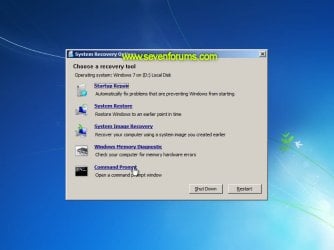
  1. Boot to the System Recovery Options screen.
    • If Windows automatically opens Startup Repair, and subsequently fails to fix a problem, you can skip ahead to step 4 below.
  2. In the System Recovery Options screen, click Startup Repair:
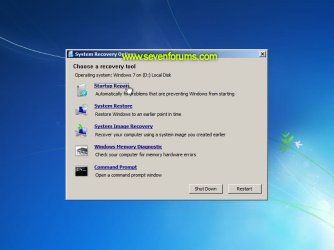
    Image05_startuprepair.jpg


  3. Windows will search for an attempt to repair startup problems:
    Image06_searching.jpg


  4. If startup problems could not be repaired, you will receive the message Windows cannot repair this computer automatically. Click View advanced options for system recovery and support:
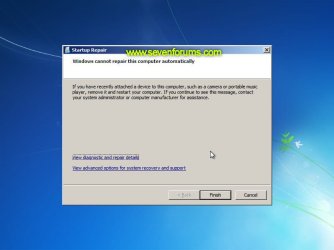
    Image07_cannotfix.jpg


  5. Click View advanced options for system recovery and support, which which bring you back to the main System Recovery Options screen.
  6. Click Command Prompt:
    Image08_clickcommand.jpg


  7. Command Prompt should open to X:, which is an internal ram disk use by System Repair:
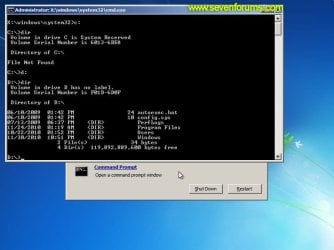
    Image10_changedrive.jpg


  8. Now you need to find your system drive. Depending on how your system is setup, this could be either C: or D:.
    • Type C: and press <ENTER>.
    • Verify that this is your system drive by typing DIR and pressing <ENTER>. If you see the Program Files, Users and Windows folders, then you have found your system drive, and can continue to step 9 below.
    • If the drive is not your system drive, repeat steps I and II above, changing the drive letter to D, E or some other letter until the system drive is located.
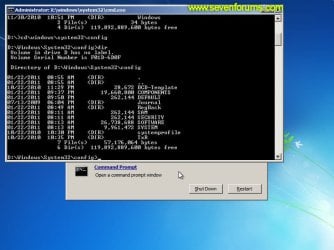
      Image11_chdir_config.jpg

  9. When you have located your Windows system drive, type CD \windows\system32\config and press <ENTER>:
  10. Type DIR and press <ENTER>, and verify that the following files and folders exist in the config folder:
    • RegBack (which is a folder)
    • DEFAULT
    • SAM
    • SECURITY
    • SOFTWARE
    • SYSTEM
      Image11_chdir_config.jpg

  11. Type MD mybackup and press <ENTER> to create a backup folder that you can use incase this procedure does not work as expected.
  12. Type copy *.* mybackup and press <ENTER>.
    • If you are prompted to overwrite existing files, press A to allow all backups to be overwritten.
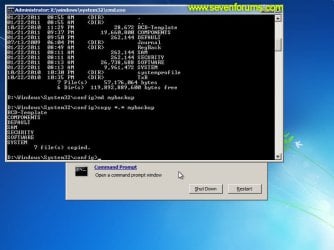
      Image12_mybackup.jpg

  13. Now you need to check if you can use the automatic Windows backups to restore your registry:
    • Type CD RegBack and press <ENTER> to go to the RegBack folder.
    • Type DIR and press <ENTER> to view the contents of the folder. All the following files must exist:
      • The DEFAULT, SAM and SECURITY files should each be about 262,000 bytes in size.
      • The SOFTWARE file should be about 26,000,000 bytes.
      • The SYSTEM file should be about 9,900,000 bytes.
      • The file sizes presented here are approximate estimations, and may vary depending on your system. If any one of them are 0 bytes, then you should stop what you're doing now and seek an alternative method of recovering your system, because Windows cannot function with a 0-byte size registry hive.
    • If the hive files listed in RegBack are ok, then proceed to step 14 of the tutorial.
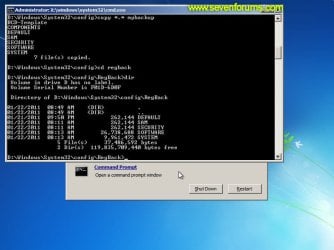
      Image13_checkregback.jpg


  14. Type copy *.* .. and press <ENTER> to copy the backup hive files to \Windows\System32\config.
    • If you are prompted to overwrite existing files, press A to allow all file to be overwritten.
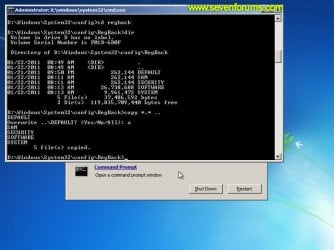
      Image14_copyregback.jpg

  15. Type exit and press <ENTER> to close the command prompt.
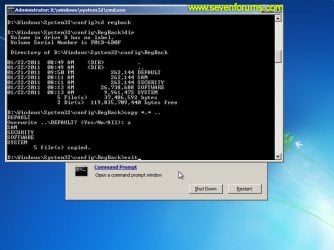
    Image15_exit.jpg


  16. Click the Restart button to reboot your computer. If all goes well, your system will boot normally.
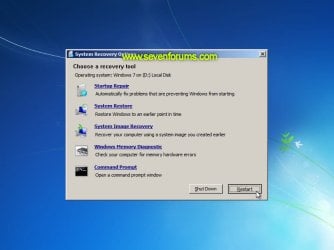
    Image16_restart.jpg
    Image17_working.jpg


Reference Information
This tutorial was made possible after learning how to manualy replace the Windows 7 Registry Hives after reading the Recovering Windows 7 Registry Hives/Files article on Microsoft Technet.


Attachments
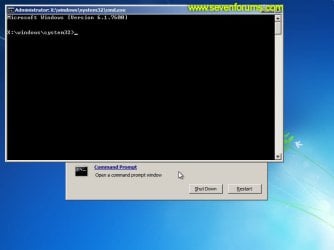
  • Image09_commandprompt.jpg
    Image09_commandprompt.jpg
    26.1 KB · Views: 373
Last edited by a moderator:
I am having this issue and i am pretty sure that it was caused by a virus. I have followed these instructions and they did not work for me. Anything i try to do brings me to the startup repair. Even trying to boot into safe mode. Any thoughts? I am trying to avoid formatting but if that is the only option i wil do it.
 

My Computer My Computer

At a glance

windows 7 ultimate 64bit
OS
windows 7 ultimate 64bit
I complete several steps and at the step 17 the File sizes are quite different. I have partitioned my Computer though if that could be a problem.
Anyway the sizes are as follows:
DEFAULT- 176,128
SAM- 98,304
SECURITY- 24,576
SOFTWARE- 40,955,904
SYSTEM- 13,074,432
Any help would be appreciated.

Oh and after that I manage to get to the starting windows screen (with the Windows Logo) then a BSOD flashes up for a second and Im dumped back to the beginning.
Any help?
Is it a hardware issue?
Ive done your steps several times and everythings fine except for the file size discrepancies in Step 17 (mentioned in previous post).
Sorry if this has been answered in another forum but this is my first forum.
Any help would be appreciated
 
Last edited by a moderator:

My Computer My Computer

At a glance

Windows 7 Professional 64 bitIntel i7
Computer Manufacturer/Model Number
DELL
OS
Windows 7 Professional 64 bit
CPU
Intel i7
Hey, silverblack, welcome to Window 7 forums;

If you already have successfully recovered your windows, then if you have some updates to install like u said, then only select the most important ones...like Hotfix, Security update,etc.

All updated everything seems ok.
For info i did a format and it worked ok for a few hours then the dreaded message appeared again.I found this info on the forum and sure enough i had a virus so check that first.
 

My Computer My Computer

At a glance

Windows 7 x64
OS
Windows 7 x64
infinite loop recovery tutorial

This tutorial did not work for me. I do have the back up file I created in the process. Can you tell me how to activate it?

Thank you
 

My Computer My Computer

At a glance

windows 7 32 bit
Computer Manufacturer/Model Number
Gateway
OS
windows 7 32 bit
Black screen after step three

does that mean its over and I have to use the disc? someone please tell me there's other options then letting my computer run for days on start up repair.
 

My Computer My Computer

At a glance

window 7 home premium 32bit
Computer Manufacturer/Model Number
Toshiba
OS
window 7 home premium 32bit
Here's an easy fix I found!

Go through all the steps listed until you get to the command prompt. Once you do type in the following.

bootrec /fixmbr

press enter then type

bootrec /fixboot

press enter and then restart your computer! So far it's been a week without any more Startup repair loops!

:D

Glen
 

My Computer My Computer

At a glance

Windows XP
OS
Windows XP
startup repair

could the problem be hard drive failing i have tried multiple things and still goes to start up repair
 

My Computer My Computer

At a glance

windows 7 x64
OS
windows 7 x64
I just wanted to say thank you for this solution Peter. I had tried everything and was about to have to complete a fresh operating system reinstall, and consequently lose a lot of data and time in the process, when I found this entry on your forum. I'm very grateful, thanks.
 

My Computer My Computer

At a glance

Windows 7 Home Premium 32bit
OS
Windows 7 Home Premium 32bit
Hello !
I don't know if this thread is still alive but I greatly need help.
I was on my laptop this morning when it crashed and brought me to Startup Repair. It had happened twice in the past and the problem had solved itself with the program. But this time, i tried 30 times and nothing happened. I tried everything (I think). I pressed every single F keys (F1 to F12) without anything special. Settings don't change anything, Safe Mode doesn't launch and trying to run the computer with another Driver doesn't work. I also tried to restore my computer to a couple of days without success. Another thing I tried was to start the computer normaly but it always comes back to where I started (Startup Repair). I was so tired of working on it I went on my other computer (which is old and slow) to find answers on the internet. I tried everything in this tutorial 2 times but nothing is happening when I restart my computer because I still am at the Startup Repair. I did everything ''Perfectly'' without any mistakes or errors because I was always triple-checking. School starts tomorrow and I really need my computer. Help would be greatly appreciated. MrDub

P.S: I didn't download anything in the past 2-3 weeks and I scanned that program. I'm running a Dell Inspiron 17, 250G Memory, 4G RAM, Intel Graphic card with Windows 7 64bit. Restoring data is not an option because I have important files on my computer. Loosing them would be a catastrophe.
 

My Computer My Computer

At a glance

Windows 7 Home Premium 64bitDell Inspiron 17250GIntel
Computer Manufacturer/Model Number
Dell
OS
Windows 7 Home Premium 64bit
CPU
Dell Inspiron 17
Memory
250G
Graphics Card(s)
Intel
Internet Speed
60 kb/s
Please help me!!!

I am having an issue with my Windows Vista (32 biT). I am absolutely new to this forum and generally speaking far from being a tech expert.

My windows vista is stuck in a continuous Start up repair loop. I tried following your tutorial but cannot go further than step 13.
When I type the system says "File not Found". In other words there is no config directory. how can it be. What do I do now?
 

My Computer My Computer

At a glance

Windows Vista
OS
Windows Vista
Excellent
I used a whole day looking for a solution, until i came across this post. Thanks it works perfectly.

Incase you restart your system and still experience having your system rebooting again? (which I did) simply go to the advance option by clicking F8 and choosing 'Select last Configoration that Worked" and you will be Good.

Thank You For This Post. Saved My FILESSSS.
 

My Computer My Computer

At a glance

Windows 7 x64
OS
Windows 7 x64
Many Thanks!!!

I could kiss you right now!!! ;) Now I can do my employee payroll and back up the laptop on the external drive! Saved me a lot of angst...
 

My Computer My Computer

At a glance

Win 7 Home Premium 64 biti7-2630QM - 2.0 GHz6 GB
Computer Manufacturer/Model Number
MSI FR720
OS
Win 7 Home Premium 64 bit
CPU
i7-2630QM - 2.0 GHz
Memory
6 GB
Thank You!

I would just like to thank you for posting this! I've spent about a week with this exact problem browsing the web on my phone looking for answers.(I'm only 16 so I'm not computer savvy yet)Anyways, I followed each step exactly and I am now posting on the now, "fixed" computer thanking you!! When I'm out of my house, you need some cash...Call THIS GUY.

-Thanks again
,Antonio L. Walker Jr.

PS: If someone could tell me, how this happens and how/what I can avoid. That'd help.
 

My Computer My Computer

At a glance

Windows 7 Home Premium 32bit
OS
Windows 7 Home Premium 32bit
Hi Peter..Im having the problem where at start up it does start repair. Usually I go to google when ever I have problem over calling Dell. The answer to everything is do a reinstall of windows. When I call then this time that's what they said. but I'm not trying to lose any my data.. Im a college student which have alot of data and my personal pictures n music that I haven't been able to back up.. Is there any way I can stop his loop. It happen when I was during normal thing on my computer that I do every night.. I close my comPuter top and open back up after five mins.. It had froze so I manually shut down my computer and then start up repair stops.
 

My Computer My Computer

At a glance

Windows 7 home premium x64 bit
OS
Windows 7 home premium x64 bit
*starts
 

My Computer My Computer

At a glance

Windows 7 home premium x64 bit
OS
Windows 7 home premium x64 bit
The file cannot be copied onto itself

EDITED....see correction below...user input error. Still having trouble though if you're interested in a challenge!

I think you have the fix! Hoping!

Background:
-virus
-BSOD
-all built-in fixes unsuccessful, including the fabled "One Touch Recovery."
-Copied directories to a Tb drive using Ubuntu on a pen drive
-scanned copies using other machine, found the trojan & removed from Tb and then, using ubuntu, located each of those files and deleted them from the c: directory on the Lenovo U150.
-Ran all built-in recovery options again: no luck
-no .iso available, called Lenovo: result: I really don't want to send Lenovo additional money for the recovery disk...plus, there's no ODD on this machine
-Found this forum and have renewed hope!
-no volume label on c: (that's funny. I'm sure the install was on c:)
-found Default, Sam....on E:\win...config
-Files a little larger than expected but there
-MD Backup created
-E:Win...config>copy *.* mybackup
-7 files copied
-...CD regback...dir...cool
-E:\Win...RegBack>copy *.*
--Default
--this file cannot be copied onto itself

Where'd I go wrong (aside from downloading the virus)?

Many thanks!


edit: didn't use the '..' at the end of the >copy *.* command string....novice made it happen but that wasn't the problem...

rats
 
Last edited:

My Computer My Computer

At a glance

7 home premium 32bit???
Computer Manufacturer/Model Number
Lenovo U150
OS
7 home premium 32bit
CPU
?
Motherboard
?
Memory
?
Graphics Card(s)
?
Sound Card
?
Monitor(s) Displays
?
Hard Drives
?
PSU
?
Case
?
Cooling
?
the files in the directory is corrupted and un readable

well peter ,
i got struck ed in a point when i typed CD\windows.......\config it was showing me the file or directory is corrupted and un readable what to do
 

My Computer My Computer

At a glance

windows 7 home premium 64 bit
OS
windows 7 home premium 64 bit
Thank you so much! Was feeling hopeless already, but you're tutorial rocked my world.
 

My Computer My Computer

At a glance

Windows 7 Home premium x64
Computer Manufacturer/Model Number
Dell Inspiron 1555
OS
Windows 7 Home premium x64
Thank you it started !

Hi Peter from Peter
PC crashed after using MiniTools partition wizard after operation1.
Searched for one week desperately to reboot. Found your site and procedure and
biggrin.gif
-miracle - it worked. Boots normally again, only a 2 programs and a driver to reinstall.

Thank you so much

Peter
 

My Computer My Computer

At a glance

Windows 7 Professional 32 bitIntel E5200 2.5 GHZ2.5 GBNVIDIA GeForce 8500 GT
Computer Manufacturer/Model Number
self assembled
OS
Windows 7 Professional 32 bit
CPU
Intel E5200 2.5 GHZ
Motherboard
Gigabyte GA-EP43-DS3R
Memory
2.5 GB
Graphics Card(s)
NVIDIA GeForce 8500 GT
Sound Card
Realtek High definition Audio
Hard Drives
3x 500 GB Raid 5
could use just a little more info in the thread

Towards the end, in step 17, you list approximate expected sizes for each of the files in the regback folder, with the warning that if any of the file sizes are zero, the process will not work. When I got to this step, I found that my of the five files, only to matched the sizes you gave, with two being much smaller and one being much larger (one order of magnitude, each directon). As none were zero, and as I needed to try something, I went ahead, but it would be useful to know what it means if the files are the wrong size but non-zero, and also what to do if they are zero (does this mean my HDD is a paperweight, for example?)

Still, a brilliantly written post, and I created an account so I could upvote this and return to the forum because the post was good. :D
 

My Computer My Computer

At a glance

multiple machines/multiple versions of 7
OS
multiple machines/multiple versions of 7
Back
Top