Harddrive and CD/DVD rom

Swifty

New member
Power User
Local time
7:38 PM
Messages
390
Location
Sioux Lookout, Ontario
Hey there everyone, I recently got a new graphics card and a new HDD, I picked up the Radeon Sapphire HD 6950 and a 1TB HDD, but here is the problem I am having right now, my computer is not picking up the HDD which is probably normal, I am uncertain how to even access it at this point because I am new to setting up a new HDD but what I wanted to do is install Windows Vista 64bit and then upgrade it to Windows 7 64bit, but here is the problem my CD/DVD drive does not work and it won't even power on at boot up, and I have tried to unplug it and plug it back in, and I have a secondary cd/dvd drive that won't boot up either.. any ideas?
 

My Computer My Computer

At a glance

Windows 7 x64 ProfessionalIntel i5-4690kCorsair Vengeance Pro Series 16GB DDR3 1866mhzR9 390 8GB
Computer type
PC/Desktop
Computer Manufacturer/Model Number
Custom
OS
Windows 7 x64 Professional
CPU
Intel i5-4690k
Motherboard
MSI Z97 Gaming 5
Memory
Corsair Vengeance Pro Series 16GB DDR3 1866mhz
Graphics Card(s)
R9 390 8GB
Monitor(s) Displays
24" Acer 3D monitor
Hard Drives
2TB Seagate HDD
120GB Adata SSD
PSU
750 watt
Case
Zalmann Z9
Cooling
Fan
Keyboard
Razer Deathstalker
Mouse
Anker Gaming Mouse
Internet Speed
20MB/S
Antivirus
AVG
Browser
Google Chrome
For the DVD DRIVE -Try updating to the latest chipset drivers which will update the storage driver - http://downloadcenter.intel.com/default.aspx
I that doesnt work go here and download and install the Intel Matrix Storage driver - if you get an error and it wont install just skip it as you havent AHCI enabled in the bios - http://downloadcenter.intel.com/Detail_Desc.aspx?agr=Y&ProdId=3061&DwnldID=17882&lang=eng
Try this filter fix if that doesnt work : Your CD drive or DVD drive is missing or is not recognized by Windows or other programs

To do with the hard drive - type "Create and format hard disk partitions" in the start search and select - find the drive:
To initialize new disks:
In Disk Management, right-click the disk you want to initialize, and then click Initialize Disk.
In the Initialize Disk dialog box, select the disk(s) to initialize. You can select whether to use the master boot record (MBR) or GUID partition table (GPT) partition style. Choose Master boot record.
Note The disk is initialized as a basic disk.

Additional considerations
New disks appear as Not Initialized. Before you can use a disk, you must first initialize it. If you start Disk Management after adding a disk, the Initialize Disk Wizard appears so you can initialize the disk.

You then need to create a new partition (volume) and format it and finally if you are going to install vista and upgrade it to W7 the new disk needs to be marked as active (right click selected drive for all options).
 

My Computer My Computer

At a glance

XP, Vista, W7 64bit Home PremiumIntel Core Duo 6850 3.0 ghz @ 3.7 ghz4GB Corsair DDR 2 PC-6400Ati 4870 1ghz
OS
XP, Vista, W7 64bit Home Premium
CPU
Intel Core Duo 6850 3.0 ghz @ 3.7 ghz
Motherboard
Asus P5E
Memory
4GB Corsair DDR 2 PC-6400
Graphics Card(s)
Ati 4870 1ghz
Sound Card
Supreme FX 11
Monitor(s) Displays
View Sonic VX1962wm
Screen Resolution
1680 X1050
Hard Drives
3 Seagate Sata Drives 160gb 250gb 500gb
PSU
Thermaltake 600 watt
Case
NZXT Alpha
Cooling
3X120cm Fans
Keyboard
Microsoft Digital Media Pro Keyboard
Mouse
Microsoft Wheel Mouse Optical
Internet Speed
1.5Mb to 8Mb/384k
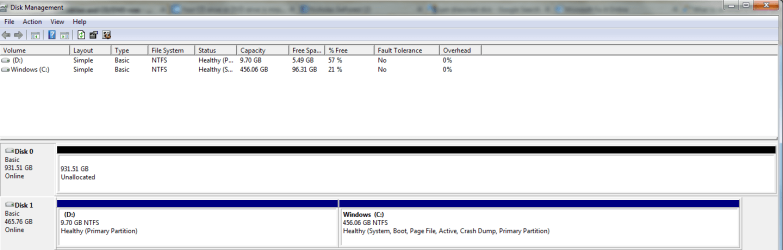
Thanks for the advice so far, none of the three links worked for me above since my motherboard is ASUS, and here is the information I have on the HDD I can't find any initialize for it, here is a screen shot.
 

Attachments

  • Untitled.png
    Untitled.png
    21.3 KB · Views: 6

My Computer My Computer

At a glance

Windows 7 x64 ProfessionalIntel i5-4690kCorsair Vengeance Pro Series 16GB DDR3 1866mhzR9 390 8GB
Computer type
PC/Desktop
Computer Manufacturer/Model Number
Custom
OS
Windows 7 x64 Professional
CPU
Intel i5-4690k
Motherboard
MSI Z97 Gaming 5
Memory
Corsair Vengeance Pro Series 16GB DDR3 1866mhz
Graphics Card(s)
R9 390 8GB
Monitor(s) Displays
24" Acer 3D monitor
Hard Drives
2TB Seagate HDD
120GB Adata SSD
PSU
750 watt
Case
Zalmann Z9
Cooling
Fan
Keyboard
Razer Deathstalker
Mouse
Anker Gaming Mouse
Internet Speed
20MB/S
Antivirus
AVG
Browser
Google Chrome
Your Asus motherboard uses an Intel P45 chipset, so the Intel chipset drivers would be appropriate for it. They probably won't help, though.

In Disk Management, my (empty) optical drives show up below the area that you've captured in your screen shot. If a CD is in the drive, the drive shows up with the hard drives.

For both CD drives, no LED lights up at startup?
 

My Computer My Computer

At a glance

Windows 7 Pro X64 SP1Intel Core I7-3930k16 GB Gskill DDR3-2133eVGA GTX680
Computer Manufacturer/Model Number
homegrown
OS
Windows 7 Pro X64 SP1
CPU
Intel Core I7-3930k
Motherboard
Asus P9X79 Pro
Memory
16 GB Gskill DDR3-2133
Graphics Card(s)
eVGA GTX680
Sound Card
Creative X-Fi Titanium
Monitor(s) Displays
As PA246Q
Screen Resolution
1920 X 1200
Hard Drives
Corsair Force GT, 120 GB
WDC 1.5TB Caviar Black
PSU
PCP&C Silencer 750 Crossfire
Case
Silverstone FT02
Cooling
Noctua NH-D14
Keyboard
cheap Logitech USB
Mouse
Microsoft Intellimouse Explorer (old optical) USB
Internet Speed
6Mb cable
Other Info
Pioneer BDR-205
Samsung SH-203B
Monsoon 5.1 speakers
Your Asus motherboard uses an Intel P45 chipset, so the Intel chipset drivers would be appropriate for it. They probably won't help, though.

In Disk Management, my (empty) optical drives show up below the area that you've captured in your screen shot. If a CD is in the drive, the drive shows up with the hard drives.

For both CD drives, no LED lights up at startup?

Nope no activity lights on start up, which is a bothersome to me because it worked a few months ago back then just stopped working all together, I was hoping to get the hard drive to work then install the OS on it, maybe there is a corrupt registry file somewhere causing this?
 

My Computer My Computer

At a glance

Windows 7 x64 ProfessionalIntel i5-4690kCorsair Vengeance Pro Series 16GB DDR3 1866mhzR9 390 8GB
Computer type
PC/Desktop
Computer Manufacturer/Model Number
Custom
OS
Windows 7 x64 Professional
CPU
Intel i5-4690k
Motherboard
MSI Z97 Gaming 5
Memory
Corsair Vengeance Pro Series 16GB DDR3 1866mhz
Graphics Card(s)
R9 390 8GB
Monitor(s) Displays
24" Acer 3D monitor
Hard Drives
2TB Seagate HDD
120GB Adata SSD
PSU
750 watt
Case
Zalmann Z9
Cooling
Fan
Keyboard
Razer Deathstalker
Mouse
Anker Gaming Mouse
Internet Speed
20MB/S
Antivirus
AVG
Browser
Google Chrome
Thanks for the advice so far, none of the three links worked for me above since my motherboard is ASUS, and here is the information I have on the HDD I can't find any initialize for it, here is a screen shot.

The links should work they are for me - anyhow try this right click the link - click copy shortcut -paste it in the address bar and hit enter

In diskmanagement click the 1tb (931.51gb) drive to highlight it then right click it and select properties and see what show up - post back.

Can you try the dvd drive on another pc? 700watt power supply is adequate - i would check inside the case for something if the dvd/cd drive (drives dont work)
 
Last edited:

My Computer My Computer

At a glance

XP, Vista, W7 64bit Home PremiumIntel Core Duo 6850 3.0 ghz @ 3.7 ghz4GB Corsair DDR 2 PC-6400Ati 4870 1ghz
OS
XP, Vista, W7 64bit Home Premium
CPU
Intel Core Duo 6850 3.0 ghz @ 3.7 ghz
Motherboard
Asus P5E
Memory
4GB Corsair DDR 2 PC-6400
Graphics Card(s)
Ati 4870 1ghz
Sound Card
Supreme FX 11
Monitor(s) Displays
View Sonic VX1962wm
Screen Resolution
1680 X1050
Hard Drives
3 Seagate Sata Drives 160gb 250gb 500gb
PSU
Thermaltake 600 watt
Case
NZXT Alpha
Cooling
3X120cm Fans
Keyboard
Microsoft Digital Media Pro Keyboard
Mouse
Microsoft Wheel Mouse Optical
Internet Speed
1.5Mb to 8Mb/384k
I meant as they will not help my problem of fixing my CD/DVD drive, but I realize that my processor is intel, but the bottom link does not even detect my CD/DVD drive so it won't go any further, and what it shows in properties is the tabs 5 tabs saying, General, Policies, Volumes, Drivers and Details.
 

My Computer My Computer

At a glance

Windows 7 x64 ProfessionalIntel i5-4690kCorsair Vengeance Pro Series 16GB DDR3 1866mhzR9 390 8GB
Computer type
PC/Desktop
Computer Manufacturer/Model Number
Custom
OS
Windows 7 x64 Professional
CPU
Intel i5-4690k
Motherboard
MSI Z97 Gaming 5
Memory
Corsair Vengeance Pro Series 16GB DDR3 1866mhz
Graphics Card(s)
R9 390 8GB
Monitor(s) Displays
24" Acer 3D monitor
Hard Drives
2TB Seagate HDD
120GB Adata SSD
PSU
750 watt
Case
Zalmann Z9
Cooling
Fan
Keyboard
Razer Deathstalker
Mouse
Anker Gaming Mouse
Internet Speed
20MB/S
Antivirus
AVG
Browser
Google Chrome
I meant as they will not help my problem of fixing my CD/DVD drive, but I realize that my processor is intel, but the bottom link does not even detect my CD/DVD drive so it won't go any further, and what it shows in properties is the tabs 5 tabs saying, General, Policies, Volumes, Drivers and Details.

You cant really get anywhere till you solve whether the dvd /cd rom drive is dead, hence a hardware problem, so you really need to test the drive to see if it will work on another PC - OR YOU COULD ASSUME IT DOES AS BOTH dvd/cd drives don't work - but it would still be nice to know for sure - so i would suggest to test it with your mates pc for your own protection, so you dont have to go to the local pc shop and have it tested, which is going to cost at best if he is honest, but how many are?

Since you cant install w7 without a dvd/cd drive thats number one. However, why dont you go into diskmanagement, and do as I suggested in my last post, and post back to see if we can get the hard drive problem solved.

* In diskmanagement click the 1tb (931.51gb) drive to highlight it then right click it and select properties and see what show up - post back.
 

My Computer My Computer

At a glance

XP, Vista, W7 64bit Home PremiumIntel Core Duo 6850 3.0 ghz @ 3.7 ghz4GB Corsair DDR 2 PC-6400Ati 4870 1ghz
OS
XP, Vista, W7 64bit Home Premium
CPU
Intel Core Duo 6850 3.0 ghz @ 3.7 ghz
Motherboard
Asus P5E
Memory
4GB Corsair DDR 2 PC-6400
Graphics Card(s)
Ati 4870 1ghz
Sound Card
Supreme FX 11
Monitor(s) Displays
View Sonic VX1962wm
Screen Resolution
1680 X1050
Hard Drives
3 Seagate Sata Drives 160gb 250gb 500gb
PSU
Thermaltake 600 watt
Case
NZXT Alpha
Cooling
3X120cm Fans
Keyboard
Microsoft Digital Media Pro Keyboard
Mouse
Microsoft Wheel Mouse Optical
Internet Speed
1.5Mb to 8Mb/384k
Have no other way of testing it on other computers, no other one's nearby, but to be honest I am wondering if it has to do with something in the registry because last time a similar issue happened my cd drive would boot and open but not read disks then I reinstalled my OS and everything worked fine.
 

My Computer My Computer

At a glance

Windows 7 x64 ProfessionalIntel i5-4690kCorsair Vengeance Pro Series 16GB DDR3 1866mhzR9 390 8GB
Computer type
PC/Desktop
Computer Manufacturer/Model Number
Custom
OS
Windows 7 x64 Professional
CPU
Intel i5-4690k
Motherboard
MSI Z97 Gaming 5
Memory
Corsair Vengeance Pro Series 16GB DDR3 1866mhz
Graphics Card(s)
R9 390 8GB
Monitor(s) Displays
24" Acer 3D monitor
Hard Drives
2TB Seagate HDD
120GB Adata SSD
PSU
750 watt
Case
Zalmann Z9
Cooling
Fan
Keyboard
Razer Deathstalker
Mouse
Anker Gaming Mouse
Internet Speed
20MB/S
Antivirus
AVG
Browser
Google Chrome
You could try a bios update that might fix it permanately - but no lights flashing seems to make it an unnecessary risk. Heres you support page - if you register your product on the asus site they offer free support - they might have an idea or post your problem on the asus forums - something might show up - you can also search the forums for problems concerning the P5Q Pro. On the support page click on knowledge and read the FAQ'S and Troubleshooting.

http://support.asus.com/download.aspx?SLanguage=en&p=1&s=22&m=P5Q PRO&os=&hashedid=qH6ZSEJ8EPY6HoNU

http://support.asus.com/Troubleshoo...PRO&s=22&hashedid=qH6ZSEJ8EPY6HoNU&os=&no=937

http://support.asus.com/faq/detail....U&os=&no=7C39CF37-C736-75A7-C479-974AAB626696

I woud take that dvd/cd drive to a computer shop they might even test it for free or a small amount of dollars - at least you would have something concrete to work with - if its a sata dvd/cd drive it has this on the site -

http://support.asus.com/faq/detail....U&os=&no=A9AE8BF4-52DC-771B-ADF3-6F203E22108E
 
Last edited:

My Computer My Computer

At a glance

XP, Vista, W7 64bit Home PremiumIntel Core Duo 6850 3.0 ghz @ 3.7 ghz4GB Corsair DDR 2 PC-6400Ati 4870 1ghz
OS
XP, Vista, W7 64bit Home Premium
CPU
Intel Core Duo 6850 3.0 ghz @ 3.7 ghz
Motherboard
Asus P5E
Memory
4GB Corsair DDR 2 PC-6400
Graphics Card(s)
Ati 4870 1ghz
Sound Card
Supreme FX 11
Monitor(s) Displays
View Sonic VX1962wm
Screen Resolution
1680 X1050
Hard Drives
3 Seagate Sata Drives 160gb 250gb 500gb
PSU
Thermaltake 600 watt
Case
NZXT Alpha
Cooling
3X120cm Fans
Keyboard
Microsoft Digital Media Pro Keyboard
Mouse
Microsoft Wheel Mouse Optical
Internet Speed
1.5Mb to 8Mb/384k
I just bought an external CD/DVD drive, but I'd like to know, how to get my harddrive up and running because I am trying to install an OS on it, I turn off my 500GB hdd leaving the 1TB on and set the boot priority to run the disk and it shows the vista background but no menu's am I doing it wrong ;P?
 

My Computer My Computer

At a glance

Windows 7 x64 ProfessionalIntel i5-4690kCorsair Vengeance Pro Series 16GB DDR3 1866mhzR9 390 8GB
Computer type
PC/Desktop
Computer Manufacturer/Model Number
Custom
OS
Windows 7 x64 Professional
CPU
Intel i5-4690k
Motherboard
MSI Z97 Gaming 5
Memory
Corsair Vengeance Pro Series 16GB DDR3 1866mhz
Graphics Card(s)
R9 390 8GB
Monitor(s) Displays
24" Acer 3D monitor
Hard Drives
2TB Seagate HDD
120GB Adata SSD
PSU
750 watt
Case
Zalmann Z9
Cooling
Fan
Keyboard
Razer Deathstalker
Mouse
Anker Gaming Mouse
Internet Speed
20MB/S
Antivirus
AVG
Browser
Google Chrome
Is the 1TB drive a seagate drive - if so you can run Sea tools for windows (download from the seagate site) as it might need a firmware update. Assuming its another drive what options come up when you highlight the drive in diskmanagement and right click the drive if any?
http://support.asus.com/faq/detail....U&os=&no=7C39CF37-C736-75A7-C479-974AAB626696

Sea tools : SeaTools | Seagate

You then need to create a new partition (volume) and format it and finally if you are going to install vista and upgrade it to Windows 7 the new disk needs to be marked as active - if want to create 2 partitions (volume) its a good time to do it - but like I have repeatedly ask you is what options comes up when you select drive in diskmanagent as thats where you create the new volume etc.
 

My Computer My Computer

At a glance

XP, Vista, W7 64bit Home PremiumIntel Core Duo 6850 3.0 ghz @ 3.7 ghz4GB Corsair DDR 2 PC-6400Ati 4870 1ghz
OS
XP, Vista, W7 64bit Home Premium
CPU
Intel Core Duo 6850 3.0 ghz @ 3.7 ghz
Motherboard
Asus P5E
Memory
4GB Corsair DDR 2 PC-6400
Graphics Card(s)
Ati 4870 1ghz
Sound Card
Supreme FX 11
Monitor(s) Displays
View Sonic VX1962wm
Screen Resolution
1680 X1050
Hard Drives
3 Seagate Sata Drives 160gb 250gb 500gb
PSU
Thermaltake 600 watt
Case
NZXT Alpha
Cooling
3X120cm Fans
Keyboard
Microsoft Digital Media Pro Keyboard
Mouse
Microsoft Wheel Mouse Optical
Internet Speed
1.5Mb to 8Mb/384k
I have finally gotten Windows 7 64bit on the computer now I am trying to bring all my files over onto my new HDD, but its really giving me a tough time, saying I need administrator rights to do this and such, and when I click continue it shuts the entire copying process down, which I don't understand why, I am the only one on this computer and I turned of UAC.
 

My Computer My Computer

At a glance

Windows 7 x64 ProfessionalIntel i5-4690kCorsair Vengeance Pro Series 16GB DDR3 1866mhzR9 390 8GB
Computer type
PC/Desktop
Computer Manufacturer/Model Number
Custom
OS
Windows 7 x64 Professional
CPU
Intel i5-4690k
Motherboard
MSI Z97 Gaming 5
Memory
Corsair Vengeance Pro Series 16GB DDR3 1866mhz
Graphics Card(s)
R9 390 8GB
Monitor(s) Displays
24" Acer 3D monitor
Hard Drives
2TB Seagate HDD
120GB Adata SSD
PSU
750 watt
Case
Zalmann Z9
Cooling
Fan
Keyboard
Razer Deathstalker
Mouse
Anker Gaming Mouse
Internet Speed
20MB/S
Antivirus
AVG
Browser
Google Chrome
Download and run a hard drive diagnostic tool (thks to the bare foot kid for his link) to see if there are any problems with your hard drives : http://www.carrona.org/hddiag.html
 
Last edited:

My Computer My Computer

At a glance

XP, Vista, W7 64bit Home PremiumIntel Core Duo 6850 3.0 ghz @ 3.7 ghz4GB Corsair DDR 2 PC-6400Ati 4870 1ghz
OS
XP, Vista, W7 64bit Home Premium
CPU
Intel Core Duo 6850 3.0 ghz @ 3.7 ghz
Motherboard
Asus P5E
Memory
4GB Corsair DDR 2 PC-6400
Graphics Card(s)
Ati 4870 1ghz
Sound Card
Supreme FX 11
Monitor(s) Displays
View Sonic VX1962wm
Screen Resolution
1680 X1050
Hard Drives
3 Seagate Sata Drives 160gb 250gb 500gb
PSU
Thermaltake 600 watt
Case
NZXT Alpha
Cooling
3X120cm Fans
Keyboard
Microsoft Digital Media Pro Keyboard
Mouse
Microsoft Wheel Mouse Optical
Internet Speed
1.5Mb to 8Mb/384k
Everything is working top notch besides fixing my internal drives but whatever a new build is on the way I won't trouble myself in fixing it when I am buying a new Motherboard, Processor, ect.. but I am just trying to adjust to the fact not everything is the same as it was on my other harddrive like nothing from program files shows up on my start up menu or in program files open up window on the start up menu, any idea what to do?
 

My Computer My Computer

At a glance

Windows 7 x64 ProfessionalIntel i5-4690kCorsair Vengeance Pro Series 16GB DDR3 1866mhzR9 390 8GB
Computer type
PC/Desktop
Computer Manufacturer/Model Number
Custom
OS
Windows 7 x64 Professional
CPU
Intel i5-4690k
Motherboard
MSI Z97 Gaming 5
Memory
Corsair Vengeance Pro Series 16GB DDR3 1866mhz
Graphics Card(s)
R9 390 8GB
Monitor(s) Displays
24" Acer 3D monitor
Hard Drives
2TB Seagate HDD
120GB Adata SSD
PSU
750 watt
Case
Zalmann Z9
Cooling
Fan
Keyboard
Razer Deathstalker
Mouse
Anker Gaming Mouse
Internet Speed
20MB/S
Antivirus
AVG
Browser
Google Chrome
In 64bit w7 there are 2 program files folders one for 32 bit programs - where most programs go, and one for 64 bit programs where not too much ends up. So you have one called Program files for 64 bit programs, and one called Program Files (X86) for 32 bit programs.

You can customise the start menu by right clicking start, select properties, select start menu and select customise.
 

My Computer My Computer

At a glance

XP, Vista, W7 64bit Home PremiumIntel Core Duo 6850 3.0 ghz @ 3.7 ghz4GB Corsair DDR 2 PC-6400Ati 4870 1ghz
OS
XP, Vista, W7 64bit Home Premium
CPU
Intel Core Duo 6850 3.0 ghz @ 3.7 ghz
Motherboard
Asus P5E
Memory
4GB Corsair DDR 2 PC-6400
Graphics Card(s)
Ati 4870 1ghz
Sound Card
Supreme FX 11
Monitor(s) Displays
View Sonic VX1962wm
Screen Resolution
1680 X1050
Hard Drives
3 Seagate Sata Drives 160gb 250gb 500gb
PSU
Thermaltake 600 watt
Case
NZXT Alpha
Cooling
3X120cm Fans
Keyboard
Microsoft Digital Media Pro Keyboard
Mouse
Microsoft Wheel Mouse Optical
Internet Speed
1.5Mb to 8Mb/384k
Back
Top