
AMD A8-3850 with ASUS F1A75-V PRO FM1 AMD A75

drmax

New member
Member
VIP
Local time
5:41 PM
Messages
314
Hello. I have the above listed equipt. in a system I built, using windows 7. My intent, was and still is, is to have to seperate capable video systems available from my one pc and a little confused at what is going on, or what I am doing wrong. I most likely do not have the correct hardware.
What I want is to be able to run movies to my t.v, with a vga hook up as well as running another t.v. remotely, with say hdmi. My intent is to have the a8-3850 for one video source, and also a newly installed GeForce GT 520 for my other video source. I want this set up to be independent from each other, as if though it were to sepate pc's. Windows is currently recognizing the geforce vid card, as this is what is driving my flat monitor. When i go to install the catalyst ati for the a8-3850 onboard graphics, it apparently is not allowed.
Could somebody please explain to me, what I need to do, to make this work?
It was mentioned by a tech at AMD today, that I should have gotten the same type of chipset of video card, that matched the amd/asus stuff, and not have bought the geforce.
I thought I did my research prior to...but apparently I did not.
Thank you for any direction...DM
 

My Computer My Computer

At a glance

W7 premium 64amd a8-38508G g-skillasus gt-520 silent
OS
W7 premium 64
CPU
amd a8-3850
Motherboard
asus f1-a75v pro
Memory
8G g-skill
Graphics Card(s)
asus gt-520 silent
Monitor(s) Displays
LED viewsonic 24"
Hard Drives
seagate sata 120
wd 2T green
PSU
cool master 600W silent pro (80+bronze)
I think I know what your trying to get at, but I don't know if you can do both at the same time. Meaning that I'm not sure if both the on die GPU and a discrete card will be recognized at the same time, its either one or the other. But I'm not quite sure how these new "APU's" handle that.
 

My Computer My Computer

At a glance

Windows 8.1 Pro w/ Media Center 64-BitIntel Core-i7 95012GB Corsair Dominator (3x4GB) DDR3 1600Mhz 9...EVGA Geforce GTX 980 4GB VRAM
Computer Manufacturer/Model Number
Custom Build
OS
Windows 8.1 Pro w/ Media Center 64-Bit
CPU
Intel Core-i7 950
Motherboard
MSI X58-GD45
Memory
12GB Corsair Dominator (3x4GB) DDR3 1600Mhz 9-9-9-24
Graphics Card(s)
EVGA Geforce GTX 980 4GB VRAM
Sound Card
Integrated HD Audio
Monitor(s) Displays
25" I-Inc iH252, 27" ASUS VE278(primary)
Screen Resolution
1920 x 1080 @ 60hz
Hard Drives
240GB OCZ Agility 3 SSD (boot drive)
WD Caviar Black 2TB Sata-III 64MB Cache (data drive)
WD Caviar Black 500GB Sata-II 16MB cache (data drive)
PSU
Raidmax RX-850AE 850 Watt gold plus PS
Case
Cooler master HAF X full tower
Cooling
2x 200mm Fan 1x 230mm/ Red LED Fan
Internet Speed
Cable
I think I know what your trying to get at, but I don't know if you can do both at the same time. Meaning that I'm not sure if both the on die GPU and a discrete card will be recognized at the same time, its either one or the other. But I'm not quite sure how these new "APU's" handle that.
I've found out, that I should have gotten a Amd/Ati 6000 series card, then there wouldn't be a conflict. I'm not sure if I'll be able to do what I want, though, either.
It'd be sorta like a dual tuner on a satellite receiver, only this'd be a dual video processor. Unsure why this wouldn't be available. I mean this is not necessary, but it will happen, that my kids will want to be watching a movie from the PC (avi type) and I'll be in the budwa, wanting to watch a different movie (avi). I must be going about this either the wrong way, or maybe not explaining myself properly.
 

My Computer My Computer

At a glance

W7 premium 64amd a8-38508G g-skillasus gt-520 silent
OS
W7 premium 64
CPU
amd a8-3850
Motherboard
asus f1-a75v pro
Memory
8G g-skill
Graphics Card(s)
asus gt-520 silent
Monitor(s) Displays
LED viewsonic 24"
Hard Drives
seagate sata 120
wd 2T green
PSU
cool master 600W silent pro (80+bronze)
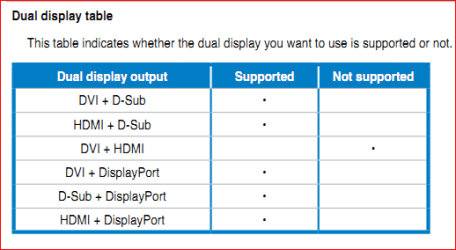
All things considering you shouldn't even need a second video card for what you want to do. That motherboard has 4 video connections on it (VGA, DVI, HDMI and displayport) and you can use any two at the same time, only limited by what it shows in this chart from the manual,

dualdisplay.PNG

Just a matter of connecting both TV's/displays appropriately, and then opening (or moving) the program for the kids movie to the correct display and run yours on the primary.
 

My Computer My Computer

At a glance

Win 7 Ultimate x64FX-8350 @ 4.6 GHz so farADATA XPG V1 Series Black 8GB DDR3 1600Sapphire R9 270x Dual-X
Computer type
PC/Desktop
Computer Manufacturer/Model Number
Me
OS
Win 7 Ultimate x64
CPU
FX-8350 @ 4.6 GHz so far
Motherboard
Asus M5A97 EVO
Memory
ADATA XPG V1 Series Black 8GB DDR3 1600
Graphics Card(s)
Sapphire R9 270x Dual-X
Sound Card
Xonar DGX w/ Corsair Vengence 1300
Monitor(s) Displays
Acer S232HL Abid
Screen Resolution
1920x1080
Hard Drives
120 GB OCZ Vertex 3
500 GB Seagate 7200.12
PSU
Antec Earthwatts 650W Green
Case
Antec Three Hundred
Cooling
Cooler Master 212 EVO
Keyboard
Logitech G510
Mouse
Logitech G500s
Internet Speed
35000/3000
All things considering you shouldn't even need a second video card for what you want to do. That motherboard has 4 video connections on it (VGA, DVI, HDMI and displayport) and you can use any two at the same time, only limited by what it shows in this chart from the manual,

View attachment 171883

Just a matter of connecting both TV's/displays appropriately, and then opening (or moving) the program for the kids movie to the correct display and run yours on the primary.

That would work but it would be more like a rig, the question of running two movies using two different GPU's at the same time from the same PC is still unresolved. But I think I'm in the same boat as stormy13 simply because I don't think what your asking is possible. The only catch with stormy13's suggestion is that running two vids concurrently might not work... work well at least, especially HD formats like Blu-ray, etc.
 

My Computer My Computer

At a glance

Windows 8.1 Pro w/ Media Center 64-BitIntel Core-i7 95012GB Corsair Dominator (3x4GB) DDR3 1600Mhz 9...EVGA Geforce GTX 980 4GB VRAM
Computer Manufacturer/Model Number
Custom Build
OS
Windows 8.1 Pro w/ Media Center 64-Bit
CPU
Intel Core-i7 950
Motherboard
MSI X58-GD45
Memory
12GB Corsair Dominator (3x4GB) DDR3 1600Mhz 9-9-9-24
Graphics Card(s)
EVGA Geforce GTX 980 4GB VRAM
Sound Card
Integrated HD Audio
Monitor(s) Displays
25" I-Inc iH252, 27" ASUS VE278(primary)
Screen Resolution
1920 x 1080 @ 60hz
Hard Drives
240GB OCZ Agility 3 SSD (boot drive)
WD Caviar Black 2TB Sata-III 64MB Cache (data drive)
WD Caviar Black 500GB Sata-II 16MB cache (data drive)
PSU
Raidmax RX-850AE 850 Watt gold plus PS
Case
Cooler master HAF X full tower
Cooling
2x 200mm Fan 1x 230mm/ Red LED Fan
Internet Speed
Cable
audio

I'm pulling the geforce and just using the onboard. No way to do this, as the audio would not work. Only one source of output. Onward march! Good thought, though I guess. Take care
 

My Computer My Computer

At a glance

W7 premium 64amd a8-38508G g-skillasus gt-520 silent
OS
W7 premium 64
CPU
amd a8-3850
Motherboard
asus f1-a75v pro
Memory
8G g-skill
Graphics Card(s)
asus gt-520 silent
Monitor(s) Displays
LED viewsonic 24"
Hard Drives
seagate sata 120
wd 2T green
PSU
cool master 600W silent pro (80+bronze)
No way to do this, as the audio would not work.

Ways around that too. If it works the easiest would be,

1. Use the HDMI connection to the TV in the other room

2. Use any of the others for the display/TV where the computer is

3. Set the HDMI audio as the default playback device in the Windows audio properties, and use the program of choice for movie watching.

4. Use a program other than WMP on the main display that has the option in it to use something other than the default playback audio device (Winamp for example), and set it to use the onboard audio or sound card.

That should get you different audio and video playback to both displays.
 

My Computer My Computer

At a glance

Win 7 Ultimate x64FX-8350 @ 4.6 GHz so farADATA XPG V1 Series Black 8GB DDR3 1600Sapphire R9 270x Dual-X
Computer type
PC/Desktop
Computer Manufacturer/Model Number
Me
OS
Win 7 Ultimate x64
CPU
FX-8350 @ 4.6 GHz so far
Motherboard
Asus M5A97 EVO
Memory
ADATA XPG V1 Series Black 8GB DDR3 1600
Graphics Card(s)
Sapphire R9 270x Dual-X
Sound Card
Xonar DGX w/ Corsair Vengence 1300
Monitor(s) Displays
Acer S232HL Abid
Screen Resolution
1920x1080
Hard Drives
120 GB OCZ Vertex 3
500 GB Seagate 7200.12
PSU
Antec Earthwatts 650W Green
Case
Antec Three Hundred
Cooling
Cooler Master 212 EVO
Keyboard
Logitech G510
Mouse
Logitech G500s
Internet Speed
35000/3000
No way to do this, as the audio would not work.

Ways around that too. If it works the easiest would be,

1. Use the HDMI connection to the TV in the other room

2. Use any of the others for the display/TV where the computer is

3. Set the HDMI audio as the default playback device in the Windows audio properties, and use the program of choice for movie watching.

4. Use a program other than WMP on the main display that has the option in it to use something other than the default playback audio device (Winamp for example), and set it to use the onboard audio or sound card.

That should get you different audio and video playback to both displays.
Usure how one set of audio outs, is to decypher the output, while there are 2 different simultaneous feeds going. You'd need seperate, independent channels. (like a dual tuner sat. reciever) This has had to been hashed over some time or another?
 

My Computer My Computer

At a glance

W7 premium 64amd a8-38508G g-skillasus gt-520 silent
OS
W7 premium 64
CPU
amd a8-3850
Motherboard
asus f1-a75v pro
Memory
8G g-skill
Graphics Card(s)
asus gt-520 silent
Monitor(s) Displays
LED viewsonic 24"
Hard Drives
seagate sata 120
wd 2T green
PSU
cool master 600W silent pro (80+bronze)
You're forgetting one thing (or don't know about it), the HDMI audio is part of the AMD graphics and works independently of any other audio device. The graphic here should help explain it,

AMD A8-3850 APU review

The HDMI audio is part and controlled by the APU, where the onboard audio is totally separate and controlled by the chipset. In essence you have two totally separate sound cards in the computer, and when configured properly can both be used at the same time.
 

My Computer My Computer

At a glance

Win 7 Ultimate x64FX-8350 @ 4.6 GHz so farADATA XPG V1 Series Black 8GB DDR3 1600Sapphire R9 270x Dual-X
Computer type
PC/Desktop
Computer Manufacturer/Model Number
Me
OS
Win 7 Ultimate x64
CPU
FX-8350 @ 4.6 GHz so far
Motherboard
Asus M5A97 EVO
Memory
ADATA XPG V1 Series Black 8GB DDR3 1600
Graphics Card(s)
Sapphire R9 270x Dual-X
Sound Card
Xonar DGX w/ Corsair Vengence 1300
Monitor(s) Displays
Acer S232HL Abid
Screen Resolution
1920x1080
Hard Drives
120 GB OCZ Vertex 3
500 GB Seagate 7200.12
PSU
Antec Earthwatts 650W Green
Case
Antec Three Hundred
Cooling
Cooler Master 212 EVO
Keyboard
Logitech G510
Mouse
Logitech G500s
Internet Speed
35000/3000
You're forgetting one thing (or don't know about it), the HDMI audio is part of the AMD graphics and works independently of any other audio device. The graphic here should help explain it,

AMD A8-3850 APU review

The HDMI audio is part and controlled by the APU, where the onboard audio is totally separate and controlled by the chipset. In essence you have two totally separate sound cards in the computer, and when configured properly can both be used at the same time.
Well damn, thank you for pointing this out. Didn't have a clue. I should be set up then. I'll have a look and try to post back when I get this thing finally set up. It will be awhile, as this is a for-fun project. Got 3 wooded acres to maintain....:)
 

My Computer My Computer

At a glance

W7 premium 64amd a8-38508G g-skillasus gt-520 silent
OS
W7 premium 64
CPU
amd a8-3850
Motherboard
asus f1-a75v pro
Memory
8G g-skill
Graphics Card(s)
asus gt-520 silent
Monitor(s) Displays
LED viewsonic 24"
Hard Drives
seagate sata 120
wd 2T green
PSU
cool master 600W silent pro (80+bronze)
stormy 13 question

Stormy, do you think I should still be able to use my monitor, with all of this, or could a seperate card be needed?

My monitor is cabled vga to hdmi.
My 55" TV (a bit older, supporting vga connection)
And my bedroom T.V. I'm converting the 35' run of hdmi to component cable (adopter)

I'm just unsure of all these hook ups. If I put in another compatible vid card (amd ati chipset) could I at least get the monitor to run off that, or will this turn into to an issue?

I'm still trying to achieve being able to work on the computer, while 2 other t.v's are displaying different things.
Let me know what you think.
 

My Computer My Computer

At a glance

W7 premium 64amd a8-38508G g-skillasus gt-520 silent
OS
W7 premium 64
CPU
amd a8-3850
Motherboard
asus f1-a75v pro
Memory
8G g-skill
Graphics Card(s)
asus gt-520 silent
Monitor(s) Displays
LED viewsonic 24"
Hard Drives
seagate sata 120
wd 2T green
PSU
cool master 600W silent pro (80+bronze)
My 55" TV (a bit older, supporting vga connection)
That will never work as one is a digital connection (HDMI) and one is an analogue connection. You will need some kind of analogue-digital converter, any other type of adapter won't work.

I'm still trying to achieve being able to work on the computer, while 2 other t.v's are displaying different things.
For three displays you will need a video card in addition to the onboard video (bit of a misnomer seeing as it is actually built into the CPU). Two you should be able to use the onboard no problem, but for 3 a card is definitely a must. To keep it inexpensive and work with the chipset and onboard something like this would do the trick,

Newegg.com - DIAMOND 5450PE512 Radeon HD 5450 (Cedar) 512MB 64-bit DDR2 PCI Express 2.0 x16 HDCP Ready Low Profile Ready Video Card

very low power so a beefy power supply isn't needed, and fanless so nice and quiet. It also will give you one more HDMI output with audio. Would/should only need a HD 6xxx series card if you planned on running it in Crossfire with the onboard, but that isn't needed for what you're looking to do.
 

My Computer My Computer

At a glance

Win 7 Ultimate x64FX-8350 @ 4.6 GHz so farADATA XPG V1 Series Black 8GB DDR3 1600Sapphire R9 270x Dual-X
Computer type
PC/Desktop
Computer Manufacturer/Model Number
Me
OS
Win 7 Ultimate x64
CPU
FX-8350 @ 4.6 GHz so far
Motherboard
Asus M5A97 EVO
Memory
ADATA XPG V1 Series Black 8GB DDR3 1600
Graphics Card(s)
Sapphire R9 270x Dual-X
Sound Card
Xonar DGX w/ Corsair Vengence 1300
Monitor(s) Displays
Acer S232HL Abid
Screen Resolution
1920x1080
Hard Drives
120 GB OCZ Vertex 3
500 GB Seagate 7200.12
PSU
Antec Earthwatts 650W Green
Case
Antec Three Hundred
Cooling
Cooler Master 212 EVO
Keyboard
Logitech G510
Mouse
Logitech G500s
Internet Speed
35000/3000
My 55" TV (a bit older, supporting vga connection)
That will never work as one is a digital connection (HDMI) and one is an analogue connection. You will need some kind of analogue-digital converter, any other type of adapter won't work.

I'm still trying to achieve being able to work on the computer, while 2 other t.v's are displaying different things.
For three displays you will need a video card in addition to the onboard video (bit of a misnomer seeing as it is actually built into the CPU). Two you should be able to use the onboard no problem, but for 3 a card is definitely a must. To keep it inexpensive and work with the chipset and onboard something like this would do the trick,

Newegg.com - DIAMOND 5450PE512 Radeon HD 5450 (Cedar) 512MB 64-bit DDR2 PCI Express 2.0 x16 HDCP Ready Low Profile Ready Video Card

very low power so a beefy power supply isn't needed, and fanless so nice and quiet. It also will give you one more HDMI output with audio. Would/should only need a HD 6xxx series card if you planned on running it in Crossfire with the onboard, but that isn't needed for what you're looking to do.
Stormy, you need to hire out...;) In the discription, how did you know that this card would work (compatibility) chipset wise? Just it being ATI? How is the audio incorporated into this? Thank you for expaining this. I'm taking in all in.
ps. i had mistakenly bought this...guess i'll ebay it...
http://www.newegg.com/Product/Product.aspx?Item=N82E16814121438
 

My Computer My Computer

At a glance

W7 premium 64amd a8-38508G g-skillasus gt-520 silent
OS
W7 premium 64
CPU
amd a8-3850
Motherboard
asus f1-a75v pro
Memory
8G g-skill
Graphics Card(s)
asus gt-520 silent
Monitor(s) Displays
LED viewsonic 24"
Hard Drives
seagate sata 120
wd 2T green
PSU
cool master 600W silent pro (80+bronze)
AND chipsets with onboard AMD video have been working like this for quite a while now, started with I believe the 690G. My motherboard with the AMD 780G chipset (and HD 3200 onboard) also has this feature/option to use the onboard in conjunction with any ATI/AMD video card, to be used for extra monitors or it can be run in Crossfire with a couple of select cards (HD 3450 in the case of mine, the HD 5450 or HD 6450 with the newer 880G chipsets). There is a setting in the bios in addition to enabling the onboard video called Surround View, which is the one that allows for the onboard and a card to be used at the same time. Despite the feature being a part of the chipset it is still up to the motherboard manufacturer to implement it in the bios; seen quite a few posts from those with a HP AMD based system and HP has either hidden or out right disabled it in the bios.

I had a look at the manual for your motherboard and that option isn't present but the feature still is. At a guess I would say either AMD changed how it works, or Asus has removed/hidden the Surround View setting while leaving it enabled by default (the setting is still there to enable or disable the onboard though).

In the discription, how did you know that this card would work (compatibility) chipset wise? Just it being ATI?
That is pretty much it, it will work with any AMD video card. Crossfire using the APU (video card built into the CPU) and a video card on the other hand is a bit different and will only with with a few select cards. You can see which here,

AMD A8-3850 APU Review: Llano Hits the Desktop - Page 7

As for the audio all ATI/AMD video cards since the release of the HD 2xxx series of cards have all had a Realtek audio chip on the card for audio over HDMI, and works independently of any other audio device (onboard or actual sound card).
 

My Computer My Computer

At a glance

Win 7 Ultimate x64FX-8350 @ 4.6 GHz so farADATA XPG V1 Series Black 8GB DDR3 1600Sapphire R9 270x Dual-X
Computer type
PC/Desktop
Computer Manufacturer/Model Number
Me
OS
Win 7 Ultimate x64
CPU
FX-8350 @ 4.6 GHz so far
Motherboard
Asus M5A97 EVO
Memory
ADATA XPG V1 Series Black 8GB DDR3 1600
Graphics Card(s)
Sapphire R9 270x Dual-X
Sound Card
Xonar DGX w/ Corsair Vengence 1300
Monitor(s) Displays
Acer S232HL Abid
Screen Resolution
1920x1080
Hard Drives
120 GB OCZ Vertex 3
500 GB Seagate 7200.12
PSU
Antec Earthwatts 650W Green
Case
Antec Three Hundred
Cooling
Cooler Master 212 EVO
Keyboard
Logitech G510
Mouse
Logitech G500s
Internet Speed
35000/3000
Ok, thx. So I know you suggested the Radeon card. If you can think of a reason I'd need a little more, that please suggest. I can spend more, just didn't want anything noisy or pwr hog. At the same time, wanted to make sure I got all that I'll need, for the time being. Not sure if finding something with ddr3 mem. is important.
 

My Computer My Computer

At a glance

W7 premium 64amd a8-38508G g-skillasus gt-520 silent
OS
W7 premium 64
CPU
amd a8-3850
Motherboard
asus f1-a75v pro
Memory
8G g-skill
Graphics Card(s)
asus gt-520 silent
Monitor(s) Displays
LED viewsonic 24"
Hard Drives
seagate sata 120
wd 2T green
PSU
cool master 600W silent pro (80+bronze)
Back
Top