
How to merge 2 partitions?

Wii Master 64

New member
Power User
VIP
Local time
9:39 AM
Messages
301
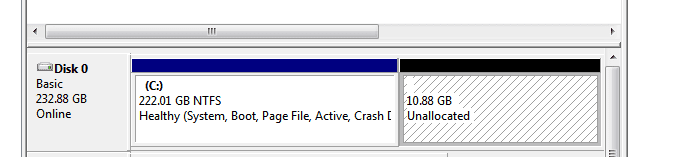
Hey everyone, I decided to delete my recovery partition since I can't burn them to disks because I don't have the appropriate program. So now, I have 10.88GB of unallocated space that I want to merge with Partition (C). How do I do this? Here's a picture:
 

Attachments
  • partitions.PNG
    partitions.PNG
    3.6 KB · Views: 941

My Computer My Computer

At a glance

Windows 7 Home Premium2 AMD Athlon 64 X2NVIDIA GeForce 8200M G graphics
Computer Manufacturer/Model Number
Compaq Presario CQ60-215DX
OS
Windows 7 Home Premium
CPU
2 AMD Athlon 64 X2
Graphics Card(s)
NVIDIA GeForce 8200M G graphics
Right click C: and select extend.
 

My Computer My Computer

At a glance

Windows 7 Ultimate x86-64[email protected] 1066MHz FSB6GB DDR3 1066MHz9300M GS 256MB Dedicated (Speed) + Intel4500M...
Computer Manufacturer/Model Number
Sony Vaio Z46GDU
OS
Windows 7 Ultimate x86-64
CPU
[email protected] 1066MHz FSB
Motherboard
Sony branded
Memory
6GB DDR3 1066MHz
Graphics Card(s)
9300M GS 256MB Dedicated (Speed) + Intel4500MHD (Stamina)
Sound Card
Realtek HD Audio
Monitor(s) Displays
13.1' WXGA
Screen Resolution
1600x900
Hard Drives
320GB 7200RPM w/ 16MB cache
Internet Speed
1MB/s
It won't let me go above a certain limit...

EDIT: nevermind, I got it now!
 

My Computer My Computer

At a glance

Windows 7 Home Premium2 AMD Athlon 64 X2NVIDIA GeForce 8200M G graphics
Computer Manufacturer/Model Number
Compaq Presario CQ60-215DX
OS
Windows 7 Home Premium
CPU
2 AMD Athlon 64 X2
Graphics Card(s)
NVIDIA GeForce 8200M G graphics
Thanks, but I've got everything solved now. This can be marked a solved topic.
 

My Computer My Computer

At a glance

Windows 7 Home Premium2 AMD Athlon 64 X2NVIDIA GeForce 8200M G graphics
Computer Manufacturer/Model Number
Compaq Presario CQ60-215DX
OS
Windows 7 Home Premium
CPU
2 AMD Athlon 64 X2
Graphics Card(s)
NVIDIA GeForce 8200M G graphics
if it was solved, why dont you post how u did that?
it's useful for other users as u got from many others.
 

My Computer My Computer

At a glance

Windows 7 Ultimate x64, Windows XP x64
OS
Windows 7 Ultimate x64, Windows XP x64
Update

Would have been nice to post a reply to show how he fixed it :rolleyes:

Anyhow, here's how to do it:

First, right click the spare partition you want to merge, scroll down to delete volume and click on it. Once done, select your primary partition, the one that you want your spare partition to merge with. Right click and scroll down to extend volume and click on it. Click next in the box that appears. The default settings that appear should be fine unless you feel the need to change anything. Click next, then click finish. Viola!

Sweet...
kris
 

My Computer My Computer

At a glance

windows 7 ultimate x64
OS
windows 7 ultimate x64
It was answered by the 2nd post in 2009, but thanks.

Welcome to the Forums :)
 

My Computer My Computer

At a glance

Windows 10 Pro x64Intel Core i7 6700KGSkill TridentZ RGB 16GB 3600 16-16-16-36EVGA GTX 980 Ti SC x2
Computer type
PC/Desktop
Computer Manufacturer/Model Number
Skylake Special #666
OS
Windows 10 Pro x64
CPU
Intel Core i7 6700K
Motherboard
Asus Sabertooth Z170 Mark 1
Memory
GSkill TridentZ RGB 16GB 3600 16-16-16-36
Graphics Card(s)
EVGA GTX 980 Ti SC x2
Sound Card
Realtek High Definition
Monitor(s) Displays
AOC G2460PG
Screen Resolution
1920 x 1080 144Hz
Hard Drives
Samsung 860 Pro 256GB, Seagate Barracuda 4TB x2
PSU
EVGA 1000 P2, EVGA White Custom Braided Cables
Case
Corsair Vengeance C70 Gunmetal Black
Cooling
Corsair H100i v2, Corsair ML120 x2, Thermal Grizzly Kryonaut
Keyboard
Logitech G910 Orion Spectrum
Mouse
Logitech G700s
Internet Speed
Verizon Fios Quantum Gateway 75/75
Antivirus
Windows Defender, Malwarebytes Free 3.8.3
Browser
Chrome
Other Info
Corsair SP120 x4, LG Blu-ray Drive, Durabrand HT-395 100 Watt Dolby Digital Amp, Corsair H2100 Wireless 7.1 Headset
Back
Top