Outlook 2007, rules and alerts not working

xrefa

New member
Local time
9:24 PM
Messages
16
Hi Everyone,

I use imap e-mail account (not a gmail) and outlook 2007 client.
I have several rules to dump mails to different folders, they should work automatically, however it is not the case, e-mails arrive and no action is taken.
When I run the rules manually, it works as expected.

And yes rules have small box checked next to them, meaning that they are active, but it doesn't make any difference if it is checked or unchecked behavior is the same, no action is being taken unless i run the rules manually.

Summary: no action is being taken by outlook itself even-though rules are enabled.
 

My Computer My Computer

OS
Windows 7 professional x64
How many rules do you have ?
Try changing the order of the rules (or disable the rules one at a time), I've seen in the past that sometimes 1 rule will cause the others not to run or work properly. I've also heard that an MS update caused problems with rules in the past ;)
 

My Computer My Computer

Computer type
PC/Desktop
Computer Manufacturer/Model Number
Self Built
OS
Windows 7 Ultimate 64bit
CPU
AMD Phenom Quad core 9950 black edition
Motherboard
Gigabyte
Memory
16Gb
Graphics Card(s)
2x XFX Radeon 5850
Sound Card
PCI Express X-Fi Titanium / Logitech G35
Monitor(s) Displays
2x HP 2410i
Screen Resolution
1920x1080
Hard Drives
2x 500Gb Seagate
1x 300Gb Seagate
1x 1Tb Seagate
2x 1Tb Hitatchi
PSU
Jean Tech Storm 700W
Case
Cooler Master COSMOS S
Cooling
Akasa Evo Blue Pro
Keyboard
Logitech G15
Mouse
Mad Catz M.M.O. 7
Internet Speed
12mb
currently I am testing only with one rule!
 

My Computer My Computer

OS
Windows 7 professional x64

My Computer My Computer

Computer type
PC/Desktop
Computer Manufacturer/Model Number
Packard Bell
OS
Windows 7 Home Premium 64bit
CPU
Intel(R) Core(TM) i3-2120 CPU @ 3.30GHz
Motherboard
Packard Bell IPISB-AG
Memory
3.00 GB
Graphics Card(s)
(1) Intel(R) HD Graphics (2) VNC Mirror Driver
Sound Card
Realtek High Definition Audio
Monitor(s) Displays
AIO LCD
Screen Resolution
1920 x 1080
Hard Drives
WDC WD10EADX-22TDHB0 ATA Device
Fixed hard disk media
4 partitions
931.51 GB
Keyboard
Wireless
Mouse
Wireless
Antivirus
Microsoft Security Essentials
Browser
IE; Firefox
Other Info
Also:
Samsung N220 Plus Netbook - Windows 7 Home
HP laptop
iPad 5
Additional info:

The filter that I am using is as follows:

Apply this rule after the message arrives
sent to e-mail_address
and with MY_WORD in the body
and on this machine only
disply NOTIFICIATION
and move to Folder
=========================
Only works if I run the rule manually!

However if remove the word from message body, than it works automatically. thing is I have to filter e-mails based upon that specific word in the body.

Any ideas why the filter doesn't work automatically but works when it ran manualy??
 

My Computer My Computer

OS
Windows 7 professional x64
Some interesting suggestions on this problem here:
Rules do not work automatically | MSOutlook.info

Tried this one, didn't solve the problem.
However identified new problem.

Outlook will filter messages without problem based upon sender or receiving email, rule works than.
As soon as I add word to the message header or body, or combination of those two, it stops. Same rule works if i run it manually.
This is still only rule that I am testing behavior with outlook. Still don't get the point why does it work when run manually.
In Addition: in send and receive I configured to download entire message content, headers body, attachments.
 

My Computer My Computer

OS
Windows 7 professional x64

My Computer My Computer

Computer type
PC/Desktop
Computer Manufacturer/Model Number
Packard Bell
OS
Windows 7 Home Premium 64bit
CPU
Intel(R) Core(TM) i3-2120 CPU @ 3.30GHz
Motherboard
Packard Bell IPISB-AG
Memory
3.00 GB
Graphics Card(s)
(1) Intel(R) HD Graphics (2) VNC Mirror Driver
Sound Card
Realtek High Definition Audio
Monitor(s) Displays
AIO LCD
Screen Resolution
1920 x 1080
Hard Drives
WDC WD10EADX-22TDHB0 ATA Device
Fixed hard disk media
4 partitions
931.51 GB
Keyboard
Wireless
Mouse
Wireless
Antivirus
Microsoft Security Essentials
Browser
IE; Firefox
Other Info
Also:
Samsung N220 Plus Netbook - Windows 7 Home
HP laptop
iPad 5
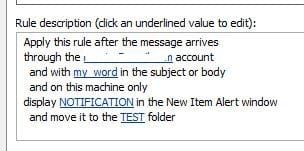
zrefa, I have just replicated your rule on my laptop which has Outlook 2007 and a specific email address.

I then send two test emails from my desktop using my main email address, including the phrase 'my_word' in the body of one and the subject of the other - it worked perfectly - I had an alert box with NOTIFICATION on it containing two emails, both of which had been transferred to the specified file!!

Don't know what to suggest now. :confused:
Illustration below - naturally I removed my email address. ;)
.
.
 

Attachments

  • outlook rules.JPG
    outlook rules.JPG
    10.8 KB · Views: 4,810

My Computer My Computer

Computer type
PC/Desktop
Computer Manufacturer/Model Number
Packard Bell
OS
Windows 7 Home Premium 64bit
CPU
Intel(R) Core(TM) i3-2120 CPU @ 3.30GHz
Motherboard
Packard Bell IPISB-AG
Memory
3.00 GB
Graphics Card(s)
(1) Intel(R) HD Graphics (2) VNC Mirror Driver
Sound Card
Realtek High Definition Audio
Monitor(s) Displays
AIO LCD
Screen Resolution
1920 x 1080
Hard Drives
WDC WD10EADX-22TDHB0 ATA Device
Fixed hard disk media
4 partitions
931.51 GB
Keyboard
Wireless
Mouse
Wireless
Antivirus
Microsoft Security Essentials
Browser
IE; Firefox
Other Info
Also:
Samsung N220 Plus Netbook - Windows 7 Home
HP laptop
iPad 5
zrefa, I have just replicated your rule on my laptop which has Outlook 2007 and a specific email address.

I then send two test emails from my desktop using my main email address, including the phrase 'my_word' in the body of one and the subject of the other - it worked perfectly - I had an alert box with NOTIFICATION on it containing two emails, both of which had been transferred to the specified file!!

Don't know what to suggest now. :confused:
Illustration below - naturally I removed my email address. ;)
.
.

Thanks for testing this for me.
Are you using imap or exchange for your account ?
 

My Computer My Computer

OS
Windows 7 professional x64
That might be the problem - I am using POP3.

I seem to recall reading somewhere in one of the links about IMAP and rules 'problems' - I'll need to go back and read through them again.


EDIT
I just found this Microsoft Article:
Manage messages by using rules - Outlook - Office.com

Short extract below:

Server-based rules and client-only rules

Server-based rules If you have a Microsoft Exchange account, the server can apply rules to your messages even if Outlook is not running. These are called server-based rules. The rules must be set to be applied to messages when they are delivered to your Inbox on the server, and the rules must be able to run to completion on the server. For example, a rule cannot run to completion on the server if the action specifies that a message be printed. If a rule cannot be applied on the server, it is applied when you start Outlook.
 

My Computer My Computer

Computer type
PC/Desktop
Computer Manufacturer/Model Number
Packard Bell
OS
Windows 7 Home Premium 64bit
CPU
Intel(R) Core(TM) i3-2120 CPU @ 3.30GHz
Motherboard
Packard Bell IPISB-AG
Memory
3.00 GB
Graphics Card(s)
(1) Intel(R) HD Graphics (2) VNC Mirror Driver
Sound Card
Realtek High Definition Audio
Monitor(s) Displays
AIO LCD
Screen Resolution
1920 x 1080
Hard Drives
WDC WD10EADX-22TDHB0 ATA Device
Fixed hard disk media
4 partitions
931.51 GB
Keyboard
Wireless
Mouse
Wireless
Antivirus
Microsoft Security Essentials
Browser
IE; Firefox
Other Info
Also:
Samsung N220 Plus Netbook - Windows 7 Home
HP laptop
iPad 5
I think the cause of the issue is identified:

When using imap, outlook downloads header and subject first, and it appears in the inbox, body and attachments are downloaded in between. Just did some testing, sent several emails to myself and ran the rules manually. Rule didn't work for the first 30-45 seconds, it didn't match the e-mail although it was in the inbox. After 30-45 secs it matched the message and did the action.

Any ideas why outlook behaves like this ?? or is it possible to schedule the rules to run on time intervals of lets say 5-10 minutes same as send/receive ??
 

My Computer My Computer

OS
Windows 7 professional x64
I can't see any way of scheduling, but I wondered if this quote from the Q&A link was relevant?

Re: Outlook 2007 - rules do not run automatically

This is copied from the Microsoft website, i hope this helps you or at least takes you in the right direction.

WORKAROUND
To work around this issue, follow these steps.

Step 1:
Modify Outlook message rules to reduce client-only conditions
Modify your message rules to try to reduce client-only conditions. For example, if a message rule contains a client-only condition such as with specific words in the recipient's address, modify it so that it uses one of the following server-side conditions instead:

? with specific words in the message header
? sent to people or distribution list

To modify a message rule in Outlook, follow these steps:
1. Start Outlook.
2. On the Tools menu, click Rules and Alerts.
3. On the E-mail Rules tab, click the client-only rule that you want to modify, and then click Edit Rule Settings on the Change Rule menu.
4. Under Step 1: Select condition(s), click to clear the check box for the client-only condition. For example, click to clear the with specific words in the recipient's address check box.
5. Click to select the check box for the server-side condition that you want to use. For example, click to select the sent to people or distribution list check box.
6. Under Step 2: Edit the rule description (click and underlined value), click the underlined value that corresponds to the rule condition that you want to configure. For example, click people or distribution list.
7. Click or type the value that you want to configure as the rule condition, and then click OK.
8. After you finish changing client-only conditions to server-side conditions, click Finish.


Step 2:
Put server-side rules ahead of client-only rules in Outlook
Try to arrange message rules in Outlook so that all the server-side message rules are processed before client-only message rules are processed. To do this, follow these steps:
1. Start Outlook.
2. On the Tools menu, click Rules and Alerts.
3. On the E-mail Rules tab, click the client-only rule that you want to modify. For example, click rule name (client-only).
4. Repeatedly, click the Move Down button that appears as a down arrow to move this rule under other rules in the Rule (applied in the order shown) list.
5. When you are finished moving client-only rules to the bottom of the Rule (applied in the order shown) list, click OK.
 

My Computer My Computer

Computer type
PC/Desktop
Computer Manufacturer/Model Number
Packard Bell
OS
Windows 7 Home Premium 64bit
CPU
Intel(R) Core(TM) i3-2120 CPU @ 3.30GHz
Motherboard
Packard Bell IPISB-AG
Memory
3.00 GB
Graphics Card(s)
(1) Intel(R) HD Graphics (2) VNC Mirror Driver
Sound Card
Realtek High Definition Audio
Monitor(s) Displays
AIO LCD
Screen Resolution
1920 x 1080
Hard Drives
WDC WD10EADX-22TDHB0 ATA Device
Fixed hard disk media
4 partitions
931.51 GB
Keyboard
Wireless
Mouse
Wireless
Antivirus
Microsoft Security Essentials
Browser
IE; Firefox
Other Info
Also:
Samsung N220 Plus Netbook - Windows 7 Home
HP laptop
iPad 5
is it possible to schedule the rules to run on time intervals of lets say 5-10 minutes same as send/receive ??
Thinking about this, if the rule is applied on arrival of the message, surely that is the schedule? ... or am I missing something?
 

My Computer My Computer

Computer type
PC/Desktop
Computer Manufacturer/Model Number
Packard Bell
OS
Windows 7 Home Premium 64bit
CPU
Intel(R) Core(TM) i3-2120 CPU @ 3.30GHz
Motherboard
Packard Bell IPISB-AG
Memory
3.00 GB
Graphics Card(s)
(1) Intel(R) HD Graphics (2) VNC Mirror Driver
Sound Card
Realtek High Definition Audio
Monitor(s) Displays
AIO LCD
Screen Resolution
1920 x 1080
Hard Drives
WDC WD10EADX-22TDHB0 ATA Device
Fixed hard disk media
4 partitions
931.51 GB
Keyboard
Wireless
Mouse
Wireless
Antivirus
Microsoft Security Essentials
Browser
IE; Firefox
Other Info
Also:
Samsung N220 Plus Netbook - Windows 7 Home
HP laptop
iPad 5
Hi The Long post above was the first thing i did, regarding your question on schedule, because of the latency of arriving e-mail to inbox and the complete e-mail body with it, verification against the rule that checks message body will fail... :(

Anyway i posted this issue to microsoft support, hope to get answer from them :D.


Thank you for the assistance and effort.
 

My Computer My Computer

OS
Windows 7 professional x64
i posted this issue to microsoft support, hope to get answer from them :D.

Thank you for the assistance and effort.
You are welcome. Please post back with any results. :D
 

My Computer My Computer

Computer type
PC/Desktop
Computer Manufacturer/Model Number
Packard Bell
OS
Windows 7 Home Premium 64bit
CPU
Intel(R) Core(TM) i3-2120 CPU @ 3.30GHz
Motherboard
Packard Bell IPISB-AG
Memory
3.00 GB
Graphics Card(s)
(1) Intel(R) HD Graphics (2) VNC Mirror Driver
Sound Card
Realtek High Definition Audio
Monitor(s) Displays
AIO LCD
Screen Resolution
1920 x 1080
Hard Drives
WDC WD10EADX-22TDHB0 ATA Device
Fixed hard disk media
4 partitions
931.51 GB
Keyboard
Wireless
Mouse
Wireless
Antivirus
Microsoft Security Essentials
Browser
IE; Firefox
Other Info
Also:
Samsung N220 Plus Netbook - Windows 7 Home
HP laptop
iPad 5
Same problem

Did you already solved that issue ? I've exactly the same problem :(
 

My Computer My Computer

OS
Windows 7 Home Premium x64
I've created another admin account and created profile from scratch on the outlook for imap.
Was working like charm till past 2 months maybe, had a blue screen and had to perform checkdsk as windows didn't boot at all. However all filters worked as charm.
Than i needed to modify few rules, and it got broken again.. i gave up on fixing this.. just filtering by the sender and receiver e-mail.
only thing still keeping me with ms outlook is its calendar and tasks.
 

My Computer My Computer

OS
Windows 7 professional x64
Back
Top