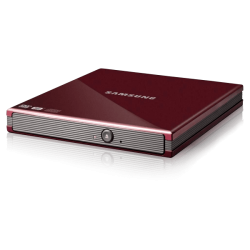
Experts how to edit .icon file?

Well I have tried my best to remove white background frm images, but I am unable to to remove it properly in photoshop/paint. I am still looking for, as to how to do that properly - Please guide me in detail


Kado897 – Thx for the link, I have tried the software but was unsuccessful in the above

PooManUK – Man ur icons are amazing with extreme shadow details, wonder how u did it.
 

My Computer My Computer

OS
Win7 x64
Well I have tried my best to remove white background frm images, but I am unable to to remove it properly in photoshop/paint. I am still looking for, as to how to do that properly - Please guide me in detail


Kado897 – Thx for the link, I have tried the software but was unsuccessful in the above

PooManUK – Man ur icons are amazing with extreme shadow details, wonder how u did it.

Have a look though this thread. it deals with a similar problem.http://www.sevenforums.com/customization/181399-icon-folders-question.html#post1538521
 
Last edited:

My Computer My Computer

Computer type
Laptop
Computer Manufacturer/Model Number
Hewlett-Packard/G62-107SA Notebook
OS
Microsoft Windows 7 Home Premium 64-bit Service Pack 1
CPU
Intel(R) Core(TM) i3 CPU M 330 @ 2.13GHz
Motherboard
Hewlett-Packard 1425
Memory
8 GB DDR3
Graphics Card(s)
Intel(R) HD Graphics
Sound Card
Realtek High Definition Audio
Monitor(s) Displays
Builtin
Screen Resolution
1366 x 768 x 32 bits (4294967296 colors) @ 60 Hz
Hard Drives
250 GB SATA Hard Disk Drive 7200 rpm
2TB Seagate GoFlex USB 2 Drive
1TB Iomega Prestige USB 2 Drive
1.5TB Iomega Prestige USB 2 Drive (Samsung)
2TB WD MyBook Live NAS.
Mouse
Logitech Anywhere MX
Internet Speed
152 Mbs download 10 Mbs upload
Antivirus
Norton 360
Browser
Chrome
Well I have tried my best to remove white background frm images, but I am unable to to remove it properly in photoshop/paint. I am still looking for, as to how to do that properly - Please guide me in detail


Kado897 – Thx for the link, I have tried the software but was unsuccessful in the above

PooManUK – Man ur icons are amazing with extreme shadow details, wonder how u did it.

I used CorelDraw pal but you can get the same effect with Photo Shop ;)
 

My Computer My Computer

Computer type
PC/Desktop
Computer Manufacturer/Model Number
Self Built
OS
Windows 7 Ultimate 64bit
CPU
AMD Phenom Quad core 9950 black edition
Motherboard
Gigabyte
Memory
16Gb
Graphics Card(s)
2x XFX Radeon 5850
Sound Card
PCI Express X-Fi Titanium / Logitech G35
Monitor(s) Displays
2x HP 2410i
Screen Resolution
1920x1080
Hard Drives
2x 500Gb Seagate
1x 300Gb Seagate
1x 1Tb Seagate
2x 1Tb Hitatchi
PSU
Jean Tech Storm 700W
Case
Cooler Master COSMOS S
Cooling
Akasa Evo Blue Pro
Keyboard
Logitech G15
Mouse
Mad Catz M.M.O. 7
Internet Speed
12mb
Kado, The thread you linked me to have been proved very useful and was successfully able to remove white backgrounds :-)
Now, the only problem i am facing is i also tend to remove shadows with backgrounds, i tried magic wand in photoshop but failed.... Please provide ur inputs and perhaps PooMan can gimme tips here as well....

I am including the image tht i am trying to retain shadows for better understanding:
http://imageshack.us/photo/my-images/27/rednm.jpg/
 

My Computer My Computer

OS
Win7 x64
If I get chance later I'll make a tutorial to show you. But 1 tip that I can recommend is to delete the drop shadow or reflection and then recreate your own. ie cut out the main shape with your masking tools, delete the background including the drop shadow then create a new layer for your new drop shadow.
The new drop shadow / reflection will then have a much better transparency. You can then export this to a png file ready to convert to an icon using the tools posted previously in this thread ;)
 

My Computer My Computer

Computer type
PC/Desktop
Computer Manufacturer/Model Number
Self Built
OS
Windows 7 Ultimate 64bit
CPU
AMD Phenom Quad core 9950 black edition
Motherboard
Gigabyte
Memory
16Gb
Graphics Card(s)
2x XFX Radeon 5850
Sound Card
PCI Express X-Fi Titanium / Logitech G35
Monitor(s) Displays
2x HP 2410i
Screen Resolution
1920x1080
Hard Drives
2x 500Gb Seagate
1x 300Gb Seagate
1x 1Tb Seagate
2x 1Tb Hitatchi
PSU
Jean Tech Storm 700W
Case
Cooler Master COSMOS S
Cooling
Akasa Evo Blue Pro
Keyboard
Logitech G15
Mouse
Mad Catz M.M.O. 7
Internet Speed
12mb
If I get chance later I'll make a tutorial to show you. But 1 tip that I can recommend is to delete the drop shadow or reflection and then recreate your own. ie cut out the main shape with your masking tools, delete the background including the drop shadow then create a new layer for your new drop shadow.
The new drop shadow / reflection will then have a much better transparency. You can then export this to a png file ready to convert to an icon using the tools posted previously in this thread ;)

Good advice. You will never get a good shadow effect by just deleting the background. It always gives poor fade to transparent.
 

My Computer My Computer

Computer type
Laptop
Computer Manufacturer/Model Number
Hewlett-Packard/G62-107SA Notebook
OS
Microsoft Windows 7 Home Premium 64-bit Service Pack 1
CPU
Intel(R) Core(TM) i3 CPU M 330 @ 2.13GHz
Motherboard
Hewlett-Packard 1425
Memory
8 GB DDR3
Graphics Card(s)
Intel(R) HD Graphics
Sound Card
Realtek High Definition Audio
Monitor(s) Displays
Builtin
Screen Resolution
1366 x 768 x 32 bits (4294967296 colors) @ 60 Hz
Hard Drives
250 GB SATA Hard Disk Drive 7200 rpm
2TB Seagate GoFlex USB 2 Drive
1TB Iomega Prestige USB 2 Drive
1.5TB Iomega Prestige USB 2 Drive (Samsung)
2TB WD MyBook Live NAS.
Mouse
Logitech Anywhere MX
Internet Speed
152 Mbs download 10 Mbs upload
Antivirus
Norton 360
Browser
Chrome
Nick, can you post here the tutorial you made for cutting the airplane out?
 

My Computer My Computer

Computer type
PC/Desktop
Computer Manufacturer/Model Number
Home Built Desktop By DataTech
OS
Windows 7 Ultimate X64 SP1
CPU
Intel i5-2550K, Differing ~4.4-4.8GHz No built in GPU
Motherboard
ASUS P8Z68-V PRO/GEN3
Memory
16GB G.Skill Sniper 1866MHz @ 2133MHz 2x8GB
Graphics Card(s)
ASUS GTX650TIB-DC2OC-2GD5, (650TI Boost)
Sound Card
Onboard Realtek 5-1
Monitor(s) Displays
Samsung P2570HD
Screen Resolution
1920x1080
Hard Drives
Samsung 840 Pro 256GB SSD for OS, 500GB Seagate Constellation (Enterprise drive) for Data
PSU
Corsair HX650W
Case
Inwin Dragon Rider
Cooling
Hyper 212 EVO w/two Noctua fans, push-pull, @1300 RPM
Keyboard
E-Z Eyes, bright yellow keys with large characters
Mouse
steelseries SENSEI Laser Pro Gaming
Internet Speed
48-51Mbs Mbs down, 11 Mbs up Xfinity Cable
Antivirus
Norton Internet Security 2013
Browser
IE 10, Opera, Pale Moon if needed
Other Info
4 case fans, LG BluRay-RE, ASUS DVD-RW, Mr. Fusion power supply, 1.21 gigawatts.
Nick, can you post here the tutorial you made for cutting the airplane out?

Yeah I know pal but I used Corel for that and I think the op wants to use Photoshop :)
 

My Computer My Computer

Computer type
PC/Desktop
Computer Manufacturer/Model Number
Self Built
OS
Windows 7 Ultimate 64bit
CPU
AMD Phenom Quad core 9950 black edition
Motherboard
Gigabyte
Memory
16Gb
Graphics Card(s)
2x XFX Radeon 5850
Sound Card
PCI Express X-Fi Titanium / Logitech G35
Monitor(s) Displays
2x HP 2410i
Screen Resolution
1920x1080
Hard Drives
2x 500Gb Seagate
1x 300Gb Seagate
1x 1Tb Seagate
2x 1Tb Hitatchi
PSU
Jean Tech Storm 700W
Case
Cooler Master COSMOS S
Cooling
Akasa Evo Blue Pro
Keyboard
Logitech G15
Mouse
Mad Catz M.M.O. 7
Internet Speed
12mb
PooMan - I am really looking forward for a tutorial from you, take your time.

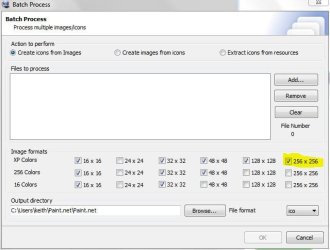
Kado - In IcoFX if i try to batch covert frm PNG to Icon... the files appears as 48x48 while previewing, but normal 256x256 when applied.... Any clue how 2 solve this problem? Also, suggest sum other "best batch convert" SW out there...
 

My Computer My Computer

OS
Win7 x64
It works for me. Do you gave the 256x256 entry checked.

Capture.JPG
 

My Computer My Computer

Computer type
Laptop
Computer Manufacturer/Model Number
Hewlett-Packard/G62-107SA Notebook
OS
Microsoft Windows 7 Home Premium 64-bit Service Pack 1
CPU
Intel(R) Core(TM) i3 CPU M 330 @ 2.13GHz
Motherboard
Hewlett-Packard 1425
Memory
8 GB DDR3
Graphics Card(s)
Intel(R) HD Graphics
Sound Card
Realtek High Definition Audio
Monitor(s) Displays
Builtin
Screen Resolution
1366 x 768 x 32 bits (4294967296 colors) @ 60 Hz
Hard Drives
250 GB SATA Hard Disk Drive 7200 rpm
2TB Seagate GoFlex USB 2 Drive
1TB Iomega Prestige USB 2 Drive
1.5TB Iomega Prestige USB 2 Drive (Samsung)
2TB WD MyBook Live NAS.
Mouse
Logitech Anywhere MX
Internet Speed
152 Mbs download 10 Mbs upload
Antivirus
Norton 360
Browser
Chrome
PooMan - I am really looking forward for a tutorial from you, take your time.

Kado - In IcoFX if i try to batch covert frm PNG to Icon... the files appears as 48x48 while previewing, but normal 256x256 when applied.... Any clue how 2 solve this problem? Also, suggest sum other "best batch convert" SW out there...

Here ya go pal. Remember once you've finished save your image as a png file, before uploading it for icon conversion. In the tutorial you will see I add a black background, this is only to show you what it looks like on black. This layer is not needed when you export to png. (the psd file with all it's layers is zipped below) ;)


Attachments

My Computer My Computer

Computer type
PC/Desktop
Computer Manufacturer/Model Number
Self Built
OS
Windows 7 Ultimate 64bit
CPU
AMD Phenom Quad core 9950 black edition
Motherboard
Gigabyte
Memory
16Gb
Graphics Card(s)
2x XFX Radeon 5850
Sound Card
PCI Express X-Fi Titanium / Logitech G35
Monitor(s) Displays
2x HP 2410i
Screen Resolution
1920x1080
Hard Drives
2x 500Gb Seagate
1x 300Gb Seagate
1x 1Tb Seagate
2x 1Tb Hitatchi
PSU
Jean Tech Storm 700W
Case
Cooler Master COSMOS S
Cooling
Akasa Evo Blue Pro
Keyboard
Logitech G15
Mouse
Mad Catz M.M.O. 7
Internet Speed
12mb
Buddy Poo! i thank you for taking time to make a video... but it shows on how to create shadow on an image tht doesnt have it.

I am already having image with shadow as well... i just have to cut it properly and make background transparent and i am set to convert & use. I just cant seem to exclude the shadow frm selection, while maing background transparent.

I hope i am clear.

Kado: Yes i have selected all sizes, but still get 128x128 size only. The images i am using are all bigger than required output.
 

My Computer My Computer

OS
Win7 x64
Buddy Poo! i thank you for taking time to make a video... but it shows on how to create shadow on an image tht doesnt have it.

I am already having image with shadow as well... i just have to cut it properly and make background transparent and i am set to convert & use. I just cant seem to exclude the shadow frm selection, while maing background transparent.

I hope i am clear.

Kado: Yes i have selected all sizes, but still get 128x128 size only. The images i am using are all bigger than required output.

I really don't know what to suggest then. As I say it's working for me and I haven't done anything since the install to enable that.
 

My Computer My Computer

Computer type
Laptop
Computer Manufacturer/Model Number
Hewlett-Packard/G62-107SA Notebook
OS
Microsoft Windows 7 Home Premium 64-bit Service Pack 1
CPU
Intel(R) Core(TM) i3 CPU M 330 @ 2.13GHz
Motherboard
Hewlett-Packard 1425
Memory
8 GB DDR3
Graphics Card(s)
Intel(R) HD Graphics
Sound Card
Realtek High Definition Audio
Monitor(s) Displays
Builtin
Screen Resolution
1366 x 768 x 32 bits (4294967296 colors) @ 60 Hz
Hard Drives
250 GB SATA Hard Disk Drive 7200 rpm
2TB Seagate GoFlex USB 2 Drive
1TB Iomega Prestige USB 2 Drive
1.5TB Iomega Prestige USB 2 Drive (Samsung)
2TB WD MyBook Live NAS.
Mouse
Logitech Anywhere MX
Internet Speed
152 Mbs download 10 Mbs upload
Antivirus
Norton 360
Browser
Chrome
Buddy Poo! i thank you for taking time to make a video... but it shows on how to create shadow on an image tht doesnt have it.

I am already having image with shadow as well... i just have to cut it properly and make background transparent and i am set to convert & use. I just cant seem to exclude the shadow frm selection, while maing background transparent.

I hope i am clear.

Kado: Yes i have selected all sizes, but still get 128x128 size only. The images i am using are all bigger than required output.

Pal this is what I'm trying to explain. You need to remove the shadow or reflection on your image and then recreate it. My image also has a reflection and shadow. That's why I cut out the image the way I did in the tutorial. It's near impossible to get the reflection cut out from an existing background and keep it's transparency onto a new one. ;)

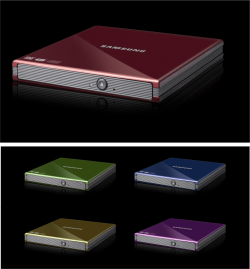
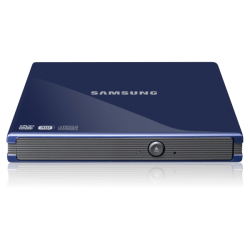
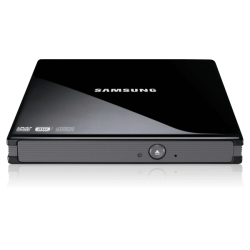
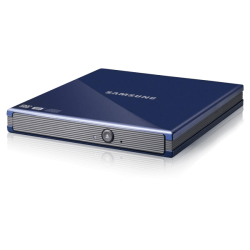
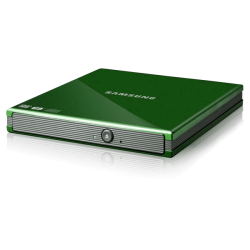
Here's a quick one I've done again using the image that you supplied. I've even changed the colours of the drives by using the "hue/saturation/lightness" tool. You'll be surprised how quick and easy it is once you've done a few. :)
 

Attachments

  • asstd colours samsung drive.png
    asstd colours samsung drive.png
    238.6 KB · Views: 3
Last edited:

My Computer My Computer

Computer type
PC/Desktop
Computer Manufacturer/Model Number
Self Built
OS
Windows 7 Ultimate 64bit
CPU
AMD Phenom Quad core 9950 black edition
Motherboard
Gigabyte
Memory
16Gb
Graphics Card(s)
2x XFX Radeon 5850
Sound Card
PCI Express X-Fi Titanium / Logitech G35
Monitor(s) Displays
2x HP 2410i
Screen Resolution
1920x1080
Hard Drives
2x 500Gb Seagate
1x 300Gb Seagate
1x 1Tb Seagate
2x 1Tb Hitatchi
PSU
Jean Tech Storm 700W
Case
Cooler Master COSMOS S
Cooling
Akasa Evo Blue Pro
Keyboard
Logitech G15
Mouse
Mad Catz M.M.O. 7
Internet Speed
12mb
172522d1314545349t-experts-how-edit-icon-file-seagate-drive-icon.png

beautiful work nick, i particularly liked how you cropped it out leaving behind the shadows so you could create a nice shiny new set of shadows, first class. :D
 

My Computer My Computer

Computer Manufacturer/Model Number
Hewlett packard/p6512uk
OS
Microsoft Windows 7 Home Premium 64-bit 7600
CPU
IIx4 amd athelon 635 processor
Motherboard
FOXCONN 2AA9
Memory
2x2gb
Graphics Card(s)
ati radeon HD 5450
Sound Card
(1) Realtek High Definition Audio (2) AMD High Definition
Monitor(s) Displays
samsung lcd tv 32"
Screen Resolution
1360x 768
Hard Drives
(1) WDC WD10 01FAES-60Z2A0 SATA Disk Device (2) Maxtor OneTouch USB Device (3) ST310003 33AS USB Device (4) WD My Book 1111 USB Device
PSU
?
Cooling
air!
Keyboard
wireless hp
Mouse
wireless Hp,optical
Internet Speed
1.10mb/s
Antivirus
MSE
Browser
Firefox
Pooman, i tried my best was unable to recreate properly the shadows, as the shape is diagonal.

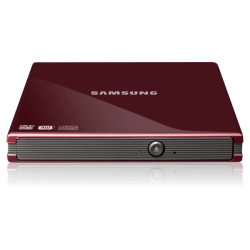
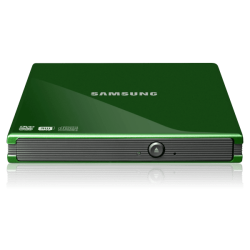
I guess i will have to let the experts handle this and hence i am requesting you to try to remove the background of the images attached below. Do take your time as am in no hurry.
 

Attachments

My Computer My Computer

OS
Win7 x64
No probs pal :)

Here's the files. I've zipped up the icons and psd files below if you want to play around with more colours .... enjoy ;)
 

Attachments

  • samsung red a.png
    samsung red a.png
    39.4 KB · Views: 6
  • samsung green a.png
    samsung green a.png
    39.1 KB · Views: 5
  • samsung blue a.png
    samsung blue a.png
    36 KB · Views: 4
  • samsung black a.png
    samsung black a.png
    25.7 KB · Views: 5
  • samsung black b.png
    samsung black b.png
    30.4 KB · Views: 4
  • samsung blue b.png
    samsung blue b.png
    36.1 KB · Views: 6
  • samsung green b.png
    samsung green b.png
    41.5 KB · Views: 4
  • samsung red b.png
    samsung red b.png
    40.2 KB · Views: 6
  • samsung drives icons.zip
    samsung drives icons.zip
    1.6 MB · Views: 5
  • samsung drives psd.zip
    samsung drives psd.zip
    3.8 MB · Views: 3

My Computer My Computer

Computer type
PC/Desktop
Computer Manufacturer/Model Number
Self Built
OS
Windows 7 Ultimate 64bit
CPU
AMD Phenom Quad core 9950 black edition
Motherboard
Gigabyte
Memory
16Gb
Graphics Card(s)
2x XFX Radeon 5850
Sound Card
PCI Express X-Fi Titanium / Logitech G35
Monitor(s) Displays
2x HP 2410i
Screen Resolution
1920x1080
Hard Drives
2x 500Gb Seagate
1x 300Gb Seagate
1x 1Tb Seagate
2x 1Tb Hitatchi
PSU
Jean Tech Storm 700W
Case
Cooler Master COSMOS S
Cooling
Akasa Evo Blue Pro
Keyboard
Logitech G15
Mouse
Mad Catz M.M.O. 7
Internet Speed
12mb
I have a question, after you get an icon you want, where/how do you install to have it show for the device in Devices and Printers? :confused:
 

My Computer My Computer

Computer type
PC/Desktop
Computer Manufacturer/Model Number
Home Built Desktop By DataTech
OS
Windows 7 Ultimate X64 SP1
CPU
Intel i5-2550K, Differing ~4.4-4.8GHz No built in GPU
Motherboard
ASUS P8Z68-V PRO/GEN3
Memory
16GB G.Skill Sniper 1866MHz @ 2133MHz 2x8GB
Graphics Card(s)
ASUS GTX650TIB-DC2OC-2GD5, (650TI Boost)
Sound Card
Onboard Realtek 5-1
Monitor(s) Displays
Samsung P2570HD
Screen Resolution
1920x1080
Hard Drives
Samsung 840 Pro 256GB SSD for OS, 500GB Seagate Constellation (Enterprise drive) for Data
PSU
Corsair HX650W
Case
Inwin Dragon Rider
Cooling
Hyper 212 EVO w/two Noctua fans, push-pull, @1300 RPM
Keyboard
E-Z Eyes, bright yellow keys with large characters
Mouse
steelseries SENSEI Laser Pro Gaming
Internet Speed
48-51Mbs Mbs down, 11 Mbs up Xfinity Cable
Antivirus
Norton Internet Security 2013
Browser
IE 10, Opera, Pale Moon if needed
Other Info
4 case fans, LG BluRay-RE, ASUS DVD-RW, Mr. Fusion power supply, 1.21 gigawatts.
I have a question, after you get an icon you want, where/how do you install to have it show for the device in Devices and Printers? :confused:

They are in the DDORes.dll in both C:\Windows\System32 and C:\Windows\SysWOW64 for 64-bit.Its a resource hacker job.

Danny
 

My Computer My Computer

Computer Manufacturer/Model Number
acer aspire 5935g
OS
Windows 7 Home Premium x64 SP1
CPU
intel(R)core(TM)2 duo CPU T6600 @ 2.20GHz
Motherboard
intel gm45/gm47 revision 07
Memory
3 gb ddr3
Graphics Card(s)
ati radeon hd4570/512mb
Monitor(s) Displays
lop156wh2-tle1 15.3 flat
Screen Resolution
1366x768
Hard Drives
OCZ-Agility3 60gig ssd
320gig external hdd
500gig external hdd
Mouse
Optical
Internet Speed
30Mbps Down/30Mbps Up

My Computer My Computer

Computer type
PC/Desktop
Computer Manufacturer/Model Number
Self Assembled
OS
Microsoft Windows 10 Pro Insider Preview 64-bit
CPU
Intel(R) Core(TM) i3-4130 CPU @ 3.40GHz
Motherboard
Gigabyte Technology Co., Ltd. B85M-D3H
Memory
Corsair Vengence 4GB x2 (8.00GB Dual-Channel DDR3 @ 798MHz)
Graphics Card(s)
2047MB GeForce GTS 450 (ZOTAC International)
Sound Card
Onboard (Realtek High Definition Audio)
Monitor(s) Displays
LG Flatron E2040T
Screen Resolution
1600x900
Hard Drives
Western Digital 1 TB
Seagate 500 GB
PSU
Corsair VS550
Case
Cooler Master K380
Cooling
Cooler Master Seidon 120V Plus
Keyboard
Logitech MK260r
Mouse
Logitech MK260r
Internet Speed
PMPL Broadband
Antivirus
Windows Defender + MBAM
Browser
Firefox
Other Info
Dell Studio 15" Laptop
Back
Top