Restart freezes on manufacture's boot screen after clean install

nabilalk

New member
Power User
Local time
1:13 PM
Messages
299
Installed Win 7 Pro x86 last night on a new HD. After installing SP1, restarting freezes at the Gateway boot screen and I have to hit the power button to shut off, then turn back on. There are no alerts in device manager, so I don't believe this is a driver issue. Everything else seems to be working fine, so I don't think the HD is bad. Any help would be appreciated. Thank you. :cool:
 

My Computer My Computer

At a glance

Win 7 Professional 32-bitIntel Core 2 Duo CPU T5750 @ 2.00 GHz3GB
Computer Manufacturer/Model Number
Gateway M6827
OS
Win 7 Professional 32-bit
CPU
Intel Core 2 Duo CPU T5750 @ 2.00 GHz
Memory
3GB
Monitor(s) Displays
ViewSonic Vx900
Screen Resolution
1280x1024
Hard Drives
150GB Hard Drive

My Computer My Computer

At a glance

Windows 7 Ultimate x64I76 x 1.5V DDR3 DIMM sockets supporting up to 2...GeForce GTX 580
Computer Manufacturer/Model Number
Alienware
OS
Windows 7 Ultimate x64
CPU
I7
Motherboard
GA-X58-USB3
Memory
6 x 1.5V DDR3 DIMM sockets supporting up to 24 GB of system
Graphics Card(s)
GeForce GTX 580
Sound Card
Realtek ALC892 codec 2/4/5.1/7.1-channel
Monitor(s) Displays
NEC Display Solutions E321 Black 32"
Screen Resolution
1366 x 768
Hard Drives
OCZ Colossus LT Series OCZSSD2-1CLSLT1T 3.5" 1TB SATA II MLC Internal Solid State Drive
PSU
XFX Black Edition XPS-850W-BES 850W ATX12V
Case
Antec
Cooling
Zalman
Keyboard
Microsoft
Mouse
Microsoft

My Computer My Computer

At a glance

Win 7 Professional 32-bitIntel Core 2 Duo CPU T5750 @ 2.00 GHz3GB
Computer Manufacturer/Model Number
Gateway M6827
OS
Win 7 Professional 32-bit
CPU
Intel Core 2 Duo CPU T5750 @ 2.00 GHz
Memory
3GB
Monitor(s) Displays
ViewSonic Vx900
Screen Resolution
1280x1024
Hard Drives
150GB Hard Drive
Can you got to a restore point before SP1 was installed.
 

My Computer My Computer

At a glance

Windows 10 Pro. 64/ version 1709 Windows 7 Pr...Intel i7-6800K @ 4.3Corsair Platinum 16 gig @2400EVGA GTX 1070 OC
Computer type
PC/Desktop
Computer Manufacturer/Model Number
Home made Desktop
OS
Windows 10 Pro. 64/ version 1709 Windows 7 Pro/64
CPU
Intel i7-6800K @ 4.3
Motherboard
ASUS X-99 Deluxe II
Memory
Corsair Platinum 16 gig @2400
Graphics Card(s)
EVGA GTX 1070 OC
Monitor(s) Displays
Asus 27" LED LCD/VE278Q
Screen Resolution
1920-1080 or 1280-720 HDMI
Hard Drives
INTEL SSD 730-240 Gb Sata 3.0/
PSU
EVGA Platium 1200W
Case
Phanteks Luxe Tempered Glass 8 fans/ one radiator
Cooling
XSPC/ Water Cooled CPU
Keyboard
Das 4 Professional
Mouse
Logitech M705/MX Anywhere 2-S
Internet Speed
100 mbits
Antivirus
Microsoft Security Essentials/ Malwarebytes Premium 3.0/ SAS
Browser
I.E. 11 default/Firefox/ ISP Time Warner Cable/Spectrum
Other Info
LG BluRay Burner/
Sound system-KLipsch-THX/
Icy Dock ssd Hot Swap bays.
Can you got to a restore point before SP1 was installed.

I don't quite understand why SP1 would cause this issue. Since it was the first thing I installed, after the drivers, I would basically have to start over. Any other ideas besides that?

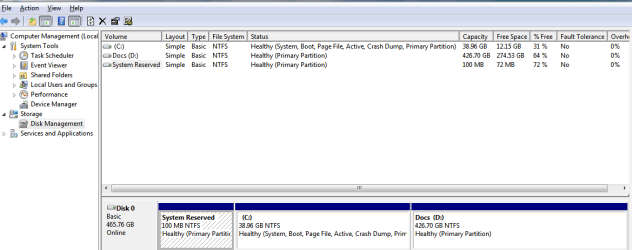
What causes this issue to begin with? I put in a brand new HD, formatted it to NTFS, and installed Windows. Did I miss a step? I also partitioned the drive, C:/ for Windows and D:/ for my Documents, Pics, Music, etc...The C:/ drive is marked active

Disk manager states the following for the C drive
Status: Healthy (System, Boot, Page File, Active, Crash Dump, Primary Partition)

Also, the problem only occurs when I restart, not when I boot up from shutdown?
 

Attachments

  • DiskManagement.png
    DiskManagement.png
    18.4 KB · Views: 10

My Computer My Computer

At a glance

Win 7 Professional 32-bitIntel Core 2 Duo CPU T5750 @ 2.00 GHz3GB
Computer Manufacturer/Model Number
Gateway M6827
OS
Win 7 Professional 32-bit
CPU
Intel Core 2 Duo CPU T5750 @ 2.00 GHz
Memory
3GB
Monitor(s) Displays
ViewSonic Vx900
Screen Resolution
1280x1024
Hard Drives
150GB Hard Drive
Back
Top