Solved How do I convert .vob file to mkv/mp4 losslessly?

Schroff87

Banned
Local time
9:29 PM
Messages
338
Location
Dubai, UAE
I want to make a digital copy of my favourite dvds and I would like to do a lossless conversion. Could someone tell me how? I tried googling but I didn't get what I wanted for lossless conversion or it was too technical for me to understand.
 

My Computer My Computer

At a glance

7 ultimate x64i7 920 @ 3.5ghz6gb corsair dominatorGigabyte Geforce GTX 460 1GB SLI
Computer Manufacturer/Model Number
Custom
OS
7 ultimate x64
CPU
i7 920 @ 3.5ghz
Motherboard
P6t Deluxe
Memory
6gb corsair dominator
Graphics Card(s)
Gigabyte Geforce GTX 460 1GB SLI
Sound Card
onboard
Monitor(s) Displays
samsung BX2450
Screen Resolution
1920x1080
Hard Drives
Seagate 7200.11 1Tb; WD green EADS 1TB
PSU
corsair tx750
Case
CM HAF 922
Cooling
coolermaster V8 + standard case fans
Keyboard
Logitech Classic Keyboard
Mouse
Logitech G500
Internet Speed
256k :P
Third one down mentions lossless
Google
 

My Computer My Computer

At a glance

Microsoft Windows 7 Home Premium 64-bit 7600IIx4 amd athelon 635 processor2x2gbati radeon HD 5450
Computer Manufacturer/Model Number
Hewlett packard/p6512uk
OS
Microsoft Windows 7 Home Premium 64-bit 7600
CPU
IIx4 amd athelon 635 processor
Motherboard
FOXCONN 2AA9
Memory
2x2gb
Graphics Card(s)
ati radeon HD 5450
Sound Card
(1) Realtek High Definition Audio (2) AMD High Definition
Monitor(s) Displays
samsung lcd tv 32"
Screen Resolution
1360x 768
Hard Drives
(1) WDC WD10 01FAES-60Z2A0 SATA Disk Device (2) Maxtor OneTouch USB Device (3) ST310003 33AS USB Device (4) WD My Book 1111 USB Device
PSU
?
Cooling
air!
Keyboard
wireless hp
Mouse
wireless Hp,optical
Internet Speed
1.10mb/s
Antivirus
MSE
Browser
Firefox
I want to make a digital copy of my favourite dvds and I would like to do a lossless conversion. Could someone tell me how? I tried googling but I didn't get what I wanted for lossless conversion or it was too technical for me to understand.

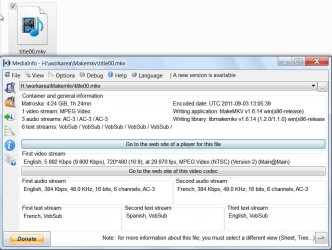
Easy way. Download MakeMKV MakeMKV - Download (The DVD functionality will remain free forever.)

Choose your main title alongwith all audio tracks and subtitles or you can select whichever audio and subtitle you want and make your mkv. Enjoy.

Screenshot:

makemkv.jpg

Now, if you want to know which will compress it best without losing quality .... hmmmm....I shall leave it to others. It is not my cup of tea. Here each one may have his own. ( I always keep and play the originals from my HDD - internal or external.)

Anyway I shall refer you to "Uncompressed MKV to compressed MKV" section in one of the latest articles here .
 
Last edited:

My Computer My Computer

At a glance

Windows 7 Home Premium 32 bit
OS
Windows 7 Home Premium 32 bit
Jumanji, I tried makemv and the converted file does work in WMP but if I try to play it on MPC-HC the video is just green but the audio works fine. Might be because of DXVA & MPEG-2.

Boohbah, I get www.allfreevideoconverter.com/ as the 3rd result. It looks a bit suspicious.
 

My Computer My Computer

At a glance

7 ultimate x64i7 920 @ 3.5ghz6gb corsair dominatorGigabyte Geforce GTX 460 1GB SLI
Computer Manufacturer/Model Number
Custom
OS
7 ultimate x64
CPU
i7 920 @ 3.5ghz
Motherboard
P6t Deluxe
Memory
6gb corsair dominator
Graphics Card(s)
Gigabyte Geforce GTX 460 1GB SLI
Sound Card
onboard
Monitor(s) Displays
samsung BX2450
Screen Resolution
1920x1080
Hard Drives
Seagate 7200.11 1Tb; WD green EADS 1TB
PSU
corsair tx750
Case
CM HAF 922
Cooling
coolermaster V8 + standard case fans
Keyboard
Logitech Classic Keyboard
Mouse
Logitech G500
Internet Speed
256k :P
no worries .wot seems to think its ok.
 

My Computer My Computer

At a glance

Microsoft Windows 7 Home Premium 64-bit 7600IIx4 amd athelon 635 processor2x2gbati radeon HD 5450
Computer Manufacturer/Model Number
Hewlett packard/p6512uk
OS
Microsoft Windows 7 Home Premium 64-bit 7600
CPU
IIx4 amd athelon 635 processor
Motherboard
FOXCONN 2AA9
Memory
2x2gb
Graphics Card(s)
ati radeon HD 5450
Sound Card
(1) Realtek High Definition Audio (2) AMD High Definition
Monitor(s) Displays
samsung lcd tv 32"
Screen Resolution
1360x 768
Hard Drives
(1) WDC WD10 01FAES-60Z2A0 SATA Disk Device (2) Maxtor OneTouch USB Device (3) ST310003 33AS USB Device (4) WD My Book 1111 USB Device
PSU
?
Cooling
air!
Keyboard
wireless hp
Mouse
wireless Hp,optical
Internet Speed
1.10mb/s
Antivirus
MSE
Browser
Firefox
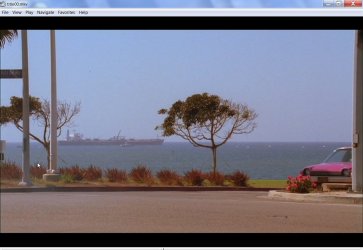
I also use MPC-Home Cinema to play mkvs. I have played the title on MPC-Home Cinema before penning the post. Experienced no problems. It is straight from the oven.:)

03-09-2011 20-10-17.jpg

And as far as I remember - and my memory is something unreliable :) - I have not touched the default settings in the MPC -HC. I am unable to make out why you should have this problem.

Edit: As an afterthought I would suggest that you redownload and install the latest version of MPC- HC (32bit or 64bit depending on your OS) straight from the author's site and try. http://mpc-hc.sourceforge.net/download-media-player-classic-hc.html
 

My Computer My Computer

At a glance

Windows 7 Home Premium 32 bit
OS
Windows 7 Home Premium 32 bit
Make MKV works well, and all automatically.
The downside is that youll need additional splitters etc to play a MKV file.

If you are they type that would rather not install any additional codecs, there is another option:

TsMuxer.
Its free but will require a little extra effort on your part.


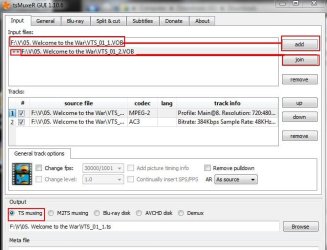
Browse the DVD and look the first .VOB
It should be .99GB in size, and lists something like ,, .VTS_01_1 - VTS_01_02 etc. >>
Notice the very last number. This will tell you the order they go in.
tsmuxer.jpg


Add the first one, then use JOIN to add the rest in order they appear.


You can then Mux as a TS or M2TS. I would just use .TS


This obviously isn't a automated method, but ...
1) Its Free
2) No extra codecs needed to play the file afterwards
3) Lossless


MP4 containers can be picky when trying to put lossless DVD into them.
Your best bet is MKV or Transport Stream.

If you decide to convert to H264, MP4 will be a good choice.
With something like MeGUI or Handbrake, a Constant Quality of 16 or 15 will yield excellent results. This is ideal if you are not concerned with file size and are after just quality. You can go lower if you want but its probably not worth it.

The large majority of the time, a Quality Bases recode of around 18 will produce very good rips. Anything lower than that (around 16) are usually percieved as lossless.

The goal of H264 in this mode is to maintain a consistant quality throughout, without any regard whatsoever to bitrate, or file size,so they will be quite unpredictable.
 

My Computer My Computer

At a glance

Windows 7 Home Premium 64bitIntel Core i7 2700k8GB Mushkin Redline Ridgebacks @1866EVGA GTX570 SC
Computer Manufacturer/Model Number
Custom (Self Build)
OS
Windows 7 Home Premium 64bit
CPU
Intel Core i7 2700k
Motherboard
eVGA P67 SLI
Memory
8GB Mushkin Redline Ridgebacks @1866
Graphics Card(s)
EVGA GTX570 SC
Sound Card
XiFi Titanium HD
Monitor(s) Displays
LG W2453V
Screen Resolution
1920x1080
Hard Drives
Intel 320 80GB -- Intel X25-V 40GB --WD Black 1TB x2 -- WD Blue 640GB
PSU
Seasonic x750
Case
Corsair 600T SE White
Cooling
eVGA Superclocked CPU Cooler
Keyboard
Saitek Cyborg
Antivirus
Kaspersky
Browser
IE
Other Info
LG BD/DVD
Thanks for your detailed response Wishmaster! :D I'll give TS muxer a try tomorrow. All I want is the dvd to in a single file and it should be lossless .. if .TS works that will be great!

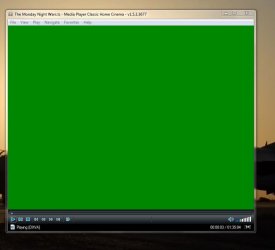
Jumanji does MPC-HC say "DXVA" after "Playing" below the play/pause buttons? I think it's the cause for the video to be solid green. I too am using MPC-HC with default settings.

Have shark007 codecs installed but since I use MPC-HC exclusively I don't think it makes any difference.
 

My Computer My Computer

At a glance

7 ultimate x64i7 920 @ 3.5ghz6gb corsair dominatorGigabyte Geforce GTX 460 1GB SLI
Computer Manufacturer/Model Number
Custom
OS
7 ultimate x64
CPU
i7 920 @ 3.5ghz
Motherboard
P6t Deluxe
Memory
6gb corsair dominator
Graphics Card(s)
Gigabyte Geforce GTX 460 1GB SLI
Sound Card
onboard
Monitor(s) Displays
samsung BX2450
Screen Resolution
1920x1080
Hard Drives
Seagate 7200.11 1Tb; WD green EADS 1TB
PSU
corsair tx750
Case
CM HAF 922
Cooling
coolermaster V8 + standard case fans
Keyboard
Logitech Classic Keyboard
Mouse
Logitech G500
Internet Speed
256k :P
Just checked. While Playing a Bluray disk MPC-HC says " Playing [DXVA]"

But while playing the mkv file it just says "Playing". There is no DXVA.

Now I remember that I had completely uninstalled the Shark 007 codecs since MPC-HC has all the codecs built-in and can play BDs and mkvs.

May be you too can uninstall the Shark007 codecs and try. Too many codecs can cause problems.

MKV playback with WMP requires just the Haali Matroska Splitter and for that sake I have installed only the Haali.

Retiring for the day now.
 

My Computer My Computer

At a glance

Windows 7 Home Premium 32 bit
OS
Windows 7 Home Premium 32 bit
Thanks Wishmaster the TS muxer method worked nicely! I still see the green color video in MPC-HC for the Vob mpeg2 files but I can live with that. BTW what do the Bitrate options in the General tab in TSmuxer do? Do they affect the video quality?

Jumanji I get the DXVA with most mkvs. I'm using the beta versions from xvidvideo.ru maybe they've changed something in it. Anyway it's no big deal .. not worth stressing out over a couple of videos .. might as well play them in WMP.

Thanks to all for trying to help me!
 

My Computer My Computer

At a glance

7 ultimate x64i7 920 @ 3.5ghz6gb corsair dominatorGigabyte Geforce GTX 460 1GB SLI
Computer Manufacturer/Model Number
Custom
OS
7 ultimate x64
CPU
i7 920 @ 3.5ghz
Motherboard
P6t Deluxe
Memory
6gb corsair dominator
Graphics Card(s)
Gigabyte Geforce GTX 460 1GB SLI
Sound Card
onboard
Monitor(s) Displays
samsung BX2450
Screen Resolution
1920x1080
Hard Drives
Seagate 7200.11 1Tb; WD green EADS 1TB
PSU
corsair tx750
Case
CM HAF 922
Cooling
coolermaster V8 + standard case fans
Keyboard
Logitech Classic Keyboard
Mouse
Logitech G500
Internet Speed
256k :P
....Jumanji I get the DXVA with most mkvs. I'm using the beta versions from xvidvideo.ru maybe they've changed something in it. Anyway it's no big deal .. not worth stressing out over a couple of videos .. might as well play them in WMP.

Thanks to all for trying to help me!

Quite possible. My version of MPC-HC is MPC - HC 32bit (x86) v1.5.2.3456 downloaded from sourceforge

Glad that you got a satisfying solution. Cheers.
 

My Computer My Computer

At a glance

Windows 7 Home Premium 32 bit
OS
Windows 7 Home Premium 32 bit

My Computer My Computer

At a glance

Microsoft Windows 7 Home Premium 64-bit Servi...Intel(R) Core(TM) i3 CPU M 330 @ 2.13GHz8 GB DDR3Intel(R) HD Graphics
Computer type
Laptop
Computer Manufacturer/Model Number
Hewlett-Packard/G62-107SA Notebook
OS
Microsoft Windows 7 Home Premium 64-bit Service Pack 1
CPU
Intel(R) Core(TM) i3 CPU M 330 @ 2.13GHz
Motherboard
Hewlett-Packard 1425
Memory
8 GB DDR3
Graphics Card(s)
Intel(R) HD Graphics
Sound Card
Realtek High Definition Audio
Monitor(s) Displays
Builtin
Screen Resolution
1366 x 768 x 32 bits (4294967296 colors) @ 60 Hz
Hard Drives
250 GB SATA Hard Disk Drive 7200 rpm
2TB Seagate GoFlex USB 2 Drive
1TB Iomega Prestige USB 2 Drive
1.5TB Iomega Prestige USB 2 Drive (Samsung)
2TB WD MyBook Live NAS.
Mouse
Logitech Anywhere MX
Internet Speed
152 Mbs download 10 Mbs upload
Antivirus
Norton 360
Browser
Chrome
Are you using Sharks Codecs?
Is the green tint only happening with the DVD copies?

If so, what happens if you disable the MPC-HC and use FFDshow instead?
 

My Computer My Computer

At a glance

Windows 7 Home Premium 64bitIntel Core i7 2700k8GB Mushkin Redline Ridgebacks @1866EVGA GTX570 SC
Computer Manufacturer/Model Number
Custom (Self Build)
OS
Windows 7 Home Premium 64bit
CPU
Intel Core i7 2700k
Motherboard
eVGA P67 SLI
Memory
8GB Mushkin Redline Ridgebacks @1866
Graphics Card(s)
EVGA GTX570 SC
Sound Card
XiFi Titanium HD
Monitor(s) Displays
LG W2453V
Screen Resolution
1920x1080
Hard Drives
Intel 320 80GB -- Intel X25-V 40GB --WD Black 1TB x2 -- WD Blue 640GB
PSU
Seasonic x750
Case
Corsair 600T SE White
Cooling
eVGA Superclocked CPU Cooler
Keyboard
Saitek Cyborg
Antivirus
Kaspersky
Browser
IE
Other Info
LG BD/DVD
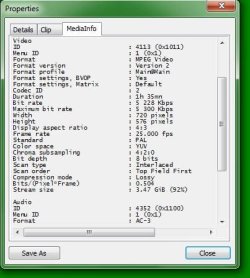
Yup I have shark's codecs installed on my PC. I have attached some screenshots .. the settings app shows the settings which I have used for a long time & the media info as per MPC-HC. Video working fine in WMP. I'm also using the latest nvidia drivers, 280.26.

In MPC-HC, Transform filters are checked entirely and in source all checked other than avi, flv, mkv, mp4 and real media. Had to make this change because on some files seeking was acting strangely.
 

Attachments

  • 1.JPG
    1.JPG
    80.3 KB · Views: 9
  • 2.JPG
    2.JPG
    35.9 KB · Views: 8
  • 3.JPG
    3.JPG
    38.6 KB · Views: 10
  • 4.JPG
    4.JPG
    48.2 KB · Views: 6

My Computer My Computer

At a glance

7 ultimate x64i7 920 @ 3.5ghz6gb corsair dominatorGigabyte Geforce GTX 460 1GB SLI
Computer Manufacturer/Model Number
Custom
OS
7 ultimate x64
CPU
i7 920 @ 3.5ghz
Motherboard
P6t Deluxe
Memory
6gb corsair dominator
Graphics Card(s)
Gigabyte Geforce GTX 460 1GB SLI
Sound Card
onboard
Monitor(s) Displays
samsung BX2450
Screen Resolution
1920x1080
Hard Drives
Seagate 7200.11 1Tb; WD green EADS 1TB
PSU
corsair tx750
Case
CM HAF 922
Cooling
coolermaster V8 + standard case fans
Keyboard
Logitech Classic Keyboard
Mouse
Logitech G500
Internet Speed
256k :P

My Computer My Computer

At a glance

7 ultimate x64i7 920 @ 3.5ghz6gb corsair dominatorGigabyte Geforce GTX 460 1GB SLI
Computer Manufacturer/Model Number
Custom
OS
7 ultimate x64
CPU
i7 920 @ 3.5ghz
Motherboard
P6t Deluxe
Memory
6gb corsair dominator
Graphics Card(s)
Gigabyte Geforce GTX 460 1GB SLI
Sound Card
onboard
Monitor(s) Displays
samsung BX2450
Screen Resolution
1920x1080
Hard Drives
Seagate 7200.11 1Tb; WD green EADS 1TB
PSU
corsair tx750
Case
CM HAF 922
Cooling
coolermaster V8 + standard case fans
Keyboard
Logitech Classic Keyboard
Mouse
Logitech G500
Internet Speed
256k :P

My Computer My Computer

At a glance

Microsoft Windows 7 Home Premium 64-bit Servi...Intel(R) Core(TM) i3 CPU M 330 @ 2.13GHz8 GB DDR3Intel(R) HD Graphics
Computer type
Laptop
Computer Manufacturer/Model Number
Hewlett-Packard/G62-107SA Notebook
OS
Microsoft Windows 7 Home Premium 64-bit Service Pack 1
CPU
Intel(R) Core(TM) i3 CPU M 330 @ 2.13GHz
Motherboard
Hewlett-Packard 1425
Memory
8 GB DDR3
Graphics Card(s)
Intel(R) HD Graphics
Sound Card
Realtek High Definition Audio
Monitor(s) Displays
Builtin
Screen Resolution
1366 x 768 x 32 bits (4294967296 colors) @ 60 Hz
Hard Drives
250 GB SATA Hard Disk Drive 7200 rpm
2TB Seagate GoFlex USB 2 Drive
1TB Iomega Prestige USB 2 Drive
1.5TB Iomega Prestige USB 2 Drive (Samsung)
2TB WD MyBook Live NAS.
Mouse
Logitech Anywhere MX
Internet Speed
152 Mbs download 10 Mbs upload
Antivirus
Norton 360
Browser
Chrome
Hmm, your using a older version of the codec pack than I have.


The lossless rip you have done should be a MPEG source, regardless which container you prefer to use (TS or MKV)
So those settings in the H264 tab shouldnt really affect that particular file type.


In the MPG-MP4 tab, try some different things there.
I have a feeling this is simply some sort of conflict with the Codecs and your setup. Though I could be wrong.
Everyone has them from time to time, which is why other options are nice to have :)


For example, in the MPEG2 specific (DVD) section, try FFDshow,Default, and DXVA.

It may also be worth trying the above in combination with different splitters.
Such as the MS/Haali splitters.

I've had a couple issues from time to time if using Gabest BluRay Splitter and disabling Haali gloabally.
Microsoft/Haali Splitters resolved my problems, so I just use those for everything.
And while it may not be true for everyone, they simply work better for me, and may for you as well.

Its worth a try anyway.
 

My Computer My Computer

At a glance

Windows 7 Home Premium 64bitIntel Core i7 2700k8GB Mushkin Redline Ridgebacks @1866EVGA GTX570 SC
Computer Manufacturer/Model Number
Custom (Self Build)
OS
Windows 7 Home Premium 64bit
CPU
Intel Core i7 2700k
Motherboard
eVGA P67 SLI
Memory
8GB Mushkin Redline Ridgebacks @1866
Graphics Card(s)
EVGA GTX570 SC
Sound Card
XiFi Titanium HD
Monitor(s) Displays
LG W2453V
Screen Resolution
1920x1080
Hard Drives
Intel 320 80GB -- Intel X25-V 40GB --WD Black 1TB x2 -- WD Blue 640GB
PSU
Seasonic x750
Case
Corsair 600T SE White
Cooling
eVGA Superclocked CPU Cooler
Keyboard
Saitek Cyborg
Antivirus
Kaspersky
Browser
IE
Other Info
LG BD/DVD
I got the .TS file which I created with TSMuxer to work in MPC-HC. The workaround was to uncheck MPEG-2 Video (DXVA) under the Transform section in Internal Filters. Shark's pack doesn't affect MPC-HC with internal filters enabled so I didn't experiment with it. Now the only difference is that DXVA is not enabled and all I can do is hope that the FFDshow folks eventually get the DXVA stuff working as well as the regular FFDshow (MPC-HC does have it embedded after all). I don't care about DXVA functionality because I have an i7 CPU so it's a small trade off.

I'm using the older version of Shark007 codec pack because every version after 2.9.0 breaks FLV thumbnails. Since I have the pack installed specifically for thumbnail generation as I use MPC-HC for playback, no point in updating anymore. Still not fixed in 3.0.3. Bummer! I like having the latest version of the software I use to have the latest bug fixes! :(
 

My Computer My Computer

At a glance

7 ultimate x64i7 920 @ 3.5ghz6gb corsair dominatorGigabyte Geforce GTX 460 1GB SLI
Computer Manufacturer/Model Number
Custom
OS
7 ultimate x64
CPU
i7 920 @ 3.5ghz
Motherboard
P6t Deluxe
Memory
6gb corsair dominator
Graphics Card(s)
Gigabyte Geforce GTX 460 1GB SLI
Sound Card
onboard
Monitor(s) Displays
samsung BX2450
Screen Resolution
1920x1080
Hard Drives
Seagate 7200.11 1Tb; WD green EADS 1TB
PSU
corsair tx750
Case
CM HAF 922
Cooling
coolermaster V8 + standard case fans
Keyboard
Logitech Classic Keyboard
Mouse
Logitech G500
Internet Speed
256k :P
Back
Top