Windows 7 Repair Environment appears to be gone?

inlineadam

New member
Local time
3:12 PM
Messages
13
Hi everyone.


My laptop has been freezing up recently just randomly at times, mostly when starting up, after minimising a program or clicking on the start menu.

I decided to go do a full repair ( full destructive recovery ) using my laptops integrated repair environment ( Advent Roma 3000 ).

I have used this before.


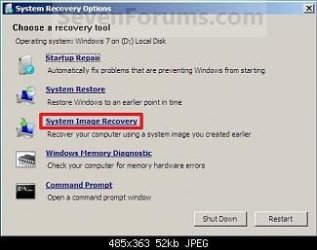
However, this time when i went to do it, after going through the process - F8- Repair Computer -- Lanaguage -- Password ... it then gives me some options such as " memory diagnostics, system restore, image recovery , startup repair "

This is a totally different window that what it was before, and what it should be.

How on earth am i suppose to access the full destructive recovery?

Thanks in advance.

Adam
 

My Computer My Computer

At a glance

Windows 7
OS
Windows 7

My Computer My Computer

At a glance

ME/XP/Vista/Win7
OS
ME/XP/Vista/Win7
I would Check the hard drive with the manufacturer's diagnostic tools.
Hard Drive Diagnostics Tools and Utilities (Storage) - TACKtech Corp.
HD Diagnostic

   Information
We always assume you have made your Recovery Disks using the OEM manufacturer's Recovery Media Creator app the first day you had your new PC.
& made the Startup Repair CD.
startup repair disc-create


Did you make the OEM manufacturer's Recovery Disks?

No the laptop didn't come with any disks. It's suppose to have built in recovery via the windows repair environment, this is the problem i'm having as i can't seem to access this...

Edit: And i didn't make any discs because i couldn't get any Dvd's...
 

My Computer My Computer

At a glance

Windows 7
OS
Windows 7

My Computer My Computer

At a glance

Windows 7
OS
Windows 7
What hard drive manufacturer?
 

My Computer My Computer

At a glance

ME/XP/Vista/Win7
OS
ME/XP/Vista/Win7
What hard drive manufacturer?

Sorry i'm not the most technically gifted person around, where will i find that out?

All i know is that it's An Advent Roma 3000
 

My Computer My Computer

At a glance

Windows 7
OS
Windows 7
Remove the hard drive from the Notebook, & look for the name of the manufacturer.
 

My Computer My Computer

At a glance

ME/XP/Vista/Win7
OS
ME/XP/Vista/Win7
It seems you are booting standard winre, instead of the manufacturer customised version.
 

My Computers My Computers

  • At a glance

    7 X64i5 84002x8gb 3200mhz
    Computer type
    PC/Desktop
    OS
    7 X64
    CPU
    i5 8400
    Motherboard
    gigabyte b365m ds3h
    Memory
    2x8gb 3200mhz
    Hard Drives
    various
    PSU
    pure power 11 400w cm
    Case
    Coolermaster
    Cooling
    cryorig m9i
  • At a glance

    7x64g54008gb ddr4 2400
    Computer type
    PC/Desktop
    OS
    7x64
    CPU
    g5400
    Motherboard
    ga b365m ds3h
    Memory
    8gb ddr4 2400
    PSU
    xfx pro 450w
It seems you are booting standard winre, instead of the manufacturer customised version.

I think it's exactly that.... any idea how i can get back to booting the manufacturer's version?
 

My Computer My Computer

At a glance

Windows 7
OS
Windows 7
What keys are you using to start Recovery?
 

My Computer My Computer

At a glance

ME/XP/Vista/Win7
OS
ME/XP/Vista/Win7
Theo makes a good point.

However, assuming you are selecting the right key :

These oem's all do different things.

I would have a look - boot up something you can see with - do you have decent boot media of some sort?

It might be the oem winre is on the recovery partition and standard winre is in a hidden folder called recovery on your win 7 partition.

Can't tell without looking at it.

EDIT - if you can still get into windows, you can have a look from there.

You might need to unhide the recov partition using Partition Wizard, or similar. You can unhide the win 7 partition recovery folder thru folder options.
 

My Computers My Computers

  • At a glance

    7 X64i5 84002x8gb 3200mhz
    Computer type
    PC/Desktop
    OS
    7 X64
    CPU
    i5 8400
    Motherboard
    gigabyte b365m ds3h
    Memory
    2x8gb 3200mhz
    Hard Drives
    various
    PSU
    pure power 11 400w cm
    Case
    Coolermaster
    Cooling
    cryorig m9i
  • At a glance

    7x64g54008gb ddr4 2400
    Computer type
    PC/Desktop
    OS
    7x64
    CPU
    g5400
    Motherboard
    ga b365m ds3h
    Memory
    8gb ddr4 2400
    PSU
    xfx pro 450w
Theo makes a good point.

However, assuming you are selecting the right key :

These oem's all do different things.

I would have a look - boot up something you can see with - do you have decent boot media of some sort?

It might be the oem winre is on the recovery partition and standard winre is in a hidden folder called recovery on your win 7 partition.

Can't tell without looking at it.

EDIT - if you can still get into windows, you can have a look from there.

You might need to unhide the recov partition using Partition Wizard, or similar. You can unhide the win 7 partition recovery folder thru folder options.


Ye i'm pretty sure I've been doing it right - the manual says F8 then " repair computer ". The Manufacturer's environment came up a month ago when i clicked on that, but now i get windows one.

Where do i navigate to access the partition recovery folder?
 

My Computer My Computer

At a glance

Windows 7
OS
Windows 7
This one

System_Recovery_Options.jpg

or
This one

RecoveryPartition03.gif
 

My Computer My Computer

At a glance

ME/XP/Vista/Win7
OS
ME/XP/Vista/Win7

My Computer My Computer

At a glance

ME/XP/Vista/Win7
OS
ME/XP/Vista/Win7
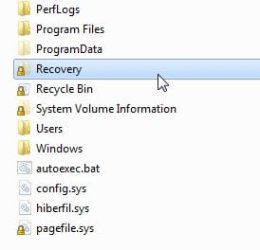
There is a folder on your windows 7 partition . It is named Recovery.

It is hidden , so you need to go to folder options and show hidden files and protected operating system files.

It should be directly on your drive.

C:\Recovery\{lots-of-numbers}\Winre.wim

Recoverydirectory.jpg

It might pretend to be empty - but if you look inside - you will see it probably isn't

Those with oem machines might find the oem has modified that.

OR the oem might have another .wim file on the oem recovery partition.

You might have both.
 

My Computers My Computers

  • At a glance

    7 X64i5 84002x8gb 3200mhz
    Computer type
    PC/Desktop
    OS
    7 X64
    CPU
    i5 8400
    Motherboard
    gigabyte b365m ds3h
    Memory
    2x8gb 3200mhz
    Hard Drives
    various
    PSU
    pure power 11 400w cm
    Case
    Coolermaster
    Cooling
    cryorig m9i
  • At a glance

    7x64g54008gb ddr4 2400
    Computer type
    PC/Desktop
    OS
    7x64
    CPU
    g5400
    Motherboard
    ga b365m ds3h
    Memory
    8gb ddr4 2400
    PSU
    xfx pro 450w
There is a folder on your windows 7 partition . It is named Recovery.

It is hidden , so you need to go to folder options and show hidden files and protected operating system files.

It should be directly on your drive.

C:\Recovery\{lots-of-numbers}\Winre.wim

View attachment 175631

It might pretend to be empty - but if you look inside - you will see it probably isn't

Those with oem machines might find the oem has modified that.

OR the oem might have another .wim file on the oem recovery partition.

You might have both.


When i try access the Recovery folder it tells me " access denied " .. yet i am on the administrator user..
 

My Computer My Computer

At a glance

Windows 7
OS
Windows 7

My Computers My Computers

  • At a glance

    7 X64i5 84002x8gb 3200mhz
    Computer type
    PC/Desktop
    OS
    7 X64
    CPU
    i5 8400
    Motherboard
    gigabyte b365m ds3h
    Memory
    2x8gb 3200mhz
    Hard Drives
    various
    PSU
    pure power 11 400w cm
    Case
    Coolermaster
    Cooling
    cryorig m9i
  • At a glance

    7x64g54008gb ddr4 2400
    Computer type
    PC/Desktop
    OS
    7x64
    CPU
    g5400
    Motherboard
    ga b365m ds3h
    Memory
    8gb ddr4 2400
    PSU
    xfx pro 450w
Back
Top