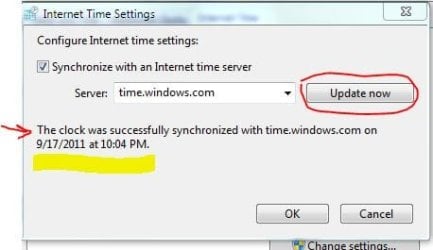
Clock is off by less than a minute.

bru

New member
Pro User
Local time
10:50 AM
Messages
417
Location
A suburb of Chicago
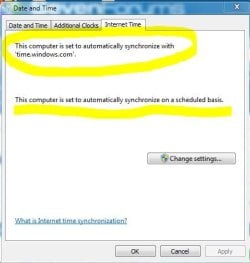
I noticed that my clock is a bit slow. I think it started happening within the last week or so. Prior to that there were no problems.

It is set to synchronize automatically but I manually synchronized and sure enough it is now correct. So is it not synchronizing on it's own? Any ideas?
 

Attachments
  • clock.JPG
    clock.JPG
    29.3 KB · Views: 7
  • clock2.JPG
    clock2.JPG
    23.6 KB · Views: 3

My Computer My Computer

Computer Manufacturer/Model Number
HP p6608f
OS
Win 7 Home Premium x64
CPU
Intel Core i3-540 3.07 GHz
Motherboard
MS-7613 (Iona-GL8E)
Memory
4 GB (2 X 2) Dual-Channel PC-10600 DDR3 @ 665MHz (9-9-9-24)
Graphics Card(s)
Integrated Intel H57
Sound Card
Integrated Realtek ALC888S Audio
Monitor(s) Displays
17" SDM-HS73 (a vestige from my old computer)
Screen Resolution
1280 X 1024
Hard Drives
750GB SATA 7200 RPM
PSU
250W
Keyboard
HP USB keyboard
Mouse
HP USB optical mouse
Internet Speed
15Mbps/1Mbps
Mine was doing that too for about a week, it finally caught up.
 

My Computer My Computer

Computer type
PC/Desktop
Computer Manufacturer/Model Number
Self Built
OS
Win 10 Pro x64
CPU
Intel I5-2500K @3.3GHz
Motherboard
Asrock P67 Extreme4
Memory
16GB G.Skill Ripjaws X (4x4GB)
Graphics Card(s)
EVGA GeForce 750 Ti SC 2GB
Sound Card
ASUS Xonar DG 5.1 Channels 24-bit 96KHz PCI Interface Sound
Monitor(s) Displays
auria eq2367
Screen Resolution
1920 x 1080
Hard Drives
250GB Samsung 850 EVO SSD
1TB WD Blue
1TB Hitachi
PSU
SeaSonic X 650W 80 Plus Gold
Case
Corsair Obsidian 750D
Cooling
Corsair H60, Three 140mm case fans
Keyboard
Logitech Wireless Keyboard K520
Mouse
Logitech Wireless Mouse M310
Internet Speed
Wave Broadband ~ 100 dn 5 up
Antivirus
Windows Defender, Malwarebytes Premium
Browser
Edge, IE11, Chrome
Other Info
Laptop specs: HP g7-1365dx /
CPU: AMD A6-3420M APU with Radeon(tm) HD Graphics /
RAM: Crucial 8Gb (2x4Gb) /
SSD: Crucial M4-CT128M4SSD2 ATA Device/ FW 000F /
GFX: AMD Radeon HD 6520G /
OS: Windows 10 Pro x64
Keep a watch. Your motherboard battery may be coming to its end of life and replacing it may be a good idea if your machine is constantly losing time when not in use or needs frequent manual synchronisation.
 

My Computer My Computer

OS
Windows 7 Home Premium 32 bit
Keep a watch. Your motherboard battery may be coming to its end of life and replacing it may be a good idea if your machine is constantly losing time when not in use or needs frequent manual synchronisation.

I sure hope not. It's an nine month old computer.
 

My Computer My Computer

Computer Manufacturer/Model Number
HP p6608f
OS
Win 7 Home Premium x64
CPU
Intel Core i3-540 3.07 GHz
Motherboard
MS-7613 (Iona-GL8E)
Memory
4 GB (2 X 2) Dual-Channel PC-10600 DDR3 @ 665MHz (9-9-9-24)
Graphics Card(s)
Integrated Intel H57
Sound Card
Integrated Realtek ALC888S Audio
Monitor(s) Displays
17" SDM-HS73 (a vestige from my old computer)
Screen Resolution
1280 X 1024
Hard Drives
750GB SATA 7200 RPM
PSU
250W
Keyboard
HP USB keyboard
Mouse
HP USB optical mouse
Internet Speed
15Mbps/1Mbps
Check Task Scheduler under Task Scheduler Library->Microsoft->Windows->Time Synchronization and see what the options are and diagnose from there.

Also, I set mine to synchronize with time.nist.gov since it's more reliable.
 

My Computer My Computer

Computer Manufacturer/Model Number
Asus G73SW-XN2
OS
Windows 2000 5.0 Build 2195
CPU
Intel Core i7-2630QM@2GHz(2.9GHz Turbo Boost) [Sandy Bridge]
Motherboard
Asus G73SW (Intel HM65 Chipset)
Memory
Kingston DDR3 1333 16GB (4GBx4)
Graphics Card(s)
nVidia GTX 460m 1.5GB
Sound Card
EAX Advanced HD 5.0, THX TruStudio
Monitor(s) Displays
17.3 in. primary & 23 in. secondary
Screen Resolution
1920x1080
Hard Drives
Seagate Momentus XT (SATA II) 500 GB @ 7200 RPM
Hitachi (SATA II) 500GB @ 7200 RPM

Non Raid because ASUS was crappy to choose an HM65 Chipset
Keyboard
Built-in 102-Key Backlit Keyboard
Other Info
It's a Laptop.
Keep a watch. Your motherboard battery may be coming to its end of life and replacing it may be a good idea if your machine is constantly losing time when not in use or needs frequent manual synchronisation.

I sure hope not. It's an nine month old computer.

I too hope it is not.:) But premature failure of any component is not unknown. And I made a conditional statement if blah, blah....

Now a definitive statement: If for no other reason your clock is losing time, then it is the battery. :) False positives and false negatives can always happen in any diagnosis.

Given your situation, I would have changed the battery without a blink -and irrespective of the battery manufacturing date, and think of any other thing only if it fails to resolve the problem. My way.
 

My Computer My Computer

OS
Windows 7 Home Premium 32 bit
Check Task Scheduler under Task Scheduler Library->Microsoft->Windows->Time Synchronization and see what the options are and diagnose from there.

Also, I set mine to synchronize with time.nist.gov since it's more reliable.

Screen shot attached. It says it's ready and that it ran succesfully. But it definitely was not run this Sunday at 1:00 AM. Does the computer have to be on? Because it is not at that time.

After the computer being off about nine hours clock is spot on at this point.
 

Attachments

  • tsched.JPG
    tsched.JPG
    22.3 KB · Views: 13

My Computer My Computer

Computer Manufacturer/Model Number
HP p6608f
OS
Win 7 Home Premium x64
CPU
Intel Core i3-540 3.07 GHz
Motherboard
MS-7613 (Iona-GL8E)
Memory
4 GB (2 X 2) Dual-Channel PC-10600 DDR3 @ 665MHz (9-9-9-24)
Graphics Card(s)
Integrated Intel H57
Sound Card
Integrated Realtek ALC888S Audio
Monitor(s) Displays
17" SDM-HS73 (a vestige from my old computer)
Screen Resolution
1280 X 1024
Hard Drives
750GB SATA 7200 RPM
PSU
250W
Keyboard
HP USB keyboard
Mouse
HP USB optical mouse
Internet Speed
15Mbps/1Mbps
It runs at the next opportunity it gets after the scheduled run time. In your case, it ran on Tuesday last week at 6:14 pm (that answers the "So is it not synchronizing on it's own?" part. Your clock synchronizes every sunday). If you could remember that it wasn't synchronized back then, it might have gotten an error but task scheduler still reported it as successful. Personally, I had my issues with synchronizing with time.microsoft.com.

On another note, there really is no need to synchronize your clock more than once a week. If your clock really gets that off often, then I would follow jumanji's advice since that's most likely the culprit. The other possibility is that some program with admin access is messing with your clock.
 

My Computer My Computer

Computer Manufacturer/Model Number
Asus G73SW-XN2
OS
Windows 2000 5.0 Build 2195
CPU
Intel Core i7-2630QM@2GHz(2.9GHz Turbo Boost) [Sandy Bridge]
Motherboard
Asus G73SW (Intel HM65 Chipset)
Memory
Kingston DDR3 1333 16GB (4GBx4)
Graphics Card(s)
nVidia GTX 460m 1.5GB
Sound Card
EAX Advanced HD 5.0, THX TruStudio
Monitor(s) Displays
17.3 in. primary & 23 in. secondary
Screen Resolution
1920x1080
Hard Drives
Seagate Momentus XT (SATA II) 500 GB @ 7200 RPM
Hitachi (SATA II) 500GB @ 7200 RPM

Non Raid because ASUS was crappy to choose an HM65 Chipset
Keyboard
Built-in 102-Key Backlit Keyboard
Other Info
It's a Laptop.
Are you sure the clock is off? What are you using to compare it to? Sure it is not off? And is less then a minute really worth all the trouble?
 

My Computer My Computer

Computer type
PC/Desktop
Computer Manufacturer/Model Number
Alienware Aurora ALX R4
OS
Windows 10 Pro (x64)
CPU
Intel Core i7-3930K (3.2GHz - 4.5GHz)
Motherboard
Alienware Aurora-R4 x79
Memory
4x Samsung 4GB PC3-12800 DDR3 (16GB 1600MHz)
Graphics Card(s)
Nvidia Geforce GTX 690
Sound Card
SteelSeries Siberia Elite
Monitor(s) Displays
Dell UltraSharp U3011
Screen Resolution
2560x1600
Hard Drives
Samsung 850 Pro 256 GB, Seagate 1TB Desktop Hybrid HDD, 2x Western Digital 4TB Green HDD
PSU
875W Some Dell PSU <.<
Case
Alienware Aurora ALX
Cooling
Custom Liquid Cooling (EK CPU & GPU blocks) dual EK 480RAD
Keyboard
Logitech G710+ Mechanical
Mouse
Logitech G700s
Internet Speed
Verizon Fios (50 mbps average)
Other Info
Server: Intel NUC D54250WYK: i5-4250U, 16GB, 256 GB mSATA, Windows Server 2012 R2

My Computer My Computer

Computer type
PC/Desktop
Computer Manufacturer/Model Number
Dell Inspiron 660
OS
Windows 7 Home Premium 64bit
CPU
Intel Core i3-3240
Motherboard
Dell 084J0R
Memory
8GB DDR3 SDRAM
Graphics Card(s)
EVGA GeForce GT 620
Sound Card
Intel Panther Point PCH High Definition Audio
Monitor(s) Displays
Acer G205HV
Screen Resolution
1600 x 900
Hard Drives
Sandisk SSD 64GB SDSSDP064G
Seagate HDD 1TB ST1000DM003-1CH162
PSU
Dell 300W
Case
Dell Inspiron
Keyboard
Logitech Wireless K320/B350
Mouse
Microsoft
Internet Speed
25Mbps/4Mbps
Antivirus
Avast
Browser
Mozilla Firefox
I sure hope not. It's an nine month old computer.

Doesn't mean that it is a 9 month old battery. Have you checked the time in the bios to make sure it isn't out? As already mentioned Windows gets its time from the bios, and if the battery is weak/dying Windows will be syncing all the time till the battery is changed.

Nice thing is that it is about the cheapest component in the computer to replace (a couple of $$ at most) and can be bought anywhere watch batteries are sold (unless they used an odd battery, most use a CR2032).
 

My Computer My Computer

Computer type
PC/Desktop
Computer Manufacturer/Model Number
Me
OS
Win 7 Ultimate x64
CPU
FX-8350 @ 4.6 GHz so far
Motherboard
Asus M5A97 EVO
Memory
ADATA XPG V1 Series Black 8GB DDR3 1600
Graphics Card(s)
Sapphire R9 270x Dual-X
Sound Card
Xonar DGX w/ Corsair Vengence 1300
Monitor(s) Displays
Acer S232HL Abid
Screen Resolution
1920x1080
Hard Drives
120 GB OCZ Vertex 3
500 GB Seagate 7200.12
PSU
Antec Earthwatts 650W Green
Case
Antec Three Hundred
Cooling
Cooler Master 212 EVO
Keyboard
Logitech G510
Mouse
Logitech G500s
Internet Speed
35000/3000
It definitely was off by about 90 seconds. Being off isn't really a problem but I was more concerned as to why it was off and why it had changed. It had been perfect for nine months and even my old computer never wavered in six years.

I was given the possibility of a battery going bad. After manually synchronizing the clock has been perfect for two days, even with the computer being off for many hours at a time. So I'm thinking it must have been related to the last synch. Perhaps microsoft.time had a glitch. Another user reported they had a problem too.

I will definitely keep an eye on things. If it again goes off then I will have to further investigate. As mentioned, it's not the clock per se being off, it's why it is happening.
 

My Computer My Computer

Computer Manufacturer/Model Number
HP p6608f
OS
Win 7 Home Premium x64
CPU
Intel Core i3-540 3.07 GHz
Motherboard
MS-7613 (Iona-GL8E)
Memory
4 GB (2 X 2) Dual-Channel PC-10600 DDR3 @ 665MHz (9-9-9-24)
Graphics Card(s)
Integrated Intel H57
Sound Card
Integrated Realtek ALC888S Audio
Monitor(s) Displays
17" SDM-HS73 (a vestige from my old computer)
Screen Resolution
1280 X 1024
Hard Drives
750GB SATA 7200 RPM
PSU
250W
Keyboard
HP USB keyboard
Mouse
HP USB optical mouse
Internet Speed
15Mbps/1Mbps
Back
Top