Long story short, I ran the Win8 (64bit) dev install on top of my Win7 (64bit). I thought it would prompt me where to install it (I have 2HDDs in my laptop and no ODD).
All was well, but I didn't really like the UI. No big deal, right? Just re-run the Win7 install and wipe out 8... Wroooong!
I used a linux pen drive boot-iso making program (grub bootloader), gave it the Win7SP1 64 bit ISO and went off on my merry way. The installer is running, just as expected. I delete the existing partitions on the OS drive and it finishes the install with no problem... until it goes to reboot the first time. It just sits at a black screen with the blinking cursor. First thing I do is power down, take out the usb stick and boot back up... same thing.
So I go and download a new iso, thinking the first one may have been bad (despite having used it half a dozen times already). Same issue. Install completes, system reboots and nothing.
I download the MS version of the Win7/USB boot key installer maker thingy. Format the usb stick and let it copy over the iso again. Installed win7 without issue. Reboot. Black screen w/ blinking cursor.
@($#*%^@($*^(*!@$
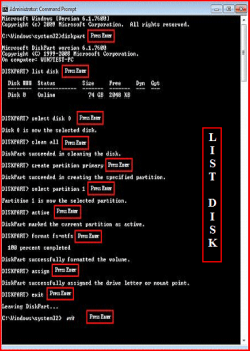
I ran the installation repair. Windows finds the installation and says... oh, nothing to repair! *bangs head on desk* Ok, so let's try all of these fancy bootsect and diskpart commands. 30 minutes of repairing, deleting, repartitioning, full formatting, reinstalling... same issue installing to both HDs.
Now, the laptop I have is a Dell XPS15 (L502X). There's only one USB2 port and Windows can't install from USB3 ports (no native driver). I'm screwed.
I take out the primary HD and swap it with another HD. Go through all of this crap over again and it has the same issue.
I can't actually remove the second HD (ODD bay with an HD caddy) because the f'ing screw was in there SO tight from the factory and the screw is way too soft... so it's pretty stripped. I mean, it's smooth as a baby's bottom in there by now.
I run up to Fry's thinking there might be some issue installing from USB as I couldn't even get a linux distro to install from the damn thing. It was doing the *exact* same thing as the Windows install, with a few minor differences. The bootloader would almost act like it was going to work, but then it would just say "file not found" and die.
I get to Fry's and they have some cheapo Memorex usb2 DVDRAM drives on sale for 30$. Great! I take it to the counter and it rings up 60$. WTF? So we go back there and I show the guy the whole rack of them and the sign. The descriptions match perfeclty but the guy says the sku numbers are different. How exactly is that my fault? You don't sticker your products and we have to rely on these signs everywhere and you won't honor the price, even with these other 7 drives all right here?? Ok, so Fry's isn't getting any more business. I head to Microcenter and they have Toshiba equivalents on sale or 25$... I pick one up and home I go...
I get home and take the drive apart to find it only has a USB-Y connector for power. The USB ports on my laptop are not at all close together to begin with and the usb2 connector is on the opposite side from the other two. *sigh* I go dig through my closet and find an ancient usb1 hub... good enough for power, yippee!
I burned the original Win7 iso to a disc... lo and behold, it freaking works! It was kinda slow to install off the external dvd drive... but yaaay I have a working laptop again!
Now that your eyes are bleeding, you can share some of my pain.
What I really want to know is... why would the Windows installer not create a proper boot sector? I couldn't do the bdc repair because there had been no initial boot. I tried copying over the bootmgr file and other system files from the dvd to the c: drive and that didn't work either. Neither did installing to the second HD in the system. I wasn't quite sure that would work anyway because Dell's BIOS is hardcoded to call the second connection an ODD, regardless of what is connected.
Also, anybody have any ideas for something I could use to cut a slit into a stripped laptop screw so I can use a flathead to back it out? I already tried binding epoxy to a throw-away screwdriver, thinking I could glue them together and then use that to back it out.
I was looking at some dremels, but I haven't been able to find a cutting blade small enough to cut the screw and not split the laptop in half. This is the first laptop I've ever had with such soft, crappy screws and such a freaking retarded placement for the only screw that holds the ODD in place.
All was well, but I didn't really like the UI. No big deal, right? Just re-run the Win7 install and wipe out 8... Wroooong!
I used a linux pen drive boot-iso making program (grub bootloader), gave it the Win7SP1 64 bit ISO and went off on my merry way. The installer is running, just as expected. I delete the existing partitions on the OS drive and it finishes the install with no problem... until it goes to reboot the first time. It just sits at a black screen with the blinking cursor. First thing I do is power down, take out the usb stick and boot back up... same thing.
So I go and download a new iso, thinking the first one may have been bad (despite having used it half a dozen times already). Same issue. Install completes, system reboots and nothing.
I download the MS version of the Win7/USB boot key installer maker thingy. Format the usb stick and let it copy over the iso again. Installed win7 without issue. Reboot. Black screen w/ blinking cursor.
@($#*%^@($*^(*!@$
I ran the installation repair. Windows finds the installation and says... oh, nothing to repair! *bangs head on desk* Ok, so let's try all of these fancy bootsect and diskpart commands. 30 minutes of repairing, deleting, repartitioning, full formatting, reinstalling... same issue installing to both HDs.
Now, the laptop I have is a Dell XPS15 (L502X). There's only one USB2 port and Windows can't install from USB3 ports (no native driver). I'm screwed.
I take out the primary HD and swap it with another HD. Go through all of this crap over again and it has the same issue.
I can't actually remove the second HD (ODD bay with an HD caddy) because the f'ing screw was in there SO tight from the factory and the screw is way too soft... so it's pretty stripped. I mean, it's smooth as a baby's bottom in there by now.
I run up to Fry's thinking there might be some issue installing from USB as I couldn't even get a linux distro to install from the damn thing. It was doing the *exact* same thing as the Windows install, with a few minor differences. The bootloader would almost act like it was going to work, but then it would just say "file not found" and die.
I get to Fry's and they have some cheapo Memorex usb2 DVDRAM drives on sale for 30$. Great! I take it to the counter and it rings up 60$. WTF? So we go back there and I show the guy the whole rack of them and the sign. The descriptions match perfeclty but the guy says the sku numbers are different. How exactly is that my fault? You don't sticker your products and we have to rely on these signs everywhere and you won't honor the price, even with these other 7 drives all right here?? Ok, so Fry's isn't getting any more business. I head to Microcenter and they have Toshiba equivalents on sale or 25$... I pick one up and home I go...
I get home and take the drive apart to find it only has a USB-Y connector for power. The USB ports on my laptop are not at all close together to begin with and the usb2 connector is on the opposite side from the other two. *sigh* I go dig through my closet and find an ancient usb1 hub... good enough for power, yippee!
I burned the original Win7 iso to a disc... lo and behold, it freaking works! It was kinda slow to install off the external dvd drive... but yaaay I have a working laptop again!
Now that your eyes are bleeding, you can share some of my pain.
What I really want to know is... why would the Windows installer not create a proper boot sector? I couldn't do the bdc repair because there had been no initial boot. I tried copying over the bootmgr file and other system files from the dvd to the c: drive and that didn't work either. Neither did installing to the second HD in the system. I wasn't quite sure that would work anyway because Dell's BIOS is hardcoded to call the second connection an ODD, regardless of what is connected.
Also, anybody have any ideas for something I could use to cut a slit into a stripped laptop screw so I can use a flathead to back it out? I already tried binding epoxy to a throw-away screwdriver, thinking I could glue them together and then use that to back it out.
I was looking at some dremels, but I haven't been able to find a cutting blade small enough to cut the screw and not split the laptop in half. This is the first laptop I've ever had with such soft, crappy screws and such a freaking retarded placement for the only screw that holds the ODD in place.
My Computer
At a glance
Win7 (7100)C2D T93004GB DDR2-800nVidia 8600m
- Computer Manufacturer/Model Number
- Dell XPS m1530
- OS
- Win7 (7100)
- CPU
- C2D T9300
- Motherboard
- mobo chipset: PM965
- Memory
- 4GB DDR2-800
- Graphics Card(s)
- nVidia 8600m
- Sound Card
- Creative X-fi (xpress card slot)
- Monitor(s) Displays
- internal lcd
- Screen Resolution
- 1680x1080
- Hard Drives
- OCZ Vertex 30GB SSD