Show us your SSD performance

Status
Not open for further replies.
Mike, I don't know how it works and I have a different Marvell, but I have the Marvell drivers installed, but it is still using msahci. I don't know exactly how that works, so perhaps a snip will be useful.
 

My Computers My Computers

System One System Two

  • Computer type
    PC/Desktop
    Computer Manufacturer/Model Number
    ALWAYS UNDER CONSTRUCTION
    OS
    Windows 11 Pro
    CPU
    Ryzen 9 5900X
    Motherboard
    Asus X570 Crosshair Viii Hero
    Memory
    32GB G Skill DDR4-3600
    Graphics Card(s)
    EVGA RTX 3080 FTW 3 Ultra
    Sound Card
    On Board/Sennheiser PC37X Headset
    Monitor(s) Displays
    3 X Asus 27"
    Screen Resolution
    2560x1440
    Hard Drives
    2 X 1 TB NVME drives
    PSU
    EVGA 850
    Case
    Phanteks Eclipse P400A
    Cooling
    EVGA 280 AIO
    Keyboard
    Logitech G510s/ Logitech G13
    Mouse
    Logitech G502
    Internet Speed
    24/1
    Antivirus
    ESET/MBAM Pro/SAS Pro
    Browser
    Chrome/ Firefox/ Edge
  • Computer type
    Laptop
    System Manufacturer/Model Number
    Dell 16 Plus
    OS
    Windows 11 Pro
    CPU
    Intel Ultra 9 288V
    Memory
    32 GB LPDDR5X 8533
    Monitor(s) Displays
    16" Mini-LED HDR600 Touch 90 Hz
    Screen Resolution
    2560X1600
    Hard Drives
    1 TB NVME
If you know the Marvell is installed then uninstall it. No Snip necessary.

If by chance the Marvell is re installed on reboot then you will need to delete the Marvell driver not uninstall.
If Marvell driver is deleted then Windows will auto install the MSAHCI since the Marvell is no longer available.

No you are not risking the system.

I'm confirming what Essenbe posted- I think!!????

How do i manually delete the Marvell driver then if it gets reinstalled automatically when restarting?
 

My Computer My Computer

Computer Manufacturer/Model Number
Asus P6X58D-E
OS
Windows 7 Ultimate x64 SP1
CPU
Core i7 920 D0 2.67Ghz @ 3.4Ghz
Motherboard
Asus P6X58D-E BIOS 0701
Memory
12Gb Corsair XMS @ 1624Mhz
Graphics Card(s)
ATI Radeon 5870 2GB @ Default
Sound Card
Realtek® ALC889 8-Channel High Definition Audio
Monitor(s) Displays
Samsung 20"
Screen Resolution
Max 1680x1050
Hard Drives
Corsair Force GT 120Gb (555/515Mb)
PSU
Corsair 750W
Case
Noname
Cooling
Scytec Mugen 2 with 2 120mm fans
Keyboard
Logitech...
Mouse
Logitech Mx510
Internet Speed
ComHem 100mbit
If you had the MSAHCI driver installed before the Marvell driver you can rollback the driver, if you didn't delete the MSAHCI driver.
 

My Computer My Computer

Computer type
PC/Desktop
Computer Manufacturer/Model Number
76~2.0
OS
Windows 7 Ult x64 - SP1/ Windows 8 Pro x64
CPU
Intel Core i5-3570K 4.6GHz
Motherboard
Gigabyte GA-Z77X UD3H, f18
Memory
8GB (2X4GB) DDR3 1600 Corsair Vengeance CL8 1.5v
Graphics Card(s)
Sapphire HD 7770 Vapor-X OC 1GB DDR5
Sound Card
Onboard VIA VT2021
Monitor(s) Displays
22" LCD Dell
Screen Resolution
1680x1050
Hard Drives
Samsung 840Pro 128GB SSD,
Seagate Barracuda 500GB SATA2 7200rpm 32MB cache, Seagate Barracuda 1TB SATA2 7200rpm 32MB cache,
PSU
Corsair HX650W
Case
Cooler Master Storm Scout
Cooling
Corsair H80 2x12cm Noctua NF P12 , 2x14cm case fans
Keyboard
Logitech Wave
Mouse
CM Sentinel
Internet Speed
Dismal
Antivirus
Avast
Browser
Opera Next
Other Info
Haswell laptop: HP Envy 17t-j, i7-4700MQ, GeForce 740M 2GB DDR3, 17.3" Full HD 1920x1080, 16GB RAM, Samsung 840 Pro 128GB, 1TB Hitachi 7200 HDD,
Desktop: eSATA ports,
External eSATA Seagate 500GB SATA2 7200rpm,
External WD USB 500GB
If you know the Marvell is installed then uninstall it. No Snip necessary.

If by chance the Marvell is re installed on reboot then you will need to delete the Marvell driver not uninstall.
If Marvell driver is deleted then Windows will auto install the MSAHCI since the Marvell is no longer available.

No you are not risking the system.

I'm confirming what Essenbe posted- I think!!????

How do i manually delete the Marvell driver then if it gets reinstalled automatically when restarting?

Before you do anything, I would like to see a screenshot of As SSD. Do not run the test, just select the SSD at the top and take a screenshot. But, to uninstall the Marvell driver, open device manager and expand IDE/ATA/AHCI drivers, at the bottom you will see the ahci drivers. If the Marvell driver is listed, right click it and select properties, click on the drivers tab, at the bottom you will see a button that says uninstall. click that buttin and click yes to all of the warnings. But first let us see the As SSD screenshot.
 
Last edited:

My Computers My Computers

System One System Two

  • Computer type
    PC/Desktop
    Computer Manufacturer/Model Number
    ALWAYS UNDER CONSTRUCTION
    OS
    Windows 11 Pro
    CPU
    Ryzen 9 5900X
    Motherboard
    Asus X570 Crosshair Viii Hero
    Memory
    32GB G Skill DDR4-3600
    Graphics Card(s)
    EVGA RTX 3080 FTW 3 Ultra
    Sound Card
    On Board/Sennheiser PC37X Headset
    Monitor(s) Displays
    3 X Asus 27"
    Screen Resolution
    2560x1440
    Hard Drives
    2 X 1 TB NVME drives
    PSU
    EVGA 850
    Case
    Phanteks Eclipse P400A
    Cooling
    EVGA 280 AIO
    Keyboard
    Logitech G510s/ Logitech G13
    Mouse
    Logitech G502
    Internet Speed
    24/1
    Antivirus
    ESET/MBAM Pro/SAS Pro
    Browser
    Chrome/ Firefox/ Edge
  • Computer type
    Laptop
    System Manufacturer/Model Number
    Dell 16 Plus
    OS
    Windows 11 Pro
    CPU
    Intel Ultra 9 288V
    Memory
    32 GB LPDDR5X 8533
    Monitor(s) Displays
    16" Mini-LED HDR600 Touch 90 Hz
    Screen Resolution
    2560X1600
    Hard Drives
    1 TB NVME
If you had the MSAHCI driver installed before the Marvell driver you can rollback the driver, if you didn't delete the MSAHCI driver.

I had the SSD first conected to the Marvell SATA3 port when installed the system from scratch, then i installed the Marvell driver, different driver versions up to the newest one i use now. I have also tried the IRST driver but when it didnt work uninstalled it.

Do i then still have the MSAHCI installed?

How do i do i rollback of the driver or if i need, a delete of the marvell driver?
 

My Computer My Computer

Computer Manufacturer/Model Number
Asus P6X58D-E
OS
Windows 7 Ultimate x64 SP1
CPU
Core i7 920 D0 2.67Ghz @ 3.4Ghz
Motherboard
Asus P6X58D-E BIOS 0701
Memory
12Gb Corsair XMS @ 1624Mhz
Graphics Card(s)
ATI Radeon 5870 2GB @ Default
Sound Card
Realtek® ALC889 8-Channel High Definition Audio
Monitor(s) Displays
Samsung 20"
Screen Resolution
Max 1680x1050
Hard Drives
Corsair Force GT 120Gb (555/515Mb)
PSU
Corsair 750W
Case
Noname
Cooling
Scytec Mugen 2 with 2 120mm fans
Keyboard
Logitech...
Mouse
Logitech Mx510
Internet Speed
ComHem 100mbit
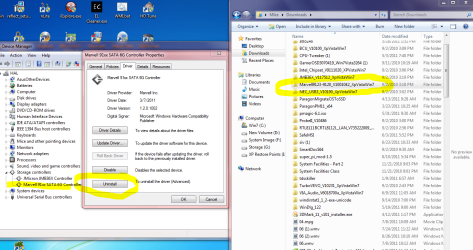
When you go into Device Manager there may be an option to uninstall and delete.
As you can see on mine there is no Delete. Probably not on yours either.

Also you can delete the unzipped driver file from downloads.
Look at the circled yellow on right of my Snip.
Can not reinstall if not on system.
Can not install from the zip folder so you can leave it if you want.

This is only IF not a certainty.
I have had other hardware reinstall the old drivers until I deleted them then the new driver installed.
Can be very confusing the first time it happens to you. :shock: ;) :D

Uninstalling should be all that is necessary but.. just in case.
 

Attachments

  • Delete Marvell.PNG
    Delete Marvell.PNG
    109.9 KB · Views: 11

My Computer My Computer

Computer Manufacturer/Model Number
Hopalong/ Godzilla
OS
Windows7 Pro 64bit SP-1; Windows XP Pro 32bit
CPU
Intel Core i7-870 Lynnfield 2.93GHz LGA 1156 95W Quad-Core
Motherboard
ASUS P7P55D-E PRO
Memory
8GB@1400MHz Crucial Ballistix DDR3-1600 4x2GB
Graphics Card(s)
ASUS ENGTX460 DirectCU/2DI/1GD5 1GB 256-bit GDDR5
Sound Card
VIA Onboard
Monitor(s) Displays
Asus VS248H-P 24"; Samsung SyncMaster 941BW 19"ws
Screen Resolution
1920x1080; 1440x900
Hard Drives
Samsung 830 120GB SSD
Intel 320 120GB SSD
Western Digital Caviar Black WD7501AALS 750GB 7200 RPM SATA 3.0Gb/s
Western Digital Caviar Black WD6401AALS 640GB 7200 RPM SATA 3.0Gb/s
PSU
COOLER MASTER Silent Pro RS850-AMBAJ3-US 850W Modular
Case
COOLER MASTER HAF 932 RC-932-KKN5-GP Black
Cooling
Scythe "Mugen-2 Rev.B" (2 ScytheKaze-Jyuni PWM fans)
Keyboard
Logitech K-320
Mouse
Kensington
Antivirus
Avast Inernet Suite
Browser
IE 9 ; Chrome
If you know the Marvell is installed then uninstall it. No Snip necessary.

If by chance the Marvell is re installed on reboot then you will need to delete the Marvell driver not uninstall.
If Marvell driver is deleted then Windows will auto install the MSAHCI since the Marvell is no longer available.

No you are not risking the system.

I'm confirming what Essenbe posted- I think!!????

How do i manually delete the Marvell driver then if it gets reinstalled automatically when restarting?

Before you do anything, I would like to see a screenshot of As SSD. Do not run the test, just select the SSD at the top and take a screenshot. But, to uninstall the Marvell driver, open device manager and expand IDE/ATA/AHCI drivers, at the bottom you will see the ahci drivers. If the Marvell driver is listed, right click it and select properties, click on the drivers tab, at the bottom you will see a button that says uninstall. click that buttin and click yes to all of the warnings. But first let us see the As SSD screenshot.

OKey, then i will FIRST do a screenshot of AS SSD and post it here for you guys so nothing gets wrong.

Thanks for the instructions above, i asked how to do this in my earlier message :p

EDIT: Hopalong X - thanks for the nice pictures :-P
 

My Computer My Computer

Computer Manufacturer/Model Number
Asus P6X58D-E
OS
Windows 7 Ultimate x64 SP1
CPU
Core i7 920 D0 2.67Ghz @ 3.4Ghz
Motherboard
Asus P6X58D-E BIOS 0701
Memory
12Gb Corsair XMS @ 1624Mhz
Graphics Card(s)
ATI Radeon 5870 2GB @ Default
Sound Card
Realtek® ALC889 8-Channel High Definition Audio
Monitor(s) Displays
Samsung 20"
Screen Resolution
Max 1680x1050
Hard Drives
Corsair Force GT 120Gb (555/515Mb)
PSU
Corsair 750W
Case
Noname
Cooling
Scytec Mugen 2 with 2 120mm fans
Keyboard
Logitech...
Mouse
Logitech Mx510
Internet Speed
ComHem 100mbit
As with most discussions, they tend to stray off the course of the original question. Just so I'm on the right page, I understood the original "misdirection" to be a discussion on whether the 9128 Marvell CONTROLLER would support the Windows TRIM command. According to Marvell, it does. And this I take on faith. As I do with Intel's specifications on their controllers. Now the discussion has moved to whether the Marvell DRIVER will pass the Windows TRIM command. According to Marvell, the latest driver will pass the TRIM command. BUT, the same exclusion exists with Marvell and Intel CONTROLLERS that the TRIM command is NOT passed to drives that are in a RAID array. And I can see where this can pose a confusing problem as many BIOS configurations don't allow specifying AHCI without specifying RAID. Even on a single drive where the user wants to implement AHCI, the only option is to select RAID as RAID includes (extension of) the AHCI implementation.

The links to other discussions posted earlier and many posted around the forums have detailed the Marvell controller TRIM problems both old and new. As I read the current discussions, they all are referring to drives that are in RAID arrays and THAT is a known deficiency with the Marvell and Intel controllers. I don't disagree.

And now, in response to a PM, I offer this publicly to one of the posters:
What was taken to be "rudely chastise" was not my intention at all. For not explaining what I was thinking and using a poor selection of words, I sincerely apologize. I can now see where my comment was a bit tart but I did not mean it to be rude. I read the references given and it was my understanding by reading the entire thread(s) that the discussion was about RAID drives. It was this that prompted the comment since OUR discussion (in my mind) was about a single drive. If I mis-read the discussions or mis-understood this discussion, then I am at fault and apologize for my gross ineptness.

In response to "proof", no one but the drive and controller chip set manufacturer can provide proof that the TRIM command is or is not acted upon. A drive may or may not act on the command right away. It could be within seconds or it could be hours. It depends on the idle state of the drive. As I stated, I accept the specifications of maker and according to Marvell, the 9128 and newer controller chip sets do pass the TRIM command for NON_RAID drives. And so far, I have not seen proof that they don't. However; as with any learning experience, I am willing to revise my opinion if someone can prove otherwise. But forum discussions are NOT proof. There's too many variables interjected and as I, opinion based.
 

My Computer My Computer

Computer type
PC/Desktop
Computer Manufacturer/Model Number
Built 2/11/2011
OS
Windows 7 Pro-x64
CPU
i7-2600 3.4GHz - 3.8GHz Turbo
Motherboard
Intel DH67BL-B3
Memory
8Gb - 2x4GB, Muskin 991770 PC3-1333
Graphics Card(s)
Integrated Intel HD 2000
Sound Card
Integrated Intel 10.1 HD, RealTek ALC892
Monitor(s) Displays
Asus LCD VH222H, Haier HL24XSL2a
Screen Resolution
1920x1080, 1920x1080
Hard Drives
Crucial SSD C300-128Gb,
Western Digital WD5002AALX - 500Gb,
Western Digital WD7501AALS - 750Gb
PSU
Seasonic 650W 80+ Gold Modular
Case
Rosewill Defender
Cooling
Stock CPU, Four 120mm case fans, PCH fan added
Keyboard
Logitech EX100 Y-RBH94 Wireless
Mouse
Logitech EX100 M-RCE95 Wireless
Internet Speed
3.0/1.5 Mbs
Antivirus
Microsoft Security Essentials
Browser
Microsoft Internet Explorer 11
Other Info
Antec Veris Premier-Multimedia IR Station,
Cyber Accoustics-3602 Speakers,
AFT XM-5U Card Reader,
Hauppauge TV-HVR-2250,
Sony LX300 USB Turntable
And in the words of an anonymous writer:

"I thought I was wrong once, but I was mistaken." :)
 

My Computer My Computer

Computer type
PC/Desktop
Computer Manufacturer/Model Number
Built 2/11/2011
OS
Windows 7 Pro-x64
CPU
i7-2600 3.4GHz - 3.8GHz Turbo
Motherboard
Intel DH67BL-B3
Memory
8Gb - 2x4GB, Muskin 991770 PC3-1333
Graphics Card(s)
Integrated Intel HD 2000
Sound Card
Integrated Intel 10.1 HD, RealTek ALC892
Monitor(s) Displays
Asus LCD VH222H, Haier HL24XSL2a
Screen Resolution
1920x1080, 1920x1080
Hard Drives
Crucial SSD C300-128Gb,
Western Digital WD5002AALX - 500Gb,
Western Digital WD7501AALS - 750Gb
PSU
Seasonic 650W 80+ Gold Modular
Case
Rosewill Defender
Cooling
Stock CPU, Four 120mm case fans, PCH fan added
Keyboard
Logitech EX100 Y-RBH94 Wireless
Mouse
Logitech EX100 M-RCE95 Wireless
Internet Speed
3.0/1.5 Mbs
Antivirus
Microsoft Security Essentials
Browser
Microsoft Internet Explorer 11
Other Info
Antec Veris Premier-Multimedia IR Station,
Cyber Accoustics-3602 Speakers,
AFT XM-5U Card Reader,
Hauppauge TV-HVR-2250,
Sony LX300 USB Turntable
If you had the MSAHCI driver installed before the Marvell driver you can rollback the driver, if you didn't delete the MSAHCI driver.

I had the SSD first conected to the Marvell SATA3 port when installed the system from scratch, then i installed the Marvell driver, different driver versions up to the newest one i use now. I have also tried the IRST driver but when it didnt work uninstalled it.

Do i then still have the MSAHCI installed?

How do i do i rollback of the driver or if i need, a delete of the marvell driver?

I did not see Dave76's post when I posted. He may very well be correct, he usually is. If you installed the OS in ahci mode, then the msahci driver is probably there. So, a rollback may put you where you want to be.
 

My Computers My Computers

System One System Two

  • Computer type
    PC/Desktop
    Computer Manufacturer/Model Number
    ALWAYS UNDER CONSTRUCTION
    OS
    Windows 11 Pro
    CPU
    Ryzen 9 5900X
    Motherboard
    Asus X570 Crosshair Viii Hero
    Memory
    32GB G Skill DDR4-3600
    Graphics Card(s)
    EVGA RTX 3080 FTW 3 Ultra
    Sound Card
    On Board/Sennheiser PC37X Headset
    Monitor(s) Displays
    3 X Asus 27"
    Screen Resolution
    2560x1440
    Hard Drives
    2 X 1 TB NVME drives
    PSU
    EVGA 850
    Case
    Phanteks Eclipse P400A
    Cooling
    EVGA 280 AIO
    Keyboard
    Logitech G510s/ Logitech G13
    Mouse
    Logitech G502
    Internet Speed
    24/1
    Antivirus
    ESET/MBAM Pro/SAS Pro
    Browser
    Chrome/ Firefox/ Edge
  • Computer type
    Laptop
    System Manufacturer/Model Number
    Dell 16 Plus
    OS
    Windows 11 Pro
    CPU
    Intel Ultra 9 288V
    Memory
    32 GB LPDDR5X 8533
    Monitor(s) Displays
    16" Mini-LED HDR600 Touch 90 Hz
    Screen Resolution
    2560X1600
    Hard Drives
    1 TB NVME
If you know the Marvell is installed then uninstall it. No Snip necessary.

If by chance the Marvell is re installed on reboot then you will need to delete the Marvell driver not uninstall.
If Marvell driver is deleted then Windows will auto install the MSAHCI since the Marvell is no longer available.

No you are not risking the system.

I'm confirming what Essenbe posted- I think!!????

How do i manually delete the Marvell driver then if it gets reinstalled automatically when restarting?

Before you do anything, I would like to see a screenshot of As SSD. Do not run the test, just select the SSD at the top and take a screenshot. But, to uninstall the Marvell driver, open device manager and expand IDE/ATA/AHCI drivers, at the bottom you will see the ahci drivers. If the Marvell driver is listed, right click it and select properties, click on the drivers tab, at the bottom you will see a button that says uninstall. click that buttin and click yes to all of the warnings. But first let us see the As SSD screenshot.

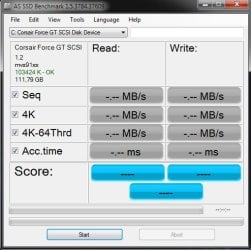
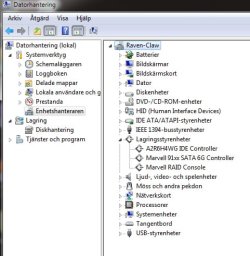
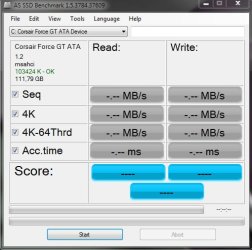
Now i have done two screenshots, one in AS SSD and one from my Device Manager so you guys can see what drivers are installed. Okey here they are:
SSD_Driver_mvs91xx.jpg

Device_Manager.jpg

Waiting for your respons :geek:
 

My Computer My Computer

Computer Manufacturer/Model Number
Asus P6X58D-E
OS
Windows 7 Ultimate x64 SP1
CPU
Core i7 920 D0 2.67Ghz @ 3.4Ghz
Motherboard
Asus P6X58D-E BIOS 0701
Memory
12Gb Corsair XMS @ 1624Mhz
Graphics Card(s)
ATI Radeon 5870 2GB @ Default
Sound Card
Realtek® ALC889 8-Channel High Definition Audio
Monitor(s) Displays
Samsung 20"
Screen Resolution
Max 1680x1050
Hard Drives
Corsair Force GT 120Gb (555/515Mb)
PSU
Corsair 750W
Case
Noname
Cooling
Scytec Mugen 2 with 2 120mm fans
Keyboard
Logitech...
Mouse
Logitech Mx510
Internet Speed
ComHem 100mbit
Try this first. In device manager expand disk drives and right click your SSD and select properties. select the driver tab and click on the roll back driver button. reboot and post a shot of As SSD.
 

My Computers My Computers

System One System Two

  • Computer type
    PC/Desktop
    Computer Manufacturer/Model Number
    ALWAYS UNDER CONSTRUCTION
    OS
    Windows 11 Pro
    CPU
    Ryzen 9 5900X
    Motherboard
    Asus X570 Crosshair Viii Hero
    Memory
    32GB G Skill DDR4-3600
    Graphics Card(s)
    EVGA RTX 3080 FTW 3 Ultra
    Sound Card
    On Board/Sennheiser PC37X Headset
    Monitor(s) Displays
    3 X Asus 27"
    Screen Resolution
    2560x1440
    Hard Drives
    2 X 1 TB NVME drives
    PSU
    EVGA 850
    Case
    Phanteks Eclipse P400A
    Cooling
    EVGA 280 AIO
    Keyboard
    Logitech G510s/ Logitech G13
    Mouse
    Logitech G502
    Internet Speed
    24/1
    Antivirus
    ESET/MBAM Pro/SAS Pro
    Browser
    Chrome/ Firefox/ Edge
  • Computer type
    Laptop
    System Manufacturer/Model Number
    Dell 16 Plus
    OS
    Windows 11 Pro
    CPU
    Intel Ultra 9 288V
    Memory
    32 GB LPDDR5X 8533
    Monitor(s) Displays
    16" Mini-LED HDR600 Touch 90 Hz
    Screen Resolution
    2560X1600
    Hard Drives
    1 TB NVME
Try this first. In device manager expand disk drives and right click your SSD and select properties. select the driver tab and click on the roll back driver button. reboot and post a shot of As SSD.

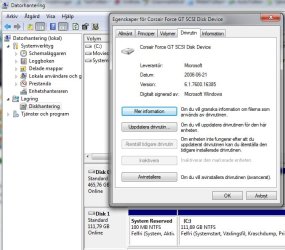
I tried it but the button to do a rollback is faded and i cant click it. See attached picture

Properties_of_SSD.jpg
 

My Computer My Computer

Computer Manufacturer/Model Number
Asus P6X58D-E
OS
Windows 7 Ultimate x64 SP1
CPU
Core i7 920 D0 2.67Ghz @ 3.4Ghz
Motherboard
Asus P6X58D-E BIOS 0701
Memory
12Gb Corsair XMS @ 1624Mhz
Graphics Card(s)
ATI Radeon 5870 2GB @ Default
Sound Card
Realtek® ALC889 8-Channel High Definition Audio
Monitor(s) Displays
Samsung 20"
Screen Resolution
Max 1680x1050
Hard Drives
Corsair Force GT 120Gb (555/515Mb)
PSU
Corsair 750W
Case
Noname
Cooling
Scytec Mugen 2 with 2 120mm fans
Keyboard
Logitech...
Mouse
Logitech Mx510
Internet Speed
ComHem 100mbit
I've never done this, so I am not sure what will happen, but there should be no damage to the computer. 1st, click on update driver and check online. after that is done (don't install it if it finds one), see if the roll back driver is available. If so, click on it. Otherwise the only option I know is to uninstall the marvell driver.
 

My Computers My Computers

System One System Two

  • Computer type
    PC/Desktop
    Computer Manufacturer/Model Number
    ALWAYS UNDER CONSTRUCTION
    OS
    Windows 11 Pro
    CPU
    Ryzen 9 5900X
    Motherboard
    Asus X570 Crosshair Viii Hero
    Memory
    32GB G Skill DDR4-3600
    Graphics Card(s)
    EVGA RTX 3080 FTW 3 Ultra
    Sound Card
    On Board/Sennheiser PC37X Headset
    Monitor(s) Displays
    3 X Asus 27"
    Screen Resolution
    2560x1440
    Hard Drives
    2 X 1 TB NVME drives
    PSU
    EVGA 850
    Case
    Phanteks Eclipse P400A
    Cooling
    EVGA 280 AIO
    Keyboard
    Logitech G510s/ Logitech G13
    Mouse
    Logitech G502
    Internet Speed
    24/1
    Antivirus
    ESET/MBAM Pro/SAS Pro
    Browser
    Chrome/ Firefox/ Edge
  • Computer type
    Laptop
    System Manufacturer/Model Number
    Dell 16 Plus
    OS
    Windows 11 Pro
    CPU
    Intel Ultra 9 288V
    Memory
    32 GB LPDDR5X 8533
    Monitor(s) Displays
    16" Mini-LED HDR600 Touch 90 Hz
    Screen Resolution
    2560X1600
    Hard Drives
    1 TB NVME
Try this first. In device manager expand disk drives and right click your SSD and select properties. select the driver tab and click on the roll back driver button. reboot and post a shot of As SSD.

When uninstalling the driver, should i also uninstall the "Marvel RAID Console"?
 

My Computer My Computer

Computer Manufacturer/Model Number
Asus P6X58D-E
OS
Windows 7 Ultimate x64 SP1
CPU
Core i7 920 D0 2.67Ghz @ 3.4Ghz
Motherboard
Asus P6X58D-E BIOS 0701
Memory
12Gb Corsair XMS @ 1624Mhz
Graphics Card(s)
ATI Radeon 5870 2GB @ Default
Sound Card
Realtek® ALC889 8-Channel High Definition Audio
Monitor(s) Displays
Samsung 20"
Screen Resolution
Max 1680x1050
Hard Drives
Corsair Force GT 120Gb (555/515Mb)
PSU
Corsair 750W
Case
Noname
Cooling
Scytec Mugen 2 with 2 120mm fans
Keyboard
Logitech...
Mouse
Logitech Mx510
Internet Speed
ComHem 100mbit
probably unless you intend on using raid on the Marvell ports.
 

My Computers My Computers

System One System Two

  • Computer type
    PC/Desktop
    Computer Manufacturer/Model Number
    ALWAYS UNDER CONSTRUCTION
    OS
    Windows 11 Pro
    CPU
    Ryzen 9 5900X
    Motherboard
    Asus X570 Crosshair Viii Hero
    Memory
    32GB G Skill DDR4-3600
    Graphics Card(s)
    EVGA RTX 3080 FTW 3 Ultra
    Sound Card
    On Board/Sennheiser PC37X Headset
    Monitor(s) Displays
    3 X Asus 27"
    Screen Resolution
    2560x1440
    Hard Drives
    2 X 1 TB NVME drives
    PSU
    EVGA 850
    Case
    Phanteks Eclipse P400A
    Cooling
    EVGA 280 AIO
    Keyboard
    Logitech G510s/ Logitech G13
    Mouse
    Logitech G502
    Internet Speed
    24/1
    Antivirus
    ESET/MBAM Pro/SAS Pro
    Browser
    Chrome/ Firefox/ Edge
  • Computer type
    Laptop
    System Manufacturer/Model Number
    Dell 16 Plus
    OS
    Windows 11 Pro
    CPU
    Intel Ultra 9 288V
    Memory
    32 GB LPDDR5X 8533
    Monitor(s) Displays
    16" Mini-LED HDR600 Touch 90 Hz
    Screen Resolution
    2560X1600
    Hard Drives
    1 TB NVME
probably unless you intend on using raid on the Marvell ports.

Okey then, here i go... keep your fingers crossed... be back in a while *i hope* :confused:
 

My Computer My Computer

Computer Manufacturer/Model Number
Asus P6X58D-E
OS
Windows 7 Ultimate x64 SP1
CPU
Core i7 920 D0 2.67Ghz @ 3.4Ghz
Motherboard
Asus P6X58D-E BIOS 0701
Memory
12Gb Corsair XMS @ 1624Mhz
Graphics Card(s)
ATI Radeon 5870 2GB @ Default
Sound Card
Realtek® ALC889 8-Channel High Definition Audio
Monitor(s) Displays
Samsung 20"
Screen Resolution
Max 1680x1050
Hard Drives
Corsair Force GT 120Gb (555/515Mb)
PSU
Corsair 750W
Case
Noname
Cooling
Scytec Mugen 2 with 2 120mm fans
Keyboard
Logitech...
Mouse
Logitech Mx510
Internet Speed
ComHem 100mbit
If you installed in ahci mode in bios without loading drivers, the msahci drivers should have installed then. When you installed the Marvell drivers, they replaced the msahci driver. What we are trying to do is get back to the msahci driver for your SSD.
 

My Computers My Computers

System One System Two

  • Computer type
    PC/Desktop
    Computer Manufacturer/Model Number
    ALWAYS UNDER CONSTRUCTION
    OS
    Windows 11 Pro
    CPU
    Ryzen 9 5900X
    Motherboard
    Asus X570 Crosshair Viii Hero
    Memory
    32GB G Skill DDR4-3600
    Graphics Card(s)
    EVGA RTX 3080 FTW 3 Ultra
    Sound Card
    On Board/Sennheiser PC37X Headset
    Monitor(s) Displays
    3 X Asus 27"
    Screen Resolution
    2560x1440
    Hard Drives
    2 X 1 TB NVME drives
    PSU
    EVGA 850
    Case
    Phanteks Eclipse P400A
    Cooling
    EVGA 280 AIO
    Keyboard
    Logitech G510s/ Logitech G13
    Mouse
    Logitech G502
    Internet Speed
    24/1
    Antivirus
    ESET/MBAM Pro/SAS Pro
    Browser
    Chrome/ Firefox/ Edge
  • Computer type
    Laptop
    System Manufacturer/Model Number
    Dell 16 Plus
    OS
    Windows 11 Pro
    CPU
    Intel Ultra 9 288V
    Memory
    32 GB LPDDR5X 8533
    Monitor(s) Displays
    16" Mini-LED HDR600 Touch 90 Hz
    Screen Resolution
    2560X1600
    Hard Drives
    1 TB NVME
HugeRaven, where are you?
 

My Computers My Computers

System One System Two

  • Computer type
    PC/Desktop
    Computer Manufacturer/Model Number
    ALWAYS UNDER CONSTRUCTION
    OS
    Windows 11 Pro
    CPU
    Ryzen 9 5900X
    Motherboard
    Asus X570 Crosshair Viii Hero
    Memory
    32GB G Skill DDR4-3600
    Graphics Card(s)
    EVGA RTX 3080 FTW 3 Ultra
    Sound Card
    On Board/Sennheiser PC37X Headset
    Monitor(s) Displays
    3 X Asus 27"
    Screen Resolution
    2560x1440
    Hard Drives
    2 X 1 TB NVME drives
    PSU
    EVGA 850
    Case
    Phanteks Eclipse P400A
    Cooling
    EVGA 280 AIO
    Keyboard
    Logitech G510s/ Logitech G13
    Mouse
    Logitech G502
    Internet Speed
    24/1
    Antivirus
    ESET/MBAM Pro/SAS Pro
    Browser
    Chrome/ Firefox/ Edge
  • Computer type
    Laptop
    System Manufacturer/Model Number
    Dell 16 Plus
    OS
    Windows 11 Pro
    CPU
    Intel Ultra 9 288V
    Memory
    32 GB LPDDR5X 8533
    Monitor(s) Displays
    16" Mini-LED HDR600 Touch 90 Hz
    Screen Resolution
    2560X1600
    Hard Drives
    1 TB NVME
HugeRaven, where are you?

I´m back :p

It wasnt as easy as that. When i uninstalled the Marvell driver as you guys said it automatically installed it self again. I tried it 2 times without success then i got thinking :sarc: and then it came to me that perhaps it was in the "Add & Remove Program" in the controllpanel. So i checked it and what do you know, there it was. :mad: So i uninstalled the driver, checked in the Device Manager and it was gone then restarted.

Wipz... no more Marvell in the Device Manager ;) then i opened AS SSD and :cool: yepp it said "MSAHCI - OK" :D
See pic:

SSD_Driver_msahci.jpg

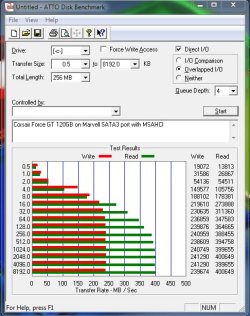
Then i opened ATTO Disk bench and made a run for it. Turned out pretty good, see pic:
ATTO_Disk_Bench_MSAHCI.jpg

and before with Marvell Drv it was:

ATTO SSD Bench MARVELL Drv.png

What do you guys think?

Should i try IRST for more speed?
 

My Computer My Computer

Computer Manufacturer/Model Number
Asus P6X58D-E
OS
Windows 7 Ultimate x64 SP1
CPU
Core i7 920 D0 2.67Ghz @ 3.4Ghz
Motherboard
Asus P6X58D-E BIOS 0701
Memory
12Gb Corsair XMS @ 1624Mhz
Graphics Card(s)
ATI Radeon 5870 2GB @ Default
Sound Card
Realtek® ALC889 8-Channel High Definition Audio
Monitor(s) Displays
Samsung 20"
Screen Resolution
Max 1680x1050
Hard Drives
Corsair Force GT 120Gb (555/515Mb)
PSU
Corsair 750W
Case
Noname
Cooling
Scytec Mugen 2 with 2 120mm fans
Keyboard
Logitech...
Mouse
Logitech Mx510
Internet Speed
ComHem 100mbit
Status
Not open for further replies.
Back
Top