
Solved Run 32-bit gadgets in Win 7 x64

CBM

New member
Power User
Local time
6:08 AM
Messages
104
Location
Ohio
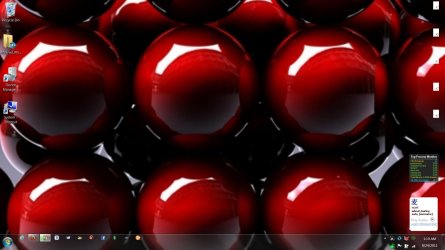
I have two Dell computers, a desktop Studio XPS 7100 and a laptop XPS 17 L702X, both running Win 7 x64. When I purchased the desktop appx. three months ago I made registry changes to allow me to run my 32-bit gadgets. The changes were successful and the gadgets have been running problem free since I made the changes. I purchased the laptop appx. two weeks ago and made, what I thought were, the same changes. The gadgets on the laptop, which are the very same gadgets that run on the desktop, installed and ran problem free for one or two days. Now, only two of the laptop gadgets are working and the remainder of them display as a tiny white triangle with a < symbol within the triangle.

I want to compare the sidebar registry entries on my desktop with the sidebar registry entries on my laptop so that I can duplicate the changes but I'm not sure which registry entries to check or where they are located. I've spent hours researching the subject but so far have been unable to determine where to go in the registry.

I would appreciate it very much if someone could steer me in the right direction for the pertinent registry entries in HKEY_CURRENT_USER, HKEY_LOCAL_MACHINE AND HKEY_USERS.

I am aware that I must close the sidebar, shutdown the sidebar x64 process with Task Manager, go to my x86 Program Files, execute the 32-bit sidebar and then restart the computers. I'm also aware that I must add "(x86) to the sidebar entry under Run in the registry entry in HKEY_CURRENT_USER (HKEY_CURRENT_USER \ Software \ Microsoft \ Windows \ CurrentVersion \ Run).

I've also gone to C>Users>My Account>AppData>Local>Microsoft>Windows Sidebar and deleted the settings file. I even deleted the Windows Sidebar folder itself. Of course, these were replaced when I rebooted and/or restarted the gadgets. These efforts produced no results. I've read just about every article concerning this issue.

Thank you in advance for your time and any assistance provided.

C.B.
 

Attachments
  • Laptop.jpg
    Laptop.jpg
    116 KB · Views: 34
Last edited:

My Computer My Computer

Computer Manufacturer/Model Number
1.Dell Studio XPS 7100 Desktop; 2.Dell XPS 17 Laptop
OS
1.Windows 7 Ultimate x64; 2.Windows 7 Ultimate x64
CPU
1.AMD Phenom II X6 1075T; 2.Intel Core i7-2720QM 2.20 GHz
Memory
1.8GB DDR3; 2.8GB DDR3
Graphics Card(s)
1.AMD HD 5670 1GB; 2.NVIDIA GeForce GT 555M 3GB
Monitor(s) Displays
1.Samsung SyncMaster; 2.17.3in FHD
Screen Resolution
1.1600X900; 2.1920X1080
Hard Drives
1.1TB; 2.1TB 500GB X2
Keyboard
1.Microsoft Wireless; 2.Backlit
Mouse
Microsoft Wireless; 2.Microsoft Wireless Mobile 3500
Internet Speed
10.0 Mbps

My Computer My Computer

Computer type
PC/Desktop
OS
Windows 10 Home x64
CPU
INTEL Core i5-750 Quad-Core 3.37GHz
Motherboard
ASUS P7P55D
Memory
HyperX Fury Black Series 8GB (2 x 4GB) 1866Mhz
Graphics Card(s)
EVGA GeForce GTX 750 Superclocked 1GB 128-Bit GDDR5
Monitor(s) Displays
LG 32MA68HY 32" IPS
Screen Resolution
1920 x 1080
Hard Drives
Samsung 840 Evo 120GB, SEAGATE 500GB Barracuda® 7200.12, SATA 3 Gb/s, 7200 RPM, 16MB cache
PSU
ANTEC TruePower New TP-550, 80 PLUS, 550W
Case
ANTEC Three Hundred Illusion
Cooling
COOLER MASTER Hyper 212 Plus, 4 x 120mm 1 x 140mm Noctua's
Internet Speed
85 + Mbps
Antivirus
Avast
Browser
Vivaldi
Thank you for replying, A Guy. I use Autoruns to disable everything that does not need to run at startup. I configure everything the same on both computers so it must be related to a conflict with software on the laptop.

I'm doing a clean install on the laptop now. If I can't figure it out I'll simply do without the gadgets on the laptop.

C.B.
 

My Computer My Computer

Computer Manufacturer/Model Number
1.Dell Studio XPS 7100 Desktop; 2.Dell XPS 17 Laptop
OS
1.Windows 7 Ultimate x64; 2.Windows 7 Ultimate x64
CPU
1.AMD Phenom II X6 1075T; 2.Intel Core i7-2720QM 2.20 GHz
Memory
1.8GB DDR3; 2.8GB DDR3
Graphics Card(s)
1.AMD HD 5670 1GB; 2.NVIDIA GeForce GT 555M 3GB
Monitor(s) Displays
1.Samsung SyncMaster; 2.17.3in FHD
Screen Resolution
1.1600X900; 2.1920X1080
Hard Drives
1.1TB; 2.1TB 500GB X2
Keyboard
1.Microsoft Wireless; 2.Backlit
Mouse
Microsoft Wireless; 2.Microsoft Wireless Mobile 3500
Internet Speed
10.0 Mbps
A lot of these issues were caused by adobe updates and adobe processes running at startup. As an easy test, you can run a clean boot to see if the problem goes away. If so suggest reenabling everything but adobe startup and see if problem is still fixed. A Guy

http://www.sevenforums.com/tutorial...ation-conflicts-performing-clean-startup.html

A Guy


Well, I did a reinstall on the laptop and so far the gadgets are working properly. I first checked Task Manager for the 64-bit sidebar process but it was not running. I uninstalled all the 64-bit gadgets that came with the OS and then checked the registry.There was no entry in the registry for sidebar under HKCU>Software>Microsoft>Windows>CurrentVersion>Run. I then looked again in Task Manager and there was no 64-bit sidebar process running. I went to my Program Files (x86) and executed the sidebar from there, restarted and added the 32-bit gadgets and every one of them installed properly. I went back to the registry and the 32-bit sidebar entry had been added automatically.

So far, so good. I'm adding my third party software at this time, restarting after every installation to determine whether or not the software affects the 32-bit gadgets.

C.B.
 
Last edited:

My Computer My Computer

Computer Manufacturer/Model Number
1.Dell Studio XPS 7100 Desktop; 2.Dell XPS 17 Laptop
OS
1.Windows 7 Ultimate x64; 2.Windows 7 Ultimate x64
CPU
1.AMD Phenom II X6 1075T; 2.Intel Core i7-2720QM 2.20 GHz
Memory
1.8GB DDR3; 2.8GB DDR3
Graphics Card(s)
1.AMD HD 5670 1GB; 2.NVIDIA GeForce GT 555M 3GB
Monitor(s) Displays
1.Samsung SyncMaster; 2.17.3in FHD
Screen Resolution
1.1600X900; 2.1920X1080
Hard Drives
1.1TB; 2.1TB 500GB X2
Keyboard
1.Microsoft Wireless; 2.Backlit
Mouse
Microsoft Wireless; 2.Microsoft Wireless Mobile 3500
Internet Speed
10.0 Mbps
A lot of these issues were caused by adobe updates and adobe processes running at startup. As an easy test, you can run a clean boot to see if the problem goes away. If so suggest reenabling everything but adobe startup and see if problem is still fixed. A Guy

http://www.sevenforums.com/tutorial...ation-conflicts-performing-clean-startup.html

A Guy


Well, I did a reinstall on the laptop and so far the gadgets are working properly. I first checked Task Manager for the 64-bit sidebar process but it was not running. I uninstalled all the 64-bit gadgets that came with the OS and then checked the registry.There was no entry in the registry for sidebar under HKCU>Software>Microsoft>Windows>CurrentVersion>Run. I then looked again in Task Manager and there was no 64-bit sidebar process running. I went to my Program Files (x86) and executed the sidebar from there, restarted and added the 32-bit gadgets and every one of them installed properly. I went back to the registry and the 32-bit sidebar entry had been added automatically.

So far, so good. I'm adding my third party software at this time, restarting after every installation to determine whether or not the software affects the 32-bit gadgets.

C.B.

Great, let us know how it goes :thumbsup:

A Guy
 

My Computer My Computer

Computer type
PC/Desktop
OS
Windows 10 Home x64
CPU
INTEL Core i5-750 Quad-Core 3.37GHz
Motherboard
ASUS P7P55D
Memory
HyperX Fury Black Series 8GB (2 x 4GB) 1866Mhz
Graphics Card(s)
EVGA GeForce GTX 750 Superclocked 1GB 128-Bit GDDR5
Monitor(s) Displays
LG 32MA68HY 32" IPS
Screen Resolution
1920 x 1080
Hard Drives
Samsung 840 Evo 120GB, SEAGATE 500GB Barracuda® 7200.12, SATA 3 Gb/s, 7200 RPM, 16MB cache
PSU
ANTEC TruePower New TP-550, 80 PLUS, 550W
Case
ANTEC Three Hundred Illusion
Cooling
COOLER MASTER Hyper 212 Plus, 4 x 120mm 1 x 140mm Noctua's
Internet Speed
85 + Mbps
Antivirus
Avast
Browser
Vivaldi
A lot of these issues were caused by adobe updates and adobe processes running at startup. As an easy test, you can run a clean boot to see if the problem goes away. If so suggest reenabling everything but adobe startup and see if problem is still fixed. A Guy

http://www.sevenforums.com/tutorial...ation-conflicts-performing-clean-startup.html

A Guy


Well, I did a reinstall on the laptop and so far the gadgets are working properly. I first checked Task Manager for the 64-bit sidebar process but it was not running. I uninstalled all the 64-bit gadgets that came with the OS and then checked the registry.There was no entry in the registry for sidebar under HKCU>Software>Microsoft>Windows>CurrentVersion>Run. I then looked again in Task Manager and there was no 64-bit sidebar process running. I went to my Program Files (x86) and executed the sidebar from there, restarted and added the 32-bit gadgets and every one of them installed properly. I went back to the registry and the 32-bit sidebar entry had been added automatically.

So far, so good. I'm adding my third party software at this time, restarting after every installation to determine whether or not the software affects the 32-bit gadgets.

C.B.

Great, let us know how it goes :thumbsup:

A Guy

I've reinstalled all my third party software and the gadgets are working perfectly, with no need for registry changes.

I thank everyone who assisted me with this matter.

C.B.
 

My Computer My Computer

Computer Manufacturer/Model Number
1.Dell Studio XPS 7100 Desktop; 2.Dell XPS 17 Laptop
OS
1.Windows 7 Ultimate x64; 2.Windows 7 Ultimate x64
CPU
1.AMD Phenom II X6 1075T; 2.Intel Core i7-2720QM 2.20 GHz
Memory
1.8GB DDR3; 2.8GB DDR3
Graphics Card(s)
1.AMD HD 5670 1GB; 2.NVIDIA GeForce GT 555M 3GB
Monitor(s) Displays
1.Samsung SyncMaster; 2.17.3in FHD
Screen Resolution
1.1600X900; 2.1920X1080
Hard Drives
1.1TB; 2.1TB 500GB X2
Keyboard
1.Microsoft Wireless; 2.Backlit
Mouse
Microsoft Wireless; 2.Microsoft Wireless Mobile 3500
Internet Speed
10.0 Mbps
Glad you got it sorted :)

A Guy
 

My Computer My Computer

Computer type
PC/Desktop
OS
Windows 10 Home x64
CPU
INTEL Core i5-750 Quad-Core 3.37GHz
Motherboard
ASUS P7P55D
Memory
HyperX Fury Black Series 8GB (2 x 4GB) 1866Mhz
Graphics Card(s)
EVGA GeForce GTX 750 Superclocked 1GB 128-Bit GDDR5
Monitor(s) Displays
LG 32MA68HY 32" IPS
Screen Resolution
1920 x 1080
Hard Drives
Samsung 840 Evo 120GB, SEAGATE 500GB Barracuda® 7200.12, SATA 3 Gb/s, 7200 RPM, 16MB cache
PSU
ANTEC TruePower New TP-550, 80 PLUS, 550W
Case
ANTEC Three Hundred Illusion
Cooling
COOLER MASTER Hyper 212 Plus, 4 x 120mm 1 x 140mm Noctua's
Internet Speed
85 + Mbps
Antivirus
Avast
Browser
Vivaldi
Back
Top