I accidentally changed all my rar File extensions..

john13134

New member
Member
Local time
8:45 AM
Messages
80
can anyone tell me how do i get it back to Default
because i changed the default opening to i.e and now its not acting right
how to restore to default file extension?

thanks in Advance:)
 

My Computer My Computer

At a glance

windows 7 Home Premium5gbNvdia
OS
windows 7 Home Premium
Memory
5gb
Graphics Card(s)
Nvdia
system restore?! :)
 

My Computer My Computer

At a glance

windows 7 build 7232 x64
OS
windows 7 build 7232 x64
system restore? are you kidding?

just right-click on a rar file, and choose 'open with'. there, you can reset the default app.
 

My Computer My Computer

At a glance

7600 x86Core 2 Duo e7200, 2.53 ghz2x DDR2 PC5300 1gb, 667 mhzGeForce 9500gt, 512mb
OS
7600 x86
CPU
Core 2 Duo e7200, 2.53 ghz
Motherboard
Micro-Star MS-7529
Memory
2x DDR2 PC5300 1gb, 667 mhz
Graphics Card(s)
GeForce 9500gt, 512mb
Monitor(s) Displays
22" LG Flatron w2234s
Screen Resolution
1680x1050
Hard Drives
Excelstor SATA-II 250gb 7200rpm, 8mb cache
PSU
CoolerMaster M520
Internet Speed
30/20 mbits
hahaha, system restore., nup, not that serious, can also set it in default programs:
Start> Default Programs on the right.

:D
 

My Computer My Computer

At a glance

W7 RTM Ultimate x64Intel Q8400 @ 2.66GHZ4GB DDR2-800Gainward GTS 450 GLH 1GB Edition
Computer Manufacturer/Model Number
Custom Build
OS
W7 RTM Ultimate x64
CPU
Intel Q8400 @ 2.66GHZ
Motherboard
Gigabyte GA-EG45M-UD2H
Memory
4GB DDR2-800
Graphics Card(s)
Gainward GTS 450 GLH 1GB Edition
Sound Card
Integrated 8 Channel
Monitor(s) Displays
AOC 23.6 Inch Widescreen LCD
Screen Resolution
1920x1080
Hard Drives
Seagate 500GB Internal
Western Digital 1TB Internal

Hitachi 1TB External
PSU
Apevia Java Power 500W
Case
Cooler Master HAF 922 Black
Cooling
Stock Intel CPU Fan
Keyboard
HP SK-2960 Multimedia Keyboard
Mouse
Logitech M350 Wireless Gaming Mouse
Internet Speed
1.5MB
What happens if I push this button <click>

system restore?! :)
Probably won't work. Format and re-install.

Just kidding. Could not resist. The aforementioned rt clk open with will work just fine, as will the set program defaults. If you took it off of your Start Menu, find it in Control Panel. But right click Open with will do it.
 
man...sorry for trying to help...
I once had a problem with .exe files, they were accidentally associated with 7-zip, and the only way i got it done was with a restore...what´s so bad with restore? hâ :huh:
Yeah..you try another forum (maybe this one will be different), but it´s all the same :sleepy:
 

My Computer My Computer

At a glance

windows 7 build 7232 x64
OS
windows 7 build 7232 x64
man...sorry for trying to help...
I once had a problem with .exe files, they were accidentally associated with 7-zip, and the only way i got it done was with a restore...what´s so bad with restore?

My bad for making light of your suggestion. It is only "wrong" in the sense that you are suggesting the use of a chainsaw to trim fingernails. Sure, the nails are trim, but what else did you lose?

Doug Knox (MS MVP) maintains a list of reg files for correcting problems like this. You could have repaired your EXE issue with a simple reg file merge.

In this specific instance, the proposed solution should be sufficient. Even an uninstall/re-install of the preferred RAR app should correct the problem without undue loss of anything else.

Don't let a bit of schoolyard fun deter you from trying to help. It might be best to limit those efforts to an area of expertise.
 
hey everyone thanx for trying to help but
when i go to default programs my only options are internet explorer and Notepad :huh:
i dont think those are the defaults :sarc:
 

My Computer My Computer

At a glance

windows 7 Home Premium5gbNvdia
OS
windows 7 Home Premium
Memory
5gb
Graphics Card(s)
Nvdia
hey everyone thanx for trying to help but
when i go to default programs my only options are internet explorer and Notepad :huh:
i dont think those are the defaults :sarc:
Yeah just choose "choose default program"-> "browse"-> locate the WinRAR folder (should be in Program Files (x86 for 64-bit)) and choose winrar.exe (? whatever the default exe to open winrar with...thats it)
 

My Computer My Computer

At a glance

Windows 7 Home Premium x64 - Mac OS X 10.6.4 x64Intel Core 2 Duo T9300 2.5 GHz4GB Kingston DDR2-800NVIDIA Geforce 8600M GT (512MB Model)
Computer Manufacturer/Model Number
Compal JFT02 (Custom Build Laptop)
OS
Windows 7 Home Premium x64 - Mac OS X 10.6.4 x64
CPU
Intel Core 2 Duo T9300 2.5 GHz
Motherboard
JFT02
Memory
4GB Kingston DDR2-800
Graphics Card(s)
NVIDIA Geforce 8600M GT (512MB Model)
Sound Card
Realtek HD Audio
Monitor(s) Displays
WUXGA Standard Laptop Display
Screen Resolution
1680*1050
Hard Drives
Toshiba 320GB 5400RPM Laptop HD
PSU
Standard Laptop Power Supply
Case
Standard Laptop Case
Cooling
Standard Laptop Cooling
Keyboard
Standard Laptop 105 Key-Keyboard
Mouse
Synaptics Touchpad
Internet Speed
Verizion Online DSL 3360/864 kbs (dl/up)
system restore? are you kidding?

just right-click on a rar file, and choose 'open with'. there, you can reset the default app.

hahaha, system restore., nup, not that serious, can also set it in default programs:
Start> Default Programs on the right.

:D

Don't let a bit of schoolyard fun deter you from trying to help. It might be best to limit those efforts to an area of expertise.

man, man ,tsts...since when associate a file type belongs to expertises area.
It was such a basic thing that i thought he was having bigger problems so i sugest him to restore to a previous point. I am new here but that doesn´t mean i am an average joe computer user.
Even with your atempt to apology your kind of presumptuous.
That´s the problem around this kind of foruns.
See you.
 

My Computer My Computer

At a glance

windows 7 build 7232 x64
OS
windows 7 build 7232 x64
man, man ,tsts...since when associate a file type belongs to expertises area.
It was such a basic thing that i thought he was having bigger problems so i sugest him to restore to a previous point. I am new here but that doesn´t mean i am an average joe computer user.
Even with your atempt to apology your kind of presumptuous.
That´s the problem around this kind of foruns.
See you.
not true....one person doesn't represent the whole....I personally treat everyone I help on the same level... I do not belittle anyone's intelligence and your solution was a valid solution none the less.

...and I don't think that he was trying to be arogant for to just suggest you to only post solutions to problems you know like th back of your hand....I think he was just trying to some literate that even if your solution was a vaild one....it might have reprocussions (such as losing things when you go back to the previous backup....). Anyhow lets not drag this on further....we are all here to help anyone who needs it...and no matter how small or large you contribute it is still needed all the same....not to discredit others' ideas
 

My Computer My Computer

At a glance

Windows 7 Home Premium x64 - Mac OS X 10.6.4 x64Intel Core 2 Duo T9300 2.5 GHz4GB Kingston DDR2-800NVIDIA Geforce 8600M GT (512MB Model)
Computer Manufacturer/Model Number
Compal JFT02 (Custom Build Laptop)
OS
Windows 7 Home Premium x64 - Mac OS X 10.6.4 x64
CPU
Intel Core 2 Duo T9300 2.5 GHz
Motherboard
JFT02
Memory
4GB Kingston DDR2-800
Graphics Card(s)
NVIDIA Geforce 8600M GT (512MB Model)
Sound Card
Realtek HD Audio
Monitor(s) Displays
WUXGA Standard Laptop Display
Screen Resolution
1680*1050
Hard Drives
Toshiba 320GB 5400RPM Laptop HD
PSU
Standard Laptop Power Supply
Case
Standard Laptop Case
Cooling
Standard Laptop Cooling
Keyboard
Standard Laptop 105 Key-Keyboard
Mouse
Synaptics Touchpad
Internet Speed
Verizion Online DSL 3360/864 kbs (dl/up)
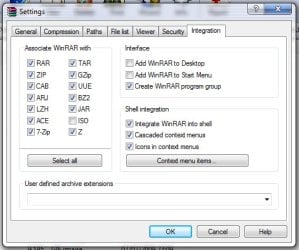
You could even use Winrar's own settings dialog..

Untick them all & hit OK, then re-open the settings page and retick the one's you want.
winrar.jpg

EDIT: Oops, my bad, you didn't mention winrar. :o
Blame Zidane for putting Winrar in my head when you never mentioned the App name. :p
 

My Computer My Computer

At a glance

XP Pro SP3 x86/Vista SP2 x64/Win7 x64 Triple-...AMD64 X2 AM2 5000+Corsair TWX 2Gb (2x1Gb) DDR2 800MhzPCI-X 2.0 Inno3D (NVidia) 9500GT 1Gb DDR2
Computer Manufacturer/Model Number
Self Built
OS
XP Pro SP3 x86/Vista SP2 x64/Win7 x64 Triple-boot
CPU
AMD64 X2 AM2 5000+
Motherboard
Asus MSN-X Plus
Memory
Corsair TWX 2Gb (2x1Gb) DDR2 800Mhz
Graphics Card(s)
PCI-X 2.0 Inno3D (NVidia) 9500GT 1Gb DDR2
Sound Card
Onboard Realtec ALC662-GR
Monitor(s) Displays
Relisys 17' CRT (model unknown)
Screen Resolution
1024x768
Hard Drives
750Gb Samsung 7200-3Gb/s 32Mb Cache SATA
PSU
500W
Cooling
Standard AMD CPU Fan, One side, front and rear case fan.
Keyboard
Microsoft Multimedia Keyboard
Mouse
Samsung Optical
Internet Speed
10M
thanx everyone
things are back to normal...............thank god lol;)
 

My Computer My Computer

At a glance

windows 7 Home Premium5gbNvdia
OS
windows 7 Home Premium
Memory
5gb
Graphics Card(s)
Nvdia
You could even use Winrar's own settings dialog..

Untick them all & hit OK, then re-open the settings page and retick the one's you want.
View attachment 17068

EDIT: Oops, my bad, you didn't mention winrar. :o
Blame Zidane for putting Winrar in my head when you never mentioned the App name. :p


its 7zip:)
 

My Computer My Computer

At a glance

windows 7 Home Premium5gbNvdia
OS
windows 7 Home Premium
Memory
5gb
Graphics Card(s)
Nvdia
You could even use Winrar's own settings dialog..

Untick them all & hit OK, then re-open the settings page and retick the one's you want.
View attachment 17068

EDIT: Oops, my bad, you didn't mention winrar. :o
Blame Zidane for putting Winrar in my head when you never mentioned the App name. :p
Hey now (I was just reading this thread and seen the "Blame Zidane..." line) I only assumed he used what most people I know do:pI wish I could say "Fooled ya" on this one but I can't:cry::D
 

My Computer My Computer

At a glance

Windows 7 Home Premium x64 - Mac OS X 10.6.4 x64Intel Core 2 Duo T9300 2.5 GHz4GB Kingston DDR2-800NVIDIA Geforce 8600M GT (512MB Model)
Computer Manufacturer/Model Number
Compal JFT02 (Custom Build Laptop)
OS
Windows 7 Home Premium x64 - Mac OS X 10.6.4 x64
CPU
Intel Core 2 Duo T9300 2.5 GHz
Motherboard
JFT02
Memory
4GB Kingston DDR2-800
Graphics Card(s)
NVIDIA Geforce 8600M GT (512MB Model)
Sound Card
Realtek HD Audio
Monitor(s) Displays
WUXGA Standard Laptop Display
Screen Resolution
1680*1050
Hard Drives
Toshiba 320GB 5400RPM Laptop HD
PSU
Standard Laptop Power Supply
Case
Standard Laptop Case
Cooling
Standard Laptop Cooling
Keyboard
Standard Laptop 105 Key-Keyboard
Mouse
Synaptics Touchpad
Internet Speed
Verizion Online DSL 3360/864 kbs (dl/up)
Ahh, ok!

How did you fix it? was it a similar thing with 7zip's settings or did you have to reinstall it or something?

EDIT: lol! I read the thread again after posting and realised he didn't mention it Zidane. :)
 

My Computer My Computer

At a glance

XP Pro SP3 x86/Vista SP2 x64/Win7 x64 Triple-...AMD64 X2 AM2 5000+Corsair TWX 2Gb (2x1Gb) DDR2 800MhzPCI-X 2.0 Inno3D (NVidia) 9500GT 1Gb DDR2
Computer Manufacturer/Model Number
Self Built
OS
XP Pro SP3 x86/Vista SP2 x64/Win7 x64 Triple-boot
CPU
AMD64 X2 AM2 5000+
Motherboard
Asus MSN-X Plus
Memory
Corsair TWX 2Gb (2x1Gb) DDR2 800Mhz
Graphics Card(s)
PCI-X 2.0 Inno3D (NVidia) 9500GT 1Gb DDR2
Sound Card
Onboard Realtec ALC662-GR
Monitor(s) Displays
Relisys 17' CRT (model unknown)
Screen Resolution
1024x768
Hard Drives
750Gb Samsung 7200-3Gb/s 32Mb Cache SATA
PSU
500W
Cooling
Standard AMD CPU Fan, One side, front and rear case fan.
Keyboard
Microsoft Multimedia Keyboard
Mouse
Samsung Optical
Internet Speed
10M
Ahh, ok!

How did you fix it? was it a similar thing with 7zip's settings or did you have to reinstall it or something?
He might have just selected 7zip.exe (I think...) or accessed the 7 zip file manager settings and did it there
 

My Computer My Computer

At a glance

Windows 7 Home Premium x64 - Mac OS X 10.6.4 x64Intel Core 2 Duo T9300 2.5 GHz4GB Kingston DDR2-800NVIDIA Geforce 8600M GT (512MB Model)
Computer Manufacturer/Model Number
Compal JFT02 (Custom Build Laptop)
OS
Windows 7 Home Premium x64 - Mac OS X 10.6.4 x64
CPU
Intel Core 2 Duo T9300 2.5 GHz
Motherboard
JFT02
Memory
4GB Kingston DDR2-800
Graphics Card(s)
NVIDIA Geforce 8600M GT (512MB Model)
Sound Card
Realtek HD Audio
Monitor(s) Displays
WUXGA Standard Laptop Display
Screen Resolution
1680*1050
Hard Drives
Toshiba 320GB 5400RPM Laptop HD
PSU
Standard Laptop Power Supply
Case
Standard Laptop Case
Cooling
Standard Laptop Cooling
Keyboard
Standard Laptop 105 Key-Keyboard
Mouse
Synaptics Touchpad
Internet Speed
Verizion Online DSL 3360/864 kbs (dl/up)
well guys technically idk if i really fixed it O.O
i just set 7zip to open it as default
originally before this happned the rar files icon just looked like a document paper
but once i changed it [Accidentally] to I.E
i screwed up:shock:
 

My Computer My Computer

At a glance

windows 7 Home Premium5gbNvdia
OS
windows 7 Home Premium
Memory
5gb
Graphics Card(s)
Nvdia
He might have just selected 7zip.exe (I think...) or accessed the 7 zip file manager settings and did it there


well guys technically idk if i really fixed it O.O
i just set 7zip to open it as default
originally before this happned the rar files icon just looked like a document paper
but once i changed it [Accidentally] to I.E
i screwed up:shock:
 

My Computer My Computer

At a glance

windows 7 Home Premium5gbNvdia
OS
windows 7 Home Premium
Memory
5gb
Graphics Card(s)
Nvdia
Back
Top