Windows Update failing, attached diagnostics log

Crowface

New member
Local time
4:14 AM
Messages
11
Hello all,

Windows 7 is failing to install around 10 updates, service pack 1 being one of them. I've read what I could, but most of the quick fixes aren't working. I've seen a few posts where someone provides files to install manually and it fixes it, but i don't know where they are getting them.

Attached is the Update Readiness log. Thanks for any help, and please ask if you need more info.

Win7Ult x64 Fresh Install
 

Attachments

My Computer My Computer

OS
Windows 7 Ultimate x64
CPU
I7 2600K 3.4GHz
Motherboard
ASUS
Graphics Card(s)
GeForce 570
Sound Card
X-Infiniti Titanium
Hard Drives
1x250GB SSD
1x1TB SATA3.0

My Computer My Computer

Computer type
PC/Desktop
Computer Manufacturer/Model Number
Built 2/11/2011
OS
Windows 7 Pro-x64
CPU
i7-2600 3.4GHz - 3.8GHz Turbo
Motherboard
Intel DH67BL-B3
Memory
8Gb - 2x4GB, Muskin 991770 PC3-1333
Graphics Card(s)
Integrated Intel HD 2000
Sound Card
Integrated Intel 10.1 HD, RealTek ALC892
Monitor(s) Displays
Asus LCD VH222H, Haier HL24XSL2a
Screen Resolution
1920x1080, 1920x1080
Hard Drives
Crucial SSD C300-128Gb,
Western Digital WD5002AALX - 500Gb,
Western Digital WD7501AALS - 750Gb
PSU
Seasonic 650W 80+ Gold Modular
Case
Rosewill Defender
Cooling
Stock CPU, Four 120mm case fans, PCH fan added
Keyboard
Logitech EX100 Y-RBH94 Wireless
Mouse
Logitech EX100 M-RCE95 Wireless
Internet Speed
3.0/1.5 Mbs
Antivirus
Microsoft Security Essentials
Browser
Microsoft Internet Explorer 11
Other Info
Antec Veris Premier-Multimedia IR Station,
Cyber Accoustics-3602 Speakers,
AFT XM-5U Card Reader,
Hauppauge TV-HVR-2250,
Sony LX300 USB Turntable
Ran the troubleshooter, the Readiness checker log, disabled AV, tried manually installing it
 

My Computer My Computer

OS
Windows 7 Ultimate x64
CPU
I7 2600K 3.4GHz
Motherboard
ASUS
Graphics Card(s)
GeForce 570
Sound Card
X-Infiniti Titanium
Hard Drives
1x250GB SSD
1x1TB SATA3.0
Hi Crowface, This should help.
-
First, make a backup of your hard drive, just to be safe.
Next, try the following one-minute, one-line MSI-error fix.
It deletes the Registry item that contains the data from a broken or unfinished MSI run.
Open an admin-level Command Prompt window.
Now, type (or copy/paste) the following long line into the command window:

reg delete HKLMSOFTWAREMicrosoftSQMClient WindowsDisabledSessions /va /f

Press the Enter key then close the Command Prompt window.
Reboot your PC to make sure you’re getting a fresh start.
When you restart, the unfinished or broken installation Registry data should be gone,
allowing you to update normally.
 

My Computer My Computer

Computer Manufacturer/Model Number
Look in my Signature.
OS
Win7 H.Prem. 32bit+SP1
No luck. Deleted the registry key, restarted, tried to update... and fail. I've seen a few people have luck if they unzip some files into a certain directory... has anyone else seen this fix and know how to go about doing it?
 

My Computer My Computer

OS
Windows 7 Ultimate x64
CPU
I7 2600K 3.4GHz
Motherboard
ASUS
Graphics Card(s)
GeForce 570
Sound Card
X-Infiniti Titanium
Hard Drives
1x250GB SSD
1x1TB SATA3.0
Open a command prompt by typing cmd in start menu search box type sfc /scannow and hit enter.
 

My Computer My Computer

Computer Manufacturer/Model Number
Look in my Signature.
OS
Win7 H.Prem. 32bit+SP1
Yup, already tried that, no luck. Keep the suggestions coming though :)
 

My Computer My Computer

OS
Windows 7 Ultimate x64
CPU
I7 2600K 3.4GHz
Motherboard
ASUS
Graphics Card(s)
GeForce 570
Sound Card
X-Infiniti Titanium
Hard Drives
1x250GB SSD
1x1TB SATA3.0
Hey buddy i have 3 Things for you to try,

First Delete all the windows update files from your disk drive.

Re-download all the updates and Do a Shutdown Install, (I.e Let it update Whilst Shutting down, not in session)


You could refer to this page and try to install each update individually, not through the patcher.

Or you could skip this as it is a non-essential update for IE 9
 

My Computer My Computer

Computer type
PC/Desktop
Computer Manufacturer/Model Number
Custom Build
OS
Windows 8.1
CPU
Intel i5 3750k OC'd 4.0Ghz
Motherboard
P8Z77-V LX3
Memory
16GB Vengence Corsair
Graphics Card(s)
GTX 770 OC 2GB Windforce
Sound Card
C-Media 7.1 Surround Card
Monitor(s) Displays
Asus 3D 23" & BenQ 24" & LG 19"
Screen Resolution
1920*1080, 1920*1080, 1440*900
Hard Drives
Crucial 512GB SSD
WD 1.5 TB
WD 500Gb
PSU
850MW Silverstone
Case
inWin DragonRider
Cooling
4 * 140mm LED Akasa, One 140mm Fan Akasa
Keyboard
Corsair k95
Mouse
R.A.T 7 Contagion
Internet Speed
152 Mb Fiber Optic
Antivirus
ESET Nod32
Browser
Waterfox x64 / Chrome x64
Other Info
Freenas / Plex Media server
Q6600
6Gb DDR3
6TB ZFS Raid
500W PSu
2 x Intel NIC's
The KB article in the attached file must be a library file or something, because it's preventing me from installing 10 updates. SP1 + 9 critical security updates.
 

My Computer My Computer

OS
Windows 7 Ultimate x64
CPU
I7 2600K 3.4GHz
Motherboard
ASUS
Graphics Card(s)
GeForce 570
Sound Card
X-Infiniti Titanium
Hard Drives
1x250GB SSD
1x1TB SATA3.0
After running Windows Update, I get this.. if it helps anyone.

Errors found:

Code 80010108
Code 800B0100
Code C355

10 Failed updates
 

My Computer My Computer

OS
Windows 7 Ultimate x64
CPU
I7 2600K 3.4GHz
Motherboard
ASUS
Graphics Card(s)
GeForce 570
Sound Card
X-Infiniti Titanium
Hard Drives
1x250GB SSD
1x1TB SATA3.0
Sorry mate did you try deleting the files and then re-downloading them and doing a Shutdown Install?
 

My Computer My Computer

Computer type
PC/Desktop
Computer Manufacturer/Model Number
Custom Build
OS
Windows 8.1
CPU
Intel i5 3750k OC'd 4.0Ghz
Motherboard
P8Z77-V LX3
Memory
16GB Vengence Corsair
Graphics Card(s)
GTX 770 OC 2GB Windforce
Sound Card
C-Media 7.1 Surround Card
Monitor(s) Displays
Asus 3D 23" & BenQ 24" & LG 19"
Screen Resolution
1920*1080, 1920*1080, 1440*900
Hard Drives
Crucial 512GB SSD
WD 1.5 TB
WD 500Gb
PSU
850MW Silverstone
Case
inWin DragonRider
Cooling
4 * 140mm LED Akasa, One 140mm Fan Akasa
Keyboard
Corsair k95
Mouse
R.A.T 7 Contagion
Internet Speed
152 Mb Fiber Optic
Antivirus
ESET Nod32
Browser
Waterfox x64 / Chrome x64
Other Info
Freenas / Plex Media server
Q6600
6Gb DDR3
6TB ZFS Raid
500W PSu
2 x Intel NIC's

My Computer My Computer

OS
Windows 7 Ultimate x64
CPU
I7 2600K 3.4GHz
Motherboard
ASUS
Graphics Card(s)
GeForce 570
Sound Card
X-Infiniti Titanium
Hard Drives
1x250GB SSD
1x1TB SATA3.0
Uhh, I manually downloaded SP1 and tried to install, but as soon as I double click it, it fails. Let me get a link to another thread where the guy fixed it with the zip file...


http://www.sevenforums.com/windows-...-unable-install-updates-because-800b0100.html


That's the fix I'm talking about... but I have no idea where he's getting those files in the zip archive from... anyone know?

Hello!

I make those .zip archives, and you are perfectly correct, that is exactly the fix you need :)

I shall create you one. However, before I can do that, I need one piece of information from you. Do you have Internet Explorer 9 installed? If you don't, please do not install it, and if you do, please do not uninstall it. Just leave it how it is until I have fix this, but just tell me whether you have it or not.

Thanks a lot!

Richard
 

My Computer My Computer

Computer Manufacturer/Model Number
Dell XPS 420
OS
Vista Home Premium x86 SP2
CPU
Intel Core 2 Quad Q9300 2.50GHz
Motherboard
Stock Dell 0TP406
Memory
4 gb (DDR2 800) 400MHz
Graphics Card(s)
ATI Radeon HD 3870 (512 MBytes)
Monitor(s) Displays
1 x Dell 2007FP and 1 x (old) Sonic flat screen
Screen Resolution
1600 x 1200 and 1280 x 1204
Hard Drives
1 x 640Gb (SATA 300) Western Digital: WDC WD6400AAKS-75A7B0 1 x 1Tb (SATA 600) Western Digital: Caviar Black, SATA 6GB/S, 64Mb cache, 8ms Western Digital: WDC WD1002FAEX-00Z3A0 ATA Device
Case
Dell XPS 420
Cooling
Stock Fan
Keyboard
Dell Bluetooth
Mouse
Advent Optical ADE-WG01 (colour change light up)
Internet Speed
Varies from 10kb/s to 170kb/s. So unreliable it is not funny
Other Info
ASUS USB 3.0 5Gbps/SATA 6Gbps - PCI-Express Combo Controller Card (U3S6)
Negative, I don't have it installed. Running IE 8 right now. When you do upload the files, could you tell me the reasoning behind it, and how you are making them? I'd like to know for future reference. Thanks!
 

My Computer My Computer

OS
Windows 7 Ultimate x64
CPU
I7 2600K 3.4GHz
Motherboard
ASUS
Graphics Card(s)
GeForce 570
Sound Card
X-Infiniti Titanium
Hard Drives
1x250GB SSD
1x1TB SATA3.0
Hello again!

Negative, I don't have it installed. Running IE 8 right now.

Thanks a lot! Read on for why this matters :)

When you do upload the files, could you tell me the reasoning behind it, and how you are making them? I'd like to know for future reference. Thanks!

That would be no problem at all! I would love to explain this to you!

Right, I don't know exactly what you do and don't know, so I shall verge on the side of over-explaining, rather than under-explaining. Please do not be offended at all by this, as I promise that no offence is ever intended. If there is anything you do not understand, please do feel free to ask as many questions as you like. Right, let's get on with it!

As I think you already know, the only log I am using is the one created by the System Update Readiness Tool (SURT), which is created in C:\Windows\Logs\CBS\CheckSUR.log. When it comes to diagnosing complicated issues, many more logs come into play. But your error code is extremely common, and quite simple to fix.

If you look under my name, you will see that I am still running Vista (the reason being that I can't afford to buy 7 :)) However, I am a Vista supporter. The error you are receiving now is extremely common for Windows 7, and there is no direct equivalent for Windows Vista. Vista had a small multitude of common Windows Update errors, all of which were harder to fix than this one, especially one particularly dire error for Vista SP1, the infamous 0xc01a001d, which I had a success rate of about 5%, otherwise a Clean Install (not even a Repair Install). That was bad. However, this error code is really, really common. A victory for Vista over 7! It may be about the only time I can say that, but it is true!

Anyway, back on topic! Let's have a look at your log file.

Code:
=================================
Checking System Update Readiness.
Binary Version 6.1.7601.21645
Package Version 13.0
2011-09-28 07:54

Checking Windows Servicing Packages

Checking Package Manifests and Catalogs
(f)    CBS MUM Corrupt    0x800F0900    servicing\Packages\Package_12_for_KB2559049~31bf3856ad364e35~amd64~~6.1.1.2.mum        Line 1: 
(f)    CBS Catalog Corrupt    0x800B0100    servicing\Packages\Package_12_for_KB2559049~31bf3856ad364e35~amd64~~6.1.1.2.cat        
(f)    CBS MUM Corrupt    0x800F0900    servicing\Packages\Package_13_for_KB2559049~31bf3856ad364e35~amd64~~6.1.1.2.mum        Line 1: 
(f)    CBS Catalog Corrupt    0x800B0100    servicing\Packages\Package_13_for_KB2559049~31bf3856ad364e35~amd64~~6.1.1.2.cat        
(f)    CBS MUM Corrupt    0x800F0900    servicing\Packages\Package_14_for_KB2559049~31bf3856ad364e35~amd64~~6.1.1.2.mum        Line 1: 
(f)    CBS Catalog Corrupt    0x800B0100    servicing\Packages\Package_14_for_KB2559049~31bf3856ad364e35~amd64~~6.1.1.2.cat        
(f)    CBS MUM Corrupt    0x800F0900    servicing\Packages\Package_15_for_KB2559049~31bf3856ad364e35~amd64~~6.1.1.2.mum        Line 1: 
(f)    CBS Catalog Corrupt    0x800B0100    servicing\Packages\Package_15_for_KB2559049~31bf3856ad364e35~amd64~~6.1.1.2.cat        
(f)    CBS MUM Corrupt    0x800F0900    servicing\Packages\Package_3_for_KB2559049~31bf3856ad364e35~amd64~~6.1.1.2.mum        Line 1: 
(f)    CBS Catalog Corrupt    0x800B0100    servicing\Packages\Package_3_for_KB2559049~31bf3856ad364e35~amd64~~6.1.1.2.cat        
(f)    CBS MUM Corrupt    0x800F0900    servicing\Packages\Package_4_for_KB2559049~31bf3856ad364e35~amd64~~6.1.1.2.mum        Line 1: 
(f)    CBS Catalog Corrupt    0x800B0100    servicing\Packages\Package_4_for_KB2559049~31bf3856ad364e35~amd64~~6.1.1.2.cat        
(f)    CBS MUM Corrupt    0x800F0900    servicing\Packages\Package_5_for_KB2559049~31bf3856ad364e35~amd64~~6.1.1.2.mum        Line 1: 
(f)    CBS Catalog Corrupt    0x800B0100    servicing\Packages\Package_5_for_KB2559049~31bf3856ad364e35~amd64~~6.1.1.2.cat        
(f)    CBS MUM Corrupt    0x800F0900    servicing\Packages\Package_for_KB2559049_RTM~31bf3856ad364e35~amd64~~6.1.1.2.mum        Line 1: 
(f)    CBS Catalog Corrupt    0x800B0100    servicing\Packages\Package_for_KB2559049_RTM~31bf3856ad364e35~amd64~~6.1.1.2.cat        
(f)    CBS MUM Corrupt    0x800F0900    servicing\Packages\Package_for_KB2559049_SP1~31bf3856ad364e35~amd64~~6.1.1.2.mum        Line 1: 
(f)    CBS Catalog Corrupt    0x800B0100    servicing\Packages\Package_for_KB2559049_SP1~31bf3856ad364e35~amd64~~6.1.1.2.cat        
(f)    CBS MUM Corrupt    0x800F0900    servicing\Packages\Package_for_KB2559049~31bf3856ad364e35~amd64~~6.1.1.2.mum        Line 1: 
(f)    CBS Catalog Corrupt    0x800B0100    servicing\Packages\Package_for_KB2559049~31bf3856ad364e35~amd64~~6.1.1.2.cat        

Checking Package Watchlist

Checking Component Watchlist

Checking Packages

Checking Component Store

Summary:
Seconds executed: 112
 Found 20 errors
  CBS MUM Corrupt Total count: 10
  CBS Catalog Corrupt Total count: 10

Unavailable repair files:
    servicing\packages\Package_12_for_KB2559049~31bf3856ad364e35~amd64~~6.1.1.2.mum
    servicing\packages\Package_12_for_KB2559049~31bf3856ad364e35~amd64~~6.1.1.2.mum
    servicing\packages\Package_13_for_KB2559049~31bf3856ad364e35~amd64~~6.1.1.2.mum
    servicing\packages\Package_13_for_KB2559049~31bf3856ad364e35~amd64~~6.1.1.2.mum
    servicing\packages\Package_14_for_KB2559049~31bf3856ad364e35~amd64~~6.1.1.2.mum
    servicing\packages\Package_14_for_KB2559049~31bf3856ad364e35~amd64~~6.1.1.2.mum
    servicing\packages\Package_15_for_KB2559049~31bf3856ad364e35~amd64~~6.1.1.2.mum
    servicing\packages\Package_15_for_KB2559049~31bf3856ad364e35~amd64~~6.1.1.2.mum
    servicing\packages\Package_3_for_KB2559049~31bf3856ad364e35~amd64~~6.1.1.2.mum
    servicing\packages\Package_3_for_KB2559049~31bf3856ad364e35~amd64~~6.1.1.2.mum
    servicing\packages\Package_4_for_KB2559049~31bf3856ad364e35~amd64~~6.1.1.2.mum
    servicing\packages\Package_4_for_KB2559049~31bf3856ad364e35~amd64~~6.1.1.2.mum
    servicing\packages\Package_5_for_KB2559049~31bf3856ad364e35~amd64~~6.1.1.2.mum
    servicing\packages\Package_5_for_KB2559049~31bf3856ad364e35~amd64~~6.1.1.2.mum
    servicing\packages\Package_for_KB2559049_RTM~31bf3856ad364e35~amd64~~6.1.1.2.mum
    servicing\packages\Package_for_KB2559049_RTM~31bf3856ad364e35~amd64~~6.1.1.2.mum
    servicing\packages\Package_for_KB2559049_SP1~31bf3856ad364e35~amd64~~6.1.1.2.mum
    servicing\packages\Package_for_KB2559049_SP1~31bf3856ad364e35~amd64~~6.1.1.2.mum
    servicing\packages\Package_for_KB2559049~31bf3856ad364e35~amd64~~6.1.1.2.mum
    servicing\packages\Package_for_KB2559049~31bf3856ad364e35~amd64~~6.1.1.2.mum
    servicing\packages\Package_12_for_KB2559049~31bf3856ad364e35~amd64~~6.1.1.2.cat
    servicing\packages\Package_12_for_KB2559049~31bf3856ad364e35~amd64~~6.1.1.2.cat
    servicing\packages\Package_13_for_KB2559049~31bf3856ad364e35~amd64~~6.1.1.2.cat
    servicing\packages\Package_13_for_KB2559049~31bf3856ad364e35~amd64~~6.1.1.2.cat
    servicing\packages\Package_14_for_KB2559049~31bf3856ad364e35~amd64~~6.1.1.2.cat
    servicing\packages\Package_14_for_KB2559049~31bf3856ad364e35~amd64~~6.1.1.2.cat
    servicing\packages\Package_15_for_KB2559049~31bf3856ad364e35~amd64~~6.1.1.2.cat
    servicing\packages\Package_15_for_KB2559049~31bf3856ad364e35~amd64~~6.1.1.2.cat
    servicing\packages\Package_3_for_KB2559049~31bf3856ad364e35~amd64~~6.1.1.2.cat
    servicing\packages\Package_3_for_KB2559049~31bf3856ad364e35~amd64~~6.1.1.2.cat
    servicing\packages\Package_4_for_KB2559049~31bf3856ad364e35~amd64~~6.1.1.2.cat
    servicing\packages\Package_4_for_KB2559049~31bf3856ad364e35~amd64~~6.1.1.2.cat
    servicing\packages\Package_5_for_KB2559049~31bf3856ad364e35~amd64~~6.1.1.2.cat
    servicing\packages\Package_5_for_KB2559049~31bf3856ad364e35~amd64~~6.1.1.2.cat
    servicing\packages\Package_for_KB2559049_RTM~31bf3856ad364e35~amd64~~6.1.1.2.cat
    servicing\packages\Package_for_KB2559049_RTM~31bf3856ad364e35~amd64~~6.1.1.2.cat
    servicing\packages\Package_for_KB2559049_SP1~31bf3856ad364e35~amd64~~6.1.1.2.cat
    servicing\packages\Package_for_KB2559049_SP1~31bf3856ad364e35~amd64~~6.1.1.2.cat
    servicing\packages\Package_for_KB2559049~31bf3856ad364e35~amd64~~6.1.1.2.cat
    servicing\packages\Package_for_KB2559049~31bf3856ad364e35~amd64~~6.1.1.2.cat

Customer Experience report successfully uploaded.  Thank you for participating.  For more information, see the Microsoft Customer Experience Improvement Program on the Microsoft web site.

Firstly, look at the list after "Unavailable repair files:". You will see that every entry there is duplicated. Nobody knows for sure the reason why, but I do have a very strong suspicion.

Take an example two lines:

(f) CBS MUM Corrupt 0x800F0900 servicing\Packages\Package_12_for_KB2559049~31bf3856ad364e35~amd64~~6.1.1.2.mum Line 1:
(f) CBS Catalog Corrupt 0x800B0100 servicing\Packages\Package_12_for_KB2559049~31bf3856ad364e35~amd64~~6.1.1.2.cat

(f): Means FATAL. You may occasionally see (w), for WARNING. Also, you will see a (fix), on the NEXT line. This means that the previous line has been FIXed.

CBS MUM Corrupt/CBS Catalog Corrupt: Explains the type of error message. There are SO many possible values here.

0x800B0100/0x800F0900: The error code you will receive back from Windows Update. If you fix all of the 0x800B0100 lines, you will receive a 0x800F0900 error from Windows Update. Vast number of possible values.

Next: Name and location of corrupt file.

Line 1: Shows you the contents of the first line. Kind of useless. Here, your files are empty. Sometimes this comes back as junk.

Basically, you have 20 corrupt Windows files, and these need to be replaced.

THE KRUX: The .zip file that I will provide you with contains good copies of these 20 files, we put them into a certain location, the System Update Readiness Tool performs the switch-over, these 20 files are no longer corrupt, and so Windows Update works again. That is the theory behind this.

Right, how do you source these files! Firstly, DO NOT take them out of a current, working, copy of Windows 7. Some people will do this. Some people will even recommend it, because they know of no other way. 95% of the time, this will be perfect. If you remember to match up computers with the same copy of Internet Explorer, I would guess that the success rate would rise to 98% or so. But it is not perfect! It is dangerous! There is a better way! Please use my way!

A few of the many dangers:

  • Mismatch Internet Explorer versions
  • Mismatch other components
  • That machine is not as clean as you first thought
  • Unlikely to be able to source all from a single machine - time consuming and dangerous
  • Windows features on and off
  • Language packs and regional settings
  • Different versions of programs
  • Any two machines are not the same!
  • The most important point which I left to the end and have forgotten...:huh:
Anyway, I am hungry! I shall go and have a bite to eat, and pick up this story in half an hour!

Richard
 

My Computer My Computer

Computer Manufacturer/Model Number
Dell XPS 420
OS
Vista Home Premium x86 SP2
CPU
Intel Core 2 Quad Q9300 2.50GHz
Motherboard
Stock Dell 0TP406
Memory
4 gb (DDR2 800) 400MHz
Graphics Card(s)
ATI Radeon HD 3870 (512 MBytes)
Monitor(s) Displays
1 x Dell 2007FP and 1 x (old) Sonic flat screen
Screen Resolution
1600 x 1200 and 1280 x 1204
Hard Drives
1 x 640Gb (SATA 300) Western Digital: WDC WD6400AAKS-75A7B0 1 x 1Tb (SATA 600) Western Digital: Caviar Black, SATA 6GB/S, 64Mb cache, 8ms Western Digital: WDC WD1002FAEX-00Z3A0 ATA Device
Case
Dell XPS 420
Cooling
Stock Fan
Keyboard
Dell Bluetooth
Mouse
Advent Optical ADE-WG01 (colour change light up)
Internet Speed
Varies from 10kb/s to 170kb/s. So unreliable it is not funny
Other Info
ASUS USB 3.0 5Gbps/SATA 6Gbps - PCI-Express Combo Controller Card (U3S6)
OK, so half an hour when to pot, and turned into 12 hours.

Anyway, the overall reason is that a single file name can have multiple contents, and not all computers have every file.

Well, the correct way is to extract a replacement file from the actual install, which makes sense.

Right, there are two tutorials for System Update Readiness Tool logfiles, both of which are long, and both of which only brush the surface. If you are truly dedicated, read this! http://www.sevenforums.com/tutorial...eadiness-tool-checksur-log-file-analyzis.html

It is not an easy read. The author's first language is not English, and it can be hard to follow at times.

However, it also teaches the basic, fundamental techniques. These are not longer used. Nowadays, we have automated tools (written by me ) to automate almost all scenarios, and tutorials for their use, usually reserved for apprentices in this field of study. If you are interested, send me a Private Message, and tell me which bits you are interested in. You are more than welcome to (and I am the author so I have the keys and rights)

Right, let's do things the semi-manual way.

Look again at your log. Take an example line.

"Package_for_KB2559049~31bf3856ad364e35~amd64~~6.1.1.2.cat"

Find which Knowledge Base (KB) article it belongs to, in this case KB2559049.

Check that there are no other KBs in the log. For you, there are not. If there are, repeat the below for each one.

Visit support.microsoft.com/kb/{number}, in this case support.microsoft.com/kb/2559049

(TIP: In actual fact, it is faster to Google KB2559049)

Select the download link for IT Professionals (none of the others will bring you to the correct page)

Find the correct download link: Download Details - Microsoft Download Center - Cumulative Security Update for Internet Explorer 8 in Windows 7 x64 Edition (KB2559049)

Understand now why I asked if you had IE8 or IE9?

Download it.

The above tutorial will show you how to extract it.

However, that is really slow. If you want to be an efficient pro, follow this tutorial instead: http://www.sevenforums.com/tutorials/155584-windows-update-extract-update.html

Now use your extracted files to produce your fix. It will take ages!

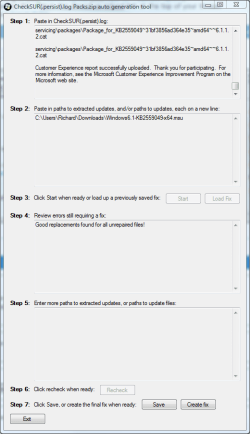
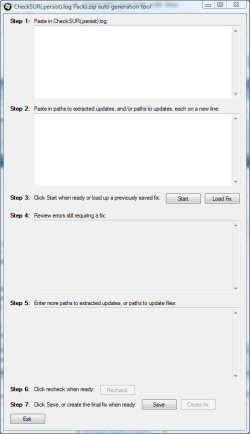
But look, I have a tool to automate the whole thing!
SURT_Fix_Generator.PNG

SURT_Fix_Generator2.PNG

Now that does save me a lot of time! It will analyse the log file, extract the update, create the fix, and .zip it up for me! I really no longer do any work at all! If you want a copy, please drop me a PM. And that goes for anybody reading this.

Very soon, there will be a version of that tool which inexperienced users can use. It features a nice wizard, analyses the log file, downloads the required files from Microsoft servers, creates the fix, and fixes the machine, all in a simple to use Next->Next->Finish format. Now that is cool :cool: About 1 month away. Perfectly in time for any trends in Windows 8 update failures. I shall be hot off the mark for Windows 8!

There are so many more programs of mine, tricks, and so much more to learn. If you are interested, ask or PM me! Anyway, onto the fix (which you hopefully understand a little better now)

WARNING! This fix was created specifically for this user! If you are not this user, do not follow these instructions!
@Crowface: Ignore the above :)

Download the attached .zip file. Inside it, will be two folders, Packages and Manifests.

Create these folders if they do not already exist: C:\Windows\Temp\CheckSur\Servicing\Packages\ and C:\Windows\Temp\CheckSur\winsxs\Manifests

Extract Packs.zip onto your Desktop. Please place the contents of my Desktop\Packages in C:\Windows\Temp\CheckSur\Servicing\Packages\ and my Desktop\Manifests in C:\Windows\Temp\CheckSur\winsxs\Manifests.

DO NOT place the .zip file in that folder, or the folders themselves. Make sure that a lot of files are in each of those Checksur folder. NOTE: For you there are no manifests. Just move on.

Re-run the System Update Readiness Tool, and get me another copy of C:\Windows\Logs\CBS\CheckSUR.log.

Also, please retest Windows Updates (with fingers slightly crossed, no matter how much we both know that that won't help! lol.)

Thanks a lot!

Richard

 

Attachments

My Computer My Computer

Computer Manufacturer/Model Number
Dell XPS 420
OS
Vista Home Premium x86 SP2
CPU
Intel Core 2 Quad Q9300 2.50GHz
Motherboard
Stock Dell 0TP406
Memory
4 gb (DDR2 800) 400MHz
Graphics Card(s)
ATI Radeon HD 3870 (512 MBytes)
Monitor(s) Displays
1 x Dell 2007FP and 1 x (old) Sonic flat screen
Screen Resolution
1600 x 1200 and 1280 x 1204
Hard Drives
1 x 640Gb (SATA 300) Western Digital: WDC WD6400AAKS-75A7B0 1 x 1Tb (SATA 600) Western Digital: Caviar Black, SATA 6GB/S, 64Mb cache, 8ms Western Digital: WDC WD1002FAEX-00Z3A0 ATA Device
Case
Dell XPS 420
Cooling
Stock Fan
Keyboard
Dell Bluetooth
Mouse
Advent Optical ADE-WG01 (colour change light up)
Internet Speed
Varies from 10kb/s to 170kb/s. So unreliable it is not funny
Other Info
ASUS USB 3.0 5Gbps/SATA 6Gbps - PCI-Express Combo Controller Card (U3S6)
Well, we're almost out of the woods. The Update tool fixed and installed SP1 and a couple more hotfixes. Thanks for that, amazing work by the way. Still having trouble with 4 hotfixes, though. I've run the Update Readiness tool and it says no errors, but I still can't install:

KB2559049
KB2491683
KB2511455
KB2544893

It's giving me error code 8024200D.

Any more magic advice?

Edit: Also, it won't let me install IE9 through the update tool. I haven't tried manually, but I'll hold off on that as I use Firefox mainly. I'd still like to update IE to 9 eventually, as multiple software programs use IE9 as a default, unchangeable browser, such as games with embedded browsers. This gives the Error Code 2.

Restarted multiple times, still no luck.

Another Edit: Tried manually deleting the SoftwareDistribution folder to clear any potentially corrupted downloads, but it just downloaded them fresh and still failed.
 
Last edited:

My Computer My Computer

OS
Windows 7 Ultimate x64
CPU
I7 2600K 3.4GHz
Motherboard
ASUS
Graphics Card(s)
GeForce 570
Sound Card
X-Infiniti Titanium
Hard Drives
1x250GB SSD
1x1TB SATA3.0

My Computer My Computer

Computer type
Laptop
Computer Manufacturer/Model Number
Asus K52F or Lenovo B51-80
OS
Win 7 x64 Home Premium (and x86 VirtualBox VM)/Win10
CPU
i3 370M/i7 6500U
Motherboard
Asus/Lenovo
Memory
8GB - finally :)/8GB
Graphics Card(s)
it's an i3, dude!/dual Intel&nVidia
Sound Card
onboard
Monitor(s) Displays
15.6" built-in
Screen Resolution
1366x768/1920x1080
Hard Drives
750GB Seagate internal
Sundry external drives attached to other computers on the local network
1TB SSD on the Lenovo
PSU
n/a
Internet Speed
as much as I can get - usually on a dongle/phone, so <1MB/s
Antivirus
MSE/Defender
Browser
IE11/12/Edge/Chrome/FF(if I must)
All the problems in the log relate to KB2559049 update - I suggest that you try reinstalling that offline (you may have to uninstall it first)

MS11-057: Cumulative Security Update for Internet Explorer: August 9, 2011

That is not the best fix for the issue. It will fail, (and may leave the system in a worse state than before). If you wish to learn how to analyse those log files, and create proper fixes, please read the publically avaiable tutorials, my above posts which give hints at the correct fix, or send me a Private Message.

Thanks a lot for your co-operation,

Richard
 

My Computer My Computer

Computer Manufacturer/Model Number
Dell XPS 420
OS
Vista Home Premium x86 SP2
CPU
Intel Core 2 Quad Q9300 2.50GHz
Motherboard
Stock Dell 0TP406
Memory
4 gb (DDR2 800) 400MHz
Graphics Card(s)
ATI Radeon HD 3870 (512 MBytes)
Monitor(s) Displays
1 x Dell 2007FP and 1 x (old) Sonic flat screen
Screen Resolution
1600 x 1200 and 1280 x 1204
Hard Drives
1 x 640Gb (SATA 300) Western Digital: WDC WD6400AAKS-75A7B0 1 x 1Tb (SATA 600) Western Digital: Caviar Black, SATA 6GB/S, 64Mb cache, 8ms Western Digital: WDC WD1002FAEX-00Z3A0 ATA Device
Case
Dell XPS 420
Cooling
Stock Fan
Keyboard
Dell Bluetooth
Mouse
Advent Optical ADE-WG01 (colour change light up)
Internet Speed
Varies from 10kb/s to 170kb/s. So unreliable it is not funny
Other Info
ASUS USB 3.0 5Gbps/SATA 6Gbps - PCI-Express Combo Controller Card (U3S6)
Sorry 'bout that - must remember not to post at silly hours!
 

My Computer My Computer

Computer type
Laptop
Computer Manufacturer/Model Number
Asus K52F or Lenovo B51-80
OS
Win 7 x64 Home Premium (and x86 VirtualBox VM)/Win10
CPU
i3 370M/i7 6500U
Motherboard
Asus/Lenovo
Memory
8GB - finally :)/8GB
Graphics Card(s)
it's an i3, dude!/dual Intel&nVidia
Sound Card
onboard
Monitor(s) Displays
15.6" built-in
Screen Resolution
1366x768/1920x1080
Hard Drives
750GB Seagate internal
Sundry external drives attached to other computers on the local network
1TB SSD on the Lenovo
PSU
n/a
Internet Speed
as much as I can get - usually on a dongle/phone, so <1MB/s
Antivirus
MSE/Defender
Browser
IE11/12/Edge/Chrome/FF(if I must)
Back
Top