Win 7 cannot start, restore or repair possible damage to MBR

kilkennycat

New member
Local time
12:13 PM
Messages
16
Hi,

I am running win 7 x64, I did create a recovery disk in 64 bit, and my laptop also came with a 32 bit recovery Disc.

Yesterday I found out I was infected with a tidserve virus, I used a removal tool from Symantec which seemed to fix the issue, before restarting I also removed some other anti virus software I had installed to try to remove the virus.

After rebooting, my laptop went straight to start windows normally or run repair, it cannot repair.

I have tried using the repair on the disk that will not work or finds no problems.
system restore will also not work.

I have just tried /scannow from command prompt and it tells me it cannot find any intgrity violations however I think I remeber the tool from symantec telling me that the file 'MBR' was infected and it fixed that.

I believe this is the source of my inability to now start up windows.

any help or advise is appreciated.

I am able to back up all my files using command prompt to external HDD but of course if this could be fixed without a complete reinstallation that would be great.

Many Thanks
 

My Computer My Computer

At a glance

windows 7 home premium x64
OS
windows 7 home premium x64
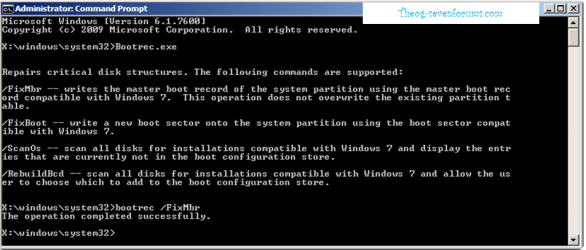
Have you tried fixmbr commnd?
 

My Computer My Computer

At a glance

Windows 7 Ultimate 64BitGenuineIntel Intel(R) Core(TM) DuoCore T2400 ...2.00 GBMobile Intel(R) 945 Express Chipset
Computer Manufacturer/Model Number
Lenovo ThinkPad T60
OS
Windows 7 Ultimate 64Bit
CPU
GenuineIntel Intel(R) Core(TM) DuoCore T2400 @ 1.83GHz
Motherboard
Intel(R) 82801G (ICH7 Family)
Memory
2.00 GB
Graphics Card(s)
Mobile Intel(R) 945 Express Chipset
Sound Card
SoundMAX Integrated Digital HD Audio
Monitor(s) Displays
ThinkPad Display
Screen Resolution
1400x1050
Hard Drives
100Gb SATA
Keyboard
Standard Keyboard
Mouse
HID-compliant Mouse
Internet Speed
Cable Broadband - 54Mbps
Other Info
Intel(R) PRO/1000 PL Network Connection
11a/b/g Wireless LAN Mini PCI Express Adapter
Hi

Yes, tried that first thing this morning and it said it was successful. this is why I now wonder if MBR is really the problem at all and not merely a coincidence.
I am now running CHKDSK waiting to see if that tells me anything
 

My Computer My Computer

At a glance

windows 7 home premium x64
OS
windows 7 home premium x64

My Computer My Computer

At a glance

ME/XP/Vista/Win7
OS
ME/XP/Vista/Win7
Hi theog,

thank you I will try that as soon as chkdk is fiished.
I should add I am really not that great with pc's, My husband was the one who helped me repair the MBR using a method he found on here, but he is at work now leaving me to try to fix this issue.

Thanking you both for taking the time to assist me :)
 

My Computer My Computer

At a glance

windows 7 home premium x64
OS
windows 7 home premium x64
I am running win 7 x64, I did create a recovery disk in 64 bit

It is nice to see someone that made there Recovery Disks, you are 1 in 10,000.
Well done. :thumbsup::dinesh:
 

My Computer My Computer

At a glance

ME/XP/Vista/Win7
OS
ME/XP/Vista/Win7
I have tried using the repair on the disk that will not work or finds no problems.
system restore will also not work.

So you put the oem re-installation disc and did a repair by select "R" at the second prompt (which is where the system detects an already install OS) and it still failed to repair?

I don't like your chances if the chkdsk /r also failed.

Get ready for a new install :p
 

My Computer My Computer

At a glance

Windows 7 Ultimate 64BitGenuineIntel Intel(R) Core(TM) DuoCore T2400 ...2.00 GBMobile Intel(R) 945 Express Chipset
Computer Manufacturer/Model Number
Lenovo ThinkPad T60
OS
Windows 7 Ultimate 64Bit
CPU
GenuineIntel Intel(R) Core(TM) DuoCore T2400 @ 1.83GHz
Motherboard
Intel(R) 82801G (ICH7 Family)
Memory
2.00 GB
Graphics Card(s)
Mobile Intel(R) 945 Express Chipset
Sound Card
SoundMAX Integrated Digital HD Audio
Monitor(s) Displays
ThinkPad Display
Screen Resolution
1400x1050
Hard Drives
100Gb SATA
Keyboard
Standard Keyboard
Mouse
HID-compliant Mouse
Internet Speed
Cable Broadband - 54Mbps
Other Info
Intel(R) PRO/1000 PL Network Connection
11a/b/g Wireless LAN Mini PCI Express Adapter
Hi again, lol yeh first thing I did ! A lot of good its doing me at the moment however :(

I tried to follow your instructions.

I suceeded as far as :

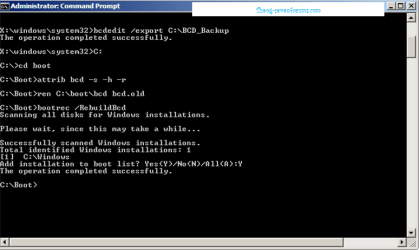
bcdedit /export c:\bcdbackup
the operation completed successfully

X:\windows\system32>c:

c:\> cd boot

The system cannot find the path specified


( please ignore typos using my sons laptop and the keys are a nightmare )
 

My Computer My Computer

At a glance

windows 7 home premium x64
OS
windows 7 home premium x64
Did you try ScanOs.
 

My Computer My Computer

At a glance

ME/XP/Vista/Win7
OS
ME/XP/Vista/Win7
umm no .... Never Heard of it to be honest everything I have tried so far I got from googling *cough*
 

My Computer My Computer

At a glance

windows 7 home premium x64
OS
windows 7 home premium x64
"umm no .... Never Heard of it to be honest " --->:what:
 

My Computer My Computer

At a glance

Windows 7 Ultimate 64BitGenuineIntel Intel(R) Core(TM) DuoCore T2400 ...2.00 GBMobile Intel(R) 945 Express Chipset
Computer Manufacturer/Model Number
Lenovo ThinkPad T60
OS
Windows 7 Ultimate 64Bit
CPU
GenuineIntel Intel(R) Core(TM) DuoCore T2400 @ 1.83GHz
Motherboard
Intel(R) 82801G (ICH7 Family)
Memory
2.00 GB
Graphics Card(s)
Mobile Intel(R) 945 Express Chipset
Sound Card
SoundMAX Integrated Digital HD Audio
Monitor(s) Displays
ThinkPad Display
Screen Resolution
1400x1050
Hard Drives
100Gb SATA
Keyboard
Standard Keyboard
Mouse
HID-compliant Mouse
Internet Speed
Cable Broadband - 54Mbps
Other Info
Intel(R) PRO/1000 PL Network Connection
11a/b/g Wireless LAN Mini PCI Express Adapter
Any reason you are pointing your efforts at c drive?
 

My Computers My Computers

  • At a glance

    7 X64i5 84002x8gb 3200mhz
    Computer type
    PC/Desktop
    OS
    7 X64
    CPU
    i5 8400
    Motherboard
    gigabyte b365m ds3h
    Memory
    2x8gb 3200mhz
    Hard Drives
    various
    PSU
    pure power 11 400w cm
    Case
    Coolermaster
    Cooling
    cryorig m9i
  • At a glance

    7x64g54008gb ddr4 2400
    Computer type
    PC/Desktop
    OS
    7x64
    CPU
    g5400
    Motherboard
    ga b365m ds3h
    Memory
    8gb ddr4 2400
    PSU
    xfx pro 450w
Just because I sound like I know what I'm talking about doesn't mean I do ;) I'm a lowly housewife and mum

I can fix basic problems with my laptop, and Im competent enough to follow instructions etc but I'm also not stupid enough to go off attemtping repairs on something I know nothing about and frankly when it comes to command prompt other than knowing how to navigate around and copy my files to my external HDD I have no clue.

So I know windows in on my C Drive and I followed the instructions in the images posted on here which pointed to C: so that is what I did ...


Let me give a better description of what is happening :

I switch on the laptop and get the starting windows message, ( just as the windows logo is apperaing there is a flash of a bluescreen too quick to see ) then it goes to windows error recovery .. where my choices are launch start up repair or start windows normally.

if I choose Startup repair I get : windows is loading files ..

start up repair is checking files ( this only lasts about 5 seconds ) before it tells me Windows repair cannot repair this computer automatically

Now if I put the recovery disk in and chose f12 boot from disk ....

choose dvd option and press any key ..

windows is loading files

I get the screen to choose keyboard input method - searches for installations - finds windows on c:

choose next and it says your computer was unable to start, startup repair is checking your system for problems.

I am letting it go through this step again to make note of what happens next.
 

My Computer My Computer

At a glance

windows 7 home premium x64
OS
windows 7 home premium x64
Now if I put the recovery disk in and chose f12 boot from disk ....

choose dvd option and press any key ..

windows is loading files

I get the screen to choose keyboard input method - searches for installations - finds windows on c:

choose next and it says your computer was unable to start, startup repair is

At the point when it find a Windows on C: is there not a option to select "R". This is the second prompt i was referring.
 

My Computer My Computer

At a glance

Windows 7 Ultimate 64BitGenuineIntel Intel(R) Core(TM) DuoCore T2400 ...2.00 GBMobile Intel(R) 945 Express Chipset
Computer Manufacturer/Model Number
Lenovo ThinkPad T60
OS
Windows 7 Ultimate 64Bit
CPU
GenuineIntel Intel(R) Core(TM) DuoCore T2400 @ 1.83GHz
Motherboard
Intel(R) 82801G (ICH7 Family)
Memory
2.00 GB
Graphics Card(s)
Mobile Intel(R) 945 Express Chipset
Sound Card
SoundMAX Integrated Digital HD Audio
Monitor(s) Displays
ThinkPad Display
Screen Resolution
1400x1050
Hard Drives
100Gb SATA
Keyboard
Standard Keyboard
Mouse
HID-compliant Mouse
Internet Speed
Cable Broadband - 54Mbps
Other Info
Intel(R) PRO/1000 PL Network Connection
11a/b/g Wireless LAN Mini PCI Express Adapter
Did you try ScanOs.

umm no .... Never Heard of it to be honest everything I have tried so far I got from googling *cough*

How to use the Bootrec.exe tool in the Windows Recovery Environment to troubleshoot and repair startup issues in Windows


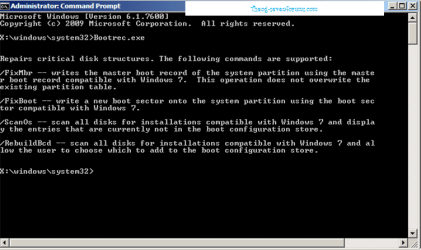
/ScanOs
The /ScanOs option scans all disks for installations that are compatible with Windows Vista or Windows 7. Additionally, this option displays the entries that are currently not in the BCD store. Use this option when there are Windows Vista or Windows 7 installations that the Boot Manager menu does not list.

Check to make sure Windows is on C: & maybe on D:.
 

My Computer My Computer

At a glance

ME/XP/Vista/Win7
OS
ME/XP/Vista/Win7
I don't have an "R" on any of my normal 7 repair media - is that some kind of oem thing?

I would like to give you a copy of my custom repair media.

I don't feel disposed to post a link publicly for the whole world to steal.

I am very busy just now, but will be back later to help.
 

My Computers My Computers

  • At a glance

    7 X64i5 84002x8gb 3200mhz
    Computer type
    PC/Desktop
    OS
    7 X64
    CPU
    i5 8400
    Motherboard
    gigabyte b365m ds3h
    Memory
    2x8gb 3200mhz
    Hard Drives
    various
    PSU
    pure power 11 400w cm
    Case
    Coolermaster
    Cooling
    cryorig m9i
  • At a glance

    7x64g54008gb ddr4 2400
    Computer type
    PC/Desktop
    OS
    7x64
    CPU
    g5400
    Motherboard
    ga b365m ds3h
    Memory
    8gb ddr4 2400
    PSU
    xfx pro 450w
AEM,

weirdly no, not on the self made 64 bit recovery anyways. I do also have the 32bit disk that came with the machine *shrugs*

SIW , thanks for confirming that, I dont feel like such a plank now and that would be appreciated very much if it might help. I'm sure I'll still be here later banging my head against the desk

and Theog

*facepalm* ok so my brain is just mush from being at this till 2am and then getting up a few hours later with kids ...

I will run the scanOS when the current repair recovery is finished.

:)
 

My Computer My Computer

At a glance

windows 7 home premium x64
OS
windows 7 home premium x64
The re-installation DVD is one that the vendor burns for you in case you need to reinstall the OS. Before the OS gets installed it searches for existing installations and will ask you what you want to do after it finds one. If it isn't able to find an existing OS, you won't get the R option.
 

My Computer My Computer

At a glance

Windows 7 Ultimate 64BitGenuineIntel Intel(R) Core(TM) DuoCore T2400 ...2.00 GBMobile Intel(R) 945 Express Chipset
Computer Manufacturer/Model Number
Lenovo ThinkPad T60
OS
Windows 7 Ultimate 64Bit
CPU
GenuineIntel Intel(R) Core(TM) DuoCore T2400 @ 1.83GHz
Motherboard
Intel(R) 82801G (ICH7 Family)
Memory
2.00 GB
Graphics Card(s)
Mobile Intel(R) 945 Express Chipset
Sound Card
SoundMAX Integrated Digital HD Audio
Monitor(s) Displays
ThinkPad Display
Screen Resolution
1400x1050
Hard Drives
100Gb SATA
Keyboard
Standard Keyboard
Mouse
HID-compliant Mouse
Internet Speed
Cable Broadband - 54Mbps
Other Info
Intel(R) PRO/1000 PL Network Connection
11a/b/g Wireless LAN Mini PCI Express Adapter
AEM,

weirdly no, not on the self made 64 bit recovery anyways. I do also have the 32bit disk that came with the machine *shrugs*

:)

Give that a shot, the self made recovery CD as you mentioned wouldn't allowed you to do that kind of repair. Issue is would you now need a 64bit version or will the 32Bit one surfice seeing you already installed 64bit over the 32bit.

Btw, if the 32B bit CD manages to detect Windows on C: and gives you the R option. When you proceed it will look like you are installing from fresh. IT's NOT so don't worry. All files and Programs will be intact after it fully recovered.
 

My Computer My Computer

At a glance

Windows 7 Ultimate 64BitGenuineIntel Intel(R) Core(TM) DuoCore T2400 ...2.00 GBMobile Intel(R) 945 Express Chipset
Computer Manufacturer/Model Number
Lenovo ThinkPad T60
OS
Windows 7 Ultimate 64Bit
CPU
GenuineIntel Intel(R) Core(TM) DuoCore T2400 @ 1.83GHz
Motherboard
Intel(R) 82801G (ICH7 Family)
Memory
2.00 GB
Graphics Card(s)
Mobile Intel(R) 945 Express Chipset
Sound Card
SoundMAX Integrated Digital HD Audio
Monitor(s) Displays
ThinkPad Display
Screen Resolution
1400x1050
Hard Drives
100Gb SATA
Keyboard
Standard Keyboard
Mouse
HID-compliant Mouse
Internet Speed
Cable Broadband - 54Mbps
Other Info
Intel(R) PRO/1000 PL Network Connection
11a/b/g Wireless LAN Mini PCI Express Adapter
Theog,

scanOs returns the following message :

total installations = 0 :confused:

AEM,

interestingly, I didn't install 64bit over the 32bit. The machine came preloaded with 64bit ( toshiba advised creating the recovery because of the fact they only supply a 32bit recovery disk )

I have absolutely no idea why they would do such a dumb thing and I never thought to question it at the time :rolleyes:

figured I'd be safe if I made a 64bit recovery myself .... appears I was wrong !

edited to add :

ok so the 32bit has detected and is now saying please select the item you use to install ( with option windowns 7 ) no sign of any 'R' ..... wondering if this is going to do complete reinstall or this is where you mentioned it looking like istalling from fresh
 

My Computer My Computer

At a glance

windows 7 home premium x64
OS
windows 7 home premium x64
Back
Top