Windows 7 cannot start on Acer 5560

sonvoong

New member
Local time
9:21 PM
Messages
8
Hi everyone,
please help me out with this issue, i've been searching all over the internet for 6 hrs so far and still unable to solve it.
I've bought my acer 5560 notebook for a week and it's been running normal until this morning when the screen froze at the acer logo after pressing the power button. I switched it off then on again and this time i went as far as the win 7 logo with the 'windows is starting' status, then turned to black screen, while the machine is still running.
I tried to start in safemode but it turned to the "blue screen of death". I restart again, press f8, then 'repair your computer', then restore it to an earliest point of time, which is when i bought it. After the process completed, windows restart then went black again after the 'windows is starting' status like before.
I also tried 'repair windows start-up' but still didn't work. I've restarted many times but the black screen issue always happens (either at the acer logo or after 'windows is starting')
I've seen people flash their BIOS on their Acer Aspire One but doesn't seem that it'll work on my model.
I would very much appreciate any help as I need the laptop urgently and can't wait for the tech support because they won't open in another 10 hrs.
Thanks in advance!
 

My Computer My Computer

OS
Windows 7 Home Premium 64bit
Hi everyone,
please help me out with this issue, i've been searching all over the internet for 6 hrs so far and still unable to solve it.
I've bought my acer 5560 notebook for a week and it's been running normal until this morning when the screen froze at the acer logo after pressing the power button. I switched it off then on again and this time i went as far as the win 7 logo with the 'windows is starting' status, then turned to black screen, while the machine is still running.
I tried to start in safemode but it turned to the "blue screen of death". I restart again, press f8, then 'repair your computer', then restore it to an earliest point of time, which is when i bought it. After the process completed, windows restart then went black again after the 'windows is starting' status like before.
I also tried 'repair windows start-up' but still didn't work. I've restarted many times but the black screen issue always happens (either at the acer logo or after 'windows is starting')
I've seen people flash their BIOS on their Acer Aspire One but doesn't seem that it'll work on my model.
I would very much appreciate any help as I need the laptop urgently and can't wait for the tech support because they won't open in another 10 hrs.
Thanks in advance!
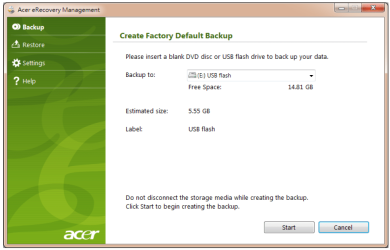
It sounds like your Windows installation is corrupted. You will need to back up your data. Next, power on your pc and as soon as you see the Acer screen press alt and f12 at the same time which will launch the Acer Erecovery Manager which will allow you to restore your pc to factory which will delete all of your files, so make sure you back up all of your data.
 

My Computer My Computer

Computer type
PC/Desktop
Computer Manufacturer/Model Number
HP Pavilion P7-1010
OS
Windows 7 Professional x64 Service Pack 1
CPU
AMD Athlon X4 645
Motherboard
Foxxcon N-Alvorix RS880
Memory
6GB DDR3 1066
Graphics Card(s)
Sapphire Radeon HD 5670 512MB GDDR5
Sound Card
Realtek Integrated Audio
Monitor(s) Displays
HP 2011x
Screen Resolution
1600x900
Hard Drives
1. Crucial M4 128GB SSD
2. 1TB Seagate Barracuda 7200.12 RPM
3. 1TB Western Digital Caviar Green 5400RPM
PSU
Seasonic S12 II Bronze 380 Watt
Case
HP OEM
Cooling
Coolermaster Heatsink, AVC Case Fan
Keyboard
HP OEM- Made by Chicony
Mouse
HP OEM- Made by Logitech
Internet Speed
20MBit Down/4 Up
Antivirus
Microsoft Security Essentials
Browser
Internet Explorer 10
It sounds like your Windows installation is corrupted. You will need to back up your data. Next, power on your pc and as soon as you see the Acer screen press alt and f12 at the same time which will launch the Acer Erecovery Manager which will allow you to restore your pc to factory which will delete all of your files, so make sure you back up all of your data.[/QUOTE]

thank you for your response, but is this the only option i have? because now i can't access windows to back up and so the system recovery would cause losing all the data that's been saved in the last few days (which i haven't saved anywhere else). is there anyway i can back up my files without logging into windows? or any other way to get back into windows without losing my files?
Thanks for helping!
 

My Computer My Computer

OS
Windows 7 Home Premium 64bit
It sounds like your Windows installation is corrupted. You will need to back up your data. Next, power on your pc and as soon as you see the Acer screen press alt and f12 at the same time which will launch the Acer Erecovery Manager which will allow you to restore your pc to factory which will delete all of your files, so make sure you back up all of your data.

If you can find an Ubuntu Linux install cd. Here is a link:Download | Ubuntu

Download it and burn it to a cd. Then, power on your pc and press f12 to bring up the boot options. Tell it to boot off the cd that you made (make sure to have the cd in the drive). When it loads up click the try ubuntu without installing button and it will load up to the Ubuntu desktop. It should have an icon for your hard drive on the desktop. double click on that and right click on the users folder. Select copy and copy the files to an external hard drive. This will have backed up your documents, music, and pictures. You will have to reinstall all of your programs.
 
Last edited:

My Computer My Computer

Computer type
PC/Desktop
Computer Manufacturer/Model Number
HP Pavilion P7-1010
OS
Windows 7 Professional x64 Service Pack 1
CPU
AMD Athlon X4 645
Motherboard
Foxxcon N-Alvorix RS880
Memory
6GB DDR3 1066
Graphics Card(s)
Sapphire Radeon HD 5670 512MB GDDR5
Sound Card
Realtek Integrated Audio
Monitor(s) Displays
HP 2011x
Screen Resolution
1600x900
Hard Drives
1. Crucial M4 128GB SSD
2. 1TB Seagate Barracuda 7200.12 RPM
3. 1TB Western Digital Caviar Green 5400RPM
PSU
Seasonic S12 II Bronze 380 Watt
Case
HP OEM
Cooling
Coolermaster Heatsink, AVC Case Fan
Keyboard
HP OEM- Made by Chicony
Mouse
HP OEM- Made by Logitech
Internet Speed
20MBit Down/4 Up
Antivirus
Microsoft Security Essentials
Browser
Internet Explorer 10
I would return to the Retailer for FREE replacement or FREE repair.

Have you tried pressing <Alt+F10> at boot up, to goto the Acer eRecovery Management.
Acer Support: Frequently Asked Questions list for How to use Acer eRecovery

   Information
We always assume you have made your Recovery Disks using the OEM manufacturer's Recovery Media Creator app the first day you had your new PC.
& made the Startup Repair CD.
startup repair disc-create


Did you make the OEM manufacturer's Recovery Disks?

Capture USB.PNG

You can Order Acer recovery disks from here:
https://secure.tx.acer.com/RCDB/Main.aspx?brand=acer
 

My Computer My Computer

OS
ME/XP/Vista/Win7

My Computer My Computer

OS
ME/XP/Vista/Win7
okay, thank you all for your replies. I will try windude99 recommendation in the meantime but i need to wait for the download. Any other suggestion is absolutely welcome and appreciated.
Thanks guys!
 

My Computer My Computer

OS
Windows 7 Home Premium 64bit
Thanks theog, but i don't have the recovery disc so i can't get to the 'install windows' screen as you show on your link. Any further suggestion? Thanks anyway!
 

My Computer My Computer

OS
Windows 7 Home Premium 64bit
Hi everyone,
please help me out with this issue, i've been searching all over the internet for 6 hrs so far and still unable to solve it.
I've bought my acer 5560 notebook for a week and it's been running normal until this morning when the screen froze at the acer logo after pressing the power button. I switched it off then on again and this time i went as far as the win 7 logo with the 'windows is starting' status, then turned to black screen, while the machine is still running.
I tried to start in safemode but it turned to the "blue screen of death". I restart again, press f8, then 'repair your computer', then restore it to an earliest point of time, which is when i bought it. After the process completed, windows restart then went black again after the 'windows is starting' status like before.
I also tried 'repair windows start-up' but still didn't work. I've restarted many times but the black screen issue always happens (either at the acer logo or after 'windows is starting')
I've seen people flash their BIOS on their Acer Aspire One but doesn't seem that it'll work on my model.
I would very much appreciate any help as I need the laptop urgently and can't wait for the tech support because they won't open in another 10 hrs.
Thanks in advance!
so bsod when starting in "safe mode". What kind of crash is it? post stopcode etc
 

My Computer My Computer

Computer type
Laptop
Computer Manufacturer/Model Number
ACER ASPIRE 5742G
OS
Microsoft Windows 7 Home Premium 64-bits 7601 Multiprocessor Free Service Pack 1
CPU
Intel(R) Core(TM) i3 CPU M 370 @ 2.40GHz
Motherboard
Acer Aspire 5742G
Memory
4,00 GB
Graphics Card(s)
ATI Mobility Radeon HD 5400 Series
Sound Card
(1) AMD High Definition Audio Device (2) Realtek High Defi
Screen Resolution
1366 x 768 x 32 bits (4294967296 colors) @ 60 Hz
Hard Drives
WDC WD5000BEVT-22ZAT0
froze?? is it black or still shows the acer logo? blinking cursor?
 

My Computer My Computer

Computer type
Laptop
Computer Manufacturer/Model Number
ACER ASPIRE 5742G
OS
Microsoft Windows 7 Home Premium 64-bits 7601 Multiprocessor Free Service Pack 1
CPU
Intel(R) Core(TM) i3 CPU M 370 @ 2.40GHz
Motherboard
Acer Aspire 5742G
Memory
4,00 GB
Graphics Card(s)
ATI Mobility Radeon HD 5400 Series
Sound Card
(1) AMD High Definition Audio Device (2) Realtek High Defi
Screen Resolution
1366 x 768 x 32 bits (4294967296 colors) @ 60 Hz
Hard Drives
WDC WD5000BEVT-22ZAT0
so bsod when starting in "safe mode". What kind of crash is it?

I can't get to safemode again, the screen turns black after or froze at the start up screen (with the acer logo)
try to tap F8 multiple times on boot. Does it show a menu?
possible to boot from installation dvd, repair dvd ??? So does it boot from dvd?
 

My Computer My Computer

Computer type
Laptop
Computer Manufacturer/Model Number
ACER ASPIRE 5742G
OS
Microsoft Windows 7 Home Premium 64-bits 7601 Multiprocessor Free Service Pack 1
CPU
Intel(R) Core(TM) i3 CPU M 370 @ 2.40GHz
Motherboard
Acer Aspire 5742G
Memory
4,00 GB
Graphics Card(s)
ATI Mobility Radeon HD 5400 Series
Sound Card
(1) AMD High Definition Audio Device (2) Realtek High Defi
Screen Resolution
1366 x 768 x 32 bits (4294967296 colors) @ 60 Hz
Hard Drives
WDC WD5000BEVT-22ZAT0
acer logo, then froze for about an hour with the blinking cursor, then 'starting windows', then black screen ...... i don't have any back up dvd, the system is of OEM.
thanks for your help, kaktussoft!
Son Voong.
 

My Computer My Computer

OS
Windows 7 Home Premium 64bit
So after about an hour it did say "starting windows"? Borrow a win7 install dvd. or let someone create a "win7 system repair disk". Try to boot from, just as a test

Perform a memory check from some recovery environment
 

My Computer My Computer

Computer type
Laptop
Computer Manufacturer/Model Number
ACER ASPIRE 5742G
OS
Microsoft Windows 7 Home Premium 64-bits 7601 Multiprocessor Free Service Pack 1
CPU
Intel(R) Core(TM) i3 CPU M 370 @ 2.40GHz
Motherboard
Acer Aspire 5742G
Memory
4,00 GB
Graphics Card(s)
ATI Mobility Radeon HD 5400 Series
Sound Card
(1) AMD High Definition Audio Device (2) Realtek High Defi
Screen Resolution
1366 x 768 x 32 bits (4294967296 colors) @ 60 Hz
Hard Drives
WDC WD5000BEVT-22ZAT0
So after about an hour it did say "starting windows"? Borrow a win7 install dvd. or let someone create a "win7 system repair disk". Try to boot from, just as a test

Perform a memory check from some recovery environment

yeah. i'll try that if possible. Appreciate your help mate!
Son Voong
 

My Computer My Computer

OS
Windows 7 Home Premium 64bit
Have you backed up your data yet?
 

My Computer My Computer

Computer type
PC/Desktop
Computer Manufacturer/Model Number
HP Pavilion P7-1010
OS
Windows 7 Professional x64 Service Pack 1
CPU
AMD Athlon X4 645
Motherboard
Foxxcon N-Alvorix RS880
Memory
6GB DDR3 1066
Graphics Card(s)
Sapphire Radeon HD 5670 512MB GDDR5
Sound Card
Realtek Integrated Audio
Monitor(s) Displays
HP 2011x
Screen Resolution
1600x900
Hard Drives
1. Crucial M4 128GB SSD
2. 1TB Seagate Barracuda 7200.12 RPM
3. 1TB Western Digital Caviar Green 5400RPM
PSU
Seasonic S12 II Bronze 380 Watt
Case
HP OEM
Cooling
Coolermaster Heatsink, AVC Case Fan
Keyboard
HP OEM- Made by Chicony
Mouse
HP OEM- Made by Logitech
Internet Speed
20MBit Down/4 Up
Antivirus
Microsoft Security Essentials
Browser
Internet Explorer 10
You do not have to mess with a brand new computer that causes these problems because the retailer will replace it, or your 1-year manufacturer's parts and Tech Support warranty from Acer will cover it for you via phone or email.

If you prefer DIY solutions then follow theog's steps below, or get a superior clean reinstall following these steps: Clean Reinstall - Factory OEM Windows 7

I would return to the Retailer for FREE replacement or FREE repair.

Have you tried pressing <Alt+F10> at boot up, to goto the Acer eRecovery Management.

Acer Support: Frequently Asked Questions list for How to use Acer eRecovery


You can Order Acer recovery disks from here:
https://secure.tx.acer.com/RCDB/Main.aspx?brand=acer
 
okay the error code is: ***STOP: 0x000000F4 (0x0000000000000003, 0xFFFFFA8005C4D400, 0xFFFFFA8005C4D6E0, 0XFFFFF8000318B5F0).
i'm on my way of installing ubuntu onto my usb and make it a bootable flash drive.
Thank you all for helping me. I'll keep posting as i go along.
 

My Computer My Computer

OS
Windows 7 Home Premium 64bit
The F4 Stop error only occurs due to hardware or driver issue, so if you want to try to repair it I would first test the hardware, then try booting into Safe Mode to determine if a driver is in error in Device Manager.

As in every case of unbootable Win7 I would also scan for malware and attempt repair of System files if malware is found.

Those steps and others are in these steps for Troubleshooting Windows 7 Failure to Boot - Windows 7 Forums
 
Back
Top