BSOD while system is idle after a few hours

NeonAnderson

New member
Local time
11:19 AM
Messages
8
Hi,

I recently installed two brand new HDDs into my PC. One normal 7200 RPM Sata 6GB/s Western Digital Caviar Black 2TB and one 120GB OCZ Vertex 3 SSD.

As I was entirely replacing my old HDDs I simply removed both of those and put both my new ones in and made a fresh install of Windows 7 Ultimate 64bit (genuine version obviously, and OEM that I got with my original PC).


I have my bios in ACHI mode (instead of IDE) and everything else in the bios should be right.

I have an Asus P7P55D-E, with an i7 860 and an Nvidia GTX 460 and 8GB DDR3.


The only codes I see in the event viewer before the BSOD is:
The VSS service is shutting down due to idle timeout.
Event ID = 8224

In my motherboard I have tried switching from using the Marvel 6GB/s plugs to the Intel SATA II plugs. The BSODs still occur.
 

My Computer My Computer

Computer Manufacturer/Model Number
Allcom-s
OS
Windows 7 Ultimate 64bit
CPU
i7 860 @2.8 GHz
Motherboard
Asus P7P55D-E
Memory
8 GB DDR3
Graphics Card(s)
Asus Nvidia GTX 460 TOP Edition
Sound Card
on-board
Monitor(s) Displays
Samsung XL2370
Screen Resolution
1080p
Hard Drives
1x OCZ 120GB Vertex3 SSD
1x WesternDigital Caviar Black 2TB
PSU
CoolerMaster Real Power 620W
Case
CoolerMaster Sileo 500
Cooling
Corsair H50
Hi NeonAnderson :)

You don't have any minidumps in the uploaded folder.

Please follow these steps to enable minidumps.

Go to Start and type in sysdm.cpl and press Enter.
Click on the Advanced tab.
Click on the Startup and Recovery Settings button.
Ensure that Automatically restart is unchecked.
Under the Write Debugging Information header select "Small memory dump (256 kB)" in the dropdown box
Ensure that the Small Dump Directory is listed as %systemroot%\Minidump

Click OK twice to exit the dialogs, then reboot for the changes to take effect.

Now wait for the new crash\bsod and rerun the,
http://www.sevenforums.com/crashes-debugging/96879-blue-screen-death-bsod-posting-instructions.html
 

My Computer My Computer

Computer Manufacturer/Model Number
Custom Built by me.
OS
Windows 7 Ultimate 64bit SP1
CPU
Intel Core 2 Quad Q6600
Motherboard
Gigabyte GA-X38-DS4
Memory
2X2GB DDR2 PC6400 800MHZ DUAL CHANNEL
Graphics Card(s)
XFX RADEON HD 6850 1GB GDDR5
Sound Card
2/4/5.1/7.1-channel Realtek High Definition
Monitor(s) Displays
Samsung LE40A656F1 1080p 100Hz LCD HD TV 50,000:1
Screen Resolution
1366x768 in Desktop,1920x1080p in gaming and video
Hard Drives
C:\WD VelociRaptor 150 GB,10,000 RPM
E:\WESTERN DIGITAL WD15EADS 1.5TB CAVIAR GREEN SATA2 F:\WESTERN DIGITAL WD15EADS 1.5TB CAVIAR GREEN SATA2
PSU
THERMALTAKE W0229 TOUGHPOWER XT 750W
Case
A-Case Twin Engine BB
Cooling
3 x thermaltake smart case fan II + 1 arctic cooling fan
Keyboard
Wireless Logitech LX710
Mouse
Logitech Wireless Gaming Mouse G700
Internet Speed
ADSL 12000 plus
Other Info
Mouse Logitech G700,with 13 buttons who needs keyboard in RPG?

D:\Sony high speed sata Dvd Rewriter
Logitech Cordless Rumblepad 2
ok thanks, I have changed those settings and now the dreaded wait :P
 

My Computer My Computer

Computer Manufacturer/Model Number
Allcom-s
OS
Windows 7 Ultimate 64bit
CPU
i7 860 @2.8 GHz
Motherboard
Asus P7P55D-E
Memory
8 GB DDR3
Graphics Card(s)
Asus Nvidia GTX 460 TOP Edition
Sound Card
on-board
Monitor(s) Displays
Samsung XL2370
Screen Resolution
1080p
Hard Drives
1x OCZ 120GB Vertex3 SSD
1x WesternDigital Caviar Black 2TB
PSU
CoolerMaster Real Power 620W
Case
CoolerMaster Sileo 500
Cooling
Corsair H50
ok it crashed again finally. This time I had it playing a youtube video on Chrome. Steam and skype were running too. Went to go get a coffee downstairs, came back up and it was a blue screen :(

Ran all the stuff again, hopefully now the information is complete.
 

My Computer My Computer

Computer Manufacturer/Model Number
Allcom-s
OS
Windows 7 Ultimate 64bit
CPU
i7 860 @2.8 GHz
Motherboard
Asus P7P55D-E
Memory
8 GB DDR3
Graphics Card(s)
Asus Nvidia GTX 460 TOP Edition
Sound Card
on-board
Monitor(s) Displays
Samsung XL2370
Screen Resolution
1080p
Hard Drives
1x OCZ 120GB Vertex3 SSD
1x WesternDigital Caviar Black 2TB
PSU
CoolerMaster Real Power 620W
Case
CoolerMaster Sileo 500
Cooling
Corsair H50
You dont have minidumps in the folder.


First
,are you sure you followed all the above steps? :)


Second,
the minidumps (if created) are usually in C:\windows\minidump.(*.dmp)


Check in C:\windows\minidump if you have minidumps zip them and upload them.


If not,run again the same procedure to enable minidump.
 

My Computer My Computer

Computer Manufacturer/Model Number
Custom Built by me.
OS
Windows 7 Ultimate 64bit SP1
CPU
Intel Core 2 Quad Q6600
Motherboard
Gigabyte GA-X38-DS4
Memory
2X2GB DDR2 PC6400 800MHZ DUAL CHANNEL
Graphics Card(s)
XFX RADEON HD 6850 1GB GDDR5
Sound Card
2/4/5.1/7.1-channel Realtek High Definition
Monitor(s) Displays
Samsung LE40A656F1 1080p 100Hz LCD HD TV 50,000:1
Screen Resolution
1366x768 in Desktop,1920x1080p in gaming and video
Hard Drives
C:\WD VelociRaptor 150 GB,10,000 RPM
E:\WESTERN DIGITAL WD15EADS 1.5TB CAVIAR GREEN SATA2 F:\WESTERN DIGITAL WD15EADS 1.5TB CAVIAR GREEN SATA2
PSU
THERMALTAKE W0229 TOUGHPOWER XT 750W
Case
A-Case Twin Engine BB
Cooling
3 x thermaltake smart case fan II + 1 arctic cooling fan
Keyboard
Wireless Logitech LX710
Mouse
Logitech Wireless Gaming Mouse G700
Internet Speed
ADSL 12000 plus
Other Info
Mouse Logitech G700,with 13 buttons who needs keyboard in RPG?

D:\Sony high speed sata Dvd Rewriter
Logitech Cordless Rumblepad 2
Folder doesn't exist. Doesn't the app in the sticky thread for BSOD posting include the minidumps on itself? (if they were in that folder that is).

I have triple checked the instructions you gave and everything is set just as you said it should be.

When my PC bsods, to make sure the minidump is created how long do I need to leave the BSOD screen up? Before rebooting?
 

My Computer My Computer

Computer Manufacturer/Model Number
Allcom-s
OS
Windows 7 Ultimate 64bit
CPU
i7 860 @2.8 GHz
Motherboard
Asus P7P55D-E
Memory
8 GB DDR3
Graphics Card(s)
Asus Nvidia GTX 460 TOP Edition
Sound Card
on-board
Monitor(s) Displays
Samsung XL2370
Screen Resolution
1080p
Hard Drives
1x OCZ 120GB Vertex3 SSD
1x WesternDigital Caviar Black 2TB
PSU
CoolerMaster Real Power 620W
Case
CoolerMaster Sileo 500
Cooling
Corsair H50
Folder doesn't exist. Doesn't the app in the sticky thread for BSOD posting include the minidumps on itself? (if they were in that folder that is).

I have triple checked the instructions you gave and everything is set just as you said it should be.

When my PC bsods, to make sure the minidump is created how long do I need to leave the BSOD screen up? Before rebooting?


Yes,but you can also find them zip them and upload them manually.


Just few seconds,you dont need to wait is automatically created.
 

My Computer My Computer

Computer Manufacturer/Model Number
Custom Built by me.
OS
Windows 7 Ultimate 64bit SP1
CPU
Intel Core 2 Quad Q6600
Motherboard
Gigabyte GA-X38-DS4
Memory
2X2GB DDR2 PC6400 800MHZ DUAL CHANNEL
Graphics Card(s)
XFX RADEON HD 6850 1GB GDDR5
Sound Card
2/4/5.1/7.1-channel Realtek High Definition
Monitor(s) Displays
Samsung LE40A656F1 1080p 100Hz LCD HD TV 50,000:1
Screen Resolution
1366x768 in Desktop,1920x1080p in gaming and video
Hard Drives
C:\WD VelociRaptor 150 GB,10,000 RPM
E:\WESTERN DIGITAL WD15EADS 1.5TB CAVIAR GREEN SATA2 F:\WESTERN DIGITAL WD15EADS 1.5TB CAVIAR GREEN SATA2
PSU
THERMALTAKE W0229 TOUGHPOWER XT 750W
Case
A-Case Twin Engine BB
Cooling
3 x thermaltake smart case fan II + 1 arctic cooling fan
Keyboard
Wireless Logitech LX710
Mouse
Logitech Wireless Gaming Mouse G700
Internet Speed
ADSL 12000 plus
Other Info
Mouse Logitech G700,with 13 buttons who needs keyboard in RPG?

D:\Sony high speed sata Dvd Rewriter
Logitech Cordless Rumblepad 2
I left it for about 30 minutes and then rebooted. Immediately ran that app, and then went through your instructions again and didn't need to change anything, everything is as it should be!

There is seriously something wrong with my PC, even the BSOD itself and minidump is broken! :(

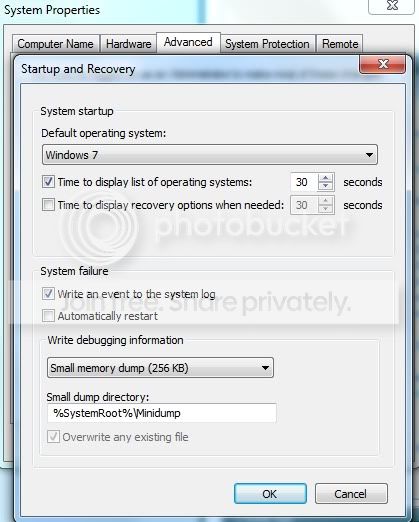
I can even take screenshot for you if you'd like to show you that the settings are as they really should be for the minidump

*edit*
Screenshot:
NewPicture1.jpg
 

My Computer My Computer

Computer Manufacturer/Model Number
Allcom-s
OS
Windows 7 Ultimate 64bit
CPU
i7 860 @2.8 GHz
Motherboard
Asus P7P55D-E
Memory
8 GB DDR3
Graphics Card(s)
Asus Nvidia GTX 460 TOP Edition
Sound Card
on-board
Monitor(s) Displays
Samsung XL2370
Screen Resolution
1080p
Hard Drives
1x OCZ 120GB Vertex3 SSD
1x WesternDigital Caviar Black 2TB
PSU
CoolerMaster Real Power 620W
Case
CoolerMaster Sileo 500
Cooling
Corsair H50
Your Minidump is enabled but your system doesn't seem to write any, or some applications such as auto-system cleaners are removing them. Please remove any of these programs

Run SFC www.sevenforums.com/tutorials/1538-sfc-scannow-command-system-file-checker.html
Code:
AutoReboot=TRUE
Caption=
DebugFilePath=%SystemRoot%\MEMORY.DMP
DebugInfoType=2
Description=
ExpandedDebugFilePath=C:\Windows\MEMORY.DMP
ExpandedMiniDumpDirectory=C:\Windows\Minidump
[B]KernelDumpOnly=FALSE[/B]
MiniDumpDirectory=%SystemRoot%\Minidump
Name=Microsoft Windows 7 Ultimate |C:\Windows|\Device\Harddisk1\Partition2
OverwriteExistingDebugFile=TRUE
SendAdminAlert=FALSE
SettingID=
[B]WriteDebugInfo=TRUE[/B]
WriteToSystemLog=TRUE
 

My Computer My Computer

Computer type
PC/Desktop
Computer Manufacturer/Model Number
Custom Build
OS
Windows 10 Pro x64, Arch Linux
CPU
Intel Core 2 Quad Q8200 OC'd 3.08GHz
Motherboard
Asus Rampage formula LGA775
Memory
8GB DDR2 900Mhz
Graphics Card(s)
MSI GT730 2GB GDDR5 (Kepler)
Sound Card
Supreme FX2
Monitor(s) Displays
Samsung LS22F350 LED
Screen Resolution
1080P
Hard Drives
Kingston SSDNow UV400 120GB, 500GB Hitachi, 2TB Samsung, 500GB Seagate FreeAgent, 640GB Samsung, 160GB Toshiba (Arch)
PSU
AeroCool 500W Bronze
Cooling
Cooler Master V6 + 3X fans
Keyboard
Prolink keyboard
Mouse
Logitech M705
Internet Speed
1MiB/s
Browser
Chrome Beta
It's more or less a fresh install of Windows 7 and I never use any cleaner programs they tend to just cause more bad than good. So no idea why my Windows 7 refuses to create the minidump :(

I ran the sfc /verifyonly command.

Came back with: Windows Resource Protection did not find any integrity violations.

I think there is something wrong with my SSD perhaps?

I have added my full system specs to my profile now too. I have already upgraded my BIOS to the latest version (after installing Windows 7 on the SSD), I have not yet flashed my Vertex3 SSD yet, as that will be a hard undertaking as it is my primary drive where my OS is installed on (I will only be able to do that in June of 2012).
 

My Computer My Computer

Computer Manufacturer/Model Number
Allcom-s
OS
Windows 7 Ultimate 64bit
CPU
i7 860 @2.8 GHz
Motherboard
Asus P7P55D-E
Memory
8 GB DDR3
Graphics Card(s)
Asus Nvidia GTX 460 TOP Edition
Sound Card
on-board
Monitor(s) Displays
Samsung XL2370
Screen Resolution
1080p
Hard Drives
1x OCZ 120GB Vertex3 SSD
1x WesternDigital Caviar Black 2TB
PSU
CoolerMaster Real Power 620W
Case
CoolerMaster Sileo 500
Cooling
Corsair H50
Ok had another Blue screen, this time while playing Dawn of War Space Marines.

Still no dump. I took a picture though of the blue screen, I left it for an hour, it didn't progress any further.
 

My Computer My Computer

Computer Manufacturer/Model Number
Allcom-s
OS
Windows 7 Ultimate 64bit
CPU
i7 860 @2.8 GHz
Motherboard
Asus P7P55D-E
Memory
8 GB DDR3
Graphics Card(s)
Asus Nvidia GTX 460 TOP Edition
Sound Card
on-board
Monitor(s) Displays
Samsung XL2370
Screen Resolution
1080p
Hard Drives
1x OCZ 120GB Vertex3 SSD
1x WesternDigital Caviar Black 2TB
PSU
CoolerMaster Real Power 620W
Case
CoolerMaster Sileo 500
Cooling
Corsair H50
Back
Top