Solved Use built in WiFi as hot spot?

bug67

Hazard Avoidance
Pro User
VIP
Local time
10:04 AM
Messages
262
Location
Eagle River, AK
I was using [url="http://www.connectify.me/]Connectify[/url] to use my laptop's built in wireless features to broadcast a wireless signal. That way, I could use the laptop as a wireless hot spot. However, with the latest Connectify update, unless I pay for the "Pro" version, this feature has been removed.

Does anyone know how to get this ability back? Free is preferred. Built into Windows 7 is even more preferred. Thanks!
 

My Computer My Computer

At a glance

Windows 7 X64 ProfessionalIntel® Pentium D Dual Core 3.6GHZ4GB DDR2 PC2-5300GeForce GT 440 (Fermi) 2GB 128-bit DDR3 PCI E...
Computer Manufacturer/Model Number
Dell XPS 400
OS
Windows 7 X64 Professional
CPU
Intel® Pentium D Dual Core 3.6GHZ
Motherboard
DELL Dimension 9150 MotherBoard DXP051 XPS400 FJ030
Memory
4GB DDR2 PC2-5300
Graphics Card(s)
GeForce GT 440 (Fermi) 2GB 128-bit DDR3 PCI Express 2.0 x16
Sound Card
ASUS XONAR DG 5.1 Channels PCI Interface Xonar DG
Monitor(s) Displays
2 X 23" Apple Cinema Display
Screen Resolution
1920 X 1200p
Hard Drives
250GB Intel® 510 Series SSD SATA 6G (w/TRIM) [500MB/s Reads]
1.0TB Western Digital Caviar Black SATA 6G 7200rpm 64MB Cache
PSU
375 Watt Dell
Case
Dell XPS 400 BTX Case
Cooling
Dell XPS 400 Air Cooling
Keyboard
Logitech Illuminated Keyboard
Mouse
Logitech M705 Marathon
Internet Speed
+/- 9929 Kbps
Other Info
This machine was given to me when my dad bought a new computer. I keep throwing upgrades at it and it keeps on ticking. Think I've done everything to it that can be done outside a PSU upgrade so I can run an even BETTER GPU.
See if this is what your are looking for... Virtual Router - Wifi Hot Spot for Windows 7 / 2008 R2 - Download: 0.9 Beta

or...

How to Setup Virtual Wifi on Windows 7
1. Open a command-prompt with administrator privileges.

Click on Start menu, All Programs, Accessories, right-click on Command Prompt, select “Run as administrator”). Type in:

2. Configure the “hosted” interface:

netsh wlan set hostednetwork mode=allow ssid=Test key=password

This example creates an access-point with an SSID of “Test”,

3. Configure Internet Connection Sharing (ICS)

Open up the networking control panel. Select the interface that currently has Internet connection (like your Ethernet or normal wifi), enable “Sharing”, and then select the special “hosted” interface.

4. Start it

netsh wlan start hostednetwork
 

My Computer My Computer

At a glance

Win7 Home Premium x64 W10Pro&HomeA12 9720p 4+8 TurionII M5206GB 8GBR7
Computer type
Laptop
Computer Manufacturer/Model Number
HP 17-ak0xx, dv7 3173nr
OS
Win7 Home Premium x64 W10Pro&Home
CPU
A12 9720p 4+8 TurionII M520
Motherboard
HP 3839
Memory
6GB 8GB
Graphics Card(s)
R7
Monitor(s) Displays
24" sa550
Screen Resolution
1600x900 1920x1080
Mouse
Logitechx2
Internet Speed
120Mb/s down 12up

Checking it out...

or...

How to Setup Virtual Wifi on Windows 7
1. Open a command-prompt with administrator privileges.

Click on Start menu, All Programs, Accessories, right-click on Command Prompt, select “Run as administrator”). Type in:

2. Configure the “hosted” interface:

netsh wlan set hostednetwork mode=allow ssid=Test key=password

This example creates an access-point with an SSID of “Test”,

3. Configure Internet Connection Sharing (ICS)

Open up the networking control panel. Select the interface that currently has Internet connection (like your Ethernet or normal wifi), enable “Sharing”, and then select the special “hosted” interface.

4. Start it

netsh wlan start hostednetwork
This method worked. However, is it something I need to do every time I restart the computer? Is this good to go from now on? Do I just go into Network Settings and select "VirtualWiFi" and turn it on?

I like the Virtual Router software. I couldn't get it to work though. Probably because I didn't have my LAN connection set up to share? I'd rather not have to use 3rd party if Windows can do it all by itself.

EDIT:

OK. The Virtual Router software does not seem to work at all.

And, in an attempt to discover if the manual, command prompt method could easily be turned on and off, it appears I have royally messed things up!

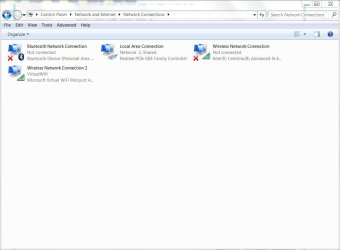
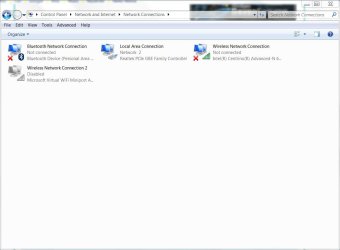
I went into Network Settings and disabled "Wireless Network Connection 2". This was my VirtualWiFi hotspot. Then, when I went to enable it, it had the red X on it seen in attachment #2.

OK, I'll go into the command prompt and

Code:
netsh wlan start hostednetwork
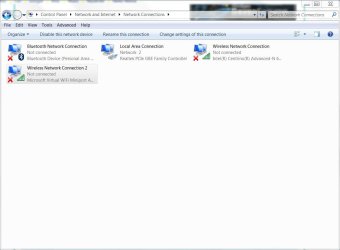
That got rid of the red X (attachment 3) but nothing is connecting. My devices (iPhone/iPad) say they are connected to wireless network "VirtualWiFi" but, they are not.

I also tried to delete ""Wireless Network Connection 2" from within Windows Explorer but, it wouldn't let me.

At this point, I'd kinda like some direction on how to completely start over...
 

Attachments

  • Capture1.JPG
    Capture1.JPG
    52.8 KB · Views: 90
  • Capture2.JPG
    Capture2.JPG
    57.9 KB · Views: 65
  • Capture3.JPG
    Capture3.JPG
    52.6 KB · Views: 62
Last edited:

My Computer My Computer

At a glance

Windows 7 X64 ProfessionalIntel® Pentium D Dual Core 3.6GHZ4GB DDR2 PC2-5300GeForce GT 440 (Fermi) 2GB 128-bit DDR3 PCI E...
Computer Manufacturer/Model Number
Dell XPS 400
OS
Windows 7 X64 Professional
CPU
Intel® Pentium D Dual Core 3.6GHZ
Motherboard
DELL Dimension 9150 MotherBoard DXP051 XPS400 FJ030
Memory
4GB DDR2 PC2-5300
Graphics Card(s)
GeForce GT 440 (Fermi) 2GB 128-bit DDR3 PCI Express 2.0 x16
Sound Card
ASUS XONAR DG 5.1 Channels PCI Interface Xonar DG
Monitor(s) Displays
2 X 23" Apple Cinema Display
Screen Resolution
1920 X 1200p
Hard Drives
250GB Intel® 510 Series SSD SATA 6G (w/TRIM) [500MB/s Reads]
1.0TB Western Digital Caviar Black SATA 6G 7200rpm 64MB Cache
PSU
375 Watt Dell
Case
Dell XPS 400 BTX Case
Cooling
Dell XPS 400 Air Cooling
Keyboard
Logitech Illuminated Keyboard
Mouse
Logitech M705 Marathon
Internet Speed
+/- 9929 Kbps
Other Info
This machine was given to me when my dad bought a new computer. I keep throwing upgrades at it and it keeps on ticking. Think I've done everything to it that can be done outside a PSU upgrade so I can run an even BETTER GPU.
make sure you kill the virtual router in processes...can't run both at once.
...and I suppose a simple batch file run as administrator on startup might work...not sure...sorry.
we have a few network guys lurkin' round that might jump in here and explain better....
 

My Computer My Computer

At a glance

Win7 Home Premium x64 W10Pro&HomeA12 9720p 4+8 TurionII M5206GB 8GBR7
Computer type
Laptop
Computer Manufacturer/Model Number
HP 17-ak0xx, dv7 3173nr
OS
Win7 Home Premium x64 W10Pro&Home
CPU
A12 9720p 4+8 TurionII M520
Motherboard
HP 3839
Memory
6GB 8GB
Graphics Card(s)
R7
Monitor(s) Displays
24" sa550
Screen Resolution
1600x900 1920x1080
Mouse
Logitechx2
Internet Speed
120Mb/s down 12up
I feel like such a n00b sometimes. I started poking around again and got it working somehow. Thanks for your help! :cool:
 

My Computer My Computer

At a glance

Windows 7 X64 ProfessionalIntel® Pentium D Dual Core 3.6GHZ4GB DDR2 PC2-5300GeForce GT 440 (Fermi) 2GB 128-bit DDR3 PCI E...
Computer Manufacturer/Model Number
Dell XPS 400
OS
Windows 7 X64 Professional
CPU
Intel® Pentium D Dual Core 3.6GHZ
Motherboard
DELL Dimension 9150 MotherBoard DXP051 XPS400 FJ030
Memory
4GB DDR2 PC2-5300
Graphics Card(s)
GeForce GT 440 (Fermi) 2GB 128-bit DDR3 PCI Express 2.0 x16
Sound Card
ASUS XONAR DG 5.1 Channels PCI Interface Xonar DG
Monitor(s) Displays
2 X 23" Apple Cinema Display
Screen Resolution
1920 X 1200p
Hard Drives
250GB Intel® 510 Series SSD SATA 6G (w/TRIM) [500MB/s Reads]
1.0TB Western Digital Caviar Black SATA 6G 7200rpm 64MB Cache
PSU
375 Watt Dell
Case
Dell XPS 400 BTX Case
Cooling
Dell XPS 400 Air Cooling
Keyboard
Logitech Illuminated Keyboard
Mouse
Logitech M705 Marathon
Internet Speed
+/- 9929 Kbps
Other Info
This machine was given to me when my dad bought a new computer. I keep throwing upgrades at it and it keeps on ticking. Think I've done everything to it that can be done outside a PSU upgrade so I can run an even BETTER GPU.
...well, if you can't break it, you're not tryin' hard enough to learn what's goin ' on...lol. Have a good day...:D
 

My Computer My Computer

At a glance

Win7 Home Premium x64 W10Pro&HomeA12 9720p 4+8 TurionII M5206GB 8GBR7
Computer type
Laptop
Computer Manufacturer/Model Number
HP 17-ak0xx, dv7 3173nr
OS
Win7 Home Premium x64 W10Pro&Home
CPU
A12 9720p 4+8 TurionII M520
Motherboard
HP 3839
Memory
6GB 8GB
Graphics Card(s)
R7
Monitor(s) Displays
24" sa550
Screen Resolution
1600x900 1920x1080
Mouse
Logitechx2
Internet Speed
120Mb/s down 12up
I have the same problem..could you please help!

I feel like such a n00b sometimes. I started poking around again and got it working somehow. Thanks for your help! :cool:

I did post a separate thread for it but no one seems to know how to solve it...so heres what it is...please take a look if you have some time..any help would be highly appreciated...

Ok so I have established a Virtual Wifi Miniport and would like to share my laptops internet via the Miniport. Whenever I connect my android phone with this access point, it works perfectly for a few minutes and then all of a sudden there is no internet on the phone. The phone remains connected to the laptop hotspot but the internet access is no more there. Now at this point if I disconnect the connection between my phone and the hotspot and then again try to reconnect back again, it wont even connect. The phone will keep on searching and shows connecting status but can never connect. I have tried all sorts of softwares connectify, virtual router, intel mywifi and even tried to create a hotspot from the cmd using netsh command. All the hotspots work in the exact same way intially works perfect but maybe after half an hour internet is gone. I have completed all the steps properly even changed the settings in the laptop adapter with interet access to allow other networks to connect but nothing seems to work. I have a Windows 7 Machine and my wireless adapter is Intel(R) Centrino(R) Wireless N-100 and the drivers are up to date according to windows. I know that its a problem with my laptop/OS or something because my android phone can connect and remain connected( without losing internet ) to the connectify hotspot in my wifi enabled desktop PC.I am breaking my head over this for the past 15 days even formatted my system once but no use. Please help if you can..please!
 

My Computer My Computer

At a glance

Windows 7 Professional 64 bit
OS
Windows 7 Professional 64 bit
Back
Top