Windows 7 Backup Fails to Start

I'm at a loss to help I'm afraid.
Someone may come along with a bright idea.

Even if you end up using different non Windows backup the situation would still be unacceptable for me.

...so if it was me I know Windows 7 SP1 shouldn't be that fragile. So I would start from scratch and do a clean install with just Disk 0 installed. Then move on to check the backup capabilities are working.
 

My Computer My Computer

At a glance

Windows 7x64 Home Premium SP1Intel i7 2600kG.Skill Ripjaws (DDR3-1600) 2x4GBNvidia GeForce GTS 450; Intel HD Graphics 300...
Computer type
PC/Desktop
Computer Manufacturer/Model Number
Own build
OS
Windows 7x64 Home Premium SP1
CPU
Intel i7 2600k
Motherboard
ASUS P8Z68 Deluxe
Memory
G.Skill Ripjaws (DDR3-1600) 2x4GB
Graphics Card(s)
Nvidia GeForce GTS 450; Intel HD Graphics 3000(GT2+)
Monitor(s) Displays
Dell Ultrasharp IPS panel U2311H, Samsung SyncMaster P2350
Screen Resolution
1920x1080
Hard Drives
Samsung 850 Pro SSD 256GB, Samsung SSD 840 120GB, Seagates 1TB Barracuda ST31000528AS x2
PSU
Seasonic M12II 520W
Case
Lian Li Lancool PC-K60
Cooling
Case: 1x120mm, 3x140mm CPU: Hyper 212+
Keyboard
Logitech MK520 (wireless)
Mouse
Logitech MK520
Internet Speed
6-7 Mbps
Antivirus
Norton Security Premium, Malwarebytes on 2 (MSE on 3rd PC)
Browser
FireFox
Other Info
Audio: Logitech Z523 2.1
I'm at a loss to help I'm afraid.
Someone may come along with a bright idea.

Even if you end up using different non Windows backup the situation would still be unacceptable for me.

...so if it was me I know Windows 7 SP1 shouldn't be that fragile. So I would start from scratch and do a clean install with just Disk 0 installed. Then move on to check the backup capabilities are working.

Thanks very much for trying!

Regards, Jim
 

My Computer My Computer

At a glance

Windows 7 Professional 64bit SP1Intel Core i7 QUAD CORE 930 2.8 GHzKingston DDR3-1333 6GBXFX Radeon HD 5700 1GB
Computer Manufacturer/Model Number
Puget Custom Computers
OS
Windows 7 Professional 64bit SP1
CPU
Intel Core i7 QUAD CORE 930 2.8 GHz
Motherboard
Asus P6X58D Premium
Memory
Kingston DDR3-1333 6GB
Graphics Card(s)
XFX Radeon HD 5700 1GB
Sound Card
On Board
Monitor(s) Displays
Samsung SyncMaster 226 BW
Screen Resolution
1680x1050
Hard Drives
2 Western Digital Cavier Blue 500GB
PSU
Antec CP-850 850 Watt
Case
Antec P183
Cooling
Gelid Tranquillo
Keyboard
Microsoft Wirelsss 3000
Mouse
Kensington Expert Mouse K64325
Internet Speed
20 Mbps
Remove Disk 2.

Backup your your C to Disk 1.
 

My Computer My Computer

At a glance

MS Windows 7 Ultimate SP1 64-bitAMD A10-4600M6.00 GB Dual-Channel DDR3 @ 798MHz (11-11-12-28)AMD Radeon HD 7660G
Computer Manufacturer/Model Number
Toshiba Satellite S875D-S7239 laptop
OS
MS Windows 7 Ultimate SP1 64-bit
CPU
AMD A10-4600M
Motherboard
AMD Pumori (Socket FT1)
Memory
6.00 GB Dual-Channel DDR3 @ 798MHz (11-11-12-28)
Graphics Card(s)
AMD Radeon HD 7660G
Sound Card
High Definition Audio Device
Monitor(s) Displays
Generic PnP Monitor (1600x900@60Hz)
Screen Resolution
1600x900@60Hz
Hard Drives
SSD 119GB Corsair CSSD-V128GB2 ATA Device
Keyboard
Standard PS/2 Keyboard
Mouse
HP Wireless Optical Mobile Mouse Model FHA-3410
Internet Speed
What the local pub, local coffee shop offers.
Other Info
Optical Drive:MATSHITA BD-CMB UJ160B ATA Device


Also have an Asus ha1002xp netbook with Win 7 Ultimate installed.
Remove Disk 2.

Backup your your C to Disk 1.
The inability to do that is what the thread is about.

Edit: He was already advised to disconnect disk 2. see post #19. Result = no go.
 
Last edited:

My Computer My Computer

At a glance

Windows 7x64 Home Premium SP1Intel i7 2600kG.Skill Ripjaws (DDR3-1600) 2x4GBNvidia GeForce GTS 450; Intel HD Graphics 300...
Computer type
PC/Desktop
Computer Manufacturer/Model Number
Own build
OS
Windows 7x64 Home Premium SP1
CPU
Intel i7 2600k
Motherboard
ASUS P8Z68 Deluxe
Memory
G.Skill Ripjaws (DDR3-1600) 2x4GB
Graphics Card(s)
Nvidia GeForce GTS 450; Intel HD Graphics 3000(GT2+)
Monitor(s) Displays
Dell Ultrasharp IPS panel U2311H, Samsung SyncMaster P2350
Screen Resolution
1920x1080
Hard Drives
Samsung 850 Pro SSD 256GB, Samsung SSD 840 120GB, Seagates 1TB Barracuda ST31000528AS x2
PSU
Seasonic M12II 520W
Case
Lian Li Lancool PC-K60
Cooling
Case: 1x120mm, 3x140mm CPU: Hyper 212+
Keyboard
Logitech MK520 (wireless)
Mouse
Logitech MK520
Internet Speed
6-7 Mbps
Antivirus
Norton Security Premium, Malwarebytes on 2 (MSE on 3rd PC)
Browser
FireFox
Other Info
Audio: Logitech Z523 2.1
Precisely. Just sit back and be in awe.
 

My Computer My Computer

At a glance

MS Windows 7 Ultimate SP1 64-bitAMD A10-4600M6.00 GB Dual-Channel DDR3 @ 798MHz (11-11-12-28)AMD Radeon HD 7660G
Computer Manufacturer/Model Number
Toshiba Satellite S875D-S7239 laptop
OS
MS Windows 7 Ultimate SP1 64-bit
CPU
AMD A10-4600M
Motherboard
AMD Pumori (Socket FT1)
Memory
6.00 GB Dual-Channel DDR3 @ 798MHz (11-11-12-28)
Graphics Card(s)
AMD Radeon HD 7660G
Sound Card
High Definition Audio Device
Monitor(s) Displays
Generic PnP Monitor (1600x900@60Hz)
Screen Resolution
1600x900@60Hz
Hard Drives
SSD 119GB Corsair CSSD-V128GB2 ATA Device
Keyboard
Standard PS/2 Keyboard
Mouse
HP Wireless Optical Mobile Mouse Model FHA-3410
Internet Speed
What the local pub, local coffee shop offers.
Other Info
Optical Drive:MATSHITA BD-CMB UJ160B ATA Device


Also have an Asus ha1002xp netbook with Win 7 Ultimate installed.
Remove Disk 2.

Backup your your C to Disk 1.

Disk 2 is a SATA drive in an external case connected to an external SATA port. It has it's own power supply. I can turn off the power and Windows no longer sees it. That is the way it was all along. I powered it on to see if Windows Backup would see it. It didn't. I powered if off again and Windows Backup still fails with the same error message.

Thanks for your patience and help, Jim
 

My Computer My Computer

At a glance

Windows 7 Professional 64bit SP1Intel Core i7 QUAD CORE 930 2.8 GHzKingston DDR3-1333 6GBXFX Radeon HD 5700 1GB
Computer Manufacturer/Model Number
Puget Custom Computers
OS
Windows 7 Professional 64bit SP1
CPU
Intel Core i7 QUAD CORE 930 2.8 GHz
Motherboard
Asus P6X58D Premium
Memory
Kingston DDR3-1333 6GB
Graphics Card(s)
XFX Radeon HD 5700 1GB
Sound Card
On Board
Monitor(s) Displays
Samsung SyncMaster 226 BW
Screen Resolution
1680x1050
Hard Drives
2 Western Digital Cavier Blue 500GB
PSU
Antec CP-850 850 Watt
Case
Antec P183
Cooling
Gelid Tranquillo
Keyboard
Microsoft Wirelsss 3000
Mouse
Kensington Expert Mouse K64325
Internet Speed
20 Mbps
Good afternoon. You must have Administration privileges to do this. If you do have Admin. rights turn off you computer, then disconnect the drive you are trying to install the backup on. Start your computer, once that is done plug your drive back in and see if windows picks it up. And I still don't see your specs in the lower left hand side of you post. The reason we need this is because every time some one tries to help they don't have to search through your post looking for your specs. Once done correctly you specs will be at the lower left of every one of your post. Check out my specs on this post and it will give you a good idea what we need.

You want me to plug the HDD in while the computer is running? Please tell me what benefit this gives over uninstalling the HDD via Device Manager, then rebooting so that Windows has to re-install it.

Thanks for your continued help, Jim
 
Last edited:

My Computer My Computer

At a glance

Windows 7 Professional 64bit SP1Intel Core i7 QUAD CORE 930 2.8 GHzKingston DDR3-1333 6GBXFX Radeon HD 5700 1GB
Computer Manufacturer/Model Number
Puget Custom Computers
OS
Windows 7 Professional 64bit SP1
CPU
Intel Core i7 QUAD CORE 930 2.8 GHz
Motherboard
Asus P6X58D Premium
Memory
Kingston DDR3-1333 6GB
Graphics Card(s)
XFX Radeon HD 5700 1GB
Sound Card
On Board
Monitor(s) Displays
Samsung SyncMaster 226 BW
Screen Resolution
1680x1050
Hard Drives
2 Western Digital Cavier Blue 500GB
PSU
Antec CP-850 850 Watt
Case
Antec P183
Cooling
Gelid Tranquillo
Keyboard
Microsoft Wirelsss 3000
Mouse
Kensington Expert Mouse K64325
Internet Speed
20 Mbps
Let's not worry about what if or what makes sense.

Let's get your backup.

However, before we even tackle that:

An fully and completely up-to-date Win 7 is imperative.

Update your Win 7.

Please carry out all steps of the following:
UPDATING YOUR WIN 7
ASSURE THAT YOU RECEIVE ALL UPDATES

WIN | type WINDOWS UPDATE | ENTER |
Change settings (left-hand column)
|
checkmark all four of the boxes | OK
button

Approve any dialog boxes presented. Let Windows install any update features.

WIN is the key with the Microsoft flag on top.

INSTALL CRITICAL UPDATES
Check for Updates
(left-hand column)
Install ALL critical updates.
Restart your computer (even if not prompted)

Repeat this procedure until there are no more critical updates.

DO NOT TRUST the “Windows is up to date” in center of dialog. until you see that TWICE IN A ROW!

INSTALL IMPORTANT UPDATES
Use the “critical update” procedure until all important updates are installed.

INSTALL OPTIONAL UPDATES
Use the “critical update” procedure until all optional updates are installed.

Under Optional updates you will be presented with a list of about 34 language updates.
You can hide those updates so that aren't continually notified of those updates. When you click on 34 optional updates are available, then you
a) highlight all of the language updates,
b) right-click anywhere in the highlighted list.
c) click on Hide Updates,
d) OK button.


UPDATE GOLDEN RULES

Install ALL, yes, ALL updates.
This is Win 7 and not Vista or XP (eXPired).

UPDATE IS HUNG –TAKING FOREVER
Hung is very doubtful unless you interrupted updates.

CTRL + SHIFT + ESC key combo will pop-up the Task Manager.
Lo and behold, Windows Update is still running!

You hold down the CTRL and SHIFT keys.
While holding them down, tap the ESC key once.
 

My Computer My Computer

At a glance

MS Windows 7 Ultimate SP1 64-bitAMD A10-4600M6.00 GB Dual-Channel DDR3 @ 798MHz (11-11-12-28)AMD Radeon HD 7660G
Computer Manufacturer/Model Number
Toshiba Satellite S875D-S7239 laptop
OS
MS Windows 7 Ultimate SP1 64-bit
CPU
AMD A10-4600M
Motherboard
AMD Pumori (Socket FT1)
Memory
6.00 GB Dual-Channel DDR3 @ 798MHz (11-11-12-28)
Graphics Card(s)
AMD Radeon HD 7660G
Sound Card
High Definition Audio Device
Monitor(s) Displays
Generic PnP Monitor (1600x900@60Hz)
Screen Resolution
1600x900@60Hz
Hard Drives
SSD 119GB Corsair CSSD-V128GB2 ATA Device
Keyboard
Standard PS/2 Keyboard
Mouse
HP Wireless Optical Mobile Mouse Model FHA-3410
Internet Speed
What the local pub, local coffee shop offers.
Other Info
Optical Drive:MATSHITA BD-CMB UJ160B ATA Device


Also have an Asus ha1002xp netbook with Win 7 Ultimate installed.

My Computer My Computer

At a glance

Windows 10 Pro. 64/ version 1709 Windows 7 Pr...Intel i7-6800K @ 4.3Corsair Platinum 16 gig @2400EVGA GTX 1070 OC
Computer type
PC/Desktop
Computer Manufacturer/Model Number
Home made Desktop
OS
Windows 10 Pro. 64/ version 1709 Windows 7 Pro/64
CPU
Intel i7-6800K @ 4.3
Motherboard
ASUS X-99 Deluxe II
Memory
Corsair Platinum 16 gig @2400
Graphics Card(s)
EVGA GTX 1070 OC
Monitor(s) Displays
Asus 27" LED LCD/VE278Q
Screen Resolution
1920-1080 or 1280-720 HDMI
Hard Drives
INTEL SSD 730-240 Gb Sata 3.0/
PSU
EVGA Platium 1200W
Case
Phanteks Luxe Tempered Glass 8 fans/ one radiator
Cooling
XSPC/ Water Cooled CPU
Keyboard
Das 4 Professional
Mouse
Logitech M705/MX Anywhere 2-S
Internet Speed
100 mbits
Antivirus
Microsoft Security Essentials/ Malwarebytes Premium 3.0/ SAS
Browser
I.E. 11 default/Firefox/ ISP Time Warner Cable/Spectrum
Other Info
LG BluRay Burner/
Sound system-KLipsch-THX/
Icy Dock ssd Hot Swap bays.
Let's not worry about what if or what makes sense.

Let's get your backup.

However, before we even tackle that:

An fully and completely up-to-date Win 7 is imperative.

Update your Win 7.

Please carry out all steps of the following:
UPDATING YOUR WIN 7
ASSURE THAT YOU RECEIVE ALL UPDATES

WIN | type WINDOWS UPDATE | ENTER |
Change settings (left-hand column)
|
checkmark all four of the boxes | OK
button

Approve any dialog boxes presented. Let Windows install any update features.

WIN is the key with the Microsoft flag on top.

INSTALL CRITICAL UPDATES
Check for Updates
(left-hand column)
Install ALL critical updates.
Restart your computer (even if not prompted)

Repeat this procedure until there are no more critical updates.

DO NOT TRUST the “Windows is up to date” in center of dialog. until you see that TWICE IN A ROW!

INSTALL IMPORTANT UPDATES
Use the “critical update” procedure until all important updates are installed.

INSTALL OPTIONAL UPDATES
Use the “critical update” procedure until all optional updates are installed.

Under Optional updates you will be presented with a list of about 34 language updates.
You can hide those updates so that aren't continually notified of those updates. When you click on 34 optional updates are available, then you
a) highlight all of the language updates,
b) right-click anywhere in the highlighted list.
c) click on Hide Updates,
d) OK button.


UPDATE GOLDEN RULES

Install ALL, yes, ALL updates.
This is Win 7 and not Vista or XP (eXPired).

UPDATE IS HUNG –TAKING FOREVER
Hung is very doubtful unless you interrupted updates.

CTRL + SHIFT + ESC key combo will pop-up the Task Manager.
Lo and behold, Windows Update is still running!

You hold down the CTRL and SHIFT keys.
While holding them down, tap the ESC key once.

Done. There were 5 optional updates.

Now what?

Thanks, Jim
 

My Computer My Computer

At a glance

Windows 7 Professional 64bit SP1Intel Core i7 QUAD CORE 930 2.8 GHzKingston DDR3-1333 6GBXFX Radeon HD 5700 1GB
Computer Manufacturer/Model Number
Puget Custom Computers
OS
Windows 7 Professional 64bit SP1
CPU
Intel Core i7 QUAD CORE 930 2.8 GHz
Motherboard
Asus P6X58D Premium
Memory
Kingston DDR3-1333 6GB
Graphics Card(s)
XFX Radeon HD 5700 1GB
Sound Card
On Board
Monitor(s) Displays
Samsung SyncMaster 226 BW
Screen Resolution
1680x1050
Hard Drives
2 Western Digital Cavier Blue 500GB
PSU
Antec CP-850 850 Watt
Case
Antec P183
Cooling
Gelid Tranquillo
Keyboard
Microsoft Wirelsss 3000
Mouse
Kensington Expert Mouse K64325
Internet Speed
20 Mbps
Can you now perform the backup?

Which partition(s) to you wish to back up?

Where do you want to put the backup?
 

My Computer My Computer

At a glance

MS Windows 7 Ultimate SP1 64-bitAMD A10-4600M6.00 GB Dual-Channel DDR3 @ 798MHz (11-11-12-28)AMD Radeon HD 7660G
Computer Manufacturer/Model Number
Toshiba Satellite S875D-S7239 laptop
OS
MS Windows 7 Ultimate SP1 64-bit
CPU
AMD A10-4600M
Motherboard
AMD Pumori (Socket FT1)
Memory
6.00 GB Dual-Channel DDR3 @ 798MHz (11-11-12-28)
Graphics Card(s)
AMD Radeon HD 7660G
Sound Card
High Definition Audio Device
Monitor(s) Displays
Generic PnP Monitor (1600x900@60Hz)
Screen Resolution
1600x900@60Hz
Hard Drives
SSD 119GB Corsair CSSD-V128GB2 ATA Device
Keyboard
Standard PS/2 Keyboard
Mouse
HP Wireless Optical Mobile Mouse Model FHA-3410
Internet Speed
What the local pub, local coffee shop offers.
Other Info
Optical Drive:MATSHITA BD-CMB UJ160B ATA Device


Also have an Asus ha1002xp netbook with Win 7 Ultimate installed.
Can you now perform the backup?

Which partition(s) to you wish to back up?

Where do you want to put the backup?

No, Backup fails to start with the same error message.

I want to backup both partitions on HDD 0 (C) to HDD 1 (D).

Thanks, Jim
 

My Computer My Computer

At a glance

Windows 7 Professional 64bit SP1Intel Core i7 QUAD CORE 930 2.8 GHzKingston DDR3-1333 6GBXFX Radeon HD 5700 1GB
Computer Manufacturer/Model Number
Puget Custom Computers
OS
Windows 7 Professional 64bit SP1
CPU
Intel Core i7 QUAD CORE 930 2.8 GHz
Motherboard
Asus P6X58D Premium
Memory
Kingston DDR3-1333 6GB
Graphics Card(s)
XFX Radeon HD 5700 1GB
Sound Card
On Board
Monitor(s) Displays
Samsung SyncMaster 226 BW
Screen Resolution
1680x1050
Hard Drives
2 Western Digital Cavier Blue 500GB
PSU
Antec CP-850 850 Watt
Case
Antec P183
Cooling
Gelid Tranquillo
Keyboard
Microsoft Wirelsss 3000
Mouse
Kensington Expert Mouse K64325
Internet Speed
20 Mbps
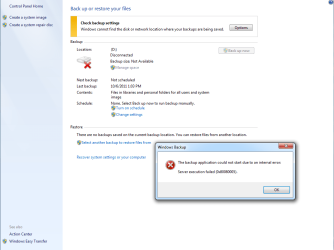
Here is a snip showing the error I get if I click, "Create a system image", or "Change Settings", or "Options > Change Settings". By the way, I physically removed HDD 1 (D) and re-installed it as had been suggested. As I expected, it did not solve the problem.

Regards, Jim
 

Attachments

  • Backup Fails.PNG
    Backup Fails.PNG
    35 KB · Views: 16

My Computer My Computer

At a glance

Windows 7 Professional 64bit SP1Intel Core i7 QUAD CORE 930 2.8 GHzKingston DDR3-1333 6GBXFX Radeon HD 5700 1GB
Computer Manufacturer/Model Number
Puget Custom Computers
OS
Windows 7 Professional 64bit SP1
CPU
Intel Core i7 QUAD CORE 930 2.8 GHz
Motherboard
Asus P6X58D Premium
Memory
Kingston DDR3-1333 6GB
Graphics Card(s)
XFX Radeon HD 5700 1GB
Sound Card
On Board
Monitor(s) Displays
Samsung SyncMaster 226 BW
Screen Resolution
1680x1050
Hard Drives
2 Western Digital Cavier Blue 500GB
PSU
Antec CP-850 850 Watt
Case
Antec P183
Cooling
Gelid Tranquillo
Keyboard
Microsoft Wirelsss 3000
Mouse
Kensington Expert Mouse K64325
Internet Speed
20 Mbps
Hawkeye,
I know that you don't think this makes any sense, but:
Physically remove Disk 2.
Leave Disk 2 removed until this problem is solved.
Disconnect from any network.

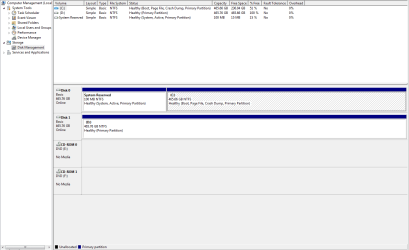
Make a fresh snapshot of DiskManagement output and include with your next post.

Now can you backup the one partition (ignoring the reserved partition) to a partition on disk 1?
 

My Computer My Computer

At a glance

MS Windows 7 Ultimate SP1 64-bitAMD A10-4600M6.00 GB Dual-Channel DDR3 @ 798MHz (11-11-12-28)AMD Radeon HD 7660G
Computer Manufacturer/Model Number
Toshiba Satellite S875D-S7239 laptop
OS
MS Windows 7 Ultimate SP1 64-bit
CPU
AMD A10-4600M
Motherboard
AMD Pumori (Socket FT1)
Memory
6.00 GB Dual-Channel DDR3 @ 798MHz (11-11-12-28)
Graphics Card(s)
AMD Radeon HD 7660G
Sound Card
High Definition Audio Device
Monitor(s) Displays
Generic PnP Monitor (1600x900@60Hz)
Screen Resolution
1600x900@60Hz
Hard Drives
SSD 119GB Corsair CSSD-V128GB2 ATA Device
Keyboard
Standard PS/2 Keyboard
Mouse
HP Wireless Optical Mobile Mouse Model FHA-3410
Internet Speed
What the local pub, local coffee shop offers.
Other Info
Optical Drive:MATSHITA BD-CMB UJ160B ATA Device


Also have an Asus ha1002xp netbook with Win 7 Ultimate installed.
Hawkeye,
I know that you don't think this makes any sense, but:
Physically remove Disk 2.
Leave Disk 2 removed until this problem is solved.
Disconnect from any network.

Make a fresh snapshot of DiskManagement output and include with your next post.

Now can you backup the one partition (ignoring the reserved partition) to a partition on disk 1?

NO, BACKUP NEVER STARTS. See the failure screen in the snip in my last post.

Tell me what you mean by "physically remove disk 2". Disk 0 is my system/boot HDD, disk 1 is the HDD I want to put the backup on, disk 2 is attached to an external SATA port. I can disconnect the SATA cable, I can power it down.

I will be out of town until October 15th. I will still be able to read Email and read the Forum, but no access to the PC in question.

Thanks, Jim
 

Attachments

  • Disk Management02.PNG
    Disk Management02.PNG
    20.6 KB · Views: 6

My Computer My Computer

At a glance

Windows 7 Professional 64bit SP1Intel Core i7 QUAD CORE 930 2.8 GHzKingston DDR3-1333 6GBXFX Radeon HD 5700 1GB
Computer Manufacturer/Model Number
Puget Custom Computers
OS
Windows 7 Professional 64bit SP1
CPU
Intel Core i7 QUAD CORE 930 2.8 GHz
Motherboard
Asus P6X58D Premium
Memory
Kingston DDR3-1333 6GB
Graphics Card(s)
XFX Radeon HD 5700 1GB
Sound Card
On Board
Monitor(s) Displays
Samsung SyncMaster 226 BW
Screen Resolution
1680x1050
Hard Drives
2 Western Digital Cavier Blue 500GB
PSU
Antec CP-850 850 Watt
Case
Antec P183
Cooling
Gelid Tranquillo
Keyboard
Microsoft Wirelsss 3000
Mouse
Kensington Expert Mouse K64325
Internet Speed
20 Mbps
Have an enjoyable trip.

The Disk 1 is presently 100% empty.

Would you run a test for me and:
1. copy, but not move, a folder and files over to there.
2. Using Windows Explorer can you read, change, add to, delete from the folder and files on Disk 1?
3. When finished, perform a quick format of Disk 1.
 

My Computer My Computer

At a glance

MS Windows 7 Ultimate SP1 64-bitAMD A10-4600M6.00 GB Dual-Channel DDR3 @ 798MHz (11-11-12-28)AMD Radeon HD 7660G
Computer Manufacturer/Model Number
Toshiba Satellite S875D-S7239 laptop
OS
MS Windows 7 Ultimate SP1 64-bit
CPU
AMD A10-4600M
Motherboard
AMD Pumori (Socket FT1)
Memory
6.00 GB Dual-Channel DDR3 @ 798MHz (11-11-12-28)
Graphics Card(s)
AMD Radeon HD 7660G
Sound Card
High Definition Audio Device
Monitor(s) Displays
Generic PnP Monitor (1600x900@60Hz)
Screen Resolution
1600x900@60Hz
Hard Drives
SSD 119GB Corsair CSSD-V128GB2 ATA Device
Keyboard
Standard PS/2 Keyboard
Mouse
HP Wireless Optical Mobile Mouse Model FHA-3410
Internet Speed
What the local pub, local coffee shop offers.
Other Info
Optical Drive:MATSHITA BD-CMB UJ160B ATA Device


Also have an Asus ha1002xp netbook with Win 7 Ultimate installed.
Have an enjoyable trip.

The Disk 1 is presently 100% empty.

Would you run a test for me and:
1. copy, but not move, a folder and files over to there.
2. Using Windows Explorer can you read, change, add to, delete from the folder and files on Disk 1?
3. When finished, perform a quick format of Disk 1.

Yes, I was able to copy a folder full of files from "C" to "D", and do all of the usual file operations. After a quick format, all that is left is a System Volume folder.

Thanks, Jim
 

My Computer My Computer

At a glance

Windows 7 Professional 64bit SP1Intel Core i7 QUAD CORE 930 2.8 GHzKingston DDR3-1333 6GBXFX Radeon HD 5700 1GB
Computer Manufacturer/Model Number
Puget Custom Computers
OS
Windows 7 Professional 64bit SP1
CPU
Intel Core i7 QUAD CORE 930 2.8 GHz
Motherboard
Asus P6X58D Premium
Memory
Kingston DDR3-1333 6GB
Graphics Card(s)
XFX Radeon HD 5700 1GB
Sound Card
On Board
Monitor(s) Displays
Samsung SyncMaster 226 BW
Screen Resolution
1680x1050
Hard Drives
2 Western Digital Cavier Blue 500GB
PSU
Antec CP-850 850 Watt
Case
Antec P183
Cooling
Gelid Tranquillo
Keyboard
Microsoft Wirelsss 3000
Mouse
Kensington Expert Mouse K64325
Internet Speed
20 Mbps
I see that we haven't run the System File Checker.

Please read following tutorial first and then if SFC doesn't give you a clean bill of health the three times: run sfc, reboot.

Help that you don't end up with files that need to be replaced as that is a little bit of a pain.

SFC /SCANNOW Command - System File Checker
How to Repair Windows 7 System Files with System File Checker
 

My Computer My Computer

At a glance

MS Windows 7 Ultimate SP1 64-bitAMD A10-4600M6.00 GB Dual-Channel DDR3 @ 798MHz (11-11-12-28)AMD Radeon HD 7660G
Computer Manufacturer/Model Number
Toshiba Satellite S875D-S7239 laptop
OS
MS Windows 7 Ultimate SP1 64-bit
CPU
AMD A10-4600M
Motherboard
AMD Pumori (Socket FT1)
Memory
6.00 GB Dual-Channel DDR3 @ 798MHz (11-11-12-28)
Graphics Card(s)
AMD Radeon HD 7660G
Sound Card
High Definition Audio Device
Monitor(s) Displays
Generic PnP Monitor (1600x900@60Hz)
Screen Resolution
1600x900@60Hz
Hard Drives
SSD 119GB Corsair CSSD-V128GB2 ATA Device
Keyboard
Standard PS/2 Keyboard
Mouse
HP Wireless Optical Mobile Mouse Model FHA-3410
Internet Speed
What the local pub, local coffee shop offers.
Other Info
Optical Drive:MATSHITA BD-CMB UJ160B ATA Device


Also have an Asus ha1002xp netbook with Win 7 Ultimate installed.
I see that we haven't run the System File Checker.

Please read following tutorial first and then if SFC doesn't give you a clean bill of health the three times: run sfc, reboot.

Help that you don't end up with files that need to be replaced as that is a little bit of a pain.

SFC /SCANNOW Command - System File Checker
How to Repair Windows 7 System Files with System File Checker

OK, "Windows Resource Protection did not find any integrity violations." I ran it three times just for kicks. Got the same message three times.

Thanks, Jim
 

My Computer My Computer

At a glance

Windows 7 Professional 64bit SP1Intel Core i7 QUAD CORE 930 2.8 GHzKingston DDR3-1333 6GBXFX Radeon HD 5700 1GB
Computer Manufacturer/Model Number
Puget Custom Computers
OS
Windows 7 Professional 64bit SP1
CPU
Intel Core i7 QUAD CORE 930 2.8 GHz
Motherboard
Asus P6X58D Premium
Memory
Kingston DDR3-1333 6GB
Graphics Card(s)
XFX Radeon HD 5700 1GB
Sound Card
On Board
Monitor(s) Displays
Samsung SyncMaster 226 BW
Screen Resolution
1680x1050
Hard Drives
2 Western Digital Cavier Blue 500GB
PSU
Antec CP-850 850 Watt
Case
Antec P183
Cooling
Gelid Tranquillo
Keyboard
Microsoft Wirelsss 3000
Mouse
Kensington Expert Mouse K64325
Internet Speed
20 Mbps
Sure wish the easy fixes would be the case.

OK. this next procedure is going to take serveral hours. I need you to run a full scan using the Microsoft Standalone System Sweeper over disk 0 and disk 1. Disk 1 shold go very quick.

PUT SYSTEM SWEEPER ON A USB STICK
System Sweeper, https://connect.microsoft.com/systemsweeper, allows you to start an infected PC and perform an offline scan to identify and remove viruses, rootkits and other advanced malware. System Sweeper is a free standalone, bootable malware and virus remover from Microsoft.


NOTE: A fine tutorial on the System Sweeper is:
How to use the Microsoft Standalone System Sweeper


Download System Sweeper (about 576 kB):
https://connect.microsoft.com/systemsweeper

Insert 256 MB or larger USB stick into a usb port.
Run the downloaded program--mssstool64.exe or mssstool32.exe
Choose the option to install to USB.
Caution: The install program will format the usb stick.

The install program will download about 200 mB more.
After the install is finished, leave the stick in the usb slot.

Run the program you downloaded once again.
This 2nd run, and any subsequent runs, will download the very latest anti-virus definitions (about 60 mB).

To keep System Sweeper up-to-date, simply reinsert the usb stick and run the installation program, mssstool64.exe or mssstool32.exe, again.

The initial, full scan by System Sweeper can easily take several hours, but subsequent quick scans will be shorter.
Remember, your computer is being very thoroughly checked for all types of malware.

The results of System Sweeper will be in:
\Windows\Standalone System Sweeper\Support as one or more files with a LOG extension which can be viewed with Notepad.
 

My Computer My Computer

At a glance

MS Windows 7 Ultimate SP1 64-bitAMD A10-4600M6.00 GB Dual-Channel DDR3 @ 798MHz (11-11-12-28)AMD Radeon HD 7660G
Computer Manufacturer/Model Number
Toshiba Satellite S875D-S7239 laptop
OS
MS Windows 7 Ultimate SP1 64-bit
CPU
AMD A10-4600M
Motherboard
AMD Pumori (Socket FT1)
Memory
6.00 GB Dual-Channel DDR3 @ 798MHz (11-11-12-28)
Graphics Card(s)
AMD Radeon HD 7660G
Sound Card
High Definition Audio Device
Monitor(s) Displays
Generic PnP Monitor (1600x900@60Hz)
Screen Resolution
1600x900@60Hz
Hard Drives
SSD 119GB Corsair CSSD-V128GB2 ATA Device
Keyboard
Standard PS/2 Keyboard
Mouse
HP Wireless Optical Mobile Mouse Model FHA-3410
Internet Speed
What the local pub, local coffee shop offers.
Other Info
Optical Drive:MATSHITA BD-CMB UJ160B ATA Device


Also have an Asus ha1002xp netbook with Win 7 Ultimate installed.
Back
Top