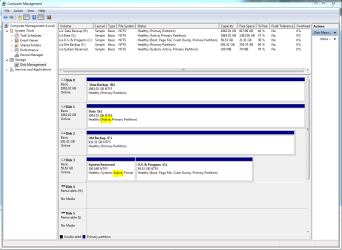
I've recently installed a new system with the OS on an SSD and data on a Homegroup shared HDD. I've noticed that my shared HDD (S has an Active partition as well as the Active partion on my system SSD. I'm concerned that somehow the MBR has got itself installed onto the S: drive rather than the C: drive. (How this can have happened I don't know as the SSD was the only drive attached when I installed Win 7 x64).
How can I tell if the MBR is on the wrong drive and if it is how to fix this? I'm presuming my backup system images (made with Macrium Reflect) will be useless if the image doesn't contain an active MBR?
Thanks
Attachments
Disk Manager snip.PNG
36.8 KB
· Views: 119
My Computer
At a glance
Microsoft Windows 7 Home Premium 64-bit 7601 ...AMD Phenom II x4 850 3.3GHz8GbATI Radeon HD 4250
Computer Manufacturer/Model Number
Home build
OS
Microsoft Windows 7 Home Premium 64-bit 7601 Multiprocessor Free Service Pack 1
CPU
AMD Phenom II x4 850 3.3GHz
Motherboard
Asrock 880GMH/U3S3
Memory
8Gb
Graphics Card(s)
ATI Radeon HD 4250
Sound Card
(1) Creatix SAA7131, Hybrid Capture Device (2) AMD High De
Monitor(s) Displays
Generic (DGM - DVI & VGA)
Screen Resolution
1680x1050
Hard Drives
(1) M4-CT064M4SSD2 ATA Device (2) WDC WD10 EARS-00Y5B1 SATA Disk Device (3) WDC WD20 EARS-00MVWB0 SATA Disk Device (4) WDC WD20 EARS-00MVWB0 SATA Disk Device (5) WDC WD10 EACS-00B6B0 SATA Disk Device
Microsoft Windows 7 Home Premium 64-bit 7601 ...AMD Phenom II x4 850 3.3GHz8GbATI Radeon HD 4250
Computer Manufacturer/Model Number
Home build
OS
Microsoft Windows 7 Home Premium 64-bit 7601 Multiprocessor Free Service Pack 1
CPU
AMD Phenom II x4 850 3.3GHz
Motherboard
Asrock 880GMH/U3S3
Memory
8Gb
Graphics Card(s)
ATI Radeon HD 4250
Sound Card
(1) Creatix SAA7131, Hybrid Capture Device (2) AMD High De
Monitor(s) Displays
Generic (DGM - DVI & VGA)
Screen Resolution
1680x1050
Hard Drives
(1) M4-CT064M4SSD2 ATA Device (2) WDC WD10 EARS-00Y5B1 SATA Disk Device (3) WDC WD20 EARS-00MVWB0 SATA Disk Device (4) WDC WD20 EARS-00MVWB0 SATA Disk Device (5) WDC WD10 EACS-00B6B0 SATA Disk Device
You can simply rightclick Disk 1 (not the S: partition, but the entire disk itself) and Set as Inactive. That's all.
I don't really see a problem with your C: partition being on disk 3 although it is a bit unusual, but if things are working fine for you, probably best to leave it alone.
To explain a bit more: Each disk has its own MBR (located at the very first sector of the disk), it's not just a matter of the MBR being only on the disk that hosts the bootable system partition. For each disk, the MBR contains that disk's partition layout and the information about which partitions are "active", meaning bootable (if they contain an operating system).
Macrium Reflect does save a copy of the MBR with every backup - at restore time you have the choice of whether to restore the MBR or not. So you're fine.
My Computer
At a glance
Windows 7 Professional SP1 32-bitIntel Core 2 Duo E6600 2.4GHz4GB DDR2-667 (4x1GB in dual-channel config)nVidia GeForce 9800 GT
Computer type
PC/Desktop
Computer Manufacturer/Model Number
Custom-built
OS
Windows 7 Professional SP1 32-bit
CPU
Intel Core 2 Duo E6600 2.4GHz
Motherboard
Asus PL5D2
Memory
4GB DDR2-667 (4x1GB in dual-channel config)
Graphics Card(s)
nVidia GeForce 9800 GT
Sound Card
Creative X-Fi XtremeMusic
Monitor(s) Displays
Acer P236H
Screen Resolution
1920x1200 (DVI)
Hard Drives
OCZ SSD Vertex Plus 60GB SATA (Firmware 3.55), 64MB cache
Hitachi HD321KJ SATA, 320GB, 7200rpm, 16MB cache
2) Physically disconnect 60gb SSD the HD.
Make the Windows 7 HD, disk0 & first HD boot in BIOS, connect 60gb SSD the HD to the first Sata port on the MOBO.
Thanks for the help. I've now marked the S: drive as inactive (using DISKPART and instructions on another forum) so am happy with that now.
I feel inclined to leave my system disk as disk 3 unless it causes me any concern in future. I am wondering whether it is listed as Disk 3 because my Mobo has 6 SATA 2 ports and 2 SATA 3 ports. The SSD with the OS on it is plugged into the first SATA 3 port with the HDDs plugged into the SATA 2 ports - maybe the Mobo recognises and lists the SATA 2 ports first?
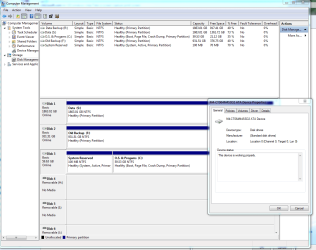
Properties for my SSD (Disk 3)shows it as being in the 0 location etc
BTW right clicking on the S: drive (when it was Active) showed me 'Mark Partition as Inactive' but this was greyed out
Last edited:
My Computer
At a glance
Microsoft Windows 7 Home Premium 64-bit 7601 ...AMD Phenom II x4 850 3.3GHz8GbATI Radeon HD 4250
Computer Manufacturer/Model Number
Home build
OS
Microsoft Windows 7 Home Premium 64-bit 7601 Multiprocessor Free Service Pack 1
CPU
AMD Phenom II x4 850 3.3GHz
Motherboard
Asrock 880GMH/U3S3
Memory
8Gb
Graphics Card(s)
ATI Radeon HD 4250
Sound Card
(1) Creatix SAA7131, Hybrid Capture Device (2) AMD High De
Monitor(s) Displays
Generic (DGM - DVI & VGA)
Screen Resolution
1680x1050
Hard Drives
(1) M4-CT064M4SSD2 ATA Device (2) WDC WD10 EARS-00Y5B1 SATA Disk Device (3) WDC WD20 EARS-00MVWB0 SATA Disk Device (4) WDC WD20 EARS-00MVWB0 SATA Disk Device (5) WDC WD10 EACS-00B6B0 SATA Disk Device
You worry too much. There is no need to change anything. Even an active partition on each drive is nothing to worry about. It probably came about because there was once an OS installed on that drive. As long as the BIOS boot sequence points to the dive from where you want to boot, things are in good order.
My Computer
At a glance
Vista, Windows7, Mint Mate, Zorin, Windows 8from 1.6GHz Duo to i7
Computer Manufacturer/Model Number
HP, Dell, Gateway, Toshiba - 4 laptops and 2 desktops
Having Win7 in Disk0 slot and making sure no other partitions are marked Active is mainly a precaution that when Startup Repair is run it will not derail the System boot files to an earlier partition which is marked Active as it can and will do - as will the installer.
This might be saying the same thing over but I will say it this way. Having your operating system on disk 0 the only active one allows what ever you are trying to do have no choice but use disk 0. It will not fool with the other drives or partitions unless you instruct it to.
My Computer
At a glance
Windows 10 Pro. 64/ version 1709 Windows 7 Pr...Intel i7-6800K @ 4.3Corsair Platinum 16 gig @2400EVGA GTX 1070 OC
Computer type
PC/Desktop
Computer Manufacturer/Model Number
Home made Desktop
OS
Windows 10 Pro. 64/ version 1709 Windows 7 Pro/64
CPU
Intel i7-6800K @ 4.3
Motherboard
ASUS X-99 Deluxe II
Memory
Corsair Platinum 16 gig @2400
Graphics Card(s)
EVGA GTX 1070 OC
Monitor(s) Displays
Asus 27" LED LCD/VE278Q
Screen Resolution
1920-1080 or 1280-720 HDMI
Hard Drives
INTEL SSD 730-240 Gb Sata 3.0/
PSU
EVGA Platium 1200W
Case
Phanteks Luxe Tempered Glass 8 fans/ one radiator
Cooling
XSPC/ Water Cooled CPU
Keyboard
Das 4 Professional
Mouse
Logitech M705/MX Anywhere 2-S
Internet Speed
100 mbits
Antivirus
Microsoft Security Essentials/ Malwarebytes Premium 3.0/ SAS
Browser
I.E. 11 default/Firefox/ ISP Time Warner Cable/Spectrum
Other Info
LG BluRay Burner/
Sound system-KLipsch-THX/
Icy Dock ssd Hot Swap bays.

 has an Active partition as well as the Active partion on my system SSD. I'm concerned that somehow the MBR has got itself installed onto the S: drive rather than the C: drive. (How this can have happened I don't know as the SSD was the only drive attached when I installed Win 7 x64).