Solved Front panel audio connections to motherboard Not Working!

cynet

New member
Building a new rig, but for some reason there is no sound when I boot the machine up, the sound always come's from the front panel audio connections to motherboard and case Hd audio or AC97 wires which are both compatible on my motherboard.

The gaming case is a Antec 900, it all seems wired up correctly, just puzzled in why I can't here the beep sound when it boots up, any one got any suggestions please.
 

My Computer

OS
Win 7 64 bit
The "Beep" sound that I think you're referring to is the post beep.

That does not come from the front panel audio connections.

That comes from the Motherboard speaker and is a separate connection.

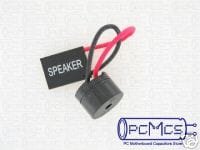
If you want to hear the post beep, get a hold of a motherboard speaker. It's a little tiny thing that plugs into 2 of the pins on the bottom right hand corner of your Motherboard.

The function of this speaker is only for those little beeps and does nothing else of value. But it can be handy if you have a hardware failure or something like that. Each motherboard has it's own little morse code of beeps depending on what is going on. A single beep means everything is cool and it kicks off into the boot sequence.
 

My Computer

Computer Manufacturer/Model Number
Custom Build
OS
Windows 7 Professional 64 Bit Service Pack 1
CPU
Intel i7-2600K OC to 3.8Ghz
Motherboard
Asus TUF Sabertooth P67
Memory
Corsair Vengence 16GB (X4 4GB)
Graphics Card(s)
X2 EVGA GTX570 SLI
Sound Card
Creative Soundblaster X-FI TI
Monitor(s) Displays
Dual HP 2311 LED Displays
Screen Resolution
1920X1080 single / 3840X1080 desktop
Hard Drives
Crucial Force 3 SSD 120GB 6Gb/s ( OS Drive )
WD Caviar Black 2 TB 6 Gb/s (Data drive)
PSU
Kingwin Mach 1 1000w Modular 80+ Bronze
Case
AZZA solano 1000
Cooling
Zalmen 700 LED CPU, X2 240mm case fans , X3 120mm case fans
Keyboard
Razer Black Widow Mechanical
Mouse
Razer Mamba
Internet Speed
26.7 mb/s Down / 7.39 Up
The "Beep" sound that I think you're referring is the post beep.

That does not come from the front panel audio connections.

That comes from the Motherboard speaker and is a separate connection.

If you want to hear the post beep, get a hold of a motherboard speaker. It's a little tiny thing that plugs into 2 of the pins on the bottom right hand corner of your Motherboard.

O'k being a half novice I'm wondering where the motherboard speaker wire goes too from the pins you speak off, I have fitted in a Gigabyte X58A-UD3R REV 2.0, thank you for the quick reply and help.
 

My Computer

OS
Win 7 64 bit
A motherboard speaker is it's own little thing that sometimes ships with the motherboard.. sometimes not. If you look at the connections down where you plugged in your wires for the HDD light and Power switch, you will see a couple connections there listed as " Speaker"

Get one of these and plug it in on those pins.

They are dirt cheap. Got a dollar?
 

Attachments

  • cd41_2.jpg
    cd41_2.jpg
    6.2 KB · Views: 1,247

My Computer

Computer Manufacturer/Model Number
Custom Build
OS
Windows 7 Professional 64 Bit Service Pack 1
CPU
Intel i7-2600K OC to 3.8Ghz
Motherboard
Asus TUF Sabertooth P67
Memory
Corsair Vengence 16GB (X4 4GB)
Graphics Card(s)
X2 EVGA GTX570 SLI
Sound Card
Creative Soundblaster X-FI TI
Monitor(s) Displays
Dual HP 2311 LED Displays
Screen Resolution
1920X1080 single / 3840X1080 desktop
Hard Drives
Crucial Force 3 SSD 120GB 6Gb/s ( OS Drive )
WD Caviar Black 2 TB 6 Gb/s (Data drive)
PSU
Kingwin Mach 1 1000w Modular 80+ Bronze
Case
AZZA solano 1000
Cooling
Zalmen 700 LED CPU, X2 240mm case fans , X3 120mm case fans
Keyboard
Razer Black Widow Mechanical
Mouse
Razer Mamba
Internet Speed
26.7 mb/s Down / 7.39 Up
A motherboard speaker is it's own little thing that sometimes ships with the motherboard.. sometimes not. If you look at the connections down where you plugged in your wires for the HDD light and Power switch, you will see a couple connections there listed as " Speaker"

Get one of these and plug it in on those pins.

They are dirt cheap. Got a dollar?

Thank you buddy, I really appreciate your time and help, all the best :)
 

My Computer

OS
Win 7 64 bit
Reputation is always a welcome thanks!
 

My Computer

Computer Manufacturer/Model Number
Custom Build
OS
Windows 7 Professional 64 Bit Service Pack 1
CPU
Intel i7-2600K OC to 3.8Ghz
Motherboard
Asus TUF Sabertooth P67
Memory
Corsair Vengence 16GB (X4 4GB)
Graphics Card(s)
X2 EVGA GTX570 SLI
Sound Card
Creative Soundblaster X-FI TI
Monitor(s) Displays
Dual HP 2311 LED Displays
Screen Resolution
1920X1080 single / 3840X1080 desktop
Hard Drives
Crucial Force 3 SSD 120GB 6Gb/s ( OS Drive )
WD Caviar Black 2 TB 6 Gb/s (Data drive)
PSU
Kingwin Mach 1 1000w Modular 80+ Bronze
Case
AZZA solano 1000
Cooling
Zalmen 700 LED CPU, X2 240mm case fans , X3 120mm case fans
Keyboard
Razer Black Widow Mechanical
Mouse
Razer Mamba
Internet Speed
26.7 mb/s Down / 7.39 Up
Back
Top