
So I basically have a very odd front panel audio connector setup, very confusing, I've made over 10 thread on different forums and non were able to help me.
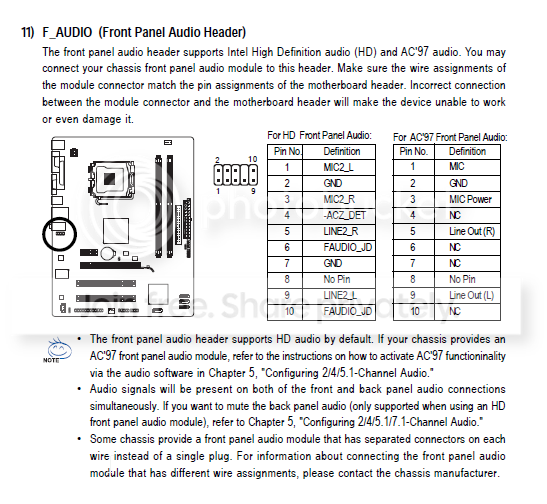
I'm using a Gigabyte G31 motherboard GIGABYTE - Motherboard - Socket 775 - GA-G31M-ES2L (rev. 1.x)
Manual page for the motherboard output can be found below the first image
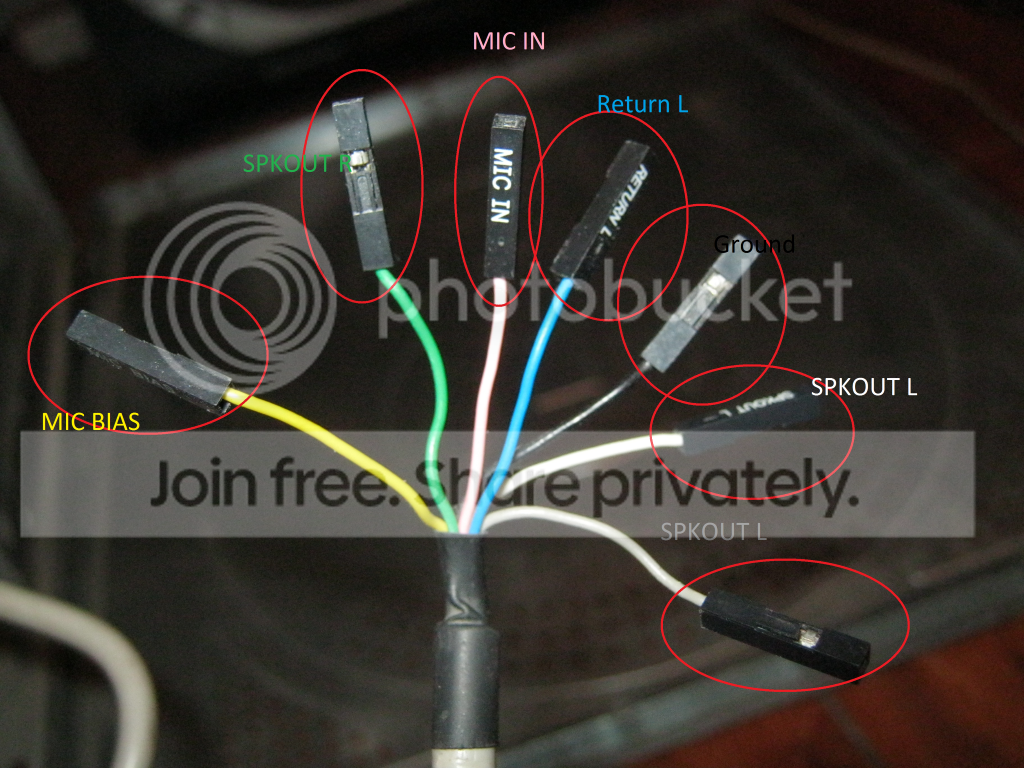
The front panel audio connectors consists of:
Yellow- MIC BIAS
Green - SPKOUT R
Peach - MIC In
Blue - Return L
Black - Ground
White - SPKOUT L
Grey - SPKOUT L
Much Thanks and appreciation to those who read this read
I'm using a Gigabyte G31 motherboard GIGABYTE - Motherboard - Socket 775 - GA-G31M-ES2L (rev. 1.x)
Manual page for the motherboard output can be found below the first image
The front panel audio connectors consists of:
Yellow- MIC BIAS
Green - SPKOUT R
Peach - MIC In
Blue - Return L
Black - Ground
White - SPKOUT L
Grey - SPKOUT L
Much Thanks and appreciation to those who read this read
My Computer
- Computer type
- PC/Desktop
- OS
- Windows 7


