Solved Questions about my new harddrive

Provided the HDD is in some kind of enclosure, there should be at least 2-4 screws to open it. Possibly hidden under stickers of some sort. And yes, Corazon is right, they mostly put drives in there that would otherwise not sell anymore
like 54000rpm/IDE drives instead of 7200 rpm SATAs

-DG

Oh well everything better than a 10 year old discontinued HDD, imma try removing the case thanks!
 

My Computer My Computer

At a glance

Windows 8 Professional x64Intel Core 2 Duo CPU E8500 3.17gHZ4.0GB Dual-Channel DDR2 @ 399MHzASUS nVidia GTX 560 DirectCU
Computer Manufacturer/Model Number
Custom Built
OS
Windows 8 Professional x64
CPU
Intel Core 2 Duo CPU E8500 3.17gHZ
Motherboard
ASUS P5KPL-AM SE
Memory
4.0GB Dual-Channel DDR2 @ 399MHz
Graphics Card(s)
ASUS nVidia GTX 560 DirectCU
Sound Card
High Definition Audio Controller [NoDB] PCI
Screen Resolution
1440x900
Hard Drives
500GB Western Digital Caviar Blue HDD
320GB Samsung S2 Portable HDD
120GB Corsair Force 3 SSD
PSU
Corsair CX600
Internet Speed
8Mbit
It appears the HDD is not a SATA/IDE drive, it only has a USB port - how do I make it a SATA/IDE?

file.php
 

My Computer My Computer

At a glance

Windows 8 Professional x64Intel Core 2 Duo CPU E8500 3.17gHZ4.0GB Dual-Channel DDR2 @ 399MHzASUS nVidia GTX 560 DirectCU
Computer Manufacturer/Model Number
Custom Built
OS
Windows 8 Professional x64
CPU
Intel Core 2 Duo CPU E8500 3.17gHZ
Motherboard
ASUS P5KPL-AM SE
Memory
4.0GB Dual-Channel DDR2 @ 399MHz
Graphics Card(s)
ASUS nVidia GTX 560 DirectCU
Sound Card
High Definition Audio Controller [NoDB] PCI
Screen Resolution
1440x900
Hard Drives
500GB Western Digital Caviar Blue HDD
320GB Samsung S2 Portable HDD
120GB Corsair Force 3 SSD
PSU
Corsair CX600
Internet Speed
8Mbit
I bet that USB port is just a tiny circuit board plugged into the drive's own IDE or SATA interface. Those four black rubber things around the corners aren't part of the drive either, you can probably just pull them off and then you should see how you can detach the board with the USB jack on it.

I don't think there is such a thing as a harddisk with a native USB interface and nothing else...
 

My Computer My Computer

At a glance

Windows 7 Professional SP1 32-bitIntel Core 2 Duo E6600 2.4GHz4GB DDR2-667 (4x1GB in dual-channel config)nVidia GeForce 9800 GT
Computer type
PC/Desktop
Computer Manufacturer/Model Number
Custom-built
OS
Windows 7 Professional SP1 32-bit
CPU
Intel Core 2 Duo E6600 2.4GHz
Motherboard
Asus PL5D2
Memory
4GB DDR2-667 (4x1GB in dual-channel config)
Graphics Card(s)
nVidia GeForce 9800 GT
Sound Card
Creative X-Fi XtremeMusic
Monitor(s) Displays
Acer P236H
Screen Resolution
1920x1200 (DVI)
Hard Drives
OCZ SSD Vertex Plus 60GB SATA (Firmware 3.55), 64MB cache
Hitachi HD321KJ SATA, 320GB, 7200rpm, 16MB cache
PSU
Antec TruePower 2.0
Case
Cooler Master Centurion
Cooling
Too many fans
Keyboard
Standard
Mouse
Microsoft wireless optical mouse
Internet Speed
AT&T U-verse (18mbit/sec)
Antivirus
Microsoft Security Essentials
Browser
Firefox
Other Info
Other devices:
Compaq CQ-60 laptop
Google Nexus 7 (2012) tablet
Nvidia SHIELD tablet (US/LTE)
Hardkernel ODROID-XU single-board computer (Samsung Exynos 5420)
I bet that USB port is just a tiny circuit board plugged into the drive's own IDE or SATA interface. Those four black rubber things around the corners aren't part of the drive either, you can probably just pull them off and then you should see how you can detach the board with the USB jack on it.

I don't think there is such a thing as a harddisk with a native USB interface and nothing else...

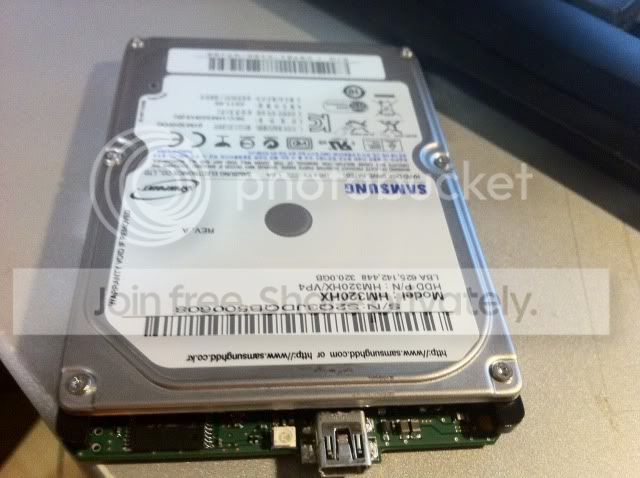
Actually that's a picture I found on the internet of the HDD without the case, I didn't tried to open the case yet since the case doesn't have any screws, see picture below. Should I break it open?

IMG_19971.jpg
 

My Computer My Computer

At a glance

Windows 8 Professional x64Intel Core 2 Duo CPU E8500 3.17gHZ4.0GB Dual-Channel DDR2 @ 399MHzASUS nVidia GTX 560 DirectCU
Computer Manufacturer/Model Number
Custom Built
OS
Windows 8 Professional x64
CPU
Intel Core 2 Duo CPU E8500 3.17gHZ
Motherboard
ASUS P5KPL-AM SE
Memory
4.0GB Dual-Channel DDR2 @ 399MHz
Graphics Card(s)
ASUS nVidia GTX 560 DirectCU
Sound Card
High Definition Audio Controller [NoDB] PCI
Screen Resolution
1440x900
Hard Drives
500GB Western Digital Caviar Blue HDD
320GB Samsung S2 Portable HDD
120GB Corsair Force 3 SSD
PSU
Corsair CX600
Internet Speed
8Mbit
Ah, I see.
Yes, if you're absolutely sure you won't be using the drive in its external case anymore, go ahead and break the case - but be careful not to damage the drive inside. Let us know if you succeed. :)

Last-minute thought: since there are no screws, the case is probably molded plastic glued together along the sides...look for a tiny groove and try to lift it open with a flat screwdriver.
 

My Computer My Computer

At a glance

Windows 7 Professional SP1 32-bitIntel Core 2 Duo E6600 2.4GHz4GB DDR2-667 (4x1GB in dual-channel config)nVidia GeForce 9800 GT
Computer type
PC/Desktop
Computer Manufacturer/Model Number
Custom-built
OS
Windows 7 Professional SP1 32-bit
CPU
Intel Core 2 Duo E6600 2.4GHz
Motherboard
Asus PL5D2
Memory
4GB DDR2-667 (4x1GB in dual-channel config)
Graphics Card(s)
nVidia GeForce 9800 GT
Sound Card
Creative X-Fi XtremeMusic
Monitor(s) Displays
Acer P236H
Screen Resolution
1920x1200 (DVI)
Hard Drives
OCZ SSD Vertex Plus 60GB SATA (Firmware 3.55), 64MB cache
Hitachi HD321KJ SATA, 320GB, 7200rpm, 16MB cache
PSU
Antec TruePower 2.0
Case
Cooler Master Centurion
Cooling
Too many fans
Keyboard
Standard
Mouse
Microsoft wireless optical mouse
Internet Speed
AT&T U-verse (18mbit/sec)
Antivirus
Microsoft Security Essentials
Browser
Firefox
Other Info
Other devices:
Compaq CQ-60 laptop
Google Nexus 7 (2012) tablet
Nvidia SHIELD tablet (US/LTE)
Hardkernel ODROID-XU single-board computer (Samsung Exynos 5420)
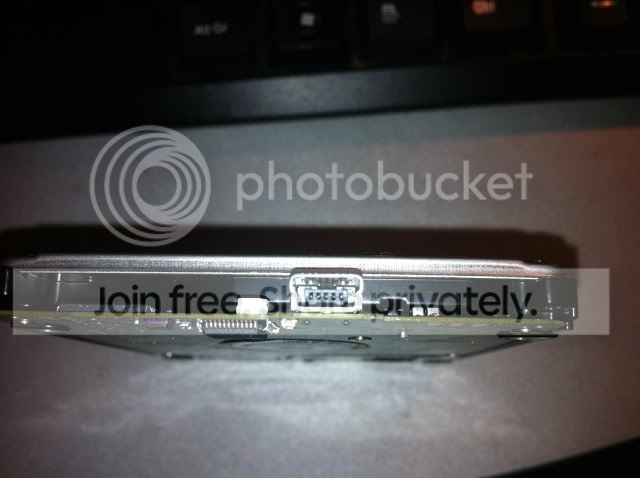
Okay, so I opened the case and the HDD indeed only has a USB port - I can't screw open the HDD itself since I don't have the screwdriver for those sort of screws. Can there still be a SATA/IDE interface in it? Because I don't feel like spending more money for a screwdriver if it doesn't have a SATA/IDE interface.

IMG_20091.jpg
 

My Computer My Computer

At a glance

Windows 8 Professional x64Intel Core 2 Duo CPU E8500 3.17gHZ4.0GB Dual-Channel DDR2 @ 399MHzASUS nVidia GTX 560 DirectCU
Computer Manufacturer/Model Number
Custom Built
OS
Windows 8 Professional x64
CPU
Intel Core 2 Duo CPU E8500 3.17gHZ
Motherboard
ASUS P5KPL-AM SE
Memory
4.0GB Dual-Channel DDR2 @ 399MHz
Graphics Card(s)
ASUS nVidia GTX 560 DirectCU
Sound Card
High Definition Audio Controller [NoDB] PCI
Screen Resolution
1440x900
Hard Drives
500GB Western Digital Caviar Blue HDD
320GB Samsung S2 Portable HDD
120GB Corsair Force 3 SSD
PSU
Corsair CX600
Internet Speed
8Mbit
That USB thing should come right off with a gentle pull - usually these are just mini-boards plugged into the SATA interface.

Do not
attempt to unscrew the harddisk. It's sealed airtight and you'll break the seal and pretty much destroy the disk if you mess with those screws.
 

My Computer My Computer

At a glance

Windows 7 Professional SP1 32-bitIntel Core 2 Duo E6600 2.4GHz4GB DDR2-667 (4x1GB in dual-channel config)nVidia GeForce 9800 GT
Computer type
PC/Desktop
Computer Manufacturer/Model Number
Custom-built
OS
Windows 7 Professional SP1 32-bit
CPU
Intel Core 2 Duo E6600 2.4GHz
Motherboard
Asus PL5D2
Memory
4GB DDR2-667 (4x1GB in dual-channel config)
Graphics Card(s)
nVidia GeForce 9800 GT
Sound Card
Creative X-Fi XtremeMusic
Monitor(s) Displays
Acer P236H
Screen Resolution
1920x1200 (DVI)
Hard Drives
OCZ SSD Vertex Plus 60GB SATA (Firmware 3.55), 64MB cache
Hitachi HD321KJ SATA, 320GB, 7200rpm, 16MB cache
PSU
Antec TruePower 2.0
Case
Cooler Master Centurion
Cooling
Too many fans
Keyboard
Standard
Mouse
Microsoft wireless optical mouse
Internet Speed
AT&T U-verse (18mbit/sec)
Antivirus
Microsoft Security Essentials
Browser
Firefox
Other Info
Other devices:
Compaq CQ-60 laptop
Google Nexus 7 (2012) tablet
Nvidia SHIELD tablet (US/LTE)
Hardkernel ODROID-XU single-board computer (Samsung Exynos 5420)
That USB thing should come right off with a gentle pull - usually these are just mini-boards plugged into the SATA interface.

Do not
attempt to unscrew the harddisk. It's sealed airtight and you'll break the seal and pretty much destroy the disk if you mess with those screws.

I tried to pull it out but I can't, it's molded to the HDD interface. And behind that port there's nothing else connected to it, behind it is a black part. Seems it's just a USB HDD...? :cry:

IMG_20101.jpg
 

My Computer My Computer

At a glance

Windows 8 Professional x64Intel Core 2 Duo CPU E8500 3.17gHZ4.0GB Dual-Channel DDR2 @ 399MHzASUS nVidia GTX 560 DirectCU
Computer Manufacturer/Model Number
Custom Built
OS
Windows 8 Professional x64
CPU
Intel Core 2 Duo CPU E8500 3.17gHZ
Motherboard
ASUS P5KPL-AM SE
Memory
4.0GB Dual-Channel DDR2 @ 399MHz
Graphics Card(s)
ASUS nVidia GTX 560 DirectCU
Sound Card
High Definition Audio Controller [NoDB] PCI
Screen Resolution
1440x900
Hard Drives
500GB Western Digital Caviar Blue HDD
320GB Samsung S2 Portable HDD
120GB Corsair Force 3 SSD
PSU
Corsair CX600
Internet Speed
8Mbit
Sorry, I'm stumped. :( Actually I'm surprised to see that, apparently, USB-only drives really do exist. Never seen anything like this before.

I guess you can either keep it as an external backup drive (it's never a bad idea to have one) or just sell it if you really don't want it.
 

My Computer My Computer

At a glance

Windows 7 Professional SP1 32-bitIntel Core 2 Duo E6600 2.4GHz4GB DDR2-667 (4x1GB in dual-channel config)nVidia GeForce 9800 GT
Computer type
PC/Desktop
Computer Manufacturer/Model Number
Custom-built
OS
Windows 7 Professional SP1 32-bit
CPU
Intel Core 2 Duo E6600 2.4GHz
Motherboard
Asus PL5D2
Memory
4GB DDR2-667 (4x1GB in dual-channel config)
Graphics Card(s)
nVidia GeForce 9800 GT
Sound Card
Creative X-Fi XtremeMusic
Monitor(s) Displays
Acer P236H
Screen Resolution
1920x1200 (DVI)
Hard Drives
OCZ SSD Vertex Plus 60GB SATA (Firmware 3.55), 64MB cache
Hitachi HD321KJ SATA, 320GB, 7200rpm, 16MB cache
PSU
Antec TruePower 2.0
Case
Cooler Master Centurion
Cooling
Too many fans
Keyboard
Standard
Mouse
Microsoft wireless optical mouse
Internet Speed
AT&T U-verse (18mbit/sec)
Antivirus
Microsoft Security Essentials
Browser
Firefox
Other Info
Other devices:
Compaq CQ-60 laptop
Google Nexus 7 (2012) tablet
Nvidia SHIELD tablet (US/LTE)
Hardkernel ODROID-XU single-board computer (Samsung Exynos 5420)
Hmm okay, last question: Is there some kind of USB to SATA cable or something?
 

My Computer My Computer

At a glance

Windows 8 Professional x64Intel Core 2 Duo CPU E8500 3.17gHZ4.0GB Dual-Channel DDR2 @ 399MHzASUS nVidia GTX 560 DirectCU
Computer Manufacturer/Model Number
Custom Built
OS
Windows 8 Professional x64
CPU
Intel Core 2 Duo CPU E8500 3.17gHZ
Motherboard
ASUS P5KPL-AM SE
Memory
4.0GB Dual-Channel DDR2 @ 399MHz
Graphics Card(s)
ASUS nVidia GTX 560 DirectCU
Sound Card
High Definition Audio Controller [NoDB] PCI
Screen Resolution
1440x900
Hard Drives
500GB Western Digital Caviar Blue HDD
320GB Samsung S2 Portable HDD
120GB Corsair Force 3 SSD
PSU
Corsair CX600
Internet Speed
8Mbit

My Computer My Computer

At a glance

Windows 10 Pro x64 ; Xubuntu x64Intel i7 860 @ 2.80 GHz O/C'ed to 4.0GHz16GB Corsair Vengance DDR3 @ 661 MHz Dual Cha...EVGA NVidia GTX 560 1024MB
Computer type
PC/Desktop
Computer Manufacturer/Model Number
Golden Mk. I.4
OS
Windows 10 Pro x64 ; Xubuntu x64
CPU
Intel i7 860 @ 2.80 GHz O/C'ed to 4.0GHz
Motherboard
Gigabyte P55A-UD3R Rev.1. Award BIOS F13
Memory
16GB Corsair Vengance DDR3 @ 661 MHz Dual Channel (9-9-9-24)
Graphics Card(s)
EVGA NVidia GTX 560 1024MB
Sound Card
Realtek Integrated
Monitor(s) Displays
Dual Samsung SyncMaster 2494HS
Screen Resolution
1920*1080 and 1920*1080
Hard Drives
1*Samsung 840 EVO 120GB SSD;
1*OCZ Vertex 2 60GB SSD;
2*Samsung F3 SpinPoint 1TB in RAID0;
1*Samsung F1 SpinPoint 1TB;
2*Western Digital 1TB External USB 3.0
1*Western Digital 500GB External USB 3.0
1*Seagate 500GB External USB 2.0
PSU
Thermaltake ToughPower QFan 750W
Case
Thermaltake Element S VK60001W2Z
Cooling
Corsair H60 Water Cooling, 2*230mm and 2*80mm case fans
Keyboard
Logitech G110
Mouse
Logitech MX518
This won't work - such adapters are meant to connect a SATA drive to an USB port, not the other way around.

Even if you find a way to connect your drive to an internal SATA port, you'll still be limited to USB2.0 speed. You're simply stuck with it...
 

My Computer My Computer

At a glance

Windows 7 Professional SP1 32-bitIntel Core 2 Duo E6600 2.4GHz4GB DDR2-667 (4x1GB in dual-channel config)nVidia GeForce 9800 GT
Computer type
PC/Desktop
Computer Manufacturer/Model Number
Custom-built
OS
Windows 7 Professional SP1 32-bit
CPU
Intel Core 2 Duo E6600 2.4GHz
Motherboard
Asus PL5D2
Memory
4GB DDR2-667 (4x1GB in dual-channel config)
Graphics Card(s)
nVidia GeForce 9800 GT
Sound Card
Creative X-Fi XtremeMusic
Monitor(s) Displays
Acer P236H
Screen Resolution
1920x1200 (DVI)
Hard Drives
OCZ SSD Vertex Plus 60GB SATA (Firmware 3.55), 64MB cache
Hitachi HD321KJ SATA, 320GB, 7200rpm, 16MB cache
PSU
Antec TruePower 2.0
Case
Cooler Master Centurion
Cooling
Too many fans
Keyboard
Standard
Mouse
Microsoft wireless optical mouse
Internet Speed
AT&T U-verse (18mbit/sec)
Antivirus
Microsoft Security Essentials
Browser
Firefox
Other Info
Other devices:
Compaq CQ-60 laptop
Google Nexus 7 (2012) tablet
Nvidia SHIELD tablet (US/LTE)
Hardkernel ODROID-XU single-board computer (Samsung Exynos 5420)
Hmm I just bought a new Western Digital Internal Hard Drive but it doesn't show up in My Computer, but it the BIOS detects it and Windows installed it's driver successfully. Should I make a new topic or?
 

My Computer My Computer

At a glance

Windows 8 Professional x64Intel Core 2 Duo CPU E8500 3.17gHZ4.0GB Dual-Channel DDR2 @ 399MHzASUS nVidia GTX 560 DirectCU
Computer Manufacturer/Model Number
Custom Built
OS
Windows 8 Professional x64
CPU
Intel Core 2 Duo CPU E8500 3.17gHZ
Motherboard
ASUS P5KPL-AM SE
Memory
4.0GB Dual-Channel DDR2 @ 399MHz
Graphics Card(s)
ASUS nVidia GTX 560 DirectCU
Sound Card
High Definition Audio Controller [NoDB] PCI
Screen Resolution
1440x900
Hard Drives
500GB Western Digital Caviar Blue HDD
320GB Samsung S2 Portable HDD
120GB Corsair Force 3 SSD
PSU
Corsair CX600
Internet Speed
8Mbit
Does it show up in Disk Management? You may have to format it and give it a drive letter there.
 

My Computer My Computer

At a glance

Windows 7 Home Premium SP1, 64-bitIntel Skylake i5-6600K, not overclocked8 GB HyperX DDR4-2666 (2 x 4 GB)none; graphics are integrated on CPU
Computer type
PC/Desktop
Computer Manufacturer/Model Number
Ignatz Special; 4 speed manual gearbox; factory air conditioning; one of one
OS
Windows 7 Home Premium SP1, 64-bit
CPU
Intel Skylake i5-6600K, not overclocked
Motherboard
AsRock Z170M Extreme 4, micro ATX
Memory
8 GB HyperX DDR4-2666 (2 x 4 GB)
Graphics Card(s)
none; graphics are integrated on CPU
Sound Card
onboard: Realtek ALC1150; external: USB Behringer UF0-202
Monitor(s) Displays
Dell S2340M 23 inch IPS
Screen Resolution
1600 x 900
Hard Drives
System: Crucial MX100 series SSD, 128 GB;
Data: Samsung Spinpoint 103SJ, 1 TB;
Backup: WD Caviar Green WD30EZRX-00D8PB0, 3 TB
PSU
Rosewill SilentNight 500 watt fanless, semi-modular
Case
Antec Solo II
Cooling
Noctua NH-U12S; Noctua F12 intake, Noctua S12A exhaust
Keyboard
Microsoft 200 6JH-00001 USB
Mouse
Dell or Microsoft optical wired; USB
Antivirus
Microsoft Security Essentials and Malwarebytes Premium
Browser
Pale Moon
Other Info
All fans PWM; speeds at idle: CPU circa 500 rpm; intake circa 600 rpm; exhaust circa 600 rpm; CPU temps 27 idle and 47 C load in a warm room (27 C/81 F) when running Intel Extreme Tuning Utility stress test.
Does it show up in Disk Management? You may have to format it and give it a drive letter there.

Thanks for the quick reply, forgot to assign a drive letter. Would my new hard drive increase boot speed and performance of games without having the files on that one? Personally didn't test it yet because I probably have to restart to check boot time but I thought asking here would be quicker and easier.
 

My Computer My Computer

At a glance

Windows 8 Professional x64Intel Core 2 Duo CPU E8500 3.17gHZ4.0GB Dual-Channel DDR2 @ 399MHzASUS nVidia GTX 560 DirectCU
Computer Manufacturer/Model Number
Custom Built
OS
Windows 8 Professional x64
CPU
Intel Core 2 Duo CPU E8500 3.17gHZ
Motherboard
ASUS P5KPL-AM SE
Memory
4.0GB Dual-Channel DDR2 @ 399MHz
Graphics Card(s)
ASUS nVidia GTX 560 DirectCU
Sound Card
High Definition Audio Controller [NoDB] PCI
Screen Resolution
1440x900
Hard Drives
500GB Western Digital Caviar Blue HDD
320GB Samsung S2 Portable HDD
120GB Corsair Force 3 SSD
PSU
Corsair CX600
Internet Speed
8Mbit
Would my new hard drive increase boot speed and performance of games without having the files on that one? Personally didn't test it yet because I probably have to restart to check boot time but I thought asking here would be quicker and easier.


Not sure I follow you.

The new drive won't improve boot times unless it is the Windows drive and is faster than the current Windows drive.

I don't game, but I'm not sure HD speed has a lot of effect on game performance.
 

My Computer My Computer

At a glance

Windows 7 Home Premium SP1, 64-bitIntel Skylake i5-6600K, not overclocked8 GB HyperX DDR4-2666 (2 x 4 GB)none; graphics are integrated on CPU
Computer type
PC/Desktop
Computer Manufacturer/Model Number
Ignatz Special; 4 speed manual gearbox; factory air conditioning; one of one
OS
Windows 7 Home Premium SP1, 64-bit
CPU
Intel Skylake i5-6600K, not overclocked
Motherboard
AsRock Z170M Extreme 4, micro ATX
Memory
8 GB HyperX DDR4-2666 (2 x 4 GB)
Graphics Card(s)
none; graphics are integrated on CPU
Sound Card
onboard: Realtek ALC1150; external: USB Behringer UF0-202
Monitor(s) Displays
Dell S2340M 23 inch IPS
Screen Resolution
1600 x 900
Hard Drives
System: Crucial MX100 series SSD, 128 GB;
Data: Samsung Spinpoint 103SJ, 1 TB;
Backup: WD Caviar Green WD30EZRX-00D8PB0, 3 TB
PSU
Rosewill SilentNight 500 watt fanless, semi-modular
Case
Antec Solo II
Cooling
Noctua NH-U12S; Noctua F12 intake, Noctua S12A exhaust
Keyboard
Microsoft 200 6JH-00001 USB
Mouse
Dell or Microsoft optical wired; USB
Antivirus
Microsoft Security Essentials and Malwarebytes Premium
Browser
Pale Moon
Other Info
All fans PWM; speeds at idle: CPU circa 500 rpm; intake circa 600 rpm; exhaust circa 600 rpm; CPU temps 27 idle and 47 C load in a warm room (27 C/81 F) when running Intel Extreme Tuning Utility stress test.
Would my new hard drive increase boot speed and performance of games without having the files on that one? Personally didn't test it yet because I probably have to restart to check boot time but I thought asking here would be quicker and easier.


Not sure I follow you.

The new drive won't improve boot times unless it is the Windows drive and is faster than the current Windows drive.

I don't game, but I'm not sure HD speed has a lot of effect on game performance.

Is it possible that I transfer all files on my old HDD to the new HDD including Windows? My current old HDD with Windows on it is C: and the new one is B:, would that have issues with the registry? Or do I completely have to reinstall Windows on the new HDD?
 

My Computer My Computer

At a glance

Windows 8 Professional x64Intel Core 2 Duo CPU E8500 3.17gHZ4.0GB Dual-Channel DDR2 @ 399MHzASUS nVidia GTX 560 DirectCU
Computer Manufacturer/Model Number
Custom Built
OS
Windows 8 Professional x64
CPU
Intel Core 2 Duo CPU E8500 3.17gHZ
Motherboard
ASUS P5KPL-AM SE
Memory
4.0GB Dual-Channel DDR2 @ 399MHz
Graphics Card(s)
ASUS nVidia GTX 560 DirectCU
Sound Card
High Definition Audio Controller [NoDB] PCI
Screen Resolution
1440x900
Hard Drives
500GB Western Digital Caviar Blue HDD
320GB Samsung S2 Portable HDD
120GB Corsair Force 3 SSD
PSU
Corsair CX600
Internet Speed
8Mbit
You could clone the existing C to the new drive.

Or you could make an image of C and then restore that image to the new C.

The registry, Windows, and all installed programs would be part of that clone or image restore---the entire partition in question.

Typical programs for that sort of thing are Macrium, EaseUS Todo, or Acronis.

It's worth a try. Lots of people do it. I've always done clean installs because imaging/cloning isn't foolproof and because I don't mind taking the time to do a clean install.
 

My Computer My Computer

At a glance

Windows 7 Home Premium SP1, 64-bitIntel Skylake i5-6600K, not overclocked8 GB HyperX DDR4-2666 (2 x 4 GB)none; graphics are integrated on CPU
Computer type
PC/Desktop
Computer Manufacturer/Model Number
Ignatz Special; 4 speed manual gearbox; factory air conditioning; one of one
OS
Windows 7 Home Premium SP1, 64-bit
CPU
Intel Skylake i5-6600K, not overclocked
Motherboard
AsRock Z170M Extreme 4, micro ATX
Memory
8 GB HyperX DDR4-2666 (2 x 4 GB)
Graphics Card(s)
none; graphics are integrated on CPU
Sound Card
onboard: Realtek ALC1150; external: USB Behringer UF0-202
Monitor(s) Displays
Dell S2340M 23 inch IPS
Screen Resolution
1600 x 900
Hard Drives
System: Crucial MX100 series SSD, 128 GB;
Data: Samsung Spinpoint 103SJ, 1 TB;
Backup: WD Caviar Green WD30EZRX-00D8PB0, 3 TB
PSU
Rosewill SilentNight 500 watt fanless, semi-modular
Case
Antec Solo II
Cooling
Noctua NH-U12S; Noctua F12 intake, Noctua S12A exhaust
Keyboard
Microsoft 200 6JH-00001 USB
Mouse
Dell or Microsoft optical wired; USB
Antivirus
Microsoft Security Essentials and Malwarebytes Premium
Browser
Pale Moon
Other Info
All fans PWM; speeds at idle: CPU circa 500 rpm; intake circa 600 rpm; exhaust circa 600 rpm; CPU temps 27 idle and 47 C load in a warm room (27 C/81 F) when running Intel Extreme Tuning Utility stress test.
You could clone the existing C to the new drive.

Or you could make an image of C and then restore that image to the new C.

The registry, Windows, and all installed programs would be part of that clone or image restore---the entire partition in question.

Typical programs for that sort of thing are Macrium, EaseUS Todo, or Acronis.

It's worth a try. Lots of people do it. I've always done clean installs because imaging/cloning isn't foolproof and because I don't mind taking the time to do a clean install.

How do I make my new HDD letter C: when my old one is already C:?
 

My Computer My Computer

At a glance

Windows 8 Professional x64Intel Core 2 Duo CPU E8500 3.17gHZ4.0GB Dual-Channel DDR2 @ 399MHzASUS nVidia GTX 560 DirectCU
Computer Manufacturer/Model Number
Custom Built
OS
Windows 8 Professional x64
CPU
Intel Core 2 Duo CPU E8500 3.17gHZ
Motherboard
ASUS P5KPL-AM SE
Memory
4.0GB Dual-Channel DDR2 @ 399MHz
Graphics Card(s)
ASUS nVidia GTX 560 DirectCU
Sound Card
High Definition Audio Controller [NoDB] PCI
Screen Resolution
1440x900
Hard Drives
500GB Western Digital Caviar Blue HDD
320GB Samsung S2 Portable HDD
120GB Corsair Force 3 SSD
PSU
Corsair CX600
Internet Speed
8Mbit
Don't worry about it.

You'll only see one C. The old one will prestomatically become D or E or F.
 

My Computer My Computer

At a glance

Windows 7 Home Premium SP1, 64-bitIntel Skylake i5-6600K, not overclocked8 GB HyperX DDR4-2666 (2 x 4 GB)none; graphics are integrated on CPU
Computer type
PC/Desktop
Computer Manufacturer/Model Number
Ignatz Special; 4 speed manual gearbox; factory air conditioning; one of one
OS
Windows 7 Home Premium SP1, 64-bit
CPU
Intel Skylake i5-6600K, not overclocked
Motherboard
AsRock Z170M Extreme 4, micro ATX
Memory
8 GB HyperX DDR4-2666 (2 x 4 GB)
Graphics Card(s)
none; graphics are integrated on CPU
Sound Card
onboard: Realtek ALC1150; external: USB Behringer UF0-202
Monitor(s) Displays
Dell S2340M 23 inch IPS
Screen Resolution
1600 x 900
Hard Drives
System: Crucial MX100 series SSD, 128 GB;
Data: Samsung Spinpoint 103SJ, 1 TB;
Backup: WD Caviar Green WD30EZRX-00D8PB0, 3 TB
PSU
Rosewill SilentNight 500 watt fanless, semi-modular
Case
Antec Solo II
Cooling
Noctua NH-U12S; Noctua F12 intake, Noctua S12A exhaust
Keyboard
Microsoft 200 6JH-00001 USB
Mouse
Dell or Microsoft optical wired; USB
Antivirus
Microsoft Security Essentials and Malwarebytes Premium
Browser
Pale Moon
Other Info
All fans PWM; speeds at idle: CPU circa 500 rpm; intake circa 600 rpm; exhaust circa 600 rpm; CPU temps 27 idle and 47 C load in a warm room (27 C/81 F) when running Intel Extreme Tuning Utility stress test.
Back
Top