Questions about my SSD and external drive.

Hatashi

New member
Member
VIP
Local time
4:55 PM
Messages
153
Location
The Netherlands
I recently built my first PC and for the time being I'm stuck with this.

I had a 2TB HDD that I can't use right now and I'm waiting for my next paycheck to buy more SSD.

Now I'd like advice on how to utilize this 500GB drive to it's fullest capabilities. I have my Steam library on there and I'd like to know if it's using it's full speed or not.

I plugged it in back through the USB 3.0 port, how can I check to make sure it's good?

I also heard something about taking it out of it's case and connecting it via SATA or something? Anyone know more about that?

Thanks!
 

My Computer My Computer

At a glance

Windows 7 Ultimate 64-bit.Intel Core i5 4460 / 3.2 GhzCrucial Ballistix Sport 8GBClub3D Radeon R9 280 royalKing 3GB - GDDR5
Computer type
PC/Desktop
Computer Manufacturer/Model Number
Custom
OS
Windows 7 Ultimate 64-bit.
CPU
Intel Core i5 4460 / 3.2 Ghz
Motherboard
Gigabyte G1.Sniper B5
Memory
Crucial Ballistix Sport 8GB
Graphics Card(s)
Club3D Radeon R9 280 royalKing 3GB - GDDR5
Monitor(s) Displays
Philips 237EQPH IPS LED
Screen Resolution
1920x1080
Hard Drives
Crucial M500 - SSD - 120 GB
Seagate 500GB External Hard Drive
PSU
Sea Sonic S12II-520 Bronze
Case
Cooler Master N300
Cooling
Titan Fenrir TTC-NK85TZ
Antivirus
Malwarebytes Anti-Malware.
Browser
Chromium.
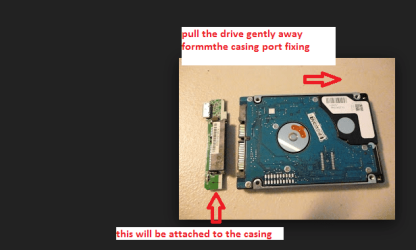
Hatashi of course you can do that I have done it many times. Take the drive casing apart - you might wreck the casing doing it - then take the drive from inside the casing - it will just pull out as if you were removing a drive from a laptop.

Now I am assuming it will be a SATA drive and not an IDE one - take the side off the machine and ground yourself before touching anything inside the machine.
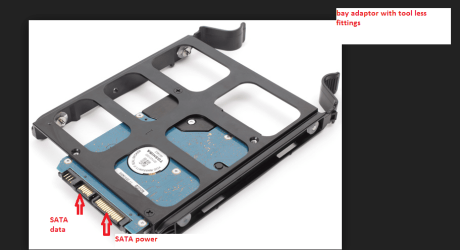
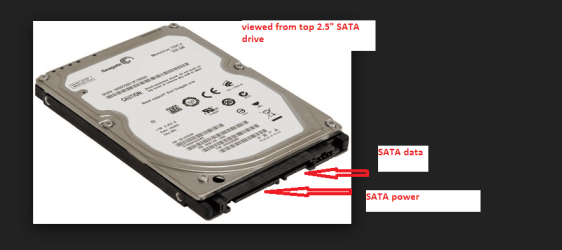
Then find a SATA power cable and fit it to the drive - then just hook up the drive with a SATA data cable to the board SATA port. Turn on the machine and see if the drive is recognised in Computer.

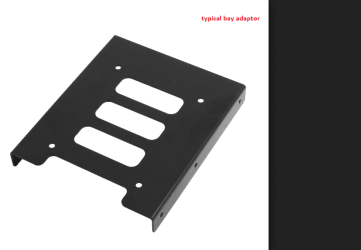
If it is you can then test want you want to and if all is ok then power off remove the cables from the drive and fit the drive into a 3.5" bay adaptor and then fit that into a 3.5" bay. Reconnect the cables and you are finished. Test to see if it is still recognised - done!
 

Attachments

  • BAY 1.PNG
    BAY 1.PNG
    31.4 KB · Views: 1
  • BAY 2.PNG
    BAY 2.PNG
    77 KB · Views: 1
  • BAY 3.PNG
    BAY 3.PNG
    43.3 KB · Views: 1
  • BAY 4.PNG
    BAY 4.PNG
    49 KB · Views: 14

My Computer My Computer

At a glance

Desk1 7 Home Prem / Desk2 10 Pro / Main lap A...Desk1 i5 3750K / Laptop i7 GTX 860M / Desk2 i...Desk1 8GB (1866) / Desk2 16GB (1333) / Laptop...Desk 1& 2NVidia GTX 650 & Laptops on board Intel
Computer type
PC/Desktop
Computer Manufacturer/Model Number
Own build (new) Desk1 / Asus ROG Win 7 / Desk2 1st build
OS
Desk1 7 Home Prem / Desk2 10 Pro / Main lap Asus ROG 10 Pro 2 laptop Toshiba 7 Pro Asus P2520 7 & 10
CPU
Desk1 i5 3750K / Laptop i7 GTX 860M / Desk2 i5 2500
Motherboard
Desk1 Asus P877-V / Desk2 Gigabyte H67 UD3H / Laptop ?
Memory
Desk1 8GB (1866) / Desk2 16GB (1333) / Laptop 8Gb DDR3
Graphics Card(s)
Desk 1& 2NVidia GTX 650 & Laptops on board Intel
Sound Card
Desk 1 & 2 -XONAR DG Realtek High Def audio Laptop
Monitor(s) Displays
Desk 1 Benq HD 2450 / Desk2 Philips 24" / Laptop 17.5"
Screen Resolution
1920x1080 D1 & D2 & Laptop 1
Hard Drives
Desk1 Samsung 120GB 830 SSD
Asus ROG 256GB 850 Pro SSD
Desk2 Samsung 840 256 SSD
Toshiba 120GB EVO
PSU
Desk 1 Corsair HX 1050/ Laptop ? / Desk 2 Corsair HX 650
Case
Desk 1 Cooler HAF XM ? Toshiba laptop / Desk2 Coolermaster
Cooling
Fans on all Desk1 -2 Desk2 - all Coolermasters 5 Laptop ?
Keyboard
Desk 1 MS Sidewinder X6 Desk 2 MS Sidewinder X 4
Mouse
Desk 1&2 - Gigabyte MS 900 gamer - laptop - Logitec wireless
Internet Speed
ADSL2+
Other Info
One other Desktop (tester) and spare Toshba laptop both with SSD's
Running Kaspersky 2016 ISS on all machines config'd identically
Logitec audio stereo systems on each machine (x3)
Canon MG5250MFC
Router/modem TP-Link running WPA2SK
I'd be waiting before pulling the ext 500GB apart.
It's a 2.5" drive plus you have USB 3 connectivity so I don't think a straight sata connection is going to really give you anything in the speed area from this drive. I keep it for what it's good for ultimately - an ext USB3 drive for data/backup/system images.

You can check the drive using chkdsk or Seagates's seatools diagnostics. You can check the speed using something like CrystalDiskMark. I think the small spinner will be the speed limiting factor and not the data connection.
 

My Computer My Computer

At a glance

Windows 7x64 Home Premium SP1Intel i7 2600kG.Skill Ripjaws (DDR3-1600) 2x4GBNvidia GeForce GTS 450; Intel HD Graphics 300...
Computer type
PC/Desktop
Computer Manufacturer/Model Number
Own build
OS
Windows 7x64 Home Premium SP1
CPU
Intel i7 2600k
Motherboard
ASUS P8Z68 Deluxe
Memory
G.Skill Ripjaws (DDR3-1600) 2x4GB
Graphics Card(s)
Nvidia GeForce GTS 450; Intel HD Graphics 3000(GT2+)
Monitor(s) Displays
Dell Ultrasharp IPS panel U2311H, Samsung SyncMaster P2350
Screen Resolution
1920x1080
Hard Drives
Samsung 850 Pro SSD 256GB, Samsung SSD 840 120GB, Seagates 1TB Barracuda ST31000528AS x2
PSU
Seasonic M12II 520W
Case
Lian Li Lancool PC-K60
Cooling
Case: 1x120mm, 3x140mm CPU: Hyper 212+
Keyboard
Logitech MK520 (wireless)
Mouse
Logitech MK520
Internet Speed
6-7 Mbps
Antivirus
Norton Security Premium, Malwarebytes on 2 (MSE on 3rd PC)
Browser
FireFox
Other Info
Audio: Logitech Z523 2.1
I would not pull it apart. USB3 gives you good performance - the Sata port would only be slightly better but not worth it.
 

My Computer My Computer

At a glance

Vista, Windows7, Mint Mate, Zorin, Windows 8from 1.6GHz Duo to i7
Computer Manufacturer/Model Number
HP, Dell, Gateway, Toshiba - 4 laptops and 2 desktops
OS
Vista, Windows7, Mint Mate, Zorin, Windows 8
CPU
from 1.6GHz Duo to i7
Monitor(s) Displays
2x HP w2207
Hard Drives
5x HDD, 7x SSD, 12x Externals
Keyboard
with trackball - no mices
Mouse
Trackball mice
Internet Speed
DSL 6000
Well I tend to agree with the others I just thought you were bent on doing just that and rather than let you go in heavy handed did my lttle post.

Having said that I have pulled them apart as I described and frankly quite a few I found were NOT actually 6Gbs as you would expect the 3.0 external to contain but just some woefully slow 3Gbs drive:mad: That was not exclusive to the cheaper brands either!!

Personally I do not like large drives as I - a) don't store a humungous amount of data and - b) because if it goes south so does a lot of data with it and retrieving it can be painful - but that is just me I would sooner have several smaller drives than one large one.
 

My Computer My Computer

At a glance

Desk1 7 Home Prem / Desk2 10 Pro / Main lap A...Desk1 i5 3750K / Laptop i7 GTX 860M / Desk2 i...Desk1 8GB (1866) / Desk2 16GB (1333) / Laptop...Desk 1& 2NVidia GTX 650 & Laptops on board Intel
Computer type
PC/Desktop
Computer Manufacturer/Model Number
Own build (new) Desk1 / Asus ROG Win 7 / Desk2 1st build
OS
Desk1 7 Home Prem / Desk2 10 Pro / Main lap Asus ROG 10 Pro 2 laptop Toshiba 7 Pro Asus P2520 7 & 10
CPU
Desk1 i5 3750K / Laptop i7 GTX 860M / Desk2 i5 2500
Motherboard
Desk1 Asus P877-V / Desk2 Gigabyte H67 UD3H / Laptop ?
Memory
Desk1 8GB (1866) / Desk2 16GB (1333) / Laptop 8Gb DDR3
Graphics Card(s)
Desk 1& 2NVidia GTX 650 & Laptops on board Intel
Sound Card
Desk 1 & 2 -XONAR DG Realtek High Def audio Laptop
Monitor(s) Displays
Desk 1 Benq HD 2450 / Desk2 Philips 24" / Laptop 17.5"
Screen Resolution
1920x1080 D1 & D2 & Laptop 1
Hard Drives
Desk1 Samsung 120GB 830 SSD
Asus ROG 256GB 850 Pro SSD
Desk2 Samsung 840 256 SSD
Toshiba 120GB EVO
PSU
Desk 1 Corsair HX 1050/ Laptop ? / Desk 2 Corsair HX 650
Case
Desk 1 Cooler HAF XM ? Toshiba laptop / Desk2 Coolermaster
Cooling
Fans on all Desk1 -2 Desk2 - all Coolermasters 5 Laptop ?
Keyboard
Desk 1 MS Sidewinder X6 Desk 2 MS Sidewinder X 4
Mouse
Desk 1&2 - Gigabyte MS 900 gamer - laptop - Logitec wireless
Internet Speed
ADSL2+
Other Info
One other Desktop (tester) and spare Toshba laptop both with SSD's
Running Kaspersky 2016 ISS on all machines config'd identically
Logitec audio stereo systems on each machine (x3)
Canon MG5250MFC
Router/modem TP-Link running WPA2SK
Back
Top