Solved how do i identify my soundcard and upgrade the drivers for it ?

bigboi972

New member
Member
VIP
Local time
11:14 AM
Messages
319
I have had my laptop sense march of this year and I have never had any problems with sound on it what so ever but recently i boguht a copy of battlefield 3 and while playing the sound constantly cuts in and out and this is the first time having audio problems and it only happens with this game. So maybe if i download new sound drivers it would help how do i find my soundcard and update the drivers ?
 

My Computer My Computer

At a glance

Microsoft Windows 7 Professional 64-bitIntel Xeon E3 @ 3.30GHzIntel(R) Xeon(R) CPU E...16.00GB Single-Channel DDR3 @ 666MHz (9-9-9-24)ATI Radeon HD 7950
Computer type
PC/Desktop
OS
Microsoft Windows 7 Professional 64-bit
CPU
Intel Xeon E3 @ 3.30GHzIntel(R) Xeon(R) CPU E3-1230 v3 @ 3.3
Motherboard
MSI Z97 GAMING 5 (MS-7917)
Memory
16.00GB Single-Channel DDR3 @ 666MHz (9-9-9-24)
Graphics Card(s)
ATI Radeon HD 7950
Sound Card
(1) AMD High Definition Audio Device (2) USB Audio Device
Hard Drives
(1) Samsung SSD 840 EVO 120GB ATA Device
(2) TOSHIBA MK7559GSM ATA Device
Other Info
TRENDnet Wireless AC1200 Dual Band USB 3.0 Adapter, TEW-805UB
Go to the HP site and display the info for your PC. It will show what sound you have. Any sound drivers should come from the PC vendor for proper operation.

As this apparently only happens on the game, it's most likely one of two issues (1) The PC is not fully compatible with the game (2) a configuration issue with the game.

Best place to post this problem is on the Gaming section.
 

My Computer My Computer

At a glance

Windows 10 64 bitIntel i7 6700K16GB Corsair DominatorIntel CPU Graphics
Computer type
PC/Desktop
Computer Manufacturer/Model Number
My Own Build
OS
Windows 10 64 bit
CPU
Intel i7 6700K
Motherboard
ASUS ROG Maximus VIII Hero
Memory
16GB Corsair Dominator
Graphics Card(s)
Intel CPU Graphics
Sound Card
RealTek
Monitor(s) Displays
27" Dell S2719dgf
Screen Resolution
2560X1440
Hard Drives
1 TB Samsung 850 EVO SSD for Win 10 Pro
500GB Samsung 850 EVO SSD for Win 10 Insider
2 TB drive for backup
PSU
EVGA Supernova 750G2
Case
BeQuiet Silent Base 600
Cooling
Deepcool Captain 120EX
Keyboard
Microsoft Wireless 2000
Mouse
Microsoft wireless
Internet Speed
100 MB/sec (Cable)
Antivirus
Microsoft Defender and Malwarebytes
Browser
Edge/Firefox
Other Info
Cakewalk (Sonar) by BandLab and Studio One 4.1 Pro recording studio software. MOTU 896Mk3 Hybrid recording interface, Frontier Tranzport wireless control unit, Behringer X-Touch Control Surface.
Five USB connected optical drives for CD Audio production using Nero BurningROM
or goto start and type without quotes: "dxdiag" . The info displayed is your machines specs, then goto the manufacturer's site and D/L the drivers for the OS and 32/64 bit. But fireberd is probably correct in it being a config issue with the game. BF3 does take a pretty fat machine to play it well.
 

My Computer My Computer

At a glance

win 7 64-bitIntel I7 92012gigNvidia 570 GTX
Computer Manufacturer/Model Number
Self Make
OS
win 7 64-bit
CPU
Intel I7 920
Motherboard
Gigabyte
Memory
12gig
Graphics Card(s)
Nvidia 570 GTX
Sound Card
Creative SB X-Fi
Monitor(s) Displays
INC 28 inch and NEC 17 inch LCDs
Screen Resolution
1920x1200 1024x768
Hard Drives
640 WD
500 Seegate
2 x 750 WD RAID
PSU
850w
Case
CoolMaster HAF 9xx
Cooling
2 x 240mm, both inward and 120mm and PS fan outward.
Keyboard
Logitech G15
Mouse
Logitech 518mx (love it!!)
Internet Speed
15 down and 2 up
playing BF3 on a laptop? lol

Well, you can try lowering BF3 settings, ESPECIALLY the sound settings. Make sure the Audio settings aren't on 5.1 surround sound on the laptop both in-game and out. Make sure you have all updates from windows that mention anything about sound and speakers. If there is nothing, go online to your motherboard manufacturer and download the audio according to your model. if you have a sound card , look up its manufacturer and download its software according to your card.

In your sound settings, make sure everything is set according to your setup. speakers coming from the laptop itself? make sure your computer settings reflect that.

Here is what i have; I set my speaker configuration on stereo:
Captured.PNG
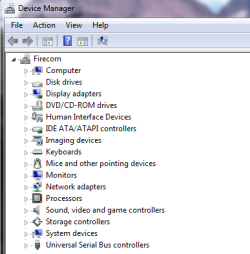
Can also check in device manager if you need any updates (click on a sound controller (whichever you have, mine are listed with grey speakers), go to properties, and click update):
Capture.PNG

This here is configuring sound/speakers in windows:
Capturing.PNG

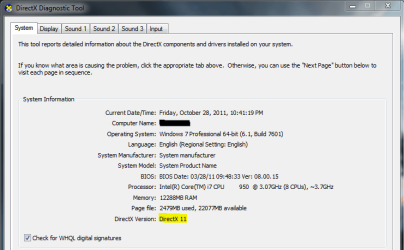
or goto start and type without quotes: "dxdiag" .
You can also determine which DirectX version you have here. Your graphics card might support DirectX11, or it might only support 10. I am not sure, but both should be playable on BF3. if you have lower, don't know if it is supported or not. Here is mine:
Capt2.PNG


and just for kicks, download all windows updates that have to do with compatability or being "important". you never know, right?
 
Last edited:

My Computer My Computer

At a glance

Microsoft Windows 8.1 Pro 64-bitIntel(R) Core(TM) i3-4130 CPU @ 3.40GHz8.00 GBNone
Computer type
PC/Desktop
Computer Manufacturer/Model Number
Custom Asus Build
OS
Microsoft Windows 8.1 Pro 64-bit
CPU
Intel(R) Core(TM) i3-4130 CPU @ 3.40GHz
Motherboard
B85M-E
Memory
8.00 GB
Graphics Card(s)
None
Sound Card
Realtek High Definition Audio
Monitor(s) Displays
Asus 23.6" Monitor
Screen Resolution
1920 x 1080 x 32 bits (4294967296 colors) @ 60 Hz
Hard Drives
INTEL SSDSC2BW180A4
Samsung SSD 840 PRO Series
PSU
Seasonic S12II-380Bronze
Case
Lian Li
Cooling
Fan, Passive
Keyboard
Logitech K120
Mouse
Microsoft Touch Mouse
Internet Speed
4ms Ping, 19.0 Mbps Download, 19.0 Mbps Upload
Antivirus
Eset Endpoint
Browser
Internet Explorer, Chrome
thats so much dust for taking the time to not only respond but to highlight and post pics and alot of people think its crazy to play bf3 on a laptop i can play on ultra and it handeles it alot better than alot of desktops out here
 

My Computer My Computer

At a glance

Microsoft Windows 7 Professional 64-bitIntel Xeon E3 @ 3.30GHzIntel(R) Xeon(R) CPU E...16.00GB Single-Channel DDR3 @ 666MHz (9-9-9-24)ATI Radeon HD 7950
Computer type
PC/Desktop
OS
Microsoft Windows 7 Professional 64-bit
CPU
Intel Xeon E3 @ 3.30GHzIntel(R) Xeon(R) CPU E3-1230 v3 @ 3.3
Motherboard
MSI Z97 GAMING 5 (MS-7917)
Memory
16.00GB Single-Channel DDR3 @ 666MHz (9-9-9-24)
Graphics Card(s)
ATI Radeon HD 7950
Sound Card
(1) AMD High Definition Audio Device (2) USB Audio Device
Hard Drives
(1) Samsung SSD 840 EVO 120GB ATA Device
(2) TOSHIBA MK7559GSM ATA Device
Other Info
TRENDnet Wireless AC1200 Dual Band USB 3.0 Adapter, TEW-805UB

My Computer My Computer

At a glance

Microsoft Windows 8.1 Pro 64-bitIntel(R) Core(TM) i3-4130 CPU @ 3.40GHz8.00 GBNone
Computer type
PC/Desktop
Computer Manufacturer/Model Number
Custom Asus Build
OS
Microsoft Windows 8.1 Pro 64-bit
CPU
Intel(R) Core(TM) i3-4130 CPU @ 3.40GHz
Motherboard
B85M-E
Memory
8.00 GB
Graphics Card(s)
None
Sound Card
Realtek High Definition Audio
Monitor(s) Displays
Asus 23.6" Monitor
Screen Resolution
1920 x 1080 x 32 bits (4294967296 colors) @ 60 Hz
Hard Drives
INTEL SSDSC2BW180A4
Samsung SSD 840 PRO Series
PSU
Seasonic S12II-380Bronze
Case
Lian Li
Cooling
Fan, Passive
Keyboard
Logitech K120
Mouse
Microsoft Touch Mouse
Internet Speed
4ms Ping, 19.0 Mbps Download, 19.0 Mbps Upload
Antivirus
Eset Endpoint
Browser
Internet Explorer, Chrome
ya nothing worked o well i guess ill have to deal with the sound issues ill take a look at the last link u posted but i think im screwed here o well look on the bright side at least i can run it on ultra lol
 

My Computer My Computer

At a glance

Microsoft Windows 7 Professional 64-bitIntel Xeon E3 @ 3.30GHzIntel(R) Xeon(R) CPU E...16.00GB Single-Channel DDR3 @ 666MHz (9-9-9-24)ATI Radeon HD 7950
Computer type
PC/Desktop
OS
Microsoft Windows 7 Professional 64-bit
CPU
Intel Xeon E3 @ 3.30GHzIntel(R) Xeon(R) CPU E3-1230 v3 @ 3.3
Motherboard
MSI Z97 GAMING 5 (MS-7917)
Memory
16.00GB Single-Channel DDR3 @ 666MHz (9-9-9-24)
Graphics Card(s)
ATI Radeon HD 7950
Sound Card
(1) AMD High Definition Audio Device (2) USB Audio Device
Hard Drives
(1) Samsung SSD 840 EVO 120GB ATA Device
(2) TOSHIBA MK7559GSM ATA Device
Other Info
TRENDnet Wireless AC1200 Dual Band USB 3.0 Adapter, TEW-805UB
actually i noticed that it has improve a slite bit just a tad
 

My Computer My Computer

At a glance

Microsoft Windows 7 Professional 64-bitIntel Xeon E3 @ 3.30GHzIntel(R) Xeon(R) CPU E...16.00GB Single-Channel DDR3 @ 666MHz (9-9-9-24)ATI Radeon HD 7950
Computer type
PC/Desktop
OS
Microsoft Windows 7 Professional 64-bit
CPU
Intel Xeon E3 @ 3.30GHzIntel(R) Xeon(R) CPU E3-1230 v3 @ 3.3
Motherboard
MSI Z97 GAMING 5 (MS-7917)
Memory
16.00GB Single-Channel DDR3 @ 666MHz (9-9-9-24)
Graphics Card(s)
ATI Radeon HD 7950
Sound Card
(1) AMD High Definition Audio Device (2) USB Audio Device
Hard Drives
(1) Samsung SSD 840 EVO 120GB ATA Device
(2) TOSHIBA MK7559GSM ATA Device
Other Info
TRENDnet Wireless AC1200 Dual Band USB 3.0 Adapter, TEW-805UB
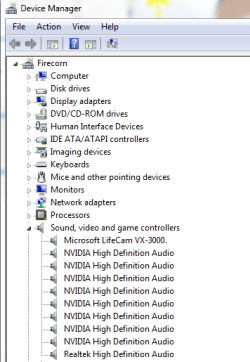
Noticed your card is amd. nvidia is usually given more support, but the card may be fine. You have all its updates from the website? You have all windows updates? you updated all drivers for your computer hardware? (look in device manager and devices and printers):
Capture.PNGCaptured.PNG

EDIT: ALSO, have you noticed any improvement with lowering ALL the settings to normal? Try it!
 
Last edited:

My Computer My Computer

At a glance

Microsoft Windows 8.1 Pro 64-bitIntel(R) Core(TM) i3-4130 CPU @ 3.40GHz8.00 GBNone
Computer type
PC/Desktop
Computer Manufacturer/Model Number
Custom Asus Build
OS
Microsoft Windows 8.1 Pro 64-bit
CPU
Intel(R) Core(TM) i3-4130 CPU @ 3.40GHz
Motherboard
B85M-E
Memory
8.00 GB
Graphics Card(s)
None
Sound Card
Realtek High Definition Audio
Monitor(s) Displays
Asus 23.6" Monitor
Screen Resolution
1920 x 1080 x 32 bits (4294967296 colors) @ 60 Hz
Hard Drives
INTEL SSDSC2BW180A4
Samsung SSD 840 PRO Series
PSU
Seasonic S12II-380Bronze
Case
Lian Li
Cooling
Fan, Passive
Keyboard
Logitech K120
Mouse
Microsoft Touch Mouse
Internet Speed
4ms Ping, 19.0 Mbps Download, 19.0 Mbps Upload
Antivirus
Eset Endpoint
Browser
Internet Explorer, Chrome
i did everything eveyone suggested and the performance of my sound/audio within the game playing throughout an entire match without it stopping is working perfectly right now i did everything you all suggested seems like updatign the sound drivers and installing the windows updates helped and i already had my drivers updated. Although it still cuts in at out from time to time its been working fine sense yesterday thanks everyone
 

My Computer My Computer

At a glance

Microsoft Windows 7 Professional 64-bitIntel Xeon E3 @ 3.30GHzIntel(R) Xeon(R) CPU E...16.00GB Single-Channel DDR3 @ 666MHz (9-9-9-24)ATI Radeon HD 7950
Computer type
PC/Desktop
OS
Microsoft Windows 7 Professional 64-bit
CPU
Intel Xeon E3 @ 3.30GHzIntel(R) Xeon(R) CPU E3-1230 v3 @ 3.3
Motherboard
MSI Z97 GAMING 5 (MS-7917)
Memory
16.00GB Single-Channel DDR3 @ 666MHz (9-9-9-24)
Graphics Card(s)
ATI Radeon HD 7950
Sound Card
(1) AMD High Definition Audio Device (2) USB Audio Device
Hard Drives
(1) Samsung SSD 840 EVO 120GB ATA Device
(2) TOSHIBA MK7559GSM ATA Device
Other Info
TRENDnet Wireless AC1200 Dual Band USB 3.0 Adapter, TEW-805UB
I'm glad you got it worked out. now if you wouldn't mind, please under the top right corner of your post click the red white and black triangle and send a "solved" report to the admins so they can mark this thread as such ;)

cheers, and hope you're able to thoroughly enjoy that game. It looks great.
 

My Computer My Computer

At a glance

Microsoft Windows 8.1 Pro 64-bitIntel(R) Core(TM) i3-4130 CPU @ 3.40GHz8.00 GBNone
Computer type
PC/Desktop
Computer Manufacturer/Model Number
Custom Asus Build
OS
Microsoft Windows 8.1 Pro 64-bit
CPU
Intel(R) Core(TM) i3-4130 CPU @ 3.40GHz
Motherboard
B85M-E
Memory
8.00 GB
Graphics Card(s)
None
Sound Card
Realtek High Definition Audio
Monitor(s) Displays
Asus 23.6" Monitor
Screen Resolution
1920 x 1080 x 32 bits (4294967296 colors) @ 60 Hz
Hard Drives
INTEL SSDSC2BW180A4
Samsung SSD 840 PRO Series
PSU
Seasonic S12II-380Bronze
Case
Lian Li
Cooling
Fan, Passive
Keyboard
Logitech K120
Mouse
Microsoft Touch Mouse
Internet Speed
4ms Ping, 19.0 Mbps Download, 19.0 Mbps Upload
Antivirus
Eset Endpoint
Browser
Internet Explorer, Chrome
Back
Top