How do I identify my SATA driver(s)

z101891

New member
Local time
9:25 PM
Messages
4
I would like to identify the SATA driver (s) that I have installed on my desk-top computer.
I do not know if I have more than one.
Per the company that made my PC, my motherboard is an ASUS, Sabertooth Z97 Mark 1, LGA1150, Intel® Z97, DDR3-1866 (O.C) 32GB /4, PCIe x16 SLI CF /1+1*, SATA 6Gb/s RAID 5 /6, [SIZE=-1]SATAe /1, DP + HDMI, USB 3.0 /4+2, HDA, GbLAN /2, ATX, Retail .[/SIZE]
I am sure that the appropriate information is in Device Manager, but how do I fish it out?
[SIZE=-1][/SIZE]
 

My Computer My Computer

Computer type
PC/Desktop
OS
Windows 7 Ultimate x64
Not sure what your asking sata drivers are built into Windows are you asking for drivers or how many ports you have?
 

My Computer My Computer

Computer type
PC/Desktop
OS
win 8 32 bit
Easiest way would be to pull the cover off of the computer, and see what is plugged into the various SATA ports. Each port is numbered (e.g. SATA0, SATA1, etc), in case you want that information.

SATA/e may be the same as eSATA, which means "external SATA", that is, a SATA port which is on the case, so that you can plug an external SATA device to it without having to open the case. But eSATA ports are usually only on laptops, not desktops.
 

My Computer My Computer

Computer type
PC/Desktop
Computer Manufacturer/Model Number
Dell
OS
Linux Mint 18.2 xfce 64-bit (VMWare host) / Windows 8.1 Pro 32-bit (VMWare guest)
CPU
Haswell
Memory
4 GB
Monitor(s) Displays
Acer 23"
Screen Resolution
1920 x 1080
Hard Drives
Two hard drives, 1TB each: One for Linux, one for my data.
Keyboard
IBM Model M
Antivirus
Sophos (Linux), Trend Micro (Windows)
Browser
Firefox, Opera
Other Info
I use Samba to share my data drive with the other computers at my house and with my guest session in VMWare Workstation Player.
I would like to identify the SATA driver (s) that I have installed on my desk-top computer.

I am sure that the appropriate information is in Device Manager, but how do I fish it out?
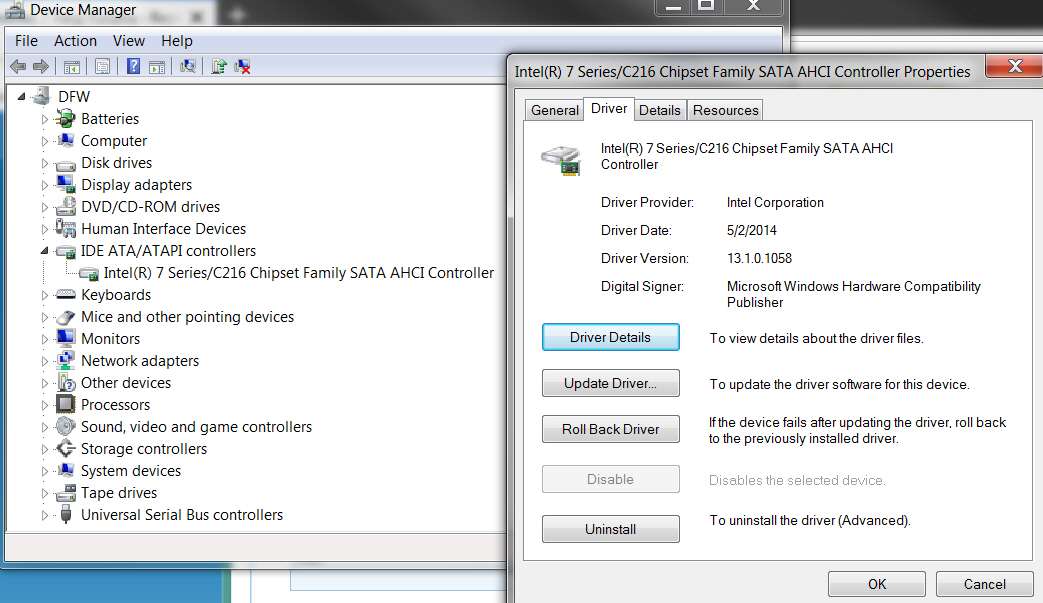
Open Device Manager. The SATA driver shows up in the category called IDE/ATA ATAPI Controllers. If you expand that category you should then see something like Intel 7 Series/C216 Chipset Family SATA AHCI Controller or similar if you have the Intel RST driver installed. Otherwise you might see something else, but this is where the SATA driver appears in Device Manager.

If you then right-click on that controller, select Properties from the popup context menu, then select the Drivers tab. You should then see some version of the Intel SATA controller, if you have the Intel RST SATA driver installed to support the Intel SATA controllers on your motherboard.

HoNmjv.jpg


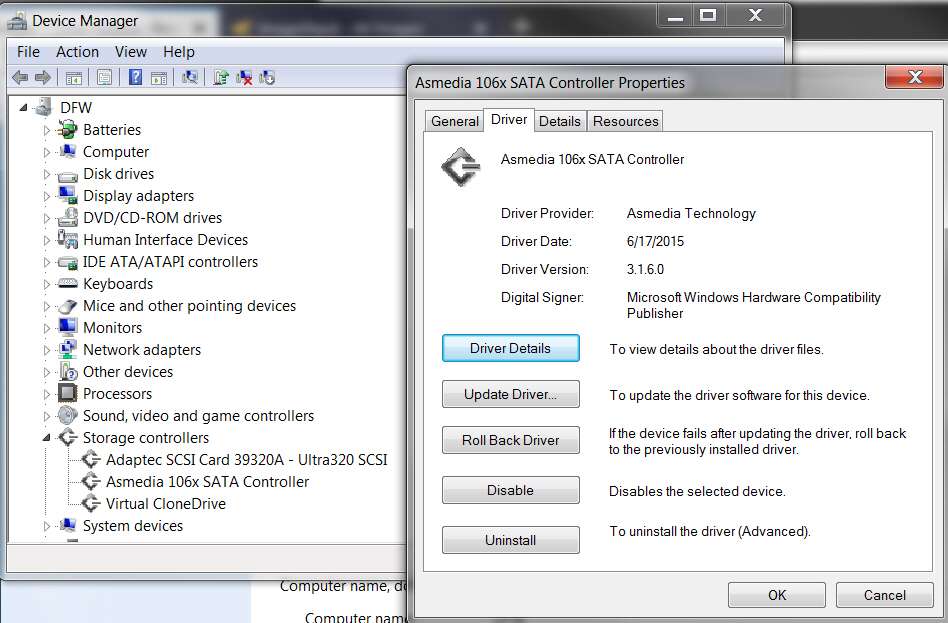
Additionally, your motherboard might have secondary SATA controllers providing additional SATA device support since older generation Intel chipsets were limited to six.

So, in Device Manager down in the Storage Controller category, if you expand it you might see an additional SATA controller device. On my own ASUS P8Z77-V Pro board I have secondary Asmedia SATA Controller which provide two additional SATA connections on the motherboard.

Again, if you right-click on any additional SATA controller you might see here and select Properties and then the Driver tab, you will see the driver version you have installed.

B2NVQu.jpg
 

My Computer My Computer

Computer type
PC/Desktop
Computer Manufacturer/Model Number
Home-built, two systems (1) and (2)
OS
Windows 7 Pro x64 (1), Win7 Pro X64 (2)
CPU
i5-3350p 3.1Ghz/6MB-cache (1); E8400 3.0Ghz/6MB-cache (2)
Motherboard
ASUS P8Z77-V Pro (1); ASUS P5Q3 (2)
Memory
8GB PC3-12800 DDR3 (1); 4GB PC3-10600 DDR3 (2)
Graphics Card(s)
ATI HD7750 (1), (see TV cards); ATI R7 250 (2)
Sound Card
Realtek ALC892 HD Audio (1); Realtek ALC1200 HD Audio (2)
Monitor(s) Displays
Eizo HD2441W LCD, Eizo S2433W (1); Eizo 24" S2433W (2)
Screen Resolution
1920x1200, 1920x1200 (1); 1920x1200 (2)
Hard Drives
(1) 1TB SATA-II (7200RPM), 2x2TB SATA-III (7200RPM), 250GB SATA-III (10000RPM) for OS; 2x2TB external USB 3.0

(2) 320GB SATA-II (7200RPM), 750GB SATA-II (7200RPM), 150GB SATA-II (10000RPM) for OS; 2TB external USB 3.0
PSU
Nesteq ECS-6001 600W (1); Nesteq ECS-5001 500W (2)
Case
Acousti-Case 360 (1) and (2)
Cooling
Noctua NH-U12P SE2 for CPU, 2x120mm case fans (1) and (2)
Keyboard
IBM PS/2 (1) and (2)
Mouse
Logitech MX Revolution wireless (1); Microsoft wired (2)
Internet Speed
100mbps down / 10mbps up
Antivirus
Microsoft Security Essentials; Malwarebyte Anti-Malware Pro
Browser
Firefox
Other Info
Ceton InfiniTV 4-tuner cablecard-enabled TV card as well as Hauppauge HVR-2250 OTA/ATSC 2-tuner TV card in (1), running under Win7 WMC
Hi All,
Greets,
Sir(s),
I recall one safe portable utility from NirSoft which lists out all the loaded drivers. I think one should make sure all the port/hubs are correctly in use. The utility is DriverView :
http://www.nirsoft.net/utils/driverview.html
It should come out handy !

One another significant application is Belarc Advisor, though i never used it. I think it has to be installed. It produces comprehensive report of your whole system. Take care while sharing the report as it would include just everything ! Here is the application : https://www.belarc.com/products_belarc_advisor

( I remember one of my seniors & his guide @ this moment : http://www.gerryscomputertips.co.uk/maintenance1a.htm )

Regards,
Vineet Garg
 
Last edited:

My Computer My Computer

Computer type
Laptop
Computer Manufacturer/Model Number
hp compaq presario c795VU notebook pc
OS
Windows 7 Ultimate x32 With Sp1 + Vista Ultimate x32 with Sp1 & Sp2 !!
CPU
Intel Mobile Core 2 Duo T5750 @ 2.00GHz Merom 65nm Technolog
Motherboard
Hewlett-Packard 30D9 (CPU)
Memory
2.00GB Dual-Channel DDR2 @ 332MHz (5-5-5-15)
Graphics Card(s)
Mobile Intel(R) 965 Express Chipset Family
Sound Card
High Definition Audio Device
Monitor(s) Displays
LP154WX4-TLCB on Mobile Intel 965 Express Chipset Family
Screen Resolution
1280x800 @ 60Hz
Hard Drives
149GB Western Digital WDC WD1600BEVS-60VAT0 ATA Device (SATA)
Keyboard
Standard 101/102-Key or Microsoft Natural PS/2 Key + HP QLB
Mouse
ALPS pointing device
Antivirus
Kaspersky AV 2017(Win 7) & AVG AntiVirus Free 2016 (VISTA)
Browser
google chrome
Back
Top