Solved Radeon HD 4350 not reconized by Windows

RetroGamer

:P
Member
Local time
12:19 PM
Messages
29
Location
United States
I have a 32-bit system currently set up, a Sony Vaio VGC-RA820G. My friend recently gave me a Radeon HD 4350 video card to put in it. It has a 3.2GHz Pentium 4 HT and 3GB of RAM. The PSU is 350w which should be more then enough for the 4350 as my friend used it with a 300w on a much more power hungry system (Quad core with 4GB). The video card currently in it, A Radeon X300 works just fine with the system. There is NO on-board display adapter and the bios and CPU-Z see the 4350 just fine. Windows does not list the card as anything in the device manager, not even as a standard video card, though video works on the card but the FPS is choppy and no support is given for DirectX or OpenGL. I know the card is not dead, though I am unsure why Windows doesn't recognize it as any video card at all. Any help is greatly appreciated.

EDIT: I have tried multiple installs of the official drivers form ATI and they recognize the card and install, but Windows doesn't use the drivers, it uses generic ones and because the card is not listed in device manager, I can't change them.
 

My Computer My Computer

At a glance

Windows 7 Ultimate x64Core i7 3820 @ 4.6Ghz (Overclocked)16384MB DDR3 1600mhz Corsair Vengeance2x Nvidia GTX 295 (In quad SLI)
Computer type
PC/Desktop
Computer Manufacturer/Model Number
Custom Build
OS
Windows 7 Ultimate x64
CPU
Core i7 3820 @ 4.6Ghz (Overclocked)
Motherboard
Asrock x79 Extreme9 (2011)
Memory
16384MB DDR3 1600mhz Corsair Vengeance
Graphics Card(s)
2x Nvidia GTX 295 (In quad SLI)
Sound Card
Creative SoundCore 3D
Monitor(s) Displays
24" LG 24EN31 LED
Screen Resolution
1920x1080
Hard Drives
OCZ Agility 3 120GB SSD (Boot Disk)
OCZ Vertex 2 240GB SSD (x2, Spanned Volume)
Western Digital 2TB Caviar Green (x2, Spanned Volume)
PSU
OCZ ModXStream 900W
Case
Fractal Design Define R4
Cooling
Corsair Hydro H60
Keyboard
Cooler Master Quickfire Rapid (Blue)
Mouse
Logitech M510
Internet Speed
Upload:5mbps Download:15mbps
Antivirus
Malware Bytes
Browser
Mozilla Firefox
Questions:

1- Is this your system - Sony Vaio VGC-RA820G

2- Do you still have to old video card (X300) installed?

2- Or did you actually replace the old video card with the 4350?
 

My Computer My Computer

At a glance

Windows 10 ProIntel Core i7-4770K (3.5Ghz)32 gig Corsair Dominator Platinum (4x8Gig)Sapphire Tri-X R9 Fury
Computer type
PC/Desktop
Computer Manufacturer/Model Number
Custom built by me.
OS
Windows 10 Pro
CPU
Intel Core i7-4770K (3.5Ghz)
Motherboard
Gigabyte G1 Sniper 5 (F10 Bios)
Memory
32 gig Corsair Dominator Platinum (4x8Gig)
Graphics Card(s)
Sapphire Tri-X R9 Fury
Sound Card
Soundblaster ZXR
Monitor(s) Displays
NEC PA242W 24" LCD Monitor
Screen Resolution
1920 x 1200
Hard Drives
Primary - Samsung 850 Pro (512gig), Samsung 840 Pro (256gig), 2TB WD Caviar Black.
PSU
EVGA Supernova 1000 G2
Case
Cooler Master HAF X
Cooling
Corsair H100i with Corsair Air Series SP120 Quiet Fans
Keyboard
Logitech Wireless Wave
Mouse
Logitech Performance MX
Internet Speed
High Speed Cable
Antivirus
Norton Security
Browser
IE11
Other Info
Memory Timings - 1866MHz @ 9-9-9-27-1T @ 1.5 volts
1. Yes, it is a Sony Vaio VGC-RA820G
2. Yes, I have the old card but it is not currently installed though I can switch it out with the 4350 if need be.

The 4350 works as a "Standard VGA Adapter" but it does not appear in the Device Manager so I can't update the drivers to the official Radeon ones
 

My Computer My Computer

At a glance

Windows 7 Ultimate x64Core i7 3820 @ 4.6Ghz (Overclocked)16384MB DDR3 1600mhz Corsair Vengeance2x Nvidia GTX 295 (In quad SLI)
Computer type
PC/Desktop
Computer Manufacturer/Model Number
Custom Build
OS
Windows 7 Ultimate x64
CPU
Core i7 3820 @ 4.6Ghz (Overclocked)
Motherboard
Asrock x79 Extreme9 (2011)
Memory
16384MB DDR3 1600mhz Corsair Vengeance
Graphics Card(s)
2x Nvidia GTX 295 (In quad SLI)
Sound Card
Creative SoundCore 3D
Monitor(s) Displays
24" LG 24EN31 LED
Screen Resolution
1920x1080
Hard Drives
OCZ Agility 3 120GB SSD (Boot Disk)
OCZ Vertex 2 240GB SSD (x2, Spanned Volume)
Western Digital 2TB Caviar Green (x2, Spanned Volume)
PSU
OCZ ModXStream 900W
Case
Fractal Design Define R4
Cooling
Corsair Hydro H60
Keyboard
Cooler Master Quickfire Rapid (Blue)
Mouse
Logitech M510
Internet Speed
Upload:5mbps Download:15mbps
Antivirus
Malware Bytes
Browser
Mozilla Firefox
The 4350 works as a "Standard VGA Adapter" but it does not appear in the Device Manager so I can't update the drivers to the official Radeon ones

I'm a little confused by the above statement. If the card is working (you get video) then it should be showing up in Device Manager as a "Standard VGA Adapter"

In this case you just have to install the drivers. Try and use these here - ATI Radeon (these ar for Win XP). You should uninstall the drivers first.

Let me know.
 

My Computer My Computer

At a glance

Windows 10 ProIntel Core i7-4770K (3.5Ghz)32 gig Corsair Dominator Platinum (4x8Gig)Sapphire Tri-X R9 Fury
Computer type
PC/Desktop
Computer Manufacturer/Model Number
Custom built by me.
OS
Windows 10 Pro
CPU
Intel Core i7-4770K (3.5Ghz)
Motherboard
Gigabyte G1 Sniper 5 (F10 Bios)
Memory
32 gig Corsair Dominator Platinum (4x8Gig)
Graphics Card(s)
Sapphire Tri-X R9 Fury
Sound Card
Soundblaster ZXR
Monitor(s) Displays
NEC PA242W 24" LCD Monitor
Screen Resolution
1920 x 1200
Hard Drives
Primary - Samsung 850 Pro (512gig), Samsung 840 Pro (256gig), 2TB WD Caviar Black.
PSU
EVGA Supernova 1000 G2
Case
Cooler Master HAF X
Cooling
Corsair H100i with Corsair Air Series SP120 Quiet Fans
Keyboard
Logitech Wireless Wave
Mouse
Logitech Performance MX
Internet Speed
High Speed Cable
Antivirus
Norton Security
Browser
IE11
Other Info
Memory Timings - 1866MHz @ 9-9-9-27-1T @ 1.5 volts
I've tried the official drivers many times, and they always say they were "successful" installing. The problem here is that for an odd unknown reason, the card doesn't update the drivers automatically. You'd expect to go into Device Manager and be able to update it there, but it doesn't exist in Device Manager. Any other video card I put in there shows up just fine in Device Manager. I've tried a Radeon x300 (The original card that came with the computer) and a Radeon 9250. Both of these show up just fine, but the 4350 does not for an unknown reason. On other forums people say that the on-board graphics card often conflicts with the 4350 and you have to turn it off in the bios, but this computer has no on-board graphics card. I'm just as lost about this situation as you. I think I may try reinstalling the OS however, as maybe some other driver is conflicting with it, and when I orrigianly installed it, the x300 card was installed, not the 4350.
 

My Computer My Computer

At a glance

Windows 7 Ultimate x64Core i7 3820 @ 4.6Ghz (Overclocked)16384MB DDR3 1600mhz Corsair Vengeance2x Nvidia GTX 295 (In quad SLI)
Computer type
PC/Desktop
Computer Manufacturer/Model Number
Custom Build
OS
Windows 7 Ultimate x64
CPU
Core i7 3820 @ 4.6Ghz (Overclocked)
Motherboard
Asrock x79 Extreme9 (2011)
Memory
16384MB DDR3 1600mhz Corsair Vengeance
Graphics Card(s)
2x Nvidia GTX 295 (In quad SLI)
Sound Card
Creative SoundCore 3D
Monitor(s) Displays
24" LG 24EN31 LED
Screen Resolution
1920x1080
Hard Drives
OCZ Agility 3 120GB SSD (Boot Disk)
OCZ Vertex 2 240GB SSD (x2, Spanned Volume)
Western Digital 2TB Caviar Green (x2, Spanned Volume)
PSU
OCZ ModXStream 900W
Case
Fractal Design Define R4
Cooling
Corsair Hydro H60
Keyboard
Cooler Master Quickfire Rapid (Blue)
Mouse
Logitech M510
Internet Speed
Upload:5mbps Download:15mbps
Antivirus
Malware Bytes
Browser
Mozilla Firefox
Ok, I'm completely confused. You don't need to go into Device manager to update the drivers.

When you put the 4350 in the PC did you hook your monitor to it?

Do you get a video signal?

And is this an XP machine? Yes or no???

Also can you post a screen shot of your device manager with the 4350 installed in the PC.

Thanks.
 

My Computer My Computer

At a glance

Windows 10 ProIntel Core i7-4770K (3.5Ghz)32 gig Corsair Dominator Platinum (4x8Gig)Sapphire Tri-X R9 Fury
Computer type
PC/Desktop
Computer Manufacturer/Model Number
Custom built by me.
OS
Windows 10 Pro
CPU
Intel Core i7-4770K (3.5Ghz)
Motherboard
Gigabyte G1 Sniper 5 (F10 Bios)
Memory
32 gig Corsair Dominator Platinum (4x8Gig)
Graphics Card(s)
Sapphire Tri-X R9 Fury
Sound Card
Soundblaster ZXR
Monitor(s) Displays
NEC PA242W 24" LCD Monitor
Screen Resolution
1920 x 1200
Hard Drives
Primary - Samsung 850 Pro (512gig), Samsung 840 Pro (256gig), 2TB WD Caviar Black.
PSU
EVGA Supernova 1000 G2
Case
Cooler Master HAF X
Cooling
Corsair H100i with Corsair Air Series SP120 Quiet Fans
Keyboard
Logitech Wireless Wave
Mouse
Logitech Performance MX
Internet Speed
High Speed Cable
Antivirus
Norton Security
Browser
IE11
Other Info
Memory Timings - 1866MHz @ 9-9-9-27-1T @ 1.5 volts
I've tried the official drivers many times, and they always say they were "successful" installing. The problem here is that for an odd unknown reason, the card doesn't update the drivers automatically. You'd expect to go into Device Manager and be able to update it there, but it doesn't exist in Device Manager.
Go to the Sony site and get the latest video drivers from Sony for your laptop. That's what needs to be installed.

If your laptop or desktop's hardware is an X300 chip I don't know that you'll be able to install "retail Catalyst drivers" for a standard "retail ATI video card". As you've seen, it can claim to be installed successfully but somehow never really gets attached properly to the hardware. Something about the "Mobility" version of Radeon hardware that does not allow the main Catalyst drivers from being installed. You need "Mobility" drivers.

There's something very odd about these OEM installs of Windows, in terms of what the manufacturers do to them somehow to actually prevent "retail Catalyst drivers" from being installed.

The only way I think you may be successful is if you erase C and install a brand new "retail Win7" from scratch. Then the hardware will be detected, and a retail Catalyst driver package will work. But with the OEM version of Windows somehow there is a lockdown.

Note that this also happens with desktop machines. I've now seen exactly the same thing on both a new Compaq and Lenovo desktop machine, both of which have modern ATI video cards (an HD540 in the Lenovo). Both have triggered automatic Windows updates but only going to 11.2. You cannot install a newer Catalyst driver downloaded from the ATI site and have it "work", although it seems to install properly. The drivers shown will still be the ones provided by Lenovo out-of-the-box, or automatically updated with Windows Update.


At least that's been my experience fighting with this very issue over the last few years. The only real solution is to eliminate the OEM version of Win7 running on the hardware, and install a retail Win7. Then you can do whatever you want.

EDIT: just noticed that your Sony Vaio is a desktop machine, not a laptop. But still... based on my similar experience with Compaq and Lenovo desktops and the same issue of wanting to install more recent drivers than 11.2 for the ATI video hardware in both machines, it just does not work with the OEM copy of Win7 that's installed by the manufacturer.
 

My Computer My Computer

At a glance

Windows 7 Pro x64 (1), Win7 Pro X64 (2)i5-3350p 3.1Ghz/6MB-cache (1); E8400 3.0Ghz/6...8GB PC3-12800 DDR3 (1); 4GB PC3-10600 DDR3 (2)ATI HD7750 (1), (see TV cards); ATI R7 250 (2)
Computer type
PC/Desktop
Computer Manufacturer/Model Number
Home-built, two systems (1) and (2)
OS
Windows 7 Pro x64 (1), Win7 Pro X64 (2)
CPU
i5-3350p 3.1Ghz/6MB-cache (1); E8400 3.0Ghz/6MB-cache (2)
Motherboard
ASUS P8Z77-V Pro (1); ASUS P5Q3 (2)
Memory
8GB PC3-12800 DDR3 (1); 4GB PC3-10600 DDR3 (2)
Graphics Card(s)
ATI HD7750 (1), (see TV cards); ATI R7 250 (2)
Sound Card
Realtek ALC892 HD Audio (1); Realtek ALC1200 HD Audio (2)
Monitor(s) Displays
Eizo HD2441W LCD, Eizo S2433W (1); Eizo 24" S2433W (2)
Screen Resolution
1920x1200, 1920x1200 (1); 1920x1200 (2)
Hard Drives
(1) 1TB SATA-II (7200RPM), 2x2TB SATA-III (7200RPM), 250GB SATA-III (10000RPM) for OS; 2x2TB external USB 3.0

(2) 320GB SATA-II (7200RPM), 750GB SATA-II (7200RPM), 150GB SATA-II (10000RPM) for OS; 2TB external USB 3.0
PSU
Nesteq ECS-6001 600W (1); Nesteq ECS-5001 500W (2)
Case
Acousti-Case 360 (1) and (2)
Cooling
Noctua NH-U12P SE2 for CPU, 2x120mm case fans (1) and (2)
Keyboard
IBM PS/2 (1) and (2)
Mouse
Logitech MX Revolution wireless (1); Microsoft wired (2)
Internet Speed
100mbps down / 10mbps up
Antivirus
Microsoft Security Essentials; Malwarebyte Anti-Malware Pro
Browser
Firefox
Other Info
Ceton InfiniTV 4-tuner cablecard-enabled TV card as well as Hauppauge HVR-2250 OTA/ATSC 2-tuner TV card in (1), running under Win7 WMC
Questions:

1- Is this your system - Sony Vaio VGC-RA820G

1. Yes, it is a Sony Vaio VGC-RA820G

Go to the Sony site and get the latest video drivers from Sony for your laptop. That's what needs to be installed.

Something about the "Mobility" version of Radeon hardware that does not allow the main Catalyst drivers from being installed. You need "Mobility" drivers.

EDIT: just noticed that your Sony Vaio is a desktop machine, not a laptop.

It's a desktop so no mobility drivers need be installed.

I'm awaiting an answer as to whether the machine in question is running XP or not. See my prior post(s).

Thanks.
 

My Computer My Computer

At a glance

Windows 10 ProIntel Core i7-4770K (3.5Ghz)32 gig Corsair Dominator Platinum (4x8Gig)Sapphire Tri-X R9 Fury
Computer type
PC/Desktop
Computer Manufacturer/Model Number
Custom built by me.
OS
Windows 10 Pro
CPU
Intel Core i7-4770K (3.5Ghz)
Motherboard
Gigabyte G1 Sniper 5 (F10 Bios)
Memory
32 gig Corsair Dominator Platinum (4x8Gig)
Graphics Card(s)
Sapphire Tri-X R9 Fury
Sound Card
Soundblaster ZXR
Monitor(s) Displays
NEC PA242W 24" LCD Monitor
Screen Resolution
1920 x 1200
Hard Drives
Primary - Samsung 850 Pro (512gig), Samsung 840 Pro (256gig), 2TB WD Caviar Black.
PSU
EVGA Supernova 1000 G2
Case
Cooler Master HAF X
Cooling
Corsair H100i with Corsair Air Series SP120 Quiet Fans
Keyboard
Logitech Wireless Wave
Mouse
Logitech Performance MX
Internet Speed
High Speed Cable
Antivirus
Norton Security
Browser
IE11
Other Info
Memory Timings - 1866MHz @ 9-9-9-27-1T @ 1.5 volts
It's currently running Windows XP Home SP3 (Not the XP MCE 2005 that originally came with the PC) I'll try and get some screenshots up as soon as I can.

In response to your earlier questions, yes I'3ve connected a monitor to the card and get a signal, however the drivers don't appear to work with the card even though they are supposedly installed and therefore I don't get the direct3d or opengl support the card has to offer.

I still plan on trying to reinstall the OS to see if that fixes it.
 

My Computer My Computer

At a glance

Windows 7 Ultimate x64Core i7 3820 @ 4.6Ghz (Overclocked)16384MB DDR3 1600mhz Corsair Vengeance2x Nvidia GTX 295 (In quad SLI)
Computer type
PC/Desktop
Computer Manufacturer/Model Number
Custom Build
OS
Windows 7 Ultimate x64
CPU
Core i7 3820 @ 4.6Ghz (Overclocked)
Motherboard
Asrock x79 Extreme9 (2011)
Memory
16384MB DDR3 1600mhz Corsair Vengeance
Graphics Card(s)
2x Nvidia GTX 295 (In quad SLI)
Sound Card
Creative SoundCore 3D
Monitor(s) Displays
24" LG 24EN31 LED
Screen Resolution
1920x1080
Hard Drives
OCZ Agility 3 120GB SSD (Boot Disk)
OCZ Vertex 2 240GB SSD (x2, Spanned Volume)
Western Digital 2TB Caviar Green (x2, Spanned Volume)
PSU
OCZ ModXStream 900W
Case
Fractal Design Define R4
Cooling
Corsair Hydro H60
Keyboard
Cooler Master Quickfire Rapid (Blue)
Mouse
Logitech M510
Internet Speed
Upload:5mbps Download:15mbps
Antivirus
Malware Bytes
Browser
Mozilla Firefox
Use the stand-alone AMD driver. Use 7-zip, extract the AMD driver package to a folder on your desktop.
Go to the device manager and select Update Driver Software, and select Browse for driver software on your computer
and point to the folder you created on your desktop.

It may work. :)
Good Luck.
 

My Computer My Computer

At a glance

Windows 7 Home Premium 64 bitIntel Core i7-4790G.SKILL 8GB (2 x 4GB) DDR3 F3-10666CL9D-8GBNTAMD Radeon R7 250
Computer type
PC/Desktop
Computer Manufacturer/Model Number
Custom Build
OS
Windows 7 Home Premium 64 bit
CPU
Intel Core i7-4790
Motherboard
GA-Z87X-D3H
Memory
G.SKILL 8GB (2 x 4GB) DDR3 F3-10666CL9D-8GBNT
Graphics Card(s)
AMD Radeon R7 250
Sound Card
Realtek ALC892
Monitor(s) Displays
Samsung UN32EH5000, Dell 1703FPT
Screen Resolution
1920 x 1080, 1280 x 1024
Hard Drives
WD5003AZEX
WD10EZEX
Samsung HD103SJ
Samsung 128 GB 840 PRO
PSU
SeaSonic M12II SS-500GM
Case
Fractal Design Define R4
Cooling
Zalman CNPS9900ALED
Keyboard
Logitech K800
Mouse
Logitech M705
Internet Speed
16 Mbps
Antivirus
Avast
Browser
Firefox
Other Info
Bose Companion 2 Multimedia Speakers
however the drivers don't appear to work with the card even though they are supposedly installed and therefore I don't get the direct3d or opengl support the card has to offer.

How did you come to that conclusion?
 

My Computer My Computer

At a glance

Windows 10 ProIntel Core i7-4770K (3.5Ghz)32 gig Corsair Dominator Platinum (4x8Gig)Sapphire Tri-X R9 Fury
Computer type
PC/Desktop
Computer Manufacturer/Model Number
Custom built by me.
OS
Windows 10 Pro
CPU
Intel Core i7-4770K (3.5Ghz)
Motherboard
Gigabyte G1 Sniper 5 (F10 Bios)
Memory
32 gig Corsair Dominator Platinum (4x8Gig)
Graphics Card(s)
Sapphire Tri-X R9 Fury
Sound Card
Soundblaster ZXR
Monitor(s) Displays
NEC PA242W 24" LCD Monitor
Screen Resolution
1920 x 1200
Hard Drives
Primary - Samsung 850 Pro (512gig), Samsung 840 Pro (256gig), 2TB WD Caviar Black.
PSU
EVGA Supernova 1000 G2
Case
Cooler Master HAF X
Cooling
Corsair H100i with Corsair Air Series SP120 Quiet Fans
Keyboard
Logitech Wireless Wave
Mouse
Logitech Performance MX
Internet Speed
High Speed Cable
Antivirus
Norton Security
Browser
IE11
Other Info
Memory Timings - 1866MHz @ 9-9-9-27-1T @ 1.5 volts
devicemanagerscreen.PNG

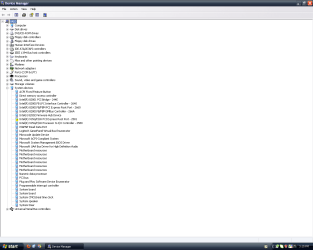
Here's the screenshot of device manager as it appears when I open it. Notice the error in the system category, which has the error message that there are not enough free resources, but even disabling almost everything I can does not free it up. Also notice that the display adapter category is missing. I don't know if this means anything either, but today I noticed that during POST with the 4350, there's only 2944MB of RAM rather then the 3072MB I get when POSTing with the x300. The resource error is gon e and the display adapter category is present with the x300 card.

however the drivers don't appear to work with the card even though they are supposedly installed and therefore I don't get the direct3d or opengl support the card has to offer.

How did you come to that conclusion?

I try to run programs that use direct3d and opengl and they won't run stating that the video card drivers need to be updated to support opengl/direct3d. My friend used this card for opengl/direct3d programs, so I know it should work with them. However every time I try to install the ATI drivers, they say that they "installed successfully". I know this card definitely works as I've tried it in other computers.

Use the stand-alone AMD driver. Use 7-zip, extract the AMD driver package to a folder on your desktop.
Go to the device manager and select Update Driver Software, and select Browse for driver software on your computer
and point to the folder you created on your desktop.

Tried that, didn't work. :(
 

My Computer My Computer

At a glance

Windows 7 Ultimate x64Core i7 3820 @ 4.6Ghz (Overclocked)16384MB DDR3 1600mhz Corsair Vengeance2x Nvidia GTX 295 (In quad SLI)
Computer type
PC/Desktop
Computer Manufacturer/Model Number
Custom Build
OS
Windows 7 Ultimate x64
CPU
Core i7 3820 @ 4.6Ghz (Overclocked)
Motherboard
Asrock x79 Extreme9 (2011)
Memory
16384MB DDR3 1600mhz Corsair Vengeance
Graphics Card(s)
2x Nvidia GTX 295 (In quad SLI)
Sound Card
Creative SoundCore 3D
Monitor(s) Displays
24" LG 24EN31 LED
Screen Resolution
1920x1080
Hard Drives
OCZ Agility 3 120GB SSD (Boot Disk)
OCZ Vertex 2 240GB SSD (x2, Spanned Volume)
Western Digital 2TB Caviar Green (x2, Spanned Volume)
PSU
OCZ ModXStream 900W
Case
Fractal Design Define R4
Cooling
Corsair Hydro H60
Keyboard
Cooler Master Quickfire Rapid (Blue)
Mouse
Logitech M510
Internet Speed
Upload:5mbps Download:15mbps
Antivirus
Malware Bytes
Browser
Mozilla Firefox
Suggestion: take a system image so you can restore what you have right now.

Then format the C-partition and install a "retail" Win7, not using a restore of the Sony-provided recovery disks but a true "retail" Win7 that will look at your hardware.

Now see if the HD4350 card is correctly recognized and supported by the "retail" Catalyst drivers from ATI.

Whatever the results, you can always restore your system image to get back to just where you are right now, so it seems you have a no-risk experiment here.
 

My Computer My Computer

At a glance

Windows 7 Pro x64 (1), Win7 Pro X64 (2)i5-3350p 3.1Ghz/6MB-cache (1); E8400 3.0Ghz/6...8GB PC3-12800 DDR3 (1); 4GB PC3-10600 DDR3 (2)ATI HD7750 (1), (see TV cards); ATI R7 250 (2)
Computer type
PC/Desktop
Computer Manufacturer/Model Number
Home-built, two systems (1) and (2)
OS
Windows 7 Pro x64 (1), Win7 Pro X64 (2)
CPU
i5-3350p 3.1Ghz/6MB-cache (1); E8400 3.0Ghz/6MB-cache (2)
Motherboard
ASUS P8Z77-V Pro (1); ASUS P5Q3 (2)
Memory
8GB PC3-12800 DDR3 (1); 4GB PC3-10600 DDR3 (2)
Graphics Card(s)
ATI HD7750 (1), (see TV cards); ATI R7 250 (2)
Sound Card
Realtek ALC892 HD Audio (1); Realtek ALC1200 HD Audio (2)
Monitor(s) Displays
Eizo HD2441W LCD, Eizo S2433W (1); Eizo 24" S2433W (2)
Screen Resolution
1920x1200, 1920x1200 (1); 1920x1200 (2)
Hard Drives
(1) 1TB SATA-II (7200RPM), 2x2TB SATA-III (7200RPM), 250GB SATA-III (10000RPM) for OS; 2x2TB external USB 3.0

(2) 320GB SATA-II (7200RPM), 750GB SATA-II (7200RPM), 150GB SATA-II (10000RPM) for OS; 2TB external USB 3.0
PSU
Nesteq ECS-6001 600W (1); Nesteq ECS-5001 500W (2)
Case
Acousti-Case 360 (1) and (2)
Cooling
Noctua NH-U12P SE2 for CPU, 2x120mm case fans (1) and (2)
Keyboard
IBM PS/2 (1) and (2)
Mouse
Logitech MX Revolution wireless (1); Microsoft wired (2)
Internet Speed
100mbps down / 10mbps up
Antivirus
Microsoft Security Essentials; Malwarebyte Anti-Malware Pro
Browser
Firefox
Other Info
Ceton InfiniTV 4-tuner cablecard-enabled TV card as well as Hauppauge HVR-2250 OTA/ATSC 2-tuner TV card in (1), running under Win7 WMC

My Computer My Computer

At a glance

Windows 7 Home Premium 64 bitIntel Core i7-4790G.SKILL 8GB (2 x 4GB) DDR3 F3-10666CL9D-8GBNTAMD Radeon R7 250
Computer type
PC/Desktop
Computer Manufacturer/Model Number
Custom Build
OS
Windows 7 Home Premium 64 bit
CPU
Intel Core i7-4790
Motherboard
GA-Z87X-D3H
Memory
G.SKILL 8GB (2 x 4GB) DDR3 F3-10666CL9D-8GBNT
Graphics Card(s)
AMD Radeon R7 250
Sound Card
Realtek ALC892
Monitor(s) Displays
Samsung UN32EH5000, Dell 1703FPT
Screen Resolution
1920 x 1080, 1280 x 1024
Hard Drives
WD5003AZEX
WD10EZEX
Samsung HD103SJ
Samsung 128 GB 840 PRO
PSU
SeaSonic M12II SS-500GM
Case
Fractal Design Define R4
Cooling
Zalman CNPS9900ALED
Keyboard
Logitech K800
Mouse
Logitech M705
Internet Speed
16 Mbps
Antivirus
Avast
Browser
Firefox
Other Info
Bose Companion 2 Multimedia Speakers
Suggestion: take a system image so you can restore what you have right now.

Then format the C-partition and install a "retail" Win7, not using a restore of the Sony-provided recovery disks but a true "retail" Win7 that will look at your hardware.

Now see if the HD4350 card is correctly recognized and supported by the "retail" Catalyst drivers from ATI.

Whatever the results, you can always restore your system image to get back to just where you are right now, so it seems you have a no-risk experiment here.

The Windows XP home on it now is retail, and the Windows 7 Home Premium I have used before on this machine is also retail. (And I don't use Windows 7 on this system anymore because it wastes 1.5GB of RAM doing nothing, so it really slows down the performance) This system originally came with MCE 2005, and I am not using that, so it should have no effect on it as it is a retail version of XP home (SP3) currently installed.


Yeah I've tried that, at first (Before making this thread) I thought it was because I didn't install the chipset drivers, but even after installing them, although it solved other hardware issues, it did not solve for the 4350.

I may install Windows 7 on another HDD just to see if it can handle the card any better then XP, as the last time I had Windows 7 on this system was sometime last year, long before I got the 4350.
 

My Computer My Computer

At a glance

Windows 7 Ultimate x64Core i7 3820 @ 4.6Ghz (Overclocked)16384MB DDR3 1600mhz Corsair Vengeance2x Nvidia GTX 295 (In quad SLI)
Computer type
PC/Desktop
Computer Manufacturer/Model Number
Custom Build
OS
Windows 7 Ultimate x64
CPU
Core i7 3820 @ 4.6Ghz (Overclocked)
Motherboard
Asrock x79 Extreme9 (2011)
Memory
16384MB DDR3 1600mhz Corsair Vengeance
Graphics Card(s)
2x Nvidia GTX 295 (In quad SLI)
Sound Card
Creative SoundCore 3D
Monitor(s) Displays
24" LG 24EN31 LED
Screen Resolution
1920x1080
Hard Drives
OCZ Agility 3 120GB SSD (Boot Disk)
OCZ Vertex 2 240GB SSD (x2, Spanned Volume)
Western Digital 2TB Caviar Green (x2, Spanned Volume)
PSU
OCZ ModXStream 900W
Case
Fractal Design Define R4
Cooling
Corsair Hydro H60
Keyboard
Cooler Master Quickfire Rapid (Blue)
Mouse
Logitech M510
Internet Speed
Upload:5mbps Download:15mbps
Antivirus
Malware Bytes
Browser
Mozilla Firefox
Just in passing... I believe the Sony Vaio VGC-RA820G is a machine that's about 7 years old (at least there are CNET reviews going back that far). It was manufactured and sold long before Win7 existed.

As with much "legacy" hardware and older computers, it (or its BIOS) may or may not be usable with Win7, or may not perform all that well with Win7 even if you can find drivers for all of its parts, or just may cause you problems with Win7. This isn't uncommon.

May run fantastic with WinXP, but not so much (if at all) with Win7. This could simply be strong reason to remain with WinXP, if you want to remain with that hardware. But there are many good things to say about Win7 when used on newer machines with more recent hardware.

Just sayin'...
 

My Computer My Computer

At a glance

Windows 7 Pro x64 (1), Win7 Pro X64 (2)i5-3350p 3.1Ghz/6MB-cache (1); E8400 3.0Ghz/6...8GB PC3-12800 DDR3 (1); 4GB PC3-10600 DDR3 (2)ATI HD7750 (1), (see TV cards); ATI R7 250 (2)
Computer type
PC/Desktop
Computer Manufacturer/Model Number
Home-built, two systems (1) and (2)
OS
Windows 7 Pro x64 (1), Win7 Pro X64 (2)
CPU
i5-3350p 3.1Ghz/6MB-cache (1); E8400 3.0Ghz/6MB-cache (2)
Motherboard
ASUS P8Z77-V Pro (1); ASUS P5Q3 (2)
Memory
8GB PC3-12800 DDR3 (1); 4GB PC3-10600 DDR3 (2)
Graphics Card(s)
ATI HD7750 (1), (see TV cards); ATI R7 250 (2)
Sound Card
Realtek ALC892 HD Audio (1); Realtek ALC1200 HD Audio (2)
Monitor(s) Displays
Eizo HD2441W LCD, Eizo S2433W (1); Eizo 24" S2433W (2)
Screen Resolution
1920x1200, 1920x1200 (1); 1920x1200 (2)
Hard Drives
(1) 1TB SATA-II (7200RPM), 2x2TB SATA-III (7200RPM), 250GB SATA-III (10000RPM) for OS; 2x2TB external USB 3.0

(2) 320GB SATA-II (7200RPM), 750GB SATA-II (7200RPM), 150GB SATA-II (10000RPM) for OS; 2TB external USB 3.0
PSU
Nesteq ECS-6001 600W (1); Nesteq ECS-5001 500W (2)
Case
Acousti-Case 360 (1) and (2)
Cooling
Noctua NH-U12P SE2 for CPU, 2x120mm case fans (1) and (2)
Keyboard
IBM PS/2 (1) and (2)
Mouse
Logitech MX Revolution wireless (1); Microsoft wired (2)
Internet Speed
100mbps down / 10mbps up
Antivirus
Microsoft Security Essentials; Malwarebyte Anti-Malware Pro
Browser
Firefox
Other Info
Ceton InfiniTV 4-tuner cablecard-enabled TV card as well as Hauppauge HVR-2250 OTA/ATSC 2-tuner TV card in (1), running under Win7 WMC
Guys please be aware this is an XP machine, NOT a Windows 7 machine!

And is this an XP machine? Yes or no???

It's currently running Windows XP Home SP3 (Not the XP MCE 2005 that originally came with the PC)

@ RetroGamer....

The Windows XP home on it now is retail, and the Windows 7 Home Premium I have used before on this machine is also retail. (And I don't use Windows 7 on this system anymore because it wastes 1.5GB of RAM doing nothing, so it really slows down the performance) This system originally came with MCE 2005, and I am not using that, so it should have no effect on it as it is a retail version of XP home (SP3) currently installed.

Honestly you need to do some research on Windows 7 and memory usage as Windows 7 DOES NOT waste memory the way you think. I would highly suggest you read this article to get a better understanding of Window 7 memory usage - Windows 7 memory usage: What's the best way to measure? | ZDNet

Whether you use 7 or not is up to you, but to not use it because of a misinformation is a bad way to go.

As far as the yellow exclaimation mark you see, it says there's a driver missing or corrupt and needs to be installed/reinstalled.

This has nothing to do with DirectX. However depending on the driver missing (video/sound) it could affect Direct X. Anyway that yellow mark seems to indicate a chipset driver for your motherboard.
 

My Computer My Computer

At a glance

Windows 10 ProIntel Core i7-4770K (3.5Ghz)32 gig Corsair Dominator Platinum (4x8Gig)Sapphire Tri-X R9 Fury
Computer type
PC/Desktop
Computer Manufacturer/Model Number
Custom built by me.
OS
Windows 10 Pro
CPU
Intel Core i7-4770K (3.5Ghz)
Motherboard
Gigabyte G1 Sniper 5 (F10 Bios)
Memory
32 gig Corsair Dominator Platinum (4x8Gig)
Graphics Card(s)
Sapphire Tri-X R9 Fury
Sound Card
Soundblaster ZXR
Monitor(s) Displays
NEC PA242W 24" LCD Monitor
Screen Resolution
1920 x 1200
Hard Drives
Primary - Samsung 850 Pro (512gig), Samsung 840 Pro (256gig), 2TB WD Caviar Black.
PSU
EVGA Supernova 1000 G2
Case
Cooler Master HAF X
Cooling
Corsair H100i with Corsair Air Series SP120 Quiet Fans
Keyboard
Logitech Wireless Wave
Mouse
Logitech Performance MX
Internet Speed
High Speed Cable
Antivirus
Norton Security
Browser
IE11
Other Info
Memory Timings - 1866MHz @ 9-9-9-27-1T @ 1.5 volts
As far as the yellow exclaimation mark you see, it says there's a driver missing or corrupt and needs to be installed/reinstalled.

This has nothing to do with DirectX. However depending on the driver missing (video/sound) it could affect Direct X. Anyway that yellow mark seems to indicate a chipset driver for your motherboard.
I know it doesn't directly deal with directx and yes, the missing driver does affect the DirectX but since I can't install a new driver, I don't get the DirectX support I need when running programs. The exclamation point according to the information on the device window, is due to the system resources being taken up by other devices. I am almost completely confused when it comes to this dilemma, but I think the system resources, if the error message is true, are the real problem. Perhaps my system simply doesn't have enough resources to run it.

Just in passing... I believe the Sony Vaio VGC-RA820G is a machine that's about 7 years old (at least there are CNET reviews going back that far). It was manufactured and sold long before Win7 existed.

As with much "legacy" hardware and older computers, it (or its BIOS) may or may not be usable with Win7, or may not perform all that well with Win7 even if you can find drivers for all of its parts, or just may cause you problems with Win7. This isn't uncommon.

May run fantastic with WinXP, but not so much (if at all) with Win7. This could simply be strong reason to remain with WinXP, if you want to remain with that hardware. But there are many good things to say about Win7 when used on newer machines with more recent hardware.

Just sayin'...

Yes, the machine is about 7 years old, and perhaps that is just it. Going along with the resource error, perhaps the machine is just to old to have the resources needed to use the card, and it would make sense as the other two systems it was used in (My newer system and my friends) are both newer then this system. As for Windows 7, I can run it just fine on this machine and with the x300 card even get areo support, so it certainly isn't too old for that. It's a great computer for the money (Which was $2500) as it still is as powerful as a mediocre box today. I think I've certainly got my money's worth out of it, and maybe it has simply reached it's end for upgrades.

Unless someone has a better cause, I shall assume that this computer is too old to have the resources needed to run the 4350 and I'll just have to stick with the x300. Thank you to everyone who posted in this thread for all your help. Rep+

EDIT: I feel really stupid right now, but I just updated my x300 drivers and found that with the new drivers, it supports every game and program I have on this computer on good settings, which is good enough for me as it'll alow me to run all the games me and my friends play on LAN. Could have used this x300 all along if I knew of the new drivers...
 
Last edited:

My Computer My Computer

At a glance

Windows 7 Ultimate x64Core i7 3820 @ 4.6Ghz (Overclocked)16384MB DDR3 1600mhz Corsair Vengeance2x Nvidia GTX 295 (In quad SLI)
Computer type
PC/Desktop
Computer Manufacturer/Model Number
Custom Build
OS
Windows 7 Ultimate x64
CPU
Core i7 3820 @ 4.6Ghz (Overclocked)
Motherboard
Asrock x79 Extreme9 (2011)
Memory
16384MB DDR3 1600mhz Corsair Vengeance
Graphics Card(s)
2x Nvidia GTX 295 (In quad SLI)
Sound Card
Creative SoundCore 3D
Monitor(s) Displays
24" LG 24EN31 LED
Screen Resolution
1920x1080
Hard Drives
OCZ Agility 3 120GB SSD (Boot Disk)
OCZ Vertex 2 240GB SSD (x2, Spanned Volume)
Western Digital 2TB Caviar Green (x2, Spanned Volume)
PSU
OCZ ModXStream 900W
Case
Fractal Design Define R4
Cooling
Corsair Hydro H60
Keyboard
Cooler Master Quickfire Rapid (Blue)
Mouse
Logitech M510
Internet Speed
Upload:5mbps Download:15mbps
Antivirus
Malware Bytes
Browser
Mozilla Firefox

My Computer My Computer

At a glance

Windows 7 Ultimate x64 SP1Intel Core i7-260012 GB Patriot Extreme DDR3-1333Nvidia GTX 470
OS
Windows 7 Ultimate x64 SP1
CPU
Intel Core i7-2600
Motherboard
Gigabyte GA-P67A-UD3P-B3
Memory
12 GB Patriot Extreme DDR3-1333
Graphics Card(s)
Nvidia GTX 470
Monitor(s) Displays
Dell UltraSharp 2209WA
Hard Drives
OCZ Agility3 240 GB, WD5001AALS, WD7501AALS
PSU
OCZ ModStream 700W
Case
CoolerMaster HAF 912 Advanced
Cooling
CoolerMaster Hyper 212 Plus
EDIT: I feel really stupid right now, but I just updated my x300 drivers and found that with the new drivers, it supports every game and program I have on this computer on good settings, which is good enough for me as it'll alow me to run all the games me and my friends play on LAN. Could have used this x300 all along if I knew of the new drivers...
Wait... what?

Where did you get "updated drivers for the x300"? From the Sony site, specifically some packaged/numbered download file to update the drivers for the "video" of this box?

Or just standard Catalyst drivers from the ATI site that were named when you searched for x300 latest drivers?

What is the version and date of these "updated drivers"? What had you previously been using, if you remember?

And why hadn't you done either of these previously? You didn't think the x300 was capable enough for use in gaming?
 

My Computer My Computer

At a glance

Windows 7 Pro x64 (1), Win7 Pro X64 (2)i5-3350p 3.1Ghz/6MB-cache (1); E8400 3.0Ghz/6...8GB PC3-12800 DDR3 (1); 4GB PC3-10600 DDR3 (2)ATI HD7750 (1), (see TV cards); ATI R7 250 (2)
Computer type
PC/Desktop
Computer Manufacturer/Model Number
Home-built, two systems (1) and (2)
OS
Windows 7 Pro x64 (1), Win7 Pro X64 (2)
CPU
i5-3350p 3.1Ghz/6MB-cache (1); E8400 3.0Ghz/6MB-cache (2)
Motherboard
ASUS P8Z77-V Pro (1); ASUS P5Q3 (2)
Memory
8GB PC3-12800 DDR3 (1); 4GB PC3-10600 DDR3 (2)
Graphics Card(s)
ATI HD7750 (1), (see TV cards); ATI R7 250 (2)
Sound Card
Realtek ALC892 HD Audio (1); Realtek ALC1200 HD Audio (2)
Monitor(s) Displays
Eizo HD2441W LCD, Eizo S2433W (1); Eizo 24" S2433W (2)
Screen Resolution
1920x1200, 1920x1200 (1); 1920x1200 (2)
Hard Drives
(1) 1TB SATA-II (7200RPM), 2x2TB SATA-III (7200RPM), 250GB SATA-III (10000RPM) for OS; 2x2TB external USB 3.0

(2) 320GB SATA-II (7200RPM), 750GB SATA-II (7200RPM), 150GB SATA-II (10000RPM) for OS; 2TB external USB 3.0
PSU
Nesteq ECS-6001 600W (1); Nesteq ECS-5001 500W (2)
Case
Acousti-Case 360 (1) and (2)
Cooling
Noctua NH-U12P SE2 for CPU, 2x120mm case fans (1) and (2)
Keyboard
IBM PS/2 (1) and (2)
Mouse
Logitech MX Revolution wireless (1); Microsoft wired (2)
Internet Speed
100mbps down / 10mbps up
Antivirus
Microsoft Security Essentials; Malwarebyte Anti-Malware Pro
Browser
Firefox
Other Info
Ceton InfiniTV 4-tuner cablecard-enabled TV card as well as Hauppauge HVR-2250 OTA/ATSC 2-tuner TV card in (1), running under Win7 WMC
Back
Top