I am utterly dissapointed with Microsoft...

But it's funny you know, everytime something gets fixed on this machine, a new problem comes up. First were the faulty ram, then was the faulty hard drive, then again another faulty ram, then came the drivers, then came a faulty windows installation and now comes high ºC CPU....


Just read the quote to drive off evil from your computer!
biggrin.gif

I figure it couldn't hurt
dunno.gif


popeanim.gif


A Latin Exorcism

exorcise_computer.gif


It's non-denominational - safe for everyone!

Source: http://www.psifly.com/cr2/index.php...6sfggm9q2okd1&topic=18608.msg140931#msg140931
 

My Computer My Computer

At a glance

Win 7 Pro 64-bitIntel i5 2.4 Ghz8GB DDR3Intel HD 3000
Computer type
Laptop
Computer Manufacturer/Model Number
Sony Vaio VPCEB47GM Laptop
OS
Win 7 Pro 64-bit
CPU
Intel i5 2.4 Ghz
Memory
8GB DDR3
Graphics Card(s)
Intel HD 3000
Sound Card
IDT High Definition
Monitor(s) Displays
15.6 WGXA Anti-Glare LED
Screen Resolution
1280x800
Hard Drives
640Gb 7200rpm
Antivirus
MSE
Browser
Opera (primary) with IE9 backup
Try using IE9 to do the same things then watch for spikes.

Simultaneously watch the temps at these exact times so you know if heat and your old CPU paste is the first suspect to be tackled.

Turn off all Startup items except AV (which is what?) in msconfig, then on it's Services tab select Hide all MS Services and uncheck all but AV, reboot, check back several times for intruders. You now have a clean boot.
 
Try using IE9 to do the same things then watch for spikes.

Simultaneously watch the temps at these exact times so you know if heat and your old CPU paste is the first suspect to be tackled.

Turn off all Startup items except AV (which is what?) in msconfig, then on it's Services tab select Hide all MS Services and uncheck all but AV, reboot, check back several times for intruders. You now have a clean boot.

Jesus Christ....now im noticing weird things again.

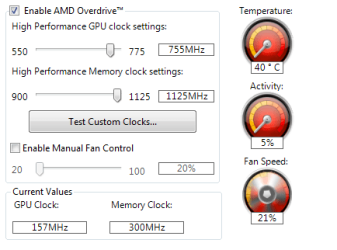
Ok, when I first started after CLEAN ALL and reformat, I told the ATI OVERDRIVE to lower the frequencies of the GPU and manually set the GPU fan to 30%....there were no changes this morning (7:39 AM)....now I come, 5:28 pm, and I see (look image).

Ok, OMFG, right now I had a BSOD with "fault_no_paged_area". Thankfully Google saved my text. my machine started a CHKDSK on its own but I canc

OAKSONjagFA, ANOTHER BSOD AFTER 2 MINUTES, this time "PFN_LIST_Corrupt".


Firma con problemas:
Nombre del evento de problema: BlueScreen
Versión del sistema operativo: 6.1.7600.2.0.0.768.3
Id. de configuración regional: 3082

Información adicional del problema:
BCCode: 4e
BCP1: 00000099
BCP2: 000C68C5
BCP3: 00000000
BCP4: 000C75C5
OS Version: 6_1_7600
Service Pack: 0_0
Product: 768_1

Archivos que ayudan a describir el problema:
C:\Windows\Minidump\101811-27534-01.dmp
C:\Users\GelbenHaus\AppData\Local\Temp\WER-36691-0.sysdata.xml

Lea nuestra declaración de privacidad en línea:
Windows 7 Privacy Statement - Microsoft Windows

Si la declaración de privacidad en línea no está disponible, lea la declaración de privacidad sin conexión:
C:\Windows\system32\es-ES\erofflps.txt

Im going to upload both minidumps.

THIS OBVIOUSLY HAS TO DO WITH ATI DRIVERS, NOW THAT I THINK ABOUT IT, IT MAKES SENSE:

-WHEN I USED TO INSTALL THE DRIVERS FROM THE CD; THERE WERE NO BSODS, ONLY FREEZES
-NOW THAT I DOWNLOAD THE DRIVERS FROM THE NET, THERE ARE BSODS, AND NO FREEZES!


Ok, this is also weird, Windows is starting to "Undo" things I've done. For example, before first BSOD, the Google Chrome icon was attached to the task bar, now, after second BSOD, it's gone.

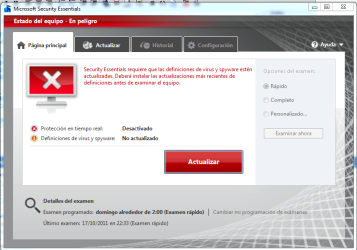
Look, Windows Security Essentials updates "have gone" and its disabled.

I cant add Minidumps to ZIP or RAR, even changing owner and "total control". I cant ***** understand, it says "You dont have administrator privileges" WTF? IM AN ADMINISTRATOR :mad: ! Managed to get past it by copying both files, and pasting the copied files into the zip :confused:

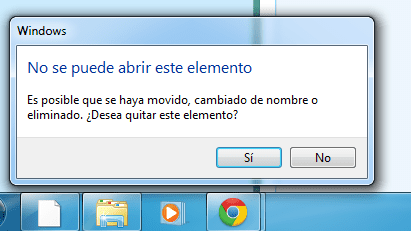
Great, this seems to be a bad joke, remember what I told you about windows going FUBAR and files/icons missing? well, take a look at the third image,Windows Explorer is now missing in action :shock:

WHAT'S WORSE, WHY AFTER SEVERAL RESTARTS THE BSODS ARE GONE?!?! WHY THE MACHINE IS DOING THINGS I DIDNT TOLD IT TO DO??, IT DOESNT MAKE ANY SENSE!

Sorry If Im being rude, but after spending 1400 dollars (and counting) on the PC and then seeing it break down its something which you cant easily handle...specially if you take into account, that I've never managed to run this machine for one month without problems.

EDIT:Gahhh, take a look again at those page errors...

 

Attachments

  • Captura.PNG
    Captura.PNG
    14.5 KB · Views: 4
  • ghf.PNG
    ghf.PNG
    62.2 KB · Views: 5
  • fsfs.PNG
    fsfs.PNG
    12.5 KB · Views: 2
  • Both Minidumps.zip
    Both Minidumps.zip
    47.3 KB · Views: 0
  • fthjfg.PNG
    fthjfg.PNG
    28.2 KB · Views: 5

My Computer My Computer

At a glance

W7 ULTIMATE 64bIntel i5 750 2.6GHZG.SKILL RIPJAWS 2GB 1333MHZ 8-8-8-24 4GB (2x2)XFX HD5850 XXX (Factory OC'ed) @ 1150/750
Computer Manufacturer/Model Number
Self-Made
OS
W7 ULTIMATE 64b
CPU
Intel i5 750 2.6GHZ
Motherboard
GIGABYTE H55M-USB3 REV 1.0
Memory
G.SKILL RIPJAWS 2GB 1333MHZ 8-8-8-24 4GB (2x2)
Graphics Card(s)
XFX HD5850 XXX (Factory OC'ed) @ 1150/750
Sound Card
On Board
Monitor(s) Displays
Ehhhh,one of those Toshiba '17 LCD
Hard Drives
1x old samsung 120 gb 7200
1x WD BLACK 500 GB 7200
PSU
Thermaltake 600W TR2-600
Case
CM690
Cooling
Geez,3 80mm (back,side,front)
Since everything is apparently going wrong and the exorcism is looking like an option - can you get your hands on another PSU and just swap it over for a while? Fluctuating voltages could cause your observed problems.
....maybe you've tried this and I missed it.
 

My Computer My Computer

At a glance

Windows 7x64 Home Premium SP1Intel i7 2600kG.Skill Ripjaws (DDR3-1600) 2x4GBNvidia GeForce GTS 450; Intel HD Graphics 300...
Computer type
PC/Desktop
Computer Manufacturer/Model Number
Own build
OS
Windows 7x64 Home Premium SP1
CPU
Intel i7 2600k
Motherboard
ASUS P8Z68 Deluxe
Memory
G.Skill Ripjaws (DDR3-1600) 2x4GB
Graphics Card(s)
Nvidia GeForce GTS 450; Intel HD Graphics 3000(GT2+)
Monitor(s) Displays
Dell Ultrasharp IPS panel U2311H, Samsung SyncMaster P2350
Screen Resolution
1920x1080
Hard Drives
Samsung 850 Pro SSD 256GB, Samsung SSD 840 120GB, Seagates 1TB Barracuda ST31000528AS x2
PSU
Seasonic M12II 520W
Case
Lian Li Lancool PC-K60
Cooling
Case: 1x120mm, 3x140mm CPU: Hyper 212+
Keyboard
Logitech MK520 (wireless)
Mouse
Logitech MK520
Internet Speed
6-7 Mbps
Antivirus
Norton Security Premium, Malwarebytes on 2 (MSE on 3rd PC)
Browser
FireFox
Other Info
Audio: Logitech Z523 2.1
Since everything is apparently going wrong and the exorcism is looking like an option - can you get your hands on another PSU and just swap it over for a while? Fluctuating voltages could cause your observed problems.
....maybe you've tried this and I missed it.

Geez, I dont have any other PSU available. I live 30km away from my Hard provider and right now its closed.

Again, if it is a faulty PSU, how come, after several restarts, it works fine?

Im thinking the guys over at the tech provider just turned on the computer and ran some casual tests, nothing serious, maybe that's the reason behind them saying 4 times the same "No, we didnt stumble across anything, its 100% fine".

Well, they also mentioned something about voltage here in my area. San Miguel, Buenos Aires is known to have spikes (lights sometimes go a little bit dim and then return to normal).
 

My Computer My Computer

At a glance

W7 ULTIMATE 64bIntel i5 750 2.6GHZG.SKILL RIPJAWS 2GB 1333MHZ 8-8-8-24 4GB (2x2)XFX HD5850 XXX (Factory OC'ed) @ 1150/750
Computer Manufacturer/Model Number
Self-Made
OS
W7 ULTIMATE 64b
CPU
Intel i5 750 2.6GHZ
Motherboard
GIGABYTE H55M-USB3 REV 1.0
Memory
G.SKILL RIPJAWS 2GB 1333MHZ 8-8-8-24 4GB (2x2)
Graphics Card(s)
XFX HD5850 XXX (Factory OC'ed) @ 1150/750
Sound Card
On Board
Monitor(s) Displays
Ehhhh,one of those Toshiba '17 LCD
Hard Drives
1x old samsung 120 gb 7200
1x WD BLACK 500 GB 7200
PSU
Thermaltake 600W TR2-600
Case
CM690
Cooling
Geez,3 80mm (back,side,front)
Is there any chance they could stress test the system for you? see what they come across and think? Just by looking at all those issues, Personally I would just go with a new build or test each individual part. :P
 

My Computer My Computer

At a glance

Windows 7 64 Home PremiumIntel Core I5 2500k Overclocked to 4.5ghz.G.Skill 8gb 2x4 1600mhz sniper CL9 1.25w2x Gigabyte GTX560 OC TI 1G 900Mhz GDDR5 PCIE...
Computer Manufacturer/Model Number
Cosmos II Gaming Rig
OS
Windows 7 64 Home Premium
CPU
Intel Core I5 2500k Overclocked to 4.5ghz.
Motherboard
ASUS z68 pro gen3 1155
Memory
G.Skill 8gb 2x4 1600mhz sniper CL9 1.25w
Graphics Card(s)
2x Gigabyte GTX560 OC TI 1G 900Mhz GDDR5 PCIE HDMI DVI sli
Sound Card
Realtek HD audio
Monitor(s) Displays
Samsung S27A950 27inch 3D LED
Screen Resolution
1920x1080
Hard Drives
Samsung 2TB Spinpoint F3/4EG EcoGreen HDD 32M
OCZ Agility 3 120gb
PSU
CoolerMaster 1000W Silent Pro Gold Modular
Case
Coolermaster Cosmos II
Cooling
6x 120mm 1x200m, Noctua D14.
Keyboard
G19 Logitech Keyboard
Mouse
Razer Naga mouse
Other Info
Logitech G930 Wireless 7.1 Headset
Razer Vespula speed mat
Logitech Z906 5.1 surround sound system
Razer Nostromo
Orange Led lighting kit
Since everything is apparently going wrong and the exorcism is looking like an option - can you get your hands on another PSU and just swap it over for a while? Fluctuating voltages could cause your observed problems.
....maybe you've tried this and I missed it.

Geez, I dont have any other PSU available. I live 30km away from my Hard provider and right now its closed.

Again, if it is a faulty PSU, how come, after several restarts, it works fine?

Im thinking the guys over at the tech provider just turned on the computer and ran some casual tests, nothing serious, maybe that's the reason behind them saying 4 times the same "No, we didnt stumble across anything, its 100% fine".

Well, they also mentioned something about voltage here in my area. San Miguel, Buenos Aires is known to have spikes (lights sometimes go a little bit dim and then return to normal).
Geez, I honestly don't know if you're being funny or serious. I know PSUs don't grow on trees and like your problem their failure mode isn't black and white.
 

My Computer My Computer

At a glance

Windows 7x64 Home Premium SP1Intel i7 2600kG.Skill Ripjaws (DDR3-1600) 2x4GBNvidia GeForce GTS 450; Intel HD Graphics 300...
Computer type
PC/Desktop
Computer Manufacturer/Model Number
Own build
OS
Windows 7x64 Home Premium SP1
CPU
Intel i7 2600k
Motherboard
ASUS P8Z68 Deluxe
Memory
G.Skill Ripjaws (DDR3-1600) 2x4GB
Graphics Card(s)
Nvidia GeForce GTS 450; Intel HD Graphics 3000(GT2+)
Monitor(s) Displays
Dell Ultrasharp IPS panel U2311H, Samsung SyncMaster P2350
Screen Resolution
1920x1080
Hard Drives
Samsung 850 Pro SSD 256GB, Samsung SSD 840 120GB, Seagates 1TB Barracuda ST31000528AS x2
PSU
Seasonic M12II 520W
Case
Lian Li Lancool PC-K60
Cooling
Case: 1x120mm, 3x140mm CPU: Hyper 212+
Keyboard
Logitech MK520 (wireless)
Mouse
Logitech MK520
Internet Speed
6-7 Mbps
Antivirus
Norton Security Premium, Malwarebytes on 2 (MSE on 3rd PC)
Browser
FireFox
Other Info
Audio: Logitech Z523 2.1
Since everything is apparently going wrong and the exorcism is looking like an option - can you get your hands on another PSU and just swap it over for a while? Fluctuating voltages could cause your observed problems.
....maybe you've tried this and I missed it.

Geez, I dont have any other PSU available. I live 30km away from my Hard provider and right now its closed.

Again, if it is a faulty PSU, how come, after several restarts, it works fine?

Im thinking the guys over at the tech provider just turned on the computer and ran some casual tests, nothing serious, maybe that's the reason behind them saying 4 times the same "No, we didnt stumble across anything, its 100% fine".

Well, they also mentioned something about voltage here in my area. San Miguel, Buenos Aires is known to have spikes (lights sometimes go a little bit dim and then return to normal).
Geez, I honestly don't know if you're being funny or serious. I know PSUs don't grow on trees and like your problem their failure mode isn't black and white.

Sorry, but I thought that in the United States and Europe they had hardware providers everywhere, wish the same happened here :(

Is there any chance they could stress test the system for you? see what they come across and think? Just by looking at all those issues, Personally I would just go with a new build or test each individual part. :P

I've been thinking the same. You'll see, everytime we decided to take the PC to the hard provider (technician) my father took it, so I dont know how he explained the problems to them. Guess One of these days I'll have to join him and tell everything to the technicians. But for sure they wont be happy....it would be the 5th I take the machine to them....

You have tested the RAM for 5-6 passes and run maker's HD diagnostics extended CD scan, correct?

Run this test of mobo next: CPU - Stress Test with Prime95 - Windows 7 Forums

Yes, Diagnostics, Memtest, OCCT, Prime95, all passed without erros.Right now, I dont think about making any stress test, I dont want to fry my CPU. Idle stands at 50 and peaks to 70' when browsing, I dont wanna know what happens under full stress. I'll make the test as soon as I get the thermal compound (tomorrow or Wednesday)

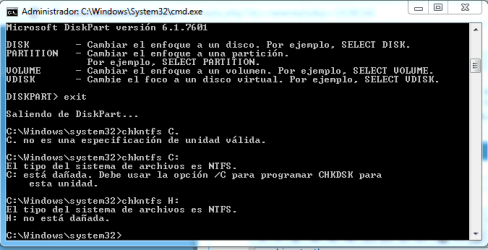
Guys, you'll wanna take a look at this...remember those random CHKDSK's at start? Well, I found how to disable them here in W7 forums...the first step told me to run the command CHKNTFS *Hard Drive*.....and....well....surprise!

Really, this is an insult, why earlier CHDKSK tests showed no errors or problems and now they come up with errors?

If you dont understand spanish, it says that C: is damaged and there are bad sectors...
 

Attachments

  • Captura.PNG
    Captura.PNG
    12.7 KB · Views: 7

My Computer My Computer

At a glance

W7 ULTIMATE 64bIntel i5 750 2.6GHZG.SKILL RIPJAWS 2GB 1333MHZ 8-8-8-24 4GB (2x2)XFX HD5850 XXX (Factory OC'ed) @ 1150/750
Computer Manufacturer/Model Number
Self-Made
OS
W7 ULTIMATE 64b
CPU
Intel i5 750 2.6GHZ
Motherboard
GIGABYTE H55M-USB3 REV 1.0
Memory
G.SKILL RIPJAWS 2GB 1333MHZ 8-8-8-24 4GB (2x2)
Graphics Card(s)
XFX HD5850 XXX (Factory OC'ed) @ 1150/750
Sound Card
On Board
Monitor(s) Displays
Ehhhh,one of those Toshiba '17 LCD
Hard Drives
1x old samsung 120 gb 7200
1x WD BLACK 500 GB 7200
PSU
Thermaltake 600W TR2-600
Case
CM690
Cooling
Geez,3 80mm (back,side,front)
If you have results or proof of evidence with what's been going on, take that with you when you see them so they know what to look for.
 

My Computer My Computer

At a glance

Windows 7 64 Home PremiumIntel Core I5 2500k Overclocked to 4.5ghz.G.Skill 8gb 2x4 1600mhz sniper CL9 1.25w2x Gigabyte GTX560 OC TI 1G 900Mhz GDDR5 PCIE...
Computer Manufacturer/Model Number
Cosmos II Gaming Rig
OS
Windows 7 64 Home Premium
CPU
Intel Core I5 2500k Overclocked to 4.5ghz.
Motherboard
ASUS z68 pro gen3 1155
Memory
G.Skill 8gb 2x4 1600mhz sniper CL9 1.25w
Graphics Card(s)
2x Gigabyte GTX560 OC TI 1G 900Mhz GDDR5 PCIE HDMI DVI sli
Sound Card
Realtek HD audio
Monitor(s) Displays
Samsung S27A950 27inch 3D LED
Screen Resolution
1920x1080
Hard Drives
Samsung 2TB Spinpoint F3/4EG EcoGreen HDD 32M
OCZ Agility 3 120gb
PSU
CoolerMaster 1000W Silent Pro Gold Modular
Case
Coolermaster Cosmos II
Cooling
6x 120mm 1x200m, Noctua D14.
Keyboard
G19 Logitech Keyboard
Mouse
Razer Naga mouse
Other Info
Logitech G930 Wireless 7.1 Headset
Razer Vespula speed mat
Logitech Z906 5.1 surround sound system
Razer Nostromo
Orange Led lighting kit
If you have results or proof of evidence with what's been going on, take that with you when you see them so they know what to look for.
Yes, you're right, I'll take photos and save all these screenshots in case they dont seem to notice anything.

Right now im going to test the HD again with the Western Digital Data Lifeguard.
 

My Computer My Computer

At a glance

W7 ULTIMATE 64bIntel i5 750 2.6GHZG.SKILL RIPJAWS 2GB 1333MHZ 8-8-8-24 4GB (2x2)XFX HD5850 XXX (Factory OC'ed) @ 1150/750
Computer Manufacturer/Model Number
Self-Made
OS
W7 ULTIMATE 64b
CPU
Intel i5 750 2.6GHZ
Motherboard
GIGABYTE H55M-USB3 REV 1.0
Memory
G.SKILL RIPJAWS 2GB 1333MHZ 8-8-8-24 4GB (2x2)
Graphics Card(s)
XFX HD5850 XXX (Factory OC'ed) @ 1150/750
Sound Card
On Board
Monitor(s) Displays
Ehhhh,one of those Toshiba '17 LCD
Hard Drives
1x old samsung 120 gb 7200
1x WD BLACK 500 GB 7200
PSU
Thermaltake 600W TR2-600
Case
CM690
Cooling
Geez,3 80mm (back,side,front)
Again run the WD DIgital LIfeguard extended test

Then run a full Disk Check with both boxes checked.

Have you done the clean reinstall yet? Did you wipe the HD? WD CD can do this for you.

If you notice the heat building too much then I'd wait until the CPU is repasted before doing much more.
 
Have you done the clean reinstall yet? Did you wipe the HD? WD CD can do this for you.

If you notice the heat building too much then I'd wait until the CPU is repasted before doing much more.

I did the Clean Reinstall with "writing zeros-clean all command-wipe clean the hard drive" yesterday.By the start of page nº3, the clean reinstall was already done. All the problems that have come up since the start of page nº3, are with clean reinstall.
RIght now, the extended HD extended test is halway done.
 

My Computer My Computer

At a glance

W7 ULTIMATE 64bIntel i5 750 2.6GHZG.SKILL RIPJAWS 2GB 1333MHZ 8-8-8-24 4GB (2x2)XFX HD5850 XXX (Factory OC'ed) @ 1150/750
Computer Manufacturer/Model Number
Self-Made
OS
W7 ULTIMATE 64b
CPU
Intel i5 750 2.6GHZ
Motherboard
GIGABYTE H55M-USB3 REV 1.0
Memory
G.SKILL RIPJAWS 2GB 1333MHZ 8-8-8-24 4GB (2x2)
Graphics Card(s)
XFX HD5850 XXX (Factory OC'ed) @ 1150/750
Sound Card
On Board
Monitor(s) Displays
Ehhhh,one of those Toshiba '17 LCD
Hard Drives
1x old samsung 120 gb 7200
1x WD BLACK 500 GB 7200
PSU
Thermaltake 600W TR2-600
Case
CM690
Cooling
Geez,3 80mm (back,side,front)
It's hardware. Work with the Crashes forum to analyze your minidump file.

Then if you need further help start a new thread in Hardware forum with the problem concisely stated in your title, since this title likely annoys many of the senior experts who could help you most.
 
It's hardware. Work with the Crashes forum to analyze your minidump file.

Then if you need further help start a new thread in Hardware forum with the problem concisely stated in your title, since this title likely annoys many of the senior experts who could help you most.

Yeap, I've thinking the same.

Finished the Extended Test....it came out with a PASS. No errors

This is too confusing....

Ok, anyway, thanks for all the help you've given me.
 

My Computer My Computer

At a glance

W7 ULTIMATE 64bIntel i5 750 2.6GHZG.SKILL RIPJAWS 2GB 1333MHZ 8-8-8-24 4GB (2x2)XFX HD5850 XXX (Factory OC'ed) @ 1150/750
Computer Manufacturer/Model Number
Self-Made
OS
W7 ULTIMATE 64b
CPU
Intel i5 750 2.6GHZ
Motherboard
GIGABYTE H55M-USB3 REV 1.0
Memory
G.SKILL RIPJAWS 2GB 1333MHZ 8-8-8-24 4GB (2x2)
Graphics Card(s)
XFX HD5850 XXX (Factory OC'ed) @ 1150/750
Sound Card
On Board
Monitor(s) Displays
Ehhhh,one of those Toshiba '17 LCD
Hard Drives
1x old samsung 120 gb 7200
1x WD BLACK 500 GB 7200
PSU
Thermaltake 600W TR2-600
Case
CM690
Cooling
Geez,3 80mm (back,side,front)
Don't give up, just use the resources we have that are best suited to get this solved: first analyze the Crash minidump thoroughly and work through those findings, then tap the Hardware experts.

You can post back here any time but this forum is mainly for Updates and Activation experts. I would ask the Mods to move the thread to Hardware but I think the title will get you less help than if you post fresh with very concise title and briefing of issues.
 
Since everything is apparently going wrong and the exorcism is looking like an option - can you get your hands on another PSU and just swap it over for a while? Fluctuating voltages could cause your observed problems.
....maybe you've tried this and I missed it.

Geez, I dont have any other PSU available. I live 30km away from my Hard provider and right now its closed.

Again, if it is a faulty PSU, how come, after several restarts, it works fine?

Im thinking the guys over at the tech provider just turned on the computer and ran some casual tests, nothing serious, maybe that's the reason behind them saying 4 times the same "No, we didnt stumble across anything, its 100% fine".

Well, they also mentioned something about voltage here in my area. San Miguel, Buenos Aires is known to have spikes (lights sometimes go a little bit dim and then return to normal).


Think of it like a car. when you first start it it is cold etc. Well with power supplies it is like this too only in another way.

The transistors inside the PSU hold a certain charge and when used continuously they dont show any errors, but when you first start your computer you are flooding the whole PSU and Motherboard and all components with electricity. This is when BSoD's are most prone to happen with a failing PSU.

The other is after long amounts of use. the PSU starts to wear down and the components that can fail eventually do. If you see BSoD's on startup two or three times then a normal start the the culprit is usually the PSU. It could still be the Motherboard, but most times its the PSU.

I think you are seeing a Sag in electric current and it is not as dangerous as a spike, but can still cause BSoD's too. You can get something like this: http://www.buy.com/pr/product.aspx?sku=224357564&sellerid=33250433

to see what your voltage is doing. Also if this is the problem, then an easy solution is to get a UPS (Uninterrupted Power Supply). That will provide a consistent voltage for the computer when the power spikes or sags.

LIke this: http://www.buy.com/prod/cyberpower-...lcd-series-1000va-600-watt-ups/204694862.html

(I dont usually shop at Buy.com...just thought It would give you an idea of what to look for)
 

My Computer My Computer

At a glance

Win7 Home Premium 64xIntel Core 2 Duo P7450 / 2.13 GHz (2.29 with ...4 GB PC-6400 Hyundai (2X2) at 800MhzNVIDIA GeForce GTX 260M 1GB DDR3 VRAM
Computer type
Laptop
Computer Manufacturer/Model Number
ASUS G60-RBBX05
OS
Win7 Home Premium 64x
CPU
Intel Core 2 Duo P7450 / 2.13 GHz (2.29 with Extreme Turbo)
Memory
4 GB PC-6400 Hyundai (2X2) at 800Mhz
Graphics Card(s)
NVIDIA GeForce GTX 260M 1GB DDR3 VRAM
Monitor(s) Displays
16" LED Backlit
Screen Resolution
1366 x 768 on laptop 1600x1050 max res on 22" external mon
Hard Drives
OCZ Agility 3 60GB SSD / 320 GB - Serial ATA-150 - 7200 rpm
PSU
6-cell Lithium ion { lasts 1.5 hours }
Case
ASUS G60 Laptop
Keyboard
Chicklet type back-lit (white light) keyboard
Mouse
Logitech G9 Laser Mouse 3200dpi and 1000 reports per minute
Internet Speed
Comcast 8.60mb/s up - 3.11mb/s down
Antivirus
MSE
Browser
Firefox
Other Info
General mid-budget gaming Comp. Low batterylife - High FrameRates - currently overheating problems :(

2nd Rig: Case: Rosewill BLACKHAWK Gaming ATX Mid Tower Computer Case

Mobo: GIGABYTE GA-990FXA-UD3
CPU: AMD FX-6200 Zambezi 3.8GHz (4.1GHz Turbo)
Heatsink: COOLER MASTER V8 CPU Cooler
RAM: Patriot Viper 3 8GB (2 x 4GB) 240-Pin DDR3 SDRAM 1866 (PC3 15000)
GPU: SAPPHIRE Radeon HD 6850 1GB 2
Since everything is apparently going wrong and the exorcism is looking like an option - can you get your hands on another PSU and just swap it over for a while? Fluctuating voltages could cause your observed problems.
....maybe you've tried this and I missed it.

Geez, I dont have any other PSU available. I live 30km away from my Hard provider and right now its closed.

Again, if it is a faulty PSU, how come, after several restarts, it works fine?

Im thinking the guys over at the tech provider just turned on the computer and ran some casual tests, nothing serious, maybe that's the reason behind them saying 4 times the same "No, we didnt stumble across anything, its 100% fine".

Well, they also mentioned something about voltage here in my area. San Miguel, Buenos Aires is known to have spikes (lights sometimes go a little bit dim and then return to normal).


Think of it like a car. when you first start it it is cold etc. Well with power supplies it is like this too only in another way.

The transistors inside the PSU hold a certain charge and when used continuously they dont show any errors, but when you first start your computer you are flooding the whole PSU and Motherboard and all components with electricity. This is when BSoD's are most prone to happen with a failing PSU.

The other is after long amounts of use. the PSU starts to wear down and the components that can fail eventually do. If you see BSoD's on startup two or three times then a normal start the the culprit is usually the PSU. It could still be the Motherboard, but most times its the PSU.

I think you are seeing a Sag in electric current and it is not as dangerous as a spike, but can still cause BSoD's too. You can get something like this: Buy.com - GFCI & Receptacle Tester

to see what your voltage is doing. Also if this is the problem, then an easy solution is to get a UPS (Uninterrupted Power Supply). That will provide a consistent voltage for the computer when the power spikes or sags.

LIke this: Buy.com - CyberPower 9-Outlet Intelligent LCD Series 1000VA 600 Watt UPS

(I dont usually shop at Buy.com...just thought It would give you an idea of what to look for)

Man, you guys are great.

Ok, I'll do the following. First check the minidumps and see what's inside them. Then, after (hopefully) seeing what's going on with the BSOD I will decide whether to take the machine again to the technicians or not. IF I decide to take it, I'll go with my father and explain them very carefully what has been happening and ask them to test every component of the computer.

I guess this will take more or less 2 weeks, as right now my pop is out of the country :confused: Hope to get the machine right in time to play BF3 online and to do those history works without trouble :p.

Right now, these components are ruled out due to extensive research and tests:
-Hard Drive is perfect
-Ram Is perfect (also managed to test them individually, ON COLD BOOT, they didnt show any error).
-CPU is perfect (Extensive OCCT and Prime95 tests).

So....these things are the only things left:
-The ATI RADEON HD5850
-The PSU
-The motherboard.

The last 2 ones will be easy to replace, as here in Argentina we got an official thermaltake provider and there's a company which is specialized in repairing faulty MOBOS.

The only thing that would be a pain in the 455 would be the HD5850....having to RMA it to the 'States and then wait for the answer takes like 1 month.

Hope you find like 100 dollars on the street or in any other place, you deserve them for helping so much people!
EDIT: Checked their page (http://www.mothersolution.com.ar/) and there's something quite funny:

Primero deberia descartar cualquier problema de software. Si asi lo hizo y continua el problema, podría ser el motherboard.

01.- La PC no apaga
02.- La PC se apaga
03.- Windows no inicia
04.- Windows falla luego de una instalación (Windows is faulty after fresh install).
05.- La PC se tilda o reinicia (PC crashes or BSODS).
06.- No funciona la red
07.- No funcionan los puertos de mouse o teclado
08.- No funcionan los USB
09.- Puertos bloqueados
Number 04 and 05 are the things that are happening to me...
 

My Computer My Computer

At a glance

W7 ULTIMATE 64bIntel i5 750 2.6GHZG.SKILL RIPJAWS 2GB 1333MHZ 8-8-8-24 4GB (2x2)XFX HD5850 XXX (Factory OC'ed) @ 1150/750
Computer Manufacturer/Model Number
Self-Made
OS
W7 ULTIMATE 64b
CPU
Intel i5 750 2.6GHZ
Motherboard
GIGABYTE H55M-USB3 REV 1.0
Memory
G.SKILL RIPJAWS 2GB 1333MHZ 8-8-8-24 4GB (2x2)
Graphics Card(s)
XFX HD5850 XXX (Factory OC'ed) @ 1150/750
Sound Card
On Board
Monitor(s) Displays
Ehhhh,one of those Toshiba '17 LCD
Hard Drives
1x old samsung 120 gb 7200
1x WD BLACK 500 GB 7200
PSU
Thermaltake 600W TR2-600
Case
CM690
Cooling
Geez,3 80mm (back,side,front)
Back
Top