I am utterly dissapointed with Microsoft...

ArgentineBoy

New member
Member
Local time
12:46 PM
Messages
89
Hello,
As you might not know, I am writing this from a fresh fresh install. Right now I am installing my ATI drivers from my HD5850 disc.
You might wonder, and where's the problem?.
The problem is, that the reason behind this formatting and re-install, is that Microsoft "detected" (in between quotes due to the fact that this detection, was made, ironically, 1 month after the same Microsoft "detected" my WINDOWS 7 HOME PREM LATAM OS-32 BITS as original) my software as pirate and decided to FUBAR my computer. And I mean FUBAR by the old way, unable to connect to internet, unable to make a repair, unable to system restore, hell, even trying to repair Windows from my Windows disc gave me a BSOD.
And wait, there's more, this is the second time I have to do this.

The questions are:
1-Why does Microsoft, when installing this OS, detects the key as original and genuine, and then, after circa 1 month of use, decides to throw away that decision and call my software "pirate"? Is there any posibility that this might be caused by a virus?
2-Why does Windows degenerates itself over time? I mean, at first, there are no Cold Boot BSODS (you might argue that this is due to a lot of drivers and software, but if that was the case, how come, after several restarts, the BSODS are gone? It makes no sense at all. If the problem was linked to a faulty driver/software, then the BSOD should repeat everytime I use the computer) but then, after 3-4 weeks of use, things start to go nuts: Cold Boot BSODS, programs crashing, archives dissapearing, chkdsk's being started at start without advise, etc.

EDIT: Oh, and I forgot: This didn't happened with Windows XP. So its something software-related. This statement is backed up by the fact that I've ran several tests with tools such as MEMTEST,OCCT,PRIME95,ATI Stress Tool,Windows memory diagnoser and they havent found a single problem.

Thank you all for your time and cooperation. Looking forward to resolve this problem.
 

My Computer

Computer Manufacturer/Model Number
Self-Made
OS
W7 ULTIMATE 64b
CPU
Intel i5 750 2.6GHZ
Motherboard
GIGABYTE H55M-USB3 REV 1.0
Memory
G.SKILL RIPJAWS 2GB 1333MHZ 8-8-8-24 4GB (2x2)
Graphics Card(s)
XFX HD5850 XXX (Factory OC'ed) @ 1150/750
Sound Card
On Board
Monitor(s) Displays
Ehhhh,one of those Toshiba '17 LCD
Hard Drives
1x old samsung 120 gb 7200
1x WD BLACK 500 GB 7200
PSU
Thermaltake 600W TR2-600
Case
CM690
Cooling
Geez,3 80mm (back,side,front)
Hello,
As you might not know, I am writing this from a fresh fresh install. Right now I am installing my ATI drivers from my HD5850 disc.
You might wonder, and where's the problem?.
The problem is, that the reason behind this formatting and re-install, is that Microsoft "detected" (in between quotes due to the fact that this detection, was made, ironically, 1 month after the same Microsoft "detected" my WINDOWS 7 HOME PREM LATAM OS-32 BITS as original) my software as pirate and decided to FUBAR my computer. And I mean FUBAR by the old way, unable to connect to internet, unable to make a repair, unable to system restore, hell, even trying to repair Windows from my Windows disc gave me a BSOD.
And wait, there's more, this is the second time I have to do this.

The questions are:
1-Why does Microsoft, when installing this OS, detects the key as original and genuine, and then, after circa 1 month of use, decides to throw away that decision and call my software "pirate"? Is there any posibility that this might be caused by a virus?
2-Why does Windows degenerates itself over time? I mean, at first, there are no Cold Boot BSODS (you might argue that this is due to a lot of drivers and software, but if that was the case, how come, after several restarts, the BSODS are gone? It makes no sense at all. If the problem was linked to a faulty driver/software, then the BSOD should repeat everytime I use the computer) but then, after 3-4 weeks of use, things start to go nuts: Cold Boot BSODS, programs crashing, archives dissapearing, chkdsk's being started at start without advise, etc.

EDIT: Oh, and I forgot: This didn't happened with Windows XP. So its something software-related. This statement is backed up by the fact that I've ran several tests with tools such as MEMTEST,OCCT,PRIME95,ATI Stress Tool,Windows memory diagnoser and they havent found a single problem.

Thank you all for your time and cooperation. Looking forward to resolve this problem.


1- It could be malware easily, or it could be as simple as the computer clock being off due to an old CMOS battery.

2-All OS's "denegrate?" over time. when you add applications the registry grows, the computer becomes slower, etc.

As someone who alalyses BSOD's I can tell you they are usually not repeatable. They are, after all, a combination of several different things.

It may have not happened with xp because the hardware was "BEEFY" enough to handle XP and it may not be the same for win 7.

If you want to spend the time, and it may be considerable, we can help you find and fix its causes.

Just as an fyi there is system file check that will verify (and repair) your OS.
Run a system file check to verify and repair your system files.
To do this type cmd in search, then right click to run as administrator, then
SFC /SCANNOW

Read here for more information http://www.sevenforums.com/tutorials/1538-sfc-scannow-command-system-file-checker.html

Let us know the results from the report at the end.


Let us know what you would like to do.
 

My Computer

Computer Manufacturer/Model Number
HP Pavillion dv-7 1005 Tx
OS
Win 8 Release candidate 8400
CPU
[email protected]
Memory
4 gigs
Graphics Card(s)
Nvidia 9600M
Sound Card
HD built-in
Monitor(s) Displays
17" Wxga
Screen Resolution
1440x900
Cooling
none
Internet Speed
45Mb down 5Mb up
I do think that all your symptoms are as much indicative of malware as they are of a slowly dying harddrive. Either way, blaming Microsoft seems premature in this case.
Windows installations do "degenerate" in some ways, depending on how they're used and what software is installed/used on them...but what you've experienced is outside the usual.
 

My Computer

Computer type
PC/Desktop
Computer Manufacturer/Model Number
Custom-built
OS
Windows 7 Professional SP1 32-bit
CPU
Intel Core 2 Duo E6600 2.4GHz
Motherboard
Asus PL5D2
Memory
4GB DDR2-667 (4x1GB in dual-channel config)
Graphics Card(s)
nVidia GeForce 9800 GT
Sound Card
Creative X-Fi XtremeMusic
Monitor(s) Displays
Acer P236H
Screen Resolution
1920x1200 (DVI)
Hard Drives
OCZ SSD Vertex Plus 60GB SATA (Firmware 3.55), 64MB cache
Hitachi HD321KJ SATA, 320GB, 7200rpm, 16MB cache
PSU
Antec TruePower 2.0
Case
Cooler Master Centurion
Cooling
Too many fans
Keyboard
Standard
Mouse
Microsoft wireless optical mouse
Internet Speed
AT&T U-verse (18mbit/sec)
Antivirus
Microsoft Security Essentials
Browser
Firefox
Other Info
Other devices:
Compaq CQ-60 laptop
Google Nexus 7 (2012) tablet
Nvidia SHIELD tablet (US/LTE)
Hardkernel ODROID-XU single-board computer (Samsung Exynos 5420)
Hello,
As you might not know, I am writing this from a fresh fresh install. Right now I am installing my ATI drivers from my HD5850 disc.
You might wonder, and where's the problem?.
The problem is, that the reason behind this formatting and re-install, is that Microsoft "detected" (in between quotes due to the fact that this detection, was made, ironically, 1 month after the same Microsoft "detected" my WINDOWS 7 HOME PREM LATAM OS-32 BITS as original) my software as pirate and decided to FUBAR my computer. And I mean FUBAR by the old way, unable to connect to internet, unable to make a repair, unable to system restore, hell, even trying to repair Windows from my Windows disc gave me a BSOD.
And wait, there's more, this is the second time I have to do this.

The questions are:
1-Why does Microsoft, when installing this OS, detects the key as original and genuine, and then, after circa 1 month of use, decides to throw away that decision and call my software "pirate"? Is there any posibility that this might be caused by a virus?
2-Why does Windows degenerates itself over time? I mean, at first, there are no Cold Boot BSODS (you might argue that this is due to a lot of drivers and software, but if that was the case, how come, after several restarts, the BSODS are gone? It makes no sense at all. If the problem was linked to a faulty driver/software, then the BSOD should repeat everytime I use the computer) but then, after 3-4 weeks of use, things start to go nuts: Cold Boot BSODS, programs crashing, archives dissapearing, chkdsk's being started at start without advise, etc.

EDIT: Oh, and I forgot: This didn't happened with Windows XP. So its something software-related. This statement is backed up by the fact that I've ran several tests with tools such as MEMTEST,OCCT,PRIME95,ATI Stress Tool,Windows memory diagnoser and they havent found a single problem.

Thank you all for your time and cooperation. Looking forward to resolve this problem.


1- It could be malware easily, or it could be as simple as the computer clock being off due to an old CMOS battery.

2-All OS's "denegrate?" over time. when you add applications the registry grows, the computer becomes slower, etc.

As someone who alalyses BSOD's I can tell you they are usually not repeatable. They are, after all, a combination of several different things.

It may have not happened with xp because the hardware was "BEEFY" enough to handle XP and it may not be the same for win 7.

If you want to spend the time, and it may be considerable, we can help you find and fix its causes.

Just as an fyi there is system file check that will verify (and repair) your OS.
Run a system file check to verify and repair your system files.
To do this type cmd in search, then right click to run as administrator, then
SFC /SCANNOW

Read here for more information http://www.sevenforums.com/tutorials/1538-sfc-scannow-command-system-file-checker.html

Let us know the results from the report at the end.


Let us know what you would like to do.

Thanks for your time and cooperation.
Im sure that my machine is capable of handling 7 very well, it gets a score of 5,9.

About the HD, as I have stated before, I have run all kinds of tests, one of those were with the tool provided by Western Digital, it didnt found any error. So HD is 100% ok.

What's more, right now, second day after fresh install, my google chrome tabs are beggining to go FUBAR, just like they did little before Microsoft detected my Windows as pirate.The only way to make them work is to hammer the F5 button :confused:

And as I write this line, my windows explorer.exe crashed and had to restart again. Remember, this the first time I start the machine on the day (5pm-technically, a cold boot)

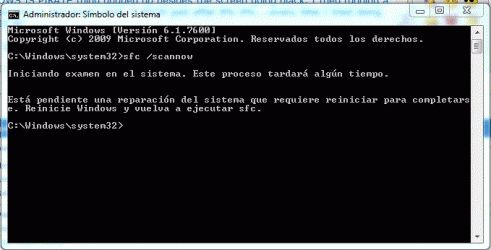
About the SFC /scannow. There is something I would like to add. When the WINDOWS IS PIRATE thing popped up besides the screen going black, I tried running a SFC /scannow, and guess what, it BSOD just after 8%-9%....every time I tried doing it...

Wow, OMFG, now, tried running sfc /scannow....look at picture. There is a pending System Reparation? Really? I mean....that's kinda weird...


I do think that all your symptoms are as much indicative of malware as they are of a slowly dying harddrive. Either way, blaming Microsoft seems premature in this case.
Windows installations do "degenerate" in some ways, depending on how they're used and what software is installed/used on them...but what you've experienced is outside the usual.

Thing is, that It doesnt make any sense at all, it happened with my previous HD, it happens with this HD.
Besides, how can you explain, that after several restarts in the same day, the machine starts to work well? I mean:
Cold boot: BSOD or things are just FUBAR.
First Restart:BSOD is gone but things are still FUBAR
Second restart:FUBAR is almost gone.
Third Restart:It works as it should work.

EDIT: Great, again:ZOMFG, this time I noticed I had to download updates, so I downloaded them, then I restarted in order to install them, guess what, it got stuck at update 6 of 23....had to manually restart the machine.....

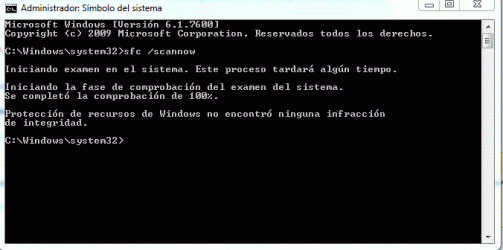
EDIT2: So...What the heck is going on here? Take a look at second picture...file also uploaded
 

Attachments

  • Captura.GIF
    Captura.GIF
    19.5 KB · Views: 36
  • Captura2.GIF
    Captura2.GIF
    15.6 KB · Views: 40
  • sfcdetails.txt
    sfcdetails.txt
    22 KB · Views: 6
Last edited:

My Computer

Computer Manufacturer/Model Number
Self-Made
OS
W7 ULTIMATE 64b
CPU
Intel i5 750 2.6GHZ
Motherboard
GIGABYTE H55M-USB3 REV 1.0
Memory
G.SKILL RIPJAWS 2GB 1333MHZ 8-8-8-24 4GB (2x2)
Graphics Card(s)
XFX HD5850 XXX (Factory OC'ed) @ 1150/750
Sound Card
On Board
Monitor(s) Displays
Ehhhh,one of those Toshiba '17 LCD
Hard Drives
1x old samsung 120 gb 7200
1x WD BLACK 500 GB 7200
PSU
Thermaltake 600W TR2-600
Case
CM690
Cooling
Geez,3 80mm (back,side,front)
Could be bad ram, poorly seated ram or cards (video card for example). It could be a motherboard going bad, any one of the chips or caps could be suspect. Even a power supply going bad. (Had 2-3 of those)

When completely random things like this happen, it is very often bad hardware. Finding it can take some time... And in the case of a bad motherboard (had two in my life) it's always the LAST thing you check due to it being the hardest to "swap" :(
 

My Computer

Computer Manufacturer/Model Number
Scratch built
OS
Windows 7 x64 Ultimate
CPU
i7 960
Motherboard
Asus P6X58D
Memory
12 Gig Corsair Dominator
Graphics Card(s)
Nvidia 480
Sound Card
Maudio Delta 44 + breakout box
Monitor(s) Displays
Dell UltraSharp U2410 24in and Samsung 21 dual monitors
Screen Resolution
1920x1200 and 1280x1024
Hard Drives
Primary: Intel X-25M G2 160G SSD
Secondary: Segate baracuda 1.0 TB
HDs in AHCI mode.
PSU
Corasair TX850
Case
Cooler Master HAF
Cooling
Corsair H50
Keyboard
Logitech G15 + N52 game pad
Mouse
Logitech MX518
Internet Speed
15kbs down 4.5kbps up
Other Info
WEI 7.6
CPU & RAM 7.6
Graphics 7.9
Hard disk 7.7
Hi,

Can I just clarify something? Your system specs say you are using Ultimate x64, yet in your first post you refer to Home Premium x86? Which is it?

Please run this tool, and post the results here in your reply:

http://go.microsoft.com/fwlink/?linkid=52012

Regards,
Golden
 

My Computer

Computer type
PC/Desktop
Computer Manufacturer/Model Number
Golden Mk. I.4
OS
Windows 10 Pro x64 ; Xubuntu x64
CPU
Intel i7 860 @ 2.80 GHz O/C'ed to 4.0GHz
Motherboard
Gigabyte P55A-UD3R Rev.1. Award BIOS F13
Memory
16GB Corsair Vengance DDR3 @ 661 MHz Dual Channel (9-9-9-24)
Graphics Card(s)
EVGA NVidia GTX 560 1024MB
Sound Card
Realtek Integrated
Monitor(s) Displays
Dual Samsung SyncMaster 2494HS
Screen Resolution
1920*1080 and 1920*1080
Hard Drives
1*Samsung 840 EVO 120GB SSD;
1*OCZ Vertex 2 60GB SSD;
2*Samsung F3 SpinPoint 1TB in RAID0;
1*Samsung F1 SpinPoint 1TB;
2*Western Digital 1TB External USB 3.0
1*Western Digital 500GB External USB 3.0
1*Seagate 500GB External USB 2.0
PSU
Thermaltake ToughPower QFan 750W
Case
Thermaltake Element S VK60001W2Z
Cooling
Corsair H60 Water Cooling, 2*230mm and 2*80mm case fans
Keyboard
Logitech G110
Mouse
Logitech MX518
Hi,

Can I just clarify something? Your system specs say you are using Ultimate x64, yet in your first post you refer to Home Premium x86? Which is it?

Please run this tool, and post the results here in your reply:

http://go.microsoft.com/fwlink/?linkid=52012

Regards,
Golden

ugh, Im gonna get ultra flamed for this, but anyway, honesty is something which you dont see everyday.
Before we installed this original genuine W7 home premium 32 bits copy....we used to have a :o pirate 64 bits ultimate version.

Dont ask me why or how, the matter is that we (my father and I) decided to purchase a legal copy of W7 and so we did.

Here's the report.
Code:
Diagnostic Report (1.9.0027.0):
-----------------------------------------
Windows Validation Data-->
 
Validation Code: 0
Cached Online Validation Code: N/A, hr = 0xc004f012
Windows Product Key: *****-*****-H87PP-QX8MT-3VXQF
Windows Product Key Hash: VLA17aFyLTzKxbX9dpWsoKliXtY=
Windows Product ID: 00359-OEM-8783736-09538
Windows Product ID Type: 3
Windows License Type: OEM System Builder
Windows OS version: 6.1.7600.2.00010300.0.0.003
ID: {4F80CDEF-4401-4862-98AA-338D4B8720C5}(1)
Is Admin: Yes
TestCab: 0x0
LegitcheckControl ActiveX: N/A, hr = 0x80070002
Signed By: N/A, hr = 0x80070002
Product Name: Windows 7 Home Premium
Architecture: 0x00000000
Build lab: 7600.win7_gdr.110622-1503
TTS Error: 
Validation Diagnostic: 
Resolution Status: N/A
 
Vista WgaER Data-->
ThreatID(s): N/A, hr = 0x80070002
Version: N/A, hr = 0x80070002
 
Windows XP Notifications Data-->
Cached Result: N/A, hr = 0x80070002
File Exists: No
Version: N/A, hr = 0x80070002
WgaTray.exe Signed By: N/A, hr = 0x80070002
WgaLogon.dll Signed By: N/A, hr = 0x80070002
 
OGA Notifications Data-->
Cached Result: N/A, hr = 0x80070002
Version: N/A, hr = 0x80070002
OGAExec.exe Signed By: N/A, hr = 0x80070002
OGAAddin.dll Signed By: N/A, hr = 0x80070002
 
OGA Data-->
Office Status: 109 N/A
OGA Version: N/A, 0x80070002
Signed By: N/A, hr = 0x80070002
Office Diagnostics: 025D1FF3-364-80041010_025D1FF3-229-80041010_025D1FF3-230-1_025D1FF3-517-80040154_025D1FF3-237-80040154_025D1FF3-238-2_025D1FF3-244-80070002_025D1FF3-258-3
 
Browser Data-->
Proxy settings: N/A
User Agent: Mozilla/4.0 (compatible; MSIE 8.0; Win32)
Default Browser: C:\Users\GelbenHaus\AppData\Local\Google\Chrome\Application\chrome.exe
Download signed ActiveX controls: Prompt
Download unsigned ActiveX controls: Disabled
Run ActiveX controls and plug-ins: Allowed
Initialize and script ActiveX controls not marked as safe: Disabled
Allow scripting of Internet Explorer Webbrowser control: Disabled
Active scripting: Allowed
Script ActiveX controls marked as safe for scripting: Allowed
 
File Scan Data-->
 
Other data-->
Office Details: <GenuineResults><MachineData><UGUID>{4F80CDEF-4401-4862-98AA-338D4B8720C5}</UGUID><Version>1.9.0027.0</Version><OS>6.1.7600.2.00010300.0.0.003</OS><Architecture>x32</Architecture><PKey>*****-*****-*****-*****-3VXQF</PKey><PID>00359-OEM-8783736-09538</PID><PIDType>3</PIDType><SID>S-1-5-21-1430248933-3366207053-2804117431</SID><SYSTEM><Manufacturer>Gigabyte Technology Co., Ltd.</Manufacturer><Model>H55M-USB3</Model></SYSTEM><BIOS><Manufacturer>Award Software International, Inc.</Manufacturer><Version>F11</Version><SMBIOSVersion major="2" minor="4"/><Date>20101101000000.000000+000</Date></BIOS><HWID>AAB93607018400FE</HWID><UserLCID>0C0A</UserLCID><SystemLCID>0C0A</SystemLCID><TimeZone>Hora estándar de Argentina(GMT-03:00)</TimeZone><iJoin>0</iJoin><SBID><stat>3</stat><msppid></msppid><name></name><model></model></SBID><OEM/><GANotification/></MachineData><Software><Office><Result>109</Result><Products/><Applications/></Office></Software></GenuineResults> 
 
Spsys.log Content: 0x80070002
 
Licensing Data-->
Versión del Servicio de licencias de software: 6.1.7600.16385
 
Nombre: Windows(R) 7, HomePremium edition
Descripción: Windows Operating System - Windows(R) 7, OEM_COA_NSLP channel
Id. de activación: 586bc076-c93d-429a-afe5-a69fbc644e88
Id. de aplicación: 55c92734-d682-4d71-983e-d6ec3f16059f
PID extendido: 00359-00174-837-309538-02-3082-7600.0000-2882011
Id. de instalación: 006743151881517872904594098961332245568912734634600305
URL del certificado de procesador: [URL]http://go.microsoft.com/fwlink/?LinkID=88338[/URL]
URL del certificado de maquina: [URL]http://go.microsoft.com/fwlink/?LinkID=88339[/URL]
URL de la licencia de uso: [URL]http://go.microsoft.com/fwlink/?LinkID=88341[/URL]
URL del certificado de clave de producto: [URL]http://go.microsoft.com/fwlink/?LinkID=88340[/URL]
Clave de producto parcial: 3VXQF
Estado de la licencia: con licencia
Recuento de rearmado de Windows restante: 3
Hora de confianza: 15/10/2011 20:44:01
 
Windows Activation Technologies-->
HrOffline: 0x00000000
HrOnline: N/A
HealthStatus: 0x0000000000000000
Event Time Stamp: N/A
ActiveX: Registered, Version: 7.1.7600.16395
Admin Service: Registered, Version: 7.1.7600.16395
HealthStatus Bitmask Output:
 
 
HWID Data-->
HWID Hash Current: NgAAAAEABAABAAEAAQACAAAAAgABAAEA6GGAXUJRdo2AlihgQsZEyBj1wo9iPZDhkuHOBHZW
 
OEM Activation 1.0 Data-->
N/A
 
OEM Activation 2.0 Data-->
BIOS valid for OA 2.0: yes, but no SLIC table
Windows marker version: N/A
OEMID and OEMTableID Consistent: N/A
BIOS Information: 
ACPI Table Name    OEMID Value    OEMTableID Value
APIC            GBT         GBTUACPI
FACP            GBT         GBTUACPI
HPET            GBT         GBTUACPI
MCFG            GBT         GBTUACPI
EUDS            GBT         
TAMG            GBT         GBT B0
SSDT            INTEL        PPM RCM

ALSO, ON THE HARDWARE ISSUE, MY FATHER AND I HAD DECIDED TO TAKE THE MACHINE TO OUR MOST TRUSTED AND SKILLFUL TECHNICIAN (WHERE WE ALSO BOUGHT OUR PC PARTS) 3 TIMES AND HE DIDNT DETECT ANYTHING WRONG HARDWARE-RELATED.
 

Attachments

  • Captura3.GIF
    Captura3.GIF
    8.3 KB · Views: 18

My Computer

Computer Manufacturer/Model Number
Self-Made
OS
W7 ULTIMATE 64b
CPU
Intel i5 750 2.6GHZ
Motherboard
GIGABYTE H55M-USB3 REV 1.0
Memory
G.SKILL RIPJAWS 2GB 1333MHZ 8-8-8-24 4GB (2x2)
Graphics Card(s)
XFX HD5850 XXX (Factory OC'ed) @ 1150/750
Sound Card
On Board
Monitor(s) Displays
Ehhhh,one of those Toshiba '17 LCD
Hard Drives
1x old samsung 120 gb 7200
1x WD BLACK 500 GB 7200
PSU
Thermaltake 600W TR2-600
Case
CM690
Cooling
Geez,3 80mm (back,side,front)
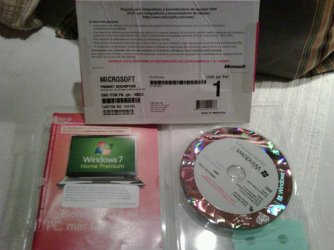
Right now im gonna upload a photo of my DVD Case....hang on...
EDIT:Geez, I cant enter GMAIL, seems like im gonna take a while....

EDIT2:Voila!
 

Attachments

  • IMG00025-20111028-2053 (1).jpg
    IMG00025-20111028-2053 (1).jpg
    59.8 KB · Views: 37

My Computer

Computer Manufacturer/Model Number
Self-Made
OS
W7 ULTIMATE 64b
CPU
Intel i5 750 2.6GHZ
Motherboard
GIGABYTE H55M-USB3 REV 1.0
Memory
G.SKILL RIPJAWS 2GB 1333MHZ 8-8-8-24 4GB (2x2)
Graphics Card(s)
XFX HD5850 XXX (Factory OC'ed) @ 1150/750
Sound Card
On Board
Monitor(s) Displays
Ehhhh,one of those Toshiba '17 LCD
Hard Drives
1x old samsung 120 gb 7200
1x WD BLACK 500 GB 7200
PSU
Thermaltake 600W TR2-600
Case
CM690
Cooling
Geez,3 80mm (back,side,front)
I recommend you wipe the HD since there was some sort of crack and possibly other infection on it, then clean reinstall following these steps to get a Perfect Reinstall.


Man, what would do people like me without you :D !

Hope this clears the situation. Thanks for your time.

EDIT: Greg and all the others, I've just noticed THIS:

Recuento de rearmado de Windows restante: 3

That means that if I reinstall Windows 3 times again using the same cdkey, then I wont be able to reinstall anymore? Thanks for answer.
 

My Computer

Computer Manufacturer/Model Number
Self-Made
OS
W7 ULTIMATE 64b
CPU
Intel i5 750 2.6GHZ
Motherboard
GIGABYTE H55M-USB3 REV 1.0
Memory
G.SKILL RIPJAWS 2GB 1333MHZ 8-8-8-24 4GB (2x2)
Graphics Card(s)
XFX HD5850 XXX (Factory OC'ed) @ 1150/750
Sound Card
On Board
Monitor(s) Displays
Ehhhh,one of those Toshiba '17 LCD
Hard Drives
1x old samsung 120 gb 7200
1x WD BLACK 500 GB 7200
PSU
Thermaltake 600W TR2-600
Case
CM690
Cooling
Geez,3 80mm (back,side,front)
If I'm translating correctly it means you have 3 more rearms of 30 day activation timeout, which you don't need to use if you have a Product Key to insert.

Retail Win7 can be reinstalled and reactivated as many times as you want. However Builder's OEM must remain on the same mobo which is why it gets such a price break.

You did buy Builder's OEM, correct? And it is activated on the current install? There should be no problem reactivating after clean reinstalling.
 
If I'm translating correctly it means you have 3 more rearms of 30 day activation timeout, which you don't need to use if you have a Product Key to insert.

Retail Win7 can be reinstalled and reactivated as many times as you want. However Builder's OEM must remain on the same mobo which is why it gets such a price break.

You did buy Builder's OEM, correct? And it is activated on the current install? There should be no problem reactivating after clean reinstalling.


What? 30 days activation timeout? That's the reason behind the machine going THIS IS PIRATE after 1 month of use? I dont understand...why do I have to activate it again after having already activated it?
 

My Computer

Computer Manufacturer/Model Number
Self-Made
OS
W7 ULTIMATE 64b
CPU
Intel i5 750 2.6GHZ
Motherboard
GIGABYTE H55M-USB3 REV 1.0
Memory
G.SKILL RIPJAWS 2GB 1333MHZ 8-8-8-24 4GB (2x2)
Graphics Card(s)
XFX HD5850 XXX (Factory OC'ed) @ 1150/750
Sound Card
On Board
Monitor(s) Displays
Ehhhh,one of those Toshiba '17 LCD
Hard Drives
1x old samsung 120 gb 7200
1x WD BLACK 500 GB 7200
PSU
Thermaltake 600W TR2-600
Case
CM690
Cooling
Geez,3 80mm (back,side,front)
Where exactly do you see this message which you posted? Can you please post a screenshot of it using the Snipping Tool in Start Menu?

What does it say at Computer>Properties when you scroll down to Activation status?
 
If I'm translating correctly it means you have 3 more rearms of 30 day activation timeout, which you don't need to use if you have a Product Key to insert.

Retail Win7 can be reinstalled and reactivated as many times as you want. However Builder's OEM must remain on the same mobo which is why it gets such a price break.

You did buy Builder's OEM, correct? And it is activated on the current install? There should be no problem reactivating after clean reinstalling.


What? 30 days activation timeout? That's the reason behind the machine going THIS IS PIRATE after 1 month of use? I dont understand...why do I have to activate it again after having already activated it?
You have 30 days time to activate Windows after installing it. If not activated during this 30 day period, the installation is considered non-genuine.

However, using Software Licence Manager (slmgr) with Rearm switch you can extend this "grace" period with another 30 days. Rearming can be made 3 times so you can use your Windows without activation a total of 120 days, if the rearm is always done on the last of the current 30 days.

To rearm, open Command Prompt as administrator and type slmgr /rearm and hit Enter.

Kari
 

My Computer

Computer type
Laptop
Computer Manufacturer/Model Number
HP ENVY 17-1150eg
OS
Windows 10 Pro x64 EN-GB
CPU
1.6 GHz Intel Core i7-720QM Processor
Memory
6 GB
Graphics Card(s)
ATI Mobility Radeon HD 5850 Graphics
Sound Card
Beats sound system with integrated subwoofer
Monitor(s) Displays
17" laptop display, 22" LED and 32" Full HD TV through HDMI
Screen Resolution
1600*900 (1), 1920*1080 (2&3)
Hard Drives
Internal: 2 x 500 GB SATA Hard Disk Drive 7200 rpm
External: 2TB for backups, 3TB USB3 network drive for media
Cooling
As Envy runs a bit warm, I have it on a Cooler Master pad
Keyboard
Logitech diNovo Media Desktop Laser (bluetooth)
Mouse
Logitech Performance Mouse MX
Internet Speed
50/10 Mbps VDSL
Antivirus
Windows Defender 4.3.9431.0
Browser
Maxthon 3.5.2., IE11
Where exactly do you see this message which you posted? Can you please post a screenshot of it using the Snipping Tool in Start Menu?

What does it say at Computer>Properties when you scroll down to Activation status?

Greg, have you read the first post? It happened to me before I had to reformat the machine. TWICE. There is a screenshot on the previous page that shows my current status.

This is the first cold boot on the day and things are still going WTF, ESET NOD32 wont start and it crashes. In a few hours after coming back im going to follow the steps you provided me.

What's worse, I cant install updates on cold boot. This machine is cursed :mad:
You have 30 days time to activate Windows after installing it. If not activated during this 30 day period, the installation is considered non-genuine.

However, using Software Licence Manager (slmgr) with Rearm switch you can extend this "grace" period with another 30 days. Rearming can be made 3 times so you can use your Windows without activation a total of 120 days, if the rearm is always done on the last of the current 30 days.

To rearm, open Command Prompt as administrator and type slmgr /rearm and hit Enter.

Kari
That's not the point, the WINDOWS IS PIRATE messages appeared one month after activating windows at install. Its not that I havent activated it and the WINDOWS IS PIRATE things pop up.
 

Attachments

  • Captura.GIF
    Captura.GIF
    20.2 KB · Views: 27

My Computer

Computer Manufacturer/Model Number
Self-Made
OS
W7 ULTIMATE 64b
CPU
Intel i5 750 2.6GHZ
Motherboard
GIGABYTE H55M-USB3 REV 1.0
Memory
G.SKILL RIPJAWS 2GB 1333MHZ 8-8-8-24 4GB (2x2)
Graphics Card(s)
XFX HD5850 XXX (Factory OC'ed) @ 1150/750
Sound Card
On Board
Monitor(s) Displays
Ehhhh,one of those Toshiba '17 LCD
Hard Drives
1x old samsung 120 gb 7200
1x WD BLACK 500 GB 7200
PSU
Thermaltake 600W TR2-600
Case
CM690
Cooling
Geez,3 80mm (back,side,front)
I asked you exactly where this message appears and a screenshot so we have the context:
EDIT: Greg and all the others, I've just noticed THIS:
Recuento de rearmado de Windows restante: 3

With BIOS-level SLP method cracks, the HD needs to be wiped to get fully rid of the crack and it's effects: SSD - HDD Optimize for Windows Reinstallation .

I'd also reinstall to the WD HD with only it plugged in, and run the WD Data Lifeguard diagnostics/repair extended CD scan and Disk Check to know the HD is good before wiping. The WD Lifeguard CD will also wipe the HD for you: HD Diagnostic.

Then follow the Clean Reinstall steps I posted earlier and activate it with the legit Product Key you've now bought.

Once you do this we will know you have a baseline perfect reinstall on a cleaned HD and can help you troubleshoot any residual issues although there should be none.
 
Last edited:
Ok, I have to type this really really fast, then shutdown machine, you'll soon know why.

Managed to launch the DOS application and run the "CLEAN ALL" command. Waited 2 hours, 500gb "cleaned".
Shut down machine, disconnected all cables and then took out all the things in order to clean the system.
Those "things" included:
-The CPU FAN
-The HD5850
-Both RAM STICKS
-HD 500gb

Nothing else.

When I got everything back into its place, I closed the case and connected all the cables where they go. Next step: Power on machine. I go to BIOS and...

ZOGDHUOSDAHOUASOMFG! CPU TEMPERATURE 90º?

NO WAY MAN!


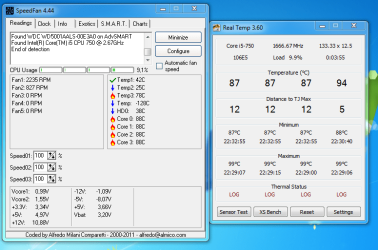
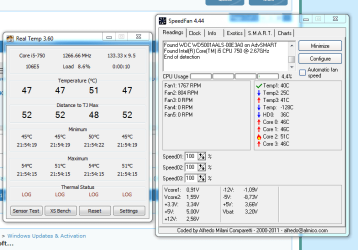
Downloaded monitoring software from .net and (take a look at the uploaded image) !!!!


NOTE: WHEN I TOOK OUT THE CPU FAN I NOTICED THE THERMAL PASTE WAS UNEVENLY DISTRIBUTED AND REALLY REALLY DRY!

I'll follow this thread through my mother's blackberry. I'll get back to the machine as soon as I get a thermal paste.

Those temps are insane!

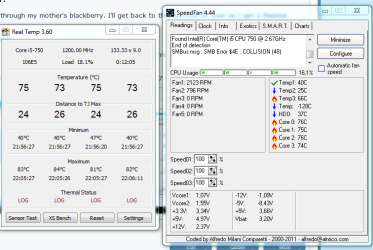
Wh...wait a second...take a look at the temps.....these temps are 3 minutes since I recorded those crazy 90ºc-89ºc.

PD:Back on original thread, I've managed to properly install Windows 7 and so far I haven't noticed any problem.

EDIT:Ok, took another screenshot of temps after 15 mins of the 2nd one, take a look at how they've been rising.
 

Attachments

  • edqw.PNG
    edqw.PNG
    36.6 KB · Views: 15
  • fsaf.PNG
    fsaf.PNG
    23.1 KB · Views: 12
  • bcbcv.PNG
    bcbcv.PNG
    22.9 KB · Views: 11

My Computer

Computer Manufacturer/Model Number
Self-Made
OS
W7 ULTIMATE 64b
CPU
Intel i5 750 2.6GHZ
Motherboard
GIGABYTE H55M-USB3 REV 1.0
Memory
G.SKILL RIPJAWS 2GB 1333MHZ 8-8-8-24 4GB (2x2)
Graphics Card(s)
XFX HD5850 XXX (Factory OC'ed) @ 1150/750
Sound Card
On Board
Monitor(s) Displays
Ehhhh,one of those Toshiba '17 LCD
Hard Drives
1x old samsung 120 gb 7200
1x WD BLACK 500 GB 7200
PSU
Thermaltake 600W TR2-600
Case
CM690
Cooling
Geez,3 80mm (back,side,front)
It's important to get the cleaning and repasting right so take all the time and preparation you need. Here's a video:

 
Greg, It seems that the temperatures fluctuate from 49-7x ºC.

Of course, the obvious reason behind this is the lack of a proper thermal paste.

As soon as I get my hands on one of those tubes, I'll apply it to the CPU and see how it turns out.

By the way, so far, I've been installing updates and the W.Security Essentials and I havent noticed a single problem.

The turning point will be tomorrow morning. If the computer passes the cold boot without any freeze/BSOD/FUBAR, then it means I have successfully repaired it (with your help of course).

I love you guys, really, you're like an swiss army knife.
 

My Computer

Computer Manufacturer/Model Number
Self-Made
OS
W7 ULTIMATE 64b
CPU
Intel i5 750 2.6GHZ
Motherboard
GIGABYTE H55M-USB3 REV 1.0
Memory
G.SKILL RIPJAWS 2GB 1333MHZ 8-8-8-24 4GB (2x2)
Graphics Card(s)
XFX HD5850 XXX (Factory OC'ed) @ 1150/750
Sound Card
On Board
Monitor(s) Displays
Ehhhh,one of those Toshiba '17 LCD
Hard Drives
1x old samsung 120 gb 7200
1x WD BLACK 500 GB 7200
PSU
Thermaltake 600W TR2-600
Case
CM690
Cooling
Geez,3 80mm (back,side,front)
Ok, I'll have to bump.

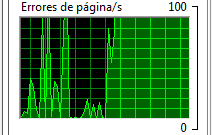
7:08 AM. Cold Boot. 5 minutes since I turned the machine on. So far, I havent noticed any problem...but I feel the BSOD/FREEZE/FUBAR is lurking around...And then....this (look at uploaded image).

Omg, is that right? I mean, never in my life, I have seen so many page errors in such a short time span. As I type this the page errors have gone to 0 and they're keeping it there. But a few seconds ago when I took the screenshot it looked like the Andes Cordillera, it was full of spikes.

It is worthy to notice that no program crashed on cold boot and all the chrome tabs, so far, arent going CRASH CRASH CRASH like before on cold boot.

EDIT: Wow, half an hour after cold boot and so far no problem...it seems I finally managed to get rid of BSODS and all that stuff.

But it's funny you know, everytime something gets fixed on this machine, a new problem comes up. First were the faulty ram, then was the faulty hard drive, then again another faulty ram, then came the drivers, then came a faulty windows installation and now comes high ºC CPU....
 

Attachments

  • peror.PNG
    peror.PNG
    1.2 KB · Views: 132
Last edited:

My Computer

Computer Manufacturer/Model Number
Self-Made
OS
W7 ULTIMATE 64b
CPU
Intel i5 750 2.6GHZ
Motherboard
GIGABYTE H55M-USB3 REV 1.0
Memory
G.SKILL RIPJAWS 2GB 1333MHZ 8-8-8-24 4GB (2x2)
Graphics Card(s)
XFX HD5850 XXX (Factory OC'ed) @ 1150/750
Sound Card
On Board
Monitor(s) Displays
Ehhhh,one of those Toshiba '17 LCD
Hard Drives
1x old samsung 120 gb 7200
1x WD BLACK 500 GB 7200
PSU
Thermaltake 600W TR2-600
Case
CM690
Cooling
Geez,3 80mm (back,side,front)
Back
Top