My computer empty, can't see drives, no thumbnails, explorer.exe error

RaWW

New member
Local time
8:43 AM
Messages
4
I have an on going issue with accessing my computer and thumbnails/icons failing to show. This has been happening for the last few weeks.

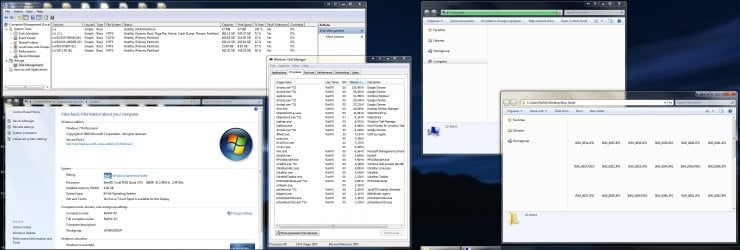
The first screen shot attached shows some details of my system and the problem at hand:

Everything seems to work fine after a fresh start up but after a short while, if i open my computer it shows up blank with a green bar that never reaches the end and a magnifying glass icon on each of the shortcut folders (favorites, libraries..).

In addition to this, if i access a folder by typing in the path or using another shortcut, all thumbnails and icons of files in that folder are missing.

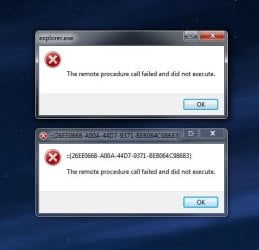
If I end explorer and restart the process, it becomes worse and I'm unable to even access my computer or the control panel. Instead I get the following message:

::{26EE0668-A00A-44D7-9371-BEB064C98683}
The remote procedure call failed and did not execute.

However, if I restart the computer or even just log on and off, the problem goes away, but only temporally.

I have tried a system restore a while back to a point before the problem was apparent.
This did not fix it. :(

Has anyone else come across this and/or can help me please?!
 

Attachments
  • Screen Shot.jpg
    Screen Shot.jpg
    301.7 KB · Views: 171
  • Screen Shot_2.jpg
    Screen Shot_2.jpg
    42.7 KB · Views: 59

My Computer My Computer

OS
Windows 7 Pro x64
Go to Services.msc and check if the Remote Procedure Call service is enabled.
Also, from task mgr, end explorer.exe and then click on File>New Task (Run) and type explorer.exe to restart the process.
 

My Computer My Computer

Computer Manufacturer/Model Number
Samsung NP530U4B-S02IN
OS
Windows® 8 Pro (64-bit)
CPU
Intel® Core™ i5 Processor 2467M (1.60GHz, 3MB L3 Cache)
Motherboard
Samsung Electronics
Memory
6GB DDR3 System Memory at 1,333MHz (on BD 4GB + 2GB x 1)
Graphics Card(s)
AMD Radeon™ HD7550M 1GB DDR3 (Ext. Graphic)
Sound Card
Realtek High Definition Audio
Monitor(s) Displays
35.56cm (14.0) SuperBright 300nit HD LED Display
Screen Resolution
1366x768
Hard Drives
1TB S-ATA II Hard Drive (5400RPM) with ExpressCache 16GB SSD
Internet Speed
sucks
Antivirus
Microsoft Security Essentials
Browser
Google Chrome (Sync enabled)
  • Like
Reactions: Arc

My Computer My Computer

Computer type
PC/Desktop
Computer Manufacturer/Model Number
Bruce ... somewhere in his 40's
OS
Windows 7 Ultimate 32bit SP1
CPU
Intel(R) Core(TM)2 Quad CPU @ 2.40GHz, 2400 MHz
Motherboard
INTEL/D975XBX2
Memory
4 GB
Graphics Card(s)
ATI Radeon HD 2600 Pro
Monitor(s) Displays
Samsung SyncMaster 914v
Screen Resolution
1280 x 1024
Hard Drives
2/500GB each ... ST3500630AS ATA Device.
One is not connected
PSU
Rocketfish 700 W
Case
G.Skill Gigabyte Chassis
Keyboard
Standard PS/2 Keyboard
Mouse
Microsoft PS/2 Mouse
Internet Speed
DSL
Antivirus
Avira Internet Security
Browser
IE 11
Other Info
ATI HDMI Audio
If my secondary drive has not been used for a while the computer's Power saving options shut it down.

When I click a desktop short-cut that needs access to a file on that drive I get a green progress bar that takes about 5 seconds as the HDD spins up.

Green HDD's could be another complication.
 

My Computer My Computer

Computer Manufacturer/Model Number
ASUSTeK Computer INC. M3A32-MVP DELUXE (CPU 1)
OS
Windows 7 Ultimate 64 bit SP1 x64
CPU
AMD Phenom X4 9500
Motherboard
ASUSTeK M3A32-MVP Deluxe (CPU 1)
Memory
8 GB
Graphics Card(s)
ATI Radeon HD 4600 Series
Sound Card
AMD High Definition Audio Device
Monitor(s) Displays
SyncMaster (1680x1050@60Hz)
Hard Drives
59GB OCZ-VERTEX2 ATA Device
+
977GB SAMSUNG HD103SJ ATA Device
+
625GB WDC WD6401AALS-00L3B2 ATA Device
Reinstall

Reinstall windows. Format your hard drive and install a fresh copy. That should resolve your problem.
 

My Computer My Computer

Computer Manufacturer/Model Number
Microsoft
OS
Windows 7 Ultimate x64
CPU
Intel E5200 2.5 GHz
Motherboard
Gigabyte EP31-DS3I
Memory
4 GB
Graphics Card(s)
Ati Radeon HD 6570
Thanks for the sugesstions

Go to Services.msc and check if the Remote Procedure Call service is enabled.
Also, from task mgr, end explorer.exe and then click on File>New Task (Run) and type explorer.exe to restart the process.

I have checked and the remote procedure call service is running, and as mentioned in my previous post - restarting explorer is what causes the error message to appear in the first place. Logging off and on, or restarting will temporarily fix my initially stated problem.


Thank you for your reply, I followed the link and tried the solution. It doesn't really explain what the command does to your computer, but it seems to have done the trick! I haven't had the problem reoccur as of yet. (fingers crossed) Thanks again Jacee! (i'll give a a few days before I mark as solved)

If my secondary drive has not been used for a while the computer's Power saving options shut it down.

When I click a desktop short-cut that needs access to a file on that drive I get a green progress bar that takes about 5 seconds as the HDD spins up.

Green HDD's could be another complication.

Yes, I realise the delay in accessing my external and secondary drives is down to the drives powering up, as I can hear them do so. This seems unrelated to the problem I first stated which also exists on all drives including my local disk C.

Reinstall windows. Format your hard drive and install a fresh copy. That should resolve your problem.

Your suggestion is almost one step away from buying a new computer... of course formatting and reinstalling will resolve most issues, but will also most likely cause new ones. It takes a hell of a long time for me to reinstall and get a stable system going. Time of which I don't have.
 

My Computer My Computer

OS
Windows 7 Pro x64
Thank you for your reply, I followed the link and tried the solution. It doesn't really explain what the command does to your computer, but it seems to have done the trick! I haven't had the problem reoccur as of yet. (fingers crossed) Thanks again Jacee! (i'll give a a few days before I mark as solved)
Fingers and eyes crossed ... hope it works for you.
 

My Computer My Computer

Computer type
PC/Desktop
Computer Manufacturer/Model Number
Bruce ... somewhere in his 40's
OS
Windows 7 Ultimate 32bit SP1
CPU
Intel(R) Core(TM)2 Quad CPU @ 2.40GHz, 2400 MHz
Motherboard
INTEL/D975XBX2
Memory
4 GB
Graphics Card(s)
ATI Radeon HD 2600 Pro
Monitor(s) Displays
Samsung SyncMaster 914v
Screen Resolution
1280 x 1024
Hard Drives
2/500GB each ... ST3500630AS ATA Device.
One is not connected
PSU
Rocketfish 700 W
Case
G.Skill Gigabyte Chassis
Keyboard
Standard PS/2 Keyboard
Mouse
Microsoft PS/2 Mouse
Internet Speed
DSL
Antivirus
Avira Internet Security
Browser
IE 11
Other Info
ATI HDMI Audio
PROBLEM HAS RETURNED out of nowhere! well I was saving a file in photoshop and the windows folder got stuck on reloading the new file's (png) thumbnail ...and now the green bar of death and everything I mentioned in my opening post is back.

this is so frustrating! :(
 

My Computer My Computer

OS
Windows 7 Pro x64
Run a full Malwarebytes scan.

Run SFC -SCANNOW Command from an Elevated Command Prompt

Make sure you're not running a bloated AV program. Use Microsoft Security Essentials or Avast 6.

Run a clean boot. In msconfig>Startup uncheck all but AV, then in msconfig>services Hide All MS Services and uncheck all but AV. Reboot several times. Any items which sneak back in should be turned off in their Program Preferences or Unintalled.

Consider a Repair Install

Never be afraid of a Clean Reinstall which is actually better than getting a new computer which are larded with manufacturer's sponsor's bloatware and useless factory Utilities which have much better versions built into Win7. Instead prepare for one by studying the steps and gathering your needed program installers: Reinstalling Windows 7
http://www.sevenforums.com/tutorials/3413-repair-install.html?ltr=R
 
Anyone out there? Did this ever get solved? I think whatever was going on with OP's computer I've got the exact same business happening (inability to load Computer or Control Panel in explorer, intermittently, and the thumbnail failure, and the foreverloading green bar...) Drivin me nuts... I can start my own thread too but wondered if anyone here who subscribed to replies had any new info! Thanks :)
 

My Computer My Computer

OS
Windows 7 Ultimate x64
Motherboard
Rampage III Formula
Memory
16GB
Graphics Card(s)
GE Force GTX 470
Hard Drives
OCZ Vertex 2 SSD
PSU
Corsair 850W
If you have time, I'd recommend a clean install. Just make sure that you back up important documents, and make sure you have your application installers handy. And make sure you have AT LEAST the network driver installer for your specific computer.
 

My Computer My Computer

Computer type
PC/Desktop
Computer Manufacturer/Model Number
Apple 17" iMac MA199LL (Early 2006)
OS
Windows 8 Pro (32-bit)
CPU
1.83GHz Intel Core Duo
Memory
2GB 667MHz DDR2 SDRAM (PC2-5300) (upgrade)
Graphics Card(s)
ATI Radeon X1600 with 128MB GDDR3 memory
Monitor(s) Displays
17-inch TFT active-matrix LCD, millions of colors
Screen Resolution
1440 x 900
Hard Drives
Hitachi 320GB HDT721032SLA360 7200RPM SATA II (upgrade)
Keyboard
Microsoft Wired Keyboard 600
Mouse
Microsoft Basic Optical Mouse v2.0
Internet Speed
4 Mbps
Antivirus
Microsoft Security Essentials
Browser
Google Chrome
Other Info
WEI:
Base Score: 3.9 Processor: 4.4 Memory 4.7
Graphics: 3.9 Gaming Graphics: 4.1 Primary HD: 5.9
:( unfortunately i really cannot afford a clean install right now. the whole visual studio/cmake followed by VTK/ITK with wrapping for tcl and python scripts is a finicky beast to get going. if i have to redo everything right now i'll just end up going off a cliff, computer in tow.

it's mostly a huge obnoxiousness problem vs an actual stability issue since i can get to control panel sometimes, and if i can't see any picture thumbnails the world doesn't end. it's just driving me crazy not knowing what the deal is because everything works swimmingly in safe mode, yet the problem isn't fixed by disabling all my startup items and disabling any services that aren't windows services.

i'd wondered about doing a repair install - didnt know if maybe that'd go fix explorer.exe and whatever dlls it was looking at (no idea what actually got borked when explorer failed, which i think was the beginning of this adventure).

i thought i'd seen that if you repair install and you have programs though that are not on your OS drive, that was a problem?
 

My Computer My Computer

OS
Windows 7 Ultimate x64
Motherboard
Rampage III Formula
Memory
16GB
Graphics Card(s)
GE Force GTX 470
Hard Drives
OCZ Vertex 2 SSD
PSU
Corsair 850W
Repair install can solve some issues but I'd consider it a last resort and first work through these Troubleshooting Steps for Windows 7- particularly getting a Clean Boot, checking System files, googling repeat errors in the logs, utilizing System Resources to solve problems.
 
I can start my own thread too but wondered if anyone here who subscribed to replies had any new info! Thanks :)
It would have been a better idea to have done that first,
and then come here with a link to your own post and an open invitation for responses there.

Did you see the same error reported in post #1, i.e.
::{26EE0668-A00A-44D7-9371-BEB064C98683}
The remote procedure call failed and did not execute.
Have you followed exactly all the steps / advice / tests / suggestions etc and had the same results as shown in posts #1 through to #9 ?

If you are not in the exact same situation as initiated this topic half a year ago then there will be less risk of confusion if you start a fresh topic.

Alan
 

My Computer My Computer

Computer Manufacturer/Model Number
ASUSTeK Computer INC. M3A32-MVP DELUXE (CPU 1)
OS
Windows 7 Ultimate 64 bit SP1 x64
CPU
AMD Phenom X4 9500
Motherboard
ASUSTeK M3A32-MVP Deluxe (CPU 1)
Memory
8 GB
Graphics Card(s)
ATI Radeon HD 4600 Series
Sound Card
AMD High Definition Audio Device
Monitor(s) Displays
SyncMaster (1680x1050@60Hz)
Hard Drives
59GB OCZ-VERTEX2 ATA Device
+
977GB SAMSUNG HD103SJ ATA Device
+
625GB WDC WD6401AALS-00L3B2 ATA Device
And the truth comes out.... SIIIIGHHH. Corrupt file.

OK for the record (for the next frustrated soul who stumbles on this thread) - I'd already done several malware scans and done a clean boot (no non-windows services and no startup items checked). SFC Scannow yielded no issues. If I killed explorer (using the start menu ctrl+shift+right click thing or thru the task manager just outright killing the process) and restarted it, yes I did get the "remote procedure call failed and did not execute". My explorer windows were doing forever-slow-load but not fully freezing on their own for the most part, however.

My windows error log for when things went wrong included VLC player crashing several times and taking windows explorer with it once. From then on explorer was doing the forever-load intermittently on "computer" and "control panel" and thumbnails (and even icons) were loading incorrectly in many folders. There were no other problems (not an instability/BSOD inducing thing).

I got the suggestion to make a new user account, which did not have these problems. In copying stuff from the old account a bit at a time, I found VLC player created a corrupt file the day it crashed several times while I converted a file. Every time explorer dealt with the folder that file was in, it began to lose its mind. Since that file was on my desktop, that was more or less all the time.

SOLUTION - I could delete the corrupt file in safe mode. All icons/thumbs are back and fine, and I imagine my slow computer/control panel window loads are not coming back either.

Thanks y'all for replying to an old thread :)
 

My Computer My Computer

OS
Windows 7 Ultimate x64
Motherboard
Rampage III Formula
Memory
16GB
Graphics Card(s)
GE Force GTX 470
Hard Drives
OCZ Vertex 2 SSD
PSU
Corsair 850W
Glad you got it fixed

Alan
 

My Computer My Computer

Computer Manufacturer/Model Number
ASUSTeK Computer INC. M3A32-MVP DELUXE (CPU 1)
OS
Windows 7 Ultimate 64 bit SP1 x64
CPU
AMD Phenom X4 9500
Motherboard
ASUSTeK M3A32-MVP Deluxe (CPU 1)
Memory
8 GB
Graphics Card(s)
ATI Radeon HD 4600 Series
Sound Card
AMD High Definition Audio Device
Monitor(s) Displays
SyncMaster (1680x1050@60Hz)
Hard Drives
59GB OCZ-VERTEX2 ATA Device
+
977GB SAMSUNG HD103SJ ATA Device
+
625GB WDC WD6401AALS-00L3B2 ATA Device
In case this helps anyone… Windows Explorer was hanging on me when I tried to open My Computer. There were no drives visible, just a blank white screen. I was also unable to view my backup files in Carbonite, so I called Customer Support to assist. They uninstalled Carbonite, and reinstalled it via a remote connection which fixed the problem. I think the technician might have used his own uninstall routine which completely cleared out everything, but don’t quote me on that. It may have been a total coincidence that this solved the problem, but if you have Carbonite installed, it probably wouldn’t hurt anything to reinstall it. PS – I also have VLC Media Player loaded, so who knows if that could’ve been related too. Good luck! ;)
 

My Computer My Computer

Computer type
Laptop
Computer Manufacturer/Model Number
HP
OS
Windows 7 Home Premium SP1 64 Bit
CPU
Intel i3 2,40 GHz
Memory
6 GB
Hard Drives
1 TB
Browser
Chrome
Back
Top