Delete Windows 7 temporary files and recover real estate.

jumanji

New member
Guru
Gold Member
VIP
Local time
7:59 PM
Messages
5,915
Over a period of time, the many applications that are installed and run leave a number of temporary files in the user’s temporary folder. These can also be AutoBackup files, log files, files in mid-creation etc., and unless checked and deleted these may occupy a large chunk of valuable disk space.

Does deleting all these temporary files really speed up your PC? Have a look at an interesting discussion here .

Whether or not it speeds up your PC, there is no denying that you will be recovering a lot of valuable real estate. This becomes more relevant if one is using an SSD with limited space.

Windows Disk Cleanup does not touch the temp folder in the user directory. CCleaner with its default settings also does not touch it unless you specifically include it under the custom folder to clean.

In this presentation the fairly easy manual cleaning as well as setting up the CCleaner for automatic deletion will be dealt with.

Manual Cleaning:

In the Windows Start Menu type run in the Search programs and files field and press ENTER. ( You can also use winlogo+r keys to bring up the run dialog box.)
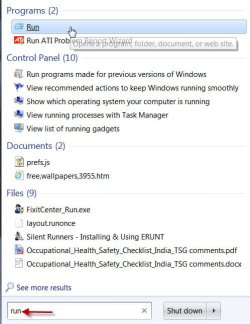
1run enter.jpg

In the resulting run dialog box type %temp% and press ENTER.
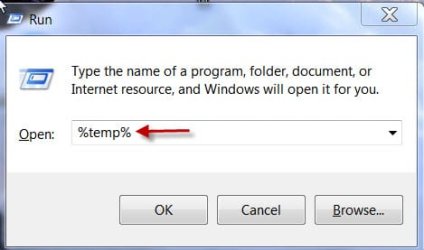
2temp.jpg

This will open up the C > Users > Username > AppData > Local > Temp folder where you can see all the files.
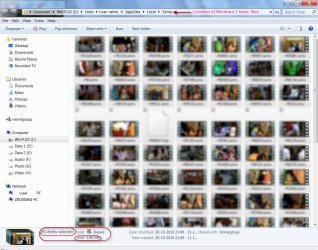
3win7temp.jpg

Press Ctrl+a ( or Organise > Select all or Edit > Select all ) to select all files, right click and delete all the files. (or press the Delete key.)

( I was just playing around with Windows Live Movie Maker, loading it with 76 HD camcorder movie clips but aborted it midway and as you can see the temp folder had nearly devoured 1GB of disk space)

There may be a few files in use and if so leave them alone and skip.
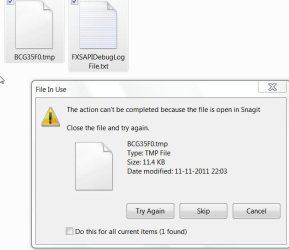
4Filesinuse.jpg

After the clean up I only had two files (in use) with 11.4KB.

Do not forget to empty the Recycle Bin.

Setting up the CCleaner:

Before setting up the CCleaner to include the temp folder as the Custom Folder to be cleaned, one has to unhide the hidden folders.

Control Panel > Folder Options > View > activate the Show hidden files,folders,and drives radio button > Apply > OK. Refresh your computer if need be.
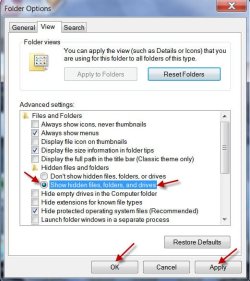
5viewhidfold.jpg

Open up the CCleaner, check Custom Files and Folders under Advanced and click on Options.
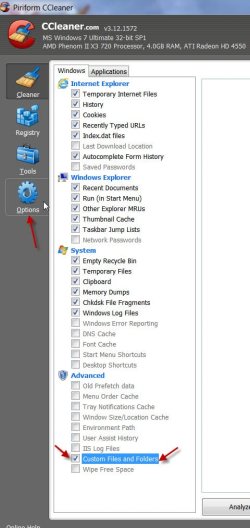
6Customfolder.jpg

Click on Include > Add > Browse to the temp folder > OK > select to Include files and subfolders in the Options field > OK

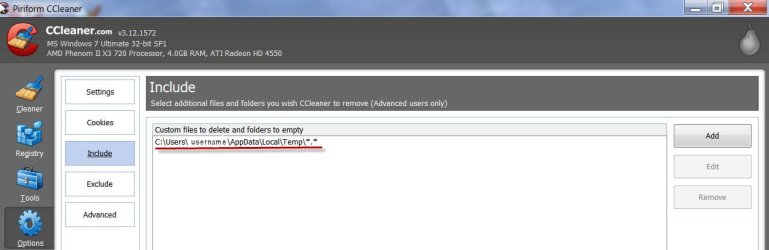
7include.jpg

8addfolder.jpg

You can now run CCleaner and it will automatically delete all the temp files in the user folder.

Keep your PC clean.:)
 

My Computer My Computer

At a glance

Windows 7 Home Premium 32 bit
OS
Windows 7 Home Premium 32 bit
CCleaner deletes temp files by default, You can see System / Temporary Files is already checked.
 

My Computer My Computer

At a glance

Microsoft Windows 10 Professional / Windows 7...Intel i5-357016GB DDR3AMD Radeon HD 7850 2GB
Computer type
PC/Desktop
OS
Microsoft Windows 10 Professional / Windows 7 Professional
CPU
Intel i5-3570
Motherboard
Lenovo Mahobay
Memory
16GB DDR3
Graphics Card(s)
AMD Radeon HD 7850 2GB
Sound Card
(1) Realtek HD Audio (2) AMD HD Audio
Monitor(s) Displays
LG LS192WS
Screen Resolution
1440 x 900 @ 32bit color
Hard Drives
(1) SUV300S37A/120G (2) ST3500413AS SATA Disk Device AHCI mode enabled.
PSU
Corsair HX620
Case
Thermaltake V4 Black Edition
Cooling
Cooler Master Hyper 212 + Artic Silver 5 on CPU/GPU
Keyboard
Dell SK-8115
Mouse
Razer Copperhead with MAPED mat (awesome!)
Internet Speed
100 Mbps up/down
Browser
Chrome
I have another question, is it safe to delete the "set up files" that are months old now? There are 355 MB worth and it does not appear they have been accessed in over 7 months. They are MS Win 7 files.

If I delete these will this have any impact if I ever need to use sys restore or repair?
 

My Computer My Computer

At a glance

win 7 home premium 64 bitcore i5 7606 gbati 5450
Computer Manufacturer/Model Number
hp pavilion 6680t
OS
win 7 home premium 64 bit
CPU
core i5 760
Motherboard
iona (from MSI)
Memory
6 gb
Graphics Card(s)
ati 5450
Sound Card
real tek 888
CCleaner deletes temp files by default, You can see System / Temporary Files is already checked.
me,too! I use ccleaner, it is safe to use the ccleaner. If you delete all tmp files. Something wrong might happen.
 

My Computer My Computer

At a glance

Windows 7 Ultimate 32bitNvidia
Computer Manufacturer/Model Number
Lenovo
OS
Windows 7 Ultimate 32bit
Graphics Card(s)
Nvidia
Screen Resolution
1366*768
Internet Speed
8M
CCleaner deletes temp files by default, You can see System / Temporary Files is already checked.

What CCleaner cleans are the temporary files in C > Windows > Temp.

As I had stated it does not touch C > Windows > Users > Username > AppData > Local > Temp, unless you add it as a custom folder to clean.

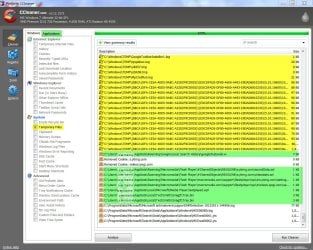
This is what CCleaner cleans with System > Temporary files checked (default)

1CC Temp.jpg

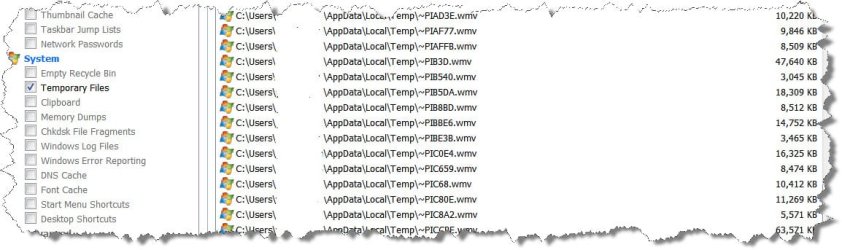
And this is what CCleaner cleans after including the custom folder.

2CC Custom.jpg


CCleaner deletes temp files by default, You can see System / Temporary Files is already checked.
me,too! I use ccleaner, it is safe to use the ccleaner. If you delete all tmp files. Something wrong might happen.

Your fears are unfounded. :)

Just one little project with Windows Live Movie Maker and I had more than 1GB of .wmv files in it. Even after completing the project these remained. 10 such projects and my C drive will be full.:) What am I to do with those .wmv files?

Well temp files are that - temporary files. One can safely delete them. The files in use will not be deleted.
 

My Computer My Computer

At a glance

Windows 7 Home Premium 32 bit
OS
Windows 7 Home Premium 32 bit
Last edited:

My Computer My Computer

At a glance

Operating System : Windows 7 Home Premium Edi...Processor : Intel Core 2 Quad Q8300 @ 2500 MHzPhysical Memory :8GB Corsair4x 2GB 800MHz C5 ...Video Card : XFX 6700 AMD
Computer Manufacturer/Model Number
packard bell IXTREME M5722
OS
Operating System : Windows 7 Home Premium Edition 6.01.7600 SP1 (x64)
CPU
Processor : Intel Core 2 Quad Q8300 @ 2500 MHz
Motherboard
Mainboard : Packard Bell (Acer EG43M )
Memory
Physical Memory :8GB Corsair4x 2GB 800MHz C5 DDR2
Graphics Card(s)
Video Card : XFX 6700 AMD
Monitor(s) Displays
Maestro 234DL - BenQ V2220 - BenQ VW2420H
Screen Resolution
Current Display :1920x1080p pixels at 60 Hz in HD LED
Hard Drives
Hard Disks : WDC (1000 GB)
Drive C: (Hard Disk) : 428 GB available on 491 GB
Drive D: (Hard Disk) : 426 GB available on 492 GB
SAMSUNG spinpoint HD103SJ 1000.2 GB
(X 2) KINGSTON SSD NOW V 30GB
PSU
XFX ProSeries 550W PSU
Case
PACKARD BELL IXTREME
Cooling
System Blower Current: 150mA Air Flow16CFM ;Akasa 90mm rear
Keyboard
Gigabyte Aivia K8100
Mouse
TRUST-Wireless Laser Mouse - Carbon edition MI-7770C
Internet Speed
TP-LINK > TL-WN951N / AV500 Gigabit Powerline Adapters
Browser
chrome dev
Other Info
EXTRA COOLING>(FAN CONTROLLER) PC Bay Cooler 3 x 40mm fans; Akasa AK-HD-BL Blue hard drive cooler 2 x 40 mm fan 4500 rpm 29.7 dBA
Bios> American Megatrends Inc.
Version : P01-A1
Date : 08/31/2009
Continued:
5. Empty the Recycle Bin. :D

Hi brianzion, good attempt there. Nice visual background but not so nice - the news in the background. And you made it in a hurry and just now. Cheers.
 

My Computer My Computer

At a glance

Windows 7 Home Premium 32 bit
OS
Windows 7 Home Premium 32 bit
Continued:
5. Empty the Recycle Bin. :D

Hi brianzion, good attempt there. Nice visual background but not so nice - the news in the background. And you made it in a hurry and just now. Cheers.

thanks updated :)
 

My Computer My Computer

At a glance

Operating System : Windows 7 Home Premium Edi...Processor : Intel Core 2 Quad Q8300 @ 2500 MHzPhysical Memory :8GB Corsair4x 2GB 800MHz C5 ...Video Card : XFX 6700 AMD
Computer Manufacturer/Model Number
packard bell IXTREME M5722
OS
Operating System : Windows 7 Home Premium Edition 6.01.7600 SP1 (x64)
CPU
Processor : Intel Core 2 Quad Q8300 @ 2500 MHz
Motherboard
Mainboard : Packard Bell (Acer EG43M )
Memory
Physical Memory :8GB Corsair4x 2GB 800MHz C5 DDR2
Graphics Card(s)
Video Card : XFX 6700 AMD
Monitor(s) Displays
Maestro 234DL - BenQ V2220 - BenQ VW2420H
Screen Resolution
Current Display :1920x1080p pixels at 60 Hz in HD LED
Hard Drives
Hard Disks : WDC (1000 GB)
Drive C: (Hard Disk) : 428 GB available on 491 GB
Drive D: (Hard Disk) : 426 GB available on 492 GB
SAMSUNG spinpoint HD103SJ 1000.2 GB
(X 2) KINGSTON SSD NOW V 30GB
PSU
XFX ProSeries 550W PSU
Case
PACKARD BELL IXTREME
Cooling
System Blower Current: 150mA Air Flow16CFM ;Akasa 90mm rear
Keyboard
Gigabyte Aivia K8100
Mouse
TRUST-Wireless Laser Mouse - Carbon edition MI-7770C
Internet Speed
TP-LINK > TL-WN951N / AV500 Gigabit Powerline Adapters
Browser
chrome dev
Other Info
EXTRA COOLING>(FAN CONTROLLER) PC Bay Cooler 3 x 40mm fans; Akasa AK-HD-BL Blue hard drive cooler 2 x 40 mm fan 4500 rpm 29.7 dBA
Bios> American Megatrends Inc.
Version : P01-A1
Date : 08/31/2009
I have another question, is it safe to delete the "set up files" that are months old now? There are 355 MB worth and it does not appear they have been accessed in over 7 months. They are MS Win 7 files.

If I delete these will this have any impact if I ever need to use sys restore or repair?

If you are talking of Windows setup log files, I can't think of anything else other than the C > Windows > Panther folder. It is only 852KB and I shall leave it alone.
Windows Setup Log Files

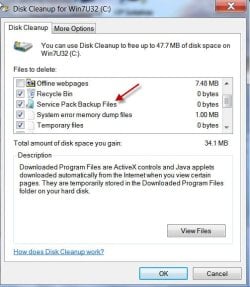
If you mean the Service Pack Backup files, yes , you can safely delete that if you do not intend to go back to the pre-SP1 age :).

For that you can use the Disk Cleanup and in the second Cleanup window, click on Cleanup System files. You can view the Service Pack Backup Files among others which you can delete.

1Clean System.jpg

2ClSPBup.jpg

Anything other than this ...... I do not know. :o :)
 

My Computer My Computer

At a glance

Windows 7 Home Premium 32 bit
OS
Windows 7 Home Premium 32 bit

My Computer My Computer

At a glance

Microsoft Windows 10 Professional / Windows 7...Intel i5-357016GB DDR3AMD Radeon HD 7850 2GB
Computer type
PC/Desktop
OS
Microsoft Windows 10 Professional / Windows 7 Professional
CPU
Intel i5-3570
Motherboard
Lenovo Mahobay
Memory
16GB DDR3
Graphics Card(s)
AMD Radeon HD 7850 2GB
Sound Card
(1) Realtek HD Audio (2) AMD HD Audio
Monitor(s) Displays
LG LS192WS
Screen Resolution
1440 x 900 @ 32bit color
Hard Drives
(1) SUV300S37A/120G (2) ST3500413AS SATA Disk Device AHCI mode enabled.
PSU
Corsair HX620
Case
Thermaltake V4 Black Edition
Cooling
Cooler Master Hyper 212 + Artic Silver 5 on CPU/GPU
Keyboard
Dell SK-8115
Mouse
Razer Copperhead with MAPED mat (awesome!)
Internet Speed
100 Mbps up/down
Browser
Chrome
hmmm......... that is really interesting. Are you sure you have not included it in the custom folder?

Just about three hours ago, I completely uninstalled CCleaner using Revo Uninstaller Pro and then reinstalled it.

After reading your post, I used CCleaner for the first time after reinstalling it. I unchecked everything but Temporary Files in the Windows tab, unchecked everything in the Applications tab and ran Analyse. It only showed files C > Windows > temp and not a single one in my user account. No messing up here. :)

Let us hear from others. I am curious now.

In the meanwhile can you please put out a full screen shot of your CCleaner? Let us see which version you are using and what are all checked under the Windows tab in it. Also please put out a screenshot of all the temp. files in your user account and that of CCleaner showing all those files. Let us unravel the mystery.
 

My Computer My Computer

At a glance

Windows 7 Home Premium 32 bit
OS
Windows 7 Home Premium 32 bit
I'm on the latest version, and mine cleans the user temp files as well... In fact in "Environmental variables" I change my default temp folders to my D: Drive, and CCleaner, without me changing any custom settings, cleans all of the temp folders on their D: location automatically...

I'm going to do some more testing with user temp folders....
 

My Computer My Computer

At a glance

Windows 7 Ultimate SP1 x64i7 950 4ghz6GB G.Skill pc12800EVGA GTX 580 SC
Computer Manufacturer/Model Number
Custom build
OS
Windows 7 Ultimate SP1 x64
CPU
i7 950 4ghz
Motherboard
EVGA x58 FTW3
Memory
6GB G.Skill pc12800
Graphics Card(s)
EVGA GTX 580 SC
Sound Card
Xfi Titanium
Monitor(s) Displays
Samsung 24"
Screen Resolution
1920x1200
Hard Drives
Vertex 3 SSD 120Gb x2 RAID 0
4 x 1TB WD Black RAID 0
PSU
Thermaltake 850
Case
Mountain Mods U2-UFO Horizon
Cooling
Custom watercooling
Internet Speed
100 down 5 up
Thanks for the info, Sedril.

To a certain extent, as of now I should say, the mystery is resolved.

When I unchecked the Only delete files in Windows Temp folders older than 24 hrs in the Options > Advanced settings all the user account temp files/folders appeared on the CCleaner ready to be removed.

I have now stuffed the temp folder again with a GB of .wmv files - courtesy Windows Live Movie Maker - and will now check after 24 hours. That should put to rest this issue.

I also had a quick look at a 05 Nov 11 post on this issue on the CCleaner Community Forum - which I was unable to access earlier due to the 403 Forbidden problem, my ISP issue but managed to peep in just a while ago - wherein the environmental variables which you have brought in is discussed as well as the fact that this 24hour wait factor can effectively be bypassed for the user temporary folder (without changing the default for the other temp. folder/s) by including it as a custom folder to be cleaned.

And yes, this appears to be a better option to those dealing with large video projects for one does not know how much goes in there and which program/s stuff it there. So either go the manual way or if you are using CCleaner everyday include the user temp folder as a custom folder still seems to be the way to go.

Thanks to OldMX we have a better insight on this.
 

My Computer My Computer

At a glance

Windows 7 Home Premium 32 bit
OS
Windows 7 Home Premium 32 bit
In the meanwhile can you please put out a full screen shot of your CCleaner? Let us see which version you are using and what are all checked under the Windows tab in it. Also please put out a screenshot of all the temp. files in your user account and that of CCleaner showing all those files. Let us unravel the mystery.

Sure, why not?

ccleanerb.jpg


ccleaner2.jpg


Hope it helps? :D
ccleanerb.jpg
 

My Computer My Computer

At a glance

Microsoft Windows 10 Professional / Windows 7...Intel i5-357016GB DDR3AMD Radeon HD 7850 2GB
Computer type
PC/Desktop
OS
Microsoft Windows 10 Professional / Windows 7 Professional
CPU
Intel i5-3570
Motherboard
Lenovo Mahobay
Memory
16GB DDR3
Graphics Card(s)
AMD Radeon HD 7850 2GB
Sound Card
(1) Realtek HD Audio (2) AMD HD Audio
Monitor(s) Displays
LG LS192WS
Screen Resolution
1440 x 900 @ 32bit color
Hard Drives
(1) SUV300S37A/120G (2) ST3500413AS SATA Disk Device AHCI mode enabled.
PSU
Corsair HX620
Case
Thermaltake V4 Black Edition
Cooling
Cooler Master Hyper 212 + Artic Silver 5 on CPU/GPU
Keyboard
Dell SK-8115
Mouse
Razer Copperhead with MAPED mat (awesome!)
Internet Speed
100 Mbps up/down
Browser
Chrome
these are the results i get when i run ccleaner and when i "clean" my files manually (left pic) ccleaner does not appear to show all :( so i stick with cleaning manual :)
 

Attachments

  • brys Snap2011.11.1420h56m24s001.png
    brys Snap2011.11.1420h56m24s001.png
    225.8 KB · Views: 41

My Computer My Computer

At a glance

Operating System : Windows 7 Home Premium Edi...Processor : Intel Core 2 Quad Q8300 @ 2500 MHzPhysical Memory :8GB Corsair4x 2GB 800MHz C5 ...Video Card : XFX 6700 AMD
Computer Manufacturer/Model Number
packard bell IXTREME M5722
OS
Operating System : Windows 7 Home Premium Edition 6.01.7600 SP1 (x64)
CPU
Processor : Intel Core 2 Quad Q8300 @ 2500 MHz
Motherboard
Mainboard : Packard Bell (Acer EG43M )
Memory
Physical Memory :8GB Corsair4x 2GB 800MHz C5 DDR2
Graphics Card(s)
Video Card : XFX 6700 AMD
Monitor(s) Displays
Maestro 234DL - BenQ V2220 - BenQ VW2420H
Screen Resolution
Current Display :1920x1080p pixels at 60 Hz in HD LED
Hard Drives
Hard Disks : WDC (1000 GB)
Drive C: (Hard Disk) : 428 GB available on 491 GB
Drive D: (Hard Disk) : 426 GB available on 492 GB
SAMSUNG spinpoint HD103SJ 1000.2 GB
(X 2) KINGSTON SSD NOW V 30GB
PSU
XFX ProSeries 550W PSU
Case
PACKARD BELL IXTREME
Cooling
System Blower Current: 150mA Air Flow16CFM ;Akasa 90mm rear
Keyboard
Gigabyte Aivia K8100
Mouse
TRUST-Wireless Laser Mouse - Carbon edition MI-7770C
Internet Speed
TP-LINK > TL-WN951N / AV500 Gigabit Powerline Adapters
Browser
chrome dev
Other Info
EXTRA COOLING>(FAN CONTROLLER) PC Bay Cooler 3 x 40mm fans; Akasa AK-HD-BL Blue hard drive cooler 2 x 40 mm fan 4500 rpm 29.7 dBA
Bios> American Megatrends Inc.
Version : P01-A1
Date : 08/31/2009
Are you running CCleaner as Administrator? I do, actually, i edited the shortcut to always run as admin.
 

My Computer My Computer

At a glance

Microsoft Windows 10 Professional / Windows 7...Intel i5-357016GB DDR3AMD Radeon HD 7850 2GB
Computer type
PC/Desktop
OS
Microsoft Windows 10 Professional / Windows 7 Professional
CPU
Intel i5-3570
Motherboard
Lenovo Mahobay
Memory
16GB DDR3
Graphics Card(s)
AMD Radeon HD 7850 2GB
Sound Card
(1) Realtek HD Audio (2) AMD HD Audio
Monitor(s) Displays
LG LS192WS
Screen Resolution
1440 x 900 @ 32bit color
Hard Drives
(1) SUV300S37A/120G (2) ST3500413AS SATA Disk Device AHCI mode enabled.
PSU
Corsair HX620
Case
Thermaltake V4 Black Edition
Cooling
Cooler Master Hyper 212 + Artic Silver 5 on CPU/GPU
Keyboard
Dell SK-8115
Mouse
Razer Copperhead with MAPED mat (awesome!)
Internet Speed
100 Mbps up/down
Browser
Chrome
Are you running CCleaner as Administrator? I do, actually, i edited the shortcut to always run as admin.

yes but there is no change i don't mind doing it my way lots of guys/girls do it this way i like ccleaner but rather clean myself :)
 

My Computer My Computer

At a glance

Operating System : Windows 7 Home Premium Edi...Processor : Intel Core 2 Quad Q8300 @ 2500 MHzPhysical Memory :8GB Corsair4x 2GB 800MHz C5 ...Video Card : XFX 6700 AMD
Computer Manufacturer/Model Number
packard bell IXTREME M5722
OS
Operating System : Windows 7 Home Premium Edition 6.01.7600 SP1 (x64)
CPU
Processor : Intel Core 2 Quad Q8300 @ 2500 MHz
Motherboard
Mainboard : Packard Bell (Acer EG43M )
Memory
Physical Memory :8GB Corsair4x 2GB 800MHz C5 DDR2
Graphics Card(s)
Video Card : XFX 6700 AMD
Monitor(s) Displays
Maestro 234DL - BenQ V2220 - BenQ VW2420H
Screen Resolution
Current Display :1920x1080p pixels at 60 Hz in HD LED
Hard Drives
Hard Disks : WDC (1000 GB)
Drive C: (Hard Disk) : 428 GB available on 491 GB
Drive D: (Hard Disk) : 426 GB available on 492 GB
SAMSUNG spinpoint HD103SJ 1000.2 GB
(X 2) KINGSTON SSD NOW V 30GB
PSU
XFX ProSeries 550W PSU
Case
PACKARD BELL IXTREME
Cooling
System Blower Current: 150mA Air Flow16CFM ;Akasa 90mm rear
Keyboard
Gigabyte Aivia K8100
Mouse
TRUST-Wireless Laser Mouse - Carbon edition MI-7770C
Internet Speed
TP-LINK > TL-WN951N / AV500 Gigabit Powerline Adapters
Browser
chrome dev
Other Info
EXTRA COOLING>(FAN CONTROLLER) PC Bay Cooler 3 x 40mm fans; Akasa AK-HD-BL Blue hard drive cooler 2 x 40 mm fan 4500 rpm 29.7 dBA
Bios> American Megatrends Inc.
Version : P01-A1
Date : 08/31/2009
I run mine as admin also.... I actually create a task to run as admin, and created a shortcut for it so I don't have to click "Yes" on the UAC every time I run it.... I do that for CCleaner and for the event log cleaner I use that is a .bat file....

Maybe it finds more files when run as admin....
 

My Computer My Computer

At a glance

Windows 7 Ultimate SP1 x64i7 950 4ghz6GB G.Skill pc12800EVGA GTX 580 SC
Computer Manufacturer/Model Number
Custom build
OS
Windows 7 Ultimate SP1 x64
CPU
i7 950 4ghz
Motherboard
EVGA x58 FTW3
Memory
6GB G.Skill pc12800
Graphics Card(s)
EVGA GTX 580 SC
Sound Card
Xfi Titanium
Monitor(s) Displays
Samsung 24"
Screen Resolution
1920x1200
Hard Drives
Vertex 3 SSD 120Gb x2 RAID 0
4 x 1TB WD Black RAID 0
PSU
Thermaltake 850
Case
Mountain Mods U2-UFO Horizon
Cooling
Custom watercooling
Internet Speed
100 down 5 up
....I have now stuffed the temp folder again with a GB of .wmv files - courtesy Windows Live Movie Maker - and will now check after 24 hours. That should put to rest this issue......

After 24 hours when I ran CCleaner, it did show all the .wmv files left behind by Windows Live Movie Maker. So OldMX is right. CCleaner does clean the temp. files in the User temp folder, but only if these are more than 24 hours old.

1Ccle24hrs.jpg


@OldMX, thanks for the screenshots. ( I gave it a pass. My eyesight has gotten worse.:o) Anyway the mystery is now resolved.

@brianzion, this 24 hour setting in the CCleaner may be the reason why the user temp files are not shown by it immediately.

That said, I shall join with you in upholding the efficacy of the simple manual cleaning to get rid of all junk files then and there immediately after each major project and let CCleaner do what it normally does in the normal routine. ( For now I know that Windows Live Movie Maker dumps tons of .wmv files in there and does not clear it when a project is aborted or even when completed. I do not know what other applications dump there and to what extent.)
 

My Computer My Computer

At a glance

Windows 7 Home Premium 32 bit
OS
Windows 7 Home Premium 32 bit
brianzion, the answer is right there in your screenshot (left half). Look at the file dates. All 11-14-2011, the day you posted the screenshot - so these would have been excluded by CCleaner because it was still set up to only delete files older than 24 hours.

Exactly what jumanji just figured out. :)

Edit: I keep getting beat by minutes today. LOL.
 

My Computer My Computer

At a glance

Windows 7 Professional SP1 32-bitIntel Core 2 Duo E6600 2.4GHz4GB DDR2-667 (4x1GB in dual-channel config)nVidia GeForce 9800 GT
Computer type
PC/Desktop
Computer Manufacturer/Model Number
Custom-built
OS
Windows 7 Professional SP1 32-bit
CPU
Intel Core 2 Duo E6600 2.4GHz
Motherboard
Asus PL5D2
Memory
4GB DDR2-667 (4x1GB in dual-channel config)
Graphics Card(s)
nVidia GeForce 9800 GT
Sound Card
Creative X-Fi XtremeMusic
Monitor(s) Displays
Acer P236H
Screen Resolution
1920x1200 (DVI)
Hard Drives
OCZ SSD Vertex Plus 60GB SATA (Firmware 3.55), 64MB cache
Hitachi HD321KJ SATA, 320GB, 7200rpm, 16MB cache
PSU
Antec TruePower 2.0
Case
Cooler Master Centurion
Cooling
Too many fans
Keyboard
Standard
Mouse
Microsoft wireless optical mouse
Internet Speed
AT&T U-verse (18mbit/sec)
Antivirus
Microsoft Security Essentials
Browser
Firefox
Other Info
Other devices:
Compaq CQ-60 laptop
Google Nexus 7 (2012) tablet
Nvidia SHIELD tablet (US/LTE)
Hardkernel ODROID-XU single-board computer (Samsung Exynos 5420)
Back
Top