Solved ReadyBoost causes antivirus to make computer unresponsive during scan

writhziden

Closed by request.
Local time
1:40 PM
Messages
11,269
Location
Colorado
I recently updated Vipre Antivirus to Vipre Internet Security 2012; I did so today, in fact. I had been using ReadyBoost to speed up my video editing software earlier today. After updating my antivirus, I decided to run a deep scan of my system to see if the new antivirus found anything the old one had not.

I had left my flash drive in the computer with ReadyBoost enabled, and when Vipre's scan reached that drive, the computer started to hang and my CPU went up to 25% (one of my four cores was being used). My computer became very unresponsive, actions took 10-20 minutes to carry out, and I am currently in the process of what has so far been a 10 minute shut down.

I normally do not run ReadyBoost as my computer's specs are great without it, but it does immensely speed up my video editing software when importing video. I was wondering: have others experienced similar problems when running ReadyBoost?
 

My Computer My Computer

At a glance

Windows 7 Home Premium 64 BitIntel(R) Core(TM)2 Quad CPU Q9550 @ 2.83GHz6.00 GB Hundai HMT125U6BFR8C-H9ATI Radeon HD 4850
Computer Manufacturer/Model Number
HP Pavilion e9110t
OS
Windows 7 Home Premium 64 Bit
CPU
Intel(R) Core(TM)2 Quad CPU Q9550 @ 2.83GHz
Motherboard
Pegatron IPIEL-LA3
Memory
6.00 GB Hundai HMT125U6BFR8C-H9
Graphics Card(s)
ATI Radeon HD 4850
Sound Card
Realtek High Definition Audio/ATI High Definition Audio
Monitor(s) Displays
Acer AL2216W
Screen Resolution
1680x1050
Hard Drives
Hitachi HDP725050GLA360 ATA Device 500 GB
PSU
Unknown/installed by HP
Case
HP generic case
Cooling
Intel Stock Cooling
Keyboard
HP Keyboard
Mouse
HP Mouse
Internet Speed
Download: 19.15 Mbps Upload: 1.67 Mbps
Other Info
Network Adapter Realtek RTL8168D/8111D Family PCI-E Gigabit Ethernet NIC (NDIS 6.20)
Network Adapter 802.11n Wireless PCI Express Card LAN Adapter
I recently updated Vipre Antivirus to Vipre Internet Security 2012; I did so today, in fact. I had been using ReadyBoost to speed up my video editing software earlier today. After updating my antivirus, I decided to run a deep scan of my system to see if the new antivirus found anything the old one had not.

I had left my flash drive in the computer with ReadyBoost enabled, and when Vipre's scan reached that drive, the computer started to hang and my CPU went up to 25% (one of my four cores was being used). My computer became very unresponsive, actions took 10-20 minutes to carry out, and I am currently in the process of what has so far been a 10 minute shut down.

I normally do not run ReadyBoost as my computer's specs are great without it, but it does immensely speed up my video editing software when importing video. I was wondering: have others experienced similar problems when running ReadyBoost?

Any chance we can get your system specs? My crystal ball is being repaired.
 

My Computer My Computer

At a glance

Win 8 Release candidate 8400[email protected]4 gigsNvidia 9600M
Computer Manufacturer/Model Number
HP Pavillion dv-7 1005 Tx
OS
Win 8 Release candidate 8400
CPU
[email protected]
Memory
4 gigs
Graphics Card(s)
Nvidia 9600M
Sound Card
HD built-in
Monitor(s) Displays
17" Wxga
Screen Resolution
1440x900
Cooling
none
Internet Speed
45Mb down 5Mb up
ReadyBoost basically creates a paging file of sorts on your USB device which Windows will keep accessing. What you encountered was probably simply a tug-of-war between the system trying to use the file and your antivirus trying to scan it.

Since it's pretty unlikely that the ReadyBoost file itself would present any kind of potential infection, I'd recommend simply adding it to the scan exclude list if your antivirus has one (but I don't know of any that don't).
That way you'd prevent this from happening again in the future.
 

My Computer My Computer

At a glance

Windows 7 Professional SP1 32-bitIntel Core 2 Duo E6600 2.4GHz4GB DDR2-667 (4x1GB in dual-channel config)nVidia GeForce 9800 GT
Computer type
PC/Desktop
Computer Manufacturer/Model Number
Custom-built
OS
Windows 7 Professional SP1 32-bit
CPU
Intel Core 2 Duo E6600 2.4GHz
Motherboard
Asus PL5D2
Memory
4GB DDR2-667 (4x1GB in dual-channel config)
Graphics Card(s)
nVidia GeForce 9800 GT
Sound Card
Creative X-Fi XtremeMusic
Monitor(s) Displays
Acer P236H
Screen Resolution
1920x1200 (DVI)
Hard Drives
OCZ SSD Vertex Plus 60GB SATA (Firmware 3.55), 64MB cache
Hitachi HD321KJ SATA, 320GB, 7200rpm, 16MB cache
PSU
Antec TruePower 2.0
Case
Cooler Master Centurion
Cooling
Too many fans
Keyboard
Standard
Mouse
Microsoft wireless optical mouse
Internet Speed
AT&T U-verse (18mbit/sec)
Antivirus
Microsoft Security Essentials
Browser
Firefox
Other Info
Other devices:
Compaq CQ-60 laptop
Google Nexus 7 (2012) tablet
Nvidia SHIELD tablet (US/LTE)
Hardkernel ODROID-XU single-board computer (Samsung Exynos 5420)
Any chance we can get your system specs? My crystal ball is being repaired.

My specs have been added. Now you will not have to replace your crystal ball.

ReadyBoost basically creates a paging file of sorts on your USB device which Windows will keep accessing. What you encountered was probably simply a tug-of-war between the system trying to use the file and your antivirus trying to scan it.

Since it's pretty unlikely that the ReadyBoost file itself would present any kind of potential infection, I'd recommend simply adding it to the scan exclude list if your antivirus has one (but I don't know of any that don't).
That way you'd prevent this from happening again in the future.

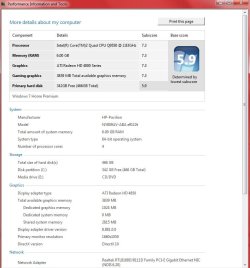
I believe Corazon is correct based on the GFI tech support I received on this issue. I kinda figured that was what was going on when it happened. I just found it odd that my antivirus had not been programmed by the developers to avoid scanning ReadyBoost drives. In the future, I will probably just disable ReadyBoost when scanning since I do not need it most of the time anyway. Just found the problem interesting.
 

Attachments

  • Performance.jpg
    Performance.jpg
    59.1 KB · Views: 24

My Computer My Computer

At a glance

Windows 7 Home Premium 64 BitIntel(R) Core(TM)2 Quad CPU Q9550 @ 2.83GHz6.00 GB Hundai HMT125U6BFR8C-H9ATI Radeon HD 4850
Computer Manufacturer/Model Number
HP Pavilion e9110t
OS
Windows 7 Home Premium 64 Bit
CPU
Intel(R) Core(TM)2 Quad CPU Q9550 @ 2.83GHz
Motherboard
Pegatron IPIEL-LA3
Memory
6.00 GB Hundai HMT125U6BFR8C-H9
Graphics Card(s)
ATI Radeon HD 4850
Sound Card
Realtek High Definition Audio/ATI High Definition Audio
Monitor(s) Displays
Acer AL2216W
Screen Resolution
1680x1050
Hard Drives
Hitachi HDP725050GLA360 ATA Device 500 GB
PSU
Unknown/installed by HP
Case
HP generic case
Cooling
Intel Stock Cooling
Keyboard
HP Keyboard
Mouse
HP Mouse
Internet Speed
Download: 19.15 Mbps Upload: 1.67 Mbps
Other Info
Network Adapter Realtek RTL8168D/8111D Family PCI-E Gigabit Ethernet NIC (NDIS 6.20)
Network Adapter 802.11n Wireless PCI Express Card LAN Adapter
Back
Top