Remote desktop won't connect over internet

woodart

New member
Local time
2:36 PM
Messages
44
I have a laptop running Win 7 Home Premium that will connect to my desktop (Win7 Professional) while connected to the LAN but won't make the same connection over the Internet using the IP address. I'm able to connect both machines with remote assistance over the Internet but not the Remote desktop.

Can someone point me in the right direction?
 

My Computer My Computer

Computer type
PC/Desktop
Computer Manufacturer/Model Number
Custom Build
OS
Windows 7 Professional 64-bit
CPU
i7 4820K
Motherboard
Asus Rampage IV Extreme
Memory
16GB GSkill Ripjaws X 2400 (4x4)
Graphics Card(s)
EVGA GTX 780 Superclocked ACX Cooler
Sound Card
SoundBlaster Zx
Monitor(s) Displays
ASUS VS248H-P 24" LED x3
Screen Resolution
1920 x 1080
Hard Drives
(2) Hitachi 320GB in RAID-0
1WD Caviar Blue 500GB
1WD Caviar Black 1TB
PSU
Ultra 1000W
Case
Coolermaster HAF 932
Cooling
Liquid
Internet Speed
20+mbps
Antivirus
Avast
I have a laptop running Win 7 Home Premium that will connect to my desktop (Win7 Professional) while connected to the LAN but won't make the same connection over the Internet using the IP address. I'm able to connect both machines with remote assistance over the Internet but not the Remote desktop.

Can someone point me in the right direction?
If the target machine to which you want to connect is behind a router, does that router have the correct "port forwarding" configuration to let Remote Desktop from your PC to the target PC through the router's firewall (from outside its LAN)?

Remote Desktop uses port 3389.

Furthermore, if you are running with Windows Firewall also active then it, too, needs to be configured to allow Remote Desktop to reach it. I'm guessing it already does, since you say you can get to the desktop from the laptop when both are behind the router on your LAN.

So my guess is that you simply need to add port forwarding for 3389 (call that service "Remote Desktop" in the ADD dialog for the router) to the IP address of your desktop. Hopefully that IP address for the desktop remains constant, but otherwise you can set fixed IP addresses for your PC desktop in the router and then the port forwarding for 3389 to that IP will never fail.
 

My Computer My Computer

Computer type
PC/Desktop
Computer Manufacturer/Model Number
Home-built, two systems (1) and (2)
OS
Windows 7 Pro x64 (1), Win7 Pro X64 (2)
CPU
i5-3350p 3.1Ghz/6MB-cache (1); E8400 3.0Ghz/6MB-cache (2)
Motherboard
ASUS P8Z77-V Pro (1); ASUS P5Q3 (2)
Memory
8GB PC3-12800 DDR3 (1); 4GB PC3-10600 DDR3 (2)
Graphics Card(s)
ATI HD7750 (1), (see TV cards); ATI R7 250 (2)
Sound Card
Realtek ALC892 HD Audio (1); Realtek ALC1200 HD Audio (2)
Monitor(s) Displays
Eizo HD2441W LCD, Eizo S2433W (1); Eizo 24" S2433W (2)
Screen Resolution
1920x1200, 1920x1200 (1); 1920x1200 (2)
Hard Drives
(1) 1TB SATA-II (7200RPM), 2x2TB SATA-III (7200RPM), 250GB SATA-III (10000RPM) for OS; 2x2TB external USB 3.0

(2) 320GB SATA-II (7200RPM), 750GB SATA-II (7200RPM), 150GB SATA-II (10000RPM) for OS; 2TB external USB 3.0
PSU
Nesteq ECS-6001 600W (1); Nesteq ECS-5001 500W (2)
Case
Acousti-Case 360 (1) and (2)
Cooling
Noctua NH-U12P SE2 for CPU, 2x120mm case fans (1) and (2)
Keyboard
IBM PS/2 (1) and (2)
Mouse
Logitech MX Revolution wireless (1); Microsoft wired (2)
Internet Speed
100mbps down / 10mbps up
Antivirus
Microsoft Security Essentials; Malwarebyte Anti-Malware Pro
Browser
Firefox
Other Info
Ceton InfiniTV 4-tuner cablecard-enabled TV card as well as Hauppauge HVR-2250 OTA/ATSC 2-tuner TV card in (1), running under Win7 WMC
  • Like
Reactions: 2xg
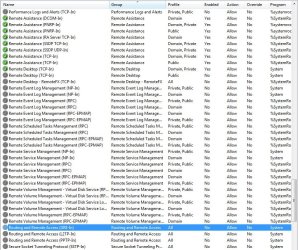
I set the router port forwarding to 3389 for both "start port" and "end port" but still couldn't get through. I checked the Win Firewall and found the settings shown in the attachment.
 

Attachments

  • Firewall.jpg
    Firewall.jpg
    157.2 KB · Views: 255

My Computer My Computer

Computer type
PC/Desktop
Computer Manufacturer/Model Number
Custom Build
OS
Windows 7 Professional 64-bit
CPU
i7 4820K
Motherboard
Asus Rampage IV Extreme
Memory
16GB GSkill Ripjaws X 2400 (4x4)
Graphics Card(s)
EVGA GTX 780 Superclocked ACX Cooler
Sound Card
SoundBlaster Zx
Monitor(s) Displays
ASUS VS248H-P 24" LED x3
Screen Resolution
1920 x 1080
Hard Drives
(2) Hitachi 320GB in RAID-0
1WD Caviar Blue 500GB
1WD Caviar Black 1TB
PSU
Ultra 1000W
Case
Coolermaster HAF 932
Cooling
Liquid
Internet Speed
20+mbps
Antivirus
Avast

My Computer My Computer

Computer type
PC/Desktop
Computer Manufacturer/Model Number
Self Built
OS
Windows 7 Ultimate 64bit
CPU
AMD Phenom Quad core 9950 black edition
Motherboard
Gigabyte
Memory
16Gb
Graphics Card(s)
2x XFX Radeon 5850
Sound Card
PCI Express X-Fi Titanium / Logitech G35
Monitor(s) Displays
2x HP 2410i
Screen Resolution
1920x1080
Hard Drives
2x 500Gb Seagate
1x 300Gb Seagate
1x 1Tb Seagate
2x 1Tb Hitatchi
PSU
Jean Tech Storm 700W
Case
Cooler Master COSMOS S
Cooling
Akasa Evo Blue Pro
Keyboard
Logitech G15
Mouse
Mad Catz M.M.O. 7
Internet Speed
12mb
I set the router port forwarding to 3389 for both "start port" and "end port" but still couldn't get through. I checked the Win Firewall and found the settings shown in the attachment.
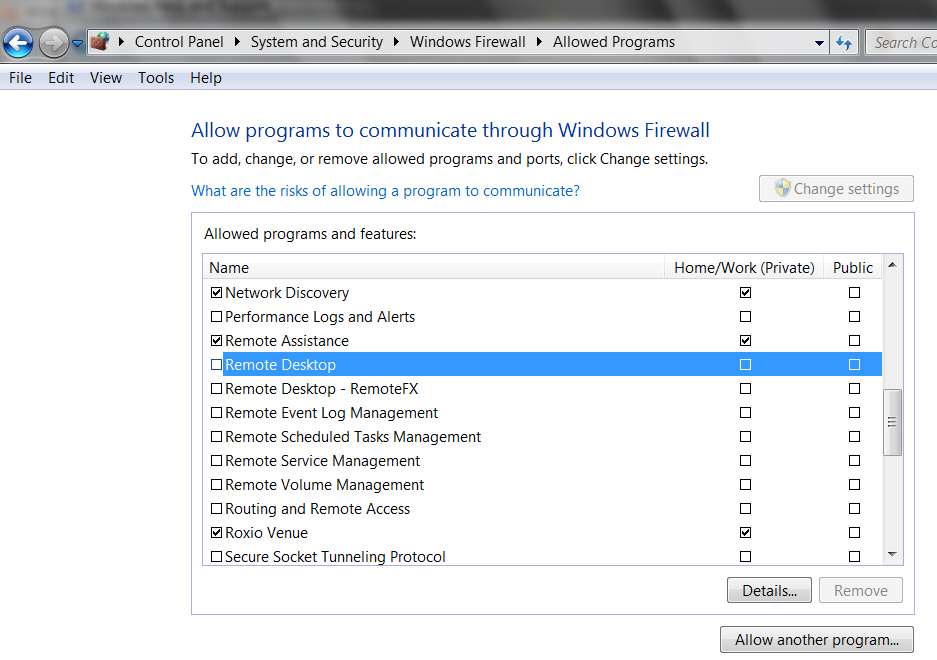
You've highlighted the wrong item in that screenshot. You highlighted "routing and remote access (Gre-in)". You should be looking earlier in that same screenshot, at "remote desktop (TCP-in)" for Public networks. It's DISABLED. I may be wrong, but I think enabling it should do the trick. Same way "remote assistance (TCP-in)" is enabled for both public and private networks right above it.

Your Private network option (just above the Public one in the screenshot) is already ENABLED which is why you can remote desktop from laptop to desktop behind the router."

The easiest way to enable either/both is through the simple "allow programs to communicate through Windows Firewall" dialog and check the proper network box:

remotedesktop.jpg
 

My Computer My Computer

Computer type
PC/Desktop
Computer Manufacturer/Model Number
Home-built, two systems (1) and (2)
OS
Windows 7 Pro x64 (1), Win7 Pro X64 (2)
CPU
i5-3350p 3.1Ghz/6MB-cache (1); E8400 3.0Ghz/6MB-cache (2)
Motherboard
ASUS P8Z77-V Pro (1); ASUS P5Q3 (2)
Memory
8GB PC3-12800 DDR3 (1); 4GB PC3-10600 DDR3 (2)
Graphics Card(s)
ATI HD7750 (1), (see TV cards); ATI R7 250 (2)
Sound Card
Realtek ALC892 HD Audio (1); Realtek ALC1200 HD Audio (2)
Monitor(s) Displays
Eizo HD2441W LCD, Eizo S2433W (1); Eizo 24" S2433W (2)
Screen Resolution
1920x1200, 1920x1200 (1); 1920x1200 (2)
Hard Drives
(1) 1TB SATA-II (7200RPM), 2x2TB SATA-III (7200RPM), 250GB SATA-III (10000RPM) for OS; 2x2TB external USB 3.0

(2) 320GB SATA-II (7200RPM), 750GB SATA-II (7200RPM), 150GB SATA-II (10000RPM) for OS; 2TB external USB 3.0
PSU
Nesteq ECS-6001 600W (1); Nesteq ECS-5001 500W (2)
Case
Acousti-Case 360 (1) and (2)
Cooling
Noctua NH-U12P SE2 for CPU, 2x120mm case fans (1) and (2)
Keyboard
IBM PS/2 (1) and (2)
Mouse
Logitech MX Revolution wireless (1); Microsoft wired (2)
Internet Speed
100mbps down / 10mbps up
Antivirus
Microsoft Security Essentials; Malwarebyte Anti-Malware Pro
Browser
Firefox
Other Info
Ceton InfiniTV 4-tuner cablecard-enabled TV card as well as Hauppauge HVR-2250 OTA/ATSC 2-tuner TV card in (1), running under Win7 WMC
In passing, I don't use Remote Desktop, nor TeamViewer.

I use RealVNC to get to my own computer from remote around the world, as well as to support the remote computers of friends and family from my home. It's not free, but it's excellent (and has an enormous user community in the "enterprise" world).
 

My Computer My Computer

Computer type
PC/Desktop
Computer Manufacturer/Model Number
Home-built, two systems (1) and (2)
OS
Windows 7 Pro x64 (1), Win7 Pro X64 (2)
CPU
i5-3350p 3.1Ghz/6MB-cache (1); E8400 3.0Ghz/6MB-cache (2)
Motherboard
ASUS P8Z77-V Pro (1); ASUS P5Q3 (2)
Memory
8GB PC3-12800 DDR3 (1); 4GB PC3-10600 DDR3 (2)
Graphics Card(s)
ATI HD7750 (1), (see TV cards); ATI R7 250 (2)
Sound Card
Realtek ALC892 HD Audio (1); Realtek ALC1200 HD Audio (2)
Monitor(s) Displays
Eizo HD2441W LCD, Eizo S2433W (1); Eizo 24" S2433W (2)
Screen Resolution
1920x1200, 1920x1200 (1); 1920x1200 (2)
Hard Drives
(1) 1TB SATA-II (7200RPM), 2x2TB SATA-III (7200RPM), 250GB SATA-III (10000RPM) for OS; 2x2TB external USB 3.0

(2) 320GB SATA-II (7200RPM), 750GB SATA-II (7200RPM), 150GB SATA-II (10000RPM) for OS; 2TB external USB 3.0
PSU
Nesteq ECS-6001 600W (1); Nesteq ECS-5001 500W (2)
Case
Acousti-Case 360 (1) and (2)
Cooling
Noctua NH-U12P SE2 for CPU, 2x120mm case fans (1) and (2)
Keyboard
IBM PS/2 (1) and (2)
Mouse
Logitech MX Revolution wireless (1); Microsoft wired (2)
Internet Speed
100mbps down / 10mbps up
Antivirus
Microsoft Security Essentials; Malwarebyte Anti-Malware Pro
Browser
Firefox
Other Info
Ceton InfiniTV 4-tuner cablecard-enabled TV card as well as Hauppauge HVR-2250 OTA/ATSC 2-tuner TV card in (1), running under Win7 WMC
One further thought...

You say when you "try to connect over the Internet"... exactly what IP address or host URL are you trying to connect to? Do you have a "fixed IP" address?

Or, like most of us home users, do you have a DHCP-assigned IP address from your cable system or DSL provider? This DCHP-assigned IP address has a "lease period" associated with it and will change periodically (at least theoretically it can change periodically) when the "lease is renewed" and your provider assigns a new IP address to your modem.

Unless you have a fixed IP address you cannot successfully connect to any given IP address and have it be successful (even potentially, assuming your firewall problems are resolved) indefinitely. The best you can hope for is temporary success, until the IP address is changed.

An excellent solution is to use something like DynDNS Hosts, as an intermediate hostname/IP-address re-direct/relay system. You define a symbolic "host name" that's maintained on their server. And you install a client program (DynDNS Updater) on the machine you want to set up as a "host server" for remote access, which every 10 minutes updates the DynDNS server's hostname/IP table with whatever that machine's current IP address is (as currently "leased" to it by the ISP).

Then, any remote client (be it RealVNC, trying to connect to the VNC Server running on your host machine, or Remote Desktop trying to connect to your host machine) uses the symbolic "host name" (e.g. davidscomputer.dyndns.org) in the connection dialog, rather than a hard fixed IP address. Since "davidscomputer.dyndns.org" is registered to DynDNS, the resolution takes place there and the current (up to the most recent 10 minutes) IP address used to relay the connection to your target machine.

In other words, you don't connect to a fixed IP address. You connect to "davidscomputer.dyndns.org". This really is the only way to get around the renewable and thus periodically changing "leased" DHCP-assigned IP addresses almost always used for home Internet connections.


As expected, I have DynDNS Updater installed on EVERY one of the machines I support remotely (including my own) and that does not have fixed IP addresses (i.e. ALL of them!!). Each of those machines corresponds to a unique "hostname" defined in my account at DynDNS.

And, every one of these "host machines" is running VNC Server, supporting remote access by me through VNC Viewer (i.e. "client") installed on any machine I care to be able to use to connect to any "server" host machine. There is a VNC Address Book at the VNC "client" machine as well, which makes selection and connection (through VNC Viewer) super-simple when there are a large number of target host/server machines that are frequently being connected to, as in my own personal situation.

So each host machine runs both (a) VNC Server, and (b) DynDNS Updater. On any of my VNC client machines my VNC Viewer (i.e. Address Book) connection dialogs for each of these target hosts names their "hostname" as defined in my DynDNS account. Thus connection from any "client" machine I happen to be sitting at to any "host" machine I want to connect to is 100% assured, symbolically via "hostname" (i.e. through DynDNS) rather than through absolute IP address which is not a known value at any given time.


NOTE: DynDNS Hosts is free for 1-2 hostnames. I pay for DynDNS Pro, because for me it's worth the $20/year cost for up to 30 hostnames -> IP, which is what I need.

RealVNC Personal Edition (which provides 256-bit AES secure encryption, which in my opinion is MANDATORY, as well as desktop scaling for use with small monitors, Address Book, file transfer, chat, printing from remote host on client printer, etc.) is $30.

 
Last edited:

My Computer My Computer

Computer type
PC/Desktop
Computer Manufacturer/Model Number
Home-built, two systems (1) and (2)
OS
Windows 7 Pro x64 (1), Win7 Pro X64 (2)
CPU
i5-3350p 3.1Ghz/6MB-cache (1); E8400 3.0Ghz/6MB-cache (2)
Motherboard
ASUS P8Z77-V Pro (1); ASUS P5Q3 (2)
Memory
8GB PC3-12800 DDR3 (1); 4GB PC3-10600 DDR3 (2)
Graphics Card(s)
ATI HD7750 (1), (see TV cards); ATI R7 250 (2)
Sound Card
Realtek ALC892 HD Audio (1); Realtek ALC1200 HD Audio (2)
Monitor(s) Displays
Eizo HD2441W LCD, Eizo S2433W (1); Eizo 24" S2433W (2)
Screen Resolution
1920x1200, 1920x1200 (1); 1920x1200 (2)
Hard Drives
(1) 1TB SATA-II (7200RPM), 2x2TB SATA-III (7200RPM), 250GB SATA-III (10000RPM) for OS; 2x2TB external USB 3.0

(2) 320GB SATA-II (7200RPM), 750GB SATA-II (7200RPM), 150GB SATA-II (10000RPM) for OS; 2TB external USB 3.0
PSU
Nesteq ECS-6001 600W (1); Nesteq ECS-5001 500W (2)
Case
Acousti-Case 360 (1) and (2)
Cooling
Noctua NH-U12P SE2 for CPU, 2x120mm case fans (1) and (2)
Keyboard
IBM PS/2 (1) and (2)
Mouse
Logitech MX Revolution wireless (1); Microsoft wired (2)
Internet Speed
100mbps down / 10mbps up
Antivirus
Microsoft Security Essentials; Malwarebyte Anti-Malware Pro
Browser
Firefox
Other Info
Ceton InfiniTV 4-tuner cablecard-enabled TV card as well as Hauppauge HVR-2250 OTA/ATSC 2-tuner TV card in (1), running under Win7 WMC
Sorry for not responding sooner but I just got home from spending the past 6 days in the hospital. I'll catch up on the replies in the morning and respond.

Thanks!
 

My Computer My Computer

Computer type
PC/Desktop
Computer Manufacturer/Model Number
Custom Build
OS
Windows 7 Professional 64-bit
CPU
i7 4820K
Motherboard
Asus Rampage IV Extreme
Memory
16GB GSkill Ripjaws X 2400 (4x4)
Graphics Card(s)
EVGA GTX 780 Superclocked ACX Cooler
Sound Card
SoundBlaster Zx
Monitor(s) Displays
ASUS VS248H-P 24" LED x3
Screen Resolution
1920 x 1080
Hard Drives
(2) Hitachi 320GB in RAID-0
1WD Caviar Blue 500GB
1WD Caviar Black 1TB
PSU
Ultra 1000W
Case
Coolermaster HAF 932
Cooling
Liquid
Internet Speed
20+mbps
Antivirus
Avast
Back
Top