Importing My Documents from External Hard Drive - XP to Win 7

rikkidegraz

New member
Local time
12:11 AM
Messages
25
Location
Canada
Up to about a week ago I had a Toshiba laptop with XP. Then I bought a new Toshiba laptop with Win 7. Here is my issue.

I am a head-hunter. I use Outlook 2007 for keeping all my contact information for both Clients and Candidates. I keep all resumes in business folder within My Documents. Each Outlook entry has a link to the candidate's folder.

On my old laptop, I backed up Outlook to a .pst file and copied to an external hard drive before formatting. I did that with all my files.

So, when I imported from the external hard drive into my new computer, I noticed something odd. When I clicked on a candidate's link in Outlook Contacts, I got the following message: cannot find C:\documents & settings\.....\my documents\business backup\........\resumes\... verify path

Furthermore, when I delete that hyperlink to recreate one, the address it shows is: C:\users\.....\Music\documents\business backup\.......\resumes\....

Music? What are my files doing in Music? They are also listed in Documents.

Can you help me to sort this out?
 

My Computer My Computer

At a glance

Windows 7 Home Premium 64 biti7-2630qm cpu @ 2.00GHz6Gintel HD Graphics Family, NVIDIA GeForce GT 540M
Computer Manufacturer/Model Number
Toshiba Satellite
OS
Windows 7 Home Premium 64 bit
CPU
i7-2630qm cpu @ 2.00GHz
Motherboard
Intel
Memory
6G
Graphics Card(s)
intel HD Graphics Family, NVIDIA GeForce GT 540M
Sound Card
Intel Display Audio, Realtek High Definition Audio
Monitor(s) Displays
Generic PnP Monitor
Hard Drives
Hitachi, Optiarc DVD
I don't have a suggestion at this time, but what you see is a perfect example why many of us don't use the "my" folders at all. I always use a second drive (or a partition if on a laptop) labeled as D for all of my user data, such as documents, photos, etc. If your paths were D:\Clients....then your links would still function properly.
 

My Computer My Computer

At a glance

Windows 7 Ultimate x64 SP1Intel Core i7-260012 GB Patriot Extreme DDR3-1333Nvidia GTX 470
OS
Windows 7 Ultimate x64 SP1
CPU
Intel Core i7-2600
Motherboard
Gigabyte GA-P67A-UD3P-B3
Memory
12 GB Patriot Extreme DDR3-1333
Graphics Card(s)
Nvidia GTX 470
Monitor(s) Displays
Dell UltraSharp 2209WA
Hard Drives
OCZ Agility3 240 GB, WD5001AALS, WD7501AALS
PSU
OCZ ModStream 700W
Case
CoolerMaster HAF 912 Advanced
Cooling
CoolerMaster Hyper 212 Plus
So I deleted the document folder within the music folder. as expected, everything was deleted from document folder and the document folder within the music folder.

I thought if I started from scratch I could fix it so instead of importing the whole my document folder, I imported each folder separtely making sure not to import the music folder.

Guess what? They still showed up in the music folder. So, is there any way to create a partition without formating the hard drive?
 

My Computer My Computer

At a glance

Windows 7 Home Premium 64 biti7-2630qm cpu @ 2.00GHz6Gintel HD Graphics Family, NVIDIA GeForce GT 540M
Computer Manufacturer/Model Number
Toshiba Satellite
OS
Windows 7 Home Premium 64 bit
CPU
i7-2630qm cpu @ 2.00GHz
Motherboard
Intel
Memory
6G
Graphics Card(s)
intel HD Graphics Family, NVIDIA GeForce GT 540M
Sound Card
Intel Display Audio, Realtek High Definition Audio
Monitor(s) Displays
Generic PnP Monitor
Hard Drives
Hitachi, Optiarc DVD
You can use software such as Partition Wizard to shrink your current partition, then create a new partition from the unused space.
 

My Computer My Computer

At a glance

Windows 7 Ultimate x64 SP1Intel Core i7-260012 GB Patriot Extreme DDR3-1333Nvidia GTX 470
OS
Windows 7 Ultimate x64 SP1
CPU
Intel Core i7-2600
Motherboard
Gigabyte GA-P67A-UD3P-B3
Memory
12 GB Patriot Extreme DDR3-1333
Graphics Card(s)
Nvidia GTX 470
Monitor(s) Displays
Dell UltraSharp 2209WA
Hard Drives
OCZ Agility3 240 GB, WD5001AALS, WD7501AALS
PSU
OCZ ModStream 700W
Case
CoolerMaster HAF 912 Advanced
Cooling
CoolerMaster Hyper 212 Plus
I agree with DeaconFrost.

Create a separate data partition and forget about using Libraries.
 

My Computer My Computer

At a glance

Windows 7 Ultimate SP1 64-BitIntel Core i7 870 @ 2.93GHz8Gb Dual-Channel DDR3 @ 664MHznVidia GeForce GTX 460 1024MB dedicated RAM
Computer Manufacturer/Model Number
HP Pavilion Elite 495UK
OS
Windows 7 Ultimate SP1 64-Bit
CPU
Intel Core i7 870 @ 2.93GHz
Motherboard
MSI 2A9C (CPU1)
Memory
8Gb Dual-Channel DDR3 @ 664MHz
Graphics Card(s)
nVidia GeForce GTX 460 1024MB dedicated RAM
Sound Card
Realtek HD Audio
Monitor(s) Displays
HP2310i
Screen Resolution
1920 x 1080
Hard Drives
1x1954GB Hitachi HDS22020ALA 330 (RAID), 1x1954GB Hitachi External for backup and storage
PSU
460W
Case
HP Elite
Cooling
Air cooled
Keyboard
Logitech K750 solar-powered keyboard
Mouse
Logitech Wireless M180 mouse
Internet Speed
2Mb
Other Info
Pure Avanti Flow Internet Radio with iPod Dock, 64Gb iPod, HP USB Speakers, Sony MDR-V500 Headphones, Sony Vaio F-Series Laptop
It sounds like your music folder is actually a junction pointing back to the Documents folder.

As for why this happened in the first place, the system path to user folders was changed between XP and Vista/7:

  • XP: C:\Documents and Settings\username\My Documents
  • 7: C:\Users\username\Documents
 

My Computer My Computer

At a glance

Windows 7 Professional SP1 32-bitIntel Core 2 Duo E6600 2.4GHz4GB DDR2-667 (4x1GB in dual-channel config)nVidia GeForce 9800 GT
Computer type
PC/Desktop
Computer Manufacturer/Model Number
Custom-built
OS
Windows 7 Professional SP1 32-bit
CPU
Intel Core 2 Duo E6600 2.4GHz
Motherboard
Asus PL5D2
Memory
4GB DDR2-667 (4x1GB in dual-channel config)
Graphics Card(s)
nVidia GeForce 9800 GT
Sound Card
Creative X-Fi XtremeMusic
Monitor(s) Displays
Acer P236H
Screen Resolution
1920x1200 (DVI)
Hard Drives
OCZ SSD Vertex Plus 60GB SATA (Firmware 3.55), 64MB cache
Hitachi HD321KJ SATA, 320GB, 7200rpm, 16MB cache
PSU
Antec TruePower 2.0
Case
Cooler Master Centurion
Cooling
Too many fans
Keyboard
Standard
Mouse
Microsoft wireless optical mouse
Internet Speed
AT&T U-verse (18mbit/sec)
Antivirus
Microsoft Security Essentials
Browser
Firefox
Other Info
Other devices:
Compaq CQ-60 laptop
Google Nexus 7 (2012) tablet
Nvidia SHIELD tablet (US/LTE)
Hardkernel ODROID-XU single-board computer (Samsung Exynos 5420)
Short of reformatting and creating partitions, do I have any other recourse?
 

My Computer My Computer

At a glance

Windows 7 Home Premium 64 biti7-2630qm cpu @ 2.00GHz6Gintel HD Graphics Family, NVIDIA GeForce GT 540M
Computer Manufacturer/Model Number
Toshiba Satellite
OS
Windows 7 Home Premium 64 bit
CPU
i7-2630qm cpu @ 2.00GHz
Motherboard
Intel
Memory
6G
Graphics Card(s)
intel HD Graphics Family, NVIDIA GeForce GT 540M
Sound Card
Intel Display Audio, Realtek High Definition Audio
Monitor(s) Displays
Generic PnP Monitor
Hard Drives
Hitachi, Optiarc DVD
There's no need to reformat just to create another partition (given enough disk space of course). DeaconFrost suggested Partition Wizard which is excellent and freely downloadable as a bootable CD .iso image, ready to be burned to disc.
 

My Computer My Computer

At a glance

Windows 7 Professional SP1 32-bitIntel Core 2 Duo E6600 2.4GHz4GB DDR2-667 (4x1GB in dual-channel config)nVidia GeForce 9800 GT
Computer type
PC/Desktop
Computer Manufacturer/Model Number
Custom-built
OS
Windows 7 Professional SP1 32-bit
CPU
Intel Core 2 Duo E6600 2.4GHz
Motherboard
Asus PL5D2
Memory
4GB DDR2-667 (4x1GB in dual-channel config)
Graphics Card(s)
nVidia GeForce 9800 GT
Sound Card
Creative X-Fi XtremeMusic
Monitor(s) Displays
Acer P236H
Screen Resolution
1920x1200 (DVI)
Hard Drives
OCZ SSD Vertex Plus 60GB SATA (Firmware 3.55), 64MB cache
Hitachi HD321KJ SATA, 320GB, 7200rpm, 16MB cache
PSU
Antec TruePower 2.0
Case
Cooler Master Centurion
Cooling
Too many fans
Keyboard
Standard
Mouse
Microsoft wireless optical mouse
Internet Speed
AT&T U-verse (18mbit/sec)
Antivirus
Microsoft Security Essentials
Browser
Firefox
Other Info
Other devices:
Compaq CQ-60 laptop
Google Nexus 7 (2012) tablet
Nvidia SHIELD tablet (US/LTE)
Hardkernel ODROID-XU single-board computer (Samsung Exynos 5420)

My Computer My Computer

At a glance

Windows 7 Ultimate SP1 64-BitIntel Core i7 870 @ 2.93GHz8Gb Dual-Channel DDR3 @ 664MHznVidia GeForce GTX 460 1024MB dedicated RAM
Computer Manufacturer/Model Number
HP Pavilion Elite 495UK
OS
Windows 7 Ultimate SP1 64-Bit
CPU
Intel Core i7 870 @ 2.93GHz
Motherboard
MSI 2A9C (CPU1)
Memory
8Gb Dual-Channel DDR3 @ 664MHz
Graphics Card(s)
nVidia GeForce GTX 460 1024MB dedicated RAM
Sound Card
Realtek HD Audio
Monitor(s) Displays
HP2310i
Screen Resolution
1920 x 1080
Hard Drives
1x1954GB Hitachi HDS22020ALA 330 (RAID), 1x1954GB Hitachi External for backup and storage
PSU
460W
Case
HP Elite
Cooling
Air cooled
Keyboard
Logitech K750 solar-powered keyboard
Mouse
Logitech Wireless M180 mouse
Internet Speed
2Mb
Other Info
Pure Avanti Flow Internet Radio with iPod Dock, 64Gb iPod, HP USB Speakers, Sony MDR-V500 Headphones, Sony Vaio F-Series Laptop
Thank you. I've looked at other partition programs but they all want money. I figure why spend more money when Microsoft is to blame for this screwup. Had they kept some things well enough alone, I would'nt be in this predicament.
 

My Computer My Computer

At a glance

Windows 7 Home Premium 64 biti7-2630qm cpu @ 2.00GHz6Gintel HD Graphics Family, NVIDIA GeForce GT 540M
Computer Manufacturer/Model Number
Toshiba Satellite
OS
Windows 7 Home Premium 64 bit
CPU
i7-2630qm cpu @ 2.00GHz
Motherboard
Intel
Memory
6G
Graphics Card(s)
intel HD Graphics Family, NVIDIA GeForce GT 540M
Sound Card
Intel Display Audio, Realtek High Definition Audio
Monitor(s) Displays
Generic PnP Monitor
Hard Drives
Hitachi, Optiarc DVD
Microsoft is hardly to blame for this. I feel like this is becoming an epidemic...people blaming Microsoft for their own system issues.

Anyway, hopefully it sunk in that you don't have to format. You also don't need to spend a dime. A simple 5 minute fix, and you can be back up and running....using good usage/operating practices.
 

My Computer My Computer

At a glance

Windows 7 Ultimate x64 SP1Intel Core i7-260012 GB Patriot Extreme DDR3-1333Nvidia GTX 470
OS
Windows 7 Ultimate x64 SP1
CPU
Intel Core i7-2600
Motherboard
Gigabyte GA-P67A-UD3P-B3
Memory
12 GB Patriot Extreme DDR3-1333
Graphics Card(s)
Nvidia GTX 470
Monitor(s) Displays
Dell UltraSharp 2209WA
Hard Drives
OCZ Agility3 240 GB, WD5001AALS, WD7501AALS
PSU
OCZ ModStream 700W
Case
CoolerMaster HAF 912 Advanced
Cooling
CoolerMaster Hyper 212 Plus
Yes, it is to blame. I had XP on my old computer. It worked well and I was happy. However, the computer was 6 years old. I wanted a new one. Unfortunately, the new one had win 7 preloaded. I didn't ask for it, did I? I made sure to backup on an external hard drive but when I imported into the new computer, everything went weird on me. My documents are also in my music folder. The path to my files all changed. Ah, I could go on but why?

I know the Microsoft guys have to keep creating new things to sell new stuff. It would be nice to be able to have a choice when buying a new computer. I really don't need this. I'm a head-hunter and I don't have time to dick around with computers. If I don't work I don't make money.

So lose the attitude.
 

My Computer My Computer

At a glance

Windows 7 Home Premium 64 biti7-2630qm cpu @ 2.00GHz6Gintel HD Graphics Family, NVIDIA GeForce GT 540M
Computer Manufacturer/Model Number
Toshiba Satellite
OS
Windows 7 Home Premium 64 bit
CPU
i7-2630qm cpu @ 2.00GHz
Motherboard
Intel
Memory
6G
Graphics Card(s)
intel HD Graphics Family, NVIDIA GeForce GT 540M
Sound Card
Intel Display Audio, Realtek High Definition Audio
Monitor(s) Displays
Generic PnP Monitor
Hard Drives
Hitachi, Optiarc DVD
Thank you. I've looked at other partition programs but they all want money. I figure why spend more money when Microsoft is to blame for this screwup. Had they kept some things well enough alone, I would'nt be in this predicament.

Partition Wizard is free and many of us have used it successfully, which is why I gave you link to use it.

If you are so anti-Microsoft, ditch your computer and buy a Mac, but ranting on here about Microsoft just puts people off from helping you.

We've offered you a solution that is easy and cost-free, but if you choose not to use it, that's your choice.

Telling people to lose the attitude when they blatently haven't got one seems counter-productive to me.

We are unpaid helpers trying to help, but you're not making it very easy for us with your carping attitude.
 

My Computer My Computer

At a glance

Windows 7 Ultimate SP1 64-BitIntel Core i7 870 @ 2.93GHz8Gb Dual-Channel DDR3 @ 664MHznVidia GeForce GTX 460 1024MB dedicated RAM
Computer Manufacturer/Model Number
HP Pavilion Elite 495UK
OS
Windows 7 Ultimate SP1 64-Bit
CPU
Intel Core i7 870 @ 2.93GHz
Motherboard
MSI 2A9C (CPU1)
Memory
8Gb Dual-Channel DDR3 @ 664MHz
Graphics Card(s)
nVidia GeForce GTX 460 1024MB dedicated RAM
Sound Card
Realtek HD Audio
Monitor(s) Displays
HP2310i
Screen Resolution
1920 x 1080
Hard Drives
1x1954GB Hitachi HDS22020ALA 330 (RAID), 1x1954GB Hitachi External for backup and storage
PSU
460W
Case
HP Elite
Cooling
Air cooled
Keyboard
Logitech K750 solar-powered keyboard
Mouse
Logitech Wireless M180 mouse
Internet Speed
2Mb
Other Info
Pure Avanti Flow Internet Radio with iPod Dock, 64Gb iPod, HP USB Speakers, Sony MDR-V500 Headphones, Sony Vaio F-Series Laptop
So lose the attitude.
I'm not the one with the attitude and misguided anger. You bought the new computer, correct? If so, you chose Windows 7. If you really didn't want Windows 7, you could have bought one with downgrade rights, or built your own computer, using whatever OS you wanted.

Second, you didn't follow good computing habits in the first place, by using the "my folders" and also by linking documents outside of Outlook. That's always a recipe for trouble...even when switching from computers of the same OS. It's the same principle behind using Excel links to bring data from various external files stored in various locations. I've been in I.T. for 15 years now, from desktop support to Director...and those usage habits have caused issues during that entire time span.

I understand your frustration that things didn't work smoothly, but if you buy a new car and never change the oil....is it the manufacturer's fault? If you buy a subcompact car, and expect to tow a boat with it...is it the manufacturer's fault when you can't?
 

My Computer My Computer

At a glance

Windows 7 Ultimate x64 SP1Intel Core i7-260012 GB Patriot Extreme DDR3-1333Nvidia GTX 470
OS
Windows 7 Ultimate x64 SP1
CPU
Intel Core i7-2600
Motherboard
Gigabyte GA-P67A-UD3P-B3
Memory
12 GB Patriot Extreme DDR3-1333
Graphics Card(s)
Nvidia GTX 470
Monitor(s) Displays
Dell UltraSharp 2209WA
Hard Drives
OCZ Agility3 240 GB, WD5001AALS, WD7501AALS
PSU
OCZ ModStream 700W
Case
CoolerMaster HAF 912 Advanced
Cooling
CoolerMaster Hyper 212 Plus
My apologies to one and all. I did not mean to offend.

I downloaded the minitool. Just to be safe, should I screw up as I am technically challenged, do I have a recourse?
 

My Computer My Computer

At a glance

Windows 7 Home Premium 64 biti7-2630qm cpu @ 2.00GHz6Gintel HD Graphics Family, NVIDIA GeForce GT 540M
Computer Manufacturer/Model Number
Toshiba Satellite
OS
Windows 7 Home Premium 64 bit
CPU
i7-2630qm cpu @ 2.00GHz
Motherboard
Intel
Memory
6G
Graphics Card(s)
intel HD Graphics Family, NVIDIA GeForce GT 540M
Sound Card
Intel Display Audio, Realtek High Definition Audio
Monitor(s) Displays
Generic PnP Monitor
Hard Drives
Hitachi, Optiarc DVD
I was brought up to believe that a gracious apology should always be accepted, so accepted it is. :)

As for recourse, of course you have it, the tutorial is well-written and should help you to solve the problem, but if there is anything you are not sure of, please ask.

It may not always be the same person who answers due to time-zone differences, but we will help you all we can.
 

My Computer My Computer

At a glance

Windows 7 Ultimate SP1 64-BitIntel Core i7 870 @ 2.93GHz8Gb Dual-Channel DDR3 @ 664MHznVidia GeForce GTX 460 1024MB dedicated RAM
Computer Manufacturer/Model Number
HP Pavilion Elite 495UK
OS
Windows 7 Ultimate SP1 64-Bit
CPU
Intel Core i7 870 @ 2.93GHz
Motherboard
MSI 2A9C (CPU1)
Memory
8Gb Dual-Channel DDR3 @ 664MHz
Graphics Card(s)
nVidia GeForce GTX 460 1024MB dedicated RAM
Sound Card
Realtek HD Audio
Monitor(s) Displays
HP2310i
Screen Resolution
1920 x 1080
Hard Drives
1x1954GB Hitachi HDS22020ALA 330 (RAID), 1x1954GB Hitachi External for backup and storage
PSU
460W
Case
HP Elite
Cooling
Air cooled
Keyboard
Logitech K750 solar-powered keyboard
Mouse
Logitech Wireless M180 mouse
Internet Speed
2Mb
Other Info
Pure Avanti Flow Internet Radio with iPod Dock, 64Gb iPod, HP USB Speakers, Sony MDR-V500 Headphones, Sony Vaio F-Series Laptop
Accepted as well, so let's get back to the issue at hand. You don't really have an undo, so to speak, but the software does show you the final results before you actually apply them. It is never a bad idea to have all of those important documents backed up off of the system anyway, but Partition Wizard has been very reliable for me. You first shrink your system volume, and once that is done and applied, you can then use Windows Disk Management to create the new, data partition from the free space.
 

My Computer My Computer

At a glance

Windows 7 Ultimate x64 SP1Intel Core i7-260012 GB Patriot Extreme DDR3-1333Nvidia GTX 470
OS
Windows 7 Ultimate x64 SP1
CPU
Intel Core i7-2600
Motherboard
Gigabyte GA-P67A-UD3P-B3
Memory
12 GB Patriot Extreme DDR3-1333
Graphics Card(s)
Nvidia GTX 470
Monitor(s) Displays
Dell UltraSharp 2209WA
Hard Drives
OCZ Agility3 240 GB, WD5001AALS, WD7501AALS
PSU
OCZ ModStream 700W
Case
CoolerMaster HAF 912 Advanced
Cooling
CoolerMaster Hyper 212 Plus
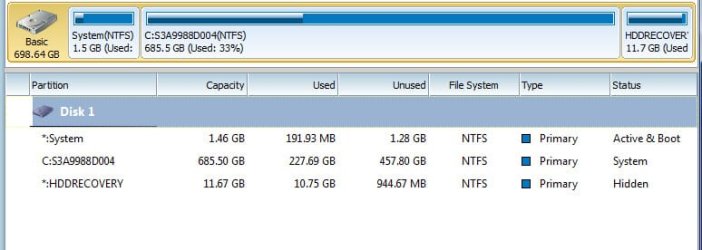
So after I make these partitions do I just drag and drop my files and folders into them? This computer was already somewhat partitioned in that it has 3 partitions. Of course, the biggest one being C. What do I do with the Libraries? I've attached a screen shot.
 

Attachments

  • screen.jpg
    screen.jpg
    44.4 KB · Views: 8

My Computer My Computer

At a glance

Windows 7 Home Premium 64 biti7-2630qm cpu @ 2.00GHz6Gintel HD Graphics Family, NVIDIA GeForce GT 540M
Computer Manufacturer/Model Number
Toshiba Satellite
OS
Windows 7 Home Premium 64 bit
CPU
i7-2630qm cpu @ 2.00GHz
Motherboard
Intel
Memory
6G
Graphics Card(s)
intel HD Graphics Family, NVIDIA GeForce GT 540M
Sound Card
Intel Display Audio, Realtek High Definition Audio
Monitor(s) Displays
Generic PnP Monitor
Hard Drives
Hitachi, Optiarc DVD
I think there is a limit of 4 primary partitions on a drive.

I'll let Seavixen and Deacon comment on this, but I think you'd probably want to create an "extended partition" from the space generated when you shrink C. Then create any desired number of "logical drives" within the extended partition. An extended partition is unusable until you make logical drives within it.

Then format the logical drives and store your data on them in a normal manner.


Partition Wizard is a good tool to do all of this.

If you are going to give up on libraries (I have), you can configure Windows 7 to pretty much get them to disappear. See the tutorials on this site. Likewise, you can avoid the entire "user" heirarchy. The idea is to save directly to the final destination folder (e.g. D:\MP3\Johnny Cash - I Walk The Line.mp3 or whatever)
 

My Computer My Computer

At a glance

Windows 7 Home Premium SP1, 64-bitIntel Skylake i5-6600K, not overclocked8 GB HyperX DDR4-2666 (2 x 4 GB)none; graphics are integrated on CPU
Computer type
PC/Desktop
Computer Manufacturer/Model Number
Ignatz Special; 4 speed manual gearbox; factory air conditioning; one of one
OS
Windows 7 Home Premium SP1, 64-bit
CPU
Intel Skylake i5-6600K, not overclocked
Motherboard
AsRock Z170M Extreme 4, micro ATX
Memory
8 GB HyperX DDR4-2666 (2 x 4 GB)
Graphics Card(s)
none; graphics are integrated on CPU
Sound Card
onboard: Realtek ALC1150; external: USB Behringer UF0-202
Monitor(s) Displays
Dell S2340M 23 inch IPS
Screen Resolution
1600 x 900
Hard Drives
System: Crucial MX100 series SSD, 128 GB;
Data: Samsung Spinpoint 103SJ, 1 TB;
Backup: WD Caviar Green WD30EZRX-00D8PB0, 3 TB
PSU
Rosewill SilentNight 500 watt fanless, semi-modular
Case
Antec Solo II
Cooling
Noctua NH-U12S; Noctua F12 intake, Noctua S12A exhaust
Keyboard
Microsoft 200 6JH-00001 USB
Mouse
Dell or Microsoft optical wired; USB
Antivirus
Microsoft Security Essentials and Malwarebytes Premium
Browser
Pale Moon
Other Info
All fans PWM; speeds at idle: CPU circa 500 rpm; intake circa 600 rpm; exhaust circa 600 rpm; CPU temps 27 idle and 47 C load in a warm room (27 C/81 F) when running Intel Extreme Tuning Utility stress test.
Ignatzatsonic is spot on with his advice.

You can create up to four primary partitions on a hard drive and use one of them to create logical partitions if you need more.

Shrink C to the size you want - 100GB should be more than enough for Windows and your applications - and then use the resultant unnallocated space to create as many logical partitions as you want.

Do not touch the D drive as that is HP's recovery drive, but you can delete it if you wish providing you have created a set of recovery discs. Just be aware that recovering your system to factory conditions takes a lot longer when using recovery discs instead of a recovery partition.

Partition Wizard is the ideal tool to use as it is more flexible than Windows 7's Disk Management.

Personally I don't bother with libraries. My unallocated space was converted to a logical partition and I created four folders: My Documents, My Music, My Pictures and My Videos.

Whatever you do, do not try and move your library folders to these new folders. Just move the data in them to the new location.

These new folders were then backed up to an external hard drive and are kept in sync using Microsoft's Sync Toy - http://www.microsoft.com/download/en/details.aspx?id=15155

However, you can use the existing library folders if you prefer. Just include the new data folders in their respective library or create a new library.

As ever, check with WSF's excellent tutorials for further advice.
 
Last edited:

My Computer My Computer

At a glance

Windows 7 Ultimate SP1 64-BitIntel Core i7 870 @ 2.93GHz8Gb Dual-Channel DDR3 @ 664MHznVidia GeForce GTX 460 1024MB dedicated RAM
Computer Manufacturer/Model Number
HP Pavilion Elite 495UK
OS
Windows 7 Ultimate SP1 64-Bit
CPU
Intel Core i7 870 @ 2.93GHz
Motherboard
MSI 2A9C (CPU1)
Memory
8Gb Dual-Channel DDR3 @ 664MHz
Graphics Card(s)
nVidia GeForce GTX 460 1024MB dedicated RAM
Sound Card
Realtek HD Audio
Monitor(s) Displays
HP2310i
Screen Resolution
1920 x 1080
Hard Drives
1x1954GB Hitachi HDS22020ALA 330 (RAID), 1x1954GB Hitachi External for backup and storage
PSU
460W
Case
HP Elite
Cooling
Air cooled
Keyboard
Logitech K750 solar-powered keyboard
Mouse
Logitech Wireless M180 mouse
Internet Speed
2Mb
Other Info
Pure Avanti Flow Internet Radio with iPod Dock, 64Gb iPod, HP USB Speakers, Sony MDR-V500 Headphones, Sony Vaio F-Series Laptop
Back
Top