Unable to connect to wireless networks

Stany1983

New member
Local time
3:20 PM
Messages
22
Hi, I've had my laptop now for a couple of months, and have recently noticed that it struggles to connect to wireless networks. The problem is strange in that it will quite happily connect to, and stay connected to some networks (ie my BT Home Hub), but will completely fail to connect to others (BT Openzone). The problem shown with Openzone is one relating to DNS, saying it is unable to resolve the primary DNS server. I've included a file detailing the results of network diagnostics - I won't pretend to know what it all means, so hopefully someone on here can tell me!

BT Openzone is my primary source of internet, as the Home Hub I use is only when I go home to visit my family. I've been having to use a network cable to connect through my pc, which is inconvenient, and doesn't help me when I'm not at home.

Also, I'm not sure, but the fact that my Microsoft Virtual Wifi Miniport Adapter is having problems (error coe 10 and will not start) may be something to do with it? I've tried updating drivers etc, but they won't install as the adapter itself cannot start.

Please help!
 

My Computer My Computer

At a glance

Windows 7 Home Premium x64
OS
Windows 7 Home Premium x64
I'm afraid I have no idea what my DNS provider is, I'm not an expert on these things, and am pretty helpless as far as DNS goes. I tried flushing my cache, and stopping and starting the DNS client, to no avail, but when I entered ipconfig/displaydns into the command prompt all I got was "could not display the DNS Resolver Cache".

Does this narrow things down at all?
 

My Computer My Computer

At a glance

Windows 7 Home Premium x64
OS
Windows 7 Home Premium x64
I've just looked, and on my pc, it lists the IPv4 DNS Servers as three numbers, two of which are 192.168.22.23, the other is the same, but ending .22.

However, my laptop has two numbers, 8.26.56.26, and 156.154.70.22. The first one looks wrong to me, not sure what you think about it though?
 

My Computer My Computer

At a glance

Windows 7 Home Premium x64
OS
Windows 7 Home Premium x64
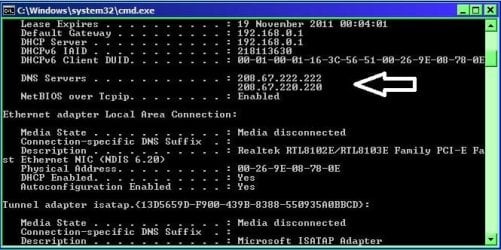
Open start menu, type cmd press enter, in the box that opens type ipconfig /all there is a space between g + / look for your dns servers as in my image.

RR.JPG

Just type them in your next post.
 

My Computer My Computer

At a glance

Win7 H.Prem. 32bit+SP1
Computer Manufacturer/Model Number
Look in my Signature.
OS
Win7 H.Prem. 32bit+SP1
The same numbers as in my last post I'm afraid.

8.26.56.26
156.154.70.22

Thanks Roderunner.
 

My Computer My Computer

At a glance

Windows 7 Home Premium x64
OS
Windows 7 Home Premium x64
This is what I found re your numbers.
-
IP: 8.26.56.26
Decimal: 135936026
Hostname: 8.26.56.26
ISP: Level 3 Communications
Organization: Peak 10
Services: None detected
Type: Corporate
Assignment: Static IP
Blacklist:
Geolocation Information
Country: United States us flag
State/Region: North Carolina
City: Charlotte
Latitude: 35.206
Longitude: -80.829
Area Code: 704
-
IP: 156.154.70.22
Decimal: 2627356182
Hostname: 156.154.70.22
ISP: NeuStar
Organization: NeuStar
Services: None detected
Type: Corporate
Assignment: Static IP
Blacklist:
Geolocation Information
Country: United States us flag
State/Region: Virginia
City: Sterling
Latitude: 38.9881
Longitude: -77.4755
Area Code: 703
Postal Code: 20166
-
Can you access your router set up. What is it's Make & Model number.
 

My Computer My Computer

At a glance

Win7 H.Prem. 32bit+SP1
Computer Manufacturer/Model Number
Look in my Signature.
OS
Win7 H.Prem. 32bit+SP1
This is what I found re your numbers.
-
IP: 8.26.56.26
Decimal: 135936026
Hostname: 8.26.56.26
ISP: Level 3 Communications
Organization: Peak 10
Services: None detected
Type: Corporate
Assignment: Static IP
Blacklist:
Geolocation Information
Country: United States us flag
State/Region: North Carolina
City: Charlotte
Latitude: 35.206
Longitude: -80.829
Area Code: 704
-
IP: 156.154.70.22
Decimal: 2627356182
Hostname: 156.154.70.22
ISP: NeuStar
Organization: NeuStar
Services: None detected
Type: Corporate
Assignment: Static IP
Blacklist:
Geolocation Information
Country: United States us flag
State/Region: Virginia
City: Sterling
Latitude: 38.9881
Longitude: -77.4755
Area Code: 703
Postal Code: 20166
-

Seems a bit strange to me, that each Ip states I'm in the us, when I'm actually in the UK. Also, each one is a different state. Surely that can't be right?

As for my router, I don't have one. I'm connecting directly to BT Openzone, which is provided in the building where I live. I have no control over it, cannot reset the hardware or anything. All I can affect is my pc.
 

My Computer My Computer

At a glance

Windows 7 Home Premium x64
OS
Windows 7 Home Premium x64
The above are the locations of the dns providers, so don't worry about them.
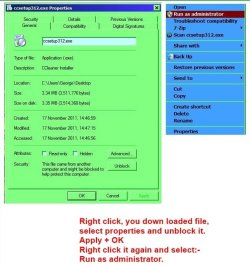
I suggest installing CCleaner follow my image on how to install it. Once done, open CCleaner, click on he 'Registry' tab and Scan for issues, fix all. Then click the 'Cleaner' tab, tick the box to add DNS Cache, Analyse and run. CCleaner is totally safe to use.

Unblocking.JPG
 

My Computer My Computer

At a glance

Win7 H.Prem. 32bit+SP1
Computer Manufacturer/Model Number
Look in my Signature.
OS
Win7 H.Prem. 32bit+SP1
I've been using ccleaner for years, and was one of the first things I installed when I got my laptop. Doing the above hasn't helped a jot, I'm afraid. Anything new for me?
 

My Computer My Computer

At a glance

Windows 7 Home Premium x64
OS
Windows 7 Home Premium x64
What is the make and model number of your router.
 

My Computer My Computer

At a glance

Win7 H.Prem. 32bit+SP1
Computer Manufacturer/Model Number
Look in my Signature.
OS
Win7 H.Prem. 32bit+SP1
There is no router, it's BT Openzone I'm trying to connect to. I'm on a military base and BT have provided it across camp. I have no porblems connecting on my pc, and my old laptop worked perfectly fine before I bought this one. The weird thing is, I can connect to some networks, such as at my girlfriend's house, but not others. I'm at a total loss.

My network adapter is an Intel(R) Centrino(R) Advanced-N 6230
 

My Computer My Computer

At a glance

Windows 7 Home Premium x64
OS
Windows 7 Home Premium x64
Try entering the following numbers in the ipv4 setting page you mentioned earlier. Keep a note of originals in case it fails.
208.67.222.222 primary 208.67.220.220 secondary
 

My Computer My Computer

At a glance

Win7 H.Prem. 32bit+SP1
Computer Manufacturer/Model Number
Look in my Signature.
OS
Win7 H.Prem. 32bit+SP1
It's ok, I finally solved the problem. My laptop wasn't set to automatically gather DNS addresses. After changing this, it can now detect, connet to and stay connected to wireless networks.

Thanks for all your help!
 

My Computer My Computer

At a glance

Windows 7 Home Premium x64
OS
Windows 7 Home Premium x64
Back
Top